DIGITIZING MICROFILMS FOR DOCUMENT MANAGEMENT AND FILING ARCHIVAL SYSTEM
ADILBEK BULATOV
ABSTRACT
ABSTRAK
Bilangan buku dan bahan-bahan bacaan lain di perpustakaan kini telah mencecah jumlah yang sangat besar dan angka ini semakin bertambah hari demi hari. Penyimpanan dan penjagaan buku-buku dan bahan bacaan sedia ada ini menjadi sangat penting bagi setiap perpustakaan.
Projek yang sedang saya jalankan ini adalah tentang perlaksanaan Sistem Pengurusan Dokumen dan Penyimpanan Fail bagi Perpustakaan Digital. Berdasarkan kajian awalan, kaedah semasa yang digunakan untuk menyimpan data dari bahan-bahan bacaan bagi Perpustakaan Sultanah Zanariah adalah dengan menggunakan teknologi ‘microfilm’ , di mana kaedah ini merupakan kaedah yang kurang efektif kerana proses untuk menyimpan, mencapai dan carian dokumen atau data dilakukan secara manual.
Kekurangan utama yang terdapat pada sistem sedia ada adalah kerana sistem ini tidak dapat menyokong capaian yang dibuat secara serentak oleh pengguna semasa ke atas data yang dikehendaki. Sistem yang dicadangkan adalah berdasarkan kepada penggunaan teknologi Imej Digital dan ia dapat membantu untuk menyelesaikan masalah berhubung capaian. Selepas memperangkakan koleksi ‘microfilm’ perpustakaan, maklumat dan data akan boleh dicapai melalui Local Area Network (LAN) atau Internet.
TABLE OF CONTENTS
CHAPTER TITLE PAGE
DECLARATION ii
DEDICATION iii
ACKNOWLEDGEMENT iv
ABSTRACT v
ABSTRAK vi
LIST OF TABLES xiii
LIST OF FIGURES xiv
LIST OF APPENDICES xvi
1 PROJECT OVERVIEW 1
1.1 Introduction 1
1.2 Background of the problem 2
1.3 Statement of the problem 2
1.4 Project objective 3
1.5 Project scope 3
1.6 Importance of project 4
1.7 Chapter summary 4
2 LITERATURE REVIEW 6
2.1 Introduction 6
2.2 Document management 7
2.2.1 Components 7
2.2.2 Metadata 8
2.2.4 Capture 8
2.2.5 Indexing 9
2.2.6 Storage 9
2.2.7 Retrieval 9
2.2.8 Distribution 9
2.2.9 Security 10
2.2.10 Workflow 10
2.2.11 Collaboration 10
2.2.12 Versioning 11
2.2.13 Publishing 11
2.3 Digital Library 11
2.4 Archival System 13
2.4.1 Micrographics 13
2.4.1.1 Filming 13
2.4.1.2 Indexing 15
2.4.1.3 Processing 15
2.4.1.4 Storage 16
2.4.1.5 Retrieval 19
2.4.2 Digital imaging 20
2.4.2.1 Capture or Scanning 21
2.4.2.2 Indexing 22
2.4.2.3 Storage 23
2.4.2.4 Retrieval 23
2.4.2.5 Distribution 24
2.4.2.6 Digital Preservation 24
2.5 Advantages and disadvantages of each technology 25
2.5.1 Micrographics 25
2.5.2 Digital imaging 26
2.6 Resolution, the Key Design Element 27
2.6.1 Micrographics 27
2.6.2 Digital imaging 29
2.7 Image Access, Distribution, and Transmission 31
2.8.1 Simon Fraser University Digital Retrospective Conversion of Theses
and Dissertations 32
2.8.2 CRL/LAMP Brazilian Government Serials Digitization Project 34
2.8.2.1 Scanning Eguipment and Processing 36
2.8.2.2 Indexing the Document Collection 37
2.8.3 The Tundra Times Newspaper Digitization Project 39
2.8.3.1 Digitization Process 40
2.8.3.2 Microfilm Scanning 40
2.8.3.3 Metadata 41
2.8.3.4 OCR Processing 42
2.8.3.5 Costs 42
2.9 Microfilm Scanners 43
2.9.1 Canon Microfilm Scanner 800 MS800 SCSI Connection 43
2.9.2 ScanPro 1000 microfilm scanner 45
2.9.3 SpeedScan 3 in 1 Microfilm Scanner 46
2.9.4 FlexScan 2 in 1 Scanner for Rollfilm and Microfiche 48
2.10 Chapter summary 51
3 PROJECT METHODOLOGY 52
3.1 Introduction 52
3.2 Project Methodology 53
3.2.1 Initial Planning Phase 53
3.2.2 Analysis Phase 53
3.2.2.1 Study Current System 54
3.2.2.2 Literature Review 54
3.2.2.3 Data Collection and Data Analysis 54
3.2.3 Microfilm Digitization 55
3.2.3.1 Scanning Process 55
3.2.3.2 Cataloging and Indexing Scanned Microfilms 57
3.2.4 Design 60
3.2.5 Implementation 60
3.3 System development methodology 63
3.3.1 The Unified Process 63
3.3.1.2 Elaboration Phase 64
3.3.1.3 Construction Phase 64
3.3.1.4 Transition Phase 65
3.3.2 Object Oriented Approach 65
3.3.3 UML Notation 66
3.4 System Requirement Analysis 67
3.4.1 Hardware Requirements 67
3.4.2 Software Requirements 68
3.5 Project Schedule 69
3.6 Chapter summary 69
4 SYSTEM DESIGN 70
4.1 Organizational analysis 70
4.1.1 Introduction 70
4.1.1.1 Mission & Goals 71
4.1.2 Structure 72
4.1.3 Functions 72
4.1.4 Problem statement in the organizational context 73
4.1.5 Case study 73
4.1.5.1 Introduction 73
4.1.5.2 The process of filming and storing of microfilms in Sultanah
Zanariah Library 75
4.2 As-Is Process and Data Model 78
4.2.1 Use Case Diagram 78
4.2.2 Use Case Description 80
4.2.3 Sequence Diagram 83
4.2.4 Activity Diagram 85
4.3 To-Be Process and Data Model 86
4.3.1 Use Case Diagram 86
4.3.2 Use Case Description 87
4.3.3 Class Diagram 90
4.3.4 Sequence Diagram 90
4.3.5 Activity Diagram 91
4.5 Physical Design 95
4.5.1 Database Design 95
4.5.2 Program (Structure) Chart 96
4.5.3 Interface Chart 97
4.5.4 Detailed Modules/Features 98
4.6 Hardware Requirements 101
4.7 Chapter summary 102
5 DESIGN IMPLEMENTATION AND TESTING 103
5.1 Coding Approach 103
5.1.1 Snapshot of Critical Programming Codes 105
5.2 Test Result/ System Evaluation 106
5.2.1 Unit Testing 106
5.2.2 User Acceptance Test 108
5.3 User Manual 108
5.4 Chapter summary 109
6 ORGANIZATIONAL STRATEGY 110
6.1. Rollout Strategy 110
6.2. Change Management 111
6.3. Data Migration Plan 113
6.4. Business Continuity Plan (BCP) 114
6.5. Expected Competitive Advantage Gain from the Proposed System 114
6.6. Chapter summary 115
7 CONCLUSIONS 116
7.1 Introduction 116
7.2 Achievements 117
7.3 Constraints and Challenges 117
7.4 Aspirations 118
7.5 Future work 118
CHAPTER II
2 LITERATURE REVIEW
2.1 Introduction
2.2 Document management
A document management system (DMS) is a computer system (or set of computer programs) used to track and store electronic documents and/or images of paper documents [1]. There are several common issues that are involved in managing documents, whether the system is an informal, ad-hoc, paper-based method for one person or if it is a formal, structured, computer enhanced system for many people across multiple offices. Most methods for managing documents address the following areas:
i) Location ii) Filing iii) Retrieval iv) Security v) Disaster vi) Recovery vii) Retention viii) Archiving ix) Distribution x) Workflow xi) Authentication
2.2.1 Components
2.2.2 Metadata
Metadata is typically stored for each document. Metadata may, for example, include the date the document was stored and the identity of the user storing it. The DMS may also extract metadata from the document automatically or prompt the user to add metadata.
2.2.3 Integration
Integration of the document management directly into other applications, so that users may retrieve existing documents directly from the document management system repository, make changes, and save the changed document back to the repository as a new version, all without leaving the application.
2.2.4 Capture
2.2.5 Indexing
Track electronic documents. Indexing exists mainly to support retrieval. One area of critical importance for rapid retrieval is the creation of an index topology.
2.2.6 Storage
Store electronic documents. Often includes management of those documents.
2.2.7 Retrieval
Retrieve the electronic documents from the storage.
2.2.8 Distribution
2.2.9 Security
Document security is vital in many document management applications.
2.2.10 Workflow
There are different types of workflow. Manual workflow requires a user to view the document and decide who to send it to. Rules-based workflow allows an administrator to create a rule that dictates the flow of the document through an organization.
2.2.11 Collaboration
2.2.12 Versioning
Versioning is a process by which documents are checked in or out of the document management system, allowing users to retrieve previous versions and to continue work from a selected point.
2.2.13 Publishing
Publishing a document is sometime tedious and involves the procedures of proofreading, peer or public reviewing, authorizing, printing and approving etc.
2.3 Digital Library
With the advances in information technology and the popularity of the Internet, more and more reference resources, which were once available only in books and journals, are now widely available electronically on the network. Libraries are no longer bound within their walls. Not only the library has the option to access a wide range of databases, but also the alternative to digitize their resources and mount them on the network to provide broader access of its collection.
intellectual access to, interpret, distribute, preserve the integrity of, and ensure the persistence over time of collections of digital works so that they are readily and economically available for use by a defined community or set of communities.”[2]
Synonyms:
• Library Without Walls
• Networked Library
• Virtual Library
• Electronic Library
• Digital Library
A library is considered as a digital library if it provides
• access to digital information by using a variety of networks, including
the Internet
• services in an automated environment
A digital library usually has:
• Library automation system
• Web server acting as gateway to digital resources
• Subscriptions to various web-based resources
• CD-ROM network
• Electronic document delivery
• Collections of electronic journals and electronic books
• Digital libraries projects
• Internet resources selection
2.4 Archival System
2.4.1 Micrographics
The process by which photographed images are much reduced in size and stored as miniature pictures.
A microfilm system consist of five basic operations: • Filming
• Indexing • Processing • Storage • Retrieval
2.4.1.1 Filming
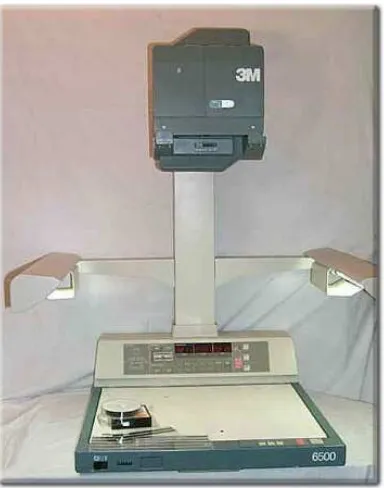
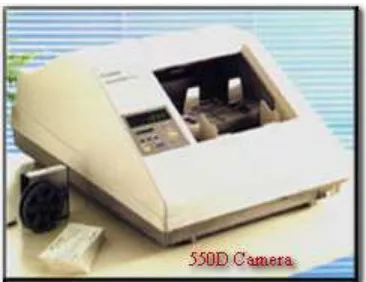
The filming of documents is done by microfilmer, a special camera that takes miniature pictures on microfilm.
These cameras are very sophisticated; however, because of features such as automatic focus, exposure, and film advance, regular personnel can operate them with little training.
Input
Some microfilmers double film; that is, two rolls of microfilm are made simultaneously. Special duplicating equipment also is available that can provide copies in seconds. The duplicate roll is very important for security purpose.
The basic kinds of microfilmers are:
Planetary. Documents are placed face up on a flat surface. The camera is positioned above the item to be photographed. Appropriate buttons are pushed to expose the film.
Figure 2.1 Planetary Microfilmer
Figure 2.2 Rotary Microfilmer
2.4.1.2 Indexing
Microforms are indexed to facilitate retrieval. In some instances, various index signals are photographed as filing guides. Indexing is accomplished by the use of standard alpha/numeric keyboard in the 3M Micrapoint system [3].
2.4.1.3 Processing
Photographing and processing can be accomplished in a one-step operation by using a camera/processor, a machine that exposes microfilm and develops it automatically.
2.4.1.4 Storage
After microfilm has been exposed, indexed, and processed, it must be stored for retrieval.
Low temperatures and low relative humidity promote chemical stability. Microfilms should be stored at temperatures less than 21˚ Celsius (70˚ Fahrenheit) with relative humidity less than 60% and good air circulation to inhibit fungus or mold germination.
Microfilm should be stored in dark enclosures to minimize damage from light. Enclosures should comply with preservation standards.
Microfilm storage areas should be located in a fire-resistant space that is kept clean and free of dust particles and other contaminants, as well as certain gases such as sulfur dioxide, hydrogen sulfide, ammonia, and ozone. All building materials and storage equipment should be noncombustible and noncorrosive.
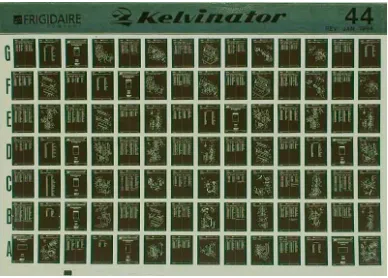
Microfilms should be regularly inspected for signs of deterioration [4]. Various microformats are used for retaining microimages, such as [3]:
• Roll film • Magazines • Jackets • Microfiche • Film folios • Aperture cards
Flat film - 105 x 148 mm flat film is used for micro images of very large engineering drawings. These may carry a title photographed or written along one edge. Typical reduction is about 20, representing a drawing that is 2.00 x 2.80 metres, that is 79 x 110 inches (2,800 mm). These films are stored as microfiche.
the sides of the film or 10,000 small documents, perhaps cheques or betting slips, with both sides of the originals set side by side on the film.
Figure 2.4 Positive roll film
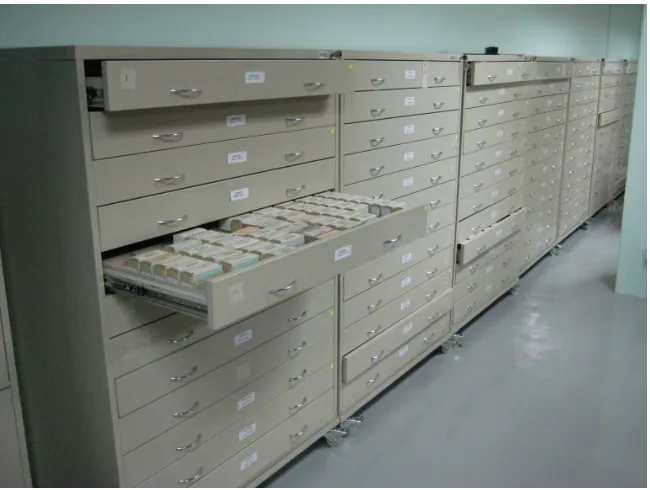
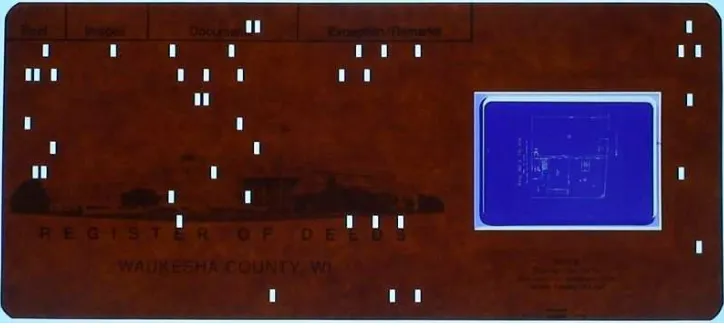
Aperture cards are Hollerith cards into which a hole has been cut. A 35 mm microfilm chip is mounted in the hole inside of a clear plastic sleeve, or secured over the aperture by an adhesive tape. They are used for engineering drawings, for all engineering disciplines. There are libraries of these containing over 3 million cards. Aperture cards may be stored in drawers or in freestanding rotary units.
Figure 2.5 Aperture card
recorded for visual identification. The most commonly used format is a portrait image of about 10 x 14 mm. Office size papers or magazine pages require a reduction of 24 or 25. Microfiche are stored in open top envelopes which are put in drawers or boxes as file cards, or fitted into pockets in purpose made books [4].
Figure 2.6 Microfiche card
2.4.1.5 Retrieval
The retrieval of items on microfilm is a very rapid process. The retrieval techniques employed are relative to the microformat in use. The general procedure is as follows:
1. The appropriate microfilm is selected from files.
3. If desired, a hard copy is made.
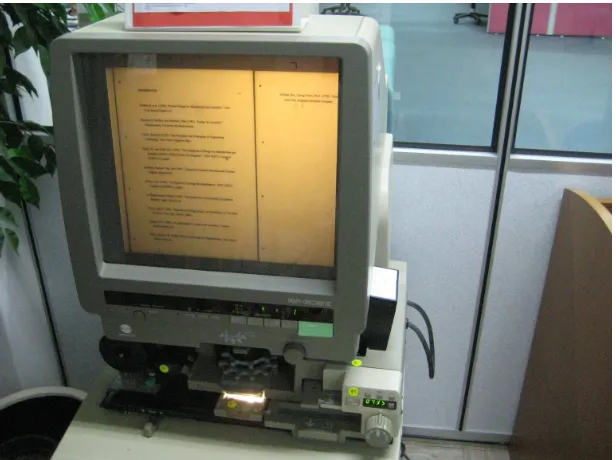
High-speed computer retrieval of microimages has fostered a new era of very rapid input and output of data and information. Computer-assisted retrieval (CAR) terminals speed up the retrieval process considerably. The computer searches for the document desired and either displays or print the location, called “identifier”, of the appropriate magazine being sought. The magazine is placed in a reader and the sought-after image is displayed very rapidly, in seconds [3].
Figure 2.7 Microfilm reader
2.4.2 Digital imaging
Imaging is a straightforward technology. Every imaging system consist of six basic components:
• Indexing • Storage • Retrieval
• Workflow/routing • Presentation
Imaging is the process of converting existing source of information (picture, a page of text) into an electronic format using scanning device that takes the analog information, digitizes it, and creates a computer-based binary representation. After that electronic image is indexed for retrieval and filed in an on-line storage device.
2.4.2.1 Capture or Scanning
This is the conversion of existing paper-based information (documents) into electronic form (images). The process may include OCR (Optical Character Recognition), which will convert all or part of the textual portions within the scanned document into machine-readable form, such as an ASCII text file or word processing file.
APPENDIX B
Interview Questions
1. What approximately the quantity of microfilms is stored in Sultanah Zanariah
Library?
2. How the process of microfilming in Sultanah Zanariah Library is organized?
3. How are you processing and indexing microfilm?
4. Which storage medium are you using to preserve microfilm?
5. How this microfilm is used and retrieved?
6. How do you archive the microfilm?
7. Which type of documents you are preserving on microfilm?
8. Which problems are you facing with when storing microfilmers?
10.Will you process images by using any OCR software when scanning from
hard copies?
11.Which scanning resolution do you use when scanning from hard copies?