Available Online at www.ijcsmc.com
International Journal of Computer Science and Mobile Computing
A Monthly Journal of Computer Science and Information Technology
ISSN 2320–088X
IJCSMC, Vol. 4, Issue. 3, March 2015, pg.500 – 507
RESEARCH ARTICLE
Mobile Application for College Bus Tracking
G. Jemilda
1, R. Bala Krishnan
2, B. Johnson
3, G. Linga Sangeeth
41
Faculty in CSE Department, JACSI College of Engineering, Tamil Nadu, India
2,3&4
UG Scholar in CSE Department, JACSI College of Engineering, Tamil Nadu, India
[email protected] 1, [email protected] 2, [email protected] 3, [email protected] 4
Abstract - This paper proposes an Android mobile phone application that gives information about buses, bus numbers as well as bus routes both online and offline. Reason for Android platform Android requires an open source development which is probably the most feasible and a present user friendly approach. This paper also deals with Location Based Services, which are used to track the current location of the bus as well as give an estimate remaining time for the tracked bus to reach its destination using the client –server technology. Also It display the required maps with the help of GPS.
Keywords – GPS, client-server Technology
I. INTRODUCTION
The mobile phone industry is one of the fastest and most dynamic business sectors today. The need to communicate efficiently and instantaneously is always an undying necessity. The market sector and the ever-growing and demanding consumers always want to have more, and they want it better than ever.
Having a mobile phone for us makes life easier. Communication is always a part of daily life, and we cannot avoid it. The invention of mobile phone has gone tremendous leaps in innovation and new applications. Originally, it was intended to be a telephone that can be carried wirelessly at greater distances. Advances in communications, upgrades in radio frequency and developments on the internet had given mobile phones more sophisticated but easy to use in applications.
Mobile phones are now equipped with navigation systems such as GPS or Global Position Satellite that aids travelers, tourists, adventurers and navigators on getting the most accurate view on their present location. Not only that, it also assists them in searching for the nearest establishment that they want to look for such as restaurants, hotels, malls, bank, police station and other places of interests.
II. LITERATURE REVIEW
Jindan Zhu et al. discussed that many popular mobile applications require the continuous monitoring and sharing of a mobile User’s location. However, exploiting a user’s location leads to disclosing sensitive information about the Users daily activity. Several location privacy-preserving schemes have been proposed, but it remains challenging for a user to achieve visibility of the associated threats as well as to control the impact of those threats. This paper presents an adaptive location privacy-preserving system (ALPS) that allows for a user to control the level of privacy disclosure with different quality of location-based service (LBS). We have identified key attack models on location tracking using powerful map- matching algorithms, and then defined a scheme that allows a user to control the privacy of tracking Information. We have implemented ALPS on Android OS and evaluated the implementation extensively via trace-based simulation, showing the effectiveness of user-controllable privacy preservation. [2]
RobiGrgurina et al. learned a student project developing a simple application for Android mobile phone. The focus of this work was on the processes and development environment that was based on open source software and we used within the project. Before this project we have never developed mobile programming. In the beginning of the project we didn’t know what kind of application we wanted to develop and we needed some time to decide. We were overwhelmed with possibilities. System requirements were defined during the brainstorming session. During application development and test we found out that some specifications needed extra clarification because everyone had a different interpretation of the specifications. Also we left out some details that could improve user experience like displaying current result. This experience was very useful because we learned something new and got insight into the entire process of creating applications. We understand the importance of formal processes for effective teamwork as is for example in our case insufficiency defined requirements have slower our development and testing by increasing the otherwise.
III. ANDROID
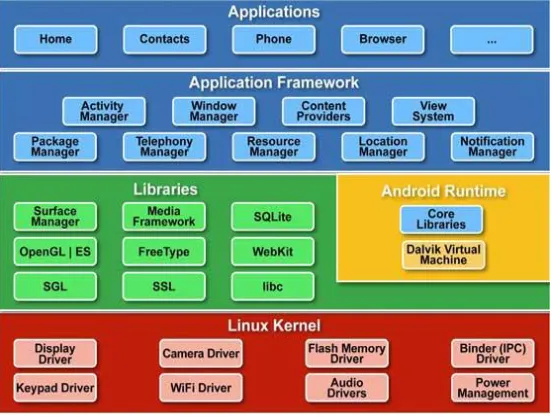
More specifically, Android is made up of several necessary and dependent parts, including the following:
Linux operating system kernel that provides low-level interface with the hardware, memory management, and process control.
Open-source libraries for application development, including SQLite, Web Kit, OpenGL, and a media manager.
Software development kit used to create applications, including tools, plug-ins, and documentation. The architecture of Android is shown in Figure 1. [4] [5]
An application framework that agnostically exposes system services to the application layer, including the window manager and location manager, content providers, telephony, and sensors.
Figure 1: Android Architecture
IV. ANDROID SDK FEATURES
The true appeal of Android as a development environment lies in the APIs it provides. As an application-neutral platform, Android gives us the opportunity to create applications that are as much a part of the phone as anything provided out of the box.
The following list highlights some of the most noteworthy Android features:
No licensing, distribution, or development fees or release approval processes
GSM, EDGE, and 3G networks for telephony or data transfer, enabling us to make or receive calls or SMS messages, or to send and retrieve data across mobile networks.
Libraries for using Bluetooth to transfer data peer-to-peer.
Full support for applications that integrate map controls as part of their user interface.
V. METHODOLOGIES
This application contains the three modules
Admin
Client
Driver
and the block diagram is shown in Figure 2.
Figure 2: Block diagram
A.Admin
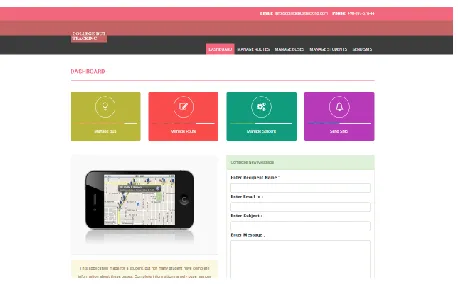
Admin can login to the admin account after authentication and authorization. He can enter new route details and also he can select the route from the list of routes and then the corresponding stops are displayed. He has the options to add or remove a route. He also has the option to modify or remove a stop from the route. If admin want to say any information to the driver then he can send the message to the driver’s mobile via the browser. He can also enter new student details and can view the list of students. He has the options to add or remove a student details. The below figure 3 shows the home page of admin.
B.Client
The below figure 4 represents the flow of actions of client.
Figure 4: Flow Diagram of client application
Client has to enter the register number and mobile number to login the application. To search for a bus, client has to enter the bus number in the search bar. Then map is displayed which shows the current location of the bus. He can also receive an alert notification when the bus came to the nearest stop.
When the application is launched, the home Activity fetches the routes from the server and binds it to the spinner for the client to select it. When the client selects a route, corresponding stops are fetched from the server and binded to the spinner for the client to select. If the client selects “Get Location” then the location details of the bus for that route is fetched. If the client selects “Show Map” then the location of the bus on the map will be displayed. The below figure 5 shows the client login page.
C. Driver
The below figure 6 shows the flow of actions of driver.
Figure 6: Flow Diagram of Driver Application
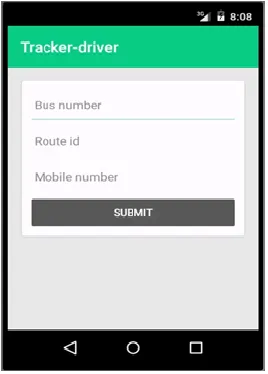
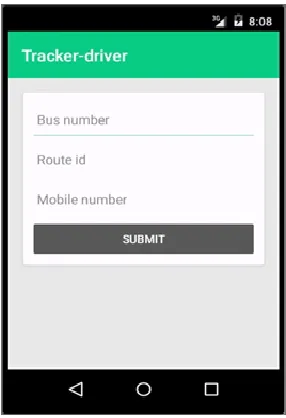
Driver has to enter the bus number, route id, and mobile number to login the application. Driver works is only start and stop the bus.
When the application is launched, the homeActivity fetches the routes from the server and binds it to the spinner for the driver to select it. If the driver selects “Start”, the location of the bus will be uploaded to the server. If the driver selects “Stop” then the uploading of location of the bus is stopped. The below figure 7 shows the driver login page.
D. Scope
Using this application,
The passengers can easily select bus route number and their stop from the list of bus route numbers and know where the bus is and how long will it take to reach their stop.
They can also know the exact location of the bus on the Google Map which gives them a better idea on the whereabouts of the bus.
The list of bus routes and their corresponding stops can be managed using the website which gives the admin a better hold on the application.
This application helps the students and staff to track their buses and also college authorities to manage efficiently.
VI. TESTING
Software testing is a process used for verifying the correctness, completeness and quality of the developed software. Software is built out of sub-systems that are composed of modules, which in turn are composed of procedures and functions.
The sequence of testing activities performed for the tracking system is as below: o Unit Testing
o Integration Testing o System Testing
A. Unit Testing
There exist a number of components in every sub-system. Every component is tested using respective test procedures. Each component is tested individually based on their needs. Unit test focuses verification effort on the smallest unit of the software design component.
B. Integration Testing
Integration tests are designed to test integrated software components to determine if they actually run as one program.
C. System Testing
System testing is the stage of implementation. Testing is the process of executing a program with the intent of finding an error. A good test case is one that has a high probability of finding a yet undiscovered error.
VII. FUTURE ENHANCEMENTS
After analyzing the test results of the developed systems, the following issues are still open which can be taken up as future enhancements.
The proposed system can further be enhanced by making use of it in BMTC bus tracking systems and also to report accidents and help in traffic monitoring. It can also be made compatible with IOS and Windows OS supporting systems.
VIII. CONCLUSION
In this project, we have presented an Android Application to track the college buses
Figure 8: Google Map
The two Android applications designed are: One for the Driver to start uploading the bus’s location to the server and the other for the user to retrieve the location of the bus and check how much time the bus takes to reach a particular stop and also to see the location of the bus on the Google Map. They all are displayed on Figure 8.
We have also designed a web portal for the admin to manage the bus routes and the stops they cover.
REFERENCES
[1] A. Thiagarajan, L. S. Ravindranath, H. Balakrishnan, S. Madden, and L. Girod, “Accurate, Low-Energy Trajectory Mapping for Mobile Devices,” in 8th USENIX NSDI, Boston, MA, March 2011.
[2] Jindan Zhu,1 Kyu-Han Kim,2 Prasant Mohapatra,1 and Paul Congdon2 “An Adaptive Privacy-Preserving Scheme for Location Tracking of a Mobile User” 2013 IEEE International Conference on sensing, Communication and networking.
[3] RobiGrgurina, Goran Brestovac and TihanaGalinacGrbac, “Development Environment for Android Application Development: an Experience Report”, MIPRO 2011, May 23-27, 2011.
[4] J.F. DiMarzio, Android A Programmer’s Guide, Chicago: McGraw-Hill, Jul. 2008.