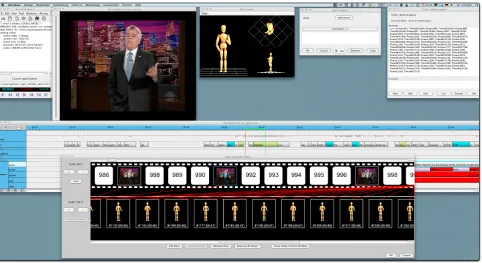
Figure 1: Regular annotations in ANVIL are displayed as color-coded boxes on the annotation board. Every annotation can contain multiple pieces of symbolic information on the corresponding event.
Figure 2: Our ANVIL extension allows to encode human poses with the precision of 3D animation tools. This information complements ANVIL’s conventional coding which stores temporal and symbolic information.
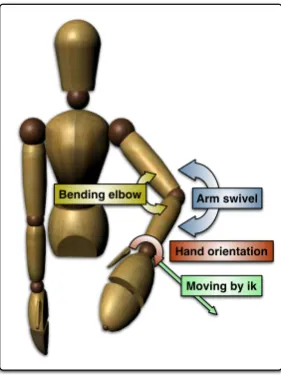
degrees of freedom. The two methods of skeleton manipu-lation are forward kinematics (FK) and inverse kinematics (IK). Pose creation with FK, i.e. rotating single joints, is slow. In contrast, IK allows the positioning of the end ef-fector (usually the hand or wrist) while all other joint an-gles of the arm are resolved automatically. In our tool, the coder can pose the skeleton by moving the hands to the desired position (IK). The coder can the fine-tune sin-gle joints using FK, changing arm swivel, elbow bent and hand orientation (Figure 4). For IK it is necessary to define kinematic chains which can be done in the running system. By default, both arms are defined as kinematic chains, thus both arms can be manipultated by the user. The underlying skeleton can be freely defined using the standardCollada3
format.
3https://collada.org
LimitationsOur controls are limited to posing arms. The coder cannot change the head pose or specify facial expres-sions. Also, there are no controls for the upper body to adjust e.g. the shoulders for shrugging or produce hunched over or upright postures. Also, no locomotion or leg posi-tioning are possible.
Pose matchingFor every new pose, our tool puts the cur-rent frame of the video in the background behind the skele-ton (Figure 3). This screenshot serves as reference for the to be annotated pose. Automatic alignment of skeleton and screenshot is performed by marking the shoulders: the tool then puts the screenshot in a correct position to match the skeleton size. To check the current pose in 3D space, the pose viewer window(Figure 5) offers three adjustable views (different camera position + angle). Additionally, the user can adjust the camera in the main editor window.
Figure 3: Thepose editorwindow takes the current frame from the video and places it in the background for direct reference.
Arm swivel
Hand orientation
Moving by ik Bending elbow
Figure 4: The coder can pose the skeleton by moving the end effector (green). To adjust the final pose the coder can correct the arm swivel (blue), bend the elbow (yellow) or change the hand orientation (red).
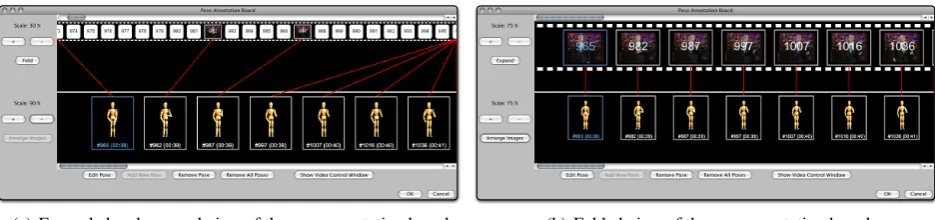
coder can validate whether the specified movement matches the original motion. The coder can always improve the an-imation by adding new key poses. In the sequence view windowthumbnails of the poses are shown to allow intu-itive viewing and editing (Figure 6(a) and Figure 6(b)).
Data exportApart from the regular ANVIL file, the poses are stored in a format that allows easy reuse in animation systems but can also be analyzed by behavior analysts. We support the two standard formats: ColladaandBML (Be-havior Markup Language)4. BML is a description language for human nonverbal and verbal behavior.Colladais a stan-dard to exchange data between 3D applications, supported by many 3D modeling tools like Maya, 3D Studio MAX or Blender. The animation data can be used to animate own skeletons in these tools or for realtime animation with ani-mation engines likeEMBR.
4http://wiki.mindmakers.org/projects:bml:
main
Figure 5: Thepose viewerprovides multiple views on the skeleton. Additionally the user can zoom and rotate the camera in each view seperatly.
3.
Evaluation
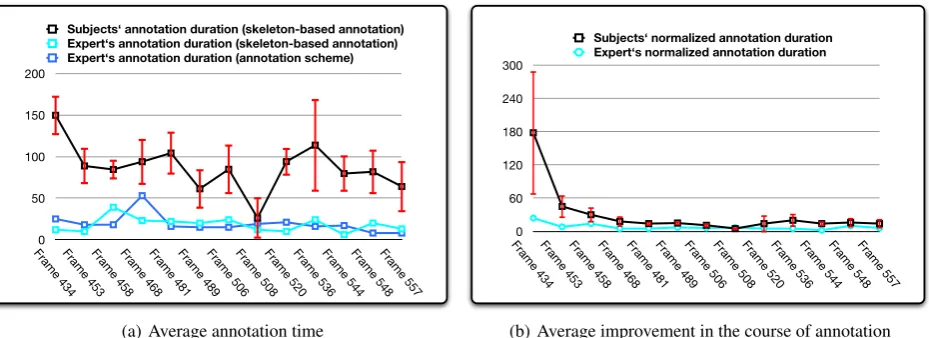
In an evaluation study we examined the intuitiveness and efficiency of our new annotation method. We recruited eight subjects (21-30 years) without prior annotation or an-imation experience. The task was to annotate a given ges-ture sequence (123 frames). Subjects were instructed with a written manual and filled in a post-session questionnaire. Subject took 19 mins on average for the gesture sequence (123 frames = approx. 5 sec). At least 13 poses were an-notated. We compared annotation times with the perfor-mance of an expert (one of the authors) which we took as the optimal performance. In addition, the expert per-formed conventional symbolic annotation (Fig. 7(a)). What is clear is that symbolic and skeleton annotation are simi-lar in terms of time, even though the symbolic annotation is much coarser in resulting data. The learning curve of the non-expert subjects needed a ”normalization” because the different poses were of differing complexity.
The complexity of a pose is measured by looking at the difference between two neighboring poses. The following formula defines complexityC:
C=T+R
whereT is the covered distance of both end-effectors be-tween the given pose and a constant base pose, andRis the sum of all joint modifications. A joint modification is the angle difference between two joint orientations (Nguyen, 2009). This means, that a pose has the highest complexity if both arms are moved in the widest range and all joints are rotated by the maximal degree.
The normalized curve (Fig. 7(b)) nicely shows that even within a single pose, a significant learning effect is observ-able which indicates that the interface is intuitive.
(a) Expanded and zoomed view of the pose annotation board (b) Folded view of the pose annotation board
Figure 6: Expanded view (left) and folded view (right) of thepose annotation board. The white areas symbolize unanno-tated frames. The coder can add new key poses to improve the animation by clicking on these areas. Areas with images represent annotated key frames. To keep an overview of all annotated key frames the coder can fold this stripe to only see key frames. Additionally, the view can be zoomed in or out to have an overview about all frames at a glance.
accessible”. One reason was the result can bee seen di-rectly. The possibility to see the animation of the annotated gesture immediately was ”highly motivating.”
We conclude that our method is regarded as intuitive in sub-jective ratings and appears to be highly learnable and effi-cient in coding. Note the impressive performance of the expert coder who was able to code a whole gesture in ap-prox. 1 minute.
4.
Related Work
To the best of our knowledge, this is the first tool using 3D skeletons to transcribe human movement. Previous ap-proaches for transcribing gesture rely on symbolic labels to describe joint angles or hand positions. In own previous work (Kipp et al., 2007), we relied on the transcription of hand position (3 coordinates) and arm swivel to completely specify the arm configuration (without hand shape). We could show that our scheme was more efficient than the re-lated Bern and FORM schemes, although it must be noted that those schemes offer a more complete annotation of the full-body configuration.
The Bern scheme (Frey et al., 1983) is an early, purely de-scriptive scheme which is reliable to code (90-95% agree-ment) but has high annotation costs. For a gesture of, say, 3 seconds duration, the Bern system encodes 7 time points with 9 dimensions each (counting only the gesture rele-vant ones), resulting in 63 attributes to code. FORM is a more recent descriptive gesture annotation scheme(Martell, 2002). It encodes positions by body part (left/right up-per/lower arm, left/right hand) and has two tracks for each part, one for static locations and one for motions. For each position change of each body part the start/end configura-tions are annotated. Coding reliability appears to be satis-factory but, like with the Bern system, coding effort is very high: 20 hours coding per minute of video. Of course, both FORM and the Bern System also encode other body data (head, torso, legs, shoulders etc.) that we do not consider. However, since annotation effort for descriptive schemes is generally very high, we argue that annotation schemes must be targeted at this point to be manageable and have research impact in the desired area.
Other approaches import numerical data for statistical anal-ysis or quantitative research. For instance, Segouat et al.
import numerical data from video, which are generated by image processing, in ANVIL to analyze the possible cor-relation between linguistic phenomena and numerical data (Segouat et al., 2006). Crasborn et al. import data glove sig-nals into ELAN to analyze sign languages gestures (Cras-born et al., 2006). ANVIL offers the possibillity to im-port and visualize motion capture data for analysis (Kipp, 2010b). It shows motion curves of e.g. the wrist joint’s absolute position in space, their velocity and acceleration. These numerical data are useful for statistical analysis and quantitative research (Heloir et al., 2010). However, our extension supports the annotation of poses and gestures, so that the annotated gesture or pose can be reproduced and reused to build a repertoire of gesture from a specific speaker.
5.
Conclusions
We presented an extension to the ANVIL annotation tool for transcribing human gestures using 3D skeleton controls. We showed how our intuitive 3D controls allow the quick creation, editing and realtime viewing of poses and animations. The latter are automatically created using interpolation. Apart from being useful in a computer animation context, the tool can be used for quantitative research on human gesture in fields like conversation analysis, gesture studies and anthropology. We also argued that the tool can be used in the field of intelligent virtual agents to build a repertoire of gesture templates from video recordings. Future work will investigate the use of more intuitive controls for posing the skeleton (e.g. using mul-titouch or other advanced input devices) and automating part of the posing using computer vision algorithms for detecting hands and shoulders. Additionally, we plan to provide more controls for the manipulation of shoulders (shrugging), leg poses or body postures.
Acknowledgements
0 50 100 150 200
Frame 434Frame 453Frame 458Frame 468Frame 481Frame 489Frame 506Frame 508Frame 520Frame 536Frame 544Frame 548Frame 557 Subjects‘ annotation duration (skeleton-based annotation) Expert‘s annotation duration (skeleton-based annotation) Expert‘s annotation duration (annotation scheme)
(a) Average annotation time
0 60 120 180 240 300
Frame 434Frame 453Frame 458Frame 468Frame 481Frame 489Frame 506Frame 508Frame 520Frame 536Frame 544Frame 548Frame 557 Subjects‘ normalized annotation duration Expert‘s normalized annotation duration
(b) Average improvement in the course of annotation
Figure 7: The left diagram shows the annotation duration per frame (successive frames of a single gesture). This was measured for all subjects (black line shows the means, red bars indicate standard deviation) and for one expert where we compared our skeleton-based annotation with the standard ”annotation scheme” method. In the right diagram all durations are normalized against thecomplexity Cof a pose. Only then do we see a clear learning effect after a few poses.
6.
References
Onno Crasborn, Hans Sloetjes, Eric Auer, and Peter Wit-tenburg. 2006. Combining video and numeric data in the analysis of sign languages with the elan annotation software. In Proceedings of the 2nd Workshop on the Representation and Processing of Sign languages: Lexi-cographic matters and didactic scenarios.
S. Frey, H. P. Hirsbrunner, A. Florin, W. Daw, and R. Craw-ford. 1983. A unified approach to the investigation of nonverbal and verbal behavior in communication re-search. In W. Doise and S. Moscovici, editors,Current Issues in European Social Psychology, pages 143–199. Cambridge University Press, Cambridge.
Alexis Heloir and Michael Kipp. 2009. Embr — a real-time animation engine for interactive embodied agents. In IVA ’09: Proceedings of the 9th International Con-ference on Intelligent Virtual Agents, pages 393–404, Berlin, Heidelberg. Springer-Verlag.
Alexis Heloir, Michael Neff, and Michael Kipp. 2010. Exploiting motion capture for virtual human animation: Data collection and annotation visualization. In Proc. of the Workshop on ”Multimodal Corpora: Advances in Capturing, Coding and Analyzing Multimodality”. Michael Kipp, Michael Neff, and Irene Albrecht. 2007. An
Annotation Scheme for Conversational Gestures: How to economically capture timing and form. Journal on Lan-guage Resources and Evaluation - Special Issue on Mul-timodal Corpora, 41(3-4):325–339, December.
Michael Kipp. 2001. Anvil – a Generic Annotation Tool for Multimodal Dialogue. In Proceedings of Eu-rospeech, pages 1367–1370.
Michael Kipp. 2010a. Anvil: The video annotation re-search tool. In Jacques Durand, Ulrike Gut, and Gjert Kristofferson, editors,Handbook of Corpus Phonology. Oxford University Press.
Michael Kipp. 2010b. Multimedia annotation, querying and analysis in anvil. In Mark Maybury, editor, Multi-media Information Extraction, chapter 21. MIT Press.
Craig Martell. 2002. FORM: An extensible, kinematically-based gesture annotation scheme. In Proceedings of the Seventh International Conference on Spoken Language Processing (ICSLP 02), pages 353–356, Denver.
Michael Neff, Michael Kipp, Irene Albrecht, and Hans-Peter Seidel. 2008. Gesture Modeling and Animation Based on a Probabilistic Recreation of Speaker Style. ACM Transactions on Graphics, 27(1):1–24, March. Quan Nguyen. 2009. Werkzeuge zur IK-basierten
Geste-nannotation mit Hilfe eines 3D-Skeletts. Master’s thesis, University of Saarland.
T Schmidt. 2004. Transcribing and annotating spoken lan-guage with exmaralda. In Proceedings of the LREC-Workshop on XML based richly annotated corpora. J´er´emie Segouat, Annelies Braffort, and Emilie Martin.
2006. Sign language corpus analysis: Synchronisation of linguistic annotation and numerical data.