© 2018 IJSRCSEIT | Volume 3 | Issue 5 | ISSN : 2456-3307
Interview Screening Software Using Salesforce
P. Soujanya*1, Prof. Shikha Singh2
1Department of Electrical and Electronics Engineering, Indus University, Rancharda via Thaltej, Ahmedabad,
Gujarat, India
2Department of Electrical and Electronics Engineering, Indus University, Rancharda via Thaltej, Ahmedabad,
Gujarat, India
ABSTRACT
Nowadays interview processes take too much of time. Candidates and company both lose out on a lot of time. This becomes tiring for candidates and they are not able to give their best performances in interview. Technology can reduce the time it takes busy hiring managers to screen job candidates. Our company provides an online application process that includes behavioral assessment tools that have been internally validated. The goal is to adopt a robust and efficient hiring system that saves managers time, results in improved quality of hire and drives cost savings through a reduction in paper.
Keywords: interview processes, performances, online application process, robust and efficient hiring system.
I.
INTRODUCTION
The Internet is the perfect place to work with other people from around the world. There are dozens of online services that allow you to work with other people and, with the ability to have instant communication, it can even make producing new products and services faster. So, this software helps to connect with people and enable the end-to-end simplification of any company’s recruitment drive.
II.
METHODS AND MATERIAL
Salesforce provides us with the capabilities of cloud computing where we can access applications, over the Internet as utilities, rather than as pieces of software running on your desktop or in the server room. The application built on Salesforce is delivered as a service so companies don't have to buy and maintain hardware and software. This particular application would help companies with their hiring process so that they can track records of the
candidates that are applying and also test their capabilities with the online test. This would also help the candidates check their results and be aware about their upcoming schedule.
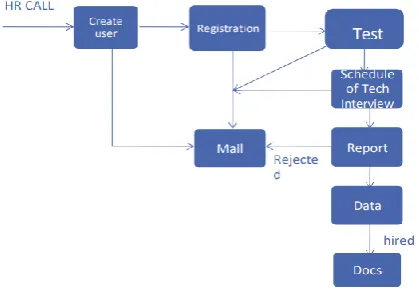
Figure 1. High Level Block Diagram
Software Overview:
The interview screening software designed here is based on the Salesforce technology. Salesforce is a customer relationship management tool (CRM), which means it is used to keep track of and strengthen a company’s relationship with its existing and potential clients. Salesforce is known best for its CRM. It provides a complete solution for that includes feature-rich solutions for marketing, sales, services, partner management and community management. CRM is originally software for managing customer interaction, such as scheduling tasks, emailing, texting, and many more. Salesforce grew into a cloud software solution and acquired several other companies for PaaS (Platform as a Service) and SaaS (Software as a Service).
Figure 2. Salesforce Ecosystem
Objects and Data
In Salesforce, we think about database tables as objects, we think about columns as fields, and rows as tables. So instead of an account spreadsheet or
table, we have an object of related company or usage with fields and a bunch of identically structured records. Salesforce supports several different types of objects. There are standard objects, custom objects, external objects etc. Standard objects are objects that are included with Salesforce. Common business objects like Account, Contact, lead and Opportunity are all standard objects. Custom objects are objects that you create to store information that’s specific to your company or industry. For example, we will be using objects such as Candidate, Interview, feedback of Interview and Question Bank in our software. Please see below image for a candidate object that holds different data about the candidate such as Name, Date of Birth, Contact Details, Address, Qualifications and Experience.
Figure 3
Other objects used in the software pertaining to different aspects (such as Interview, Question Bank, Feedback of Interview and so on) are designed in a similar manner.
Objects and their relationships
Relationships are to link objects with each other, so that when your users view records, they can also see related data. Different types of relationships between objects in Salesforce determine how they handle data deletion, sharing, and required fields in page layouts. Main two types of relationships used are:
record. Deleting a master record also deletes related detail and sub detail records.
2. Lookup Relationship: Link two different objects and even links an object with itself. Deletion of one object does not affect the other object.
For example: Candidate and Interview objects are in master-detail relationship with each other, where candidate is the master object and Interview is the detail object. On the contrary, Interview object is in lookup with Feedback of interview object.
Users, Profiles and Permissions
A user is anyone who logs in to Salesforce. Every user in Salesforce has a user account. The user account identifies the user, and the user account settings determine what features and records the user can access.
A profile is a group/collection of settings and permissions that define what a user can do in Salesforce. Profiles define how users access objects and data, and what they can do within the application. When you create users, you assign a profile to each one.
A profile can be assigned to many users, but user can be assigned single profile at a time.
For example, Users in this process are Candidates, HR and Interviewer. Profile can be such as System Administrator, Developer, Sales Representative.
III.
RESULTS AND DISCUSSION
A Candidate Registration
Particular company’s HR would find appropriate candidates for the recruitment process. We have used community feature of Salesforce for creating users and candidate registration. At the basic level, a community is a group of people connecting around a common mission or goal. They can share information and collaborate among themselves.
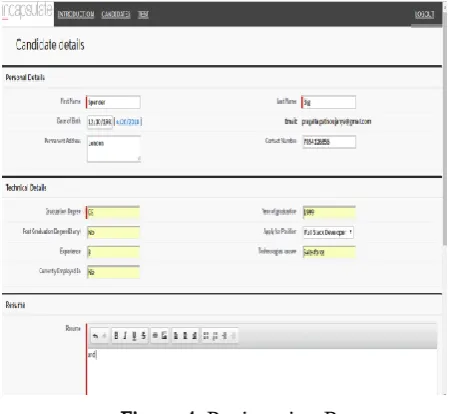
We have created a community named recruitment for candidates where any candidate’s goal is to register themselves for the interview process. The candidate can register himself by the use of a Registration Page. Pages in Salesforce are created using Visualforce. Visualforce is the component-based user interface framework for the Salesforce platform. The framework includes a tag-based markup language, similar to HTML.
Figure 4. Registration Page
B Test Module
Figure 5. Test Module – Sample
C Emails and Email templates
Email templates allow you to send email to contacts, leads, and others using predefined templates. In Salesforce Classic, you can create four different types of email templates: text, HTML with letterhead, custom, and Visualforce. All of these email templates can include text, merge fields, and attached files. You can also include images on your HTML and Visualforce templates. You can use email templates when you send an email from the Activity History or HTML Email Status related list of a record.
For example, emails can be sent to both Candidate and HR once a new candidate has registered himself. Similarly for Interview Scheduling, Feedbacks and other communications.
Email Alerts
Email alerts are emails generated by an automated process and sent to designated recipients. These actions consist of the standard text and list of recipients for an email. You can associate email alerts with processes, flows, workflow rules, approval processes etc.
Process Builders
Process Builder is a point-and-click tool that lets you easily automate if/then business processes and see a graphical representation of your process as you build. The trigger identifies when the process should run. For record change processes, the trigger determines which object and which of the following changes the process should pay attention to.
1. Only when a record is created. 2. Anytime a record is created or edited.
Actions define what the process should do. When a criteria node evaluates to true, the process executes the associated actions or waits to execute them at a scheduled time.
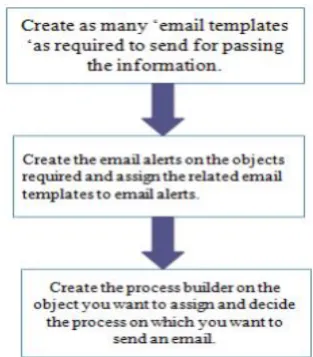
Here’s a block diagram representation of how the Emails, Email Alerts and Process Builders are used to trigger the mailing process in Salesforce:
Figure 6. Automated Email Process Flow by the Use of Emails, Email Alerts and Process Builders
D Reports
A report is a list of records that meet the criteria you define. It is displayed in Salesforce in rows and columns, and can be filtered, grouped, or displayed in a graphical chart. Every report is stored in a folder. Folders can be public, hidden, or shared, and can be set to read only or read/write. You control who has access to the contents of the folders based on roles, permissions, public groups, and license types. You can make a folder available to your entire organization or make it private so that only the owner has access.
the respective Rounds, Candidates who cleared final interview and so on.
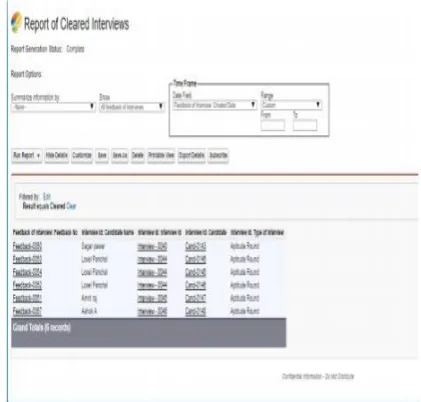
Please see below example of a report of candidates who cleared final interviews:
Figure 7. Sample Report of Candidates who cleared interviews
E APEX
Apex is a proprietary language developed by the Salesforce.com. As per the official definition, Apex is a strongly typed, object-oriented programming language that allows developers to execute the flow and transaction control statements on the Force.com platform server in conjunction with calls to the Force.com API. It has a Java-like syntax and acts like database stored procedures. It enables the developers to add business logic to most system events, including button clicks, related record updates, and Visualforce pages. Apex code can be initiated by Web service requests and from triggers on objects. Apex should be used when we are not able to implement the complex business functionality using the pre-built and existing out of the box functionalities.
IV.
CONCLUSIONThe delivered software demonstrates that Salesforce provides us with the capabilities of cloud computing where we can access applications, over the Internet as utilities, rather than as pieces of software running
on your desktop or in the server room. The application built on Salesforce is delivered as a service so companies don't have to buy and maintain hardware and software. This particular application would help companies with their hiring process so that they can track records of the candidates that are applying and also test their capabilities with the online test. This would also help the candidates check their results and be aware about their upcoming schedule.
Scope for future would include enhancing the application development with different available languages such as python, java, php since the application is currently developed using apex, Visualforce and JavaScript. Also, the introduction of machine learning algorithms for the same purpose (recruitment process) would be the way ahead in the right direction.
V.
REFERENCES[1]. https://help.salesforce.com/articleView?id=net works_creating.htm&type=5
[2]. https://www.salesforce.com/blog/2013/01/what -is-crm-your-business-nervecenter.html [3]. https://developer.salesforce.com/docs/atlas.enus
.apexcode.meta/apexcode/apex_triggers_contex t_variables.htm
[4]. http://www.salesforcetutorial.com/using-custom-controllers-visualforce-page/
[5]. https://developer.salesforce.com/docs/atlas.enus .pages.meta/pages/pages_styling_slds.htm [6]. https://developer.salesforce.com/docs/atlas.enus
.api.meta/api/sforce_api_objects_concepts.htm [7]. https://developer.salesforce.com/docs/atlas.enus
.api_rest.meta/api_rest/intro_what_is_rest_api. htm
[8]. https://developer.salesforce.com/docs/atlas.en-us.pages.meta/pages/pages_intro.htm
[9]. https://reactjs.org