USING VIDEO IN DISTANCE LEARNING Kruk B.I., Zhuravleva O.B., Meteleva E.V.
Siberian State University of Telecommunications and Information Sciences, Novosibirsk, e-mail: [email protected]; [email protected]; [email protected]
This paper describes the creation of training video materials in the Siberian State University of Telecom-munications and Information Sciences (SibSUTIS), the experience of video consultations via videoconferencing facilities, and the experience of remote defence of a graduation project using videoconferencing. The authors dis-cuss technical aspects of preparation of educational video lectures in special video studio, features of equipment selection, recording and editing of video lectures. This paper reports on hard- and software required for Internet videoconferencing and methods of videoconferencing in training process. It considers cognitive and incentive roles of the lectures on the electronic medium. This paper also describes methods of creation of video and audio sets for electronic lectures.
Keywords: e-learning, studio video lectures, electronic medium lectures, videoconferences, distance learning
Such method of training like lecture ap-peared more than 1,000 years ago, and became the leading form of the traditional educational process. Having lost in the beginning its signifi -cance when the new educational technologies, such as computer training, appeared lecture came back as video lecture on the individual electronic medium or on the web server [6]. Video lecture gained the most important advan-tage of the textbook: student can stop the play-back at any moment and look for the required explanations in previous sections of the video lecture, or other sources. It became possible to increase both cognitive and incentive roles of the lectures on electronic medium [1, 3].
Currently, there are several types of elec-tronic video lectures. A number of American uni-versities [7–9] placed on their web sites video re-cordings of traditional classroom lectures, which were carried out by skillful and trained operators.
Other universities offer videos of lectures recorded in a special studio and representing
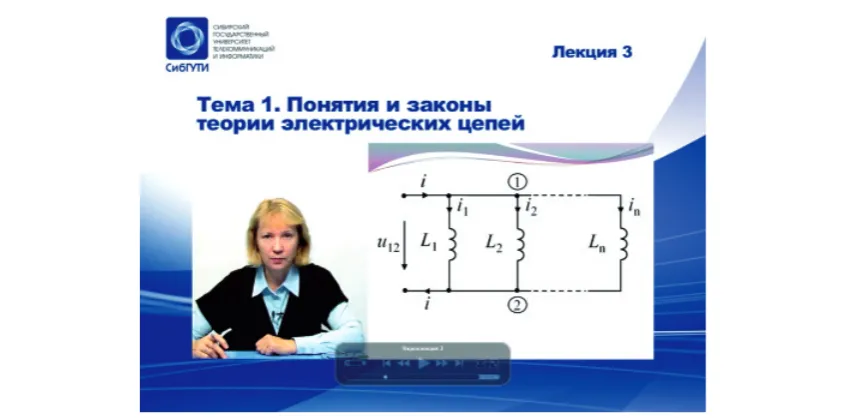
alternation on the screen of the lecturer and shots with schemes or formulas (they can be prepared in advance or played by the lecturer during the lecture). In process of improvement of recording methods it became possible to combine the lecturer and the course materials on the same screen (Fig. 1). Sometimes, elec-tronic avatar is placed on the screen instead of the lecturer himself who reads the text of the lecturer. In this paper the authors deal with the issues of creating and using electronic studio video lectures (Fig. 1) and videoconferencing used in distance learning at SibSUTIS. The rest of this paper is organizes as follows. The next two sections discuss the methods of formation of the motives for learning among distance students and introduce the technical aspects of creating a video studio at the university. Final-ly, last section shows the use of videoconfer-encing in distance learning. Presentation of the effectiveness of video lectures’ implementation into the learning process concludes the paper.
Methods of motivation of students It is very important for instructor to know how to attract attention and to awake students’ interest in the lecture when creat-ing learncreat-ing video material. The instructors who prepare video lectures for students of distance learning are trained in the follow-ing methodical modes.
The contents of the video lecture should be understandable, and its volume has to be feasible for the student. The material has to be implemented by the principle from the simple to the complex. Systematization of the material and its correct rubricating play important role in the video lecture. Each video lecture should represent holistic and complete fragment.
One of the most powerful methods of motivation is the use of well-known didactic principle of theory-practice connection [7, 4]. Practice-oriented video lecture is not only in-teresting and gives professional knowledge, but also is a good school of life.
An introduction of problem elements into the video lecture gives the essential mo-tivation for learning [5]. The whole point is that the lecturer creates a problem situation or gives a challenging task, which has to be settled by the lecture with the assistance of students. The lecturer reveals the logic of solving the problem, shows the diffi culties and ways to get over them. Students become participators of the research. Such activity promotes a developing of creative and men-tal capacity of students.
The lecturer’s speech is one of the most important “tools” of teaching in the video lecture. The strength of the speech is in ability to share lecturer’s emotional mood with listeners. Speech of the lecturer must not contain inaccurate turns and profession-al diprofession-alect. It is unacceptable to use vulgar expressions. It should be brief and consist mainly of short sentences. The lecturer should be expressive.
In pedagogy great importance is attached to the behavior of the lecturer, his style and man-ner. The expressiveness of the speech can be enhanced by using gestures, facial expressions, and poses. The gesticulation has to be as tem-perate as possible. Facial expressions are also very important. However, it is inadmissibly to use entertainment mimicry: grimaces, winks etc. The face of the lecturer should have kind expression and should always express positive attitude towards the student.
Since the effectiveness of studying dis-cipline depends to a large extent on the quality of the video lecture, instructors have to take the creation of video lectures responsibly. Something that goes unnoticed
in a traditional classroom lectures, will be forever imprinted in the video lectures on the electronic medium.
Technical aspects of video lectures creation The main functions of the video studio are the following: video recording, audio recording, video editing and arrangement, video storage, and video recording on dif-ferent carriers.
The main element of the video studio is a video camera. The more professional video camera the better the video quality. It is important that it should have a high defi-nition recording format. It would be good if the camera in the studio pavilion was equipped with a special teleprompter with TFT monitor, such as TLW-LCD150. Such a teleprompter is able to play the text of the lecture that is visible to the lecturer, but “in-visible” for the camera.
The lecturer can use any video material during his lecture, such as a slide presentation that is pre-recorded on a dedicated computer (usually a laptop) and put by lecture “to the air” at the right moments. Thus two video streams are consolidated in the video studio: one from the camcorder and the other from the lecture’s laptop. These two streams are combined by a device that is called “video mixer” (e.g. video mixer SE-500, “Data Video”).
In order to record the sound clip-on micro-phone (“SENNHEISER EW 122-G2”) is used. In order to make a sound of a high quality it is also necessary to use a condenser microphone, for example, “AKG C 3000 B”. In order to mix the sound mixing console “Yamaha MGC – 124 CX” is used. Sound control is put into ef-fect by the instrumentality of audio monitors “Yamaha MSP-3” and “Beyerdynamics DT990 PRO” earphones.
Generic data fl ow that is formed in the video studio transmits to the apparatus room. Since modern facility in the video studio gen-erates video and audio signals in digital form, special equipment has to be used for transmit-ting a digital data fl ow from the video studio to the apparatus room.
The main device in the apparatus room is a nonlinear editing station based on Apple MacBook Pro and Final Cat Studio 2.0. soft-ware package. It provides high-quality video and sound fi les editing. As a rule video and au-dio mixers are put in apparatus room and not in studio pavilion.
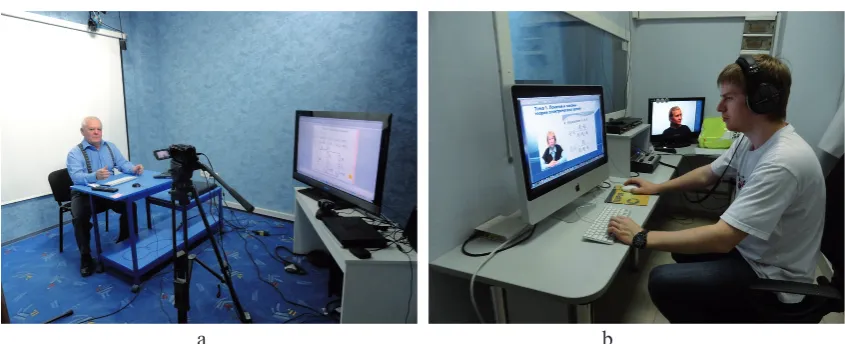
In SibSUTIS a simplified version of video studio was chosen, which neverthe-less allows one to create a learning product of high quality [2].
a b
Fig. 2. Appearance of the studio pavilion (a) and apparatus room (b) in SibSUTIS
When recording of the video lecture in pa-vilion is over an engineer puts it on a tempo-rary nonlinear editing program track and makes a draft of the lecture. In this instance the lecture work is not over. It must be reviewed by the instructor, whose lecture was recorded, and he must specify those video parts on a temporary track that need to be corrected. Video engineer makes correcting and editing of clips (scenes) via nonlinear editing tools, or if such a correc-tion is not possible, retakes these clips. In order to store these digital fi les special device RAID-array (e.g., Promise SmartStor NS4300N), which provides easy access to the stored fi les, has to be used. Four 1 – terabyte hard disks are placed inside of the RAID-array. Such memory space will provide a fi le backup and storage of 130 hours of unreduced video lectures and 600 hours in a packed form. Finally, the video lectures are placed on the training web-site or recorded for students to DVDs.
The use of videoconferencing
Modern videoconferencing system in-cludes the following hardware and software:
● terminals with a camera and microphone providing a visual communication;
● video and audio output facilities (PDP or LCD panels, monitors, TVs, projectors, sound amplifi ers, speakers, etc.;
● pecial videoconferencing servers;
● specialized software (for data collabora-tion, text and graphic documents, etc.).
It is very conveniently to exercise the vide-oconferencing via equipment that is called Em-blaze VCON’s xPoint. It is good for group vide-oconferencing so long as it allows one to display the presentation on big screen, to connect the external laptop for collaborate work of the users with the data and a variety of documents.
Currently the following kinds of video communication are used in SibSUTIS distance learning: network online video lectures broad-casted via the Internet to one or more class-rooms; online workshops, video consultations, colloquiums, testing, remote tests and exami-nations, and distance defense of students’ de-gree thesis [10].
Fig 3 shows the organization of distance defense of graduate works in SibSUTIS. On the one monitor the speaker is shown and on the other one presentation materials of the speaker are displayed. It is also possible to see colleagues on Fig 3, b, who are involved into remote defence and stay in another classroom, on the monitor.
The described in this paper saving engi-neering solution for creating video studio ena-bles one to put into practice high-quality video and audio recording on various carriers.
Conclusion
Functional capabilities of the used in Sib-SUTIS educational process videoconferenc-ing systems allow one to organize any on-line training sessions: lectures, laboratory practical, consultations, testing, and defence of students’ degree thesis.
Systems”, “Computer Aids and Automated Systems’ Software”, “Multi-channel commu-nication systems”, and “Radio Commucommu-nication and Television”. Approximately 46 % of the graduates gained their fi rst higher education, and 54 % gained their second degree. The sur-vey showed that 88 % of respondents worked in the sphere of telecommunications.
The assessment of distance learning in Sib-SUTIS showed that all specialties’ graduates have highly estimated (9,8 points) the usability of training video materials. The degree of interest in video materials was evaluated by graduates at 8,8 points, and the availability and convenience of distance learning web-site – at 8,5 points. Re-sults of the survey are presented in Table 1.
a b
Fig. 3. Organization of the distance defence of graduation project in SibSUTIS
Table 1 Students’ satisfaction with e-learning technology
Estimable Parameter
Specialty
Average grades
“Econom-ics and Manage-ment”
“Communica-tion Networks and Switching
Systems”
“Computer Aids and Automated
Systems’ Soft-ware”
“Multi-chan-nel com-munication
systems”
“Radio
Communi-cation and Television” Availability of
training materials 8,9 9,1 8,8 9,1 6,5 8,5 Degree of interest
in video materials 8,0 8,5 9,7 8,8 9,0 8,8 Utility of training
materials 9,9 9,7 10,0 9,5 9,8 9,8
Table 2 E-learning materials grade estimation
Estimable Parameter
Specialty
Average grades
“Econom-ics and Manage-ment”
“Communica-tion Networks and Switching
Systems”
“Computer Aids and Automated Systems’
Soft-ware”
“Multi-chan-nel com-munication
systems”
“Radio Communi-cation and Television” Theoretical material 6,1 7,6 7,1 6,3 8,1 6,8 Tests and yearly
projects
implemen-tation study guides 6,5 8,1 7,5 6,5 8,4 7,1 Virtual laboratory
works 7,2 8,5 7,1 8,0 8,4 7,7
Educational video
Respondents were asked to rate the follow-ing types of e-learnfollow-ing materials: a theoretical material, guidelines for the implementation of tests and yearly projects, laboratory works, educational video materials.
Analysis of grades showed the following results:
● the quality of the theoretical material – 6,8 points;
● the quality of tests and yearly projects implementation study guides – 7,1 points;
● the quality of virtual laboratory works – 7,7;
● the quality of educational video materi-als – 8,9.
Results of the e-learning materials grade estimation are presented in Table 2.
In conclusion, it should be noted that the implementation of the above-described video lectures for distance learning in SibSUTIS enabled students to signifi cantly improve their motivation to studying.
References
1. Kruk B.I., Sitnikov S.G., Zhuravleva O.B., N. Chupa-khina N.A. Change of Educational Paradigm to Respond the Chellenge of Information Society // Proceedings of International
Conference “PHOENIX-PHE”. – Brazov, Romania. September 2010. – P. 175–182.
2. Kruk B.I., Svarovsky I.N., Zhuravleva O.B. Sup-port System in E-learning at the Workplace // Interna-tional Journal of Experimental Education. – 2011. – № 12. – P. 12–16.
3. Kruk B.I., Zhuravleva O.B. Analysis of Transfor-mations in Innovative Pedagogical Education // Interna-tional Journal of Experimental Education. – 2010. – № 5. – P. 119–126.
4. Kruk B.I. Zhuravleva O.B. Corporate E-learning Strat-egy // International Journal of Advanced Corporate Learning (IJAC). – 2010. – Vol. 3. – P. 41–44.
5. Kruk B.I. Zhuravleva O.B. Modern Approaches to Engi-neering Education // International Journal of Experimental Edu-cation. – 2013. – № 6. – P. 10–13.
6. Kruk B.I., Zhuravleva O.B. Тhe Experience of Uni-versity – Industry Interaction in Telecommunication Sector // International Journal of Experimental Education. – 2013. – № 2. – P. 6–9.
7. Lectures of Carnegue Mellon University. – URL: http:// www.cmu.edu/oli (date of reference: 30.11.2015).
8. Lectures of Massachusetts Institute of Technology. – URL: http://www.ocw.mit.edu/OcwWeb/web/home/home/in-dex.htm (date of reference: 30.11.2015).
9. Lectures of the Yale University. – URL: http://www.open. yale.edu/courses/index.html (date of reference: 30.11.2015).