An Analysis Framework for Generating and
Processing System Data using Android
Forensics
Anurag Iyer
1, Sunil Chockalingam
2, Nishant Makhija
3,Rajesh Kadu
4U.G Student, Department of Computer Engineering, SIES GST, Navi Mumbai, Maharashtra, India1
U.G Student, Department of Computer Engineering, SIES GST, Navi Mumbai, Maharashtra, India2
U.G Student, Department of Computer Engineering, SIES GST, Navi Mumbai, Maharashtra, India3
Head of Department, Department of Computer Engineering, SIES GST, Navi Mumbai, Maharashtra, India4
ABSTRACT: Digital espionage is on the rise nowadays, especially with the advent of smartphones and mobile technology. Criminals are becoming increasingly adept on the use of digital media to steal credentials of a particular person while posing as legitimate account holders. To counteract such kind of events, an analysis framework has been designed. This framework stores different kind of system data of a particular user’s phone, namely App Permissions, Browser History and Searches, Call Log Information and Device Accounts, and generates a database to store this system information. This can then be used later to conduct forensic analysis in the eve of a case, and also informs the user about the kind of system data which is stored on his phone.
KEYWORDS:Android Forensics, System Data , Android
I. INTRODUCTION
The Android mobile operating system has, of late, become one of the most popular, free and usable systems in the world. The almost-zero cost and open source functionality has led to Android becoming one of the top contenders when it comes to the mobile OS market-but it has it’s flipsides. Many hackers and criminals are trying to use the Android platform for malicious and nefarious activities which endangers the dignity and privacy-sometimes even the lives-of innocent mobile users. Android phones have also become the cornerstone of evidence for many crimes committed, so it is very important that all the data stored in an Android phone be stored and report of changes be known to the user. Here is where Android Forensics comes to play. Android Forensics can help us know and understand different schematic changes and see if these changes are legitimate or not. In our project we are designing an analysis framework to collect and store data for further analysis
II. PROBLEMSTATEMENT
Calendar events registered in the inbuilt Google calendar by various devices. All of the aforementioned data is collected and stored in a complete and precise manner for further analysis and inspection.
III. RELATEDWORK
According to recent reports, smart phones and tablets are being globally adopted at a rate faster than any other consumer technology in history. These small factor devices introduce a new processing and communication paradigm, enabling end-users to access and manage a varied set of data and services, while on the move. To materialize this, a wide range of mobile applications have been developed, which are extending from entertainment and gaming to mobile banking and proprietary enterprise applications.
Along with great opportunities, mobile devices reveal new attack points for the involved parties (i.e., users, service providers, data owners, etc.). Data can be snooped on ,manipulated and illicitly used just as in complete workstations. Many commercially available products, such as personal “spy” apps (e.g., Mobistealth, StealthGenie, FlexiSpy, andMobile Spy), collect many of the same data sets , but they have other drawbacks such as requirements for elevated privileges and a lack of enterprise storage and analysis capabilities. They are also often classified as spyware because they collect personal information without knowledge or consent of the user.
The existing DroidWatch framework only stores the data , it does not display to the user. Hence, the user(or analyzer) has no idea about the data being stored , so it might affect his analysis in the later part. In one of the systems , there is a use of the collection recovery image , which creates an image formed from the system images. To do that ,root access should be provided, which creates many unnecessary security issues. So , for this purpose , the framework presented in this paper will not have the need for root access.
IV.DESIGN
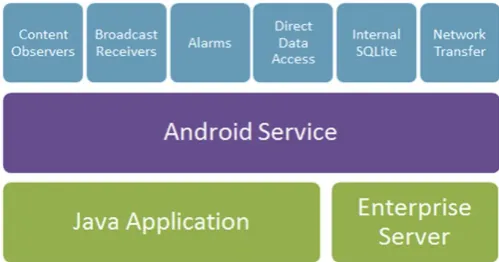
The general architecture of the application[1] is shown below-
Fig 1:Framework Architecture. The framework uses Content Observers ,Broadcast Receivers , Alarms and stores all the data in the internal SQLite database. All of this is initiated by an Android Service, over a Java Application and
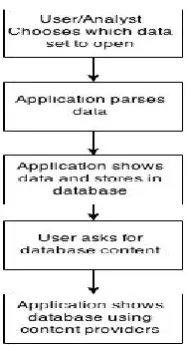
The general flow chart design of the application is shown below-
Fig 2:Framework data flow. First the user/analyst chooses a data set type in the menu. Then the application parses the data and shows it to the user while simultaneously storing it in the database. The user can also query the database
using an interface. Content Providers are used for accessing the database.
A. User chooses which data set to open
Different data sets , are presented to the user. The user can decide which data set to access -generally all applications, or browser searches, browser history , call logs , calendar events or device accounts.
B. Application parses data
Data is then parsed , under forensically sound conditions[1].In an android application , data is normally stored in content providers in raw form. This raw form is made statistically stronger and then generated into a cleaner form of data.
C. Application shows data and then stores it in database
Once the data has been parsed , it is shown to the user, in a more presentable form. It is also simultaneously stored in an SQLite database.
D. User asks for database content
The user also has an option of checking the database , to see if everything is stored in a correct and precise manner. Sometimes , some discrepancies are found in the data which if the analyst wants to correct , he can do so.
E. Application shows database using content providers
All data in the analysis framework has been done using content providers. Content providers manage access to a structured set of data. They encapsulate the data, and provide mechanisms for defining data security. Content providers are the standard interface that connects data in one process with code running in another process.
V. IMPLEMENTATION
A. Main UI Activity
B. Scanning Apps based on permissions
When the “Scan Apps Now!” button is clicked , a ListView is shown which contains the different permissions. When one of the items in the listview is clicked , an Asynchronous task is launched which forms a PackageManager instance and uses that collects the meta data required for accessing the permissions. Then it sorts out all the applications which have said permission and then displays it to the user in the form of another ListView. If the user clicks on one of the items of the ListView, the launch intent for the package of the application clicked is received and the activity of the package is launched using that intent, effectively starting the application. The user can then ascertain whatever he wants to do with the concerned application. In this way the user can easily find out which app is accessing which permission. If he observes any discrepancy between the application’s access and functionality , he can easily remove/uninstall that application.
C. Reading Browser History
All the browser history of a particular device is stored in a particular URI(Uniform Resource Identifier).A Uniform Resource Identifier identifies an abstract or physical resource. The inbuilt URI for storing all the history data is the browser’s content provider , BOOKMARKS_URI. BOOKMARKS_URI is a table containing both bookmarks and history items. The columns of the table are defined in Browser.BookmarkColumns. Reading this table requires the READ_HISTORY_BOOKMARKS permission and writing to it requires the WRITE_HISTORY_BOOKMARKS permission. The framework reads the rows and columns of Browser.BookmarkColumns and then stores them in the database. The values stored are the name(title) of the website , the URL of the website and the date and time when it was visited. In this way one can find out whether any kind of malicious websites were visited by the user.
D. Reading Browser Searches
All the searches in the default browser of the device are stored in the Browser class’s database which can be accessed through the URI SEARCHES_URI.. SEARCHES_URI is a table containing a log of browser searches. The
columns of the table are defined inBrowser.SearchColumns. Reading this table requires the
READ_HISTORY_BOOKMARKSpermission and writing to it requires
theWRITE_HISTORY_BOOKMARKS permission..The framework reads SEARCHES_URI and then stores them in the database. The values stored are the search terms and the date and time when it was searched. In this way the user can have a record of all his searches.
E. Reading Call Logs
The call log information of the device are stored in CallLog.Calls class. It contains details about all the recent calls. This class is accessed to find out different details about the call log and these details are stored in the database. These details include the inbuilt ID of each call , the cached number i.e. the number stored in the phone , the cached name i.e. the name of the caller or called , the duration of the call in milliseconds , the date and time when the call was made , the cached number type associated-such as home, work etc ,if it exists and the direction of the call- whether incoming or outgoing. In this way , the user can see if any suspicious calls or contacts are trying to call him or not.
F. Reading Calendar Events
Various applications store calendar data, which is then accessed by different applications. The Calendar’s URI is accessed and then data is extracted , namely the start date of the event , description of the event and the inbuilt ID of the event. This data is then stored in the database. A user can easily know all the information on the calendar database and see if there is any discrepancy with his internal calendar.
G. Reading Device Account Information
H. Database
The database which is used by the framework consists of 6 tables ,and each table has been provided with an interface , using which the user can see all its contents. Content providers have been provided so that if a developer/analyser wishes to use the database for some analysis or coding he can do so by using the content providers.
VI.RESULTS
After running the application ,we have found out that the data sets are being stored in the database ,and that some data which has been deleted from the system is still persistent in the app’s database. Thus we can say that data stored by the framework is much more ready and effective for analysis as it also deals with the past information
VII. SCREENSHOTS
(b) (c)
(a) Fig 3: (a)Screenshot of the main menu, the many options regarding the data sets are shown ,one can choose from full phone scanning , browser info , device accounts , call logs , calendar database , and the local SQLite database where all data is stored
(b) (b)Screenshot of a sample data list, here the one of permissions .One can see the thumbnail , package name and app name of each app. (c) (c)Screen shot of database interface of call log data. Here one can see
VIII. CONCLUSION
We have successfully implemented an Analysis framework for parsing different kinds of system data , namely Applications , Browser History , Browser Searches, Call Logs , Device Accounts and Calendar Events. We have also understood the significance of such an application for forensic analysis.
REFERENCES
[1] Justin Grover , “Android Forensics :Automated data Collection and Reporting from a mobile device ”,Elsevier ,Digital Investi gation 10 (2013) S12-S20 , 2013
[2] Christoforos Ntantogian, Dimitris Apostolopoulos, Giannis Marinakis,Christos Xenakis,” Evaluating the privacy of Android mobile applications under forensic analysis” ”,Elsevier ,Computers and Security 42 (2014) 66-76 , 2014