Many people face the challenge of finding effective computer-based software instruction, including employees who must learn how to use software applications for their job and students of distance education classes. Therefore, it is important to conduct research on how computer-based multimedia software tutorials should be designed so they are as effective as possible for instructing users on a software application and preparing them to use it for the tasks they will need to perform. This study investigated if comprehension of a software program and performance of accomplishing tasks using the software is aided by incorporating animation and user interactivity in a multimedia software tutorial. Effects of multimedia on user engagement and workload were also explored. The study compared common multimedia types of software tutorials – static, animated, and interactive. Results indicated that interactivity in multimedia software tutorials is effective in improving user engagement, the user’s perception of the learning experience, declarative knowledge of the
by Lisa Whitman
A dissertation submitted to the Graduate Faculty of North Carolina State University
in partial fulfillment of the requirements for the degree of
Doctor of Philosophy
Psychology
Raleigh, North Carolina 2013
APPROVED BY:
_______________________________ ______________________________
Eric Wiebe, Ph.D. Christopher B. Mayhorn, Ph.D.
Co-Chair of Advisory Committee Co-Chair of Advisory Committee
BIOGRAPHY
Lisa Whitman specializes in human factors research and applying it to the design of usable computer systems, especially instructional technology. Lisa finds it rewarding to help people utilize e-learning to accomplish their educational goals. She strives to research and communicate best practices for distance education and apply her knowledge to designing and developing effective and engaging e-learning programs. Lisa has worked in the field of human factors since 2001, analyzing user experiences and designing user interfaces for websites, software, mobile applications, and instructional technology. She has worked for SAS Institute, Inc. since 2005, currently in the role of Senior Sales Training and
Development Specialist designing and developing e-learning programs for sales employees, and previously as a Usability Analyst designing SAS Business Intelligence web-based applications and mobile applications. Lisa has also previously done usability research and design work for Lenovo, Distance Learning Systems Group, and Dunlap and Associates. She has presented her research at conferences including Human-Computer Interaction
ACKNOWLEDGMENTS
I would like to express my gratitude to the members of my dissertation committee. They have not only been instrumental in helping me develop my knowledge of human factors psychology research, but they have all contributed to increasing my enthusiasm for human factors psychology and instructional technology design. I appreciate my professors for teaching and challenging me.
TABLE OF CONTENTS
LIST OF TABLES ... v
LIST OF FIGURES ... vi
INTRODUCTION ... 1
Introduction Summary ... 6
LITERATURE REVIEW ... 9
Learning with Multimedia ... 12
Attracting and maintaining attention and engagement with e-learning ... 12
Information processing while learning with multimedia ... 17
Developing procedural knowledge through multimedia tutorials ... 42
Comparing multimedia modalities for software tutorials ... 44
The potential of interactive software tutorials ... 49
Hypotheses ... 51
METHOD ... 54
Participants ... 54
Design ... 54
Data Collection ... 65
Data Analysis ... 66
RESULTS ... 68
DISCUSSION ... 85
REFERENCES ... 90
APPENDICES ... 95
Appendix A - Main concepts and associated tasks covered in the tutorials ... 96
Appendix B – Informed Consent Form ... 107
Appendix C – Initial Experiment Participant Questionnaire ... 109
Appendix D – Declarative Knowledge Test ... 111
Appendix E – User Engagement Scale ... 114
Appendix F – Online NASA-TLX used in the research study ... 115
Appendix G – Final Experiment Participant Questionnaire ... 118
Appendix H – Debriefing Form ... 119
LIST OF TABLES
Table 1 Characterization of the assessment questions ………... 59
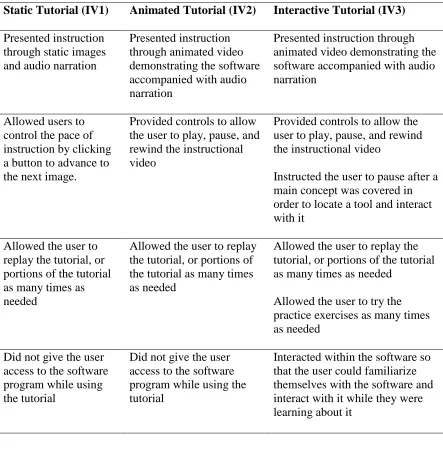
Table 2 Differences between the multimedia tutorials………... 65
Table 3 User Engagement Scale Performance ………... 70
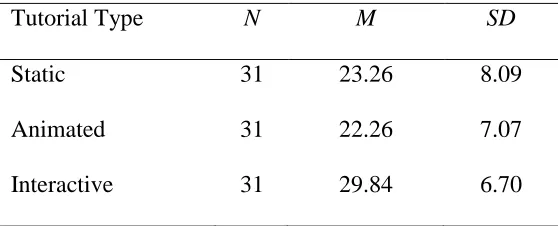
Table 4 Declarative Knowledge Test Performance ………... 72
Table 5 Procedural Knowledge Test Performance ………...…. 74
Table 6 NASA-TLX composite scores………...……… 76
Table 7 NASA-TLX unweighted performance scores ……….. 78
Table 8 NASA-TLX unweighted effort scores ………...…….. 79
Table 9 NASA-TLX unweighted temporal scores ………...…. 81
Table 10 NASA-TLX unweighted mental workload scores ……… 82
Table 11 NASA-TLX unweighted physical workload scores ………. 83
Table 12 NASA-TLX unweighted frustration workload scores……… 83
LIST OF FIGURES
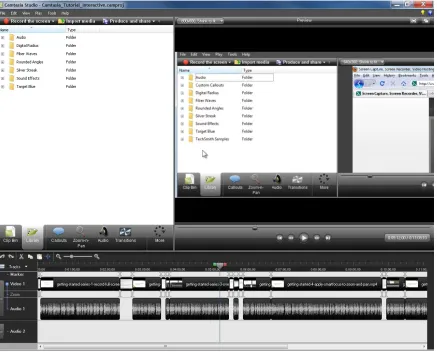
Figure 1 Interactive tutorial – Immersing the user in the software user interface ..…… 62
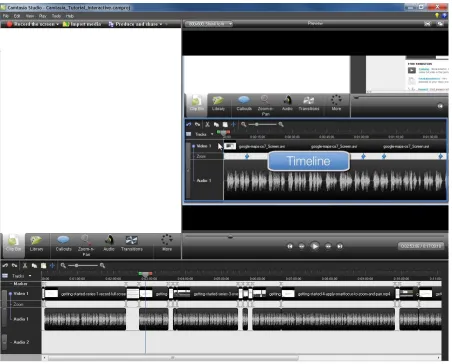
Figure 2 Interactive tutorial – Locating components in the UI ……….…….… 63
Figure 3 User Engagement Scale scores for the three groups ……… 70
Figure 4 Declarative knowledge test scores for the three groups ...……… 72
Figure 5 Procedural knowledge test scores for the three groups ……… 75
Figure 6 NASA-TLX composite scores for the three groups … ……… 77
Figure 7 NASA-TLX unweighted performance scores for the three groups …………. 78
Figure 8 NASA-TLX unweighted effort scores for the three groups ………. 80
Figure 9 NASA-TLX unweighted temporal scores for the three groups ……… 81
INTRODUCTION
Computer users often have to learn new software programs in order to accomplish personal or professional tasks. People may find themselves having to learn software that comes with a new electronic device in order to use it, or become accustomed to a newer version of a familiar software application in order to take advantage of recently added features. Students may need to learn new software applications when they are taking classes. Many students find that they have to learn how to use software on their own if they are taking college courses through distance learning or if a college does not provide time for students in a class to learn the software in a computer lab together. A company may decide to use a new software application as a standard for accomplishing a task, and employees need to learn the software application quickly before productivity starts to decrease, but thoroughly enough to do their job well. New employees may find it daunting to be hired on to a new position if they are faced with the challenge of learning software applications that they will be required to use. The employer or the employee needs to find an effective way of learning the
necessary software applications, so that the new employee can start doing his or her job as quickly as possible.
(Atlas, Cornett, Lane, & Napier, 1997; Sims, Burke, Metcalf, & Salas, 2008). Help features are built into many software programs, providing the software user with tutorials or step-by-step instructions on how to accomplish common tasks and provide answers to frequently asked questions. Many software applications refer users to on-line help by providing links to the software company’s website. Computer-based tutorials are becoming an increasingly
popular means of training (Gist, Schwoerer, & Rosen, 1989). Tutorials on many software applications can be purchased, and an increasing number of software applications include tutorials as a help feature or provide them on the support section of their website. Software tutorials are a type of computer-based instruction that usually contains illustrated examples, instruction, structured exercises, and feedback based on the user’s performance (Gist et al., 1989).
There are many advantages to providing software instruction in an electronic format (Atlas et al., 1997; Carpenter, Watson, Raffety, & Chabal, 2003; Reclam & Sexton, 1994; Steele-Johnson & Hyde, 1997). One advantage of computer-based instruction is convenience. Software tutorials included with software or available online are always available to a
If computer-based software tutorials are usable and designed well, then they can effectively teach the user about a software application and how to use it, which will not only improve efficiency and satisfaction with using the software, but financially benefit the software company in reduced product support and marketing costs as well (Atlas et al., 1997). It is in the interest of a software company to provide effective instruction to its users so that users will be able to take advantage of the software application’s capabilities, be satisfied enough with the software to recommend it to others and purchase newer versions, and not have to call for technical support. Since the need is evident for computer-based software tutorials, research should be conducted on how tutorials should be designed so they are as effective as possible for instructing users on a software application and preparing them to use it for the tasks they will need to perform. With the potential that computer-based software tutorials have, their design should be optimized to provide software users with highly effective instruction.
the program’s capabilities, and 4) help the user learn the procedures and skills for performing
tasks. An effective tutorial will teach the user how to eventually use the software to perform tasks and help the user acquire the skills necessary to perform the tasks without the tutorial’s
assistance. Part of the key to the success of the software tutorial will be effectively engaging the user in the cognitive tasks needed to master the software tool.
Tutorials can be described as being designed in one of three different forms of multimedia presentation: static, animated, and interactive. Static tutorials contain written instruction, and sometimes include graphic illustrations and audio instruction. The user can move from one section to the other as they view the tutorial and learn about the features of the software program that they are interested in. An animated tutorial includes movement of objects on the display with the intent to better demonstrate how one would perform an action using the software. For example, the tutorial could include a video showing a screen shot of the software application with the mouse cursor moving toward a menu, then selecting a feature, the consequent dialogue box appearing, the mouse selecting the appropriate
editing a Microsoft Office document. Ribbon Hero will provide the user with a work file to open in an Office program so the user can use the program’s tools to practice editing the
document based on what they learned. If the desired result is not obtained, the user can refer back to the tutorial and click on links to view images that guide them to the tools that they need to use to perform the task. An interactive tutorial like this provides instruction, gives the user an opportunity to practice, and provides additional help if it is needed.
While software tutorials hold the potential to be effective learning tools, if they are not designed well, then they can pose disadvantages to the user’s learning experience (Hegarty, 2004). For example, a poorly designed tutorial could increase a student’s cognitive workload.
In order for a software tutorial to be designed well, the designer must know the goals of an effective software tutorial and apply psychology research to understand what makes a tutorial effective. An effective software tutorial will help a user understand how a software application works and give them the ability to perform required tasks on their own. In order to do this, tutorials must first be able to draw and maintain the user’s attention enough that
they are motivated to use the tutorial and learn about the software. Secondly, effective tutorials should also be designed in a way that promotes learning, based on cognitive psychology research models, in order to promote efficient storage of information in long-term memory through schema construction and automation, and decrease extraneous cognitive workload. Finally, effective tutorials should be designed to optimize the
capabilities of multimedia in order to help the user be able to learn, remember, and apply the concepts and skills taught in the tutorial. Since all of these factors must be considered in the design of a software tutorial for it to be effective, the application of research on how people learn, and specifically how people learn with multimedia instruction, is needed to design effective software tutorials (Hannafin & Kim, 2003; Hung, 2001; Langhorne & Swierenga, 2004; Winn, 2002; Yan, Hao, Hobbs, & Wen, 2003).
Introduction Summary
application enough to be able to use it on their own to accomplish necessary tasks. Computer-based learning tools have the potential to instruct users in ways that other materials cannot. Computers can provide multimedia instruction, engaging different senses with audio instruction, visual displays, and physical interaction. Research has shown that the use of multimedia in computer-based instruction has the potential to capture a user’s
attention and increase their learning performance (Zolna & Catrambone, 2008). Computers also allow for animation so that students can see an analogous representation of the software being used exactly how they will use it. For example, a tutorial can show a video of what it would look like when the mouse moves across the screen and selects tools in the software’s
user interface. In contrast to other forms of study aids, such as manuals or guides, computers have the potential to offer unique capabilities and opportunities for the creation of interactive elements between the student and the subject matter, giving students the ability to manipulate objects on the display and see the subsequent outcomes. For example, students can be
instructed on how to accomplish a task using a software application’s tools and then be given
the opportunity to practice the task using the software application. In addition, the computer can provide feedback on the student’s accuracy and level of understanding of the material through responses to the student’s interactions with the computer program. The effects of
multimedia, tutorial design, and the capabilities of computers on computer-based instruction and software tutorials have yet to be fully explored. Knowing more about how the
determine if comprehension of a software program and performance of accomplishing tasks using the software is aided by incorporating animation and user interactivity in a computer-based software tutorial. Also of interest is whether animation and interactivity raise perceived user engagement in the tutorial and whether this enhanced engagement leads to more
LITERATURE REVIEW
A review of psychology research will support that, in order to be effective, a software tutorial should: 1) engage the user enough so they maintain their attention on the instructional material and are motivated to use the tutorial and learn about the software, 2) provide
effective instruction that minimizes extraneous cognitive workload and promotes efficient information processing for storage of information in long-term memory, and 3) teach the user the procedures and tools involved in performing tasks using the software program. Of
particular interest is design strategies that can be used to present demonstrations of software use and whether animated and/or interactive elements in a software tutorial provide a
mechanism for improved learning. In order to produce an effective software tutorial that will maximize user comprehension of a software program and promote good performance in accomplishing tasks using the software after using the tutorial, literature research must be conducted in areas including human factors and multimedia learning, and then applied to tutorial design.
By exploring research in these areas, software tutorial designers can address the unique challenges of designing effective multimedia instruction in a way that will promote learning and performance for the tutorial user. A software tutorial designer needs to make sure that the tutorial is meeting the needs of the user, and not just including the latest technologies without thought on how the technology affects the learning experience.
comprehension and performance are enhanced. Research can also reveal to tutorial designers ways in which they can improve their design to be more effective.
Effective software tutorial production is not only dependent on tutorial designers reviewing research, but it also relies on researchers. Empirical research should be driving the design of software tutorials. In order for that to be accomplished, researchers must address the questions necessary to understand and meet the needs of software users. Researchers need to understand what the users are using the software for, how often they will be using the software, and by what means they are able to gain instruction on how the software works. Sometimes people do not use a software program frequently, so software tutorials need to be effective in order to maximize retention of information related to important aspects of the software. Computers are becoming a common way for many software users to obtain
instruction (Atlas et al., 1997; Gist et al., 1989; Sims et al., 2008), therefore researchers need to investigate the optimal ways of utilizing a computer environment for providing instruction to software users. This requires research in psychology and education, specifically research in multimedia learning, in order to understand how learning is influenced by different multimedia modalities, and how it can be enhanced by multimedia instead of negatively affected by it. Researchers need to apply supported theories in psychology, education, and human factors in order to design experiments to test relevant hypotheses and develop guidelines for tutorials design. Researchers also need to notice what types of new
for providing effective instruction. Improving multimedia software instruction demands an iterative process between research and design to support the wide, and persistently growing, population of people who need to learn software in a computer-based environment.
As tutorial design and development have evolved along with technology to include different kinds of multimedia, human factors research can be conducted to provide design guidelines for producing more effective multimedia tutorials (Mayer & Moreno, 2002a). Design improvements based on research are likely to lead to more effective software tutorials (Stemler, 1997). An effective tutorial will help the learner understand how the software works and promote accurate performance of skills learned by providing the ability to perform required tasks using the software without the help of the tutorial. A software tutorial can be designed effectively by using multimedia to attract and maintain the user’s attention to
important information, applying theories of information processing to promote effective use of cognitive resources for processing and long-term storage of information and minimize extraneous cognitive workload, promoting the development of an accurate mental model of the software program, and helping the user develop procedural knowledge while practicing skills. Research in these areas can provide guidelines on which multimedia modalities to use - static, animated, or interactive - and encourage methods for engaging users and maintaining their attention, and supporting optimal information processing for storage in long-term memory and retrieval for good performance when the information needs to be used.
technologies are involved in developing a multimedia software tutorial, the design of the tutorial should adhere to the principles established in empirical research in order to be effective in promoting optimal learning and performance, and utilize the multimedia modality that best promotes learner engagement, effective use of cognitive resources for information processing and long-term storage, mental model development, and development of procedural knowledge while rehearsing skills using the software.
Learning with Multimedia
Multimedia technology provides instructional designers with a variety of options for delivering computer-based software tutorials. It is important for designers to understand potential benefits and limitations of different technologies and modalities in order to choose the best delivery method for a software tutorial. Psychologists have conducted research comparing different multimedia modalities and various applications of emerging computer technologies in the context of computer-based tutorials in order to develop learning theories and provide guidelines for using technology to promote effective instruction.
Attracting and maintaining attention and engagement with e-learning
An instructional designer can manipulate the various ways that multimedia can be utilized to attract and maintain a learner’s attention in a computer-based tutorial. Therefore, it
is important that a tutorial is designed based on research on how engagement with
multimedia can lead to deeper learning and improved performance. Otherwise, multimedia may accidentally be implemented in a way that distracts the user’s attention rather than focus
promote further comprehension of the subject matter. Useful multimedia draws the user’s
attention to important information, maintains their attention on the instructional materials, and motivates them to interact with it. While designing a multimedia tutorial, the
instructional designer must think about how to get learners to engage and focus on the instructionally important elements of the tutorial and how the multimedia instruction can be designed so that it is not only engaging, but also effective for instruction. Designing
enjoyable and engaging training is important since it is difficult to motivate people to learn more than a minimal amount to get the job done. A training program that no one will use or refer to is useless. Increasing the learner’s motivation to interact with a training program is
important, but the training program must also effectively teach the material if it is to be a good use of the learner’s time. (Atlas et al., 1997)
One modality for presenting computer-based instruction is through static words and images on a computer display. Research has shown that the time users will typically spend with static instructions and images, which do not contain animation, is not sufficient to learn how to use the software efficiently (Atlas et al., 1997). Studies have shown that using multimedia and animation in an instructional system increases learners’ motivation to
audio and animation to static graphics and instructional materials without audio. Research has shown that multimedia can keep learners engaged more than passively reading a sequence of screens that contain instructional text and static images by incorporating multimedia and interactivity similar to that of video games, in a method known as serious gaming (e.g., Neill, 2009). The learner is engaged with this type of multimedia learning environment because the animated graphics and sound add a level of realism to the materials that static images and text do not portray, and with realism, the learner feels that the learning environment is relevant to the work environment that they will be executing real tasks in after the training. The learner feels more immersed in the environment when it is realistic and relevant and when interactivity is incorporated to maintain their engagement. Interactivity added should challenge the learner to perform tasks in the simulated environment that are similar to what they would do in their work environment, with hints and tips that can appear to guide the learner. If the learner is advanced, then tips should not appear to distract and frustrate the learner. The multimedia should support the learner’s level of expertise, with animated tips and feedback appearing as they are needed (Neill, 2009). Static graphics and instructional text cannot support the user in this way, so they may get frustrated if they come across sections that they don’t understand or may get bored and start skimming if they are not challenged enough. Multimedia has the potential to keep a user engaged through a learning environment that is realistic, relevant, and provides customized coaching.
predicted that effective interactive design of instructional content will improve learning by engaging students in deep-level cognitive processing through behavioral processes. Kennedy proposed that by using cognitive strategies to participate in activities and interactions with the instructional materials, students will have greater motivation to learn due to maintenance of interest in the materials through sustained meaningful cognitive processing. Kennedy also stated that students would have increased performance in recall and comprehension of information learned from interactive instructional materials due to interactivity actively promoting students to engage in learning strategies that promote both surface-level processing (such as rehearsal and memorization) and deeper level processing (including elaboration, organization, and critical thinking).
Research shows that active interaction with instructional materials is important to learning, and a valuable method for keeping students cognitively engaged in the instruction. As Kozielska (2000) states, “Learning can be defined as becoming aware of various
relationships: the world with the object, the object with its features, a specific action with its results. This happens, primarily, as the result of carrying out specific educational tasks or assignments” (p. 162). Kozielska compared and analyzed the contribution to cognitive
activeness of computer assistance in a physics laboratory at a technical university, and demonstrated that students who used educational computer programs showed more activeness in their cognitive behavior on three levels. Three groups of students were compared, a control group that did not use computer assistance, a group that used a
request, and a group that used a more interactive dialogue version of the program which responded directly to specific questions asked by the students with information, values, and examples. All three levels of cognitive activeness; problem-solving, research, and creativity; were enhanced with computer assistance over the control group. The demonstrative program aided activeness in problem-solving the most, and the dialogue program was the most helpful in assisting research activeness and accuracy. Kozielska’s (2000) research on cognitive
activeness showed that student behavior was positively affected by interactivity, and it emphasized the importance of exploring the possible instructional benefits of interactive computer-based learning.
As technologies have emerged that allowed for user interactivity with computer-based tutorials, psychology researchers have developed experiments to investigate the potential advantages to utilizing these technologies. Results have revealed that interactive multimedia instruction can be more engaging than static or animated multimedia instruction. Mar, Chabal, Anderson, and Vore (2003) conducted a study that looked at user preferences of an interactive tutorial that instructed nurses on pain assessment. The tutorial provided its students with interactive multimedia instruction, that allowed them to go through
their computer-based tutorial gave positive feedback including comments such as “simple and straightforward, it made learning easy”, “challenging and engaging” and “interesting, easy to use, and informative.”
An interactive tutorial has the capacity to give students the most control over how they will view the materials, allowing them to select when they view animations, what animations they want to see, and if they want to replay an accompanying audio narration. By being able to interact with the instructional presentation, a student is enabled to design the presentation based on how they want to study and their learning pace and preferences, while the computer acts as a guide and tutor by showing the student what choices they have for material
presentation modes and allowing the student opportunities to enhance and customize their learning experience through the manipulation of their study materials. Interactive tutorials may also help a user maintain interest in the subject, as well as provide motivation by
discouraging passive learning and allowing the student to take a more involved and hands-on approach to grasping a concept. Research suggests that interactivity will expand on the instructional potential of animation by allowing students to manipulate and control the animations in order to better perceive and comprehend them (Tversky & Morrison, 2002). When investigating the best way to design multimedia software tutorials in order to maximize usability and effectiveness, it is essential to include research on maintaining the user’s attention on important information (Carpenter et al., 2003; Hegarty, 2004; Shah &
Freedman, 2003; Najjar, 1998).
Psychology research that employs an information processing model can reveal the way the brain works as someone studies material from a tutorial, providing insight for guidelines for designing effective computer-based multimedia tutorials. A limited amount of
information can be stored in working memory as it is processed, so it is essential to understand the literature on information processing to know how working memory can be used efficiently for processing information and storing it in long-term memory. Instructional materials need to be sensitive to processing limitations of working memory and allow enough cognitive resources for schema construction and transfer of knowledge. Dynamic
visualizations and interaction with them can be useful, but only if they are directly related to learning and consider the learner’s knowledge base and prior experience (Chandler, 2004).
Understanding how information is stored in long-term memory is important for effective software tutorial design since the goal of software training is to support user performance after the training and promote good long-term performance of the skills learned (Atlas et al., 1997). In the extensive amount of psychology research in this area, the literature includes four theories that are especially relevant to information processing in the context of learning from computer-based multimedia tutorials. These theories are dual coding theory, cognitive load theory, multiple resource theory, and multimedia learning theory.
According to Paivio’s Dual Coding Theory (Paivio, 1986), cognitive behavior (including
information. Learning is considered to be better when information is processed through the two channels rather than through one channel alone. (Michas & Berry, 2000; Shah & Freedman, 2003)
Cognitive load theory (CLT) is another information processing theory that can lend insight to instructional design. For a software tutorial to be effective, extraneous cognitive load should be minimized so the learner can have more working-memory resources to devote to learning the instructional material and schema acquisition. Material in working memory can be transferred to long-term memory in the form of schemas, which can vary in their amount of automaticity. Schema construction and automation reduce the load on working memory (Sweller, Merrienboer, & Pass, 1998). Reducing extraneous cognitive load will allow for more resources to focus on developing schemas from the knowledge in working memory using germane cognitive load. The more germane cognitive load available, the more schemas can be created, decreasing intrinsic cognitive load for processing elements of
It is important for instructional designers to understand cognitive load theory and the cognitive architecture of learners since the way that information is presented has the potential to add to cognitive load, leaving less capacity in working memory available for processing new information and schema construction (Shnotz & Kürschner, 2007). The purpose of constructing schemas is to organize and store the information learned into long-term memory and to reduce working memory load. Since working memory has a limited capacity, but long-term memory has an unlimited capacity, it is the goal of instructional materials to help a learner construct schemas so that information is stored in long-term memory. Working memory is where a learner consciously attends to information that they are receiving. The learner is not conscious of their long-term memory, which hides away information, where it is organized and stored until it is needed. When the information in long-term memory is needed, someone can recall the information to bring it back into consciousness. If the information was stored as a schema with a lot of other information, then all of that information can be retrieved at once without the person having to recall each individual element of the information. For example, someone can recall everything they experienced at a restaurant, without having to separately recall the way the restaurant looked, and then what their waiter looked like, and then what type of food was served, and so on. In this way, a schema helps to decrease cognitive load in a person’s working memory, since instead of
having to remember several items individually, they are remembering one single unit of information. Since working memory is only capable of holding about seven pieces of
besides just the schema that is being recalled. A person can hold a limited amount of information in their working memory, but if they are actively attending to information in order to learn it, including processing novel information and trying to organize and store it, then working memory only has capacity for two or three items (Paas et al., 2003b; Sweller et al., 1998).
A tutorial should be designed to help the user focus on relevant information that they need to learn in order to help them more effectively and efficiently process, organize, and store the information as a schema that can be recalled later. Once someone has become an expert, then years of exposure and practice will allow them to store larger and more
complicated sets of information elements as a schema. However, as someone is first learning a piece of information, there is more demand on working memory to learn the unfamiliar information, so smaller pieces must be processed and stored at a time. The more elements that a schema consists of, the less load it causes on working memory because it takes less capacity in working memory and contains many elements of information.
and schema construction. Those who research cognitive load theory have been able to devise useful guidelines and methods for instructional design because they understand how a
learner’s working memory attends to and stores information that is being learned (Paas et al.,
Another type of cognitive load defined in cognitive load theory is called extraneous (or ineffective) cognitive load, and should be reduced as much as possible (Paas et al., 2003b). Intrinsic cognitive load is relatively fixed, since it is determined by how complex the information is that is being processed and how much element interconnectivity there is. Extraneous workload, on the other hand, can be diminished by presenting information in a way that efficiently allows for processing and storing of information. If an instructional designer does not take care to design a tutorial in a way that takes into account the limited working memory capacity of learners and how schema construction occurs, then they run the risk of introducing extraneous cognitive load into the instructional materials, giving the learner less working memory capacity to devote to the intrinsic cognitive load which could result in the learner not completely understanding the full intrinsic complexity of the system being learned. Instead of devoting conscious effort to learning about the system, the learner is distracted by irrelevant elements that are not assisting with schema construction. For
example, if the instructional material is presented in a way that is unclear or does not fully explain a concept so that a learner has to search for and refer to other instructional materials, then extraneous cognitive workload is increased. The process of searching for the
information to make the instruction delivery clear demands capacity of the learner’s working
memory that could otherwise be devoted to learning the new information. Therefore, it is a more efficient use of a learner’s cognitive workload if instructional material is presented in a
cognitive workload since a portion of their working memory capacity would attend to the irrelevant information, leaving less capacity for schema construction of the important information. Therefore, instructional designers should avoid using irrelevant materials in their presentations, including stories, graphics, animations, or pop-up windows that do not relate to the important information that should be focused on. Since cognitive load is additive, if the system that is being learned is complex and it has high intrinsic cognitive load, then it is especially important that extraneous cognitive load be decreased as much as possible since the high intrinsic cognitive load will require as much of the capacity of
working memory as possible to be understood, processed, and stored into long-term memory. If a learner is being presented with information that is familiar to them or is less complex, then the intrinsic cognitive load of the material is low, and extraneous cognitive load will have less of an impact on learning performance.
would help the user understand the material better and result in better schema construction (Paas et al., 2003b). Since the three types of cognitive load are additive, if too much working memory is taken up by extraneous cognitive load, then there will not be much remaining capacity for germane cognitive load, which could compromise the level of understanding that a learner would be able to achieve. Therefore, an instructional designer can increase learning potential by designing the tutorial to reduce extraneous cognitive load.
An instructional designer should evaluate their design to ensure that it is providing instruction as efficiently and effectively as possible. Measuring the effort that a learner puts into learning, as well as their performance, can give the designer an idea of how much effort (working memory capacity) was required to produce the output (knowledge demonstrated on a test). A smaller amount of effort needed to demonstrate successful learning would suggest that the instructional materials were designed efficiently. If a large amount of effort was measured, but successful learning was obtained, then the instructional designer would learn that they should adjust the instructional materials to be more efficient by decreasing
extraneous cognitive workload. They can analyze the tasks that the learner performs to see where extraneous effort is spent, and then work to reduce the amount of extraneous cognitive load that is interfering with learning (Paas, Tuovinen, Tabbers, & Van Gerven, 2003a).
multiple tasks in terms of three dimensions of information processing. One of the three dimensions, called the stages of processing, states that resources used for perceptual and cognitive tasks are different than the resources used for selection and execution of tasks. The next dimension, the codes of processing, states that tasks involving spatial activity use different perception, cognitive, and action sources than verbal/linguistic activities. The third dimension, the modalities dimension, states that tasks involving auditory perception use different resources than tasks involving visual perception (Wickens, 2008). The dimensions can guide a designer on how to reduce workload for a user when they have to multi-task while using a system. If two tasks that a user participates in at the same time use different levels along the three dimensions, then time-sharing will be better and workload will be less. However, a designer needs to take into account the particular tasks that the user will
participate in when considering if multi-tasking will cause cognitive overload. For example, if a user is time-sharing an auditory task and a visual task, generally their cognitive workload will not be overloaded because the information is being processed by two different
perceptual modalities, but if both tasks involve speech perception (listening to speech and reading), then they may compete for common perceptual resources and code-defined
resources, which could affect performance (Wickens, 2008). Therefore, while cognitive load theory and multiple resource theory help to guide a designer on how they can design tasks in a tutorial to reduce workload, the designer still needs to evaluate the tutorial and assess user performance to ensure that the particular characteristics of the tasks are not affecting
Multiple resource theory suggests reducing cognitive load when a user is multi-tasking by promoting efficient time-sharing by dividing tasks across the different resources in
processing dimensions. For example, if a driver is involved in the act of manually driving a car, they should not also try to engage in manually entering a phone number on their cell phone or driving performance would suffer. Therefore, using a voice command would be a better way for the driver to perform the task of dialing a phone number since the verbal task will not interfere with the manual task. Another example would be if a person is processing important information visually by looking at an animation, then additional important information should not be presented at the same time as text. The additional information would compete on the visual channel of perceptual modalities and could overload resources resulting in poor performance of processing the information. Instead the designer should use cross-modal time sharing, utilizing the auditory channel for the additional information so that the user can see one piece of information and hear the other piece of information. This will more efficiently utilize resources, decrease cognitive load, and improve performance (Wickens, 2002).
Mayer’s multimedia learning theory discusses how learning is improved, cognitive
workload is decreased, and working memory is used most efficiently when multimedia information is received through both a visual channel and an auditory channel
information without increasing cognitive workload. It is when information competes within one channel of working memory, like text and a picture competing in the visual channel, that the learner risks cognitive overload and information is not sufficiently processed. In this situation, the student is forced to choose relevant pieces of information instead of being able to view and process all of it. This was demonstrated by Mayer and Moreno (2002b) who tested the effects of different narrated presentations of a multimedia scientific explanation of lightning formation. They found that learning comprehension was increased when verbal instruction was presented in both visual and audio formats, providing that the animation was not presented at the same time as the verbal information, and thus, not competing for
processing in visual working memory. Cognitive workload is increased and information is not stored as efficiently if one channel is forced to process more than one piece of
information at once. For example, if the visual channel attempts to process both an
illustration and written text (Mayer, 2001). The theory states that e-learning systems should be designed bearing in mind that people process visual/pictorial and auditory/verbal
information in separate channels of working memory, people have limited capacity for each channel, and learning results from attending to relevant information, organizing the
Sweller, 1995) and animated graphics (Mayer & Moreno, 1998). The authors concluded that these results were due to a reduction in cognitive load. Students did not experience cognitive overload in viewing verbal instruction with simultaneous audio because visual working memory and auditory working memory process independently of one another. These results suggest that tutorials should use verbal information displayed as text on the screen with accompanying audio to provide information and steps to be performed by the participants. Also, audio should accompany visuals, including graphics or animations, in order to use dual-mode presentation. Mayer and Moreno (2003a) call this strategy synchronizing, which involves presenting corresponding segments of animation and narration at the same time in order to decrease cognitive load. Decaptioning, eliminating redundant captions from a narrated animation, will also reduce extraneous cognitive load for a user by reducing the amount of information that is competing for a user’s visual attention. A multimedia online
tutorial is promoting meaningful learning when a learner is able to efficiently use their
working memory (both visual and auditory channels) to select, retain, organize, and integrate, relevant information so it can be stored in long-term memory (Mayer & Moreno, 1998).
Theories on information processing based on psychology research has inspired human factors researchers to devise empirical research studies to test predictions on how systems can be designed to minimize workload and improve user performance. These theory-based studies have participants use systems designed with varying characteristics that could affect workload, and then assess user performance to compare how the different designs changed performance. Many research studies have been conducted to see how workload and
performance are affected as users process different types of information and as users process information presented in different modalities (Mayer & Moreno, 2003a). Since cognitive load is additive, if the system that is being learned is complex and it has high intrinsic cognitive load, then it is especially important that extraneous cognitive load be decreased as much as possible since the high intrinsic cognitive load will require as much of the capacity of working memory as possible to be understood, processed, and stored into long-term memory. Human factors researchers can apply the research findings to design guidelines to help designers decrease the extraneous workload that a system imposes on a user so the user’s resources can be devoted to intrinsic or germane workload that are involved in
learning. Research experiments have revealed a split-attention effect, where learners
divided across the auditory channel and the visual channel so that users who were engaging in multiple tasks were practicing cross-modal time-sharing. Research found that if intra-modal time-sharing occurred, where a user had to perform two tasks that used the same perceptual modality, performance suffered (Wickens, 2002). The application of these theories is important when designing multimedia tutorials in order for the content and presentation of the tutorials to be designed in a way that is sensitive to the processing limitations of working memory and allows enough cognitive resources for schema construction and transfer of knowledge.
When computer-based instruction is being designed, it is important to consider the impact of multimedia on cognitive load. Knowing what psychology research has shown on the effects of different technology and display types on learning can help an instructional
designer choose an optimal format for a computer-based software tutorial that will utilize the technology to its full potential in a way that enhances learning instead of hindering it.
Computer-based tutorials that teach software users how to use a software program are presented either in static (pdf or html format with text and static images), animated (including video demonstrations of the software program), or interactive (user-controlled, self-paced) formats. Psychology research on information processing can help a designer choose which format is optimal for promoting learning of a software program.
the learner by providing a representation of the information so that the learner does not have to create one mentally (Shah & Freedman, 2003). Research has shown that dual-mode presentation (audio and visual) of instructional information is more effective than single-mode presentation (visual alone) in teaching with static graphics (Mousavi et al., 1995) and animated graphics (Mayer & Moreno, 1998). The authors concluded that these results were due to a reduction in cognitive load. Working memory has a limited capacity, but its capacity can be enhanced if information is processed using both the visual and auditory channels. Therefore, it would be more beneficial to include recorded audio narration to accompany the static text and images for learners who are viewing a static software tutorial. Mentally animating visualizations that are presented in a static format can provide germane cognitive workload, keeping the learner engaged in active learning. However, if the concept being displayed is too complex, then the learner might have difficulty picturing the spatial
relationships and may become overloaded trying to visualize a realistic animated version of the visualization in their heard (Hegarty, 2004).
Research in information processing suggests that animated tutorials are better for
(2002b), or multiple animations presented at the same time. In this situation, the learner is forced to choose relevant pieces of information instead of being able to view and process all of it. Therefore, a designer must remember to not have information competing on the same channels while being presented in order for the information to be processed efficiently by the learner.
Interactive software tutorials show even more promise for promoting learning than
animated tutorials. Animations that are interactive and can be manipulated by learners further reduce the likelihood of information processing overload, as long as the interface for
interacting with the animations does not increase cognitive workload. A guide on how to interact with the animations may be beneficial to the learner so that they can devote cognitive workload to the animations instead of the user interface of the tutorial (Hasler et al., 2007; Hegarty, 2004; Lowe, 2004). If animations are too complex or play too quickly, they cannot be accurately perceived, and fail the apprehension principle of good graphics design
(Tversky, Morrison, & Betrancourt, 2002). If the animation is too complex or plays too quickly, the learner will have a difficult time processing the information and then have a difficult time integrating that information with additional relevant information that may be presented later in the tutorial. It puts a heavy demand on the learner to remember the information from the previous animation, and integrate it with information presented later. Static tutorials have an advantage over animated in that the learner can scan the static
over both static and animated tutorials because they provide the benefit of animations, but provide the learner with control to interact with the animations, so they can more easily navigate through them and process them at their own pace, allowing them to refer back to or repeat important information. Interactive animations can provide learners with the ability to deal with information selectively (by pausing, stopping, and replaying) to avoid excessive processing demands (Lowe, 2004).
It is important to consider information processing research, the information being
displayed, and the tasks required of a learner when choosing a display type for a multimedia software tutorial. Based on psychology literature on information processing, interactive software tutorials show the most promise for reducing extraneous cognitive workload, so that the working memory of learners can focus on important information and developing schemas for long-term memory storage. Interactive tutorials also help the learner manage the intrinsic cognitive workload by presenting complex information in a way that is self-paced, so the user can pause or replay animations that they need to refer back to as they process and integrate information. Interactivity allows learners to think about whether they have
sufficiently learned from an animation, and gives them the control to replay the animation if they don’t feel confident that they have learned the material (Scheiter, Gerjets, &
they would perform in real-world tasks, providing practice and helping to automate schemas of integrated information on the software program.
Research on mental models and how they are used by learners who are processing and storing new information should be considered when designing multimedia software tutorials. Developing an accurate mental model of a software program will help a user understand the layout of the program, the location of tools, and how to perform a task using the program. Developing an accurate mental model of the program improves the user’s ability to perform
tasks with the program (Ben-Ari & Yeshno, 2006). This is because the more complete a user’s understanding of a program is, the more they will be able to know which tools in the
how they work, as well as an accurate understanding of the effects that components have on other components and the consequences of changing components in the software program. To determine a mental model for a piece of software, an instructional designer could start by breaking down the components - the tools and displays in the user interface. For example, in a program like Microsoft Word, the tool components would include the top toolbar, the ribbon toolbar, the buttons and menus within the toolbars, the tabs of the ribbon toolbar, and the buttons on the task bar at the bottom of the user interface. Tool components would also include right-click context menu options and keyboard shortcut options that are hidden from view, but still available to a user if they want to use them. Display components would include the blank page canvas where the user can type and see the results; as well as user interface components that are added to the display to assist the user, like the blue rectangle that
appears when text is selected and the red squiggly lines that are spell-check indicators. When the user has a complete and accurate understanding of the different components in the
other to create changes in the display, the user has developed a causal model (Mayer & Moreno, 2003b).
To develop the software training tutorial, the instructional designer should know accurate information about the components and component interactions involved in the task that is being taught in the tutorial. The instructional designer does not need to cover every
component and component relationship at once in the tutorial. Rather than overwhelming the user, it is better to break the description of the system up. One way to break up the
components would be to cover a relevant section of a user interface. For example, the
instructional designer may want to provide an introductory module in the tutorial that teaches the user about the components in the right-click context menu, and how they affect the words typed on the page display. Or, the instructional designer may want to break up the
information by task, teaching the user only about the components involved in the task of creating a cover page and how the components used affect the display. Careful tutorial design is important because if a user has an inaccurate mental model, then it can have a negative impact on performance and the user will commit more errors (Wickens, 2008).
Since there are many components that need to be learned, schema construction can assist a user with learning the different components together as a single representation, or schema. For example, in order to be able to more efficiently store and retrieve information on the many buttons related to changing font styles, a user can develop a schema related to font styles. When the font style buttons are learned together as one representation and effectively organized and processed as a schema, then when they are retrieved they are retrieved as one unit in working memory, instead of several separate units that can fill the limited capacity of working memory. If a user has the components for changing font, font size, bold, italicize, and so on processed as one unit, then when they are retrieved the user will still have space in their working memory to notice and process other information because the font style schema will only take the space of one unit in working memory capacity. As the user becomes familiar with other components, he or she can integrate the knowledge of those components into the schema, making the schema bigger so that it not only covers font styles, but also all main toolbar user interface components. It is important that the user’s training promotes
& Kürschner, 2007). Providing conceptual information is helpful for building a mental framework on which learners can base related procedural information. (Atlas et al., 1997) The double-fading support approach may also help guide students in building a mental model of software applications (Leutner, 2000). This method involves two types of user support to assist with developing a mental model of a software program as the learner gets more familiar with the program during the course of the tutorial. One form of user support is limiting the functionality of a software program in the beginning of the tutorial, and then gradually providing additional functionality until the learner is using the fully-functional software. The other form of user support removes the detailed guidance, which can slowly fade throughout the course of the tutorial until the user is working with the program unassisted.
required to perform a task, and what manipulations of the tools and user interface
components will create the desired outcome. Mayer has done research showing a contiguity effect, demonstrated by learners generating a median of 50% more creative solutions to transfer problems when verbal and visual explanations were coordinated rather than presented separately (Mayer & Anderson, 1992). It is proposed that the coordinated presentation helps the learners to develop procedural knowledge of the system being described by helping them build referential connections between the visual and verbal information, especially if the learner is inexperienced with the system (Michas & Berry, 2000). The synchronized presentation may help learners to use dual coding (using verbal and pictorial channels) to increase cognitive interconnections between the two forms of studied information to prior knowledge. Studies have shown that recognition and performance on problem-solving transfer tests are improved with synchronized presentation of auditory narration and an animation or movie (Najjar, 1998).
Interaction can lead to better support of information processing than animation alone. Animations have the potential to help learners build good coherent mental models of
complex change processes since they can depict situational dynamics explicitly. In addition, interactive animations can provide learners with the ability to deal with information
(2005) also found that animations improve comprehension, especially if the learner has control of the presentation of animations. Allowing the learner to control the material makes it closer to the learner’s pace of integrating information, as well as letting them be more
actively engaged in the learning task. Self-control is especially helpful when the processing demand of the task and the cognitive load increase. Learners with low prior knowledge of the material benefited the most from animations and self-control of the presentation. Research has also shown controllable (interactive) animations to be beneficial for helping learners create an effective mental model by integrating a complex mechanical system presented with textual explanation (Schneider & Boucheix, 2006; Tversky & Morrison, 2002). According to Mayer, meaningful learning occurs when learners select relevant information from what is displayed, organize the information into a coherent mental representation, and ingrate that representation with others that are stored in memory (Mayer, 1997).
Developing procedural knowledge through multimedia tutorials
Effective computer-based software tutorials will also utilize multimedia in a way that develops procedural knowledge. Multimedia has the potential to assist learners in developing procedural knowledge as they learn the tasks and procedures involved in using a software program. Research has shown the positive effects of combining verbal and visual information for learning of procedural tasks. Learning of procedural tasks requires understanding of the steps in the procedure, retention of the information, and ability to apply the information by performing the procedure. A study done on instruction of a bandaging procedure showed that the most effective type of instructional presentations were a presentation including
Interactive tutorials show promise in being more effective than static or animated tutorials in promoting the development of procedural knowledge for learners. Most people prefer to explore a new software program and learn about it by using it (Potosnak, 1989). Interactive tutorials provide the opportunity to practice skills and procedures taught by a tutorial. In problem solving, more practice has been found to increase the long-term
understanding of a subject matter (Shute, Gawlick, & Gluck, 1998). Practicing material in a context similar to the operational environment in which it will be applied after it is learned also increases long-term retention, as shown in a study by Conway, Cohen, and Stanhope (1991) involving subjects learning research methods in the context of designing and conducting their own experiments. Learning tasks in a context similar to the operational environment helps users to integrate the knowledge and skills necessary for effective task performance, give them the opportunity to learn to coordinate skills that make up complex task performance, and enable them to transfer what is learned to their work settings (Boot, van Merriënboer, & Theunissen, 2008). Interactive tutorials also have the advantage of being able to offer feedback on the learner’s level of mastery of the concepts presented, and the
application of their knowledge.
what types and uses of multimedia are beneficial for learning. The instructional effectiveness of a multimedia lesson should always be the design focus. A software tutorial must help the user comprehend the purpose of the program, the program capabilities, the layout of the program, and the function of the program’s tools. It should also teach the user how to
perform a task in a way that will enable the user to use the software to perform the task, or a similar one, in a real-life situation without the tutorial’s assistance.
Comparing multimedia modalities for software tutorials
There is a base of empirical research that can be studied to better understand how people can effectively learn from various multimedia instructional presentations. Research has shown that students learn more deeply from well-designed multimedia presentations that contain both words and pictures than from text alone, thus multimedia learning shows promise in improved training over some traditional text-only methods, such as textbooks (Mayer, 2003c). Multimedia research is important to consider in the design of software tutorials. Since users now interact with many software applications through a graphical user interface, a tutorial should use visuals to demonstrate what objects in the GUI look like, where they are located, and what they look like when they are interacted with (Atlas et al., 1997).
Animated materials have been shown to be more effective for instruction than static materials since research has shown that they draw and maintain the user’s attention on
animation in complex system comprehension (Schneider & Boucheix, 2006). Animated diagrams were found to be more effective than text alone in a study based on the instruction of tree diagrams (Cox, McKendree, Tobin, Lee, & Mayes, 1999). Animated diagrams have been found to be more effective than static diagrams in a study that analyzed the
effectiveness of instruction of computer algorithms (Catrambone & Seay, 2002). Animations have been used in software tutorials for a while now (Atlas et al., 1997), but is animation effective for learning software usage and improving task performance? Will interacting with animations improve learning? Research has shown that animation may be useful for
introducing a software application and procedural tasks to a user, but animation alone may not be enough to help a user remember long tasks.
The unique capabilities of interactivity in computer-based learning have yet to be fully explored, though prior research suggests that interactive multimedia software tutorials will provide increased comprehension and transfer for those who receive interactive
instruction over animated and static tutorials that represent the same concepts. While animated tutorials have the capability to demonstrate instructional content in a way that facilitates learning through the illustration of real-time movements across the screen,
interactive tutorials go beyond animated by enabling students to choose what they will learn. For example, students can choose which menu in a software program’s user interface they
learning since, through manipulation of objects on the display, they can reinforce concepts, such as finding and using certain tools in the software program to perform a task. Interactive tutorials also let students receive immediate feedback about their progress of learning by seeing the results of their manipulations and having the computer check if the outcome is correct. Thus, interactive tutorials may facilitate learning like a tutor, guiding the student and allowing them to choose what they learn, practice what they learn, and receive feedback on their learning progress; unlike static and animated tutorials that simply present information, like a book or video. Based on these ideas, interactive tutorials should prove helpful for students who are learning about software applications.
Research suggests that interactive software tutorials have the potential to be better than passive animated or static tutorials for instruction by being more effective at
maintaining the user’s attention, supporting processing and long-term storage of information, and developing the user’s skills to perform the procedures being taught. An interactive
help a user maintain interest in the subject, as well as provide motivation by discouraging passive learning and allowing the student to take a more involved and hands-on approach to grasping a concept. Learners enjoy being able to try things out with a software application as they are learning about it by performing meaningful tasks that show them how the
application works and reacts (Atlas et al., 1997). An interactive educational multimedia user interface can allow learners to control, manipulate, and explore the learning material, and can ask learners to answer questions that integrate the material. Interactive user interfaces seem to have a significant positive effect on learning from multimedia (Najjar, 1998). Tasks that encourage learners to actively process and integrate information may focus their attention on the information and cause them to process the information with more elaboration, especially when the processing focuses on the meaning of the information instead of its appearance (Najjar, 1998). Interactivity should expand on the instructional potential of animation by allowing students to manipulate and control the animations in order to better perceive and comprehend them (Harp, Taylor, & Satzinger, 1998; Hegarty, 2004; Tversky et al., 2002).
increase long-term retention of the content by increasing active learning. Long-term retention is important so that users do not have to repeatedly refer back to the software tutorial.
Primary school students who were presented with learner-paced educational animations showed higher test performance on more difficult, high element interactivity questions and relatively lower cognitive load compared to students in groups that received system-paced educational animations (Hasler et al., 2007). Kennedy (2004) proposed that by using cognitive strategies to participate in activities and interactions with the instructional
materials, learners will have greater motivation to learn due to maintenance of interest in the materials through sustained meaningful cognitive processing. Kennedy also stated that learners would have increased performance in recall and comprehension of information learned from interactive instructional materials due to interactivity actively promoting learners to engage in learning strategies that promote both surface-level processing (such as rehearsal and memorization) and deeper level processing (including elaboration,
organization, and critical thinking).
Interactive tutorials also have the advantage of being able to offer feedback on the student’s level of mastery of the concepts presented, and the application of their knowledge.
After the user has manipulated a display, they can instantly see the results. For example, students can use tools and objects within a tutorial to practice editing a graphic in order to practice performing a certain graphic-editing task, like cropping. Feedback given by an instructional computer program in response to a user’s manipulation of the display allows the
For example, a user can practice cropping a sample graphic in the tutorial and then compare their product to the computer’s example.
Interactive multimedia software tutorials have the potential to be effective if their design is based on human factors research, instructional design principles, and the individual students’ needs. Research is essential to the design of e-learning that takes advantage of the
capabilities of multimedia to meet the needs of learners. Additional research is still needed on how to make the latest multimedia technology educationally effective for teaching subject matter, like the use of software programs (Stemler, 1997).
The potential of interactive software tutorials