Developing a Face Recognition and Analysis
System (FRAS) and its Applications
Ashin Guha Majumder
1, Anurag Roy
2, Suvasish Dasgupta
3, Shalabh Agarwal
4B.Sc.(Hons.) Student, Department of Computer Science, St Xavier’s College (Autonomous), Kolkata, India1
B.Sc.(Hons.) Student, Department of Computer Science, St Xavier’s College (Autonomous), Kolkata, India2
B.Sc.(Hons.) Student, Department of Computer Science, St Xavier’s College (Autonomous), Kolkata, India3
Associate Professor, Head, Department of Computer Science, St Xavier’s College(Autonomous), Kolkata, India4
ABSTRACT: Face recognition is a significant research area of Computer Vision which would leverage research and development in critical fields like Artificial Intelligence and Machine Learning. Currently research is being done to further develop the subject and extend the applications of this technology to various other sectors such as security, identification, object recognition and sentiment analysis. The aim of this article is to discuss an original face recognition and analysis software using the Local Binary Pattern algorithm. The application software which was developed to perform primary recognition, security for online banking, biometric crime database, attendance record and sentiment analysis was tested and yielded successful results.
KEYWORDS: Face recognition, Local Binary Pattern Histogram, OpenCV, Eigenface, Fisher faces, Data Set Creator, Trainer, Detector.
I. INTRODUCTION
Face recognition is a popular area of computer vision and one of the most successful applications of image analysis and understanding. Because of the nature of the problem, not only computer science researchers are interested in it, but neuroscientists and psychologists also. It is the general opinion that advances in computer science vision research will provide useful insights to neuroscientists and psychologists into how the human brain – human eye co-ordination works and vice versa in developing fully automated humanoid robots enabled with human-like computer vision with full emotion recognition and decision making capabilities through visual perception. It will play an important role in the future world where we expect to have more automation and increased human-computer interaction.A general simplified statement of the face recognition problem (in computer vision) can be formulated as follows: “Given still or video images of a scene, identify or verify one or more persons in the scene using a stored database of faces.”
II. BACKGROUND
values thus obtained for all non-boundary pixels are plotted in form of histograms which is called LBP histogram. The algorithm can only work with grey scale images. The computational aspect of LBP operator has been described below. [2]
LBP operator considers a particular pixel as the centre pixel during each iteration. It compares the intensity of centre pixels with those of neighbouring eight pixels one by one in clockwise manner.1 is assigned to the neighbouring pixel if its intensity is greater than that of the centre pixel. Otherwise, 0 is assigned.This is applied to all the 8 neighbouring pixels to obtain an 8-bit binary number. The decimal equivalent of the binary number is known as the label or LBP value of that particular centre pixel. Since an LBP value has 8 bits, it can take maximum 256 values (i.e. 28) which ranges from 0 to 255. (Fig.1)
Fig 1: Obtaining the label for a pixel
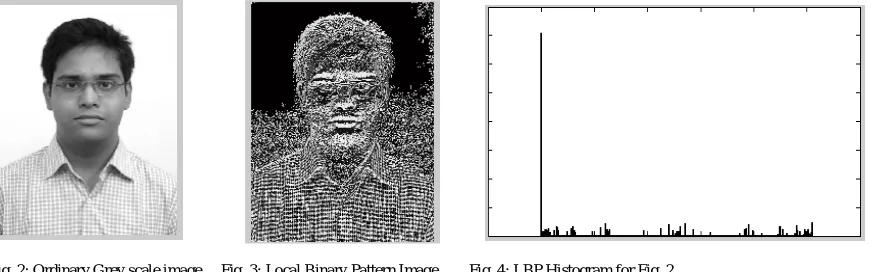
The frequency of each LBP value is plotted in the form of histograms(Fig. 4). The histograms essentially represent the texture of the image and hence are used to recognise and compare two images. The algorithm (pseudocode) for LBPH has been discussed under LBPH Implementation - section IV-A.
Fig. 2: Ordinary Grey scale image Fig. 3: Local Binary Pattern Image Fig. 4: LBP Histogram for Fig. 2
III. SOFTWARE DESIGN
A. Primary Modules
The Face Recognition and Analysis System (FRAS) software is poised to solve real-life problems using Face Recognition. An abstract conceptual model of the system was designed before implementing the system. The stages that the system encounters are:
2) Training the system to recognize those images and differentiating a set of images from other images. 3) Detecting a face for recognition.
B. Conceptual Model
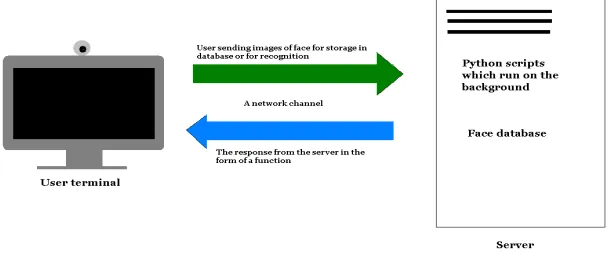
The conceptual model of the complete Data Flow of the Face Recognition and Analysis System is shown in Fig. 5:
Fig 5: Conceptual Model of the FRAS software.
C. User Interface
The user interface was designed after the backbone of the software, i.e. the constituent programs were run separately and unit testing was done. For the purpose of this software, Web-based interfaces have been designed, which can be accessed by many other users across a network. This is made possible because all the scripts, programs, configuration files, databases and other tools are kept in a centralized server. The user only needs the following to access the software:
i.
Internet Connection
ii. Any supported Web browser
iii.
A web cameraThe architecture can be roughly discussed pictorially using the following image:
IV. SOFTWARE IMPLEMENTATION
A. Implementation of LBPH using MATLAB
The function of LBPH algorithm is to convert an RGB image as input and produce LBP histogram as output:
Algorithm LBP_algo(rgb_image) Begin
gray_image1 to_gray(rgb_image); // Convert RGB image to gray image
LBP_matrix[1... rows, 1... cols]=0; // Initialising every element of LBP_matrix to zero rows number of rows in gray_image1;
cols number of columns in gray_image1;
for row=2 to rows-1 do
for col=2 to cols-1 do
centre_pixel gray_image1[row,col];
// check and compare 8 neighbourhood pixels with the centre pixel Pixel7 1 if gray_image1[row-1,col-1]>centre_pixel;
Pixel6 1 if gray_image1[row-1,col]>centre_pixel; Pixel5 1 if gray_image1[row-1,col+1]>centre_pixel; Pixel4 1 if gray_image1[row,col+1]>centre_pixel; Pixel3 1 if gray_image1[row+1,col+1]>centre_pixel; Pixel2 1 if gray_image1[row+1,col]>centre_pixel; Pixel1 1 if gray_image1[row+1,col-1]>centre_pixel; Pixel0 1 if gray_image1[row,col-1]>centre_pixel;
//decimal equivalent of the binary label Pixel7 Pixel6...Pixel0 considering Pixel7 as most significant bit (MSB) and Pixel0 as least significant bit (LSB)
LBP_matrix[row,col]=decimal value of (Pixel7 Pixel6 ... Pixel0); End col_for
End row_for
Plot Histogram(LBP_matrix[1....row,1....col]); End LBP_algo
The above LBPH algorithm has been implemented using MATLAB [5]. The structure of the program has been adopted from the official site of StackOverflow[3]. Discussed below is the strategy followed for the MATLAB
implementation.
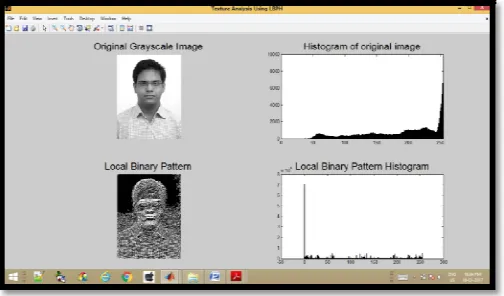
(i) The input image int_img is converted to gray scale and stored in grayImage matrix.
(iii) The entire output window is divided into 2 X 2 matrix using subplot().
(iv) The original gray scale image i.e grayImage is displayed along with its intensity histogram in the 1st and 2nd cell respectively. The histogram is obtained using imhist().
(v) The local binary pattern array is initialised to 0.
(vi) A nested for-loop is made to execute, the outer for rows and the inner for column of the grayImage.
(vii) During each iteration, the current pixel is considered as centre pixel and stored in the variable centrePixel.
(viii) The 8 neighbourhood pixel values are considered and comapared with centrePixel.
(ix) If each neighbourhood pixel value is greater than centrePixel, the corresponding pixel variable (i.e pixel7, pixel6,...,pixel0) is set to 1, otherwise 0.
(x) The binary bits thus obtained are combined and converted to decimal, which acts as the label for that centrePixel, and stored in the corresponding location of LBP_matrix.
(xi) The above steps (vii) to (x) are repeated for all non-boundary pixels.
(xii) Again the image LBP_matrix is displayed in the 3rd cell of the output window, followed by its histogram. i.e. the Local Binary Pattern Histogram in the 4th cell of the window.
(xiii) MATLAB Code for LBPH (Adopted from official website of StackOverflow) can be found in [3].
B. Implementation of FRAS Software
The FRAS software has been implemented using Python v2.3 [6], Intel OpenCV [7] and SQLite v3.0 [8]. The database used in the FRAS software is 1 N.F. It stores a User ID as primary key and other user information as attributes.
The primary modules of the FRAS software are explained as follows (the source code can be found at [4]):
1) Data Set Creator Module- This module creates a data set consisting of all the images of the person to be detected. The data set is created by capturing multiple images (at the rate of 1 frame per second i.e. 1fps) of the user and then converting them to grey scale (Fig 8), so that they can be analysed using the LBPH algorithm during the training stage.
2) Trainer Module – The trainer module is integrated with the data set creator module. This module trains the software using the data set. This training specifically means to receive the analysed data of each image given by the LBPH algorithm and analyse all of them as a whole to reconcile patterns in the developed matrices and gradients in order to detect the face in the next step.
3) Detector / Face Recognizer Module – The Detector / Face Recognizer Module is integrated with the previous two modules viz. Data Set Creator Module and the Trainer Module. The detector module detects the actual user in real time using the analysed data from the trainer. The accession rights or information are then provided accordingly.
4) Integrating the software with SQLite 3 database – The detector module is then integrated with the SQLite3 database which stores all the user data. The images of the user contain their id in their filename. When the user’s face is detected the ID is mapped to the database. The data such as the user’s name and other data is then fetched from the database using SQL statements.
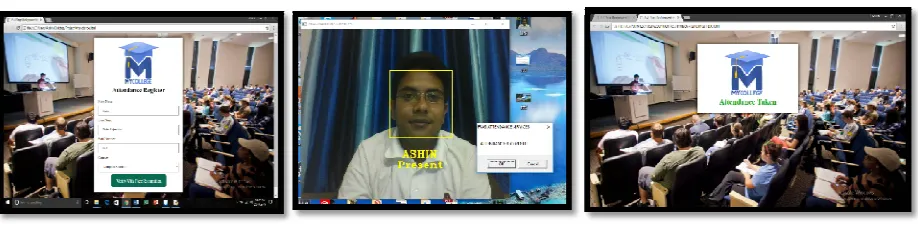
5) Further Integration – The software produced is then customized & integrated to perform certain applications including Attendance Recording (Fig 12.1, 12.2 and 12.3), Biometric Identification (Fig 10), Online Banking Security (Fig 9.1, 9.2, 9.3 and 9.4) and Sentiment Analysis (Fig 11.1 and 11.2). The primary modules and the application software was entirely coded using Python v2.7, Open CV and the database was created and stored using SQLite v3.0.
V. SOFTWARE TESTING
The modules, once integrated, were tested as a whole using variety of specified test cases. The modules were also tested after integrating them with the web technologies for the end user interface.
Fig 8: Primary Module: Data Set Creator & Trainer Fig 9.1 Fig 9.2
Fig 10: Biometric Database Fig 9.1, 9.2, 9.3, 9.4: Detector for Online Banking Security
Figure 8 shows the output of the Data Set Creator and Trainer. The image shows 50 images taken successively at 1fps stored in the data set creator folder. Figure 9.1 through 9.4 shows the detection module of the FRAS software (Fig. 9.3) integrated with the model online banking security website where users can access accounts using facial recognition after logging in with their username and password. Fig. 10 shows the modified detection module for the Biometric Database containing Name, Gender, Blood Group and Criminal Records.
Fig 12.1, 12.2, 12.3: Attendance Record
Fig 11.1 & 11.2 shows the sentiment analysis application output detecting when a user is happy or sad based on facial expressions. Fig 12.1,12.2,12.3 shows the output of the Attendance record application. All the applications were developed using the FRAS system.
VI. RESULTS
After conducting the Unit testing, Integration testing and FRAS software testing the following conditions were found for accurate functioning of the software:
Intensity of light: Very High to Medium Confidence Value: 60 to 80
Distance from camera: 0.5 ft. to 3 ft.
Comparison of LBPH with other face recognition algorithms: LBPH > Eigenface > Fisher Faces
The FRAS software has been tested manually in a short period of time. These test cases include changing the confidence value (conf) of the OpenCV face recognizer using LBPH, and testing the software in different kinds of lighting conditions.The Confidence Value (conf) of FRAS depends on several factors such as:
1. Number of training images 2. Light Conditions
0 10 20 30 40 50 60 70 80 90 100 Very Low
Low Medium High Very
High Light Intensity (X-axis) - Correct
Recognition Rate (%) (Y-axis)
The following Table 1 and Fig. 13 graph shows the test result for the respective conf value range:
Table 1: Relation between the accuracy of the software and Confidence Value Fig 13: The graph depicting the relation in Table 1
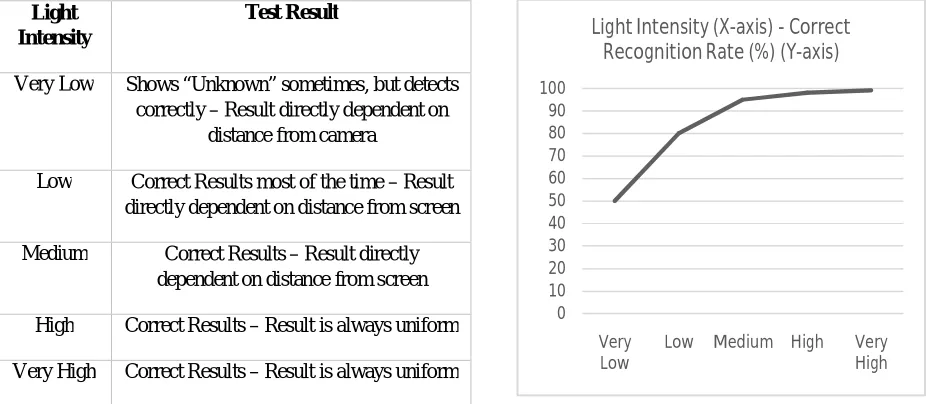
Light intensity of the surrounding plays a major role. The variation is shown graphically: (Very high = Above 5000 lumens; Very low = Below 100 lumens) in Table 2 and Fig. 14.
Table 2: Relation between the accuracy of the software and the light conditions Fig 14: The graph depicting the relation given in Table 2 10 25 45 75 95 75 45 25 10 0 20 40 60 80 100 Less than 10 10 to 20 20 to 40 40 to 60 60 to 80 80 to 100 100 to 120 120 to 140 More than 140
Confidence Value (X-axis) - Correct
Detection Rate (%) (Y-axis)
Correct Detection (%)
Confidence Value
Test Result
0-20 Anomalous, Shows “Unknown”
20-40 Shows “Unknown” sometimes
40-60 Correct Results
60-800 Correct Results but requires high intensity surrounding light
80-100 Correct Results but requires very high intensity surrounding light
100+ Anomalous
Light Intensity
Test Result
Very Low Shows “Unknown” sometimes, but detects correctly – Result directly dependent on
distance from camera
Low Correct Results most of the time – Result directly dependent on distance from screen
Medium Correct Results – Result directly dependent on distance from screen
High Correct Results – Result is always uniform
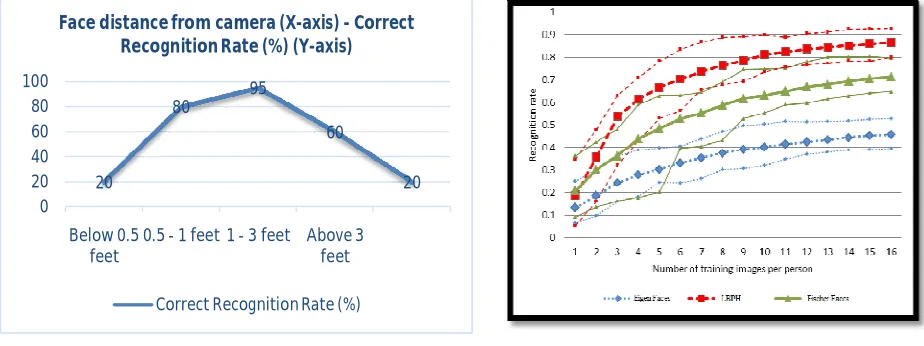
The distance of the user face from the camera is also an important factor as shown below graphically in Fig. 15. A graphical variation of the face recognition methods, Eigen Face - LBPH - Fisher Face recognition rates with respect to number of training images in Fig. 16. From the comparison shown in the graph it is notable that for a small number of images in the training data set the recognition rate is low and almost similar for all the three method. But for a large number of images in the data set (recommended), the best results are shown by LBPH.
Fig 15: The graph depicting the relation between face distance from Fig 16: A graph comparing the three popular face recognition algorithms the camera and the accuracy of the software (i.e. Correct Recognition Rate)
VII. RESULTS
The FRAS software has achieved the primary objective with which it was developed, i.e. correct recognition of different faces. The software has a few limitations. However, there areendless ways in which the software can be improved and be applied to numerous other domains. Listed below are a few areas to which the software can be expanded:
(i) Using a CCTV camera-based face recognition at home as a key for entry. (ii) Increasing the sentiment analysis & emotion recognition capabilities.
(iii) Helping blind people recognize others by using face recognition and by also including speech recognition. (iv) Incorporating online face recognition in every login website.
(v) Using face recognition technology with Internet of Things (IoT) to control multiple things which use the same system, etc.
The entire FRAS Source Code is available for download for research & development purposes.[4]
20
80
95
60
20 0
20 40 60 80 100
Below 0.5 feet
0.5 - 1 feet 1 - 3 feet Above 3 feet
Face distance from camera (X-axis) - Correct Recognition Rate (%) (Y-axis)
VIII. ACKNOWLEDGEMENT
We would like to extend our gratitude to the Department of Computer Science at St Xavier’s College (Autonomous), Kolkata for helping with the development of the software project and its various areas.
REFERENCES
1. Timo Ojala, Matti Pietkainen, David Harwood, “A comparative study of texture measures with classification based on featured distributions, Pattern Recognition”, Volume 29 Issue 1, January 1996.
2. B.K. Julsing,“Face Recognition with Local Binary Patterns Assignment”, Bachelor University of Twente, Department of Electrical Engineering, Mathematics & Computer Science (EEMCS) , Signals & Systems Group (SAS) , The Netherlands, 2007.
3. StackOverflow:http://stackoverflow.com/questions/22161194/local-binary-patters-original-code-and-references-in-matlab, 2015.
4. Author: FRAS Authors : A. Guha Majumder, A. Roy, S. Dasgupta, S. Agarwal,Title: “Face Recognition & Analysis System”;https://ashinguhamajumder.weebly.com/fras.html FRAS Source Code, 2017.
5. Matlab Documentation, Features, Overview, Mathworks,https://in.mathworks.com/products/matlab.html, 2017.
6. Author: Python Software Foundation; Title: “Python Language Reference”;https://docs.python.org/2/reference/ Python 2.7.13, 04.05.2017. 7. OpenCV Documentation, Intel, http://docs.opencv.org/2.4.13.2/ OpenCV 2.4.13.2, 16.12.2016.