ISSN(Online): 2320-9801
ISSN (Print): 2320-9798
I
nternational
J
ournal of
I
nnovative
R
esearch in
C
omputer
and
C
ommunication
E
ngineering
(An ISO 3297: 2007 Certified Organization)
Vol. 4, Issue 8, August 2016
Copyright to IJIRCCE DOI: 10.15680/IJIRCCE.2016. 0408146 15556
Design and Implementation of Image
Processing Applications in Embedded System
Vaishali Masal1, R.R.Itkarkar2M.E. Student, Dept. of E & TC, JSPM’s RSCOE Pune, India
Asst. Professor, Dept. of E & TC, JSPM’s RSCOE Pune, India
ABSTRACT: Image processing has many application in many areas. But the people are applying traditional method on images. For example, capturing an image and apply various operation on it. All these multifunction are performed using various software. The software tools perform the various operations with varying pixel value and because of this system complexity also increases. To avoid these people are using various hardware platforms. With the help of hardware, workload is reduced so accuracy improved. This paper gives a specific hardware based solution which is designed only for certain specific image processing tasks. Embedded platform is very unique and easy to implement. This paper manages with the design and implementation of a multifunction processor with different modules using a Raspberry pi board. The design has been prototyped on a Raspberry pi 2 Broadcom BCM2836 for different processes like color conversion ,rotation of image, mirror image of input image, histogram equalizations of image.
KEYWORDS: Embedded system, image processing, raspberry pi, python
I. INTRODUCTION
Image processing system processes images as two-dimensional signals while by applying traditional signal processing methods on them. It allows a larger range of algorithms is applied to the input data and can maintain a strategic distance from issues, for example, the development of clamor and flag mutilation amid handling. Since pictures are characterized more than two measurements (maybe more) digital image processing may be the model in the form of multidimensional systems. These image processing concepts are implemented in Raspberry pi in the application of micro air vehicle (MAV). The Raspberry Pi is the fundamental introduced system and an insignificant exertion a lone board. It moreover diminish the multifaceted way of systems continuously applications. Raspberry Pi is a central embedded structure having a Master card evaluated single board PCs made in the UK by the Raspberry Pi Foundation. The Raspberry Pi relies on upon the Broadcom BCM2836 structure on a chip (System On Chip) which unites an ARM1176JZF-S Core (ARM V6K)700 MHz CPU processor, Broadcom Video Core IV GPU Graphics processor unit having 20 pins, 3.5W of power, and 1 GB of Random Access memory.
ISSN(Online): 2320-9801
ISSN (Print): 2320-9798
I
nternational
J
ournal of
I
nnovative
R
esearch in
C
omputer
and
C
ommunication
E
ngineering
(An ISO 3297: 2007 Certified Organization)
Vol. 4, Issue 8, August 2016
Copyright to IJIRCCE DOI: 10.15680/IJIRCCE.2016. 0408146 15557 II. RELATED WORK
The large majority of the continuous picture handling and machine vision frameworks are utilized DSP and FPGA based picture preparing sheets. These items gave the torque important to process a lot of information progressively. Universally useful DSPs tend to bolster the biggest basic component in all calculations, with no respects for particular needs. As an aftereffect of this inclination, DSPs have biggest required word widths, the most widely recognized memory tending to plans, and nonspecific number-crunching operations. Bigger information width brings extra necessities of pressing two or more neighboring bits into in word. Picture handling requires higher information widths like drifting point calculations. Field Programmable Door Clusters, or FPGAs, give a programmable, fast arrangement that is both not so much costly but rather more adaptable than DSPs. In any case, FPGA framework is more convoluted and difficult to actualize. FPGA is likewise unreasonable.
This methodology gets various equipment stages where to know how of every equipment is an unquestionable requirement. In view of this foundation, this paper examines the execution and design tradeoffs required in the different picture preparing applications have been completed on raspberry pi model. The point of this work is to search at an understudy level the part of executing different picture preparing applications on a Raspberry pi implanted framework.
III.SYSTEM ARCHITECTURE
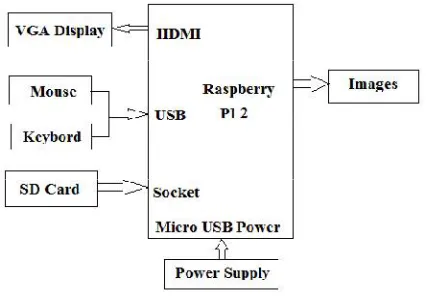
The whole system is framed by taking after parts: a camera for picture capturing processes, Raspberry Pi board to run image identification programs on it. Digital Visual Interfaces are perfect screens additionally associated with this framework amid introductory stages to review the caught pictures and give the user indication. The block diagram of entire process is shown in Figure 1.
Fig 1. System Block Diagram
A. RASPBERRY Pi BOARD:
ISSN(Online): 2320-9801
ISSN (Print): 2320-9798
I
nternational
J
ournal of
I
nnovative
R
esearch in
C
omputer
and
C
ommunication
E
ngineering
(An ISO 3297: 2007 Certified Organization)
Vol. 4, Issue 8, August 2016
Copyright to IJIRCCE DOI: 10.15680/IJIRCCE.2016. 0408146 15558
Fig 2. Raspberry PI 2 Board [9].
B. INSTALLATION OF OS ON RASPBERRY Pi
There are various Operating System, which will be supported by raspberry pi. We select the original OS called Raspbian “wheezy”. The Raspberry pi have SD card slot, in which, any SD card having OS image can work.
C. DISPLAY CONFIGURATION
Raspberry PI have HDMI output, so any display, which is HDMI, can be connected directly to Raspberry pi. I was not having any HDMI output display so need to figure out some` other method.
D. LIST OF PACKAGES
For implementing the proposed model the following packages are installed for implementing. Installation commands have been listed below[9].
i. sudo apt-get install camera ii. sudo apt-get install python-dev iii sudo apt-get install libjpeg62-dev iv. sudo apt-get install libpngl2-dev v. sudo apt-get install python-matplotlib vi. sudo apt-get install python-numpy vii. sudo apt-get install python-scipy viii. sudo apt-get install python-imaging ix. sudo apt-get install python-tim
IV.RESULT
The operation performed on raspberry pi 2 boards. The various operations which are performed such as color
ISSN(Online): 2320-9801
ISSN (Print): 2320-9798
I
nternational
J
ournal of
I
nnovative
R
esearch in
C
omputer
and
C
ommunication
E
ngineering
(An ISO 3297: 2007 Certified Organization)
Vol. 4, Issue 8, August 2016
Copyright to IJIRCCE DOI: 10.15680/IJIRCCE.2016. 0408146 15559 A. COLOR TO BINARY
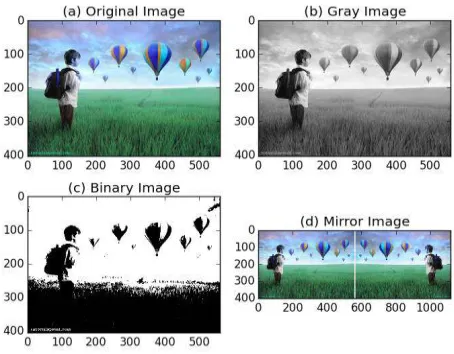
In this block we have used the concept of Thresholding. Pixel values are compared with a specific value and then using a decision statement we either convert the pixel to black orwhite. The threshold value can be decided by the user. Fig. 3(b) shows the binary image.
B. COLOR TO GRAYSCALE
This module also uses Thresholding but has different thresholds. The pixel value lying between two consecutive highest thresholds is assigned a shade lighter than black and hence a greyscale image is obtained by assigned different levels to every pixel value. Fig.3(c) shows a greyscale image.
C. MIRRORING
The horizontal and the vertical addresses of the image pixels are exchanged. This completely creates a mirrored image of the original. Fig.3(d) shows the mirrored effect on the display.
Fig.3 (a) Object Image (b) Binary Image(c) Grayscale Image (d) Mirror Image
D. ROTATION
ISSN(Online): 2320-9801
ISSN (Print): 2320-9798
I
nternational
J
ournal of
I
nnovative
R
esearch in
C
omputer
and
C
ommunication
E
ngineering
(An ISO 3297: 2007 Certified Organization)
Vol. 4, Issue 8, August 2016
Copyright to IJIRCCE DOI: 10.15680/IJIRCCE.2016. 0408146 15560
Fig.4 (a) Object Image (b) 90 degree rotate Image(c) 180 degree rotate Image (d) 270 degree rotate
E. HISTOGRAM EQUALIZATION
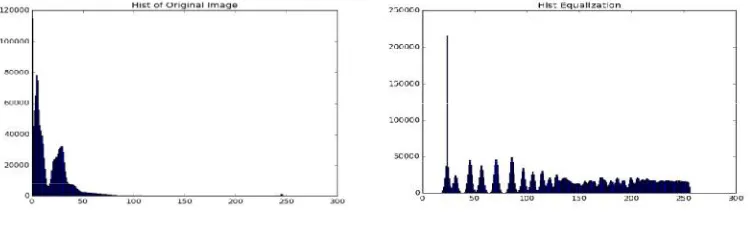
As the ROM is accessed the histogram of an image gives the frequency of occurrence of the gray level.The goal of HE is to approximate the grayscale value distribution of an image to the uniform distribution.HE spread the grayscale values and allows one to see a large range of grayscale value.
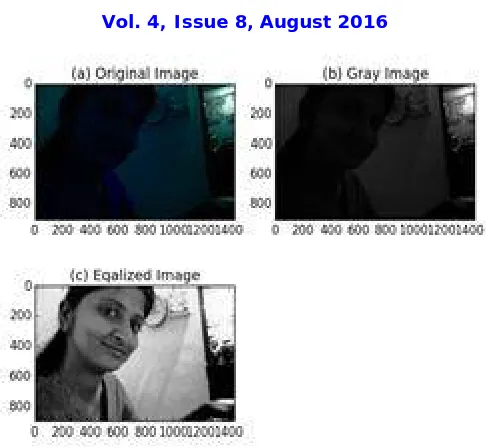
Fig. 5(a) shows the histogram of the original image and Fig. 5(b) shows the histogram after equalization operation. Basically for histogram equalization is a process to convert the color image into gray image then histogram equalization operation will be performed on grayscale image. Because of this process the value of grayscale is spread in entire image and the resulted image is histogram equalized which has even distribution of gray value.
Fig.5 (a) Histogram Object Image Fig.5 (b) Histogram Equalized Image
ISSN(Online): 2320-9801
ISSN (Print): 2320-9798
I
nternational
J
ournal of
I
nnovative
R
esearch in
C
omputer
and
C
ommunication
E
ngineering
(An ISO 3297: 2007 Certified Organization)
Vol. 4, Issue 8, August 2016
Copyright to IJIRCCE DOI: 10.15680/IJIRCCE.2016. 0408146 15561
Fig.6 (a) Object Image (b) Grayscale Image(c) Histogram Equalized Image
V. RESULTS DISCUSSION
As per above, results is implemented using by the Raspberry pi 2 model. The results has shown that the algorithm though simple can be efficiently implemented and deployed on a portable and fast platform like Raspberry pi Model 2. Matplotlib,Numpy, Scipy ,PIL, and OpenCV were installed successfully for different image processing application. Such system can be used in photography for quick picture editing.Also given below are the processing times. This system is smaller,lighter and offers lower power consumption. The below table shown time required for different processing which performed on embedded system Raspberry pi 2 model.
Table 1. Processing time required for different application.
Sr. No. Operations Time(sec)
1. Black and White 0.0223569869995
2. Gray Scale 0.00796508789062
3. Image Mirror 0.359899997711
4. Image Rotation 0.054309129715
5. Histogram Equalization 8.81559300423
VI.CONCLUSION AND FUTURE WORK
ISSN(Online): 2320-9801
ISSN (Print): 2320-9798
I
nternational
J
ournal of
I
nnovative
R
esearch in
C
omputer
and
C
ommunication
E
ngineering
(An ISO 3297: 2007 Certified Organization)
Vol. 4, Issue 8, August 2016
Copyright to IJIRCCE DOI: 10.15680/IJIRCCE.2016. 0408146 15562 REFERENCES
[1] Mrutyunjaya Sahani and Mihir Narayan Mohanty “Realization of Different Algorithms Using Raspberry Pi for Real-Time Image Processing Application”, Proceedings of ICCD by Springer publication India 2014, Vol 2, pp 473-479, 2015.
[2] Hedjam, R.; Nafchi, H.Z.; Kalacska, M.; Cheriet, M., "Influence of Color-to-Gray Conversion on the Performance of Document Image Binarization: Toward a Novel Optimization Problem," IEEE Transactions in Image Processing, vol.24, no.11, pp.3637-3651, Nov. 2015. [3] G.Senthilkumar1, K.Gopalakrishnan, V. Sathish Kumar3 “Embedded Image Capturing System Using Raspberry Pi System”, International
Journal of Emerging Trends & Technology in Computer Science (IJETTCS) Vol 3, Issue 2, March–April 2014.
[4] Brahmbhatt, Samarth, "Embedded Computer Vision: Running OpenCV Programs on the Raspberry Pi",Practical OpenCV Springer publication India 2014, pp 201-218, 2013.
[5] Brahmbhatt, Samarth, "Setting up OpenCV on Your Computer",Practical OpenCV Springer publication India 2014, pp 7-12, 2013.
[6] KS.Shilpashree, Lokesha.H, Hadimani Shivkumar, “Implimentation of Image on Raspberry Pi”, International Journal of Advanced Research in Computer and Communication Engineering (IJARCCE) Volume 4, Issue 5 p.p 199-202,May 2015.
[7] Jignesh K. Tank,Prof. Vandana Patel, “ Edge Detection Using Different Algorithms in Raspberry Pi ”,IJSRD,Vol 1, Issue 4 p.p 1019-1021, 2013.
[8] R. C. Gonzalez and P. Wintz, Digital Image Processing - Second Edition,Addison- Pearson Education Publishing Company, 2005.
[9] Available Raspberry Pi B+ Data Sheet: http://www.element14.com/community/servlet/JiveServlet/previewBody/65470-102-287848/Raspberr Pi%20Technical%20Data%20Sheet.pdf.
[10] Available Raspberry pi B+ pin diagram: http://jeffskinnerbox.me/images/raspberry-pi-rev-1-gpio-pin-out1.jpg
[11] Jan Erik Solem, Programming Computer Vision with Python,2012.Raspberry pi – www.raspberrypi.org
![Fig 2. Raspberry PI 2 Board [9].](https://thumb-us.123doks.com/thumbv2/123dok_us/1437358.1176137/3.595.147.461.161.382/fig-raspberry-pi-board.webp)