Volume 4, No. 3, March 2013 (Special Issue)
International Journal of Advanced Research in Computer Science
RESEARCH PAPER
Available Online at www.ijarcs.info
Case Study of Virtualization in Existing System
Lovely Soni
B.Tech. Student (Final Year CSE) Chartered Inst. of Tech., Rajasthan
Suneet Chaudhary
Asst. Prof. (CSE)
Dehradun Inst. of Tech., Dehradun [email protected]
Shailendra Singh Tanwar
M.Tech. (Final Year CSE) Dehradun Inst. of Technology
Abstract: In this communication we will present the application of Virtualization technologies in the following areas such as server consolidation, secure computing platforms, supporting multiple operating systems, system migration, virtual local area network (VLAN) resulting in widespread usage [4]. Virtualization to be the act of abstracting the physical boundaries of a technology [5]. Physical abstraction is now occurring in several ways, with many of these methods including optimize security, flexibility, fault tolerance, power efficiency, and performance. Virtual machines are separate entities from one another. Therefore if one of them fails, they are completely isolated from all the other software on that physical machine, including other virtual machines. This greatly increases security, because problems can be contained [9].
Keywords: Virtualization, Cloud computing, Ethernet, Remote desktop.
I. INTRODUCTION
Virtualization technology emulates real or physical computing resources, such as desktop computers and servers, processors and memory, storage systems, networking, and individual applications. Server virtualization creates “virtual environments” [5] that allow multiple applications or server workloads to run on one computer, as if each has its own private computer. Virtualization is one of the hottest and most disruptive technologies of the past decade and continues to be so today. Yet the basic concept of virtualization originated more than 40 years ago within mainframe computers. In the 1960s, large and expensive mainframe computers and dumb terminals comprised the enterprise technology landscape, and relatively inexpensive client-server networks with multitasking servers and personal computer (PC) workstations were not even close to becoming a reality. Each user was provided with a virtual machine (VM), which enabled multiple users to access the same mainframe computer simultaneously. A software hypervisor was created to manage memory sharing in the mainframe. A hypervisor also known as a virtual machine manager (VMM) [5] allows multiple “guest” operating systems to run concurrently on a single physical host computer. The hypervisor functions between the computer operating system (OS) and the hardware kernel.
II.CURRENTMARKETSCENARIO
Virtualization’s impact on the IT industry has been dramatic [5]. Using virtualization to improve data centeroperations will continue to drive the deployment of virtualization technologies. The best building blocks for streamlined operations and maximum agility in the data center are comprised of a combination of Hardware, OS, Virtualization, Database, Applications, Management and Support.
Enterprise business requirements are driving a rapidly evolving technology landscape [5] in which:
a. Enterprises need greater optimization and efficiency beyond simple consolidation and provisioning of systems. Data centers are becoming “service centers” that must deliver applications on demand and respond to changing customer requirements with speed and flexibility. b. Cloud computing necessitates full stack, integrated
application provisioning and management in order to provide users with access to services at any time and from anywhere. Virtualization is a key technology used in data centers to optimize resources.
c. Provision new systems faster by building standard server operating system images. This strategy works well for file, print, and web server consolidation, where high availability and scalability requirements are often less stringent than for other critical business systems.
rapidly deliver services on demand, such as infrastructure-as-a-service (IaaS) [5], platform-as-a-service (PaaS), and software-as-platform-as-a-service (SaaS). Everything simply must work together reliably and securely and always faster! As a result, virtualization solutions need to mature and facilitate flexibility, agility, and speed in deploying complete application stacks to support the new services based charter.
III. DIFFERENTWAYSOF VIRTUALIZATION
A. Operating System Virtualization:
The most prevalent form of virtualization today, virtual operating systems (or virtual machines) arequic`kly becoming a core component of the IT infrastructure.[6]
B. Application Server Virtualization:
ApplicationServerVirtualization has beenaround since the first load balancer, whichexplains why “application virtualization” isoften usedasa synonym for advancedload balancing.
C. Application Virtualization:
While they may sound very similar, Application Server and Application Virtualization are two completely different concepts. What we now refer to as application virtualization we used to call “thin clients.”
D. Management Virtualization:
The paradigm can be extended down to segment administration roles on one platformor box, which is where segmentedadministration becomes “virtual.”
E. Network Virtualization:
Network virtualization may be the most ambiguous, specific definition of virtualization.For brevity, the scope of this discussion is relegated to what amounts to virtual IP management and segmentation. A simple example of IP virtualization is a VLAN: a single Ethernet port may support multiple virtual connections from multiple IP addresses and networks, but they are virtually segmented using VLAN tags. Each virtual IP connection over thissingle physical port is independent and unaware of others’ existence, but theswitch is aware ofeach unique connection and manages each one independently.
F. Hardware Virtualization:
Hardware virtualization is very similar inconcept to OS/Platform virtualization, and to some degree is required for OS virtualization to occur. Hardware virtualization breaks up pieces and locations of physical hardware into independent segments and manages those segments as separate, individual components.
G. Storage Virtualization:
Storage virtualization can be broken up into two general classes: block virtualization and file virtualization. Block virtualization is best summed up by Storage Area Network (SAN) and Network Attached Storage (NAS) technologies: distributed storage networks that appear to be single physical devices.
H. Service Virtualization:
Service virtualization connects all of the components utilized in delivering an application over the network, and includes the process of making all pieces of an application work together regardless of where those pieces physically reside. This is why service virtualization is typically used as an enabler for application availability.
IV. TYPESOFVIRTUALIZATION
A. Parallel Server:
Parallel Server [4] is cross-platform software that enables you to efficiently use your physical computer’s hardware resources by sharing them between multiple virtual machines created on this computer. Parallels Server can be installed on any Intel VT-x and AMD-V based Mac, PC, or bare-metal computer that complies with the system requirements.
With Parallel Server, you can create virtual machines on a computer with a Mac OS X, Windows, or Linux primary OS installed and make them accessible to other computers on the network. Parallel Management Console included in the Parallel Server [4] package enables you to control virtual machines both locally and remotely. You can install Parallel Server on a physical server and then create, run and configure virtual machines using Parallel Management Console, Parallel Command Line Tool, or other client application installed on the same computer or other computer on the network. You can also create your own applications using the Parallel SDK package that is installed together with Parallel Server.
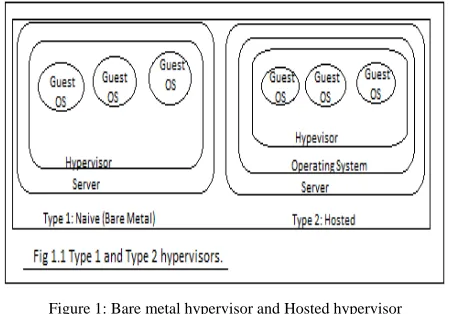
The kernel was known as the supervisor [5]in mainframes; hence the termhypervisor [5]was coined for the software operating above the supervisor. Two types of hypervisors are defined for server virtualization. Type 1 and Type 2 (see Figure) [5]:
A Type 1 hypervisor, also known as a native or bare metal hypervisor, runs directly on the host computer’s hardware. A Type 2 hypervisor, also known as a hosted
hypervisor, runs within an operating system environment (OSE).
Parallels Server is cross-platform software that enables you to efficiently use your physical computer's hardware resources by sharing them between multiple virtual machines created on this computer. Parallels Server can be installed on any Intel VT-x and AMD-V based Mac, PC, or bare-metal computer that complies with the system requirements.
With Parallels Server, you can create virtual machines on a computer with a Mac OS X, Windows, or Linux primary OS installed and make them accessible to other computers on the network. Parallels Management Console included in the Parallels Server package enables you to control virtual machines both locally and remotely.
Figure 2: Parallel Server
B. Virtual Private Network (VPN):
A virtual private network is a way to simulate a private network over a public network, such as the Internet. It is called "virtual" because it depends on the use of virtual connections that is, temporary connections that have no real physical presence, but consist of packets routed. Some of the major tunneling protocols used by VPN vendors[8]. These protocols are the Point-to-Point Tunneling Protocol (PPTP), Layer 2 Forwarding (L2F), and the Layer 2 Tunneling Protocol (L2TP). The PPP is commonly used to transport IP and other protocols over serial and digital connections. Typically PPP connections are made between a client and a remote host, such as a remote access server. Likewise, PPTP, L2F, and L2TP are all used to tunnel PPP connections over the Internet so that they may be terminated on a remote host. In this case, the tunnel essentially acts in place of the line.
Figure 3: Virtual Private Network (VPN).
C. Virtualization Extension:
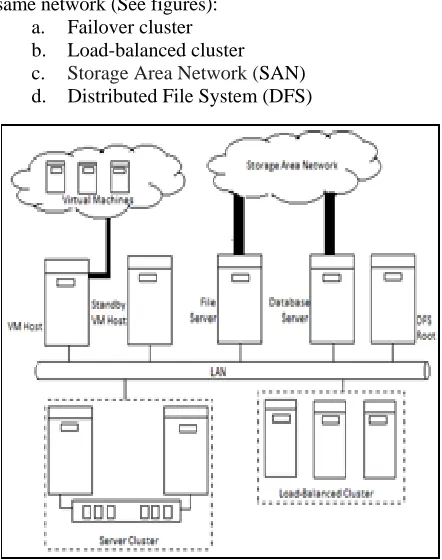
We have seen the many facets of virtualization, virtualized networks and some new techniques as well. The major elements of the Virtual Information System (VIS) [7],then how virtualization assists data management and how to add fault tolerance [12] to virtual machine infrastructure by maintaining standby VM host servers.
The following technologies are deployed within the same network (See figures):
a. Failover cluster b. Load-balanced cluster c. Storage Area Network (SAN) d. Distributed File System (DFS)
Figure5: SAN-attached deployment
V.SECURITYTHREATS
The level of threat [11] posed by a hostile virtualized environment that can subvert the normal operation of the virtual machine will be classified as follows:
a. Total Compromise: The virtual machine monitor
is subverted to execute arbitrary code on the host with the privileges of the VMM process.
b. Partial Compromise: The VMM leaks sensitive
information about the host, or a hostile process interferes with the VMM (e.g., allocating more resources than the administrator intended) or contaminating state checkpoints.
c. Abnormal Termination: The virtual machine
monitor exits unexpectedly or triggers an infinite loop that prevents a host administrator from interacting with the virtual machine (for example, suspending, rolling back, etc.), particularly if accessible as an unprivileged user within the guest.
VI. RESULTS(CASESTUDY)
A. VLAN (Virtual Local Area Network):
Figure 6: VLAN ID with respective VLAN
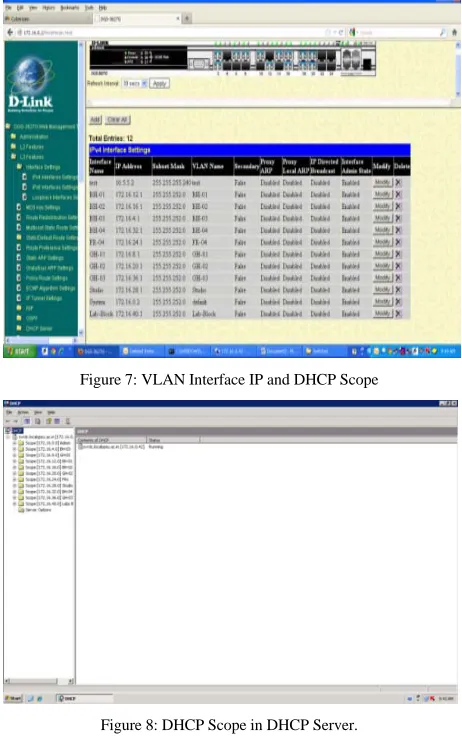
Figure 7: VLAN Interface IP and DHCP Scope
Figure 8: DHCP Scope in DHCP Server.
Table 1: VLAN Details.
VLAN ID
DGS3627 G Switch Port
Interface IP DHCP IP Range
1 1-27 172.16.0.2 172.16.0.0 – 172.16.3.255
2 2 172.16.4.1 172.16.4.0 – 172.16.7.255
3 4 172.16.8.1 172.16.8.0 – 172.16.11.255
4 1 172.16.12.1 172.16.12.0 – 172.16.15.255
5 3,6 172.16.16.1 172.16.16.0 – 172.16.19.255
6 5 172.16.20.1 172.16.20.0 – 172.16.23.255
7 3,6 172.16.24.1 172.16.24.0 – 172.16.27.255
8 7,21 172.16.32.1 172.16.28.0 – 172.16.31.255
9 9 172.16.28.1 172.16.32.0 – 172.16.35.255
10 24 10.5.5.2
11 5,13 172.16.36.1 172.16.36.0 – 172.16.39.255
12 22 172.16.40.1 172.16.40.0 – 172.16.43.255
B. Hardware Virtualization:
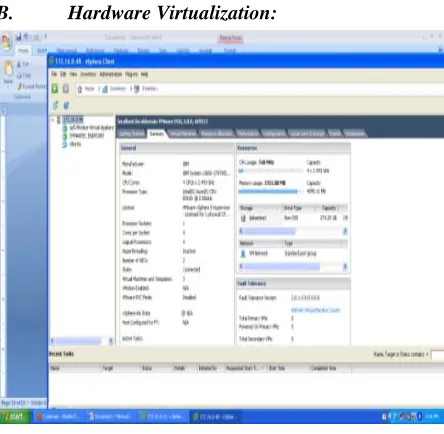
Figure 9: Hardware Virtualization through ESXi
Hardware virtualization provides logically division of the of the hardware resources like RAM, Hard disk, CPU cycles, I/O interfaces etc. It gives logically division of system resources between different or similar types of Operating Systems. It not only increases the resource utilization be also increased the number of service instance running on a single machine.
C. Server Virtualization on IBM ESXi Software:
Figure 10:Hardware Virtualization in ESXi
Figure 11: Host OS Virtualization in ESXi.
Server virtualization increases the portability and scalability of the system. It logically divides the machine resources and increases the resource utilization at every instance running. Its saves the electrical power consumption.
D. Virtualization through Remote Desktop
Protocol (RDP):
Figure 12: Virtualization using RDP.
Figure 13: The RDP user login.
Figure 14: The user profile in Remote Desktop Server.
VII. CONCLUSION
I have done case study of virtualizations in our existing system. With the following points like VLAN, Hardware Virtualization, Server Virtualization on IBM ESXi Software, Virtualization through Remote Desktop Protocol and finally conclude that VLAN of the system prevent congestion in the network and its provide segments to unwanted congestion in the network. Similarly Hardware virtualizations not only increases the resource utilization of the existing system but also increased the number of service instance running on a single machine (Server level machine). To increases the portability and scalability of the system Server Virtualization on IBM ESXi Software play a very important role. For secured access of the Server and as well as the minimization of IT infrastructure cost the Virtualization through Remote Desktop Protocol (RDP) is a good technique.So, the whole summary of the Virtualization technologies are that Virtualization technologies have matured to the point where the technology is being deployed across a wide range of platforms and environments.
The advantages of using virtualizations is cost effective IT infrastructure developments, less downtime, high response time, scalability, power management and carbon foot print. The usage of virtualization has gone beyond increasing the utilization of infrastructure, to areas like data replication and data protection. The continuing evolution of virtualization, its potential, and scientific and technological challenges on optimizing virtualization as well as how to future proof the technology.
From my case study, I finally come on the conclusion that, the Virtualization technologies have above mentioned advantages and disadvantage in the security aspect.
VIII. REFERENCES
[1]. Parallel Virtual Machine, A Users_ Guide and Tutorial for Networked Parallel Computing by Al Geist, Adam Beguiling, Jack Dongarra, Weicheng Jiang , Robert Manchek, VaidySunderam, 1994.
[2]. Parallels Virtual Desktop Infrastructure Quick Start Guide, Parallels Holdings, Ltd.
[3]. http://www.ecsl.cs.sunysb.edu/tr/TR179.pdf. [4]. Parallels® Virtual Machine Guide, Copyright ©
1999-2008 by Parallels Software International,. [5]. Server Virtualization For Dummies®, Oracle
Special Edition, Copyright © 2012 by John Wiley &Sons,Inc., Hoboken, New Jersey.
[6]. Virtualization From the Desktop to the Enterprise by CHRIS WOLF AND ERICK M. HALTER. [7]. Virtual Private Networks, Second Edition, Charlie
Scott Paul Wolfe Mike Erwin, Publisher: O'Reilly, Second Edition January 1999.
[8]. Virtualization - The Complete Cornerstone Guide to Virtualization Best Practices: Concepts, Terms, and Techniques for Successfully Planning, Implementing and Managing Enterprise IT VirtualizationTechnology, Copyright © The Art of Service.
[9]. http://www.trendmicro.com/cloud content/ us/