
Windows 2000 and NT4.0 Profile Merging
8
0
0
Full text
(2) Revision History. Revision 1 2 3 4 5 6. Change Description Original version Peer review. Updated By Daniel Feller Drew Robbins. Windows 2000 Profile Merging. Date 12/07/2000 02/09/2001. Page ii Citrix Confidential.
(3) Table of Contents 1. Overview ..................................................................................................................................... 1 1.1 Windows NT 4.0 Profile Overview ............................................................................................ 1 1.2 Windows 2000 Profile Overview............................................................................................... 2 2 Profile Issues................................................................................................................................ 4 3 Conclusion ................................................................................................................................... 5. Windows 2000 Profile Merging. Page iii Citrix Confidential.
(4) 1 Overview With the advent of the wide array of new features that are incorporated with Windows 2000, it is vital to understand how these features will affect many of the issues encountered with a Windows NT 4.0 environment. One of the biggest concerns, especially for Terminal Services environments, is the issue of user profiles. More specifically, the concept of profile merging has been a cause of some concern. This document will briefly discuss the following items: ! Windows NT 4.0 Profile Overview ! Windows 2000 Profile Overview ! Profile Management ! Profile Issues This document will give infrastructure administrators the initial knowledge necessary to understand what is at stake when implementing a roaming profile environment. Understanding user profiles is important because pre-configured profiles are not included with Microsoft products. Administrators are left with the task of creating efficient and scalable user profile configurations.. 1.1 Windows NT 4.0 Profile Overview Profile management in Windows NT 4.0 takes on a very simplistic process. This process, upon logout, simply initiates a few functions. The diagram in Figure 1 explains this process.. 1. Logoff. 2 Hive info saved to NTUser.Dat. 3 Copy Local Profile to Remote Profile. 4. Logoff Completed. Figure 1 1.. Process begins by the user logging off of the workstation. 2.. The user’s HKEY_CURRENT_USER is saved back to their NTUser.Dat file located in the %UserProfile% directory.. 3.. The locally cached profile stored in the %UserProfile% directory is copied out to the network location specified in the User Manager for Domain’s User Profile field. This includes the NTUser.dat file as well as all of the User Shell Folders (i.e. Start Menu, Temporary Internet Files, Cookies, etc…). 4.. User has been logged out of the workstation.. Windows 2000 Profile Merging. Page 1.
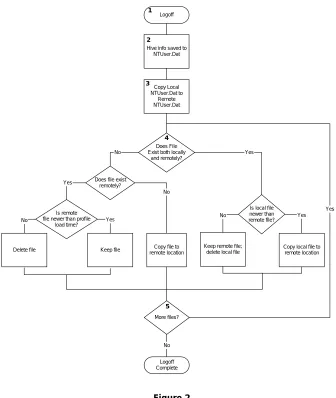
(5) A problem occurs when the same user is logged onto two separate computers. In this case, the roaming profile is copied locally to each of the computers at logon. When the user logs off of the first computer the profile is copied to the network. When the user logs off of the second computer, the local profile is copied to the network and the files from the first profile are overwritten with the files from the second profile. This means that the profile changes made during the first logon session have not been recorded.. 1.2 Windows 2000 Profile Overview Windows 2000 improves on the NT 4.0 profile management process by performing a check on the timestamp of the local and remote files located within the user shell folders of the roaming and local profiles. Figure 2 shows the logoff process of a Windows 2000 computer. 1. Logoff. 2 Hive info saved to NTUser.Dat. 3. Copy Local NTUser.Dat to Remote NTUser.Dat. 4 No. Yes. Does File Exist both locally and remotely?. Yes. Does file exist remotely? No. No. Is remote file newer than profile load time?. Delete file. No. Yes. Keep file. Copy file to remote location. Keep remote file; delete local file. Is local file newer than remote file?. Yes Yes. Copy local file to remote location. 5 More files?. No Logoff Complete. Figure 2 1. 2. 3.. User logs off of their workstation The user’s HKEY_CURRENT_USER is saved back to their NTUser.Dat file located in the %UserProfile% directory. The NTUser.dat file located in the %UserProfile% directory is copied out to the network location specified in the User Manager for Domain’s User Profile field.. Windows 2000 Profile Merging. Page 2 Citrix Confidential.
(6) 4.. The files that make up the directory of the locally cached profile are compared to the files in the roaming profile. Refer to the table below to determine the corresponding action.. Existing Files Local and remote Local and remote Local only Remote only Remote only 5.. Most recent Local file timestamp Remote file timestamp -------------------------------Time of profile load Remote file timestamp. Action Local file is copied to remote location Local file is deleted and remote file is kept Local file is always copied to remote location Remote file is deleted No action is performed. The process continues until all of the files in both the local and roaming profiles are analyzed.. Windows 2000 Profile Merging. Page 3 Citrix Confidential.
(7) 2 Profile Issues Even though Microsoft has put forth an effort to make the merging capabilities of roaming profiles more robust, certain risks still exist, especially in a multi-user environment like MetaFrame. Windows 2000 is able to avoid the deletion of user shell folder files by placing the most recently accessed file on the network. However, the saving of the registry undergoes the same process in Windows 2000 as it does in NT 4.0. This concept is best explained by the following example: ! A user has their roaming profile stored on the server RP_SERVER. In addition, the user will be logging onto two separate Terminal Services servers: TSE_1 and TSE_2. TSE_1 and TSE_2 do not comprise of the same applications. ! The user logs onto TSE_1 and TSE_2. During each logon, the roaming profile is cached from RP_SERVER to the local drives of TSE_1 and TSE_2. ! The user makes numerous changes to their environment, including changes to some of the server specific applications loaded on TSE_1 and TSE_2. Modifications made to TSE_1’s environment are stored in the user’s locally cached copy of their roaming profile on TSE_1. Likewise, modifications made on TSE_2’s environment are stored in the user’s locally cached copy of their roaming profile on TSE_2. ! The user logs out of TSE_1. The locally cached copy of their roaming profile is uploaded to RP_SERVER. The roaming profile is merged according to the steps discussed in the Windows 2000 Profile Overview section. ! The user now logs out of TSE_2. This locally cached copy of the roaming profile is now uploaded to the ROAMING_PROFILE_SERVER. Again, the roaming profile is merged according to the steps discussed in the Windows 2000 Profile Overview section. ! This merging only occurs with files, and NOT with the NTUser.dat (the user’s HKEY_CURRENT_USER registry hive). The user’s TSE_1 NTUser.dat file is overwritten when the TSE_2 profile is uploaded. In addition to the fact that the registry settings are not merged, checking the file timestamp is not always the most reliable manner in which to determine the best file to save to the network. Since the changes to the same file in two different sessions are made independently, it is not a guarantee that the file that was closed at a later date is the file that the user wants to keep in the roaming profile.. Windows 2000 Profile Merging. Page 4 Citrix Confidential.
(8) 3 Conclusion Microsoft improved on the profile process with Windows 2000 by checking the timestamp when copying files to a roaming profile. This ensures that the most recently altered file will be available the next time a particular user logs onto the network. However, Microsoft was not able to provide a mechanism that will successfully merge the HKEY_CURRENT_USER sections of the two locally cached roaming profiles. In addition, the file with the most recent timestamp is not always the file that the user wants to store in the roaming profile. To utilize the full capability of profiles in Windows 2000, administrators should be aware of the process of profile merging as well as the limitations that may exist.. Windows 2000 Profile Merging. Page 5 Citrix Confidential.
(9)
Figure
Related documents