The
Connection Machine
System
CM/AVS User's Guide
Version 1.0
February 1993
First printing, February 1993
The information in this document is subject to change without notice and should not be construed as a commitment by Thinking Machines Corporation. Thinking Machines reserves the right to make changes to any product described herein.
Although the information in this document has been reviewed and is believed to be reliable, Thinking Machines Corporation assumes no liability for errrs in this document. Thinking Machines does not assume any liability arising from the application or use of any information or product described herein.
Connection Machine® is a registered trademark of Thinking Machines Corporation.
CM, CM-2, CM-200, CM-5, CM-5 Scale 3, and DataVault are trademarks of Thinking Machines Corporation. CMosr, CMAX, and Prism are trademarks of Thinking Machines Corporation.
C*® is a registered trademark of Thinking Machines Corporation.
Paris, *Lisp, and CM Fortran are trademarks of Thinking Machines Corporation. CMMD, CMSSL, and CMX11 are trademarks of Thinking Machines Corporation. Scalable Computing (SC) is a trademark of Thinking Machines Corporation. Thinking Machines® is a registered trademark of Thinking Machines Coporation. AVS is a trademark of Advanced Visual Systems, Inc.
SPARC and SPARCstation are trademarks of SPARC International, Inc. Sun, Sun-4, and Sun Workstation are trademarks of Sun Microsystems, Inc. UNIX is a registered trademark of UNIX System Laboratories, Inc.
The X Window System is a trademark of the Massachusetts Institute of Technology.
Copyright C 1993 by Thinking Machines Corporation. All rights reserved. Thinking Machines Corporation
245 First Street
Cambridge, Massachusetts 02142-1264 (617) 234-1000
Contents
About This Manual ... vii
Customer Support ... xi
Chapter 1 Introduction ...
....
11.3 Overview of CVMAVS ... 1
1.4 The CM/AVS Package ... 2
Chapter 2 Using CM/AVS Modules ...
52.1 The CM/AVS Modules ... 5
2.2 Using CM/AVS Modules in a Network ... ... 6
2.3 Preparing to Run Remote CM/AVS Modules ... 7
2.4 Running a Remote CM/AVS Module - Tutorial ... 8
2.5 An Important Note about Performance ... 12
2.6 Running CM/AVS Modules Locally ... 13
2.7 Cleaning Up ... ... 14
Chapter 3 Writing CM/AVS Modules ...
15
3.1 The Field Type ... 15
3.2 The Parallel Field Type ... 16
3.2.1 Declaring a Parallel Field ... 17
3.2.2 Passing a Parallel Field ... 17
3.3 Using AVS Field Routines on Parallel Fields ... 17
3.4 Allocating Parallel Fields ... 18
3.4.1 Parallel Input Ports ... 18
3.4.2 Explicit Allocation ... 19
3.5 Accessing Field Data and Coordinates ... 20
3.5.1 Access Routines ... 20
3.5.2 Primitive Data Types ... 22
3.5.3 Data Array Layout ... 23
Version 1.0, February 1993
CM/AVSUer'sGuid
3.5.4 Coordinate Array Layout ... 23 3.5.5 Declaring the Am
3.6 Luminance Module Example 3.6.1 Luminance Modu 3.7 The CM/AVS Header Files 3.8 The CM/AVS Libraries ... 3.9 Compiling a Module ... 3.10 Debugging a Module ... 3.11 Getting Help... 3.12 Multiple-Module Binaries.
Appendix A
A.1
A.2
ays ....
...
23
...
leCode
...
... ... ,... ... ... e...
...
...
CMIAVS Routines.
CMAVScorout-init ...
CMAVSdataalloc
....
A.3 CMAVSfieldalloc..
A.4 A.5 A.6 A.7 A.8 A.9 A.10 CMAVSfieldallocdatU CMAVSfieId_aloc_poii CMAVSfield_copy..poi CMAVSfield_dataget CMAVSfieldpoints_ge
CMAVSfield_reset min CMAVSis_field_onCM
... ... ... ...
a_shape
...itsshape
...
ts ...
... ...
itsmax ...
I .... ... .... . ...
Appendix B CM/AVS Modules (man pages) ...
antialias cm ... clamp cm ... color range cm ... colorizer cm ... combine scalars cm ...
compare field cm ...
compute gradient cm ... contrast cm ...
downsize cm ...
24 24 27 27 28 29 29 30 31 32 32 33 34 35 35 36 37 38 39 41 43 45 48 51 54 57 60 64 67 4
Cotents _Vor,@$C- k | , ; R ,,,>Ss> '
extract scalar cm ... fft cm ...
field math cm ...
field to byte cm ... field to double cm ...
field to float cm ... field to int cm ... luminance cm ... orthogonal slicer cm ... threshold cm ...
Appendix C
...
74
...
78
...
80
...
82
...
84
...
86
...
89
...
93
Unsupported Programs and Modules ..
avstoppm
...
ppmtoavs
...
field to polygons ... 95 97 98 99 101 field to spheres ...Index ...
...
105
Version 1.0, February 1993
Copyright © 1993 Thinking Machines Corporation
70 72
Contents v
...
...
...
...
...
...
About This Manual
Objectives of This Manual
This manual describes CM/AVS. Working in conjunction with the Application
Visualization System (AVS), CM/AVS provides a graphic programming
environment for building distributed visualization applications. This manual tells how to build applications that include computation on a CM-5 system, and how to create your own CM/AVS modules.Intended Audience
This manual is intended for
* Users who are familiar with the AVS product and who want to visualize data on a CM-5 system. You must also be familiar with using a CM-5. * Application developers who want to write modules that are compatible
with CM/AVS. You should be an experienced C or Fortran programmer, knowledgeable about AVS, and familiar with C* or CM Fortran and using
a CM-5.
Revision Information
This is a new manual.
Organization of This Manual
This manual contains the following chapters:
Chapter 1 Introduction
An overview of CM/AVS concepts and a list of installed compo-nents.
Version 1.0, February 1993
VUi1 nIVAra1 VuSr a rJULu I
Chapter 2 Using CM/AVS Modules
How to set up the environment to run CM/AVS modules locally on a CM-5 partition manager or remotely from a workstation. How to to build a simple application "network" to use a CM/AVS module remotely.
Chapter 3 Writing CM/AVS Modules
A brief discussion of the properties that differentiate serial and parallel fields. How to allocate and access parallel fields. Exam-ple module. How to compile, debug, and link modules.
Appendix A CM/AVS Routines
Descriptions of the CM/AVS routines.
Appendix B CM/AVS Modules
Descriptions of the CM/AVS modules.
Appendix C Unsupported Programs and Modules
Descriptions of programs and modules that are included in the CM/AVS package without guarantee or support.
Related Documents
The following document contains information concerning the hardware and software requirements and installation of CM/AVS:
* CM/AVS Release Notes for Version 1.0.
You should have the complete AVS document set. The following manuals are required:
* AVS User Guide
An introduction to AVS. To use CM/AVS effectively, you must be familiar with the concepts introduced in this manual.
* AVS Developer
S Guide
How to write AVS modules. * AVS Module Reference
Detailed descriptions of all the AVS modules. 4
Version 1.0, February 1993 Copyright Q 1993 Thinking Machines Corporation
fl ISIA TIC 7 7 --- J-'
About This M
* AVS Tutorial Guide
A tutorial introduction to using AVS. AVS Applications Guide
Information on using the Module Generator.
Notation Conventions
The table below displays the notation conventions observed in this manual.
Convention Meaning
bold typewriter
% bold typewriter
regular typewriter
typewriter
italics
UNIX and CM System Software commands, com-mand options, and filenames, when they appear embedded in text. Also, programming language elements, such as keywords, operators, and func-tion names, when they appear embedded in text. In interactive examples, user input is shown in bold typewriter and system output is shown in
regular typewriter font.
Code examples and code fragments.
Argument names and placeholders in function and command formats.
-Version 1.0, February 1993
Copyright © 1993 Thinking Machines Corporation
Customer Support
Thinking Machines Customer Support encourages customers to report errors in Connection Machine operation and to suggest improvements in our products.
When reporting an error, please provide as much information as possible to help Ius identify and correct the problem. A code example that failed to execute, a session transcript, the record of a backtrace, or other such information can
greatly reduce the time it takes Thinking Machines to respond to the report. If your site has an applications engineer or a local site coordinator, please contact that person directly for support. Otherwise, please contact Thinking Machines' home office customer support staff:
Internet
Electronic Mail:
uucp
Electronic Mail:
U.S. Mail:
Telephone:
Version 1.0, February 1993
Copyright © 1993 Thinking Machines Corporation
ames!think!customer-support
Thinking Machines Corporation Customer Support
245 First Street
Cambridge, Massachusetts 02142-1264
(617) 234-4000
Chapter 1
Introduction
CM/AVS adapts and extends the Application Visualization System (AVS) to the realm of the CM-5. AVS provides a graphic programming environment in which a user builds a distributed visualization application. An application may involve
diverse operations such as filtering, graphing, volume rendering, polygon
rendering, image processing, and animation. CM/AVS enables an application to operate on data that is distributed on CM-5 processing nodes and to interoperate with data from other sources. CM/AVS also facilitates the incorporation of CM-5 code into a CM/AVS application.CM/AVS is not run separately from AVS. A user runs AVS normally, using CM/AVS modules and functions to handle data on the CM-5.
1.1 Overview of CM/AVS
The building blocks of an AVS application program are small, packaged units of code, called modules. Most modules process typed data input(s) into typed data output(s). Each module performs a given function. The function may be as simple as adding two arrays, or as complicated as extracting isosurfaces of a volume. When a CM/AVS module is used, the function is performed on a CM-5.
Modules are connected to form larger applications, called networks. In a
network, information is passed between the modules as various data types. Only the field data type, which represents an array of data, is relevant to CM/AVS. CM/AVS supports a parallel field that accommodates the distribution of data across the CM-5 processing nodes. CM/AVS includes routines to allocate the parallel arrays, and to access the data and coordinates as CM Fortran arrays or C* parallel variables.Version 1.0, February 1993
2 C/ -S U- Gud
When CM/AVS modules that operate on parallel data are connected with AVS modules that operate on serial data, CMIAVS routines convert the data between parallel and serial fields as required. The conversion is transparent to the user and to the module writer.
The AVS Network Editor visual interface makes it easy to build application networks graphically. Alternatively, the Network Editor may be driven by the AVS Command Language Interpreter.
1.2 The CM/AVS Package
The CM/AVS software package includes:
* A set of modules that handle data on a CM-5. The modules are described in Appendix B.
* A set of routines that provide general operations for parallel fields. The routines are used by the CM/AVS modules and users may incorporate them in their own C* or CM Fortran modules. The concepts that differentiate serial and parallel fields are discussed in Chapter 3. The routines are described in Appendix A.
· On-line code examples, help files, and release notes. CM/AVS is installed on the CM-5 compile server as follows:
CM/AVS libraries /usr/lib
CM/AVS include files Combined module binary, list-dir file, and
library description file Examples
Module help files
/usr/include
/usr/lib/cmavs_library
/usr/examples/cmavs
/usr/doc/cmavs/modules
Version 1.0, February 1993 Copyright 1993 Thinking Machines Corporation
.v*
a
4. -8)
_Release notes
/usr/doc/cmavs-l.0.releasenotes
Source (by license only) /usr/src/cmavsThe directory /usr/examples/cmavs/unsupported contains items that are supplied without guarantee or support. The README file in this directory
contains information about its contents. Appendix C contains additional
information about unsupported programs and modules.Version 1.0, February 1993
Convriht © 1993 ThinkinR Machines Corporation
Chapter 2
Using CM/AVS Modules
This chapter tells how to execute the CM/AVS modules from a workstation and from a CM-5 partition manager. The following topics are discussed:
*
The CM/AVS Modules· Using CM/AVS Modules in a Network · Preparing to Run Remote CM/AVS Modules · Running a Remote CM/AVS Module - Tutorial · An Important Note about Performance
· Running CM/AVS Modules Locally · Cleaning Up
For a more thorough discussion of remote module execution, please refer to the AVS Users Guide.
2.1 The CM/AVS Modules
CM/AVS provides the following modules. Most are CM-5 versions of AVS modules. A detailed description of each module appears in Appendix B.
antialias
cm
clamp cmcolor range cm
colozizer
cm
combine scalars
cm
Version 1.0, February 1993
aL
~6~e~BB~s~
-compare field cm
compute gradient cm
contrast cm
downsize cm
extract scalar cm
fft cm
field math cm
field to byte cm
field to double cm
field to float cm
field to int cm
luminance cm
orthogonal slicer cm
threshold cm
The following modules are unsupported. Detailed descriptions of these modules appear in Appendix C.
field to polygons
field to spheres
2.2 Using CM/AVS Modules in a Network
AVS supports distributed computation over a heterogeneous network of
computers. While you run the AVS kernel on a local graphics workstation, you can execute modules locally or on other workstations or systems. Using CM/AVS, you can also execute CM/AVS modules on a CM-5.You use CMIAVS modules in exactly the same manner as AVS modules. When you build a network, you may interconnect AVS modules and CM/AVS modules. If you run AVS on a CM-5 partition manager, you can run CM/AVS modules
locally. (We do not recommend this as a good use of partition manager
resources.)Version 1.0, February 1993 Copyright ) 1993 Thinking Machines Corporation
~8i~$B~es~g
p~sseasp~----2.3 Preparing to Run Remote CM/AVS Modules
It is likely that you will run AVS on a local workstation and run the CM/AVS modules on the CM-5. The remote use of any modules, including CM/AVS, requires some preparation.
AVS uses a "hosts file" to find remote modules. The file identifies remote hosts and the directories on those hosts that contain modules. The hosts file format is described under Remote Module Execution in the Advanced Network Editor chapter in the AVS User s Guide.
You may choose to rely on the system administrator to maintain the file
/usr/avs/runtime/hosts. Alternatively, you may choose to create and maintain a private hosts file. In either case, your .avsrc initialization file must point to a legitimate hosts file.To create and use a . avsrc file, follow these steps:
1. Create a. avser file. AVS looks for this file first in the current directory, and then in your home directory. We recommend putting it in your home directory.
A minimal .averc file might look like this:
# Point to a file containing remote hosts
Hosts /home/yourname/.avs-hosts
where the specified hosts file is /home/yourname/. avs -hosts.
2. Check the hosts file:
· It must reside at the pathname specified in the .avsrc file. The pathname must be valid on the system where AVS is invoked.
* It must contain one line of information for every remote
host/directory combination where you want AVS to look for
modules.Each information line in a hosts file contains four fields, in this order: (1) A logical name that identifies a particular combination of a remote
host and a module directory. This logical name will appear in the Remote Host Browser. (Just the host name may be used for this purpose, unless more than one module directory on the host is of interest. In that case, each of the directories requires its own line in the hosts file.)
Version 1.0, February 1993
CnnvriPht 1993 Thinking Machines CorDoration
8 CM/ VUer'Gid (2) Both the name of the remote shell program (the path to rsh) and
the actual host name of the remote machine. (For CW/AVS modules, the host name should be a CM-5 partition manager.) You may add
options to rsh. The entire field is enclosed in double quotes.
(3) The directory on the remote host that should be searched for
modules.
(4) The default data directory on the remote host.
To make the remote CM/AVS modules available, the hosts file must contain a line that specifies a CM/AVS modules directory on a partition manager. The line might look like this:
pep.think.com "/usr/ucb/rsh pep.think.com -n"
/usr/lib/cmavs library
/usr/avs/data
pep. think. con is the logical name of the CM-5 partition manager
(pep. think. cor) and the module directory /usr/lib/cmavs_
library. (Field 1)/usr/ucb/rsh is the command to run a command shell on the remote machine, whose real name is pep. think. com; -n is an rsh option that prevents input conflicts with the caller. (Field 2)
/usr/lib/cmavs_library is the directory that contains CM/AVS modules. (Field 3)
/usr/avs/data
is the data directory. (Field 4)
2.4 Running a Remote CM/AVS Module
-
Tutorial
In this section, we build a simple network to turn an RGB image into a greyscale image. We use a CM/AVS module, luminance cm, in the network. The module is the CM-5 version of the AVS luminance module.
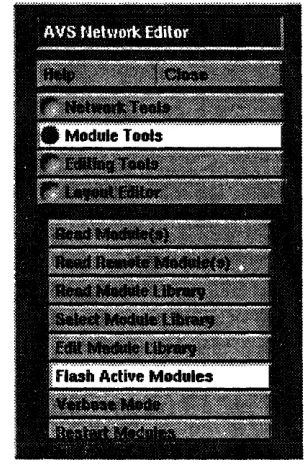
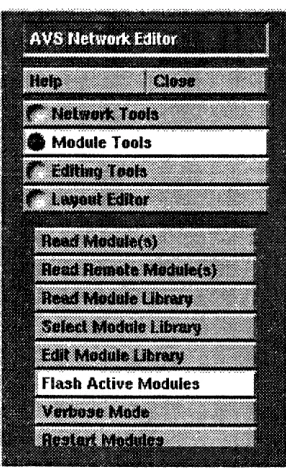
First, make the preparations described in Section 2.3. Then, follow these steps: 1. Start AVS and bring up the AVS network editor. From the menu in the upper left of the network editor menu, select Module Tools, as shown
in Figure 1.
Version 1.0, February 1993 Copyright © 1993 Thinking Machines Corporation
5 5.. .5 5B'9is2N 5:55 5:5::':i-" .5.:.$:: :.,,.,,.
j,.f;- ,.,.5:.:.:.5 ..55.5::.... 5 .. 5:...:... :. 5 ..5...
:55::55::5:5:::: : 55 5:5 ::::::s:::::55
~
: :5:: 5: : ::55::5 : S:::: :: : ::~~:: 55~s: 5 555~::55:::::5::55.5 5 :555:5: 5:5.:5~ : 5:55::555555s,.:555 5 55:~555 55 5 55 555 55: S .. * .~
... * .::..::55:::5, .: .. 5:: :.:::.:5:.55. :...55555... 5552. Optional: If you want the CM/AVS module icons to appear under a CM Modules Library header instead of being incorporated in the AVS module lists, do the following:
Select Edit Module Library, then select Create Empty Library on the
resulting pop-up window. Enter cM Modules in the pop-up prompt for
a name, then select OK. Close the
Edit Module Library
pop-up
window. CM Modules appears as the selected AVS Module Library header in the AVS Module Palette.Figure 1. Module Tools menu.
3. Select Read Remote Module(s) from the Module Tools menu. This
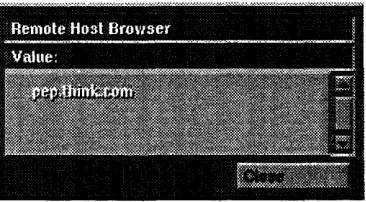
brings up a Remote Host Browser containing a list of available hosts. Select a CM-5 partition manager (one that is named in .avs-hosts) from this list. In this example, we use pep, as shown in Figure 2. The selection causes the display of the contents of the current directory on the host. If the binary file cmarvs-modules is not in the contents list,
change to the directory that contains it (/usr/lib/cmavs_
library). Select cmavs-modules from. the list and close the module selection window.
Version 1.0, February 1993
Copyright (O 1993 Thinking Machines Corporation
!: !if!i !S *' AS ': :. -, / * > .,·'> " . ' ..,' : .>.1 :'0: :': .CM../A V ' ue::
Figure 2. Remote Host Browser.
When the read of the binary file is complete, an icon representing each of its modules appears under the appropriate Library header. Each icon has a button on the right side. On a remote module, this button is colored pink.
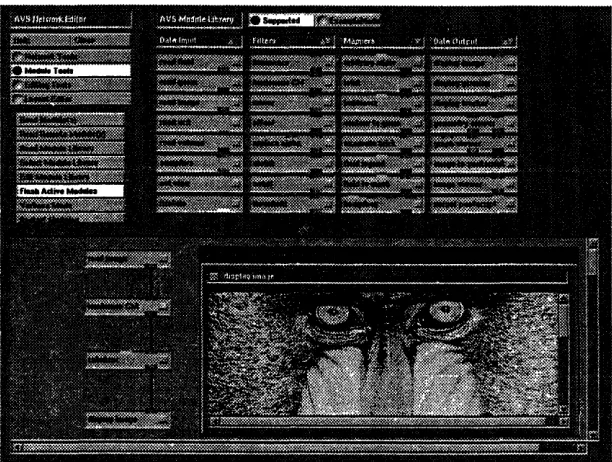
4. Drag one instance each of the following modules into the network editor workspace. Place them as shown in Figure 3. The appearance of colored
badges designating input and output ports indicates that the AVS
modules are active and ready to accept connections. Wait for the ports to appear on one module before you drag in the next one. (Section 2.5 explains the benefit of waiting.)read image (Data Input list) luminance cm (Filter list)
colorizer cm (Filter list)
display image (Data Output list)
When display image becomes active, the image display window comes up. Reposition it, if you like. (It will expand to about four times its initial size to accomodate the result.)
5. When all four modules are active, connect the output of read image to the input of luminance cm: position the cursor over the read image
output port, press the middle mouse button, move the cursor to the luminance cm input port, and release. Similarly, connect the output of luminance cm to the input to colorizer cm, and the output of colorizer cm to the input to display image. See Figure 3.
Version 1.0, February 1993 Copyright © 1993 Thinking Machines Corporation
Chapter 2. UsingSC WA VS Module 11e
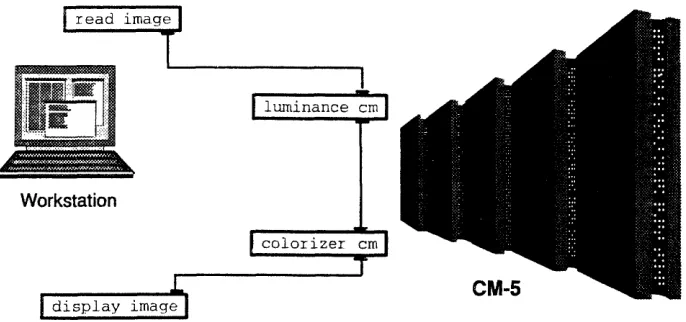
6. Select read image on the Network Control Panel and read the image /usr/avs/data/image/mandrill.x. TOhis image file is included with AVS.) The modules in the network change color when they are active, so you can watch as the image data progresses through the network. During processing, it is actually transferred to the CM-5 for luminance and colorizer calculations, then back to the local workstation to be displayed. See Figure 3 and Figure 4.
Figure 3. The complete network and display.
Version 1.0, February 1993
Copyright ) 1993 Thinking iachines Corporation
12 CM/A VS User ~ Guide i;ii:,:iiiii i : iii; ::iii:: · : ;i::ii !!!!!:i :i:i!!:!i !!iii:!!: iii i!:i;:;: !::E:ii .!i:5!!;:!~ :::::.i l i::!:!i:! Z.:i::i!ii:iiiiii i:1ii:iii!i!;~iiii1~:!ii iiii 'ii:!1i!!~i: i:!: ii!i ::::;..::.:....:..:...i:.i:iii!1i
W
Figure 4. Example network: processing locations.
2.5 An
Important Note
about Performance
To realize the best performance for your application, you must take a bit of care
when you add modules to a network. After you drag a module into the
workspace, wait for its ports to appear before you drag in another module. This can have an effect on performance because multiple CM/AVS or AVS modules may be linked into a single binary, enabling multiple modules in a network to run in a single process. Field transfers between modules in a single process consist of a simple pointer copy. By contrast, field transfers between processes must use sockets. If you add new modules to your network too quickly, AVS may not have time to ascertain whether or not it can fulfill the module requests with a single process.Chapter 2. Using CM/A VS Modules 13
2.6 Running CM/AVS Modules Locally
Running AVS on a CM-5 partition manager does not make the best use of the partition manager resources. However, it can be done, provided you follow these steps to make the CM/AVS modules accessible to the AVS Network Editor:
1. Start AVS and bring up the AVS Network Editor. From the menu in the upper left of the Network Editor menu, select Module Tools, as shown
in Figure 5.
2. Optional: If you want the CM/AVS module icons to appear under a CM Modules Library header instead of being incorporated in the AVS module lists, do the following:
Select Edit Module Library, then select Create Empty Library on the
resulting pop-up window. Enter CM Modules in the pop-up prompt for a name, then select OK. Close the Edit Module Library pop-up window. CM Modules appears as the selected AVS Module Library header in the AVS Module Palette.
Figure 5. Module Tools menu
3. Select Read Module(s) from the Network Editor list. A display shows the contents of the current directory. If the binary file cmavs-modules
Version 1.0, February 1993
14 CM/A VS User's-Guide
is not in the contents list,. change to the directory that contains it
(/usr/lib/cmavslibrary). Select cmavs-modules from the list, then close the module selection window. (From this point, you may pick up with Step 4 in the tutorial, Section 2.4, if you like.)2.7
Cleaning Up
If AVS terminates abnormally (if the kernel crashes or if there are network problems, for example), CM/AVS modules may be left running on the CM-5. Therefore, it is a good idea to use camps and check the partition manager process status after AVS terminates. Be sure that no stray modules continue to run and waste system resources.
Version 1.0, February 1993 Copyright 0 1993 Thinking Machines Corporation
Chapter 3
Writing CM/AVS Modules
You can develop new code or adapt existing code to be compatible with the CM/AVS environment. You may combine your modules in a network with modules from other sources.
This chapter talks about the aspects of code that are unique to handling parallel arrays, including the topics listed below:
· The Parallel Field Type
· Using AVS Field Routines on Parallel Fields · Allocating Parallel Fields
· Accessing Field Data and Coordinates
The chapter includes a sample module, and concludes with instructions for compiling and debugging your modules.
3.1 The Field Type
The data that is passed between AVS modules is categorized by type. Only the field data type is pertinent to CM/AVS.
An AVS field is an n-dimensional array of byte, short integer, integer, floating-point, or double-precision floating-point numbers. AVS fields contain some descriptive information, such as the number of dimensions and the type of coordinate mapping, but the bulk of a field is in its data and coordinate arrays. A field is defined in a computation space where the axes are orthogonal and each data point is unit distance away from its neighbors along any axis.
Version 1.0, February 1993
16.`CM/A`VS User's..G:uie::
This computation space is mapped into a coordinate space in one of three ways;
uniform The coordinate space is determined by minimum and maximum values along each axis and is mapped directly onto the Cartesian grid defined by these extents. rectilinear The neighbors along any axis may be different distances
apart; for each axis there is a separate array that gives the mapping from computation to coordinate space. irregular Each data point also has an explicit coordinate stored
with it; this can be used to represent curvilinear
volumes. The connectivity is still topologically recti-linear.Fields are described in further detail in the AVS Developer 's Guide.
3.2 The Parallel Field Type
The defining feature of a parallel field is the distribution of its data across the CM-5 processing nodes. The field's coordinate array may also be stored on the processing nodes. If the mapping from computation space to coordinate space is rectilinear or irregular, then the coordinate array is automatically placed on the processing nodes. If the mapping is uniform, then the few floating point-numbers that describe the mapping are left on the partition manager; the coordinate array for a uniform field is never put on the processing nodes.
In this discussion, we use the term parallel field for a field whose data is distributed over the CM-5 processing nodes. The term serialfield refers to a field whose data lives in the memory of some scalar machine: either your local workstation or a CM-5 partition manager. When this distinction does not matter, we simply use the term field. CM/AVS provides routines for allocating and accessing parallel fields.
Version 1.0, February 1993 Copyright Q 1993 Thinking Machines Corporation CW VS User S Guide
Chap-te 3. W CM/A VS'. Modul: 1
3.2.1 Declaring a Parallel Field
Parallel fields are declared in the same way as standard AVS fields. In C*, a parallel field is declared as a structure or as a pointer to a structure, as appropriate:
AVSfield *field;
In CM Fortran, a parallel field is declared as an opaque integer, which should be operated on only with AVS or CM/AVS routines:
integer field
3.2.2 Passing a Parallel Field
Parallel fields must be passed as single arguments to CM Fortran functions. This means that any CM Fortran module must include in its module description function a call to AVSset_moduleflags with the SINGLE_ARG_DATA
flag
set:
call AVSsetmodule flags (SINGLE ARG DATA)
For coroutine modules that output parallel fields, the COROUT_UNPACKARGs flag must also be set. In CM Fortran, module flags may be combined by using the IOR intrinsic:
call AVSset_module_flags(IOR(SINGLE_ARG_DATA,
$
COROUT
UNPACKARGS
))
3.3 Using AVS Field Routines on Parallel Fields
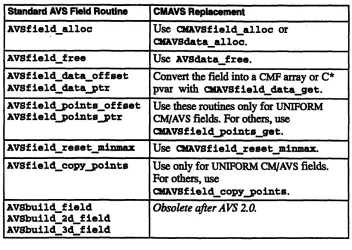
Most of the standard AVS field access routines work correctly on parallel fields; the exceptions are the ones that that touch the field data or coordinates. CM/AVS provides equivalents for these, as listed in Table 2.
Version 1.0, February 1993
Copyright © 1993 Thinking Machines Corporation
18 C/A S Usrj uid
Table 2. Standard AVS field routine equivalents for parallel fields.
3.4 Allocating Parallel Fields
There are two ways that a parallel field can come into being: it may be explicitly allocated, or an input port may be declared as parallel, causing the received field to reside on the processing nodes.
3.4.1
Parallel Input Ports
To direct a module to distribute data on the CM-5 processing nodes, use the
PARALLEL flag with AVScreate inputport. (This flag may be OR'ed with
others, such as RoQURED.) If the PARALLEL flag is not set, the data is placed on the partition manager.
For example, a CM Fortran module that reads an image and processes it on the processing nodes might contain this input port definition:
Version 1.0, February 1993 Copyright 1993 Thinking Machines Corporation
Standard AVS Field Routine CMAVS Replacement
AVSfield alloc Use CMAVSfield alloc or
CAVSdata alloc.
AVSfieldfree Use AVSdata free.
AVSfield dataoffset Convert the field into a CMF array or C*
AVSfield_data_ptr pvar with Avsfield data_get.
AVSfieldpoints offset Use these routines only for UNIFORM
AVSfield points tr CM/AVS fields. For others, use
CMAVSfieldpoints
get.AVSfieldreset minmax Use CMAVSfield reset minmax.
AVSfield.copypoints Use only for UNIFORM CM/AVS fields.
For others, use
CMAVSfield_copy points.
AVSbuild field
Obsolete after AVS 2.0.
AVSbuild2dfield
AVSbuild 3d field
Chapte 3. rItg C A e
$
inport = AVScreate_input_port('input 'field 2D 4-vector byte', IOR(REQUIRED, PARALLEL))
field',
The AVS Network Editor displays ports for parallel fields and serial fields the same way, and allows connections between the two.
NOTE
A connection between an AVS module and a CM/AVS module
can work only if the modules are not linked in the same binary.
If this condition is not met, the results may appear to be correct at first; however, errors may appear later.3.4.2 Explicit Allocation
To allocate a CM/AVS field, one may call CMAVSdata_alloc
or
CMAVSfield_alloc.
Given a dimension array and a string describing the desired field, CAVsdata_ alloc returns a parallel field.
output = CMAVSdataalloc
("field 2D scalar byte",dims)
The string describing the field is the same as that used by AVSdata_alloc.
Version 1.0, February 1993
Copyright 0 1993 Thinking Machines Corporation
-- - -- - - -- -- - -- - - -- - -- -- -- - - - -- - -- - -
-ranew#a4pRsaaM
20 M S Users Gud e:
NOTE
CAVSdata_alloc may be used only to allocate fields. If the string describes any other type, an error is raised.
CMAVSfield_alloc
takes an AVS field as a template and allocates a
corresponding parallel field. The new field may take its dimensions from the template or from an explicit dimensions array. This CM Fortran code fragment allocates an output field with the same properties as the input field:iresult = AVSfieldmake_template(input, template)
output = CMAVSfield_alloc(template,O)
The resulting output field is a duplicate of the input field, and it is guaranteed to be on the processing nodes, even if the input field was not.
3.5 Accessing Field Data and Coordinates
CM/AVS provides some special routines to gain access to a parallel field's data and coordinates.
3.5.1 Access Routines
There are two CM/AVS routines that give access to the data and coordinates in a CNAVS field: CMAVSfield data_get and CMAVSfield point_get:
void:void *
CMAVSfield_data_get(AVSfield *field, shape S);
float:void *
CMAVSfield_points_get(AVSfield *field shape S);
Version 1.0, February 1993 Copyright © 1993 Thinking Machines Corporation
.:.
Cs' :::::.'. :r:tn
.'.:.
Mod s
,,:'S:.f
..
.:S'..
2
The C* interface to these routines takes both a field and a shape, and returns a pointer to a parallel variable. The parallel pointer refers to the coordinates in the
first argument (Avs field).
You must pre-allocate the shape using
CMAVSf ieldalloc_points_shape. You may use the same shape to construct pointers to any fields that have the same rank and dimensions. In CM Fortran, the situation is slightly more complicated because both these routines construct and return arrays of arbitrary rank There is no way to express such a generic array constructor in CM Fortran itself, so the routines instead return an opaque object that can be passed to a routine expecting a CM Fortran array.This approach is similar to that used by the CM Fortran utility function
CMF_ALLOCATE_ARRAY. CVMAVS uses a small array on the partition manager to hold an array descriptor. This one-dimensional array of integers must have length
CMF_SIZEOF_DESCRIPTOR, which is defined in /usr/include/cm/
CMF defs.h.
include '/usr/include/cm/CMF_defs.h' include '/usr/include/cm/cmavs.inc' integer field
integer desc(CMFSIZEOFDESCRIPTOR)
CMF$LAYOUT desc(:serial)
call CMAVSfield_data_get(field, desc)
call CMAVSfield_points_get(field, desc)
The
CMF$LAYOUTdirective is not actually needed, but its use in the
documentation and example code emphasizes that desc must not be a parallel array. The descriptor array returned by CMAVSfield data_get or
CMAVS-fieldpoints_get may be passed to any routine expecting a CM Fortran
array. Section 3.5.5 shows how to declare the layout of these arrays.
Note that both the C* and CM Fortran access routines are really returning pointers to a memory location on the processing nodes. Be careful not to refer to one of these pointers after freeing a field; it will no longer refer to valid data.
Version 1.0, February 1993
Covyright © 1993 Thinking Machines Corporation
22~.~~~~~~~~~~~~~~~~~~~~~-:
.~
:C:::M:/:
.::-
: :::
::: .*:.M..:/A::srs:ud
:
:
:
3.5.2 Primitive Data Types
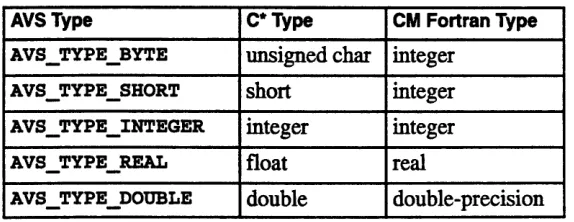
When you declare a C* parallel variable or a CM Fortran array, the primitive data type must correspond with the AVS type, as shown in Table 3.
Table 3. Primitive data types.
AVS Type C* Type CM Fortran Type
AVS_TYPE_BYTE unsigned char integer
AVS_TYPESHORT short integer
AVSTYPEINTEGER integer integer
AVSTYPEREAL float real
AVSTYPEDOUBLE double double-precision
CM/AVS byte and short fields are promoted to integers for CM Fortran, since CM Fortran does not support parallel arrays of bytes or shorts, and it is simpler to manipulate integer fields. During this promotion, shorts are sign-extended to form integers, and bytes are not sign extended: shorts are in the range -32768 <= x <= 32767 and bytes are in the range 0 <= x <= 255.
NOTE
Even though the field data is promoted to integers, the
min_data and max_data values are still kept as bytes and shorts. With Version 5.0, AVS provides AVSfield_get_minmaxas_int and AVSfield_set_minmax_as_int, which automatically coerce shorts and bytes to ints.
.:$:::.
When you convert the coordinates in a CM/AVS field to a C* parallel variable or CM Fortran array, the result is always stored as single-precision floating-point numbers.
Version 1.0, February 1993 Copyright © 1993 Thinking Machines Corporation
... 1111.*'I"I" ~ ~ ~ ~ ~ ~ ~ ~ ~ ~ ~ ~ ~ ~ ::
Cp3W nCA M.ue
3.5.3 Data Array Layout
An AVS field is essentially an n-dimensional Cartesian grid, where each point in the grid may contain a single value or a vector of values. The length of this vector is given by the veclen member of the field structure.
In C*, the field data is stored in an n-dimensional shape. In this shape, we
allocate a 1-dimensional per-processor array of length veclen using the
appropriate primitive data type.In CM Fortran, the field data is stored in an array with n+ 1 dimensions. The first axis has: SERIAL ordering (elements along this axis reside in the same physical processor) and length veclen. We call this serial axis the "vector axis." To make it easier to write modules that are independent of vector-length, this vector axis is present even for scalar fields; in this case it is of length one. The remaining axes have :NEWS ordering.
3.5.4 Coordinate Array Layout
There is only one valid type for coordinate arrays: single-precision floating point. This applies to coordinates on the processing nodes or on the partition manager.
Uniform fields always have their coordinates stored on the partition manager. Irregular fields are placed in a floating-point array with ndim+ 1 axes, where ndim is the dimensionality of the data array. The first ndim are :NEWS axes whose
length is given by the corresponding entry in the dimensions array. The
remaining axis is
SERIALand of length nspace, where nspace is the
dimensionality of the space in which the data points exist.Rectilinear fields are placed in a 1-dimensional floating-point array with a single : NEWS axis. The length of the array is the sum of the lengths of all axes in the field.
3.5.5 Declaring the Arrays
Assume that you have a 2-dimensional uniform field, with a 4-vector of bytes at every point. In CM Fortran, the field data would be loaded into an array declared
Version 1.0, February 1993
Copyright © 1993 Thinking Machines Corporation
24 '~.,... ~ -*":-. ~.' '.'~'~:~'.. :'.~ *' '"'~ !~.-"~.%'.~ ~. ~ ii~i ~ ~ ~ ~-~.:'.~'i~.".':..::~ i:~: :~;.*.::-;.".[.~;~;~'~ ~'..~->~ :~,~'.'i~?'"' "~'~ "'-~' ~. i~?'.~.*~CM /A.~ ~.:'J~ :~ f~..";f.';i~f<.. VS User's Guide.'~' ;/.'.'~.~i"~f/"~' '~"". ~' ~' ~.' '~.~i~i~~ ' :~
integer array(4, x, y)
CMF$LAYOUT(:serial, :news, :news)
where x and y are the lengths of the field's axes.
If you have a 3-dimensional scalar field, the field data would be loaded into an array declared
integer array(l, x, y, z)
CMF$LAYOUT(:serial, :news, :news, :news)
3.6 Luminance Module Example
As a simple example, consider a module that takes the luminance of an image. In AVS, an image is represented by a 2-dimensional field with a 4-vector of bytes at every point. The coordinate mapping is usually uniform.
The luminance of an image is a weighted sum of the color components at each pixel. The first byte in each 4-vector is the alpha component; this component is typically used to store opacity, and it is not used to compute the luminance. The remaining bytes are the red, green, and blue components; we combine these, using weights appropriate for the NTSC luminance. This choice of weights makes our simple routine compatible with the AVS luminance module.
3.6.1 Luminance Module Code
A copy of the module luminance.fcm is included with other examples in the directory
/usr/examples/cmavs
Below is the CM Fortran code for the module. Note that the bytes of the image are automatically promoted to integers by CM/AVS; this makes it easier to deal with byte fields in CM Fortran. Note also that we have a separate routine, luminance_compute, which extracts parallel arrays from the CM/AVS fields and passes them to the function that actually computes the luminance.
Version 1.0, February 1993 Copyright © 1993 Thinking Machines Corporation
Chapter 3. Writing CM/A AVS Modules 25
C A luminance module
C*******************************************************************
C-
-
---C Describe the module to AVS subroutine AVSinit modules implicit none
include 'avs/avs.inc' include 'cm/cmavs.inc' integer iport, oport external luminancecompute C Set the module name and type
call AVSset module name('luminance CM', 'filter') C Make sure we pass in the args as integers
call AVSset_module_flags(IOR(SINGLE_ARGDATA,
$ IOR(COOPERATIVE,REENTRANT)))
C Create an input port for the required field input iport - AVScreate input_port(' input field', $ 'field 2D 4-vector byte',
$ IOR(REQUIRED, PARALLEL)) C Create an output port for the result
oport - AVScreate output_port('output field', $ 'field 2D scalar byte-')
call AVSset_computeyroc(luminance_compute) return
end
C---C Unpack the structure members we need, create C---CMF arrays that point C to the field data, and call the routine that does the real work
C---integer function luminance_compute(in, out) implicit none
include 'avs/avs.inc'
include '/usr/include/cm/CMFdefs.h' include 'cm/cmavs.inc'
integer in, out
integer indesc(CMF_SIZEOF_DESCRIPTOR),
$ outdesc(CMF_SIZEOF_DESCRIPTOR)
integer iresult, dims(2)
Version 1.0, February 1993
26 CM/A VS User's Guide
C Now get pointers to the arrays containing the AVS field data call CMAVSfield_data_get(in,indesc)
iresult- AVSfield_get_dimensions(in, dims) C If there is already output data, deallocate it.
if (out .ne. 0) then
call AVSdatafree("field",out) endif
out - CMAVSdataalloc("field 2D scalar byte",dims) C Get a pointer to the output data
call CMAVSfield_data_get(out,outdesc) C Copy the points from input to output
iresult- CMAVSfield_copy_points(in,out) C Call the real function that does the work
call luminanceinternal(indesc, outdesc, dims(l), dims(2)) C Return 1 to indicate success
luminancecompute - 1
return end
C---C The real workhorse
C---subroutine luminance_internal(in, out, x, y) integer x, y
integer in(4,x,y), out(l,x,y)
CMF$LAYOUT in(:serial,:news, :news), out(:serial,:news, :news)
C
C Set up the weights for NTSC luminance C
double precision red_weight, greenweight, blue_weight parameter (red_weight = .299,
$ green_weight - .587,
$ blue_weight = .114)
out(l,:,:) in(2,:,:) * red_weight +
$ in(3,:,:) * green_weight +
$ in(4,:,:) * blue_weight
return end
Version 1.0, February 1993 Copyright O 1993 Thinking Machines Corporation
Chapter Wrtn
~ ~ ~ ~
g: A VS M odls2:7::.:j:' 3.s iji~~~j~ i. ,Sf.,.f:CMAV 3:Wi.: : ::C2,
3.7 The CM/AVS Header Files
The routines that you write must include the standard AVS header files. In addition, they must include the CM/AVS files that define all the appropriate symbols and return types for the CM/AVS routines.
The header file for CM Fortran routines is
/usr/include/cm/cmavs. inc
The include file for C* routines is <cm/cmavs.h>
3.8 The CM/AVS Libraries
The CM/AVS subroutine and coroutine libraries are listed below. For a sparc processor:
CMF subroutine CMF coroutine
C* subroutine C* coroutine
libcmavsflow_fcm5 sparc_sp.a
libcmavssim_f_cm5 sparc_sp.a
libcmavsflow_c_cm5_sparcsp.a
libcmavssim_c_cm5_sparc_sp.a
For a vector unit processor:
CMF subroutine CMF coroutine
C* subroutine C* coroutine
libcmavsflow_fcm5 vu sp.a libcmavssim_f_cm5 vusp.a
libcmavsflow_c_cm5 vu sp.a
libcmavssim_c_cm5 vu sp.a
These libraries act in conjunction with the standard AVS libraries:
FORTRAN subroutine FORTRAN coroutine C subroutine
C coroutine
libflow f.a
libsim f.a
libflow c.a
libsim c .a
When you link a CM/AVS module, specify the CM/AVS library first, then the corresponding AVS library. To build a CM Fortran subroutine module, for
Version 1.0, February 1993
Copyright © 1993 Thinking Machines Corporation
2z: C:.C/ S rGieS
example, link against libcmavsflow_f_cm5 sparc_sp. a first, then against
libflow f.a.
3.9 Compiling a Module
To compile a CM Fortran subroutine module, start a shell on a CM-5 compile server and invoke the CM Fortran compiler:
For a sparc processor:
cmf -cm5 -sparc -o module_name module_name. fcm \
-lcmavsflow_f_cm5_sparcsp -L/usr/avs/lib -lflow_f \
-1geom -lutil -lm
For a vector unit processor:
cmf -cm5 -vu -o module_name module_name. fcm\
-lcmavsflow_f_cm5_vu_sp -L/usr/avs/lib -lflow_f \
-lgeom -lutil -lm
To compile a C* subroutine module, start a shell on a CM-5 compile server and invoke the C* compiler:
For a sparc processor:
cs -cm5 -sparc
-o
module_name
module_name.
cs \
-lcmavsflow_c_cm5_sparcsp -L/usr/avs/lib -lflow_c \
-1geom -lutil -lm
For a vector unit processor:
cs -cm5 -vu -o module name module_name.cs \
-lcmavsflow_c_cm5 vusp -L/usr/avs/lib -lflow_c \
-1geom -lutil -lm
To compile coroutine modules, replace flow with sim in the lcmavsf low...
and lflowc library names above.
Version 1.0, February 1993 Copyright © 1993 Thinking Machines Corporation
Chapter 3.# Writing CM/A V. Mo.dules2
3.10 Debugging a Module
AVS reports run-time errors in a dialog box. However, the run-time error messages are not as detailed as those issued by a debugger, and some problems may appear to be downstream from the actual error.
To obtain detailed debugging messages, follow these steps: 1. Compile all the files for your module with the -g switch.
2. Select Read Remote Modules (or Read Modules, if you are on the
partition manager) to add your module to the palette.
3. Start a shell on the machine that will run this module (for CM/AVS modules, this is the partition manager).
4. In this shell, change to the directory containing your module and invoke
avs dbx:
avs_dbx -debug prism yourmodule
The -debug switch lets you specify your preferred debugger. You may
substitute "prism -C" (including the quotes) for prism.
5. Drag your module into a network. It will not fire immediately. Instead, you will see the following message in the window where you invoked
avs dbx:
your_module instance waiting, fire when ready...
6. Set the desired breakpoints.
7. Launch the module by telling the debugger to run it.
3.11 Getting Help
Man pages for all the CM/AVS modules are viewable through AVS after you have "read" them following the instructions in Sections 2.3 and 2.4. To view them:
1. In the shell where you will invoke the AVS kernel, set the environment
variable
AVS HELPPATH as follows:Version 1.0, February 1993
Copyright © 1993 Thinking Machines Corporation
3CM/A S User'sGuide
C shell:
setenv AVS _HELP_PATH /usr/doc/cmavs/modules
Bourne or Korn shell:
AV_HELP_PATH/usr/doc/cmavs/modules
export AVS_HELP_PATH
2. Open the AVS network editor.
3. In the module library list, find the CM/AVS module whose man page you want to view. Using the right mouse button, select the button on the right of the module icon.
4. On the resulting pop-up menu, select Show Module Documentation. The man page will appear in the AVS viewer.
3.12 Multiple-Module Binaries
CM/AVS modules may be linked together into a single binary in exactly the same way as AVS modules. With the exception noted below, this is desirable, because it enables multiple modules in a network to run in a single process.
NOTE
A connection between an AVS module and a CM/AVS module can work only if the modules are not linked in the same binary.
Field transfer between modules in a single process can be considerably faster than field transfer between modules in separate processes. The former involves a simple pointer copy, while the latter uses sockets to transfer all the data.
Version 1.0, February 1993 Copyright © 1993 Thinking Machines Corporation
gBPeSg518gsg
BBji3889asB88
CWA AVS User 's Guide
Appendix A
CM/AVS Routines
This appendix contains descriptions of the supported user-visible routines in the CM/AVS libraries, in alphabetical order.
A module may use the CM/AVS routines to * allocate parallel arrays
* gain access to the data and coordinates as CM Fortran arrays or C* parallel variables
* query whether or not a field is parallel CMAVS provides the following routines:
cKAVScorout init
CuAVSdata_alloc
CMAVSfield_alloc
CaAVSfieldalloc_datashape
CMAVS8field alloc.pointsshape
CMAV
f
ieldcopypoints
CAVSfielddataget
CNAVSfield points_get
CMAVSfield reset_minm=a
CMAVSis field on CM
These routines should be used in conjunction with the standard AVS routines. Most of the standard AVS routines also work on parallel fields. The exceptions are listed in Table 1 in Chapter 3.
Version 1.0. February 1993
Grmmon2
-tB
n
A.1 CMAVScorout_init
Initializes a CMIAVS coroutine module.
C* Binding
#include <cm/cmavs.h> void
CMAVScorout_init (int argc, char *argv[],
int (*desc) ());
CMF Binding
include '/usr/include/cm/cmavs.inc' SUBROUTINE CMAVScorout init(desc) external desc
This subroutine should be used instead of Avscorout_init to initialize a
CM/AVS coroutine module. It must precede any other AVS or CM/AVS routines.
The subroutine sets up some internal data structures, then calls the user-supplied module description function dese.
For the C* interface, argc and argv are the same arguments that are passed to
main.
A.2 CMAVSdata_alloc
Allocates a parallel field based on a descriptive string.
C* Binding
#include <cm/cmavs.h>
void *
CMAVSdataalloc(char *string, int *dims);
CMF
Binding
include '/usr/include/cm/cmavs.inc' character*n string
integer dims()
integer function CMAVSdata alloc(string,dims)
Version 1.0, February 1993 Copyright © 1993 Thinking Machines Corporation
CWA VS Ulser 's Guide
Appendx1 A.-CM/--S Routines-33
This routine allocates a parallel field based on a descriptive string. The behavior is similar to AVSdata_alloc, except that it allocates the data and points on the CM-5 processing nodes. The string argument is a descriptive string in the same form that is used for AVSdata alloc.
NOTE
The string argument must describe a field; trying to allocate any other AVS object such as ucd or geom on the processing nodes will result in a fatal run-time error.
The dims argument is an array of integers that tells us how much space to allocate for this field on the CM-5. In C*, this routine returns a pointer to an AVSfield structure. In CM Fortran, it returns an opaque integer that can be used anywhere a parallel field is needed.
A.3 CMAVSfield_alloc
Allocates a field structure for a parallel field using the given template field. C* Binding
#include <cm/cmavs.h>
AVSfield *
CMAVSfieldalloc(CMAVSfield *template, int *dims)
CM Fortran Binding
include /usr/include/cm/cmavs.inc' integer template
integer dims()
integer function CMAVSfield alloc(template, dims)
Version 1.0, February 1993
Copyright 0 1993 Thinking Machines Corporation
3 C V e
This routine allocates a field structure for a parallel field using the given template field. The template may be either a parallel or serial AVS field. The newly allocated field will always be a parallel field.
The dims argument is an array of integers that tells how much space to allocate for this field on the processing nodes. If you use zero in CM Fortran, or NULL
in C*, instead of a dimensions array, the dimensions are taken from the template field.
In C*, this routine returns a pointer to an AVSfield structure. In CM Fortran, it returns an opaque integer that can be used anywhere a CM/AVS field is needed.
A.4 CMAVSfieldalloc_data_shape
Allocates a C* shape that can contain the data from a field. C* Binding
#include <cm/cmavs.h> shape
CMAVSfieldallocdatashape(AVSfield *field)
CM Fortran Binding Not applicable.
This routine allocates a C* shape that can be used to refer to the data in any parallel field having the same rank and dimensions as the intput field. Note that the field's veclen does not matter; vectors become C* per-processor arrays that do not affect the choice of shape.
Each time you call CMAVf ield_allocdata_shape, a new shape is allocated, even if you use the same field as input.
To deallocate the shape that this routine allocates, you must use the C* routine deallocate_shape. The field data is not affected when you free the shape that points to it.
Version 1.0, February 1993 Copyright C 1993 Thinking Machines Corporation
CWA AVS User b Guide
¢.:..:-1. .. 1. :: :::.::...
A.
5 CMAVSfield_alloc_points_shape
Allocate a C* shape that can contain the points from a field. C* Binding
#include <cm/cmavs.h> shape
CMAVSfield_alloc_points_shape(AVSfield *field)
CM Fortran Binding Not applicable.
This routine allocates a C* shape that can be used to refer to the coordinates in any parallel field having the same rank and dimensions as the input field. Do not call this routine on a uniform field; the coordinates for a uniform field can never reside on the processing nodes.
For a rectilinear field, this routine returns a one-dimensional shape with a number of positions equal to the sum of the field dimensions. For an irregular field', it returns a shape of rank ndim, where the number of positions in each axis is given by the dimensions array.
Each time you call CMAVSfield_alloc_points_shape, a new shape is allocated, even if you use the same field as input.
To deallocate the shape that this routine allocates, you must use the C* routine deallocate_shape. The field coordinates are not affected when you free the shape that points to them.
A.16 CMAVSfield_copy_points
Copies points array from infield to outfield. C* Binding
#include <cm/cmavs.h>
int CMAVSfield_copy_points(AVSfield *infield, AVSfield *outfield)
Version 1.0, February 1993
Copyright © 1993 Thinking Machines Corporation
36 CM/A VS User's.Guide
I - --- ~S.~
CMF Binding
include '/usr/include/cm/cmavs.inc' integer infield, outfield
integer function
CMAVSfield copy_points(infield, outfield)
This routine copies a points array from an infield to an outfield. It works only if the points arrays are both on the partition manager or both on the processing nodes. The routine returns 1 on success, 0 on failure.
A.7 CMAVSfield_data_get
Gets access to the data portion of a parallel field by returning a pointer to a C* parallel variable or filling in a CM Fortran array descriptor.
C* Binding
#include <cm/cmavs.h>
void:void *
CMAVSfield_data_get(AVSfield *field, shape S)
CM Fortran Binding
include '/usr/include/cm/CMF_defs.h' include '/usr/include/cm/cmavs.inc'
integer field
integer basevec(CMF SIZEOFDESCRIPTOR)
CMF$LAYOUT basevec(:serial)
subroutine CMAVSfield_data_get(field, basevec)
This routine returns a pointer to a C* parallel variable or fills in a CM Fortran array descriptor, thereby giving access to the data portion of a parallel field. (The C* parallel variable is allocated in the specified shape.) Once the descriptor is loaded with a CM Fortran array descriptor, it may be passed to any CM Fortran routine that is expecting a parallel array of the appropriate rank.
Note the following:
The C* interface takes both a field and a shape; it returns a pointer to a
parallel variable. The parallel pointer refers to the data in the first
argument
(AVS
f i l d). You must pre-allocate the shape using
Version 1.0, February 1993 Copyright © 1993 Thinking Machines Corporation
ARoomi AC S
CNAVSfieldallocatepoints_shape.
You may use the same shape to construct pointers to any fields that have the same rank and dimensions. * If you dispose of the field (as with AVSdata_free) you should no longerrefer to any arrays created from that field.
* A pointer returned by
CMAVSfield_data_get
can be invalidated if you make another call to CMAVSfield_data_get on the same field. * If you use CMAVSfield_data_get on a field whose data resides on thepartition manager, a fatal error occurs.
A.8 CMAVSfield_points_get
Returns a pointer to the parallel coordinate data from a CM/AVS field. C* Binding
#include <cm/cmavs.h>
float:void *
CMAVSfield_points_get(AVSfield *field, shape S)
CMF Binding
include '/usr/include/cm/CMF_defs.h' include '/usr/include/cm/cmavs.inc' integer field
integer basevec(CMF_SIZEOFDESCRIPTOR) CMF$LAYOUT basevec(:serial)
subroutine CMAVSfield_points_get (field, basevec)
This routine returns a pointer to the parallel coordinate data from a CM/AVS field. It works only when the coordinate array resides on the processing nodes, and it does not work on uniform fields.
Note the following:
The C* interface takes both a field and a shape; it returns a pointer to a
parallel variable. The parallel pointer refers to the data in the first
argument (AV
field).
You must pre-allocate the shape using
CMV8field_allocatepoints_shape. You may use the same shape to construct pointers to any fields that have the same rank and dimensions.Version 1.0, February 1993
Covrivht 0 1993 Thinking Machines Corvoration
3'.8..:i..'.,.:.:..;.g...,...
.. ', .-
K
· i
.S..' Gu:isd.i...-...e...,..-....:
s.v..N..,
*
A pointer returned by CiAvsfield oints_get can be invalidated if you make another call to CMAVSfieldp oints_get on the same field.*
If you use CMAVSfieldpoints_get on a field whose data resides onthe partition manager, a fatal error occurs.
A.9 CMAVSfieldreset_minmax
Recomputes the minimim and maximum values for the field's computational data and stores those values with the field.
C* Binding
#include <cm/cmavs.h> void
CMAVSfieldreset minmax(AVSfield *field)
CM Fortran Binding
include '/usr/include/cm/cmavs.inc' integer field
SUBROUTINE CMAVSfieldresetminmax(field)
This routine recomputes the min and max values for the field's computational data and stores those values with the field. The routine works for both parallel and serial fields.
Version 1.0, February 1993
Copyright © 1993 Thinking Machines Corporation
Appendix A. CM/A VS Routines 39
A.110
CMAVSisfieldonCM
Accepts a pointer to an AVS field, and returns true if the field is a parallel field.
C* Binding
#include <cm/cmavs.h> bool
CMAVSis_fieldon CM(AVSfield *field);
CM Fortran Binding
include '/usz/include/cm/cmavs.inc' integer field
logical function CMAVSis field on CM(field)
Version 1.0, February 1993
Appendix B
CM/AVS Modules
This appendix contains man pages for alphabetical order:
antialias cm
clamp cm
color range cm
colorizer cm
combine scalars cm
compare field cm
compute gradient cm
contrast cm
downsize cm
extract scalar cm
the following CM/AVS
modules, in
fft cm
field math cm
field to byte cm
field to double cm
field to float cm
field to int cm
luminance cm
orthogonal slicer cm
threshold cm
With the exception of fft cm, all the CM/AVS modules are AVS modules that have been adapted for the CM-5, and they may be interchanged with their AVS counterparts. For example, downsize cm and downsize are interchangeable.
See Appendix C and /usr/examples/cmavs/unsupported/README for
information about unsupported modules.
Version 1.0, February 1993
antialias cm (CM/AVS)
NAME
antialias cm - antialias an image
SUMMARY
Name
Type
Inputs
Outputs
Parameters
antialias cm
filter
field 2D uniform 4-vector byte (image) field 2D uniform 4-vector byte (image) none
DESCRIPTION
The antialias cm module downsamples an image using a Gaussian 3x3 convolution filter. This produces an antialiasing effect, reducing jagged edges. The output image is half the size of the input image in each dimension-a 512x512 image becomes a 256x256 image after antialiasing.
It: should be noted that the CM implementation uses a different algorithm than the serial version. This will probably be corrected in a later release.
INPUTS
Image
Image
(required; field 2D uniform 4-vector byte) The image to be antialiased.
(field 2D uniform 4-vector byte)
The output antialiased image. This image is half the size of the input image in each dimension.
Last change: October 1992 OUTPUTS
antialias cm (CMAVS)
antialias cm (CM/AVS)
EXAMPLE 1
'The following network reads an image, antialiases it on the CM-5, and displays it through
ithe image viewer.
READ IMAGE
I
ANTIALIAS CM
I
IMAGE VIEWER
RELATED MODULES
Modules that could provide the Image input:
colorizer cm composite
convolve
field math cm localops read image
replace alpha
Modules that can process antialias cm output:
extract scalar cm image viewer display image
Last change: October 1992
antialias cm (CMAVS)
clamp c (CMIAVS)
NAME
clamp cm - restrict values in data field to user-specified range
SUMMARY
Name clamp cm
Type filter
Inputs
field any-dimension n-vector any-data any-coordinates
Outputs field of same type as inputParameters Name Type Default Min Max
clamp_min float 0.0 none none
clamp_max float 255.0 none none
DESCRIPTION
The clamp cm module transforms the values of a field as follows:
o Any value less than the value of the clamp_min parameter is set to clamp_min.
o Any value greater than the value of the clampmax parameter is set to clamp_max.
o Values within the clamp_min-to-clamp_ max range are not changed. ,After being clamp'ed, a data set's values are all in this range:
clamp_min <= value <= clampmax
If appropriate, clamp cm also changes the values of the minval and max_val attributes of the output field in accordance with