C
FOR
DUMmIES
‰2
ND EDITION
C
FOR
DUMmIES
‰C
FOR
DUMmIES
‰2
ND EDITION
About the Author
Dan Gookin has been writing about technology for 20 years. He has contributed articles to numerous high-tech magazines and written more than 90 books about personal computing technology, many of them accurate.
He combines his love of writing with his interest in technology to create books that are informative and entertaining, but not boring. Having sold more than 14 million titles translated into more than 30 languages, Dan can attest that his method of crafting computer tomes does seem to work.
Perhaps Dan’s most famous title is the original DOS For Dummies, published in 1991. It became the world’s fastest-selling computer book, at one time moving more copies per week than the New York Times number-one best seller (although, because it’s a reference book, it could not be listed on the
NYT best seller list). That book spawned the entire line of For Dummies
books, which remains a publishing phenomenon to this day.
Dan’s most recent titles include PCs For Dummies, 9th Edition; Buying a Com puter For Dummies, 2004 Edition; Troubleshooting Your PC For Dummies; Dan Gookin’s Naked Windows XP; and Dan Gookin’s Naked Office. He also pub lishes a free weekly computer newsletter, “Weekly Wambooli Salad,” full of tips, how-tos, and computer news. He also maintains the vast and helpful Web page www.wambooli.com.
Publisher’s Acknowledgments
We’re proud of this book; please send us your comments through our online registration form located at www.dummies.com/register/.
Some of the people who helped bring this book to market include the following:
Acquisitions, Editorial, and Media Development
Project Editor: Rebecca Whitney Acquisitions Editor: Gregory Croy
Technical Editors: Greg Guntle, Kip Warner (http://TheVertigo.com)
Editorial Manager: Carol Sheehan Media Development Supervisor:
Richard Graves
Editorial Assistant: Amanda M. Foxworth Cartoons: Rich Tennant (www.the5thwave.com)
Production
Project Coordinator: Maridee Ennis Layout and Graphics: Amanda Carter,
Andrea Dahl, Lauren Goddard, Denny Hager, Michael Kruzil, Lynsey Osborn
Proofreaders: Laura Albert, Andy Hollandbeck, TECHBOOKS Production Services
Indexer: Johnna VanHoose
Publishing and Editorial for Technology Dummies
Richard Swadley, Vice President and Executive Group Publisher Andy Cummings, Vice President and Publisher
Mary C. Corder, Editorial Director Publishing for Consumer Dummies
Diane Graves Steele, Vice President and Publisher Joyce Pepple, Acquisitions Director
Composition Services
Contents at a Glance
Introduction ...1
Part I: Introduction to C Programming...7
Chapter 1: Up from the Primordial C ...9
Chapter 2: C of Sorrow, C of Woe...19
Chapter 3: C Straight...29
Chapter 4: C What I/O ...39
Chapter 5: To C or Not to C ...55
Chapter 6: C More I/O with gets() and puts()...65
Part II: Run and Scream from Variables and Math ...73
Chapter 7: A + B = C...75
Chapter 8: Charting Unknown Cs with Variables ...93
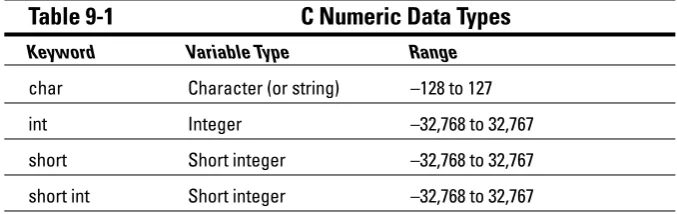
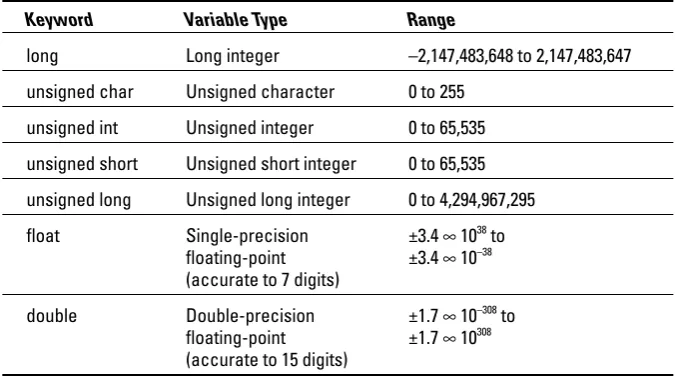
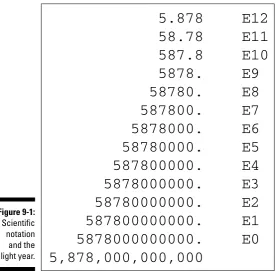
Chapter 9: How to C Numbers ...107
Chapter 10: Cook That C Variable Charred, Please...121
Part III: Giving Your Programs the Ability
to Run Amok ...131
Chapter 11: C More Math and the Sacred Order of Precedence ...133
Chapter 12: C the Mighty if Command...147
Chapter 13: What If C==C? ...165
Chapter 14: Iffy C Logic...175
Chapter 15: C You Again ...185
Chapter 16: C the Loop, C the Loop++ ...201
Chapter 17: C You in a While Loop...215
Chapter 18: Do C While You Sleep...225
Chapter 19: Switch Case, or, From ‘C’ to Shining ‘c’...239
Part IV: C Level ...251
Chapter 20: Writing That First Function ...253
Chapter 21: Contending with Variables in Functions...265
Chapter 22: Functions That Actually Funct ...275
Chapter 24: The printf() Chapter ...305
Chapter 25: Math Madness!...313
Chapter 26: The Old Random-Number Function ...325
Part V: Part of Tens ...337
Chapter 27: Ten More Things You Need to Know about the C Language...339
Chapter 28: Ten Tips for the Budding Programmer...347
Chapter 29: Ten Ways to Solve Your Own Programming Problems ...353
Appendix A: The Stuff You Need to Know before You
Read All the Other Stuff in This Book...359
Appendix B: ASCII Table ...371
Table of Contents
Introduction ...1
“What Will Understanding C Do for Me?”...1
About This Here Dummies Approach...2
How to Work the Examples in This Book ...2
Foolish Assumptions ...3
Icons Used in This Book...3
What’s New with This Edition?...4
Final Thots ...4
Part I: Introduction to C Programming ...7
Chapter 1: Up from the Primordial C . . . .9
An Extremely Short and Cheap History of the C Language ...9
The C Development Cycle...11
From Text File to Program...11
The source code (text file) ...12
Creating the GOODBYE.C source code file...13
The compiler and the linker...14
Compiling GOODBYE.C...15
Running the final result ...16
Save It! Compile and Link It! Run It!...16
Chapter 2: C of Sorrow, C of Woe . . . .19
The Required Woes of Editing and Recompiling ...19
Reediting your source code file...20
Recompiling (or the C equivalent of the “do-over”) ...21
Dealing with the Heartbreak of Errors ...22
Yikes! An error! But, before you shoot yourself. . . . ...22
The autopsy ...23
Repairing the malodorous program...24
Now try this error!...26
Chapter 3: C Straight . . . .29
The Big Picture ...29
C Language Pieces’ Parts ...30
The C Language Itself — the Keywords...32
Other C Language Components ...34
Pop Quiz! ...35
The Helpful RULES Program ...36
The importance of being \n...36
Chapter 4: C What I/O . . . .39
Introduce Yourself to Mr. Computer ...39
Compiling WHORU.C...40
The reward ...41
More on printf()...41
Printing funky text...42
Escape from printf()! ...44
The f means “formatted” ...46
A bit of justification...47
scanf Is Pronounced “Scan-Eff” ...49
Putting scanf together...49
The miracle of scanf()...51
Experimentation time! ...52
Chapter 5: To C or Not to C . . . .55
Adding Comments...55
A big, hairy program with comments ...56
Why are comments necessary? ...58
Comment Styles of the Nerdy and Not-Quite-Yet-Nerdy ...58
Bizarr-o comments ...59
C++ comments ...60
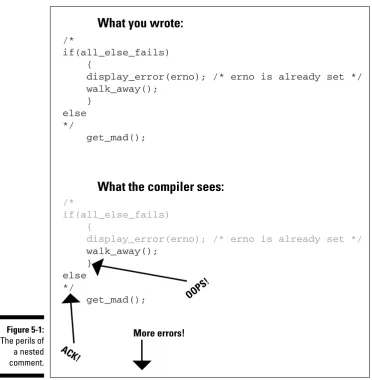
Using Comments to Disable...61
The Perils of “Nested” Comments...62
Chapter 6: C More I/O with
gets()
and
puts()
. . . .65
The More I Want, the More I gets() ...65
Another completely rude program example...66
And now, the bad news about gets()...67
The Virtues of puts()...67
Another silly command-prompt program ...68
puts() and gets() in action...68
More insults ...69
puts() can print variables ...70
Part II: Run and Scream from Variables and Math ...73
Chapter 7: A + B = C . . . .75
The Ever-Changing Variable...75
Strings change ...76
Running the KITTY ...77
Welcome to the Cold World of Numeric Variables...77
Hello, integer...78
Reading and Writing Single Characters ...125
The getchar() function ...126
The putchar() function ...127
Character Variables As Values...128
Part III: Giving Your Programs the Ability
to Run Amok ...131
Chapter 11: C More Math and the Sacred Order of Precedence . . .133
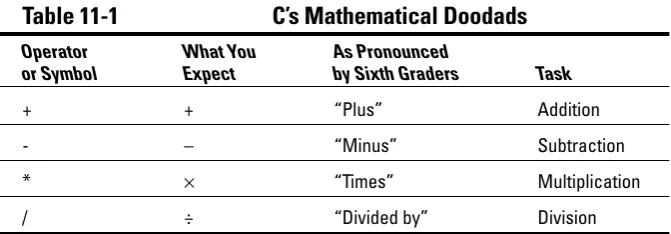
An All-Too-Brief Review of the Basic C Mathematical Operators ...133
The old “how tall are you” program...135
Unethical alterations to the old “how tall are you” program ...136
The Delicate Art of Incrementation (Or, “Just Add One to It”) ...137
Unhappily incrementing your weight ...138
Bonus program! (One that may even have a purpose in life) ...140
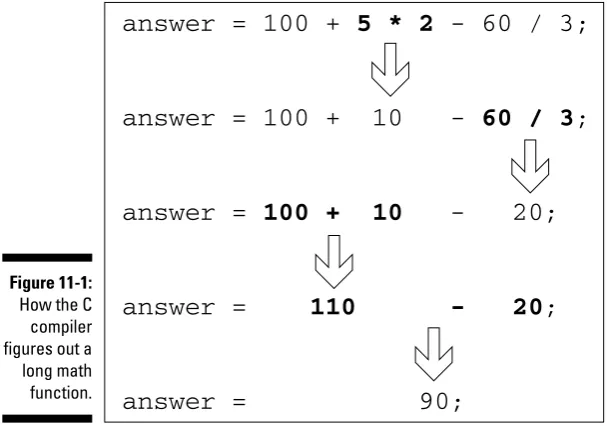
The Sacred Order of Precedence ...141
A problem from the pages of the dentistry final exam...141
What’s up, Sally?...142
The confounding magic-pellets problem...144
Using parentheses to mess up the order of precedence...145
Chapter 12: C the Mighty
if
Command . . . .147
If Only. . . ...147
The computer-genie program example ...148
The if keyword, up close and impersonal ...150
A question of formatting the if statement ...154
The final solution to the income-tax problem ...155
If It Isn’t True, What Else? ...157
Covering all the possibilities with else...158
The if format with else...159
The strange case of else-if and even more decisions ...160
Bonus program! The really, really smart genie...163
Chapter 13: What If
C==C
? . . . .165
The World of if without Values ...165
Which is greater: S or T, $ or –? ...166
The problem with getchar()...168
Fixing GREATER.C to easily read standard input ...170
“Can I get getchar() to read only one character?” ...171
Meanwhile, back to the GREATER problem ...171
Another, bolder example ...173
Chapter 18: Do C While You Sleep . . . .225
The Down-Low on Upside-Down do-while Loops ...225
The devil made me do-while it! ...226
do-while details ...227
A flaw in the COUNTDWN.C program ...228
The always kosher number-checking do-while loop ...229
Nested Loops and Other Bird-Brained Concepts...231
Adding a tense, dramatic delay to the COUNTDWN.C program...231
The nitty GRID.C of nested loops ...234
Break the Brave and Continue the Fool ...235
Please continue. . . ...236
The continue keyword ...237
Chapter 19: Switch Case, or, From ‘C’ to Shining ‘c’ . . . .239
The Sneaky switch-case Loops ...239
The switch-case Solution to the LOBBY Program ...241
The Old switch-case Trick ...243
The Special Relationship between while and switch-case...248
Part IV: C Level...251
Chapter 20: Writing That First Function . . . .253
Meet Mr. Function ...253
A silly example you don’t have to type ...254
A potentially redundant program in need of a function...255
The noble jerk() function ...256
How the jerk() function works in BIGJERK2.C...257
Prototyping Your Functions...258
Prototypical prototyping problems ...259
A sneaky way to avoid prototyping problems...260
The Tao of Functions ...262
The function format ...262
How to name your functions...263
Chapter 21: Contending with Variables in Functions . . . .265
Bombs Away with the BOMBER Program! ...265
Will the dual variable BOMBER.C program bomb? ...267
Adding some important tension...267
How We Can All Share and Love with Global Variables...269
Making a global variable...270
Chapter 22: Functions That Actually Funct . . . .275
Marching a Value Off to a Function...275
How to send a value to a function...276
An example (and it’s about time!) ...277
Avoiding variable confusion (must reading) ...279
Sending More than One Value to a Function...280
Functions That Return Stuff...282
Something for your troubles ...282
Finally, the computer tells you how smart it thinks you are ...284
Return to sender with the return keyword ...285
Now you can understand the main() function ...287
Give that human a bonus!...288
No Need to Bother with This C Language Trivia If You’re in a Hurry ...289
Chapter 23: The Stuff That Comes First . . . .293
Please Don’t Leave Me Out! ...294
Say! Aren’t you the #include construction? ...294
What’s up with STDIO.H?...297
Writing your own dot-H file ...298
A final warning about header files ...300
What the #defines Are Up To ...302
Avoiding the Topic of Macros...303
Chapter 24: The
printf()
Chapter . . . .305
A Quick Review of printf()...305
The Old Displaying-Text-with-printf() Routine ...306
The printf() Escape Sequences...306
The printf() escape-sequence testing program deluxe...307
Putting PRINTFUN to the test ...308
The Complex printf() Format ...310
The printf() Conversion Characters...311
Chapter 25: Math Madness! . . . .313
More on Math ...313
Taking your math problems to a higher power ...314
Putting pow() into use...315
Rooting out the root...317
Strange Math? You Got It! ...319
Something Really Odd to End Your Day ...320
The perils of using a++...320
Oh, and the same thing applies to a --...322
Chapter 26: The Old Random-Number Function . . . .325
On Being Random...325
Using the rand() function ...326
Planting a random-number seed ...328
Randoming up the RANDOM program...329
Streamlining the randomizer ...331
The Diabolical Dr. Modulus...333
Rolling the Dice with the Final RANDOM Program ...335
Part V: Part of Tens ...337
Chapter 27: Ten More Things You Need to Know
about the C Language . . . .339
Arrays ...339
Strings...340
Structures...341
Pointers ...343
Linked Lists...343
Binary Operators ...344
Interacting with the Command Line ...345
Disk Access ...345
Interacting with the Operating System ...345
Building Big Programs ...346
Chapter 28: Ten Tips for the Budding Programmer . . . .347
Use the Command-Line History ...347
Keep Your Editor Open in Another Window...348
Use a Context-Colored Text Editor ...348
Know the Line-Number Commands in Your Editor...349
Keep a Command Prompt Window Open If You’re Using the IDE...350
Know a Few Handy Command-Prompt Commands ...350
Carefully Name Your Variables ...351
Know Your Post- and Pre-Incrementing and Decrementing Riddles...351
Breaking Out of a Loop...352
Chapter 29: Ten Ways to Solve Your Own Programming
Problems . . . .353
Work on One Thing at a Time ...354
Break Up Your Code...354
Simplify...355
Talk through the Program ...355
Monitor Your Variables...356
Document Your Work...356
Use Debugging Tools ...357
Use a C Optimizer...357
Read More Books! ...358
Appendix A: The Stuff You Need to Know before
You Read All the Other Stuff in This Book ...359
Setting Things Up ...359
The C language compiler...360
The place to put your stuff...361
Making Programs ...363
Finding your learn directory or folder...363
Running an editor ...364
Compiling and linking ...365
Appendix B: ASCII Table ...371
Introduction
W
elcome to C For Dummies, 2nd Edition — your last, desperate, and final attempt to understand the C programming language.Although I can’t promise that you’ll become a C guru after wading through this text, I can guarantee that you will
Know how to recognize a C program and, when one is grouped with an IRS Form 1040, the morning stock report, baseball statistics, and anything written in Braille, you’ll be able to pick out which one is the C program. Be able to write C programs that no other publisher would let an author print in its C books.
Appreciate the following code, but be unable to use it at cocktail parties to impress your friends:
while(dead_horse) beat();
Find out how to speak in C Talk, which is the ability to look at character groupings, such as printf, putchar, and clock, and pronounce them as “print-f,” “put-kar,” and “see-lock.”
Have fun.
I can’t really guarantee that last point. However, this book was written minus the sword of mathematics hanging over anyone’s head. Let’s leave stern program ming up to those who fuss over Avogadro’s number and Fibonacci sequences and who debate the merits of how to indent their C program source code. Serious work is for the nerds. Fun happens when you read C For Dummies,
2nd Edition.
“What Will Understanding C Do for Me?”
Look at your computer screen. Imagine something happening there. Anything. As long as you know how to program a computer, what you imagine will take place. Okay, maybe not as fast as you like — but it can be done.
Programming is the ultimate way to get even with a computer. You are in charge.
Anything your computer does, any devices it talks with or controls, can be manipulated by using a programming language and writing programs that pull the right levers. The C programming language has been crowned the best and most common way to program any personal computer. C may not be the easi est programming language to figure out, but it’s not the most difficult, either. It’s tremendously popular and well supported, which makes it a good choice.
About This Here Dummies Approach
Most programming books start out by assuming that you don’t know anything. The author may remember that for, oh, maybe two or three chapters. Then, after that initial pressure is off, there he goes! Chapter 4 is written not to teach you how to program, but, rather, to impress the author’s programming buddies back at college. So your learning journey ends with a whimper. You will not find that problem in this book.
The best way to learn something is one piece at a time. With programming, I prefer to show you things by using small programs, tiny models, and quick-to-type examples. That way, you’re not overwhelmed with an initial program that’s three pages long, and you don’t get lost after a few chapters. That’s because the pace stays the same throughout the book. I insist on it! This book also gets you started right away. When researching other books, I noticed that often the first program you have to type is not only several dozen lines long, but also nearly 50 pages into the book on average! In this book, you get started right away with a program example on Page 13. That quick!
How to Work the Examples in This Book
Part of the fun of finding out how to program by reading a book is that you type the programs yourself. That’s the way I figured out how to program a com puter. I sat down with Dr. David Lien’s Learning TRS-80 BASIC (Compusoft) and, 36 solid hours later, I finished. Then I slept. Then I did it again because I com pletely forgot everything, but remembered enjoying doing it the first time. Your first task is to read Appendix A. It tells you how to set up a C language compiler on your computer and get things all ready to work.
Next, you need to know how to type stuff. This stuff looks like this:
Mostly, you type complete programs, consisting of several lines like the one before this paragraph. Type them all, and press Enter at the end of each line. Because this book is only so wide, however, occasionally you see a line split in two. It looks like this:
This is an example of a very long line that was painfully split in two by this book’s cruel typesetters.
When you see that, don’t type two lines. If you just keep typing, everything fits on one line on your screen. If you forget this advice, your programs mess up, so I toss in several reminders throughout this book whenever such a thing happens.
Foolish Assumptions
This book makes the following assumptions about you, your computer, your compiler, and — most important — your state of mind:
You have a computer, or at least you have access to one. It can be just about any computer; this book is not specific to Windows.
You’re pretty good with the computer. You understand things. You may even fix your own problems or help others with their problems. You know how to look things up on the Web, download stuff, and find things you need.
You have a passing familiarity with your operating system’s command prompt or terminal window. This is important, and it’s explained in Appendix A.
You’re willing to find out how to program — perhaps even desperate to do so!
Icons Used in This Book
Technical information you can merrily skip over.
Something you should remember not to do.
A healthy suggestion worthy of note.
What’s New with This Edition?
This book isn’t really the second edition of any previous book, but it does borrow material from the old C For Dummies books, Volumes I and II. This book represents a compilation of basic material from both books. And, by reading this book, you’ll have a broad, basic knowledge of the C language. Unlike the older books, this one is organized on a chapter-by-chapter level, not by lessons. Each chapter is self-contained and, where necessary, cross references to other chapters are included.
Gone are the quizzes and tests. This book has no homework, per se.
Alas, this book is only so big, and only so much ground could be covered, given this book’s gentle pace. Because of that, those interested in pursuing the C language further should check out the companion book, C All-in-One Desk Reference For Dummies (Wiley). That book is for more experienced program mers, which is what you will become after reading this book.
Final Thots
Understanding how to use C is an ongoing process. Only a dweeb would say “I know everything about programming in C.” There are new things to be learned every day and different approaches to the same problems. Nothing is perfect, but many things are close.
This book has a companion Web page, replete with bonus material and all sorts of fun information:
http://www.c-for-dummies.com
Introduction to C
Programming
In this part . . .
Y
can punch numbers into your cell phone and hit the Send dungeon of programming
nothing
your turn to tell the computer exactly what to do wait until it bellows “Uncle! UNCLE!
ou have never programmed anything in your life. The VCR? Forget it! On your microwave oven, you use the Popcorn and Add a Minute buttons. You know that you button, yet you dare not touch any of the other buttons, for fear of entering that dark realm, that dank and musty . If that’s you, get ready to turn your life around.
Contrary to what you may believe, it’s to program a computer. Anyone can do it. Programmers may carry themselves with an air of mysticism and treat their skills like priests performing sacred religious rites. Poppycock. Programming is painless. It’s easy. It’s fun.
It’s now
with itself. In just a few pages, you will be programming your PC. It’s time to get even! Time to twist its arm and
Chapter 1
Up from the Primordial C
In This Chapter
Hysterical C history
How C programs are created Building the source code Compiling and linking Running the result
A
s the most useful device you have ever used, a computer can become anything — as long as you have the ability to program it. That’s what makes computers unique in the pantheon of modern devices. And although most computer users shy away from programming — confusing it with math ematics or electrical engineering — the fact is that programming a computer is really a rather simple and straightforward thing. It’s easy.This chapter introduces you to the basics of programming. Although it has some yabber-yabber and background information, the meat of the chapter involves creating, compiling, and running your first program. Feel the power! Finally, it’s you who can tell the computer what to do with itself!
Because you probably didn’t read this book’s Introduction (for shame), know that you should preview Appendix A before starting here.
An Extremely Short and Cheap
History of the C Language
The guy who created the C programming language at Bell Labs is Dennis Ritchie. I mention him in case you’re ever walking on the street and you happen to bump into Mr. Ritchie. In that case, you can say “Hey, aren’t you Dennis Ritchie, the guy who invented C?” And he’ll say “Why — why, yes I am.” And you can say “Cool.”
The C Development Cycle
Here is how you create a C program in seven steps — in what’s known as the
development cycle:
1. Come up with an idea for a program. 2. Use an editor to write the source code.
3. Compile the source code and link the program by using the C compiler. 4. Weep bitterly over errors (optional).
5. Run the program and test it. 6. Pull out hair over bugs (optional). 7. Start over (required).
No need to memorize this list. It’s like the instructions on a shampoo bottle, though you don’t have to be naked and wet to program a computer. Eventually, just like shampooing, you start following these steps without thinking about it. No need to memorize anything.
The C development cycle is not an exercise device. In fact, program ming does more to make your butt fit more snugly into your chair than anything.
Step 1 is the hardest. The rest fall naturally into place.
Step 3 consists of two steps: compiling and linking. For most of this book, however, they are done together, in one step. Only later — if you’re still interested — do I go into the specific differences of a compiler and a linker.
From Text File to Program
As a programmer, you job is not “programming.” No, the act of writing a pro gram is coding. So what you do when you sit down to write that program is
code the program. Get used to that term! It’s very trendy.
The job of the programmer is to write some code! Code to do what? And what type of code do you use? Secret code? Morse Code? Zip code?
The purpose of a computer program is to make the computer do something.
The object of programming is to “make it happen.” The C language is only a tool for communicating with the PC. As the programmer, it’s your job to trans late the intentions of the computer user into something the computer under stands and then give users what they want. And if you can’t give them what they want, at least make it close enough so that they don’t constantly com plain or — worse — want their money back.
The tool you have chosen to make it happen is the C programming language. That’s the code you use to communicate with the PC. The following sections describe how the process works. After all, you can just pick up the mouse and say “Hello, computer!”
Programming is what TV network executives do. Computer programmers
code.
You use a programming language to communicate with the computer, telling it exactly what to do.
The source code (text file)
Because the computer can’t understand speech and, well, whacking the computer — no matter how emotionally validating that is for you — does little to the PC, your best line of communications is to write the computer a note — a file on disk.
To create a PC epistle, you use a program called a text editor. This program is a primitive version of a word processor minus all the fancy formatting and print ing controls. The text editor lets you type text — that’s about all.
The source code file is a text file on disk. The file contains instructions for the computer that are written in the C programming language. You use a text editor to create the source code file. See Appendix A for more information on text editors.
Creating the GOODBYE.C source code file
Use your text editor to create the following source code. Carefully type each line exactly as written; everything you see below is important and necessary. Don’t leave anything out:
#include <stdio.h> int main()
{
printf(“Goodbye, cruel world!\n”); return(0);
}
As you review what you have typed, note how much of it is familiar to you. You recognize some words (include, main, “Goodbye, cruel world!”, and return), and some words look strange to you (stdio.h, printf, and that \n thing).
When you have finished writing the instructions, save them in a file on disk. Name the file GOODBYE.C. Use the commands in your text editor to save this file, and then return to the command prompt to compile your instructions into a program.
See Appendix A for information on using a text editor to write C language programs as well as for instructions on where you should save the source code file on disk.
In Windows Notepad, you must ensure that the file ends in .C and not in
.TXT. Find a book about Windows for instructions on showing the file name extensions, which makes saving a text file to disk with a .C exten sion easier.
Note that the text is mostly in lowercase. It must be; programming lan guages are more than case sensitive — they’re case-fussy. Don’t worry when English grammar or punctuation rules go wacky; C is a computer
language, not English.
Also note how the program makes use of various parentheses: the angle brackets, < and >; the curly braces, { and }; and the regular parentheses,
If all goes well and the compiler is duly pleased with your source code, the compiler creates an object code file. It’s a middle step, one that isn’t necessary for smaller programs but that becomes vital for larger programs.
Finally, the compiler links the object code file, which creates a real, live com puter program.
If either the compiler or the linker doesn’t understand something, an error message is displayed. At that point, you can gnash your teeth and sit and stew. Then go back and edit the source code file again, fixing whatever error the compiler found. (It isn’t as tough as it sounds.) Then you attempt to compile the program again — you recompile and relink.
The compiler translates the information in the source code file into instruc tions the computer can understand. The linker then converts that infor mation into a runnable program.
The GCC compiler recommended and used in this book combines the compiling and linking steps. An object file is created by GCC, but it is automatically deleted when the final program file is created.
Object code files end in OBJ or sometimes just O. The first part of the object file name is the same as the source code filename.
Feel free to cheerfully forget all this object code nonsense for now. Text editor➪Compiler.
Source code➪Program.
Compiling GOODBYE.C
The gritty details for compiling a program are in Appendix A. Assuming that you have thumbed through it already, use your powerful human memory to recall the proper command to compile and link the GOODBYE.C source code. Here’s a hint:
gcc goodbye.c -o goodbye
Type that command at your command prompt and see what happens. Well?
If you do get an error, you most likely either made a typo or forgot some tiny tidbit of a character: a missing “ or ; or \ or ) or ( or — you get the idea. Very carefully review the source code earlier in this chapter and compare it with what you have written. Use the editor to fix your mistake, save the code to disk, and then try again.
Note that GCC reports errors by line number, or it may even specifically list the foul word it found. In any event, note that Chapter 2 covers error-hunting in your C programs.
Running the final result
If you used the proper compiling command, the name of the program to run is identical to the first part of your source code. So why not run that program! In Windows, the command to type is
goodbye
In the Unix-like operating systems, you must specify the program’s path or location before the program name. Type this command:
./goodbye
Press the Enter key and the program runs, displaying this marvelous text on your screen:
Goodbye, cruel world!
Welcome to C language programming!
(See Appendix A for more information on running programs.)
Save It! Compile and Link It! Run It!
Four steps are required in order to build any program in C. They are save, com pile, link, and run. Most C programming language packages automatically per form the linking step, though whether or not it’s done manually, it’s still in there.
Compile and link! Compiling is the process of transforming the instructions in the text file into instructions the computer’s microprocessor can under stand. The linking step is where the instructions are finally transformed into a program file. (Again, your compiler may do this step automatically.)
Run! Finally, you run the program you have created. Yes, it’s a legitimate pro gram, like any other on your hard drive.
You have completed all these steps in this chapter, culminating in the cre ation of the GOODBYE program. That’s how C programs are built. At this stage, the hardest part is knowing what to put in the source file, which gets easier as you progress through this book. (But by then, getting your program to run correctly and without errors is the hardest part!)
Chapter 2
C of Sorrow, C of Woe
In This Chapter
Reediting and recompiling Fixing an error
Understanding the error message Dealing with heinous linker errors
D
on’t let the success of a first-time compile spoil an otherwise normal day of programming.The fact is, most of your programming time is spent dealing with errors, from typos to flaws in logic. Those errors have to be fixed. It happens so often that one guru I know commented that the process should be called debugging and not programming.This chapter gets you used to the idea of errors and how to deal with them. As you may note, it’s the second chapter of this book. That must mean that dealing with errors is a larger part of the programming picture than you may have otherwise imagined.
The Required Woes of Editing
and Recompiling
As a human, you may commit the vocal sin of pronouncing the t in often or adding an r after the a in Washington. Big deal! But just once, type pirntf
Before you cower in shame, fear not, gentle programmer newbie person. Errors happen. You deal with them. Like this:
1. Reedit your source code, saving the fixed-up file to disk.
2. Recompile the source code.
3. Run the result.
Errors can still happen. Heck, you may never get to Step 3! But these steps show you how to deal with them.
It happens.
I might remind you to look at the C language development cycle from Chapter 1. Note Steps 4 and 6. Nod your head wisely in agreement.
Reediting your source code file
Source code is not carved in stone — or silicon, for that matter. It can be changed. Sometimes, the changes are necessary, in the case of errors and boo-boos. At other times, you may just want to modify your program, adding a feature or changing a message or prompt — what the hard-core C geeks call
tweaking or twiddling. To do that, you have to reedit your source code file. For example, the GOODBYE program from Chapter 1 displays a message on the screen:
Goodbye, cruel world!
This program can easily be modified to show any message you like. To do so, use your editor and change the source code file, replacing the original mes sage with your newer, pithier message. Follow these steps:
1. Use your text editor to reedit the GOODBYE.C source code.
2. Edit Line 5, which looks like this:
printf(“Goodbye, cruel world!\n”);
3. Replace the text Goodbye, cruel world! with Farewell, you ugly toad!
printf(“Farewell, you ugly toad!\n”);
4. Double-check your work.
5. Save the file to disk.
It’s okay to overwrite the original; your modified file becomes the new GOODBYE.C source code file.
Now you’re ready to recompile your source code, as covered in the next section.
“Reedit your source code file” means to use your text editor to modify the source code, the text file that contains the C language instructions. You reedit the source code file to repair an error caught by the compiler or linker or to modify the program. This situation happens a lot.
If you’re using the command prompt to run your editor, don’t forget that you can use the up-arrow key to recall previous commands (in certain command-prompt environments). In this case, press the up-arrow key a few times until the original command to edit the GOODBYE.C source code file reappears at the prompt.
Recompiling (or the C equivalent
of the “do-over”)
Recompiling means to make the program one more time — to rework the steps you went through to create the program originally. This process usually hap pens after you modify or change the source code, such as you do in the pre ceding section. Because the source code is different, you have to feed it to the compiler again to generate the new, better (and, hopefully, bug-free) program. To recompile the new GOODBYE.C source code, use your compiler as outlined in Appendix A. For most everyone, that’s
gcc goodbye.c -o goodbye
Press the Enter key and pray that no error messages appear, and then you’re done. The new program has been created.
Run the program! Type the proper command — either goodbye or ./goodbye — at the prompt to see the new, stunning output.
After you reedit your source code file, you have to recompile to re-create the program file. That is how you fix an error or modify the program. If you’re programming in an IDE (Integrated Development Environment) such as Dev-C++ or Microsoft Visual C++, you may need to use a Rebuild or Rebuild All command to create a new program after modifying your source code.
If you see any errors after recompiling, you must re-reedit your source code and then re-recompile again. (You only “reedit” and “recompile”; no sense in getting re-happy.)
Dealing with the Heartbreak of Errors
Errors happen. Even the best of programmers get errors, from the innocent code-writing cog at Microsoft to the sneering, snooty Linux programmer whose only contact with humanity is the pizza guy — they all get errors. Every day. Errors are nothing to be embarrassed about. Consider them learning tools or gentle reminders. That’s because the compiler tells you, with uncanny accu racy, just what the error is and where it is. Contrast this with your most night marish math class: The wicked pedant would write only “WRONG!” next to your calculations, no matter how innocent a mistake you made. Yes, computers can be forgiving — and this can even teach you something.
Yikes! An error! But, before
you shoot yourself. . . .
Here is a new program, ERROR.C. Note the optimism in its name. It’s a flawed C program, one that contains an error (albeit an on-purpose error):
#include <stdio.h> int main()
{
printf(“This program will err.\n”) return(0);
}
Type the source code exactly as it appears here. Do not use the GOODBYE.C source code as a base; start over here with a clean editor window.
Unfortunately, when you compile this program, it produces an error. The next section provides the autopsy.
Pay careful attention as you type! Each little oddball character and nutty parenthesis is important to the C language!
Here’s a hint on the common GCC command to compile this source code:
gcc error.c -o error
That’s the last compiling hint you get in this book!
The autopsy
The ERROR.C program erred! What a shock.
Don’t be alarmed — it was expected. (In fact, you may have seen this type of error before.) Here is a sample of what the cruel message may look like:
error.c: In function `main’:
error.c:6: parse error before “return”
How rude! It’s not that reassuring hand on your shoulder and the kind, avun cular voice explaining that you boo-booed. Still, what the error message lacks in personality, it makes up for in information.
On the up side, though the error message is cryptic, it’s informative. What ever your compiler, you should be able to single out the following bits of information:
The source code file that contained the error, error.c
The line that contains the error, Line 6 (though it may not be — you can’t really trust computers too much)
The type of error, a parse error or syntax error or something similar The location of the error (before the word return)
It still may not be clear exactly what’s wrong, but you’re given many clues. Most important, you’re given a line number: The error is in Line 6.
Okay, it’s really in Line 5, but the C programming language is flexible, and the compiler doesn’t discover that “something’s missing” until Line 6. (You can cut the compiler some slack here.)
The solution? You have to reedit the source code file and fix what’s wrong. In this case, you would reedit ERROR.C and add the semicolon to the end of Line 5. Even if you looked at Line 6 (per the output’s insistence), you would see nothing wrong there. If so, your eyes would wander back and — because you’re aware of the Missing Semicolon Syndrome — you would see the prob lem and mend it.
Errors are not the end of the world! Everyone gets them.
Syntax refers to the way a language is put together. Some compilers use that term rather than parse, which means “the order in which things are put together.” Eh.
Some versions of GCC put double quotes around “return” rather than the tick marks shown in the preceding example. Beyond that, GCC is remarkably consistent with its error messages.
Missing semicolons are one of the most popular types of errors in the C language. You find out in the next chapter more about semicolons and the role they play.
The error message’s line number refers to a line in the source-code text file. That’s why nearly all text editors use line numbers, which you can see at the top or bottom of the screen or editing window.
The line number may or may not be accurate. In the case of a missing semicolon, the next line may be the “error line.” This statement holds true with other types of errors in C. Oh, well — at least it’s close and not a generic honk of the speaker and “ERRORS GALORE, YOU FOOL” plas tered onscreen.
A good habit is to fix the first error listed and then recompile. Often, the first error is the only real one, but the compiler lists others that follow because it becomes confused.
Of course, you may be thinking “Okay, smarty-pants computer, you know what’s wrong — fix it!” But computers don’t just jump to conclusions like that. That is the evil of the statement “Do what I mean”: Computers can’t read minds, so you must be precise. They are champs, however, at point ing out what’s wrong (and almost snobbishly so).
Repairing the malodorous program
No need to fill your head with this
C programming has two degrees of errors: warnings and errors. Some compilers call the errors critical errors. (Sounds like a mistake Roger Ebert would make.) Other times, they’re
fatal errors, like opening a creepy closet in one of those Scream movies.
Chances are, your program runs, but it may not
ers, you can switch off some of the more per snickety warning error messages.
to do something so criminal that I cannot
stand your instructions. The warning error means “Ooo, this doesn’t
look tasty, but I’ll serve it to you anyway.”
do what you intend. Or, it may just be that the
compiler is being touchy. With most C compil
The critical error means “Dear Lordy, you tried
morally complete this program.” Okay, maybe it’s not that severe. But the compiler cannot complete its task because it just doesn’t under
You can fix the ERROR.C program by adding a semicolon. Edit Line 5 and add a semicolon to the end of the line. Also correct the sentence displayed on the screen so that it reads as follows:
printf(“This program will no longer err.\n”);
Other than changing Line 5, everything else in the program remains untouched.
Save ERROR.C back to disk. Recompile the program and then run it:
This program will no longer err.
Indeed, it does not!
I can’t always tell you where to fix your programs. ERROR.C is the only program listed in this book that contains an on-purpose error. When you get an error message, you should check it to see where the error is in your source code. Then cross-check your source code with what’s listed in this book. That way, you find what’s wrong. But when you venture out on your own and experiment, you have only the error message to go by when you’re hunting down your own errors.
Now try this error!
Don’t dispense with the ERROR.C file just yet. Don’t close the window, and don’t zap the project. (If you did, use your editor to load the ERROR.C file and prepare to reedit.)
Change Line 6 in the ERROR.C source code file to read this way:
retrun(0);
In case you don’t see it, the word return has been mangled to read retrun; the second r and the u are transposed. Otherwise, the zero in the parentheses and the semicolon are unchanged.
The way C works is that it just assumes that retrun is something you’re seri ous about and not a typo. The compiler couldn’t care less. But the linker goes nuts over it. That’s because it’s the linker that glues program files together. It catches the error when it doesn’t find the word retrun in any of its libraries. And, like any frazzled librarian, the linker spews forth an error message. Save the modified ERROR.C file to disk. Then recompile. Brace yourself for an error message along the lines of
temporary_filename.o: In function ‘main’:
temporary_filename.o: undefined reference to ‘retrun’
Or, the message may look like this:
temporary_filename.o(blah-blah):error.c: undefined reference to ‘retrun’
It’s harder to tell where the error took place here; unlike compiler errors, linker errors tend to be vague. In this case, the linker is explaining that the error is in reference to the word retrun. So, rather than use a line-number reference, you can always just search for the bogus text.
To fix the error, reedit the source code and change retrun back to return. Save. Recompile. The linker should be pleased.
As I mention elsewhere in this book, the GCC compiler both compiles and links.
If the linker is run as a separate program, it obviously produces its own error messages.
Chapter 3
C Straight
In This Chapter
Looking at the C language Dissecting source code Obeying the RULES Using \n
Splitting up lines with \
A
ny new language looks weird to you. Your native tongue has a certain cadence or word pattern. And the letters all fit together in a certain way. Foreign languages, they have weird characters: ç, ü, and ø and letter combi nations that look strange in English — Gwynedd, Zgierz, Qom, and Idaho. Strange new things require getting used to. You need a road map to know what’s what. There’s really no point in blindly typing in a C program unless you have a faint idea of what’s going on. That’s what this chapter shows. After reading through two chapters and compiling two different C programs and dealing with the heartbreak of errors, this chapter finally and formally introduces you to the C language.The Big Picture
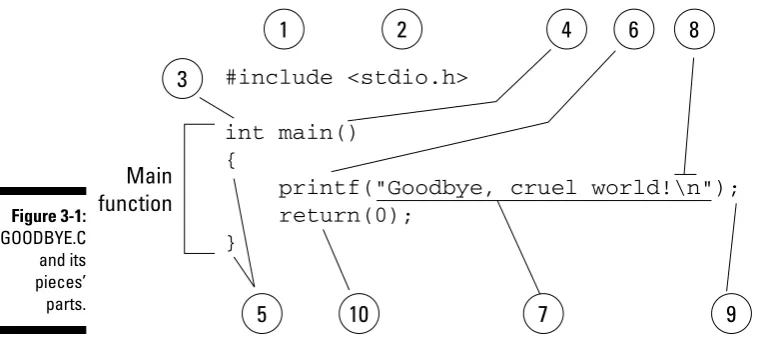
Figure 3-1 outlines the GOODBYE.C program’s source code, which I use as an example in Chapter 1.
2. <stdio.h> is a filename hugged by angle brackets (which is the C lan-guage’s attempt to force you to use all sorts of brackets and whatnot). The whole statement #include <stdio.h> tells the compiler to take text from the file STDIO.H and stick it into your source code before the source code is compiled. The STDIO.H file itself contains information about the STanDard Input/Output functions required by most C programs. The H
means “header.” You read more about header files in Chapter 23. 3. int main does two things. First, the int identifies the function main as
an integer function, meaning that main() must return an integer value when it’s done. Second, that line names the function main, which also identifies the first and primary function inside the program.
You find out more about functions returning values in Chapter 22. 4. Two empty parentheses follow the function name. Sometimes, items may
be in these parentheses, which I cover in Chapter 22.
5. All functions in C have their contents encased by curly braces. So, the function name comes first (main in Item 3), and then its contents — or the machine that performs the function’s job — is hugged by the curly braces.
6. printf is the name of a C language function, so I should write it as
printf(). It’s job is to display information on the screen. (Because printers predated computer monitors, the commands that display infor mation on the screen are called print commands. The added f means “formatted,” which you find out more about in the next few chapters.) 7. Like all C language functions, printf() has a set of parentheses. In the
parentheses, you find text, or a “string” of characters. Everything between the double quote characters (“) is part of printf’s text string.
8. An interesting part of the text string is \n. That’s the backslash character and a little n. What it represents is the character produced by pressing the Enter key, called a newline in C. You read more about this and other weird backslash-character combinations in Chapter 7.
9. The printf line, or statement, ends with a semicolon. The semicolon is C language punctuation — like a period in English. The semicolon tells the C compiler where one statement ends and another begins. Note that all statements require semicolons in C, even if only one statement is in a program or function.
10. The second statement in GOODBYE.C is the return command. This command sends the value 0 (zero) back to the operating system when the main() function is done. Returning a value is required as part of the
Text in a program is referred to as a string. For example, “la-de-da” is a string of text. The string is enclosed by double quotes.
A C language function starts with the function type, such as int, and then the function name and parentheses, as in main(). Then come a set of curly braces, { and }. Everything between the { and } is part of the function.
The C language is composed of keywords that appear in statements. The statements end in semicolons, just as sentences in English end in periods. (Don’t frazzle your wires over memorizing this right yet.)
The C Language Itself — the Keywords
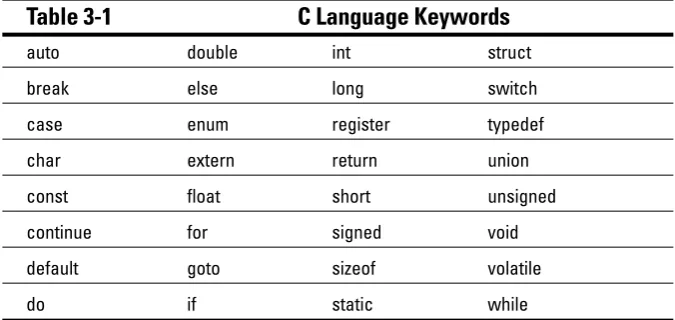
The C language is really rather brief. C has only 32 keywords. If only French were that easy! Table 3-1 shows the keywords that make up the C language.
Table 3-1
C Language Keywords
auto double int struct
break else long switch
case enum register typedef
char extern return union
const float short unsigned
continue for signed void
default goto sizeof volatile
do if static while
Not bad, eh? But these aren’t all the words you use when writing programs in C. Other words or instructions are called functions. These include jewels like
printf() and several dozen other common functions that assist the basic C language keywords in creating programs.
Functions such as printf() require a set of parentheses and lots of stuff inside the parentheses. (Don’t fret over this statement right now; just nod your head and smile in agreement, “Yes, printf() does require lots of stuff.”)
By the way, the fact that printf() is a C function and not a keyword is why the #include <stdio.h> thing is required at the beginning of a pro gram. The STDIO.H file contains instructions telling the compiler what exactly printf() is and does. If you edit out the #include <stdio.h>
line, the compiler produces a funky “I don’t know what to do with this
printf() thing” type of error.
Other C Language Components
The C language has many other parts, making it look rather bizarre to the new programmer. Right now, all that’s standing between ignorance and knowledge is time, so don’t dwell on what you don’t know. Instead, keep these few points rolling around in your mind, like so many knowledge nuggets:
The C language uses words — keywords, functions, and so forth — as its most basic elements.
Included with the words are symbols. Sometimes these symbols are called
operators, and at other times they’re called something else. For example, the plus sign (+) is used in C to add things.
The words have options and rules about how they’re used. These rules are all referenced in the C reference material that came with your compiler. You don’t have to memorize all of them, though a few of them become second nature to you as you study and use C.
Parentheses are used to group some of the important items required by C words.
The words are put together to create statements, which are similar to sentences in English. The statements all end with a semicolon.
Braces are used to group parts of a program. Some words use braces to group their belongings, and all the separate functions you create within a program are grouped by braces. In Figure 3-1 and in all your C programs in the first two chapters, for example, the braces have been used to con tain the belongings of the main() function.
___
___
Pop Quiz!
1. The core function in every C language program is called A. numero_uno().
B. main(). C. primus(). D. core().
2. C language keywords are
A. The “words” of the C language. B. Held together with string and earwax.
C. Uttered only in candlelit reverence by the C Language Gurus. D. As numerous as the stars and nearly as distant.
3. In addition to keywords are
A. Functions, such as printf().
B. Operators, such as +, -, and other weird things.
C. Curly braces or brackets, angle brackets — all sorts of brackets. Man, do we have a bracket problem!
D. Probably all of the above.
4. Functions require parentheses because A. They talk in whispers.
B. The parentheses keep the function warm.
C. The parentheses hold various things required by or belonging to the function.
D. What’s a function?
5. A telltale sign of any C program is its curly braces. Using what you know of C, draw in the braces where they should appear in the following program:
int main()
printf(“Goodbye, cruel world!\n”); return(0);
The Helpful RULES Program
I just can’t let you go without a program in this chapter. To help you under stand the most easily offended C rules, I have summarized them in the follow ing program. It displays several lines of text that remind you of the basic rules of C that you know about:
#include <stdio.h> int main()
{
printf(“Braces come in pairs!”); printf(“Comments come in pairs!”);
printf(“All statements end with a semicolon!”); printf(“Spaces are optional!”);
printf(“Must have a main function!”); printf(“C is done mostly in lowercase.\
It’s a case-sensitive language.”); return(0);
}
Type the preceding source code into your editor. Save the code to disk as RULES.C. Compile and run.
The resulting program is named RULES, and you can run it whenever you need a reminder about some basic C do’s and don’ts.
This program is really no different from those shown in previous chap ters. It merely has more printf() functions.
The final printf() function (in Line 10) may seem a little odd. That’s because it’s split between two lines. This weird contraption is covered later in this chapter.
The importance of being
\n
Did you notice something odd about the output of the RULES program? Yes, it resembles an ugly clot of text:
Braces come in pairs!Comments come in pairs!All statements end with a semicolon!Spaces are optional!Must have a main function!C is done mostly in lowercase. It’s a case-sensitive language.
\n
This line is C-speak for “Gimme a new line of text.” The n stands for new in new line (though they write it as one word: newline).
The program you just created, RULES.C, needs the \n character at the end of each line to ensure that each line is displayed on a line by itself on the screen. This addition makes the output of the RULES program easy to read.
Edit the RULES.C source code file again. Before the last double-quote in each
printf() string, add the \n newline character.
If you’re good with search and replace, search for the “) (quote-paren) and replace it with \n”).
Save the file to disk and recompile it. The output should now be more pleasing:
Braces come in pairs! Comments come in pairs!
All statements end with a semicolon! Spaces are optional!
Must have a main function!
C is done mostly in lowercase. It’s a case-sensitive language.
In C, the \n character is used in a text string as though the Enter key were pressed.
It’s always \n with a little n. C is mostly lowercase.
The \n is called newline, though calling it “slash-n” or “backslash-n” is acceptable as long as you don’t say it aloud.
Table 24-1, in Chapter 24, lists other characters of a similar nature to \n.
Breaking up lines\ is easy to do
Another anomaly of the RULES program is that rogue \ character found at the end of the tenth line. When used to end a line, the sole \ tells the compiler that the rest of the line is merely continued on the line that follows. So, these two lines:
printf(“C is done mostly in lowercase\ It’s a case-sensitive language.\n”);
are both seen as one single line when it comes time to compile; all the compiler sees is this:
You may find such a trick necessary for extra-long lines as your programs grow more complex. The \ simply lets you split up a long line between several lines in your source code. That can be handy.
Depending on how your editor and compiler behave, the result of splitting a line with a string of text in it may not be what you want. For example, the output on your screen may look like this:
Braces come in pairs! Comments come in pairs!
All statements end with a semicolon! Spaces are optional!
Must have a main function!
C is done mostly in lowercase. It’s a case-sensitive language.
That happens because the split line includes a few tabs to indent things — which looks pretty in your source code, but looks like blech when the pro gram runs. The solution is merely to edit the source code so that the extra tabs are removed from the string of text.
To wit, change Lines 10 and 11 in the source code from this:
printf(“C is done mostly in lowercase.\ It’s a case-sensitive language.”);
to this:
printf(“C is done mostly in lowercase. \ It’s a case-sensitive language.”);
Note the extra space after the period in the first line (before the backslash), which keeps the two lines of text from running into each other. Save that mess. Compile and run. The output shall be most pleasing to the eye.
Do note that some programs elsewhere in this book may use the \ to split long lines.
Don’t worry about using the \ to split any lines. It’s a trick you see others use occasionally, but in my travels I prefer using a sideways-scrolling editor to splitting up long lines.
Chapter 4
C What I/O
In This Chapter
Reading the keyboard Understanding printf()
Creating formatted output Understanding scanf()
C
omputers are all about input and output — the old I/O of days gone by, what the pioneers once sang about. The wimminfolk would want to dance real slow. Maybe cry. It was a sentimental thing, y’all — something that fancy, dooded-up city slickers read about in dime magazines.A-hem!
Input and output: You type something in and get a response, ask a question and get an answer, put in two dollars in coins and get your soda pop — things along those lines. This goes along with what I present in Chapter 3: It is your job as a programmer to write a program that does something. At this point in the learning process, triviality is okay. Soon, however, you begin to write pro grams that really do something.
Introduce Yourself to Mr. Computer
The purpose of this program is to type your name at the keyboard and then have the computer display your name on the screen, along with a nice, friendly greeting:
#include <stdio.h> int main()
{
char me[20];
printf(“What is your name?”); scanf(“%s”,&me);
printf(“Darn glad to meet you, %s!\n”,me); return(0);
}
Type the preceding source code into your editor. Double-check everything. Don’t bother with any details just yet. Type and hum, if it pleases you. Save the file to disk. Name it WHORU.C.
Don’t compile this program just yet. That happens in the next section. The char me[20]; thing is a variable declaration. It provides storage for the information you enter (the I in I/O). You find out more about variables in Chapter 8.
The new function here is scanf(), which is used to read input from the keyboard and store it in the computer’s memory.
Left paren is the ( character. Right paren is the ) character. Paren is short for parenthesis or a type of steak sauce. (It’s also not a “real” word and is frowned on by English teachers of the high-and-tight bun.)
Compiling WHORU.C
Compile the WHORU.C source code. If you see syntax or other errors, double-check your source code with what is listed in this book. Ensure that you entered everything properly. Be on the lookout for jots and tittles — parentheses, double quotes, backslashes, percent signs, sneeze splotches, or other unusual things on your monitor’s screen.
Refer to Chapter 2 for more information on fixing errors and recompiling. A common beginner error: Unmatched double quotes! Make sure that you always use a set of “s (double quotes). If you miss one, you get an error. Also make sure that the parentheses and curly braces are included in pairs; left one first, right one second.
The reward
Enough waiting! Run the WHORU program now. Type whoru or ./whoru at the command prompt and press the Enter key. The output looks like this:
What is your name?
The program is now waiting for you to type your name. Go ahead: Type your name! Press Enter.
If you typed Buster, the next line is displayed:
Darn glad to meet you, Buster!
If the output looks different or the program doesn’t work right or gener ates an error, review your source code again. Reedit to fix any errors and then recompile.
I/O is input/output, what computers do best. I/O, I/O, it’s off to code I go. . . .
This program is an example that takes input and generates output. It doesn’t do anything with the input other than display it, but it does qual ify for I/O.
The WHORU.C source code mixes two powerful C language functions to get input and provide output: printf() and scanf(). The rest of this chapter tells more about these common and useful functions in detail.
More on
printf()
The format for using the basic printf function is
printf(“text”);
printf is always written in lowercase. It’s a must. It’s followed by parentheses, which contain a quoted string of text, text (see the example). It’s printf()’s job to display that text on the screen.
In the C language, printf()is a complete statement. A semicolon always fol lows the last parenthesis. (Okay, you may see an exception, but it’s not worth fussing over at this point in the game.)
Although text is enclosed in double quotes, they aren’t part of the mes sage that printf() puts up on the screen.
You have to follow special rules about the text you can display, all of which are covered in Chapter 24.
The format shown in the preceding example is simplified. A more advanced format for printf() appears later in this chapter.
Printing funky text
Ladies and gentlemen, I give you the following:
Ta da! I am a text string.
It’s a simple collection of text, numbers, letters, and other characters — but it’s not a string of text. Nope. For those characters to be considered as a unit, they must be neatly enclosed in double quotes:
“Ta da! I am a text string.”
Now you have a string of text, but that’s still nothing unless the computer can manipulate it. For manipulation, you need to wrap up the string in the bun-like parentheses:
(“Ta da! I am a text string.”)
Furthermore, you need an engine — a function — to manipulate the string. Put printf on one side and a semicolon on the other:
printf(“Ta da! I am a text string.”);
Consider this rabble:
He said, “Ta da! I am a text string.”
Is this criminal or what? It’s still a text string, but it contains the double-quote characters. Can you make that text a string by adding even more double quotes?
“He said, “Ta da! I am a text string.””
Now there are four double quotes in all. That means eight tick marks hovering over this string’s head. How can it morally cope with that?
“”Damocles” if I know.”
The C compiler never punishes you for “testing” anything. There is no large room in a hollowed-out mountain in the Rockies where a little man sits in a chair looking at millions of video screens, one of which contains your PC’s output, and, no, the little man doesn’t snicker evilly whenever you get an error. Errors are safe! So why not experiment?
Please enter the following source code, DBLQUOTE.C. The resulting program is another “printf() displays something” example. But this time, what’s dis played contains a double quote. Can you do that? This source code is your experiment for the day:
#include <stdio.h> int main()
{
printf(“He said, “Ta da! I am a text string.””); return(0);
}
Type the source code exactly as it appears, including the double quotes — four in all. (You notice right away that something is wrong if your editor color-codes quoted text. But work with me here.)
Save the source code file to disk as DBLQUOTE.C.
Compile and run the preceding program — if you can. Chances are that you encounter one of these errors instead:
dblequote.c: In function ‘main’: dblequote.c:5: parse error before “Ta”
or
dblequote.c: In function ‘main’:
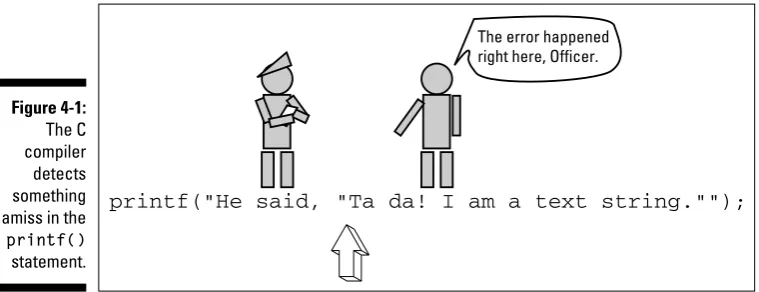
The printf() function requires a text string enclosed in double quotes. Your compiler knows that. After the second double quote in the string was encoun tered (before the word Ta), the compiler expected something else — something other than “Ta.” Therefore, an error was generated. Figure 4-1 illustrates this in a cute way.
Figure 4-1: The C compiler detects something amiss in the printf()
statement.
printf("He said, "Ta da! I am a text string."");
The error happenedright here, Officer.
Obviously, there is a need to use the double-quote character in a string of text. The question is how to pass that character along to printf() without it ruin ing the rest of your day. The answer is to use an escape sequence.
In the olden days, programmers would have simply gone without certain char acters. Rather than trip up a string with a double quote, they would have used two single quotes. Some ancient programmers who don’t know about escape sequences still use these tricks.
Escape from