Usability Evaluation of a Dutch Multimodal System for Train Timetable
Information
Janienke Sturm*, Ilse Bakx , Bert Cranen*,
Jacques Terken , Fusi Wang*
* Department of Language and Speech Nijmegen, The Netherlands
{Janienke.Sturm,F.Wang,B.Cranen}@let.kun.nl
Department User-Centered Engineering (Technology Management), TU Eindhoven Eindhoven, The Netherlands
{I.H.M.Bakx,J.M.B.Terken}@tue.nl
Abstract
In the MATIS project a multimodal system has been developed for train timetable information. The aim of the project was to obtain guidelines for designing multimodal interfaces for information systems. The MATIS system accepts input both in spoken and in graphical mode (no keyboard input) and provides feedback in the same two modes. The user can choose at any time which of the input modalities (s)he prefers to use for a certain action. A user test was carried out in which 25 subjects were asked to evaluate the system. For comparison, users were also asked to test a GUI (Graphical User Interface) version of the train timetable information system as well as a speech-only version of the system. We measured the efficiency and the effectiveness of the interaction and the user satisfaction with all three systems.
1. Introduction
Automatic information services can be implemented in several ways, e.g. as purely graphical user interfaces (GUI) (fill-in forms like the Yellow Pages on the Internet) or as speech-only interfaces (people call and get information via a spoken dialogue). Both types of interfaces have advantages and disadvantages. With respect to transparency, graphical interfaces are clearly superior to speech interfaces. With a graphical interface (if designed properly) the user has few problems in knowing which information needs to be filled in and which information the system already has. Spoken dialogue systems are far less transparent to the user, due to the lack of visual support. With respect to the naturalness and the efficiency of the interaction it has been claimed that speech interfaces are superior to graphical user interfaces (see http://www.bell-labs.com/project/ConC/demo.html and
http://www.sls.lcs.mit.edu/ec-nsf/mit-sls.html): pointing at a screen and typing on a (virtual) keyboard may be tiresome, especially on small devices like palmtops or mobile phones, whereas a purely spoken dialogue is a natural and efficient means to convey information (provided that the speech recogniser does not make too many mistakes). Usability research has shown that users' preference for one or the other modality depends strongly on the situation. In fact, users prefer to be able to choose the mode that fits their goals best (Oviatt et al., 2000a). A multimodal system, combining the strengths of both GUI’s and spoken interaction could solve the usability problems of both types of interfaces.
The research that is done within the MATIS project (Multimodal Access to Transaction and Information Services) is aimed at finding ways to combine speech and graphical interaction in such a way that the usability is maximised. The research described in this paper is restricted to form-filling interfaces. A prototype system for train timetable information has been developed, that accepts input both in the form of speech and from a
graphical interface and provides both spoken and graphical feedback. This paper reports the results of a user test that has been carried out to determine whether providing multiple modalities helps to improve the usability of the system compared to unimodal systems: a spoken dialogue system and a graphical interface. We report on the usability of three systems (speech-only, GUI-only, and multimodal) measured in terms of effectiveness, efficiency, and user satisfaction, and describe to what extent users notice and use the extra interaction facilities that are available in the multimodal system.
We start out with describing the multimodal prototype in Section 2 and the experimental set-up in Section 3. Section 4 contains the actual results of the user test, and in Section 5, the results are discussed and conclusions are drawn.
2. The MATIS system
When maintaining the form-filling metaphor, forms are best represented as visual objects. Therefore, we conceive a multimodal form-filling interface as an enriched GUI where part of or the entire graphical interaction can also be accomplished using speech.
as the MATIS system without the screen. However, in the spoken dialogue system each user answer is verified, regardless of the confidence level of the recognised utterance. Furthermore, in the speech-only system, the complete travel advice is given in spoken form.
Although the MATIS system has been designed to operate on small devices such as palmtops or mobile phones, in the present experiment, for practical reasons, the system was implemented on a desktop computer without a keyboard, but with a touch screen that displayed the fill-in form. To start using the system subjects had to call in using an ordinary telephone equipped with a headset. The Speech-only system was operated by an ordinary telephone. For the GUI system, a normal desktop computer was used with a keyboard and a normal screen on which the GUI fill-in form was shown.
3.2. Subjects and tasks
Twenty-five subjects (fifteen male and ten female, between 19 and 28 years of age) took part in the test. The subjects were all students who travel by train regularly. They mostly use the Internet to get timetable information; only a few subjects had ever used a commercial spoken dialogue service providing timetable information, or any other spoken dialogue system. All subjects were experienced users of computers.
All subjects tested all three systems. Different groups of subjects used the systems in different orders, to avoid confounding effects of order of presentation (see Table 1).
Series 1 Series 2 Series 3 Group 1 MATIS Speech-only GUI Group 2 Speech-only GUI MATIS Group 3 GUI MATIS Speech-only
Table 1 Experimental design
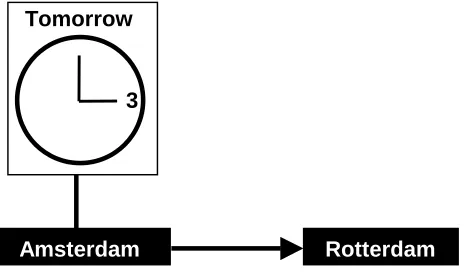
After a short introduction, subjects were asked to complete three scenarios with each system. The scenarios were presented graphically in order to avoid influencing the manner in which subjects express themselves (see Figure 2). Different scenarios were created for each system, in order to circumvent any learning effect. Furthermore, to ensure that the test would provide information about how users deal with speech recognition errors, each series of scenarios contained at least two station names that are highly confusable for the automatic speech recogniser.
Figure 2 Example of a test scenario
Subjects started each test series with an exercise scenario allowing them to get used to the system. Assistance was given after the completion of this scenario, but only if the user had not been able to complete the exercise. In case of the MATIS system, if the subjects did not use any of the graphical interaction possibilities in the exercise scenario, the test leader would show how the display could be used, without explicitly encouraging the subject to use the display.
After each series of dialogues with one of the systems, subjects completed a questionnaire in which they expressed their agreement or disagreement with statements on a five point Likert-scale (1 = “I strongly disagree”, 3 = “I agree nor disagree”, 5 = “I strongly agree”). Five statements were the same for each of the systems:
G1. I consider the system easy to use
G2. I always understood what was expected from me G3. I found it easy to correct errors
G4. I thought the system was slow G5. I thought the travel advice was clear
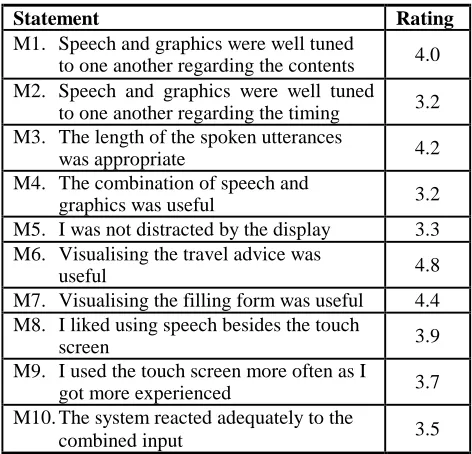
Ten additional statements specifically concerned the MATIS system:
M1. Speech and graphics were well tuned to one another regarding the contents
M2. Speech and graphics were well tuned to one another regarding the timing
M3. The length of the spoken utterances was appropriate M4. The combination of speech and graphics was useful M5. I was distracted by the display
M6. Visualising the travel advice was useful M7. Visualising the filling form was useful M8. I liked using speech besides the touch screen M9. I used the touch screen more often as I got more
experienced
M10. The system reacted adequately to the combined input
Finally, once all three systems had been tested, subjects gave preference judgments by rank ordering the systems on a number of aspects, such as “Which system did you consider easiest to use?” and “Which system would you prefer to use in the future?”.
3.3. Data capture and evaluation metrics
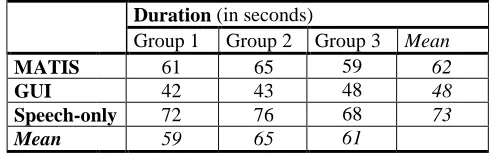
Clicking actions and utterances of all dialogues with the multimodal system and the speech-only system were automatically logged (including time stamps). Additionally, all dialogues were videotaped. As clicking and typing actions with the GUI system could not be logged automatically, the data for this system were obtained from the videotapes.The usability of the systems is measured in terms of effectiveness, efficiency, and user satisfaction. The effectiveness of the systems is measured as the number of successfully completed dialogues (the dialogue success rate). The efficiency of each of the systems is measured as task completion time (the time span between the start of the first user answer and the moment at which the query is sent to the information database). User satisfaction is measured through Likert-type scales and user preferences concerning relevant aspects of the systems.
Rotterdam
Amsterdam
Tomorrow
Oviatt, S.L. (2000b), Taming recognition errors with a multimodal interface. Communications of the ACM, 2000, vol. 43, no. 9, 45-51.
Sturm, J., Wang, F., Cranen, B. (2001), Adding extra input/output modalities to a spoken dialogue system. Proceedings 2nd SIGdial Workshop on Discourse and Dialogue, Aalborg, Denmark.