Applying Accessibility-Oriented Controlled Language (CL) Rules to Improve
Appropriateness of Text Alternatives for Images: an Exploratory Study
Silvia Rodríguez Vázquez
1,2, Pierrette Bouillon
1, Anton Bolfing
3 1Multilingual Information Processing Department (TIM/ISSCO)Faculty of Translation and Interpreting, University of Geneva, Switzerland 40, Bd. du Pont d’Arve, CH-1211 Geneva 4
2Cod.eX Research Group
Faculty of Translation and Interpreting, University of Salamanca, Spain 6-16, Francisco Vitoria, 37008 Salamanca
3Access for All Foundation, Switzerland
Dörflistrasse 10, CH-8057 Zürich
E-mail: [email protected], [email protected], anton.bolfing@access-for-all
Abstract
At present, inappropriate text alternatives for images in the Web continue to pose web accessibility barriers for people with special needs. Although research efforts have been devoted to define how to write text equivalents for visual content in websites, existing guidelines often lack direct linguistic-oriented recommendations. Similarly, most web accessibility evaluation tools just provide users with an automated functionality to check the presence of text alternatives within the <img> element, rather than a platform to verify their content.
This paper presents an overview of the findings from an exploratory study carried out to investigate if the appropriateness level of text alternatives for images in French can be improved when applying controlled language (CL) rules. Results gathered suggest that using accessibility-oriented alt style rules can have a significant impact on text alternatives’ appropriateness. Although more data would be needed to draw further conclusions about our proposal, this preliminary study already offers an interest insight into the potential use of CL checkers such as Acrolinx for language-based web accessibility evaluation.
Keywords: image text alternatives, appropriateness, accessibility-oriented CL rules
1.
Introduction and Background
Over the last decades, the Word Wide Web has become a complex multimodal platform, transforming the access to information experience, traditionally channelled through mainly text-only websites, into an enriched human-computer interaction practice. Content is now often rendered through multiple sensory modalities (auditory, tactile or visual) that sometimes challenge the message transfer and, thus, its accessibility, for people with special needs. Hence, the Web Accessibility Initiative (WAI) from the World Wide Web Consortium (W3C) recommends through its Web Content Accessibility Guidelines (WCAG 2.0), recently approved as an ISO/IEC International Standard (ISO/IEC 40500: 2012), to provide text alternatives for any non-text content, so that it can be changed into other forms people need, such as large print, braille, speech, symbols or simpler language (Guideline 1.1, W3C, 2014).
For the present research, the focus is specifically on images (including, inter alia, graphics, charts, pictures, icons, buttons and interactive areas), for which text alternatives are provided through an alt attribute within the HTML <img> element, and should serve their equivalent purpose.1 While being a widely extended recommendation, whose importance is acknowledged by most web professionals’
1 Within our research framework, when talking about image text equivalents, we always refer to short text alternatives. HTML 4 offered the possibility of introducing the longdesc attribute to link long text alternatives to complex images, for which a more
communities, studies have shown that compliance is still lower than expected (Access for all, 2011; Hanson and Richards, 2013). The latter might be derived from lack of awareness among content authors, as well as the existence of multiple sources of both official and non-official sets of guidelines on how to write text alternatives, which often remain too abstract and lack linguistic-oriented guidance for each specific language. In Rodríguez Vázquez and Torres del Rey (2012), an innovative approach was proposed to evaluate the accessibility degree of text alternatives for images by means of a state-of-the-art controlled language (CL) checker, which could also be potentially implemented as an automated tool for authoring support.
In the light of the aforementioned proposal, this paper aims at estimating the impact of applying human-oriented controlled-language (HOCL) rules text alternatives of non-accessible images in order to obtain appropriate text equivalents for images in French.
2.
Related Work
Significant research efforts have been devoted to study existing accessibility evaluation methods (AEM) and putting forward new ones depending on the context to be considered (Brajnik, 2008). Five main categories have been
defined in the literature: i) inspection methods: an auditor checks a webpage for its accessibility; ii) automated testing: an auditor uses an automated accessibility tool to check accessibility conformance of a webpage; iii) screening techniques: an auditor uses a webpage simulating some of the conditions that are typical for people with disabilities (for instance, artificially reducing some sensory or motor capabilities); iv) subjective assessments: an auditor asks a group of users to use a website autonomously and send back their opinions; and v) user testing: real users are asked to navigate through a webpage or site while being observed by accessibility auditors (Brajnik et al., 2012). The inspection method, and most concretely WCAG 2.0 conformance review, has proven to be the most popular one, where auditors follow a list of prescribed criteria to check the webpage(s) against (ibid). According to WCAG 2.0, those criteria can be machine testable or reliably human testable, with evaluators needing to reach at least an 80% agreement on the audit results in the case of the latter. Evidence suggest, however, that such level of agreement is rarely attained, and that more concrete guidance on how to interpret WCAG 2.0 criteria could lead to a higher degree of reliability (ibid). In this sense, when narrowing accessibility conformance review to the particular case of images, a study of the literature shows that considerable research attempts have been already made to offer that kind of guidance.
On one hand, guidelines for image description have been proposed both by scholars and official bodies to enhance human verification of text alternatives. From both sides, the general tendency has been to offer general recommendations on when to use the alt attribute − depending on the nature of the image (informative vs. decorative) −, its context within the webpage, and its purpose (Korpela, 2010; W3C, 2012). Guidance on linguistic appropriateness has been generally limited to subjective techniques; for instance, care about spelling and grammar; avoid special characters; use normal prose; and make text simple, succinct and accurate (Nyong, 2009; WebAIM, 2010). The Technical Specification ISO/IEC TS 20071-11:2012 offers a more detailed question-guided procedure for providing informative text alternatives, but language-oriented hints are barely referred to. In Craven (2006), Tercedor Sánchez (2009a) and Tercedor Sánchez et al. (2009b), attention has been drawn to the need of avoiding redundant expressions such as “image of”, minimizing orality markers such as “in the image we can see”, or using perceptual content with care (for instance, colours or forms); however, no automatic checking solution has been offered so far.
On the other hand, studies on machine checking of image text equivalents have mainly focused on image OCR or text pattern recognition techniques (e.g., dictionary-based word search, file type abbreviations, HTML code, number of characters) to automatically identify what should not be present in appropriate text alternatives (Hu and Bagga, 2003, Olsen et al., 2010). The size of the image has also been widely used as a reference to detect non-accessible images (Bigham et al., 2006), classifying as informative
(and thus in need of alt) those bigger than 10 x 10 pixels, and then automatically giving them text alternatives based on web content analysis, OCR and human labelling (ibid). Besides evaluation and repair solutions, guidance tools, such as the one proposed by Tang (2012) help authors to assess the importance of the information communicated by an image through a customizable set of questions. Nonetheless, to the best of our knowledge, no in-depth linguistic analysis in terms of style, syntax and terminology adequateness has been carried out until present.
Our research has attempted to bridge the gap between human and machine verification of text alternatives through an analysis of accessible linguistic patterns for image text equivalents. This served as ground basis for the development of an initial set of accessibility oriented CL rules and their evaluation. Before presenting our study findings, we illustrate in section 3 how to render images accessible by providing an appropriate text alternative.
3.
Appropriateness of Text Alternatives for
Images: an Overview
Writing appropriate text alternatives to obtain accessible images in the Web has been sometimes defined as an art in itself (Tang, 2012; Bigham et al., 2006). Their quality level can be influenced not only by the accessibility and language skills of the person who adds the text alternative to the image, but also by the context in which it appears within a given webpage. The value of the alt attribute of an
<img>element should be considered as an image textual
replacement, rather than as image description (Korpela, 2010). Consequently, it is crucial to understand the meaning of the image in context and interpret it correctly, as we illustrate in the following example.
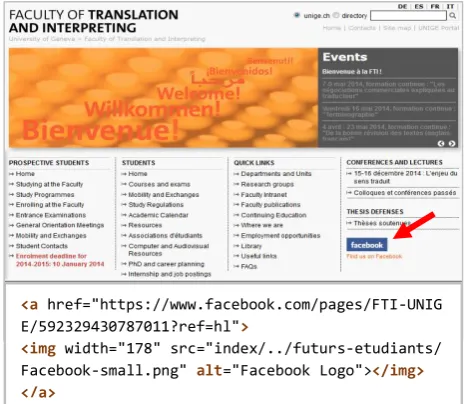
Figure 1: Example of inappropriate text alternative for an image with an embedded link.
The text alternative for the image marked with a red arrow in Figure 1 is “Facebook Logo”. Although it might seem appropriate at first glance, it is worth noting that the image has an embedded link to the Facebook page of the Faculty
<a href="https://www.facebook.com/pages/FTI-UNIG E/592329430787011?ref=hl">
of Translation and Interpreting (FTI), University of Geneva (UNIGE). In this case, the Facebook logo could be considered either as a decorative image for which we could introduce an empty alt (alt=“”)2, given that there is a “Find us on Facebook” textual link underneath, or as a functional image that would need a non-empty alt such as “Facebook page of FTI-UNIGE”.
In the study presented in the following sections, a similar judgement exercise has been carried out by sighted and blind accessibility experts in order to test our hypothesis, which states that applying CL rules to inappropriate text equivalents could contribute to a higher degree of image accessibility.
4.
Experimental Plan
In this section, we describe how we selected the data used in our study, which CL rules were defined and applied, and how was the evaluation performed.
4.1
Material Selection
The identification of accessible and non-accessible linguistic patterns frequently used in text alternatives was obtained through a comprehensive review of existing guidelines found in the literature on how to create accessible text alternatives and a detailed analysis of a corpus of websites, which served as our main training data set.
4.1.1. Training Web Corpus
The web document collection initially consisted of 100 websites chosen for a web accessibility evaluation study, commissioned by the Swiss authorities and conducted by the Swiss Access for all Foundation (Access for all, 2011), for which two AEM were implemented: conformance review and user testing. The 100 websites were mostly Swiss, including governmental and cantonal sites, as well as those of the ten biggest cities of the country. Others were related to public transport, educational and media services. For the purposes of this study, the web document collection size was simplified as follows: first, websites in languages other than French were dismissed, as well as two global websites, namely Facebook and Wikipedia. The Wayback Machine (Internet Archive, 2014) was used to retrieve all pages within a distance of one link from the homepage (also included). From the reduced sample (57 websites), five more websites were eliminated due to the impossibility to locate them in the Internet Archive.3 The final corpus consisted of 52 websites, accounting for 1,938 webpages.
4.1.2. Training Image Set
The experimental web corpus files (in HTML format) were converted into XLIFF (version 1.2). A set of XPath expressions were then applied to the XLIFF file set in order
2If the alt text is empty or set to null (i.e. alt=“”), it means for assistive technology that the image can be safely ignored. Having no alt attribute, considered as a non-accessible technique, could lead users to think they are missing important content in the page. Also, when there is no alt, some screen readers read the file name
to extract the following information: <img> elements with an alt attribute, <img> elements with no alt attribute, and <img> elements with an empty alt attribute. From the resulting image set, we filtered 1) images with the same source and the same attribute value used in the same page context, and 2) images automatically added by the Internet Archive during the websites retrieval. Since the study of the null alt appropriateness, as well as the existence or non-existence of an alt attribute, were beyond the scope of this research, we limited our training image set to a total of 7,945 unique text alternatives (see Table 1).
Total <img>
No
alt
Empty
alt
Non-empty alt
Initial set 50,633 9,241 12,238 29,154
Filtered set 12,778 1,267 3,566 7,945
Table 1: Total number of images and alt variants before and after the training image set filtering process.
The final training image set was explored as a source of good and bad examples of text alternatives, taking as a baseline the results from the web accessibility study leaded by the Access for All Foundation (2011). Evidence found on both subsets was compared and enlarged with information gathered during the extensive literature review on appropriateness of text alternatives.
Following an inductive approach, we used AntConc, a freeware concordancer software programme, to perform a semiautomatic analysis on the training image set with a view to obtaining representative examples of appropriate and inappropriate text alternatives that shared similar linguistic patterns. This analysis helped us to identify a preliminary set of language-based rules to be applied when assessing text alternatives for their appropriateness.
4.2
Definition of Accessibility-oriented Style
Rules for Text Alternatives Verification
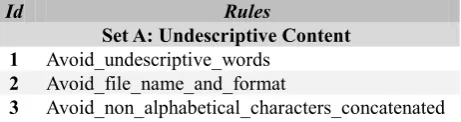
Our preliminary set of rules covered general punctuation, spelling and grammar verification, and a special accessibility-oriented alt style validation package. As in previous studies (Hu and Bagga, 2003, Olsen et al., 2010), a complementary subset of rules was also defined under the style rule set with a view to detect undescriptive elements within image text alternatives. Table 2 summarizes the accessibility-oriented alt style rule package inferred from the literature and the web corpus analysis.
Id Rules
Set A: Undescriptive Content 1 Avoid_undescriptive_words
2 Avoid_file_name_and_format
3 Avoid_non_alphabetical_characters_concatenated
4 Avoid_image_size
5 Avoid_HTML_language_or_URL
6 Avoid_uninformative_placeholders
7 Punctuation:_avoid_bullet_points
8 Punctuation:_avoid_standalone_question_and _exclamation_mark
9 Avoid_ASCII_code
Set B: Perceptual Content 10 Avoid_colours_for_non_connotative_object
_description
11 Use_appropriate_texture_adjectives
12 Avoid_shape_description_for_user_actions
13 Use_appropriate_perspective_description
14 Use_appropriate_adjectives_for_transformation _and_process_description
15 Use_connotative_description_for_meaningful _decorative_images
16 Use_appropriate_spacial_relationship_description
Set C: Functional Content 17 Avoid_description_of_structural_images
18 Use_action_verb_for_functional_images
19 Expand_navigation_items_function
20 Describe_social_media_actions
Set D: Descriptive Content
21 Avoid_stand-alone_abbreviations_or_acronyms
22 Avoid_passive_voice
23 Use_normal_prose_present_tense
24 Avoid_alt_too_long
25 Avoid_stand-alone_copyright_information
26 Avoid_redundant_expression_logo
27 Avoid_redundant_expression_link
28 Avoid_redundant_expression_image
29 Avoid_orality_markers
30 Avoid_multiple_noun_clusters
Table 2: Preliminary accessibility-oriented alt style rule package.
4.2.1. Selected Rules for Evaluation
For the purposes of this exploratory study, we have formalised 12 of the 30 language-based guidelines into controlled language (CL) rules using Acrolinx, a state-of-the-art controlled language programme which includes both a rule developing and testing platform. Acrolinx rules are written following an error description formalism that allows the “specification of error phenomena using regular expressions over linguistic objects, represented as feature structures. These feature structures denote the linguistic annotations provided by different underlying NLP components, such as POS and morphological taggers” (Bredenkamp et al., 2000). Table 3 shows a brief explanation of the rules selected for the study, as well as examples of inappropriate text alternatives flagged by the tool.
4.2.2. Evaluation Image Set
A web corpus of 12 websites was built to assess the impact of the 12 rules selected from our preliminary accessibility-oriented alt style rule package. The new web
Id Explanation & example of alt flagged
1 Isolated undescriptive words or word sets should be avoided. Some examples include: title, web, page, online, click, spacer, read more, image, home.
Alt flagged: alt=“accueil”
2 Image file name and format should not be repeated in the alt text.
Alt flagged: alt=“bookcover12-pag.png”
3 Strings of non-alphabetical characters (such as numbers or punctuation signs) combined with letters that are not presented in a meaningful way should be avoided.
Alt flagged: alt=“formcont5_ssr”
17 Images that provide structure to the web document should not be described in the alt. If so, they should reflect the macrostructure of the web content (e.g., alt=“New blog entry”).
Alt flagged: alt=“ligne horizontale”
18 Text alternatives of functional images which allow the user to perform specific actions should describe them using a verb in infinitive or imperative form (e.g. alt=“Print this page”).
Alt flagged: alt=“Version pour impression”
19 When a navigational symbol is included, the sense of the navigation should be specified, as well as the items through which the user is browsing (e.g., alt=“Next article”)
Alt flagged: alt=“flèche”
20 If social media logos have an embedded link, a description of the related action should be provided (e.g., alt= “Share this page on Facebook”). Alt flagged: alt=“page Facebook”
21 Isolated abbreviations and acronyms should not be included as the only element in the text alternative. Alt flagged: alt=“mp3”
24 Text alternatives that are too short to be informative and too long to be retrieved by assistive technology should be avoided. For this rule, we have set at a maximum of 100 characters.
26 Redundant expressions containing words like logo, insignia, or emblem should be used with care, especially when the image has an embedded link (e.g., alt=“Home page of Artionet website”). Alt flagged: alt=“Logo Artionet”
27 Indicating that an image has an embedded link with an expression such as “link to” is not necessary, since assistive technology already gives this information to the user.
Alt flagged: alt=“Link to FTI website”
28 Succinctness implies the omission of redundant expressions such as “image of”, “picture of”, “icon”, “photo illustrating…”.
Alt flagged: alt=“Une image de l’accident”
document collection consisted of seven Swiss websites not present in the training web corpus and five websites that were part of it, but whose content or structure had changed since 2011. The 12 websites retrieval was done during the last week of February 2014. The smallest website had 32 pages, in line with the first results of the work-in-progress on page sampling for web accessibility testing reported in Velleman & van der Geest (2013). A total of 901 webpages containing 3,207 filtered images (of which 1,731 had a unique non-empty alt) were verified against the selected rule set using Acrolinx IQ Batch Checker, Acrolinx IQ client for HTML content analysis. The Batch Checker had been previously configured to only include the values of all the non-empty alt attributes during the checking process.
4.3
Exploratory Evaluation study
The goal of this evaluation study was to investigate if text alternatives’ appropriateness in terms of accessibility improves or not when applying the selected rule set. The method chosen was a human comparative assessment of alt values by both sighted and blind users, as per ISO/IEC TS 20071-11:2012. The study took place in mid-March 2014.
4.3.1. Study Design and Environment
From the evaluation image set, accounting for 1,731 unique non empty alt values, a sample of 110 text alternatives flagged after running the Batch Checker were selected for the study. Changes proposed by Acrolinx were manually applied, thus creating 110 pairs of original and edited text alternatives (220 alt values in total, of less than 100 characters each).
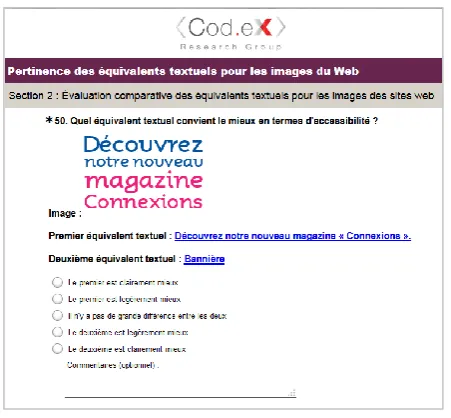
SurveyMonkey was the evaluation environment that best served our study purposes. The survey was written in French and consisted of a first section covering demographic questions, a second section where the 110 images and their two text alternative proposals were presented, and a third section including a brief post-task questionnaire.
Figure 2: Evaluation environment.
Participants were asked to assess text alternatives’ appropriateness in context, based on a five-point grading system (first clearly better, first slightly better, about equal, second slightly better, second clearly better). To this end, each text alternative proposal had an embedded link to the page in which their corresponding image appeared. At the top of each page, we introduced a “Skip to image for evaluation” link that jumped the user down to an anchor at the beginning of the image that needed to be assessed. This technique was used to facilitate a quick and easy location of the image, especially for blind users. Contrary to this participant group, sighted users were visually presented with the image as well (see Figure 2). Original and edited text alternative proposals, together with their respective webpages, were randomly presented as “first text alternative” and “second text alternative” throughout the survey in order to avoid research bias. An optional comments box was also introduced after each assessment question for participants to include any potential remarks about the choice made or a text alternative proposal of their own, if deemed necessary.
4.3.2. Participants
Four users participated in the evaluation: two were sighted users and two were blind users (N=4, aged between 28 and 39, x̅ = 34.7, sd = 4.99, all males). Both non-sighted participants were regular users of the same screen readers: JAWS and NVDA. All participants were accessibility experts who have been working in web accessibility projects for more than 4 years (x̅ = 5.5, sd = 3.1) and self-rated their knowledge on appropriateness of text alternatives for images in the Web as advanced. The four participants were recruited by the Access for All Foundation and were of Swiss origin, fluent both in German and French.
5.
Data Analysis and Results
At this stage of our research, Acrolinx rules allow the scanning of webpages for error candidates, but no style suggestions are shown to the user yet. Consequently, as mentioned in section 3, the appropriateness level achieved in the new text alternative (rewritten without the error(s) flagged by Acrolinx) is subject to the editor’s accessibility background. Therefore, for the purposes of this exploratory study, when participants suggested a third different text alternative proposal of their own in which the rule that was being tested was not violated, we inferred that the rule had a positive impact.
Table 4: Impact of rule set per user evaluation.
BU1 BU2 SU1 SU2
Raw better 6 21 10 12
% 5% 19% 9% 11%
Edited better 92 82 85 97
% 84% 75% 77% 88%
No impact 12 7 15 1
% 11% 6% 14% 1%
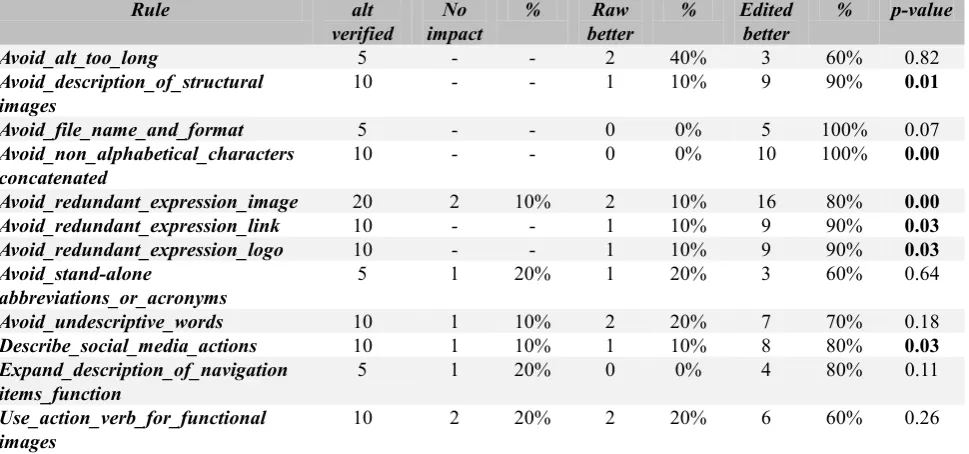
Table 5: Evaluation results per rule.
We applied the same coding principle if they had included a comment indicating that there was still room for improvement as regards the text alternative they chose as more appropriate without contravening the rule being evaluated.
Table 4 offers an overview of the evaluation results per participants: blind users (BU) and sighted users (SU). We have grouped the values “first clearly better” and “first slightly better” to obtain a general “raw better” category, and merged “second slightly better” and “second clearly better” under the “edited better” category, while “No impact” observations refer to “about equal” responses. Although evidence found indicates that participants perceived the edited version as more appropriate in more than 75% of the cases, we used McNemar’s test to assess if the difference between “raw better” and “edited better” results was significant. As shown in table 4, results reveal that the selected rule set for the exploratory study had a statistically significant impact on text alternative appropriateness (p<0.001).
Interestingly, this positive tendency towards choosing the edited image text equivalent as the preferred proposal is maintained at a rule-per-rule scale. However, there is not conclusive evidence to report a significant impact on text alternatives’ appropriateness in six of the twelve rules selected for the study (see Table 5). We hypothesize that this might be due, among other reasons, to the reduced sample of text alternatives available for each rule (for instance, in the case of Avoid_file_name_and_format or Expand_description_of_navigation_items_function).We plan to increase the number of alt values verified per rule in future studies.
Our findings also point at the length of the text alternative as a source of disagreement. Although the optimum length is set at 75-100 characters by most authors, blind users appeared to agree that the more complete the alt value is, the better, provided that the content is meaningful. They
also converged as regards structural images: text alternatives such as “bandeau”, “transparent”, “séparateur” or “ligne” were rated as very poor compared to the empty alt suggestion offered. As far as the use of redundant expressions including the word image or contextual synonyms (for instance, “photo de”, “icône représentant”, “illustration de”) is concerned, it is worth highlighting that, when the image being described was used as a metaphorical representation of the surrounding content, participants seemed to prefer to explicitly mention it in the text alternative (for example, “Image d'illustration: des mains disposées en cercle tendent des pièces de puzzle colorées” under a news article entitled “Towards a coherent integration policy”). It would be of notable interest to further analyze similar cases and investigate if this preference is also maintained across languages and cultures. The use of the expression “logo of” might be also worth exploring within the same study framework.
Table 6: Interrater agreement within and between blind and sighted user groups.
Finally, the interrater reliability values observed between groups and users from the same group type indicate a high degree of agreement among participants (see Table 6). To compute this reliability test, we included “about equal” results under the “edited better” category. This decision is based on a closer examination of each “about equal”
Rule alt
verified
No impact
% Raw
better
% Edited
better
% p-value
Avoid_alt_too_long 5 - - 2 40% 3 60% 0.82
Avoid_description_of_structural images
10 - - 1 10% 9 90% 0.01
Avoid_file_name_and_format 5 - - 0 0% 5 100% 0.07
Avoid_non_alphabetical_characters concatenated
10 - - 0 0% 10 100% 0.00
Avoid_redundant_expression_image 20 2 10% 2 10% 16 80% 0.00
Avoid_redundant_expression_link 10 - - 1 10% 9 90% 0.03
Avoid_redundant_expression_logo 10 - - 1 10% 9 90% 0.03
Avoid_stand-alone
abbreviations_or_acronyms
5 1 20% 1 20% 3 60% 0.64
Avoid_undescriptive_words 10 1 10% 2 20% 7 70% 0.18
Describe_social_media_actions 10 1 10% 1 10% 8 80% 0.03
Expand_description_of_navigation items_function
5 1 20% 0 0% 4 80% 0.11
Use_action_verb_for_functional images
10 2 20% 2 20% 6 60% 0.26
Raw better
Edited better
Total Int. agr.
Blind users
2 (2%) 85 (77%) 87 (79%) 0.7909
Sighted users
5 (5%) 93 (85%) 98 (89%) 0.8909
Two groups
response, during which we found two main different patterns: either no comment was left for the evaluator (from what we assumed that the rule had not decreased the appropriateness level of the text alternative), or new text alternative suggestions were put forward without violating the selected rules.
6.
Discussion and Conclusions
As part of the exploratory study, participants were requested to fill in a short post-task questionnaire. When asked about the criteria on which they had based their evaluation, blind users mentioned their own personal experience as the main foundation for their choices, although one of them reported to have taken into account the context in which each image appeared as well. While this was also the basis for one of the two sighted users’ decisions, this group considered their professional experience as a sufficient source of knowledge on text alternative appropriateness. None of the participants indicated to have looked at language correctness in terms of spelling and grammar, which lead us to believe that web accessibility experts give more importance to text alternatives appropriateness from a functional perspective, rather than from a strictly linguistic point of view.
Nonetheless, in spite of having selected the image context as one of the criteria on which to ground their evaluation, 75% of the participants (N=3 out of 4) estimated that they had checked the page in which the image appeared only in 25% of the cases before making their judgement. This could explain some responses where there was a clear disagreement between users. Another factor that might have influenced participants’ decisions during the evaluation is their previous knowledge about the web accessibility level of the websites chosen for the study. While two participants reported that they had not visited the selected webpages until the time of the evaluation, one blind user said he knew 25% of the pages and one sighted user indicated that he had browsed 50% of them prior to the study.
All in all, the present paper illustrates how the application of CL rules specifically designed for image text alternatives verification can lead to an improvement of their appropriateness level and thus contribute to a higher web accessibility degree. The study also shed light on the potential effectiveness of using Acrolinx as a validation tool for language-related accessibility barriers, whose rules proved to have a positive impact on text alternatives adequateness, regardless of the type of user performing the evaluation.
7.
Limitations and Future Work
Due to time and mobility constraints, a subjective assessment was chosen as the AEM for this exploratory study. Although it was designed following recommendations included in ISO/IEC TS 20071-11:2012, blind participants experienced certain difficulties while checking some images in context, thus needing to devote more time to the task. We hope to follow a user testing approach in future studies, as well as to increase the number
of participants and rules being tested. Despite these limitations, evidence found reveals that controlled language could be used as an interesting resource for text alternatives verification support. Further research would be needed, however, to reinforce this statement. As a first step, we plan to carry out a second exploratory study where users will be given the set of rules and the text alternatives flagged by Acrolinx, and asked to suggest their own improvement proposal. Results of both exploratory studies will be then compared with the aim of strengthening the rules’ precision and adding pertinent suggestions. Also, within this research project framework, we will complement each rule with help resources for the user, explaining the reason why a certain error has been flagged. This would make of Acrolinx a potential evaluation, guidance and repair tool for both experts and non-experts in image accessibility.
8.
Acknowledgements
We would like to extend our gratitude to all members of the Access for All Foundation for their ongoing support in providing us with access to their studies material and human resources, as well as to the four participants who took part in the evaluation. Another special thank you should be given to Emilio Rodríguez Vázquez de Aldana, who donated his time and experience to the preparation of this study.
9.
References
Access for all (2011). Étude 2011 sur l’accessibilité des sites Web suisses. Retrieved 17 Mar. 2014, from http://bit.ly/1kBqFNe.
Bigham, J., Kaminsky, R. S., Ladner, R. E. (2006). WebInSight: Making Web Images Accessible. In Proceedings of ACM SIGACCESS Conference on Computers and Accessibility (ASSETS 2006), Portland, Oregon, USA, 22-25 Oct. 2006.
Brajnik, G., (2008). Beyond Conformance: The Role of Accessibility Evaluation Methods. In S. Hartmann et al. (Eds.), WISE 2008, pp. 63--80.
Brajnik, G., Yesilada, Y., Harper, S. (2012). Is Accessibility Conformance an Elusive Property? A Study of Validity and Reliability of WCAG 2.0. ACM Transactions on Accessible Computing, 4(2), pp. 8:1--8:28.
Bredenkamp, A., Crzsmann, B., Petrea, M. (2000). Looking for Errors: A Declarative Formalism for Resource-Adaptive Language Checking. In Proceedings of the Language Resources and Evaluation Conference (LREC 2000), Athens, Greece, 31 May-2 Jun. 2000. Craven, T. (2006). Some features of alt texts associated
with images in Web pages. Information Research 11(2).
Retrieved 17 Mar. 2014 from
http://www.informationr.net/ir/11-2/paper250.html. Hanson, V. L., Richards, J. T. (2013). Progress on Website
Accessibility? ACM Transactions on Accessible Computing, 7(1), pp. 2:1--2:30.
and Recognition (ICDAR 2003). Edinburgh, Scotland, UK, 3-6 Aug. 2003.
ISO/IEC TS 20071-11:2012. Guidance for alternative text for images (2012). Switzerland: International Organization for Standardization (ISO) and International Electrotechnical Commission (IEC).
Korpela, J. (2010). Guidelines on alt texts in IMG elements.
Retrieved 17 Mar. 2014, from
http://www.cs.tut.fi/~jkorpela/html/alt.html.
Nyong, N. (2009). Guidelines for creating meaningful and effective alternative text. University of Saskatchewan. Retrieved 17 Mar. 2014, from http://bit.ly/Vdxp8M. O’Brien, S. (2003). Controlling Controlled English: An
analysis of several controlled language rule sets, In Proceedings of the Joint Conference of the 8th International Workshop of the European Association for Machine Translation and the 4th Controlled Language Applications Workshop (EAMT-CLAW-03), Dublin, Ireland, 15-17 May 2003, pp. 105--114. Retrieved 17 Mar. 2014, from: http://bit.ly/14yupm.
O’Brien, S., Roturier, J. (2007). How Portable are Controlled Languages Rules? A Comparison of Two Empirical MT Studies. In Proceedings of the XI Machine Translation Summit, Copenhagen, Denmark, 10-14 Sept. 2007, pp. 345--352. Retrieved 17 Mar. 2014, from http://bit.ly/NzTh8I.
Olsen, M.G., Snaprud, M., Nietzio, A. (2010). Automatic checking of alternative texts on web pages. In Proceedings of the 12th international conference on Computers helping people with special needs. Part I (ICCHP’10). K. Miesenberger, J. Klaus, W. Zagler and A. Karshmer (Eds.), Berlin-Heidelberg: Springer-Verlang, pp. 425--432.
Rodríguez Vázquez, S., Torres del Rey, J. (2012). A communicative approach to evaluate web accessibility localisation using a controlled language checker: the case of text alternatives for images. Localisation Focus, 11(1), pp. 27--39. Retrieved 17 Mar. 2014, from http://www.localisation.ie/locfocus/issues/11/1-0. Tang, L. (2012). Producing informative text alternatives for
images. PhD in Computer Science. University of Saskatchewan, Saskatoon.
Tercedor Sánchez, M., ed. (2009a). Materiales multimedia para todos. Granada: Ediciones Tragacanto.
Tercedor Sánchez, M., Alarcón Navío, E., Prieto Velasco, J.A., López Rodríguez, C.I. (2009b). Images as part of technical translation courses: implications and applications. Journal of Specialised Translation, 11, pp. 143--168. Retrieved 17 Mar. 2014, from http://www.jostrans.org/issue11/art_tercedoretal.php. Velleman, E., van der Geest, T. (2013). Page Sample Size
in Web Accessibility Testing: How Many Pages is Enough? In Proceedings of the 15th ACM SIGACCESS International Conference on Computers and Accessibility (ASSETS 2013), Bellevue, Washington, USA, 21-23 Oct. 2013.
Internet Archive (2014). Wayback Machine. http://www.archive.org/web/. Last visited: 17 Mar. 2014. Web Accessibility in Mind, WebAIM (2010). Appropriate
Use of Alternative Text. Retrieved 4 Oct. 2013, from http://webaim.org/techniques/alttext/.
World Wide Web Consortium, W3C (2012). HTML 5: Techniques for providing useful text alternatives.
Retrieved 17 Mar. 2014, from
http://www.w3.org/TR/html-alt-techniques/.
World Wide Web Consortium, W3C (2013). HTML5 Image Description Extension (longdesc). Retrieved 10 Oct. 2013, from http://www.w3.org/TR/html-longdesc/. World Wide Web Consortium, W3C (2014). Understanding WCAG 2.0: A guide to understanding and implementing Web Content Accessibility Guidelines 2.0. Retrieved 17
Mar. 2014, from