Nx56/64
(Second Generation)
Option Module PN 1202054L1
Plug-On Board PN 1202053L1
P.O. Box 070020 Huntsville, AL 35807 Phone: (205) 971-8000
Fax: (205) 971-8699
FEDERAL COMMUNICATIONS COMMISSION
RADIO FREQUENCY INTERFERENCE STATEMENT
This equipment has been tested and found to comply with the limits for a Class A digital device, pursuant to Part 15 of the FCC Rules. These limits are designed to provide reasonable protection against harmful interference when the equipment is operated in a commercial environment. This equipment generates, uses, and can radiate radio frequency energy and, if not installed and used in accordance with the instruction manual, may cause harmful interference to radio frequencies. Operation of this equipment in a residential area is likely to cause harmful interference in which case the user will be required to correct the interference at his own expense.
Table of Contents
Table of Contents
Chapter 1. Introduction
Second Generation (2nd GEN) Nx56/64 V.35 Option Module Overview .. 1
2nd GEN Nx56/64 V.35 Plug-On Board Overview ... 1
Functional Description of the 2nd GEN Nx56/64 V.35 Option Module and Plug-On Board ... 2
Features of the 2nd GEN Nx56/64 Option Module ... 3
Interfaces ... 3
2nd GEN Nx56/64 (V.35) Option Module Specifications ... 4
Physical Description ... 5
Chapter 2. Installation Unpack & Inspect ... 7
ADTRAN Shipments Include ... 7
Customer Provides ... 7
Installing The Option Module ... 8
Placement of the Option Module ... 8
Power Connection ... 8
Attaching the Plug-On Board ... 9
Warranty and Customer Service ... 10
Wiring ... 11
Power-Up Testing and Initialization ... 12
Chapter 3. Operation Overview ... 13
Front Panel Indicators/Buttons ... 13
Menu Structure ... 13
2nd GEN Nx56/64 V.35 Menus Are All Submenus ... 14
Operation ... 14
2)PORT Status, Submenu of 1)Status ... 16
Operation ... 16
7)PORT CONFIG, Submenu of 2)CONFIG ... 17
Operation ... 17
3)FACTORY RESTORE, Submenu of 3)UTIL ... 21
Operation ... 21
7)PORT UTILITY, Submenu of 3)UTIL ... 21
Operation ... 21
Appendix A. TSU/HSU X00 System Messages
Alarm Messages ... 25
Network Interface (NI) ... 25
2nd GEN Nx56/64 V.35 Option Module ... 25
Status Messages ... 26
Network Interface (NI) ... 26
2nd GEN Nx56/64 V.35 Option Module ... 26
List of Figures Figure 1-1 2nd GEN Nx56/64 V.35 Option Module ... 5
Figure 2-1 Installing the Option Module ... 8
Figure 2-2 Attaching the Plug-on Board ... 9
Figure 3-1 TSU 100 Main Menu Tree ... 14
Figure 3-2 2nd GEN Nx56/64 V.35 Option Module Menu Tree ... 15
Figure 3-3 Port Status Submenu ... 16
Figure 3-4 Port Configuration Submenu ... 18
Figure 3-5 Inband Remote Configuration ... 20
Figure 3-6 Port Utility Submenu ... 21
Figure 3-7 Display of Port Name and Software Version ...22
Figure 3-8 Port Test Submenu ...23
List of Tables Table 2-A V.35 Winchester Pin Connection. ... 11
Chapter 1. Introduction
Chapter 1
Introduction
SECOND GENERATION (2ND GEN) NX56/64 V.35 OPTION
MODULE OVERVIEW
The Second Generation (2nd GEN) Nx56/64 V.35 option module is one of the option modules available for use with the following ADTRAN equipment:
• TSU 100 (part number 1200052L1) • TSU 600 (part number 1200076L1) • TSU 120 (part number 1200129L1) • HSU 100 (part number 1200097L1) • HSU 600 (part number 1200098L1)
The 2nd GEN Nx56/64 V.35 option module installs in the option slot of the TSU/HSU family of products and provides an additional synchronous V.35 interface port. When used in these products, this interface port allows an additional DTE to have access to the T1 service.
2ND GEN NX56/64 V.35 PLUG-ON BOARD OVERVIEW
THE FUNCTIONAL DESCRIPTION OF THE 2ND GEN NX56/
64 V.35 OPTION MODULE AND PLUG-ON BOARD
Chapter 1. Introduction
FEATURES OF THE 2ND GEN NX56/64 V.35 OPTION MODULE
• Operates using 1 to 24 DS0s
• Includes an elastic store for absorption of rate variations
• Capable of including a Nx56/64 V.35 plug-on interface port, resulting in a dual port module
• Outputs a 50 percent duty-cycle output clock at all rates
• Menu operation for easy configuration
• Executes and responds to V.54 looping codes
• Generates and checks a 511 test pattern
• Performs an extensive self test
• Supports multiport dial backup operation
• Provides inband channel network management communication
Interfaces
• CCITT V.35 electrical (differential)
• Connector
V.35 Winchester
• Loopbacks
Port (toward the network) DTE (toward the DTE)
2nd GEN Nx56/64 (V.35) Option Module Specifications
DTE Interface
CCITT V.35 Synchronous
Rates
56 kbps to 1.536 Mbps in 56K or 64K steps
Clock Options
Normal, Inverted
Tests
Local Loopback (Bilateral) Menu activated Remote Loopback (V.54)
Menu activated Self Test
Test Pattern
511 with errored seconds display and error inject capability
Data Inversion
Menu selectable
1s Density Protection
Force 1s to network after one second of consecutive zeros from DTE. On/Off.
CTS, DCD, DSR Options
Normal or Forced ON
Connector
Winchester (V.35), female
Inband Communication Channel
Chapter 1. Introduction
Physical Description
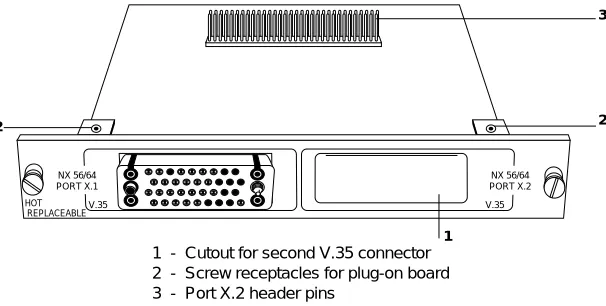
The 2nd GEN Nx56/64 V.35 option module plugs into the option slot in the rear of the TSU/HSU family of products (see Figure 1-1).
The rear panel of the option module includes a plastic plug over a cutout for a second V.35 connector. This allows a 2nd GEN Nx56/64 V.35 plug-on board (or any other plug-on board) to be added to the 2nd GEN Nx56/64 option module creating a multiport module. The PORT X.1 and X.2 indication is linked to the port numbering philosophy of the TSU/HSU product family. The X represents the slot number, into which the option module is plugged. For the TSU 100 there is only one option slot. Therefore the port designation would be 1.1 and, if a plug-on V.35 is present, port 1.2. In a TSU 600 with six option slots, these port numbers would be port 1.1 to port 6.1. The numbers appear in the front panel LCD menu displays.
Figure 1-1 2nd GEN Nx56/64 V.35 Option Module
NX 56/64 PORT X.2 V.35 NX 56/64 PORT X.1 V.35
1 - Cutout for second V.35 connector 2 - Screw receptacles for plug-on board 3 - Port X.2 header pins
Chapter 2. Installation
Chapter 2
Installation
UNPACK & INSPECT
Carefully inspect the option module or plug-on board for any shipping damage. If damage is suspected, file a claim immediately with the carrier and then contact ADTRAN customer service. If possible, keep the original shipping container for use in shipping the option module or plug-on board back for repair or for verifica-tion of damage during shipment.
ADTRAN Shipments Include
• The 2nd GEN Nx56/64 Module or 2nd GEN Nx56/64 Plug-on Board • The user manual (to be inserted into main
TSU/HSU user manual)
Customer Provides
INSTALLING THE OPTION MODULE
Placement of the Option Module
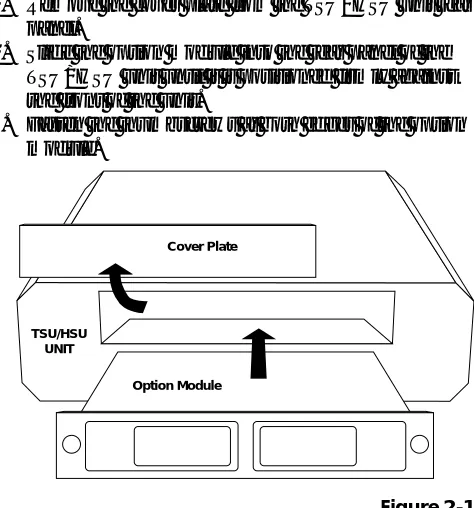
Figure 2-1is representative of the action required for proper placement of the option module. Perform the following steps to install the option module:
1. Remove the cover plate from the TSU/HSU unit rear panel.
2. Slide the option module into the rear panel of the TSU/HSU unit until it is positioned firmly against the front of the unit.
3. Fasten the thumbscrews at both edges of the option module.
Figure 2-1 Installing the Option Module
Power Connection
Each option module derives power from the base TSU/ HSU unit. Power to the TSU/HSU is supplied by a captive eight-foot power cord.
TSU/HSU UNIT
Chapter 2. Installation
Attaching the Plug-On Board
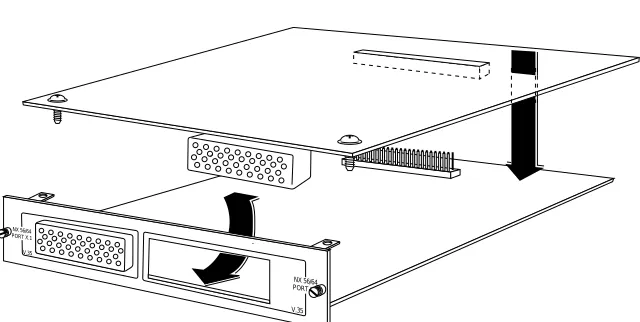
Figure 2-2is representative of the action required for proper attachment of a plug-on board to the option module. Perform the following steps to install the plug-on board:
1. Hold the plug-on board above the option module. 2. Using a downward and right-to-left motion, slip the
V.35 Connector plug into opening in the option module back panel.
3. Moving the plug-on board downward, secure the connection of the header pins at the front of the boards.
4. Install the two 4-40 screws at both edges of the option module.
Figure 2-2
Attaching the Plug-On Board
The connection of the header pins between the option module and the plug-on board must be visually verified. Severe damage of the equipment can result from an improper connection.
NX 56/64 PORT X.1
V.35
NX 56/64 PORT X.1
WARRANTY AND CUSTOMER SERVICE
ADTRAN will replace or repair this product within five years from the date of shipment if it does not meet its published specifications or fails while in service. For detailed warranty, repair, and return information refer to the ADTRAN Equipment Warranty, Repair, and Return Policy Procedure.
Return Material Authorization (RMA) is required prior to returning equipment to ADTRAN.
Chapter 2. Installation
WIRING
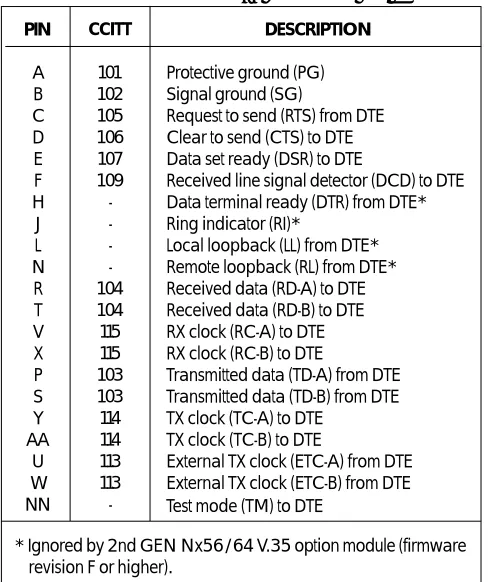
The 2nd GEN Nx56/64 V.35 option module has a V.35 Winchester-style connection as defined in Table 2-A.
Table 2-A V.35 Winchester Pin Connection
PIN A B C D E F H J L N R T V X P S Y AA U W NN CCITT 101 102 105 106 107 109 -104 104 115 115 103 103 114 114 113 113 -DESCRIPTION
Protective ground (PG) Signal ground (SG)
Request to send (RTS) from DTE Clear to send (CTS) to DTE Data set ready (DSR) to DTE
Received line signal detector (DCD) to DTE Data terminal ready (DTR) from DTE* Ring indicator (RI)*
Local loopback (LL) from DTE* Remote loopback (RL) from DTE* Received data (RD-A) to DTE Received data (RD-B) to DTE RX clock (RC-A) to DTE RX clock (RC-B) to DTE
Transmitted data (TD-A) from DTE Transmitted data (TD-B) from DTE TX clock (TC-A) to DTE
TX clock (TC-B) to DTE
External TX clock (ETC-A) from DTE External TX clock (ETC-B) from DTE Test mode (TM) to DTE
Power-Up Testing and Initialization
The option module executes a self test during the power-up sequence, as described in the TSU/HSU manual. No initialization input is required. Upon power-up, any previously configured setting for the option module is automatically restored.
Chapter 3. Operation
Chapter 3
Operation
OVERVIEW
The 2nd GEN Nx56/64 V.35 option module is con-trolled as part of the TSU/HSU using the same methods as described in the appropriate TSU/HSU user manual.
Front Panel Indicators/Buttons
Refer to the description of the TSU/HSU front panel indicators and buttons in the appropriate user manual.
Menu Structure
The 2nd GEN Nx56/64 V.35 option module menus appear as a subset of, and operate the same as, menus for the TSU/HSUs. The menus are accessed by selecting 1.1 2nd GEN Nx56/64 under the PORT menu items.
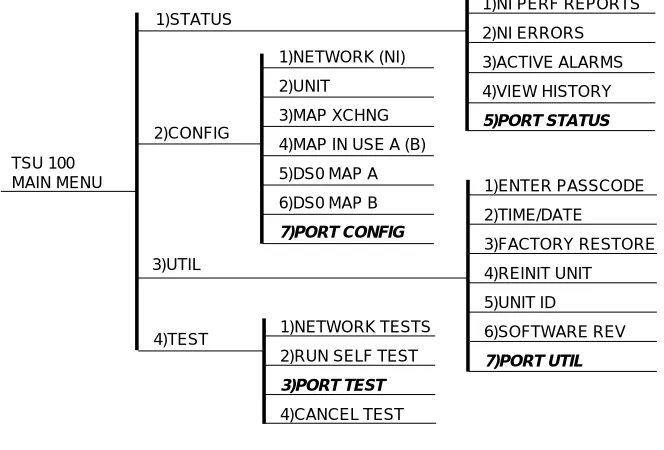
The Main menu for the TSU 100 is used for illustrative purposes. The Main menu for the other TSU/HSU units operates in a similar way. Figure 3-1shows the TSU 100 Main menu with the PORT menu items printed in bold italics.
Figure 3-1 TSU 100 Main Menu Tree
2nd GEN Nx56/64 V.35 Menus Are All Submenus
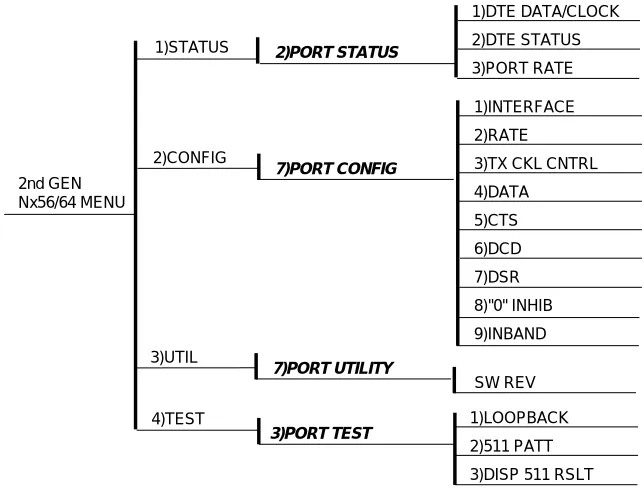
The 2nd GEN Nx56/64 V.35 option module menus are accessed from and operated the same as menus for the TSU 100. Menu items in the Main menu in Figure 3-1 printed in bold italics are submenu choices for 2nd GEN Nx56/64V.35 option modules (see Figure 3-2). Each submenu is discussed in the following paragraphs. All are accessed by the same method.
Operation
With the cursor on one of the four Main menu choices, press the Enter or number key. The results are a display of the first two submenu items with the cursor on the TSU 100
MAIN MENU
1)STATUS
2)CONFIG
3)UTIL
1)NI PERF REPORTS
2)NI ERRORS 3)ACTIVE ALARMS 4)VIEW HISTORY 5)PORT STATUS 1)ENTER PASSCODE 2)TIME/DATE 3)FACTORY RESTORE 4)REINIT UNIT 5)UNIT ID 6)SOFTWARE REV 7)PORT UTIL 1)NETWORK TESTS
2)RUN SELF TEST
3)PORT TEST 4)CANCEL TEST 4)TEST 1)NETWORK (NI) 2)UNIT 3)MAP XCHNG
4)MAP IN USE A (B)
5)DS0 MAP A
6)DS0 MAP B
Chapter 3. Operation
Figure 3-2 2nd GEN Nx56/64 V.35 Option Module Menu Tree 2nd GEN
Nx56/64 MENU
1)STATUS
2)CONFIG
1)INTERFACE
2)RATE
3)TX CKL CNTRL
4)DATA
5)CTS
6)DCD
7)DSR
8)"0" INHIB
9)INBAND
1)DTE DATA/CLOCK
2)DTE STATUS
3)PORT RATE
7)PORT CONFIG
3)PORT TEST
4)TEST
2)PORT STATUS
3)UTIL
7)PORT UTILITY
SW REV
1)LOOPBACK
2)511 PATT
2)PORT Status, Submenu of 1)Status
The Status menu branch provides the ability to view the status of the TSU 100 operation. It displays the status of the monitored signal line on the 2nd GEN Nx56/64 V.35 option board and the data rate for which the option module is configured.
Operation
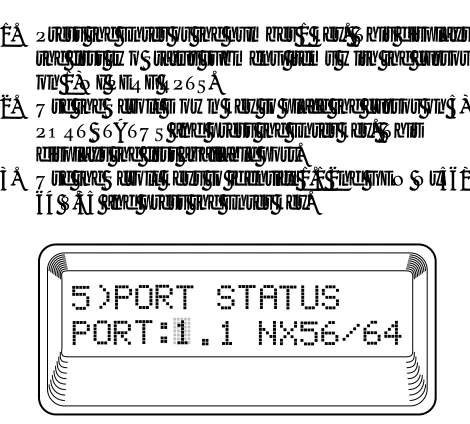
To display Figure 3-3 on the TSU 100, starting with the cursor on Main menu item 1)STATUS, do the following:
1. Press the Enter or the number 1 key. This displays the first two Status submenu items with the cursor on 1)NI PERF RPTS.
2. Use the Scroll Down key to place the cursor on 5) PORT STATUS and press the Enter key. This displays the first available port.
3. Use the Scroll keys to identify 1.1 2nd GEN Nx56/ 64 V.35 and press the Enter key.
The Nx interface offers the status screens listed in this manual. For other option modules, refer to the appro-priate manual.
2ND GEN NX56/64 Status
Chapter 3. Operation
DTE Data/CK
Shows the status (active or not active) of the following lines:
TXD Transmit data from the DTE RXD Receive data toward the DTE ETC External transmit clock from DTE LCK Lock status of the phase locked loop
DTE Status
Shows the status (active or not active) of the following lines:
RTS Request to send from DTE CTS Clear to send to DTE DCD Data carrier detect to DTE DSR Data set ready to DTE
Port Rate
Displays the data rate to which the NX port is set.
Exit the displays as described in the TSU 100 User Manual.
7)PORT CONFIG, Submenu of 2)CONFIG
The 7)PORT CONFIG submenu is used for configura-tion of the 2nd GEN Nx56/64 V.35 opconfigura-tion module.
Operation
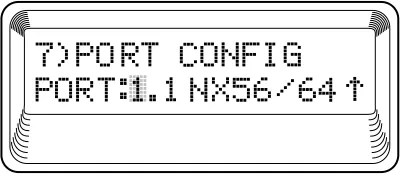
To display Figure 3-4 on the TSU 100, starting with the cursor on Main menu item 2)CONFIG, do the following:
1. Press the Enter or the number 2 key. This displays the first two Configuration submenu items with the cursor on 1)NETWORK (NI).
2. Use the Scroll Down key to place the cursor on 7)PORT CONFIG and press the Enter key.
Figure 3-4 Port Configuration Submenu
To select Port Configuration, press the Enter key. This displays the first of eight submenu items. They are defined as follows:
1)INTERFACE
This selects the active interface for the Base Nx port. The Nx ports, which are installed as option modules, have only one type of interface.
Choice - V.35
2)RATE 56/64
This sets the base rate of the interface. The actual data rate depends on the number of DS0s assigned to the Nx port. The DTE data rate versus the number of DS0s appear in the appendix DTE Data Rate Chart of the TSU 100User Manual.
Choices - 56K or 64K
3)TX CLK
Controls the clock used by the TSU 100 to accept the transmit (TX) data from the DTE. Normally this is set to Normal. If the interface cable is long, causing a phase shift in the data, the clock can be selected as Inverted. This switches the phase of the clock which should compensate for a long cable.
Choices - Normal or Inverted
4)DATA
Chapter 3. Operation
5)CTS
Used to control characteristics of CTS.
Choices - Normal or Force On (see Table 3-A).
6)DCD
Data Carrier Detect - Indicates to the DTE when a valid signal is being received at the Network Interface.
Choices - Normal or Force On (see Table 3-A).
7)DSR
Data Set Ready - This signal indicates to the DTE when the DCE is turned On and ready for operation.
Choices - Normal or Force On (see Table 3-A).
8)0 INHIB
If the Nx interface detects an uninterrupted string of 0s being transmitted toward the network, and if 0s are transmitted for more than one second, then the TSU 100 forces 1s towards the network.
Choices - On or Off
Table 3-A Normal Mode Operation (conditions which cause the port control signal to be deactivated)
V.54 511 TEST SELF TEST NETWORK NO DS0 NETWORK SIGNAL RTS LOOPBACK ON ACTIVE TEST ACTIVE MAPPED ALARM CTS Follows Off Off Off Off Off Off DCD - - - Off Off Off Off DSR - Off Off Off Off Off - = Do not care
9)INBAND (Inband Configuration Channel)
Used to enable/disable an 8 kbps remote configuration channel (see Figure 3-5). When this option is set to ON, the first DS0 mapped to the Nx interface operates in 56K mode and the DTE clock rate is reduced by 8 kbps. The TSU/HSU uses this 8 kbps channel to send and receive configuration data across a T1 span. As shown in Figure 3-5, this allows the PC connected to the chain-in port on TSU 600 A to monitor/configure both TSU 600 A and B. This feature is useful when FDL connectivity is not available across the T1 span.
This 8 kbps channel is only taken out of the first DS0. If two 64K DS0s are mapped, the DTE rate would be 120 kbps instead of 128 kbps.
The menu option can also be set to On-Demand which will activate the Inband Channel only when commands are sent from T-Watch to the remote unit (TSU 600 B in Figure 3-5). If no T-Watch activity is detected for 10 minutes, the Inband Channel is deactivated.
Figure 3-5 Inband Remote Configuration
Although a router can accommodate this 8K rate reduction, some DTE devices may not (i.e., video). Determination TSU 600 A
NX DSX 1 CHAIN IN
ROUTER PBX
TSU 600 B
NX DSX 1
ROUTER PBX
NETWORK
Chapter 3. Operation
3)FACTORY RESTORE, Submenu of 3)UTIL
This selection is used to restore the factory default settings for all Passthru option module parameters.
Operation
To return the unit to the opening Main menu with all the factory default settings restored, do the following:
1. Follow the standard operating procedure to access the 3)UTIL menu items.
2. With the cursor on 3)FACT RESTORE, press the Enter key.
7)PORT UTILITY, Submenu of 3)UTIL
The 7)PORT UTILITY submenu is used primarily to display the current software information for each port installed in the unit. This information is required when requesting assistance from ADTRAN Technical Support or when updates are needed.
Operation
To display Figure 3-6 on the TSU 100, do the following:
1. Follow the standard operating procedure to access the 3)UTIL menu items.
To display the port name and the software version installed as shown in Figure 3-7, do the following:
1. Use the Scroll keys to move through the available ports, or enter the port number with the number key.
2. When the desired port name is displayed, press the
Enter key.
Press the Cancel key to exit or to select another port.
2)RUN SELF TEST, Submenu of 4)TEST
This menu item is used to execute both the internal test of the TSU/HSU and of the 2nd GEN Nx56/64. This is the same test executed during power-up. The results of the self test are shown on the TSU 100 display. For additional information on self test, see the chapter Operation in the appropriate TSU/HSU user manual.
To activate a self test, do the following:
1. Follow the standard operating procedure to access the 4)TEST menu items.
2. With the cursor on 2)RUN SELFTEST, press the
Chapter 3. Operation
3)PORT TEST, Submenu of 4)TEST
This menu item is used to activate testing of specific data ports. It also controls the activation of loopbacks and the initiation of data test patterns. Test results are shown on the TSU/HSU display.
The execution of Port Tests disrupts normal data flow in the port being tested.
Operation
To display Figure 3-8 on the TSU 100, starting with the cursor on 3)PORT TEST, press the Enter or number 3
key. This displays the available ports.
1.1 2nd GEN Nx56/64: The Nx interface offers the following test functions:
1) LOOPBK Initiates a loopback.
PRT/LCL The Nx port activates both a local loopback (back toward the DTE) and a port loopback when either is invoked. REMOTE The remote loopback causes a V.54
The TSU/HSU checks the remote loopback activation by detecting a proper response from the remote end. While waiting for the response, the display shows LOOPING. If successful, the display changes to LOOPED UP. If unsuc-cessful, the display shows FAILED.
2)511 PATT
Activates the generation of the 511 test pattern.
ON The pattern check circuitry is enabled and a test started. The test is ended by selecting OFF.
OFF The pattern generation and check is disabled.
3)DIS 511 RESLT
Appendix A. TSU/HSU X00 System Messages
Appendix A
TSU/HSU X00 System Messages
ALARM MESSAGES
Network Interface (NI)
Red Alarm
NI unable to align frame with incoming signal
Yellow Alarm
Remote alarm indication (RAI) being received from the far end
Blue Alarm
Unframed all 1s (AIS) being received at NI
Loss of Signal
No signal detected at NI
2nd GEN Nx56/64 V.35 Option Module
Clock Slip
Difference in frequency of the data clock at the network and DTE
PLL Alarm
Unable to lock phase lock on the clock provided by the network interface
Zeros Alarm
STATUS MESSAGES
Network Interface (NI)
Payload On
Payload loopback activated
Line On
Line loopback activated
Loopback Off
All loopbacks deactivated
Factory Restore Factory setting restored
Power On Unit powered on
Self Test
Internal self test performed
2nd GEN Nx56/64 V.35 Option Module
Loop Up
Data is looped back at both the network interface and the DTE interface of the card
Remote Loop Up
Sending a V.54 pattern in an attempt to loop up a remote device
511 Pattern On
Sending a 511 pattern towards the network interface
Loop Down
Data is no longer looped back at the network interface or the DTE interface
Appendix A. TSU 100 System Messages
Product Support Information
Pre-Sales Inquiries and Applications Support Please contact your local distributor, ADTRAN Applica-tions Engineering, or ADTRAN Sales:
Applications Engineering (800) 615-1176
Sales (800) 827-0807
Post-Sale Support
Please contact your local distributor first. If your local distributor cannot help, please contact ADTRAN Techni-cal Support and have the unit serial number available.
Technical Support (800) 726-8663
Repair and Return
If ADTRAN Technical Support determines that a repair is needed, Technical Support will coordinate with the Return Material Authorization (RMA) department to issue an RMA number. For information regarding equipment currently in house or possible fees associated with repair, contact RMA directly at the following number:
RMA Department (205) 971-8722
Identify the RMA number clearly on the package (below address), and return to the following address:
ADTRAN, Inc. RMA Department 901 Explorer Boulevard
Huntsville, Alabama 35806-2807