Virtually Integrated Multi Purpose Server
Mr. J. Mark Jain ME *1, J.Ferlin Getziah #2, A.Hameeda #3, N.Naveena #4 , K.Nasren Subaitha Banu #5 *1 Lecturer/CSE Dept.,Dr,Sivanthi Aditanar College of Engineering
Tiruchendur,TamilNadu
#UG Student, Dr,Sivanthi Aditanar College of Engineering,
Tiruchendur,TamilNadu
Abstract:The proposed work “Virtually Integrated Multipurpose Server” is designed to provide an efficient and multi functional server. At present, servers are used to perform specific functions whereas we intend to develop a server which will perform multiple server functions of delivering web pages, information exchange, and transferring, storing and managing mails. The scalability of the server is increased facilitating consolidation of multiple servers. It integrates the functionality of network server, mail server, FTP server, telnet server, database servers etc.
Mail server is responsible for receiving, routing, and delivering e-mail messages in short it serves as an electronic post office for email. The network server designed to process requests and deliver data to other computers over a local network, provides enhanced usability for the user to accomplish their goals effectively. Web server applications provide network access to Web pages and other intranet and Internet content. It includes servers such as Proxy server to protect from anonymous user and to improve performance, FTP server for secure file transfer, Telnet server to perform task on remote computer. Database server is dedicated to provide database services with data consistency and accuracy. DNS server is for managing the names of Web sites and it is robust. This server is highly durable and has the ability to adapt to the changing circumstances.
1. INTRODUCTION:
A server is a computer machine running to serve the requests of other machines, the "clients". Thus, the "server" performs some computational task on behalf of "clients". The clients either run on the same computer or connect through the network.
Network clients make requests to a server by sending messages, and servers respond to their clients by acting on each request and returning results. One server generally supports numerous clients. A client computer and a server computer are usually two separate devices, each customized for their designed purpose. For example, a Web client works best with a large screen display, while a Web server[1] does not need any display at all and can be located anywhere in the world.
A Network Server[8] is a computer designed to process
requests and deliver data to other (client) computers over a local network or the Internet[11].Network servers typically are configured with additional processing, memory and storage capacity to handle the load of servicing clients. Some of the most popular applications on the Internet follow the client-server model including email, FTP and Web services. File sharing is provided by Ftp, Telnet and Http Servers whereas communication is performed using Mail, DNS and Network Servers as well as services are through Database, web and Proxy Servers. Usually, Servers are used to perform their designated function. Hence to implement all Server functions a wide range of Servers are needed. This is an expensive one and requires more man power. Also causes complexity in
maintenance. To overcome all these drawbacks of having several Servers, an idea of integrating various server functionalities in a single Server was evolved.
2. RELATED WORK:
Thus, we designed a Server “VIRTUALLY INTEGRATED MULTIPURPOSE SERVER” that can perform multiple server functions. Virtually[7] is a term that applies to computer-simulated environments that can simulate physical presence in places in the real world, as well as in imaginary world. We have integrated the functions of Web, Http, Proxy, Mail, DNS, Network, Telnet[9], Ftp[6] and Database Servers. Our Server can respond to different client requests through client side applications and their responses are sent through server side programming. We are using LAMP[12] server.
LAMP server includes:
L - Linux Operating system. A - Apache server.
M - MySQL database. P - Perl/PHP programming. The need for using LINUX:
Rebooting Windows is required when an application crashed, and couldn't continue working. But, if an application crashes in Linux, it will usually not harm the kernel or other processes. Linux has the advantage of the code being in the public domain. The security of Linux is very impressive. Having the code out in the open, and the ability to fix things yourself if necessary is a big plus. You can be very trusting, or you can be
paranoid. Linux gives you this flexibility. Advantages:
1. Single server can provide all services. 2. This server is secure and reliable. 3. Reduction in cost.
3. SYSTEM DEVELOPMENT: 3.1 SERVICE ORIENTED SERVERS 3.1.1 WEB SERVERS:
Every Web site sits on a computer known as a Web server. This server is always connected to the internet [11]. Every Web server that is connected to the Internet is given a unique address made up of a series of four numbers between 0 and 256 separated by periods for example, 68.178.157.132 or 68.122.35.127. When you register a Web address, also known as a domain name, such as abc.com you have to specify the IP address of the Web server that will host the site Web server can refer to either the hardware or the software that helps to deliver content that can be accessed through the Internet. The most common use of web servers is to host websites, but there are other uses such as gaming, data storage or running enterprise applications.
3.1.2 DATABASE SERVERS:
A Database server is a computer program that provides database services to other computer programs or computers, as defined by the client–server model. The term may also refer to a computer dedicated to running such a program. Database management systems frequently provide database server functionality, and some DBMS (e.g., MySQL) rely exclusively on the client–server model for database access. Such a server is accessed either through a "front end" running on the user’s computer which displays requested data or the "back end" which runs on the server and handles tasks such as data analysis and storage. The Client can access the database on the server without starting the MySQL service. A database server offers you database management services. The client-server interactions are fast and smooth with a database server. If you have client-server architecture where the clients need process data too frequently, it is better to work with a database server. Some organizations use the file server to store and process data. A database server is much more efficient than a file server.
3.1.3 PROXY SERVERS:
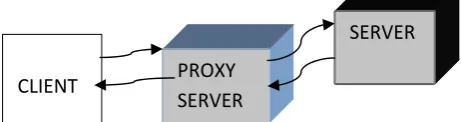
A Proxy server[4][13] is a server that acts as an intermediary for requests from clients seeking resources from other servers. A client connects to the proxy server, requesting some service, such as a file, connection, web page, or other resource available from a different server. The proxy server evaluates the request according to its filtering rules. For example, it may filter traffic by IP address or protocol or URL. If the request is validated by the filter, the proxy provides the resource by connecting to the relevant server and requesting the service on behalf of the client. A client connects to the proxy server, then requests a connection, file, or other resource available on a different server. The proxy provides the resource either by connecting to the specified server or by serving it from a cache. In some cases, the proxy may alter the client's request or the server's response for various purposes.
Fig - 3.1.3 Proxy Server Architecture
The proxy server gets the request from the clients through client side applications which are saved in the database available in the server. Considering the databases the responses are sent. There are ways in which the responses to the client can be differentiated. They are, a single client can be provided with the services or a group of client can be provided with the services, a single client can be blocked or particular websites can be blocked or only particular websites can be allowed to access.
3.2 FILE SERVERS:
3.2.1HYPERTEXTTRANSFER PROTOCOL
HTTP is an application protocol for distributed, collaborative, hypermedia information systems. HTTP is the foundation of data communication. It is the underlying protocol used by the World Wide Web. HTTP defines how messages are formatted and transmitted, and what actions web servers and browsers
should take in response to various commands. For example, when you enter a URL in your browser, this actually sends an HTTP command to the Web server directing it to fetch and transmit the requested Web Page. The Web component fills in an HTTP response object, which the server converts to an HTTP response and sends to the client. An HTTP session is a sequence of network request-response transactions. An HTTP client initiates a request by establishing a Transmission Control Protocol (TCP) connection to a particular port on a server (typically port 80; see List of TCP and UDP port numbers). An HTTP server listening on that port waits for a client's request message. Upon receiving the request, the server sends back a status line, such as "HTTP/1.1 200 OK", and a message of its own, the body of which is perhaps the requested resource, an error message, or some other information. An HTTP request consists of a request method, a request URL, header fields, and a body. An HTTP response contains a result code, header fields, and a body. The first line of the HTTP response is called the status line and includes a numeric status code (such as "404") and a textual reason phrase (such as "Not Found"). The HTTP protocol expects the result code and all header fields to be returned before anybody content.
Fig – 3.2.1 Http Server Architecture
3.2.2 FTP: FILE TRANSFER PROTOCOL:
It is the protocol for exchanging files over the Internet. FTP[6] works in the same way as HTTP for transferring Web pages from a server to a user's browser and SMTP for transferring electronic mail across the Internet in that, like these technologies, FTP uses the Internet's TCP/IP protocols to enable data transfer. FTP is most commonly used to download a file from a server using the Internet or to upload a file to a
CLIENT
(Browser)
WEB
SERVER
(HTTP
server)
Web
page
PHP/html pages
(any required file)
PROXY
SERVER
SERVER
server. We can also transfer files using a web browser such as Internet Explorer or Firefox, instead of an “HTTP” address, you enter an “FTP” address (ftp.hostname.com) and you transfer files instead of opening them. It can be used to download multimedia files such as music, images or video files or patches, or software.
Data transfer in FTP can be done in any of three modes. They are Stream mode in which data is sent as a continuous stream, relieving FTP from doing any processing. Rather, all processing is left up to TCP. SFTP, the "SSH File Transfer Protocol," is not related to FTP except that it also transfers files and has a similar command set for users. SFTP, or secure FTP, is a program that uses Secure Shell (SSH) to transfer files. It encrypts both commands and data, preventing passwords and sensitive information from being transmitted openly over the network. It is functionally similar to FTP, but because it uses a different protocol, you can't use a standard FTP client to talk to an SFTP server, nor can you connect to an FTP server with a client that supports only SFTP.
3.2.3 TELNET: TERMINAL NETWORK
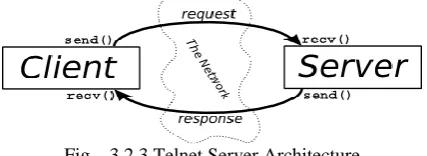
Telnet[9] is a network protocol used on the Internet or local area networks to provide a bidirectional interactive text-oriented communications facility using a virtual terminal connection. Most implementations of Telnet have no authentication that would ensure communication is carried out between the two desired hosts.
A terminal emulation program for TCP/IPnetworks such as the
Internet. The Telnet program runs on your computer and connects your PC to a server on the network. You can then enter commands through the Telnet program and they will be executed as if you were entering them directly on the server
console. To start a Telnet session, you must log in to a server by entering a valid username and password. Telnet is a common way to remotely controlWeb servers.
Fig – 3.2.3 Telnet Server Architecture
Telnet, by default, does not encrypt any data sent over the, and so it is often practical to eavesdrop on the communications and use the password later for malicious purposes; anybody who has access to a router, switch, hub or gateway located on the network between the two hosts where Telnet is being used can intercept the packets passing by and obtain login, password and data with a packet analyzer.
3.3. COMMUNICATION SERVERS: 3.3.1 MAIL SERVER:
A mail server[3] is the computerized equivalent of your friendly neighborhood mailman. Every email sent passes through a series of mail servers along its way to its intended recipient. Mail servers can be broken down into two main categories: outgoing mail servers and incoming mail servers.
Outgoing mail servers are known as SMTP, or Simple Mail Transfer Protocol, servers. Incoming mail servers come in two main varieties. POP3, or Post Office Protocol, version 3, servers are best known for storing sent and received messages on local hard drives. IMAP[11], or Internet Message Access Protocol. Most POP3 servers can store messages on servers.
Fig – 3.3.1 Mail Server Architecture The Process of Sending an Email:
After composing a message and hitting send, your email client connects to your domain's SMTP server. This server can be named many things; a standard example would be [email protected]. Your email client communicates with the SMTP server, giving it your email address, the recipient's email address, the message body and any attachments.
The SMTP[3] server processes the recipient's email address. If the domain name is the same as the sender's, the message is routed directly over to the domain's POP3 or IMAP server. If the domain is different, the SMTP server will communicate with the other domain's server through DNS. Now that the SMTP server has the recipient's IP address, it can connect to its SMTP server. The message is routed along a series of unrelated SMTP servers until it arrives at its destination. The recipient's SMTP server scans the incoming message. If it recognizes the domain and the user name, it forwards to the domain's POP3 or IMAP server. From there, it is placed in a send mail queue until the recipient's email client allows it to be downloaded and read. 3.3.2 DNS SERVER:
The Domain Name System (DNS[5]) is a hierarchical distributed naming system for computers, services, or any resource connected to the Internet or a private network[7]. IT is otherwise called the Name Server. A Domain Name Service translates queries for domain names into IP addresses for the purpose of locating computer services and devices worldwide. The client requests the server to refer a Domain Name. This request is mapped with the domain-IP mapping table, which provides complete information about available domain names along with the specific IP address. Thus the particular domain name is translated into IP address of the specific system for access in the internet.
3.3.3 NETWORK SERVER:
using server side applications. Network Server helps in controlling and analyzing the working of clients. It provides information regarding how many servers are connected to the server, the routes available etc.
4. EXPERIMENTAL SETUP: 4.1 DNS SERVER:
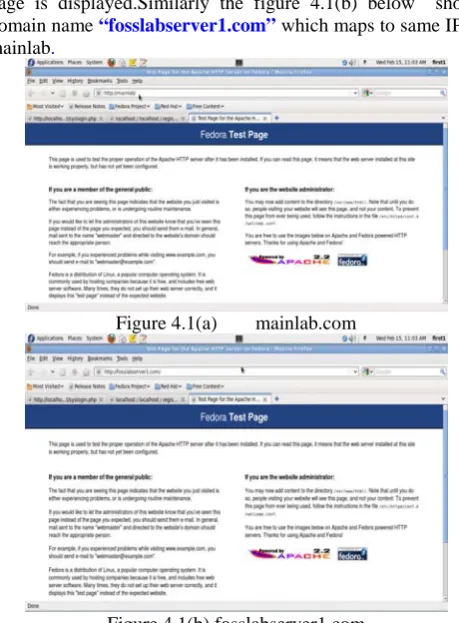
The Domain Name System (DNS) is a distributed hierarchical naming system for computers. The DNS assigns domain names and map those names to IP addresses by designating authoritative name servers for each domain. The mapping can be done in two ways.1) A Domain name can map to a particular IP address 2) A particular IP address can have several Domain names, but each possess varying information or files.
This figure 4.1(a) below shows a Domain name “mainlab.com”. This name maps to an IP address and its test page is displayed.Similarly the figure 4.1(b) below shows domain name “fosslabserver1.com” which maps to same IP as mainlab.
Figure 4.1(a) mainlab.com
Figure 4.1(b) fosslabserver1.com
4.2 NETWORK SERVER:
A network server is a computer that provides various shared resources to workstations and other servers on a computer network. Network Servers also help simplify the management tasks for network and systems administrators. Here our Network Server provides network information. It responds to the administrator request by providing their required information about that network. Examples are, it traces the route of certain IP, provides information about iptables, and so on. Thus it helps in monitoring the network.
Fig – 4.2 Network Server Controls
4.3 MAIL SERVERS:
Login: The registered user can login using their user name and password . If their user name and password are correct, they are allowed to use mail service provided by our Mail Server.
Sign Out: The user can signout to get out of the service. And he can log in again using the correct username and password on his need to use the service.
<?php global $version$org_name = "Dr.SACOE";$org_logo = SM_PATH . 'images/sm_logo.png'; $org_title= "Dr.SACOE $version"; 'http://drsacoe.edu/'; $provider_name = 'Dr.SACOE';$domain = 'drsacoe.edu';143$smtpServerAddress='localhost';$smtpPort=2 5;$imap_server='uw';Protocols = imap pop3 lmtp
Fig – 4.3.1 Login Page of Mail Server.
Composing mail: Once the user logged in, then he can compose, send and receive mail. The received mails are stored in inbox and can be deleted.
inet_interface=localhost;inet_protocols=all;mydestination=$my hostname,localhost.$mydomain,localhost,drsacoe.edu;sendmail _path=/usr/sbin/sendmail.postfix;newaliases_path=/usr/bin/new aliases.postfix;
Inbox: Inbox contains mails from other users and also informs user about unread mails
Fig – 4.3.4 Mail Inbox Page of Mail Server 4.4 DATABASE SERVER:
Fig – 4.4 Data base accessed from the Database Server through the Client
The user can access the database server from the client machine with the user name and password allotted by the server. One user cannot access another user's database.
4.5 PROXY SERVER:
A Proxy server is a server that acts as an intermediary for requests from clients seeking resources from other servers. We configure the system to access Proxy services by enabling manual proxy settings in all client systems. The manual configuration setting is shown below.
Fig – 4.5.1 Proxy – Client Configuration
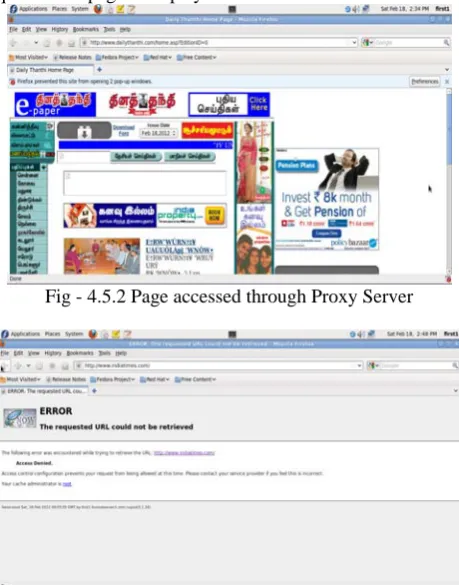
The client system is now connected to the proxy server and the user requests www.dailythanthi.com this web page request is sent to the proxy server which in turn decides whether to provide this webpage access or not to that particular client. In this figure the web page access is given to the client and the required web page is displayed.
Fig - 4.5.2 Page accessed through Proxy Server
Fig- 4.4.3shows indiatimes.com is blocked to client who is requesting it through Reg-Ex
Fig – 4.4.4 shows that the Proxy server is disconnected from the network
Configuration of Proxy Server:
visible_hostname first1.drsacoe.edu;acl GoodSites dstdomain "/etc/squid/allowed-sites";acl BadSites dstdomain
4.6 FILE SERVERS:
Fig 4.6- FTP,TELNET, HTTP Servers Configuration & Controls
FTP SERVER: Using file servers the clients connected in a network can download and share necessary files. This service is initiated when the client requests for file transfer services and this request is sent to the server which in turn provides services to the requested clients. Then the files that are to be shared are accessed through ftp://<Server IP>/pub
TELNET SERVER: For accessing telnet services the client has to send request to the server, and then the server provides the services to the client systems in a network. The client then has to login into the system using the login name and password. Using telnet user can chat with people who are connected in that network and can login into remote systems and can share information.
HTTP SERVER: In http server the client sends http request to the server and then the server responds to the request through http response. When the client system receives the response signal it can access the web pages and can perform activities that can be carried out through http. Configurations as follows: ServerTokensOS
URL:http://httpd.apache.org/docs/2.2/mod/mpm_common.html ServerRoot "/etc/httpd";Timeout 60; KeepAlive Off;
ServerAdmin [email protected]; ServerName drsacoe.edu:80 <Directory/>Options FollowSymLinks; AllowOverride None</Directory> Order allow,deny; Allow from all </Directory>;NameVirtualHost *:80 <VirtualHost *:80> ServerAdmin
[email protected];#DocRoot/www/docs/drsacoe.edu;ServerNa
medrsacoe.edu; ErrorLoglogs/drsacoe.edu-error_log;
CustomLog logs/drsacoe.edu-access_log common</VirtualHost>
<VirtualHost *:80> #DocumentRoot/www/docs/mainlab.com; ServerName mainlab.com; ErrorLog logs/mainlab.com-error_log; CustomLog logs/mainlab.com-access_log common</VirtualHost>
5. SYSTEM ANALYSIS
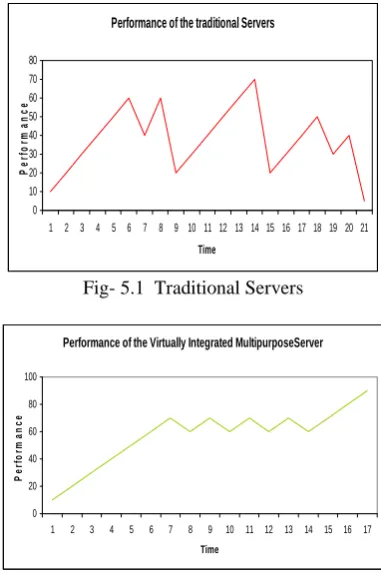
This Fig 5.1 shows the Performance of the Traditionally Used Servers with Time as X-axis and Performance as Y-axis. In the traditional servers there will be separate servers to provide different services to the client. So it will be taking larger time to process the user requests and this makes lower performance and sometimes it will process the user requests very soon thus, performance will be fluctuating in the traditional servers.
The Fig 5.2 shows the Performance of the Virtually Integrated Multipurpose Server with Time as X-axis and Performance as Y-axis. In this server there will be a single server to provide different services such as mail, file transfer and database service to the client. So it will immediately processes the client requests and makes the performance higher , and rarely it will take much time to process the client requests. So the performance is consistent in this multi-purpose server.
Performance of the traditional Servers
0 10 20 30 40 50 60 70 80
1 2 3 4 5 6 7 8 9 10 11 12 13 14 15 16 17 18 19 20 21
Time
P
e
rf
o
rm
a
n
ce
Fig- 5.1 Traditional Servers
Performance of the Virtually Integrated MultipurposeServer
0 20 40 60 80 100
1 2 3 4 5 6 7 8 9 10 11 12 13 14 15 16 17
Time
P
e
rf
or
m
a
nc
e
Fig -5.2 Virtually Integrated Multipurpose Server
6. CONCLUSION:
Thus our server integrates the functionality of many servers using LAMP. Mail Server helps in sending and receiving of mails. Network server helps in controlling and analyzing the network clients. Http and Web Server helps in retrieving web pages as required by the user. Telnet server provides accessibility to the server files and remote login. Reliable file transfer is initiated by FTP server. DNS server is for remembering the names of the site rather than the IP address. Proxy server acts as the intermediate for providing services as Servers. The functionality of server is initiated depending on the request from client. We can term this as a optimal One Stop Server since it integrates all the functionalities of an individual server at one place with at most integrity, reliability, portability in a cost effective manner.
ACKNOWLEDGEMENT
REFERENCES:
1. Xubin He, Qing Yang, "Performance Evaluation of Distributed Web Server Architectures under E-Commerce Workloads", Proceedings of the 1st International Conference on Internet Computing (IC’2000), Nevada, USA, June 2000, pp. 285-292.
2. Masaki KOHANA, Shusuke OKAMOTO, Masaru KAMADA and
Tatsuhiro YONEKURA: Dynamic data allocation scheme for multi-server web-based MORPG system, The Sixth International Symposium on Web and Mobile Information Services (WAMIS), IEEE AINA 2010 Workshop, (April 2010).
3. John Holbrook: Step by step installation of a secure linux web, DNS and Mail Server, SANS Institute InfoSec Reading Room (Feb 10,2004). 4. Steve Manchini: Auditing a Squid Web Proxy Server, SANS Institute
GSNA practical version 3.1 (Feb 24, 2007)
5. Christian Cachin, Asad Samar: Secure Distributed DNS, Work done in IBM research Lab
6. Brian Tate: Selinux: Securing a Legacy FTP server, SANS Institute GSEC v1.4c ( 2005).
7. Rodrigo Roman, Javier Lopez, Jianying Zhou: Casual Virtual Private Networks, Institute for Infocomm research.
8. Ms. May Paing, Ms. Su Myat Marlar Soe: Design and implementation of Client Server Network Management System for Ethernet LAN, Academy of Science, Engineering and Technology (Aug 2008).
9. Haslina Binti Mahmood, Transport Layer Security Protocol in TELNET, International Conference (Mar 2003)
10. Chu-Hsing Li, Jung-chun Liu, Chien-Ting kuo,Mei-Chung cho: Safeguard Intranet using Embedded and Distributed Firewall System, International Journal of Future Generation Communication and Networking(Mar 2009) 11. T.B Rajashekar: Internet and its applications in libraries, Internet and
Libraries(2004)
12. UV Raman, T.V Prabhakar: Some experiments with the Performance of LAMP architecture.
13. Dr. T. R Gopalakrishnan: Stochastic Model Based Proxy Servers Architecture, International Journal of Computer Science, Vol 7(Jan 2010).
Author’s Bibliography :
J.Ferlin Getziah , N.Naveena, A.Hameeda , K.Nasren Subaitha Banu are B.E CSE final year students of Dr.Sivanthi Aditanar College of Engineering, Tiruchendur. Their area of interest is “Network Security” . They have published two papers in national conferences in the area of Network Security.