Issue 1
MULTIPLE DIGITAL MESSAGING UNIT
V-5325100
by
PagePac
®INTRODUCTION
The Multiple Digital Messaging Unit (MDMU) is a microprocessor based digital voice announcement system. It outputs
prerecorded messages through a public address system. Up to 99 messages can be placed in the units digital memory for queued replay. Up to eight messages can be programmed to play in sequence with timed delays.
The MDMU can store up to 3 minutes and 15 seconds of messages. Voice and audio messages can be stored into memory through dial-up telephone, microphone interface, or tape input.
(The MDMU is programmed by dial-up telephone DTMF tones.)
This guide gives installation, recording, and programming steps. Since messages are digitally stored, and there are no moving parts, the MDMU should give years of uninterrupted service.
Power Requirements
• 115 Vac, 60 Hz
Dimensions/Weight
• 16.3”W x 1.8”H x 9.3”D (41.3cm x 4.5cm x 23.5cm) • 13.0 lbs (5.9 kg)
Environment
INSTALLATION
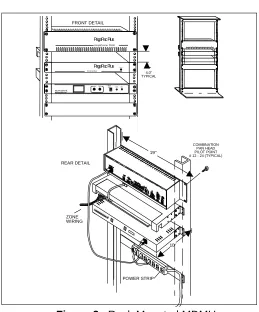
1. Mount the MDMU to either a wall, cabinet or a rack (near the paging equipment if possible).
Figure 1. Wall Mounted MDMU
Figure 2. Rack Mounted MDMU
2. Connect the MDMU to the telephone system.
AMPLICENTER
CONTROLLER
MULTIPLE DIGITAL MESSAGING UNIT
3/4" PLYWOOD
SIDE VIEW
POWER
FRONT DETAIL
4.0" TYPICAL
POWER STRIP REAR DETAIL
ZONE WIRING
COMBINATION PAN HEAD PILOT POINT # 12 - 24 (TYPICAL)
19''
10'' FU NCRU N
MULTIPLE DIGITAL MESSAGING UNIT
HA ND SE T TAP EMIC
AmpliC enter D3 00
PagePac Plus
Figure 3. MDMU Connection to telephone system
3. Plug the modular cord into connector J1 on MDMU and connect the wires on the other end to the Controller Attendant Access terminals.
Figure 4. MDMU Connection to Controller Attendant Access
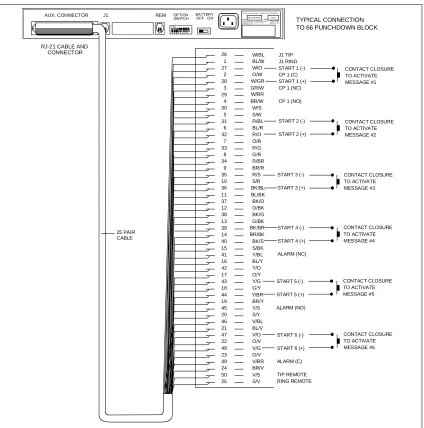
4. Connect the RJ-21 cable/connector to the MDMU Aux. Interface and to terminal block.
NOTE: For specific pin-out information for this connector refer to Figure 5. Messages 1 through 6 correspond to message starts 1 through 6.
AUX. CONNECTOR J1 BATTERY OFF ON
1 2 3 4 5 6 7 8 ON
REM OPTION
SWITCH
TELEPHONE EQUIPMENT - DIGITAL VOICE ANNOUNCER
SERIAL MODEL
543210 SMU-4RAB-MDMU
R .E .N .= 0 .7B (ac ); 2 .6 (d c); 12 0V AC, 6 0H z, 0.1A , 1 2W FCC REGISTR ATION No. F4 P4LB-1 65 78-AN -N CONN ECT TO U SOC R J11C OR RJ 21X DOC LOAD No . 26
TIP AND RING FROM ANALOG STATION
HOST TELEPHONE
Figure 5. Connection of RJ-21 cable to MDMU and 66 Punchdown Block
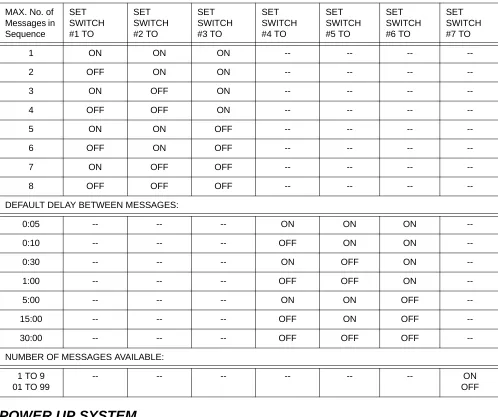
5. Set the MDMU options on the DIP switch. Refer to Table 1.
NOTE: Switches 1, 2 and 3 set the number of messages in a single queue sequence. The timing between those messages is set by switches 4, 5 and 6. Switch 7 sets the total possible number of messages for the unit. Switch 8 is always in the ON position.
Figure 6. Set MDMU Options on DIP Switch
AUX. CONNECTOR J1 BATTERY
OFF ON
1 2 3 4 5 6 7 8 ON
REM OPTION SWITCH
TEL EPHONE EQU IPMENT - DIGITAL VOICE ANNOUNCER
SERIAL MODEL
543210 SMU-4RAB-MDMU
R.E .N .= 0.7 B(ac ); 2. 6(d c); 120VA C , 60H z, 0.1A , 12W FC C REGI STRATION No. F 4P 4LB-16578-AN-N CONNE CT TO U SOC RJ 11C OR R J21X DOC LOAD N o. 26
RJ-21 CABLE AND
CONNECTOR 26 1 27 2 28 3 29 4 30 5 31 6 32 7 33 8 34 9 35 10 36 11 37 12 38 13 39 14 40 15 41 16 42 17 43 18 44 19 45 20 46 21 47 22 48 23 49 24 50 25 W/BL BL/W W/O O/W W/GR GR/W W/BR BR/W W/S S/W R/BL BL/R R/O O/R R/G G/R R/BR BR/R R/S S/R BK/BL BL/BK BK/O O/BK BK/G G/BK BK/BR BR/BK BK/S S/BK Y/BL BL/Y Y/O O/Y Y/G G/Y Y/BR BR/Y Y/S S/Y V/BL BL/V V/O O/V V/G G/V V/BR BR/V V/S S/V J1 TIP J1 RING START 1 (-) CP 1 (C) START 1 (+) CP 1 (NC)
CP 1 (NO)
START 2 (-)
START 2 (+)
START 3 (-)
START 3 (+)
START 4 (-)
START 4 (+)
ALARM (NC)
START 5 (-)
START 5 (+)
ALARM (NO)
START 6 (-)
START 6 (+)
ALARM (C) TIP REMOTE RING REMOTE CONTACT CLOSURE TO ACTIVATE MESSAGE #1 TYPICAL CONNECTION TO 66 PUNCHDOWN BLOCK
Table 1. DIP Switch Setting Definitions
POWER UP SYSTEM
1. Plug the power cord into the AC input connector on the MDMU, then into the wall outlet.
The MDMU will display three messages in sequence:
Software version of unit.
Total time available in memory for recording.
Indicates the status MDMU: Idle = no activity
PLY = a message is being played out through connector J1 Delay = the time delay between successive messages is active
MAX. No. of Messages in Sequence
SET SWITCH #1 TO
SET SWITCH #2 TO
SET SWITCH #3 TO
SET SWITCH #4 TO
SET SWITCH #5 TO
SET SWITCH #6 TO
SET SWITCH #7 TO
1 ON ON ON -- -- --
--2 OFF ON ON -- -- --
--3 ON OFF ON -- -- --
--4 OFF OFF ON -- -- --
--5 ON ON OFF -- -- --
--6 OFF ON OFF -- -- --
--7 ON OFF OFF -- -- --
--8 OFF OFF OFF -- -- --
--DEFAULT DELAY BETWEEN MESSAGES:
0:05 -- -- -- ON ON ON
--0:10 -- -- -- OFF ON ON
--0:30 -- -- -- ON OFF ON
--1:00 -- -- -- OFF OFF ON
--5:00 -- -- -- ON ON OFF
--15:00 -- -- -- OFF ON OFF
--30:00 -- -- -- OFF OFF OFF
--NUMBER OF MESSAGES AVAILABLE:
1 TO 9 01 TO 99
-- -- -- -- -- -- ON
OFF
MDMU 2.00
3:16
2. Push the Battery slide switch to the ON position.
The MDMU is now ready to record and play messages.
NOTE: The internal battery maintains the recorded messages two hours in the event of a power failure or brownout. Allow 48 hours to fully charge. If power is to be removed from the MDMU for an extended period of time, turn the battery switch to the OFF position to avoid permanent damage to the battery.
NOTE: The suggested reliable lifetime of the rechargeable battery used in the equipment is 36 months. To ensure the system has reliable battery backup, it is recommended the battery be replaced every 30 months.
Figure 7. Battery Switch
FRONT PANEL OPERATION
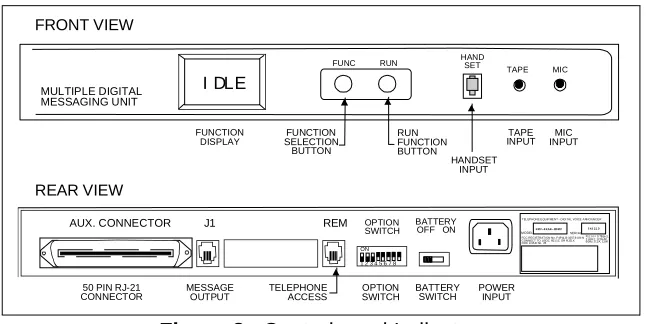
The MDMU can record messages input from the front panel through the hand set, tape and mic
connectors. The unit can also record and store messages input remotely through telephone access to the REM port using a DTMF (touch tone) telephone.
CONTROLS AND INDICATORS
Figure 8. Controls and Indicators
RECORDING MESSAGES
The highest priority message should be recorded on the lowest message number (1) to ensure fastest replay (i.e., fire in building...).
1. Plug the telephone handset, microphone or tape player into the appropriate connector on the front panel.
2. Press the (black) FUNC button until the RECORD message is displayed.
RECORD HAND SET MULTIPLE DIGITAL MESSAGING UNIT MIC TAPE RUN FUNC
AUX. CONNECTOR J1 BATTERY
OFF ON
1 2 3 4 5 6 7 8 ON
REM OPTION SWITCH
TEL EPHONE EQUIPMENT - DIGI TAL VOICE ANNO UNCER
SERI AL MODEL
543210 SMU-4RAB-MDMU
R.E.N.= 0.7B(a c); 2 .6(dc ); 12 0VAC, 6 0Hz, 0.1 A, 12W FCC REGISTRATI ON No. F4P4L B-1657 8-AN-N CONNECT TO USOC RJ1 1C OR RJ21X DOC LOAD No. 26 THIS DEVICE COMP LIES W ITH PA RT 15 AND P ART 68 OF TH E FCC RULES . OPE RATION IS SU BJECT TO TH E FOLL OWING TWO CONDITIONS: FUNCTION
DISPLAY
50 PIN RJ-21
CONNECTOR MESSAGEOUTPUT TELEPHONEACCESS BATTERYSWITCH POWERINPUT
3. Press the (red) RUN button to display the message #1.
4. To record on another message number, press the FUNC key until the desired message number appears.
5. Press the RUN button and begin speaking into the handset, microphone or press the play on the tape player.
6. When recording is complete, press the FUNC key.
The display shows the amount of time used for the message:
7. Repeat steps 2 through 6 to record other messages.
LISTENING TO RECORDED MESSAGES
1. Press the FUNC button until the display indicates monitor.
NOTE: Use the front panel handset to listen to messages.
2. Press the RUN button to select the message number.
3. Press the FUNC button until desired message number appears.
4. Press RUN button to listen to the message.
MSG-1
SURE ? mm:ss
TIME 0.30 DONE
IDLE
MONITOR
MSG-01
NOTE:
As the message plays into the handset, the display counts down the message time.
Length of message.
Done playing message.
PLAYING MESSAGES
Once messages have been recorded, they may be played over the paging system as described below. Messages can also be queued by a contact closure of one of the pairs of the RJ-21 cable (see Figure 5).
1. Press the FUNC button until PLAY is displayed.
2. Press the RUN button.
The first message displayed.
3. Press the FUNC button to select a message other than MSG-01 to play in.
4. Press RUN to play the message.
Ply = Play, message #9 out of sequence.
Configured delay between the messages (see Table 1).
NOTE: If a contact closure comes in on the RJ-21 cable, the message sequence will stop. The contact closure message will play until the closure is removed. The sequence message will resume where it left off.
PLAYING MESSAGES IN SEQUENCE
A group or sequence of messages can be played to the output channel. The maximum number of messages in a sequence can be up to 8 (determined by the DIP switch settings on the back panel). To add messages to the sequence simply repeat the PLAY command, selecting the message to be added each time.
mm:ss
DONE
PLAY
MSG-01
MSG-09
PLY-S09
1. Press the FUNC button until PLAY is displayed.
2. Press the RUN button.
The first message displayed.
3. Press the FUNC button to select a message other than MSG-01 to play in.
4. Press RUN to play (and group) the message.
Ply = Play, S = sequence message #9.
5. Repeat steps 1 through 4 to add up to 8 messages if you are configured for 8 (see pages 7-8).
NOTE: If a contact closure comes in on the RJ-21 cable, the message sequence will stop. The contact closure message will play until the closure is removed. The sequence message will resume where it left off.
ADDING A TIME DELAY BETWEEN MESSAGE PLAYS
A time delay can be inserted before successive message plays. The amount of time depends on the maximum time delay set on the option DIP switch.
1. Press the FUNC button until DELAY appears.
2. Press the RUN button to display the message numbers.
3. Press the FUNC button to select the message number to add the delay.
4. Press the RUN button to display the delay times. PLAY
MSG-01
MSG-09
PLY-S09
DELAY
MSG-01
MSG-04
5. Press the FUNC button to scroll the available delay times.
6. Press the RUN button to accept the selected delay time.
7. Repeat steps 1 through 6 to add delays to other message numbers.
CLEARING A MESSAGE SEQUENCE
The message sequence can be cleared leaving the individual messages to be played separately.
1. Press the FUNC button until PLAY is displayed.
2. Press the RUN button.
3. Press the FUNC button until the following message is displayed.
This is the message abort number.
4. Press the RUN button to clear the message sequence.
CHECKING MESSAGE TIMES
The TIME function displays the time used for each message recorded. It also displays the remaining time available in system memory to record other messages.
1. Press the FUNC button until TIME is displayed. DELAY
DELAY
PLAY
MSG-01
MSG-00
CLEARED DONE
IDLE
2. Press the RUN button to view message numbers and recording time.
Message number.
Time used to record message.
3. Once all messages and times are displayed, the display indicates:
Amount of time left on the system to record other messages.
Available MDMU memory time in minutes and seconds.
RESET DELAY TIMES TO DEFAULT
The INIT (initialize) function resets the operating parameters and delay time to the default setting of five seconds without effecting the recorded messages.
1. Press the FUNC button until INIT is displayed.
2. Press the RUN button.
Verification of command.
3. Press the RUN button to initialize.
AUDIO AND MEMORY TESTS
Two diagnostic tests are built into the MDMU internal software. The audio test plays a 1000 Hz tone to the installed J1 output line. The memory test clears all recorded messages and internally writes and reads a number of test patterns to verify proper operation.
MSG-01
mm:ss
LEFT
2:09
DONE
INIT
SURE ?
AUDIO TEST
1. Press the FUNC button until TEST is displayed.
2. Press the RUN button to display the test options.
3. Press the RUN button again to begin the test.
4. Press the FUNC button to end the continuous audio test.
MEMORY TEST
1. Press the FUNC button until TEST is displayed.
2. Press the RUN button to display the test options.
3. Press the FUNC button to select the memory test.
4. Press the RUN button to initialize the test.
Verification of memory test command.
5. Press the RUN button again to begin the test.
This number indicates the number of times
the memory test has executed.
TEST
AUD TEST
WAIT IDLE
TEST
AUD TEST
MEM TEST
SURE ?
CAUTION:
The memory test will erase all recorded and stored messages.
To cancel the memory test command, press the FUNC button.
6. Press the FUNC button to end the test.
TELEPHONE ACCESS OPERATION
The MDMU may be accessed remotely using a DTMF (Touch Tone) telephone. Telephone access can be
made directly through a telephone switching system with one of its analog stations connected to the
MDMU REM report.
RECORDING MESSAGES
1. Dial the telephone extension of the MDMU.
2. Press
∗
7
(R for record) and the message number. (For example,∗
76
- record message number 6)3. When you hear the beep, begin recording the message.
4. Optionally, to send this message to a particular paging zone, dial the zone number now, then con-tinue recording this message.
5. Press the
#
key to end recording and save message.6. Press the
#
key again to disconnect from the MDMU.LISTENING TO RECORDED MESSAGES
1. Dial the telephone extension of the MDMU.
2. Press
∗
6
(M for monitor) and the message number. (For example,∗
609
- monitor message number 6)3. Press the
#
key to end monitoring message.4. Press the
#
key again to disconnect from the MDMU.APPLICATION NOTES
While recording messages through the telephone access method, dialing the paging controller zone (before speaking) enables the playback of this message to be routed to a Controller Zone or Zone Group when replayed. You must, however, program the Controller Zone Microphone feature to be ON to accept DTMF tones to route the message.
The controller programming sequence for the Zone Microphone feature is as follows:
1. Dial the Controller extension and enter
∗∗
.
2. Enter
58
, you will hear a double beep.3. Enter
1
(ON), you will hear a triple tone (confirmation).4. Press
#
to exit the programming mode.SPECIFICATIONS
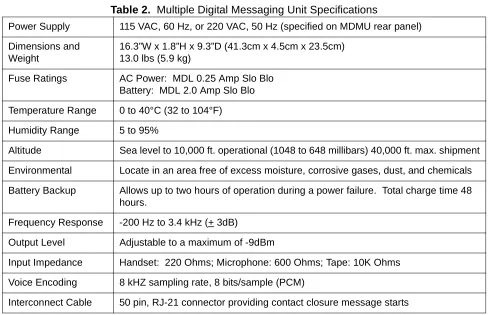
Table 2 lists the specifications for the Multiple Digital Messaging Unit.
Table 2. Multiple Digital Messaging Unit Specifications
TECHNICAL ASSISTANCE
When calling, have a VOM and a telephone test set available and call from the job site.
Call (800) 782-5266 and ask for PagePac Technical Support, or call (540) 427-6000 for Valcom 24-hour Automated Support or visit our websites at http://www.pagepac.com and www.valcom.com.
Should repairs be necessary, attach a tag to the unit clearly stating company name, address, phone number, contact person, and the nature of the problem. Send the unit to:
Valcom, Inc. PagePac® Repair Dept.
5614 Hollins Road Roanoke, VA 24019-5056
Power Supply 115 VAC, 60 Hz, or 220 VAC, 50 Hz (specified on MDMU rear panel)
Dimensions and Weight
16.3”W x 1.8”H x 9.3”D (41.3cm x 4.5cm x 23.5cm) 13.0 lbs (5.9 kg)
Fuse Ratings AC Power: MDL 0.25 Amp Slo Blo Battery: MDL 2.0 Amp Slo Blo
Temperature Range 0 to 40°C (32 to 104°F)
Humidity Range 5 to 95%
Altitude Sea level to 10,000 ft. operational (1048 to 648 millibars) 40,000 ft. max. shipment
Environmental Locate in an area free of excess moisture, corrosive gases, dust, and chemicals
Battery Backup Allows up to two hours of operation during a power failure. Total charge time 48 hours.
Frequency Response -200 Hz to 3.4 kHz (+ 3dB)
Output Level Adjustable to a maximum of -9dBm
Input Impedance Handset: 220 Ohms; Microphone: 600 Ohms; Tape: 10K Ohms
Voice Encoding 8 kHZ sampling rate, 8 bits/sample (PCM)