Comparative Study of Project Tracking and
Management Tools
Yakshi Makhija1 , Ankush Goyal2
1
M.Tech. Student, 2Assistant Professor,
Department of Computer Science, Shri Ram College of Engineering and Management, Palwal, Haryana, India
Abstract -The main objective of this paper is to provide the knowledge for project tracking and management in the qualitatively fulfilment of the project. Project tracking and management have the same weightage as any deliverable component does have in any project, lacking of which could lead the scrape of that project. Tracking of a project starts with its initiation and ends at post implementation of the project. It covers all the stages of the project life cycle. Perfect tracking and management may help to grab new projects to the organization. It helps in future enhancements of the projects.
Keywords:- Project, Life cycle of the Project, PTAM, Plans, Roles, Responsibility
1.INTRODUCTION
IT Industry is growing rapidly in this age of computers and robotics. In India itself, IT industry delivers millions of projects per year to the outer world. But its not only about to deliver the project in one go, its important to keep a track of each and every activity related to the project and to manage the project for its perfect delivery, the qualitative and the quantitative delivery.
2. PROJECT LIFE CYCLE
Every Project have its life cycle. There are multiple phases in the life cycle of the project.
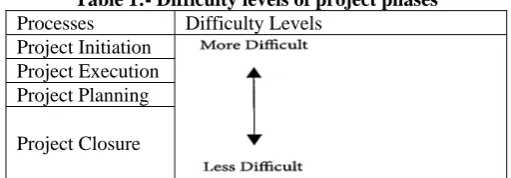
Below are the phases of a project life cycle and tabular expression showing the difficulty level of each phase:- 1. Project Initiation
2. Project Execution 3. Project Planning 4. Project Closure
Project Initiation is the most difficult level known as. Followed by project execution, phase 2, then project planning, phase 3 and project closure, the last phase is known as the least difficult.
Table 1:- Difficulty levels of project phases
Processes Difficulty Levels
Project Initiation Project Execution Project Planning
Project Closure
Above all, Project tracking and management(PTAM) goes hand in hand with all phases which is actually on of the main area to focus for 100% fulfilment of the project.
3. PROJECT TRACKING AND MANAGEMENT
Project Tracking refers project Management software, which actually automates the tracking of tasks and activities of different phases. Project tracking requires a balance of monitoring to ensure that you will achieve the results with in the time frame or not. By project tracking you may track simple milestones to ensure that your team have been reached up to what extents, or you might track the number of hours each resource has spent on a task and can calculate the associated cost.
Project tracking straight away refers project management and one of the major key component of project management is controlling. Project management software is frequently used by companies to assist in managing different phases of project life cycle. Project Management is the disciple of planning, organizing, and managing resources to bring about the successful completion of specific project goals and objectives. Without setting measurable goals and keeping track of various efforts and resources, project don’t stand a chance of seeing a successful completion.
Project Management is the skills, tools, and management processes required to undertake a project successfully. Project management comprises:
A set of skills. Specialist knowledge, skills and experience are required to reduce the level of risk within a project and thereby enhance its likelihood of success.
A suite of tools. Various types of tools are used by project managers to improve their chances of success. Examples include document templates, registers, planning software, modeling software, audit checklists and review forms.
A series of processes. Various management techniques and processes are required to monitor and control time, cost, quality and scope on projects. Examples include time management, cost management, quality management, change management, risk management and issue management.
4. MULTIPLE TOOLS OF PROJECT TRACKING
baseline) are identified and managed to keep the project within scope, on time, and within budget.
The section describes the tools and reports that are used to track and report the status of the project to all stakeholders. For the purpose of project tracking and management, there are various tools which are already used by multiple organizations and multiple can be developed to fulfill this requirement, which can keep track of multiple things like project scope, assumptions, dependencies, estimation, budget, resource planning, project development, testing, project delivery, closure.
4.1 Lighthouse
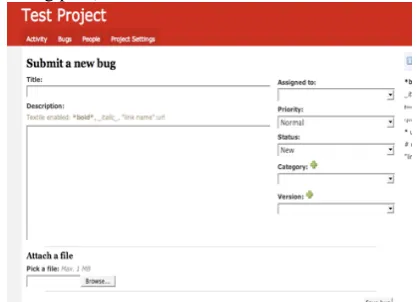
Lighthouse[1] is a bug- and issue-tracking app that tracks timelines and milestones, integrates with your email client and more. You can update tickets through your inbox, manage your beta testing (by making tickets and milestones public), integrate it with subversion and manage and prioritize your tickets.
Figure 1. Lighthouse
4.2 Springloops
Springloops[2] is another subversion browser that integrates project management. It counts a unique AJAX code browser and Basecamp(another tool) integration as among its features. You can add your source code by this tool to maintain your repository.
Figure 2. Springloops
4.3 CreativePro Office
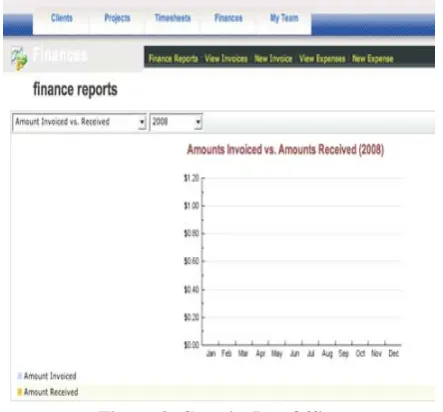
CreativePro Office[3] offers complete office management tools. CreativePro Office is completely free, setting it apart from the other apps here. Additionally, we can check our financial reports of the project timely.
Figure 3. CreativePro Office
4.4 Jumpchart
Jumpchart[4] is a website planning application that allows you to plan the navigation of your website by creating, dragging and dropping pages into the plan. You can also add text and formatting to pages and then export your CSS files and site map when you’re finished. We can add multiple pages to our project as per requirement.
Figure 4. Jumpchart
4.5 No Kahuna
Figure 5. No Kahuna
4.6 Basecamp
Basecamp[6] is often considered to be the best project management and collaboration platform out there. Its features are impressive: to-do lists, file sharing, message boards, milestones, time tracking, project overviews and commenting. The user interface is definitely one of the best out there, and because of its popularity, tons of other companies are making products that integrate with Basecamp, extending its capabilities.
Figure 6. Basecamp 4.7 Trac Project
Trac Project[7] is a project management app that is based on wiki functionality. It also includes a subversion browser, a timeline, ticket tracking, a road map (showing milestones and the number of current open and closed tickets) and builds status tracking.
One of Trac’s best features is the range of plug-ins available for it. There are plug-ins for Web administration, authentication, code documentation, file management, ticketing, testing, user management and version control. Another big advantage: Trac is free and licensed under a modified BSD license.
Figure 7. Trac Project
4.8 PBwiki
PBwiki[8] is one of the easiest free wikis out there to use. You can share files with other users, set access controls for individual pages and folders, add other users to your wiki, monitor and track version changes and more. Setup is quick and easy and can be done in less than a minute. The PBwiki interface is very intuitive, and there is virtually no learning curve. Creating folders and pages is straightforward, as is editing existing pages. You can also comment on each page, and get a printable version with a single click.
Figure 8. PBwiki
There are multiple themes you can choose from for the design, as well as templates for individual page content (or you can start from scratch). There are a few different plans available, both paid and free. The free plan allows from 1 to 3 users. Paid plans range from $4 per month per user (if you have more than 10,000 users) to $8 per month per user (for 4 to 999 users).
4.8 16Bugs
16bugs[9] is a very simple bug-tracking system. Its main advantage is the color-coding system used for different types of information (like updates, comments and closed tickets). Setup is quick and easy. The user interface is easy to figure out. Creating bugs is easy, and the color-coded labels on the activity tab make it easy to see what’s going on at a glance. There are a variety of account types available. The free account allows 1 project, 1 MB of storage and Basecamp imports. Starting at $8 per month, paid plans include more projects (3 with the Basic plan), 150 MB to 10 GB of storage, RSS and email notifications, Campfire notifications and SSL (starting with the $15-per-month Big plan).
4.10 JIRA
JIRA[10] is issue- and bug-tracking software that includes a lot of great features. It has advanced reporting features, workflow mapping as well as issue and project organizing; it is also customizable. JIRA’s biggest drawback is its pricing; it’s not cheap. A hosted account starts at $299 per month for up to 25 users and goes up from there (250 users costs $599 per month). If you want to download JIRA and host it on your own server, it starts at $1200 for a single project team, and goes as high as $4800 for an entire organization. If you need an academic license, solutions start at only $600.
Figure 10. JIRA 4.11 ActiveCollab
ActiveCollab[11] is a project management and collaboration tool that lets you set up a collaboration area right on your website. You can have unlimited projects, organized into groups for easy management. Collaboration features include file sharing, discussions, assignments, collaborative writing and reminders. Project management features include printing and exporting, time tracking, calendar and schedule functionality, ticket management and milestones. Plug-ins (modules) mean that activeCollab can be extended to suit your specific needs.
Figure 11. Activecollab
4.12 DimDim
DimDim[12] is a Web-conferencing platform that provides collaboration tools for meeting online. It’s scalable, reliable and flexible, with both hosted and on-site versions available. DimDim allows you to share your desktop with those you’re meeting with, as well as share and present documents (both PowerPoint and PDFs). You can also share Whiteboards, and it has built-in voice-over-IP and teleconferencing capabilities. There are public and private chat capabilities as well as annotation and markup tools.
Figure 12. Dimdim
There are free and paid plans available. The free plan offers the complete feature set, with support for meetings of up to 20 people. DimDim Pro offers the complete feature set, plus custom branding and up to 100 people in a meeting for only $99 per year. There is also an Enterprise-level package that includes all of the above but also allows simultaneous meetings with up to 1000 attendees for $1998 per year. 4.13 Vyew
Vyew[13] is a browser-based Web presentation service that allows for custom branding and PowerPoint-like authoring. With Vyew, you can give a live presentation or just post a document for your colleagues to review at their convenience.
Figure 13. Vyew
Features include real-time desktop sharing, whiteboarding and drawing tools, embedded comments, built-in voice over IP, free teleconferencing, built-in webcam video support, text chat, dedicated rooms and direct URLs and more. It’s a complete solution for Web conferencing.
4.14 Simply Invoices
Figure 14. Simply invoices
There are a few different plans available, including a free plan that includes up to five invoice templates and SSL support. Paid plans start at $9 per month (which includes up to ten invoice templates, plus a custom logo and link-free invoices) and go up to $25 per month (which includes an unlimited number of templates).
4.15 Less Accounting
Less Accounting[15] is a simple online accounting and invoicing program that is incredibly easy to use. Less Accounting has a variety of features, including proposal creation and tracking, mileage tracking, sales-lead management and expense tracking. You can import your existing Wesabe.com account, and you can even invite your CPA to look at your books. Less Accounting also sends a weekly email with an update on the status of your accounts.
Figure 15. Less accounting
There are a variety of account plans available, including a free plan. The free plan includes up to 5 invoices, expenses, sales notes, deposits, proposals, mileage logs each month, SSL encryption, reports and bank-account integration. The paid plans range from the Even Less plan at $12 per month (including invoicing, expenses, contacts, SSL encryption, technical support, deposits and reports) to the More plan at $24 per month (including everything in the Even Less plan, plus sales notes, bank accounts, proposals, mileage logs, bank reconciliation, support for multiple types of sales tax and more). A 30-day free trial is available for all plans.
4.16 Live Timer
LiveTimer[16] is an easy-to-use time-tracking program that works on both your computer and iPhone. It can be used for billing purposes or simply to improve your productivity and accountability.
Figure 16. Live timer
Features include a daily ledger, bulk time entry (by day or week), customizable classifications, multiple currencies, custom billing rates, intelligent report filters and a developer API. The iPhone integration makes it easy to track your time even if you’re not at your desk, making it more useful than many other Web-based time-tracking applications.
Pricing is cheap, at only $5 per active user per month. Qualifying non-profits get a 50% discount. There is a 30-day free trial available.
4.17 ForteenDayz
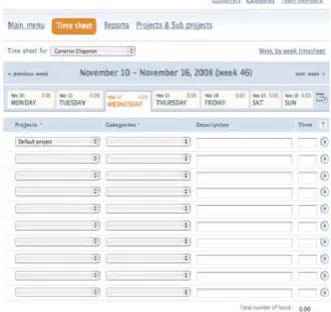
FourteenDayz[17] is a time-tracking program specifically for teams. It features day-by-day time sheets, exportable reports (in both PDF and Excel formats), drag-and-drop categories and no user limit.
There are 6 different plans offered, including a free account (which includes up to 4 active projects/clients, 10 project categories, an unlimited number of users and reporting functions). The paid plans range from the Personal at $5 per month (which includes the free account features plus up to 7 active projects/clients, 15 project categories, 30 project subcategories and PDF reports) to the Platinum at $99 per month (which includes all the Personal features plus unlimited active projects/clients, unlimited project categories and subcategories, XLS/CSV exportability and SSL connections).
REFERENCES
[1] Justin James, Tech Decision Maker, February 16, 2009, 10:00 PM PST // @justin_m_james
http://www.techrepublic.com/blog/tech-decision-maker/easily-manage-software-projects-with-lighthouse/794/#
[2] Kasia Mikoluk, March 28, 2014
https://www.udemy.com/blog/springloops/ [3] Jeff , 2010 http://www.mycpohq.com/ [4] https://www.jumpchart.com/
[5] Mike Gunderloy, Aug. 7, 2008
http://gigaom.com/2008/08/07/nokahuna-lightweight-project-management/www. nokahuna.com
[6] Zach Katkin March 1, 2013 https://basecamp.com/ [7] Edgewall , http://trac.edgewall.org/
[8] Pbwikinathan introduced in 2006 and later on huge work done by The PBworks Team http://www.pbworks.com/
[9] Michele Finotto and Wonsys S.r.l. © 2005-2007
http://www.xmarks.com/site/www.16bugs.com/ and http://www.16bugs.com/
[10] Atlassian, Inc. in 2002 https://www.atlassian.com/software/jira [11] Ilija Studen in 2006 and further shared with Goran Radulovic
https://www.activecollab.com/
[12] Dimdim, Inc. in year 2006 and Salesforce.com on January 6, 2011www.dimdim.com
[13] Team of UC Berkeley grads in 2005 www.vyew.com [14] Integrates with Basecamp
[15] Jacksonville, Florida as designer Allen Branch and developer Steve Bristol , 2006 www.lessaccounting.com
[16] http://www.smashingmagazine.com/2008/11/ 13/15-useful-project-management- tools/