Direct Touch-based Mobile Interaction with
Dynamic Displays
Abstract
An inherent obstacle in current mobile applications is the limited output capabilities of mobile phones. This paper describes a solution to this limitation which is based on a combination of a public display and Near Field Communication (NFC) technology. The public display (represented by a projection in the developed prototype) is augmented with a matrix of NFC tags whereby each tag is analogous to a touchable pixel on the display. A corresponding NFC mobile phone behaves as a „smart‟ stylus for interaction with the display. According to the user‟s interaction, dynamic feedback is projected onto the matrix of tags. A map-based tourist guide prototype was implemented which successfully demonstrates the feasibility of the concept. A user study analysed the usability of the interaction technique and elicited ideas for further development.
Keywords
Mobile interaction, direct, touch-based, public display.
ACM Classification Keywords
H.5.2 [Information Interfaces and Presentation]: User Interfaces – Input devices and strategies
.
Copyright is held by the author/owner(s). CHI 2008, April 5 – April 10, 2008, Florence, Italy ACM 1-xxxxxxxxxxxxxxxxxx.
Robert Hardy
Embedded Interactive Systems group Computing Department
Lancaster University, UK [email protected]
Enrico Rukzio
Embedded Interactive Systems group Computing Department
Introduction
Public displays are a popular concept with regards to ubiquitous computing [1]. When combined with mobile phones there is great potential for new interaction paradigms that can be explored using the input modalities (e.g. joystick and keypad) and sensory capabilities (e.g. NFC reader) of the phone. There are also further motives from both mobile interaction and public display perspectives. The emerging versatility and capabilities of mobile phones creates many new opportunities for mobile applications. However, current mobile user interaction can restrict developers from taking advantage of these opportunities. Mobile phones can access a mass of information though data services and are able to collect contextual information about the user and their environment. Unfortunately, a key limitation of these devices is the user‟s inability to manage a large amount of information at once [2]. Furthermore, installing dedicated hardware on a public screen for interaction can be expensive and susceptible to vandalism [3].
Several research projects have combined mobile interaction with public displays to create new interaction techniques for viewing information, exchanging multimedia and playing games.
The Point-and-Shoot technique uses visual codes for the implementation of point-and-shoot interactions [3]. However, a limitation to this interaction technique is that the code must be inside the phone display area at all times. This restricts the phone‟s movement away from the visual code when using image maps. It also demands that visual codes are displayed over the entire interaction area for reasonable coverage. Touch screens are the main competitors to touch-based mobile
interaction as they have finer input resolutions compared with the current implementation of our approach. However, in reality, most touch screen interfaces in the public sector have targets greater than 2.6 square cm [4]. In this instance, both the touch screen and touch-based input resolutions will be similar whilst the touch-based concept additionally uses the capabilities of the phone.
Vetter et al. [5] and Reilly et al. [6] explored novel touch-based interaction and both focued on the potential of different interaction techniques and feedback styles. Reilly experimented with a matrix of RFID tags augmented to a paper map and Vetter used the same concept but used a dynamic display and NFC tags. NFC tags store 1/4 Kbytes of data, require no power source, are low cost and have a read/write range of 0-5 cm [7]. The concept of using touch-based interactions can be explored further by investigating further types of direct manipulation interactions and feedback in an application with richer functionality.
Hardware and Design of the Prototype
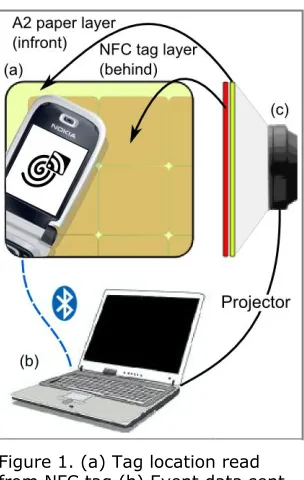
Figure 1 shows the hardware consisting of five parts: a 6131 Nokia NFC phone, a 10x10 matrix of Mifare NFC passive tags, an A2 scale paper layer for the tags, a laptop and a projector. The tags used were circular with a diameter of 40mm. The phone reads tags sequentially using inductive coupling with a read/write range of a few centimetres. Each tag had its location in the matrix pre-stored - ready to be read by the phone. User interactions are executed using the phone and events were sent to a laptop (playing the server role). The server processes actions received from the phone, updates the state of the system and provides visual feedback of the state change using the projector. A thin Figure 1. (a) Tag location read
[image:2.792.23.175.113.353.2]paper layer covers the tag matrix for projection clarity. Because this layer covers up the location of the tags, a virtual, semi-transparent tag overlay is projected onto the paper. With this setup the following interactions were explored:
Hovering – Using the hovering technique, a phone can be moved within read range of a tag and additional information about a tag is displayed on the phone screen.
Selection – When a tag is hovered, the user can press a specified key on the phone to select the tag. Only a single tag can be selected at a time.
Multi-selection – If the user holds the key they are able to select multiple tags.
Polygon-select – Polygon points can be plotted by holding a specified key and touching the appropriate tags. When the key is released, the tags inside the polygon area are selected.
Pick-and-drop – Items selected are „picked up‟ using the phone and can be dropped elsewhere on the screen.
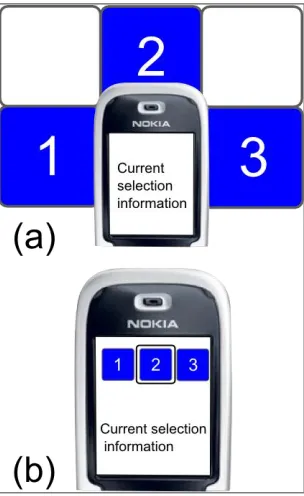
Context menu – There were two designs for the context menu shown in Figure 2. Design (a) displays the context menu on the public display around the phone. Design (b) displays a context menu on the phone. Using the phone‟s directional keys, different options can be selected. With design (a) there is also the problem of occlusion caused by the phone and by the options occluding the surrounding area. Design (b) was chosen to avoid occlusion and interaction is very
similar to menus on most phones and for that reason intuitive.
Remote Clear – This interaction de-selects any currently selected tags remotely. Incorporating remote interactions into the prototype reduces arm fatigue which builds with prolonged use with pointing interactions.
The tags in the system were designed around the concept of JButtons [8] for Java Swing applications. Using tags, a user can add several listeners to them so their changes can be handled in multiple ways. They can undertake a broad range of varying roles
supporting text, graphics, location and size parameters. Creating a tag with similar behaviour to a JButton will help developers quickly familiarize themselves with the tags.
A custom event model was implemented for the prototype. The event model would serve events sent by the phone. An event-driven approach suits the direct manipulation paradigm and allows events to be handled using a number of event handlers depending on the state of the system. The event model is abstract and extensible making it easy for developers to create new types of events or change the way events are handled. The abstract functionality deals with tag selection state and tag overlay feedback. The model can simply be extended with new handlers and listeners which are customized to the specific needs of their application.
[image:3.792.23.175.120.368.2]The phone display is used to show complementary information to the user. Additional help information is displayed when particular tags are hovered in cases where the tag represents a particular option. Haptic Figure 2. Two different designs for
feedback forces the user to look at the phone display in response to an event such as alerting the user that help is currently displayed on the phone. Haptic feedback is also used for more assertive feedback on tag selections in conjunction with audio feedback. Audio feedback alerts the user of possible errors during interactions.
An advantage over touch screen systems is the use of the phone display to contrast between public and private information. Sharp et al. [9] highlight privacy issues with public screens and describe the “shoulder-surf” - a method attackers use to obtain user
credentials. Sensitive information such as user
passwords and possible account or address information can be displayed on the phone display and could also be input using the phone keypad privately. Using the phone‟s storage capability, data can be taken away from the public screen such as contact details or pictures. The argument is that a touch screen system supports transmission of data but does not do so with the same level of transparency.
The Prototype Application
The prototype application is a tourist guide shown in Figure 3. Using the application the user is able to view information about places of interest (represented by markers on the map) and build an itinerary of places they would like to visit. There were three types of markers: restaurants, hotels and events. A Google map of the area allows the user to perform zooming/panning operations and a side menu can be toggled on or off remotely. Figure 4 shows a screenshot of the display and side menu. Help information is displayed on the phone when each menu option is hovered. Each menu option consists of two tags which increases the option target area. The menu provides a map key as the top
menu option; this information is displayed on the phone when hovered and indicates what each marker icon represents. The second option down changes the application mode to „view mode‟. In this mode the phone assignments change for viewing and panning the map. A satellite display also appears on the phone to show the user‟s position when they are zoomed into the map. The third menu option toggles the map satellite imagery on or off. The fourth menu option provides itinerary functionality. When this option is hovered, the user can add markers to the itinerary which have previously been picked up by the phone. The itinerary can be viewed publicly or privately on the phone by pressing an alternate phone key. The final menu option allows markers to be filtered by category, for example, filtered to show only restaurants.
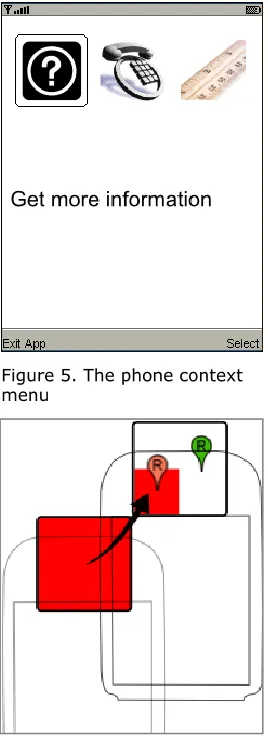
When a tag containing a marker is hovered, the phone display shows additional information about the marker such as name and rating. Whilst hovering, the user can press a key on the phone to enter the context menu corresponding to the marker (see Figure 5). The context menu options allow extra information to be retrieved from the marker, retrieval of a VCard from the marker and a distance calculation to another marker. If a tag is selected which contains markers then these markers are also selected. Selected marker names are displayed as a list on the phone display. The phone additionally vibrates to indicate that the user has picked up markers onto the phone.
Tag Granularity
[image:4.792.34.179.119.300.2]A key reason for adopting a map application is to address the course granularity issues of the current implementation. In the case of the prototype there could be multiple markers contained in a single tag. Figure 3. The prototype with three
[image:4.792.35.188.347.502.2]selected tags and one selected marker
There were a number of ways to address the granularity problems.
One solution is to use touch-based gestures. A gesture upwards towards the marker will select the bottom half of the tag where the marker is located. Figure 6 shows a diagonal gesture which selects a smaller, quarter portion of the tag. However, using the gestures, the granularity is still relatively large. In addition, the feasibility of the design will be questionable when gestures have to be made at the edges of the display. Another method would be to iterate over the markers using repeated pressing of a phone key. The advantage of this method is that the markers can be selected without concern over marker separation as input resolution does not apply. The only downfall to this approach is if there are many markers in a single tag, the iterations would be time consuming in a worst case scenario. A different approach would be to display a list of the markers contained in a single tag on the phone. This could be a checkbox list so the user can tick the markers they wish to select. The advantage of a list is the user can iterate from the beginning or skip to the end which makes selection quicker than the previous iteration method in a worst case scenario. Another approach is to assign each marker a number; the user can then select a marker by pressing the corresponding number on the phone keypad.
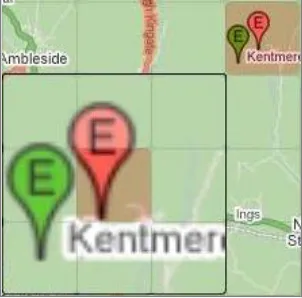
The chosen approach was to enlarge a tag by a scale of three into nine tags. This approach would increase the resolution of the tags and should be the most intuitive approach as normal tag interaction can be adopted in the enlarged area. If multiple markers remain within a single tag once the tag has been enlarged then the iteration method could be used. Using both
enlargement and iteration methods, the number of iterations required will be much smaller - probably two or three maximum. Figure 7 shows a diagram of the enlarge concept. When a tag with multiple markers is selected, the enlarged area appears. The enlarged area is offset in a direction where it will appear fully within the bounds of the display. The centre point of the tag is translated to the centre of the enlarged area. The marker offsets from the centre of the tag are mirrored with the centre of the enlarged area and multiplied by three (in keeping with proportion to scale).
The User Study
The user study was aimed at discovering the usability of the interactions and feedback techniques. It also studied the potential for the interaction techniques in a rich application.
A group of ten subjects (nine males, one female) were chosen to take part in a within-groups, cooperative evaluation. The subject group average age was 25 and each subject was asked to complete various trials. The first trial was to build an itinerary for the day. This trial involved various interactions and was used to
understand the extent to which each subject can perform a relatively rich task using the prototype. The next trial requested the user selects a number of markers which could be executed in a number of ways and will identify their interaction preference for particular interactions.
The user study was predominantly qualitative and comprised mainly of observations and subject feedback comments.
[image:5.792.27.161.119.492.2]Figure 6. A diagonal gesture which selects the bottom-left quarter of the sought tag
The main usability problems occurred during hovering interactions. Some of the subjects held the phone too high as they did not know NFC reader was near the tip of the phone. As a result the adjacent tag above was selected. Also, because a flip phone was used, in some cases the phone would fold in if it touched the display with too much force. It also became apparent that in some cases the phone display was too detailed. Users reaching to a far area would not be able to read small font on the display. The display should be used more effectively using large icons and concise text.
Each subject started hesitantly but quickly reached an autonomous and comfortable level. Many subjects enjoyed tentative interactions (such as hovering markers) and the contextual help provided. Subjects also liked the fact that the main display could be kept clear using concepts like the disappearing side menu. Subjects were pleased with the effect of the haptic and audio feedback to validate actions such as closing the application and selections. Many subjects commented that they thought the list of markers and satellite view on the phone display complemented the public display very well.
Table 1 shows the preliminary tag selection times that were recorded to compare the ideal selection speed and the selection speed supported by the prototype. Two types of interactions were tested, pointing to each corner of the display and scrolling down ten vertical tags. Results showed the prototype could not support ideal scroll times; however, pointing interactions can be easily supported. The polygon-select interaction takes advantage of this fact and is considerably more usable than the equivalent lasso interaction. The time taken for the user to move their arm between tags draws the
user‟s attention away from the short delays in tag reading response. Moreover, as the user brings the phone down onto the tag, the phone will detect the tag a few centimetres before it hits the display. This makes the response time appear reduced.
Table 1. Mean user study timings in seconds
Subject responses to the effectiveness of the different types of feedback were positive. On an interval scale between one and five (very ineffective – very effective) the public display mean effectiveness was 4.1, the phone display was 3.6 and the audio and haptic was 4.0.
Conclusion
The project has made significant progress in exploring the potential for touch-based interaction. By using the phone display, storage, audio and haptic features the phone becomes much more than a „dumb‟ pointing device. The prototype has also uncovered some important points to be considered for future
development. For example, pointing interactions work much better than scroll interactions and careful consideration must be made to how the phone display is used in the interactions. Information on the phone display must be eye-catching and viewable from arm‟s length. The project has also uncovered necessity for multiple tag reading and experimentation with finer granularity tag matrices. These improvements will provide finer granulation for input and faster tag response times.
Scroll
[image:6.792.27.178.121.270.2](ideal) Scroll (actual) Corner (ideal) Corner (actual) 4.17 8.89 4.12 3.93
Acknowledgements
This work was performed in the context of the MULTITAG project [10] which was funded by DoCoMo Euro-Labs.
References
[1] Seokhee Jeon, Jane Hwang, Gerard J. Kim, Mark Billinghurst. Interaction Techniques in Large Display Environments using Hand-held Devices. Virtual Reality Software and Technology, Limassol, Cyprus 2006.
[2] Ka-Ping Yee. Peephole Displays: Pen Interaction on Spatially Aware Handheld Computers. CHI 2003, Ft. Lauderdale, Florida, USA.
[3] Rafael Ballagas, Michael Rohs, Jennifer Sheridan, and Jan Borchers. Sweep and & shoot: Phonecam-based interactions large public displays. CHI 2005 Extended Abstracts, New York, NY, USA.[4] M. C. Maguire. International Journal of Human-Computer Studies. Academic Press, Inc. Duluth, MN, USA. March 1999
[4] M.C. Maguire. A review of user-interface design guidelines for public information kiosk systems. Academic Press, Inc. Duluth, MN, USA. March 1999 [5] Johannes Vetter, John Hamard, Massimo Paolucci, Enrico Rukzio, Albrecht Schmidt. Physical Mibile Interaction with Dynamic Physical Objects. Demo @ MobileHCI 2007, Singapore.
[6] Derek Reilly, Michael Welsman-Dinelle Colin Bate, Kori Inkpen. Just point and click?: using handhelds to interact with paper maps. Mobile HCI 2005, Salzburg, Austria.
[7] User Guide for Nokia NFC shell. 2005.
http://www.nokia.com/NOKIA_COM_1/Operators/zz_N okia_NFC/Document_Centre/nokia_nfc_shell_ug_en.pdf
[8] JButton Class
http://java.sun.com/j2se/1.4.2/docs/api/javax/swing/J Button.html
[9] Sharp, R., Scott, J., Beresford, A. R. Secure Mobile Computing Via Public Terminals. In Proc. Pervasive‟06. Springer. 238-253. 2006
[10] The MULTITAG Project