© 2017, IRJET | Impact Factor value: 5.181 | ISO 9001:2008 Certified Journal
| Page
1378
HPC Cloud Burst Using Docker
Khandave Devendra
, Kumbhakarn Swati, Kulkarni Shruti, Janbandhu Shreejeet
Pune Institute of Computer Technology,Department of Computer Technology, Pune University
Pune,India
---
---Abstract -Cloud Bursting is an application model in which an application runs in a private cloud or data center and burst into a public cloud when the demand for computing capacity spikes. High Performance Computing (HPC) application require system with environments for maximum use of limited resources to facilitate efficient computations. However, these systems are faced with a large trade-off between efficient resource allocation and minimum execution times for the applications executing on them. Also, deploying applications in newer environments is exciting. To alleviate this challenge,container-based systems are recently being deployed to reduce trade-offs. Here we investigate container-based technology as an efficient virtualization technology for running High performance scientific applications. We select docker a a container based technology. Docker is a tool designed to make it easier to create,deploy,and run applications by using containers. Containers allow a developer to package up an application by using containers. Containers allow a developer to package up an application with all of the parts it needs.In this project, we are trying to deploy the container(docker)consisting web applications from private to public cloud securely under the situation when overload occurs.
KeyWords Docker, Distributed System, Security,
Storage,Virtualization
1.INTRODUCTION
In these recent years, virtualization technologies have been adopted to support efficient scientific computations and high performance applications. Correspondingly, there have been diverse Cloud Management Platforms (CMP) which provision and manage various computing resources. At the infrastructural level, platforms like OpenStack are mostly used to provision and manage both private and public cloud platforms with their processor, storage, and network resources. These aforementioned middleware systems developed on the basis of hypervisor (HPV) virtualization technology however, require the installation of Guest Operating Systems (Guest OS) for
each virtual machine (VM) created. This approach requires memory resources and slows down overall execution times of applications. Containers on the other hand, do not require Guest OS thus are more light-weight compared to hypervisor-based virtualization technologies.
Using Docker container-based systems, we demonstrate that the light-weight feature of container-based virtualization compared to hypervisor-based virtualization reduces the overall execution times of HPC scientific applications due to approximately zero start-up time when launching containers. . We also demonstrate that even though the most utilized resource in the Docker container-based system is main memory (RAM), Docker manages memory resources efficiently hence creating a stable environment for HPC applications. We are trying to reduce the level of effort and time required to deploy the applications. Docker containerization environment coupled with automatic configuration and deployment modules allow quickly-deployable ,easily reconfigurable solutions.
2. RELATED WORK
2.1Docker Container VS virtual machine
1. Container has less Overhead- At best, you could run may be fifty VMs on the top of the single physical host and you need a powerful server host to get to even that number. But because container have less overhead you could run hundred on the single host.
2.Containers are easy to work with-One of the coolest thing of docker container is the way you can pull and run a container image in a few.You could also download and set up a VM image from the internet but that process is not stream lined.
3.Containers are more standardized-There are multiple VM platfroms each with its own way of doing things.Being an expert VMware does not necessarly qualify you to work with KVM but with conatiners ,dockers dominance and open container initiative have help to standardlized the entire container stack.
© 2017, IRJET | Impact Factor value: 5.181 | ISO 9001:2008 Certified Journal
| Page
1379
which are only partially ao not at all open. In contrast platform such as docker are completely open source that makes containers the better choice if you are worried about vendor lockin.
2.2 Docker Container
Docker is a tool easier to create,deploy and run application by using containers. Containers allow a developer to package up an application with all the parts it need, uch a librarie and other dependencies and hip it all out as a package. By doing so, thanks to the container, the developer can rest assured that the application will run on any other Linux machine regardles of any customized setting that machine might have that could differ from the machine used for writing and testing the code.
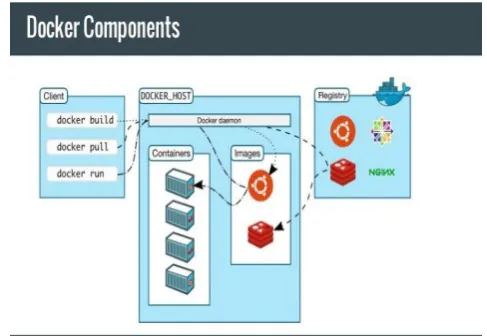
[image:2.595.42.286.430.598.2]In a way docker is a bit like virtual machine. But unlike a virtual machine, rather than creating the whole virtual operating system, Docker allows applications to use the same linux kernel as the system that they're running on and only requires applications be shipped with things not running it on host computer. This gives a significant performance boost and reduces size of application. And importantly docker is a open source. Thi means that anyone can contribute to Docker and extend it to meet their own needs if they need additional features that aren't available out of the box.
fig 1. Docker Components
Docker daemon-The docker daemon runs on host machine.The user uses the docker client to interact with the daemon.
Docker Client-The Docker client, in the form of the docker binary, is a primary user interface to the docker. It accepts commands and configuration flags from the user and communicates with docker daemon. One client can even communicate with multiple unrelated daemons.Inside DockerTo understand docker's internal, you need to know about images, registries and containers.
Docker images-A Docker image is a read-only template with instructions for creating a docker container. For example,an image might contain an ubuntu operating systemwith Apache web server and your web application installed. You can build or update images from scratch or download and use images created by others.An image may be based on,or may extend one or more images. A docker image is described in text file called a Dockerfile, which has a simple, well-defined syntax. For more details about images, Docker images are the build component of Docker. Docker Container-A Docker container is a runnable instance of a Docker image. You can run,start,stop,move or delete a container using Docker API and CLI commands. When you run a container, you can provide configuration meta data such as networking information or environment variables. Each container is an isolated and secure application platforms, but can be given access to resources running in a different host or container, as well as persistent storage or databases.
Docker Registery-A docker registry is a library of images. A registry can be public or private, and can be on the same server as the Docker daemon or Docker client, or on a totally separate server.
2.3 Docker Hub
Docker Hub is a cloud hosted service that provides registry capabilities for private and public content. Collaborate effortlessly with the broader Docker community or within your team on key content, or automate your application building workflows. Docker stores downloaded images on the Docker host. If an image isn’t already present on the host then it’ll be downloaded from a registry: by default the Docker hub registery.
[image:2.595.309.562.529.667.2]
fig 2. Docker Hub Login
© 2017, IRJET | Impact Factor value: 5.181 | ISO 9001:2008 Certified Journal
| Page
1380
Fig 3. Pushing Image On Docker Hub
If you don’t yet have a Docker ID, you can You can search Docker Hub and pull images without an account and without signing in. However, to push images, leave comments, or to star a repository, you need to log in using a Docker ID. Once you have a personal Docker ID, you can also create or join Docker Hub Organizations and Teams.
3. A MODEL FOR DEPLOYING DISTRIBUTED APPLICATIONS ON DOCKER
Many types of applications can be configured with different approaches depending on each virtualised architecture. For example, VMs as the hypervisor-based instances have full components provided by hypervisor layer, i.e hardware, OS, libraries. Hypervisor has to deploy an entire OS and filesystem in each virtual machines. This results in the overhead of emulating OS and libraries when generating a large range and number of Virtual machines. As the advantage of VMs is isolation, its disadvantage is overhead when running applications. This feature is also one of problems that developers have to consider in PaaS field . of problems that developers have to consider in PaaS field . Based on the container-based architecture, Docker is a platform supporting containers that can share the same OS kernel and related libraries. In further, Docker containers can share common files because their images are constructed from layered filesystems . When running a job, each container is assigned a unique PID, it can be observed equivalently as a process at the view of host machine. Through these characteristics of Docker, we deploy applications that share the same dependencies, essential libraries under the host machine.This method is available for solving scalable problems andportable computations because we can reduce remarkably theoverhead, when comparing to VMs.. Normally, VMs
provide a com-lete environment which supports multiple users as well as applications. VMs emulate the hardware and full OS along with individual libraries. Hence, we have the same way to configure distributed application on VMs and host system. We need to install and configure applications, libraries inside each virtual machine to execute as a cluster. In contrast to Vms, we exploit the sharing ability of Docker with host OS kernel to deploy applications. Each Docker container does not need to set up a whole OS or image with related libraries, they can share the same binaries and libraries during executing.
Dockers architecture uses client-server model with three main components including: Docker image, Docker registry and Docker container. A container is created from a Docker image and it then creates a read-write layer on top of image using union file system (UnionFS). Union file system allows Docker image divide into many layers. When containers run, UnionFS creates a writable layer on the top and we use this layer to update into a new image. Typically, the libraries and environment variables under host are mounted to this new image, meanwhile, running containers. There is only our application on Docker container, the required libraries can share with host OS. Our applications run on Docker container with these advantages that make system more lightweight and faster. This is a model which we propose to deploy distributed applications on Docker container.
4. SYSTEM OVERVIEW
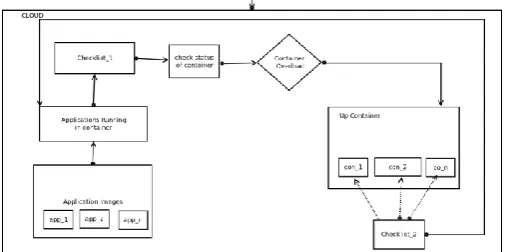
[image:3.595.309.562.612.738.2]System overview describes the flow of system.Here initially web application are created and then it image created. Later that image can be uploaded on docker hub so it can be easily transferred from on sytem to another system.
© 2017, IRJET | Impact Factor value: 5.181 | ISO 9001:2008 Certified Journal
| Page
1381
On cloud initally docker is installed.then we created the images of web apps and run it on the docker conatiner. We set the threashold value. Later we check the memory status of the container I.e cpu usage,memory usage If the status exceeds the threshold the we need to up the next container.We create the checklist1 which list the set of running container with less memory usage. when container exceeds its memory usage it ups the new container from checklist1 and transfer the application to new application .While transferring the application or process to new container it is necessary to check whether the application is properly transferred to new container and running properly or not.
When multiple containers are running and if particular container ends with its task then we need to down the container by stopping it.Hence we maintain the memory and detect the overload using docker container. We also maintained load balancing by moving the applications from one container to other..
5. IMPLEMENTATION
As we have studied and proposed various techniques to address the overloading of storage we now turn our attention to detail implementation to start up with our implementation. Private cloud is been accessed where dockerAAA acts as a host. Initially we installed the docker on cloud. Following image shows the installation of docker :
As we know that docker may consist of multiple containers, we moved the ubuntu image into the docker container. While moving the image various techniques were addressed but SCP mechanism was efficient for transferring the image files to the container. Later we installed and moved the applications in it and run the applications. The applications which were deployed in the container were saved using the commit mechanism used in the docker.
Now we need to transfer the container from private cloud to another machine in such a way that it will not need any configuration to run the applications on that machine. So, initially we pushed the ubuntu image which includes complete configuration and web-apps on docker hub. After uploading the image on docker hub we need to pull it over local machine which successfully transfer the image from cloud to local host.
As we have already discussed docker may contain multiple containers and each container may contain multiple applications. We can see the status of each running container i.e. memory used, up time etc. For that docker stats mechanism was used.
UP THE CONTAINER IN CASE OF OVERLOAD
© 2017, IRJET | Impact Factor value: 5.181 | ISO 9001:2008 Certified Journal
| Page
1382
previously overloaded container becomes free,then the running process will be transferred to previous container
DOWN THE CONTAINER:
When overload occurs we up the container and move to new container. But when we transfer the load to another container the previous overloaded container is closed is termed as down the container. To down the container we need to maintain the list of free docker. Also we need to check the container which was initially overloaded and now it is free to use. But to down the container does not mean to stop the running processes belonging to specific container. When we down the container, container should be stopped but the process should be running. If we down the container and processes gets stop then task will remain incomplete.Hence we are transferring the running process to another free container to maintain overload.
5. CONCLUSIONS
Hence,in this project we have achieved high performance computing by using the concept of docker. We also maintained load balancing by moving the applications from one container to other. From our results, container-based systems are more efficient in reducing the overall execution times for HPC applications and have better memory management for multiple containers running in parallel. We conclude that Container-based systems are more suitable for HPC applications. In the future, we will try to move the container from private cloud to public cloud in case overload on private cloud.
REFERENCES
[1] Abhishek Gupta, Laxmikant V. Kale,Filippo Gioachin, Chun Hui Suen, Bu-Sung Lee, “The Who, What, Why, and How of High Performance Computing in the Cloud”,978-0-7695-5095-4/13 $31.00 © 2013 IEEE DOI 10.1109/CloudCom.2013.47.
[2] Theodora Adufu, Jieun Choi, Yoonhee Kim , “Is Container-Based Technology a Winner for High Performance Scientific Applications?”, NRF-2013R1A1A300786,Copyright 2015 IEICE.
[3] Arwa S. Fadel,Ayman G. Fayoumi, “CLOUD RESOURCE PROVISIONING AND BURSTING APPROACHES”,978-0-7695-5005-3/13 $26.00 © 2013 IEEE DOI
10.1109/SNPD.2013.2
[4] Ayush Dusia,Michela Taufer,”Network Quality of Service in Docker Containers”,978-1-4673-6598-7/15 $31.00 © 2015 IEEE DOIn 10.1109/CLUSTER.2015.96