Developing Cross Platform Secured Mobile Widgets
using Subject-Role based Access Control Mechanism
Asha Kokil
Department of Computer Science & Engineering, University of Mauritius,
Reduit, Mauritius.
Leckraj Nagowah
Department of Computer Science & Engineering, University of Mauritius,
Reduit, Mauritius.
ABSTRACT
Widgets are simple, self-contained applications, typically with a single purpose. For years, they've existed on desktop computers to provide information in a user-friendly manner, like offering weather reports and newsfeeds but now that's old news. Widgets are rapidly moving to mobile phones, and business people are salivating at every opportunity to develop these mobile applications either as a new business venture or to increase value of their products. However current situation demonstrates that fast rising demand of mobile widgets is causing the widget market to become fragmented. Thus, vendors are providing widgets which are not interoperable across platforms; resulting in duplication of work, increased time and cost of development to make them run everywhere. To alleviate the situation, several standardizing bodies are working towards write-once-run-everywhere widgets. This paper drills down to different standardization approaches, and shows how widgets can be made interoperable across mobile platforms using W3C standards. An important contribution is also brought to the subject by introducing a subject-role based access control mechanism, which makes the interoperable widgets more secure, thereby improving user confidence along with user experience.
General Terms
Mobile Computing
Keywords
Cross Platform Development, Mobile Widgets, World Wide Web Consortium (W3C), OMTP BONDI, Joint Innovative Lab (JIL)
1.
INTRODUCTION
The mobile industry started its journey in year 1973 and witnessed 39 years of drastic transformations which have revolutionized the world. Though the journey of mobile phones started with the mere idea of communication device, today it has transcended all barriers to become a widely used mobile computing platform that can provide users with unlimited information and services at the right place and the right time. Nowadays the mobile market is developing swiftly, and widgets are creating a hype wave in the industry. The concept has made its own way – single purpose, mini applications, while nice-to-have on PCs, but must-have on mobiles. There is plenty of demand for widget-driven solutions on mobile devices. In order to respond to these rising demands, the market of mobile platforms is becoming fragmented mainly due to the number of mobile operating systems and programming languages that can be used for mobile development. As a result, mobile developers are using platform specific tools to program applications that run on specific mobile platforms [1]. However this practice is leading to increased costs for supporting applications on
different platforms. The cost factor and need for shorter development processes have therefore driven the necessity to innovate towards cross platform solutions, where widgets can be coded once and made to run everywhere, thus giving rise to the concept of write-once-run-anywhere widgets [2].
2.
LITERATURE REVIEW
World Wide Web Consortium (W3C) defines widgets as “interactive single purpose applications for displaying and/or updating local data or data on the Web, packaged in a way to allow a single download and installation on a user’s machine or mobile device”. Widgets can be organized in three main categories namely desktop, web and mobile. Each category of widget requires an intended runtime environment for the widget to execute, known as widget engine [3].
Widget engines act as an intermediary between the widget and the Application Programming Interfaces (API) which access device specific capabilities [4]. They provide widgets with the required interfaces to be able to communicate with the underlying platform. Widget engines tend to imitate the behaviour of web browsers such that HTML pages are rendered by abiding to the CSS and JavaScript instructions [3] defined on the page.
Currently widgets and widget engines are platform-specific, i.e. they do not run on all platforms. To make widgets interoperable, three different standardizing bodies are being analyzed for this paper: World Wide Web Consortium (W3C), OMTP BONDI, and Joint Innovative Lab (JIL). All three are critically evaluated based on a rating system against specific criteria.
2.1.1
Widget Packaging and Configuration
W3C requires no special tools to build a widget package [5]. W3C recommends a widget package to be a ZIP archive file, bearing extension WGT. The ZIP archive can support a number of file formats, but should mandatorily comprise of a default start file and a configuration document. BONDI also makes use of the W3C Widget specifications, which were defined with the help of OMTP [6]. As declared by Sachse [7], JIL is also based on that recommendation.
So an overview of the criterion, Widget Packaging and Configuration, shows that all three standards are aligned across the same practices, which are based on W3C. So W3C is the best practice that has got as followers BONDI and JIL.
2.1.2
Security Infrastructure and Device API
complementary efforts which take care of the shortcoming of W3C. BONDI focuses on two main concerns namely Device API and security framework [7]. It defines a security policy language, based on OASIS Extensible Access Control Markup Language (XACML), for widgets. OMTP BONDI also exposes APIs to govern access to device features. Of course BONDI greatly relies on W3C Widget Family of Specifications for general functionalities but the eleven additional APIs improve secure access to device functions [4]. JIL widget platform also defines its APIs that are invoked using JavaScript language [8]. To support the emerging W3C standards, JIL is contributing its widget API specification to the W3C to allow for an open mobile development platform [7]. As a result, W3C is not the leading standard where device API and security are concerned. BONDI has moved ahead with the number of APIs exposed and the security policy framework. JIL has also progressed relatively better in these aspects, but the progress is medium, when aligned to that of BONDI.
2.1.3
Maturity of standards
The three standards that have been taken into consideration have different maturity levels. Overall, W3C has a well defined maturity structure with its specifications gaining much popularity. As for BONDI, it has its own specifications and is contributing to W3C family of specifications. However JIL hides its specifications, which makes it difficult to evaluate its maturity. Nevertheless it is worth noting that BONDI and JIL are undergoing formal releases of its specifications, while W3C is still in its draft state. However though formally released, specifications might not necessarily become standards.
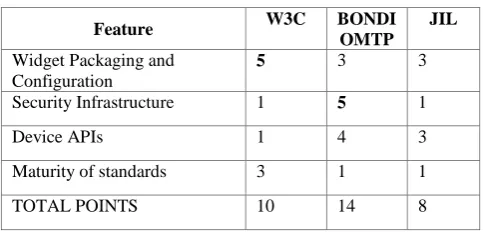
[image:2.595.48.290.492.608.2]After going through the different criteria, different ratings are allocated to each standard, with respect to each criterion. The rating system is based on points. Out of a total of five points, each standard is rated from one to five, where one is the least scoring and five is the most scoring.
Table 1. Rating of standards Feature W3C BONDI
OMTP JIL
Widget Packaging and Configuration
5 3 3 Security Infrastructure 1 5 1
Device APIs 1 4 3
Maturity of standards 3 1 1
TOTAL POINTS 10 14 8
Based on the rating system, the strong areas have been identified on the different platform standards. These strong points help to formulate the requirements of the proposed work.
3.
DESIGN ISSUES
Amidst the rapid rise of widgets and widget engines rest a number of issues for mobile users, developers, and vendors [9]. Widget engines on different platforms face similar challenges and attempt to provide equivalent implementations to overcome the challenges. However the rapid growing popularity of widgets and the associated revenues are forcing vendors to create new innovative products for product/service
wide range of technologies in use is widget engine incompatibilities. Thus a severe limitation of current propriety widget is that it is not possible for a user to run a widget developed for one widget engine onto another widget engine without significant medication to either of them. Thus these incompatibilities prevent widget from being globally ubiquitous and thus contradicting the concept of cross-platform [4]. Caceres [9] and Mendes [4] describe different areas for incompatibilities.
3.1
Development
Development refers to the way in which widgets on built on a set of technologies, by combining HTML, XML, CSS, images, sounds, and ECMAScript. The main concern with widget development is the variation in programmatic control provided by widget engine. The way widget engines handle requests and provide functionality is different across engines. This result in vendor lock-in situation where users cannot run widgets intended for one platform on a different one.
3.2
Packaging, Distribution, and
Deployment
Widgets are available in packaged format on the galleries. Packaging a widget means embedding all the necessary resources and metadata used by the widget into a single file for distribution and deployment. W3C standards specify that widgets should be packaged in ZIP format. Once widget is packaged for distribution it is served with an appropriate media type, which refers to the kind of data contained in the resource and obeys format content-type: content-type/sub-type, where sub-type is usually the file format. The widget engine then registers the media type and the file system to be associated to it. This helps web browsers to automatically attempt to instantiate widgets on appropriate engines. However incompatibilities around packaging conventions include: inconsistent file extensions, inconsistent internet media types, undefined Zip specifications, inconsistent packaging structure.
3.3
Security
Security refers to how users can be kept safe from malicious widgets. The scope of security among widgets deals mainly with access control. However various incompatibilities exist as to how security policies should be enforced by engines to control actions instantiated widgets are able to perform, e.g. read, writes, modify, and delete files, access to networks, etc… There is currently no standard security model defined for mobile widgets.
3.4
Configuration and Metadata
Widget packages include a configuration file which contains metadata and configuration parameters for a widget. Metadata refers to how authors store information about the widget. An evaluation of widget engines show that XML is used for configuration files [10]. However there is an inconsistency reigning about what exact information and structure of information the author should be recording. Furthermore there is no standardized manner to identify version of widget, thus making it difficult to manage releases.
3.5
Internationalization and localization
and resources for different languages are placed in predefined directories. However the inconsistency in packaging structure used on different engines cause a problem.
3.6
Device-independence
Device independence refers to the ability of widgets to run on different devices. There are multiple factors that obstruct this independence: differences in screen resolution, inconsistent use of local file system, and access to platform specific capabilities.
To resolve the different incompatibilities discussed above, there have been numerous attempts to standardize various aspects of a widget and overcome the fragmentation of widget market. Caceres [9] defines standardization as follows: “Standardization is a process whereby competing entities and other interested parties collaborate on the creation and ratification of a standard that defines how products are supposed to interact in the form of a specification.”
4.
SYSTEM ARCHITECTURE
Standards have defined specifications to help resolve the incompatibilities across widgets and widget engines. The best practices of these specifications have been used to propose a design which will allow creation of cross platform widgets.
4.1
Architecture diagram
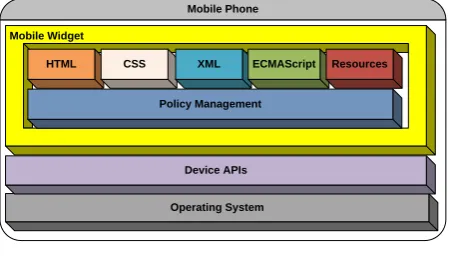
The architecture diagram, Figure 1, illustrates the different layers that would be proposed for cross platform widget development.
Mobile Phone Mobile Widget
Operating System Device APIs Policy Management
[image:3.595.313.541.153.317.2]HTML CSS XML ECMAScript Resources
Fig 2: Layers of proposed framework
The layers consist of the following:
HTML - Main markup language for displaying web pages and other information
CSS - Style sheet language used for describing the presentation semantics of a document written in a markup language
XML - Markup language that defines a set of rules for encoding documents in a format that is both human-readable and machine-readable. It is widely used for the representation of arbitrary data structures.
ECMAScript - Scripting language standardized by Ecma International in the ECMA-262 specification and ISO/IEC 16262. The language is widely used for client-side scripting on the web, and used in the form of JavaScript.
Resources - Any other files required by the widget, e.g. icons, images, .mp3 files, flash files
Policy Management- Layer responsible for access control mechanism. This will implement the Subject-Role based access control.
4.2
Component diagram
The component diagram's main purpose is to show the structural relationships between the components of a system.
User
Security Access Control XML Parser Persistence Data Store
HTML JavaSc
ript CSS XML Widget engine <<execution environment>>
Widget WGT package
«implementation class»
External libraries
«extends» «extends» «extends»
«inherits»
«uses» «uses»«uses»«uses»
[image:3.595.55.280.389.520.2]Components of widget
Fig 2: Component diagram of proposed framework
The component diagram, Figure 2, illustrates several components that are critically important to meet principle design goals. These are:
1. Security – to enhance security on widget (authentication, authorization, access control)
2. Parser – to parse XML files mainly when dealing with data structures
3. Persistence – to store data
4. External libraries – use of developed and well-tested libraries to enhance any functionality
4.3
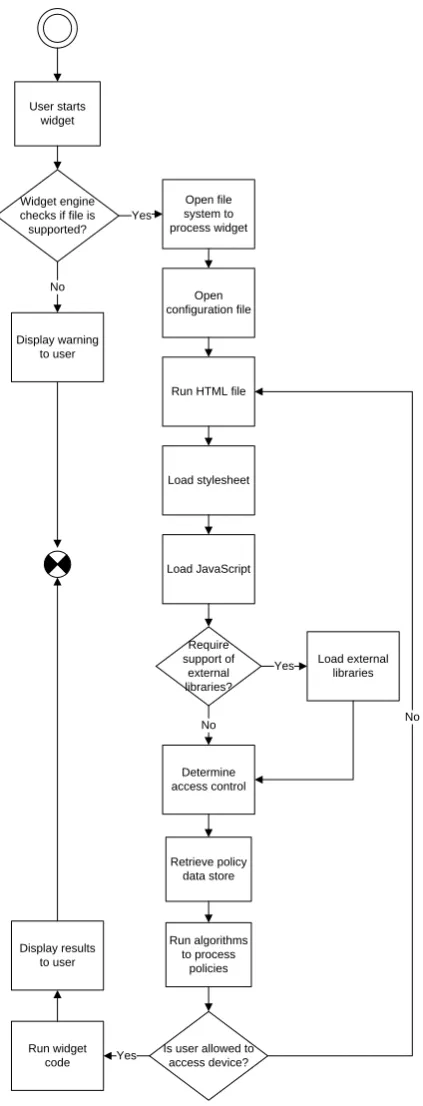
Flow chart
User starts widget
Widget engine checks if file is supported?
Open file system to process widget Yes
Open configuration file
Run HTML file
Load stylesheet
Load JavaScript
Require support of
external libraries?
Load external libraries Yes
Determine access control
No
Retrieve policy data store
Run algorithms to process
policies
Is user allowed to access device?
No
Run widget
code Yes
Display results to user Display warning
[image:4.595.57.269.69.623.2]to user No
Fig 3: Flow chart showing detailed processes.
4.4
Data Store
Widget framework will allow the widgets to store the session information and user preferred information on the mobile device. This persistent data will be internally handled by the Widget and is readable and writable by the user configured. The persistent data can be stored in different formats. BONDI specifications consider eXtensible Markup Language (XML) to be the appropriate language given its simplicity, generality, and usability.
For cross platform widget development, XML is deemed to be more apt for the following reasons [11].
Device independence - XML is device independence, a characteristic which makes it very popular among wireless, mobile and portable devices.
Content Personalization - Data can be personalized with the use of XML, as it separates content from presentation. Standard Format - XML stores content in a standardized, open format, which can be made to be recognized by any software since it is not a proprietary language.
Cost Saving - XML is free and does not bear any license cost for usage.
4.5
Algorithm
The proposed framework will use BONDI specification to develop a customized access control to process policies. The access control mechanism that will be developed is named as Subject-Role based access control mechanism.
Pseudo code 1 describes how to go about to parse a policy file and process its contents, according to BONDI’s specification, to evaluate to a decision which later determine whether a request should be allowed or not.
Pseudo code 2 demonstrates how to process a specific policy or rule. It is worth noting that the same algorithm is used to resolve both policies of a policy-set and rules of each policy.
Table 2.
Pseudo Code 1 – Parse policies file and
evaluate to decision
Check policy combining algorithm which can be DENY-OVERRIDES,
OR PERMIT-OVERRIDES, OR FIRST-APPLICABLE , OR ONLY-ONE-APPLICABLE FOR EACH policy in policy set,
FOR EACH rule in policy,
Check rule combining algorithm, which can be
DENY-OVERRIDES, OR PERMIT-OVERRIDES, OR FIRST-APPLICABLE , OR ONLY-ONE-APPLICABLE Evaluate if rule applies
To determine if rule applies, check if Subject, Resource, Action on request A matches that in policy file.
IF rule applies, THEN return effect associated to rule. Effect can be deny or permit or Not Applicable.
Using rule combining algorithm, process rule according to Pseudo code 1.
Return result of processing each policy’s rule. Combining result of rules according to policy combining algorithm (Process occurs as in Pseudo code 1).
Table 3. Pseudo Code 2 – Course of action for each type of algorithm
FOR EACH rule OR policy
IF combining algorithm is DENY-OVERRIDES THEN
Look through the set of policies IF any rule (or policy) evaluation returns deny, THEN overall result is DENY ELSE IF any rule (or policy) is undetermined, THEN overall result is undetermined
IF any rule (or policy) evaluation returns prompt one-shot, THEN overall result is PROMPT ONE-SHOT.
IF any rule (or policy) evaluation returns prompt session, THEN overall result is PROMT SESSION.
IF any rule (or policy) evaluation returns prompt blanket, THEN overall result is PROMPT BLANKET.
ELSE IF any rule (or policy) evaluations return permit, THEN overall result is PERMIT
ELSE IF no rule (or policy) is applicable, Not Applicable is returned
ELSE IF combining algorithm is PERMIT-OVERRIDES THEN
Look through the set of policies
IF any rule (or policy) evaluation returns permit, THEN permit is returned
ELSE IF all rule (or policy) evaluations return deny, THEN deny is returned ELSE IF no rule (or policy) is applicable, Not Applicable is returned
ELSE IF combining algorithm is FIRST-APPLICABLE THEN
Look through the set of policies Find the first one that applies
IF match found, return that policy evaluation result
ELSE IF no rule (or policy) is applicable, Not Applicable is returned
ELSE IF combining algorithm is ONLY-ONE-APPLICABLE THEN
IF only one applicable rule/policy, THEN return the decision of the only applicable rule
ELSE IF there are more than one applicable rule, THEN return indeterminate (which indicates an error)
ELSE IF no rule (or policy) is applicable, Not Applicable is returned
ELSE invalid combining algorithm.
5.
TESTING
In order to be able to test the proposed widget architecture based on W3C standards, and Subject-Role Access Control mechanism, a widget application has been proposed, which is a bus fare calculation widget for Mauritius. The purpose of the widget is to calculate bus fare tariff for Mauritius routes. This is achieved based on the inputs supplied by the user:
• Origin • Destination
• Category (Adult, Child, Student, Disabled) • Resources (Stage – routes are made up of stages,
Cost, Route)
The user is able to read tariff information or write specific information depending upon the access level configured for that user.
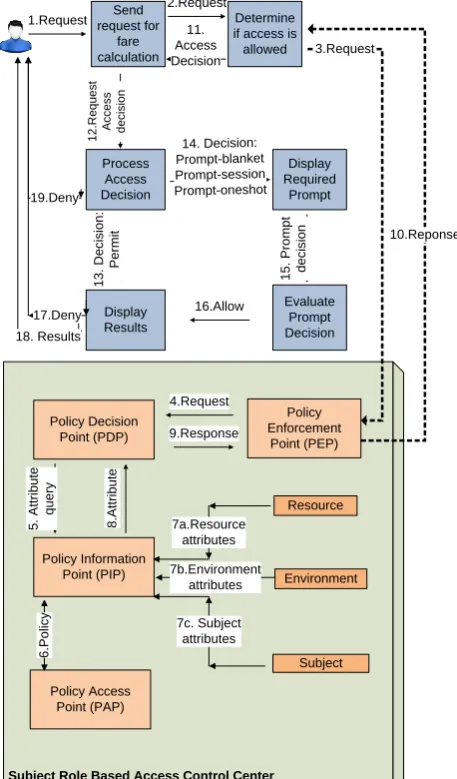
Figure 4 shows an overview of the bus fare calculation widget. Send request for fare calculation Determine if access is allowed Display Required Prompt Process Access Decision Evaluate Prompt Decision Display Results 1.Request 2.Request 11. Access Decision 1 2 .R e q u e s t A c c e s s d e c is io n 1 3 . D e c is io n : P e rm it 18. Results 14. Decision: Prompt-blanket Prompt-session Prompt-oneshot 1 5 . P ro m p t d e c is io n 16.Allow 19.Deny 17.Deny
Subject Role Based Access Control Center
Policy Enforcement Point (PEP) Subject Resource Environment Policy Decision Point (PDP) Policy Access Point (PAP) 9.Response Policy Information Point (PIP) 5 . A tt ri b u te q u e ry 6 .P o lic y 7a.Resource attributes 7b.Environment attributes 7c. Subject attributes 8 .A tt ri b u te 4.Request 10.Reponse 3.Request
Fig 4: Overview of widget
[image:5.595.323.552.290.680.2]Fig 5: Policy XML file of widget
[image:6.595.319.540.72.262.2]Different test cases have been created to test the different policies that have been configured in the policy XML file. After running the widget on two different platforms (Symbian and Android), the results have been recorded.
Table 4. Decision combinations for bus fare application
Ca
te
g
o
ry
Ac
tio
n
(R/W)
Resources
Co
m
b
in
in
g
Co
n
d
iti
o
n
Route Stage Cost
Child R PERMIT PERMIT PERMIT OR
W DENY DENY DENY OR
Student R PERMIT PERMIT PERMIT OR
W DENY DENY
PROMPT-ONESHOT OR
Adult R PERMIT PERMIT PERMIT OR
W DENY DENY
PROMPT-BLANKET OR
Disabled R PERMIT PERMIT PERMIT OR
W DENY DENY
PROMPT-SESSION OR
Admin R N/A N/A N/A N/A
W PERMIT PERMIT PERMIT OR
5.1.1
Test case 1- Child requests to read info
from Port Louis to Rose Hill
Decision of policy: PERMIT
Since from policy XML file, read is permitted for all categories, then the same results will be obtained with every category, except for admin user, who does not see any route information.
Figure 6. Read on Android Figure 7. Read on Symbian
5.1.2
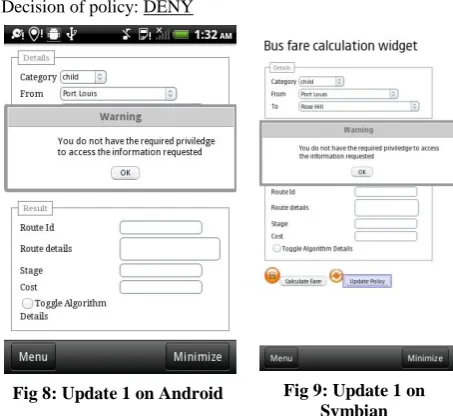
Test case 2- Child requests to update all
resources from Port Louis to Rose Hill
Decision of policy: DENY
Fig 8: Update 1 on Android Fig 9: Update 1 on Symbian
5.1.3
Test case 3- Student requests to update cost
info from Port Louis to Rose Hill
[image:6.595.315.542.303.511.2]Decision of policy: PROMPT-ONESHOT
[image:6.595.47.299.319.577.2] [image:6.595.318.542.565.761.2]5.1.4
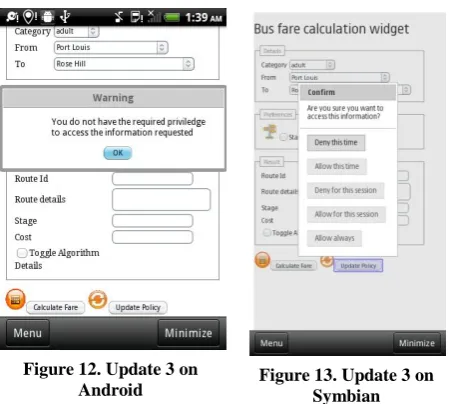
Test case 4- Adult requests to update cost
info from Port Louis to Rose Hill
[image:7.595.56.282.122.324.2]Decision of policy: PROMPT-BLANKET
Figure 12. Update 3 on
Android Figure 13. Update 3 on Symbian
5.1.5
Test case 5- Disabled requests to update
cost info from Port Louis to Rose Hill
[image:7.595.311.547.347.772.2]Decision of policy: PROMPT-SESSION
Figure 14. Update 3 on Android
Figure 15. Update 3 on Symbian
If the decision is to allow the user to carry on with the update operation, then the process continues until the cost information is saved, for the requested route and specified category.
6.
DISCUSSION AND EVALUATION
The two main areas of focus were highlighted for cross platform widgets:
(a) W3C Packaging and Configuration, which is a strong aspect of the W3C specifications to make widgets interoperable
(b) W3C lack of security control.
So to make widgets go by write-once-run-anywhere mechanism, W3C Packaging and configuration specifications were adopted and BONDI’s specifications were used to
develop Subject-Role based access control mechanism to complement for the lack of security on W3C.
To demonstrate the above implementation, a bus-fare calculation widget was developed to be used by the public of Mauritius to acquire more information on Mauritian routes and tariffs. The application could successfully exhibit required features like:
(c) Use of W3C Packaging and Configuration standards for widget content definition, and package building definition
(d) Use of BONDI’s specification to develop Subject-Role based access control mechanism, which is a customized mechanism that uses subject and role information to derive access permissions.
Testing results support the testing of pre-requisites defined for the widget, and the objectives set were greatly achievable. Apart from the two main aspects identified during analysis, there were several findings from research papers gathered about the different incompatibilities resulting from cross platform widgets. The contributions that can be brought in these areas are listed in table below.
Table 5. Evaluation of results and experiences with past work
FINDING CONTRIBUTIONS
Incompatible browser implementation [12]
This is indeed a problem
encountered during
implementation.
Very few browsers are built according to W3C standard, e.g. Opera.
Declarative Markup [12]
The solution identified for this incompatibility is somewhat different. With the introduction of HTML5, and the support of JQuery library, formatting is no longer an issue.
Portability [12] XML is indeed extensible, but should allow only attributes as defined by W3C standards. This is because widget runtimes built on W3C standards would not understand any other attribute other than those defined in specifications.
Interoperability and Compatibility Issues [3,4, 12, 13]
There are publicly available APIs like WAC APIs for standard access to device features, but these do not work across all platforms, as local resources may be located at different locations.
Usability and User Interaction Issues [12]
HTML5 has done a great job in UI perspective.
Abstraction level of widgets [14]
Not applicable to widget proposed.
Packaging and distribution Configuration and metadata
[image:7.595.56.281.378.584.2]Internationalization [4,13]
development.
Security Models and Digital Signatures [13]
Not applicable to widget proposed.
Manifest document [3] The Document Type Definition (DTD) and property keys on the manifest file should not be modified. Instead the manifest file should conform to W3C standards. Plug-in [3] Not applicable to widget proposed.
7.
CONCLUSION AND FUTURE WORK
Widgets are handy applications whose power rests on the strong relationship to web technologies. Their grace lies within their simplicity and orientation to a single specific task. However mobile widgets are in the initial stage of their development. Nearly all vendors of mobile widgets use their proprietary markup and scripting languages to develop widgets making them incompatible across platforms. The solution to this has been to adopt standardization approaches originating from World Wide Web Consortium (W3C) which provide well-defined guidelines of how widgets should be built to make them interoperable.
Security concern is another major issue where widgets are concerned. Users do not want to put at risk sensitive information. Thus Subject-Role based access control mechanism has been proposed as a potential way to go around this concern.
The implementation of a prototype, bus fare calculation, has been successful in demonstrating the above features. The standards adopted from W3C to create and build the widget have allowed the widgets run across different platforms. On the other hand, the Subject-Role based access control mechanism provides control while accessing resources. Several limitations have been identified during the course of the study, which are food for thoughts for future work. One major area that definitely needs to be looked at is widget runtimes. Building widgets that conform to standards might prove not to be useful, if we do have the appropriate widget runtimes for the widgets to operate in. Currently each platform uses its own widget runtime to run widgets. So this requires a collaborative effort to make mobile platforms support widgets which are compliant to standards.
HTML5 is a promising technology for building highly interactive web applications. Widget runtimes should be able to support those technologies so that there is greater scope for creating innovative widgets.
Some widgets are built to operate as standalone applications on the client mobile device. These widgets might need some application cache or local storage for persisting client data. Currently this is not achievable on browsers supported by mobile devices, but is possible on desktop applications. The
idea should be definitely extended to mobile widgets, so that static client data can be persisted.
8.
REFERENCES
[1] Allen, S., Graupera, V. and Lundrigan, L. 2010. “Pro Smartphone Cross-Platform Development: iPhone, Blackberry, Windows Mobile and Android Development and Distribution”, 1st Ed. Apress, New York.
[2] Paananen, T. 2011. “Smartphone Cross-Platform Frameworks: A Case Study. Bachelor’s Thesis”, Jamk University of Applied Sciences
[3] Kaar, C. 2007. “An introduction to widgets with particular emphasis on Mobile Widgets”, Mobile Computing, Technical Report, Mobile Computing, University of Applied Sciences, Hagenberg, Austria [4] Mendes, P., Caceres, M. and Dwolatzky, B. 2009. “A
review of the widget landscape and incompatibilities between widget engines”, AFRICON 2009.
[5] Marcos, C. 2011. “Misconceptions about W3C Widgets”, W3C Workshop on The Future of Off-line Web Applications, Redwood City, CA
[6] Rogers, D. 2010. “BONDI Augmented Reality”, Position Paper, Mobile AR Summit at Mobile World Congress [7] Sachse, J. 2010, “The standardization of Widget-APIs as
an approach for overcoming device fragmentation”, GRIN Verlag.
[8] Duarte, C. and Afonso, A. P. 2011. “Developing once, deploying everywhere: A case study using JIL”, Proceedings of the 8th International Conference on Mobile Web Information Systems MobiWIS, pp. 641-644. 2011.
[9] Caceres, M. 2007. “Standardizing widgets – Improving various aspects of client‐side web applications”, Queensland University of Technology
[10]Jones, N. 2007. “Nokia widgets will encourage S60 mobile services”, Gartner Research Report, vol. G00148087
[11]Costello, J., Canestraro, D. S., Werthmuller, D., Gil-Garcia, J. R. and Baker, A. 2006. “Using XML for Web Site Management”, Center for Technology in Government University, Albany
[12]Kostiainen, A. 2008. “The Web as a Runtime in Mobile Context”, Helsinki University of Technology
[13]Mendes, P. A. 2010. “Evaluation of widget-based approaches for developing rich internet applications”, Masters Thesis, University of the Witwatersrand, Johannesburg.