560
A MULTIPLE CLICK BASED GRAPHICAL
AUTHENTICATION SYSTEM
1S. YAMINI, 2Dr. D. MAHESWARI
1
Research Scholar, School of Computer Studies - PG, RVS College of Arts & Science, Sulur, Coimbatore
2
Assistant Professor, School of Computer Studies-PG, RVS College of Arts & Science, Sulur, Coimbatore E-mail: [email protected], [email protected]
ABSTRACT
Authentication is possible in several ways namely textual, graphical, bio-metric, 3D password and third party authentication. In this paper, the authentication system is presented by introducing the multi-level authentication technique which generates the password in multiple levels to access the services. The details of proposed multilevel authentication techniques are presented along with data flows, algorithms. In today’s scenario, graphical password is the alternative in network security to replace text-based password in which users interact with images for authentication rather than input alphanumeric strings. In general, the image-based authentication can be classified into two categories, i.e, click-image-based graphical password and choice-based graphical password. However, each of them is having several limitations. In this paper, a multiple Click based graphical authentication system (MC-GAS) is proposed with the purpose of improving the image-based authentication in both security and usability by combining the above two techniques with alpha numeric password.
Keywords: Graphical Password, Multi-level Authentication, Secured Remote Accessibility, Network
Security, Multiple Clicking.
1. INTRODUCTION
For authentication, different methods are exist like Simple text password, Third party authentication, Graphical password, Biometric and 3D password object to access the services securely. The weakness of textual password Technique is that it is easy to break and vulnerable to dictionary or brute force attacks. Graphical passwords are based on the idea that users can recall and recognize pictures better than the alpha numeric strings. However, some of the graphical password schemes take a long time to validate the user [25] [28].
Another simple approach is to use the combination of the above techniques in multi-level authentication, so that, the security level is increased to a larger extent. Hence it has induced us to introduce a multi-level authentication technique in secure transmission for ensuring the strict authentication. Specifically, our proposed scheme mainly contains three operational steps: image selection, sequence of clicks and secret coding. That is, users’ first choose an image category from the list. Then in that subset, an image to be choosen and the sequence of clicks in the selected image and code their secrets to be done. We present an initial
user study which shows positive results that our scheme is good at both security and usability, and eventually give a preliminary security analysis of our scheme against several well- known attacks (e.g., dictionary attack).
Currently, the most commonly used method in the computer authentication is called text-based password in which users have to input their user names and text passwords for authentication. But previous research work [5] has shown that the text-based passwords are suffered from both security and usability problems (i.e., users are likely to choose short and simple strings for easy memorization). To attenuate the drawbacks of traditional text-based authentication, graphical password schemes have been recommended as an alternative to text- based passwords as human brain is better at remembering and recognizing images than text (e.g., alpha numeric strings). An assumption here is that by reducing the memory burden, users can produce more secure passwords through using images (i.e., offering larger password space) than text-based password schemes.
561 selected by many users which is associated with their genders and interests (i.e., girls prefer flowers, car enthusiasts are more likely to choose cars). The click-based scheme encounters the similar problem referred to as ‘hot-spot’ that most users choose the similar or the same click point or area when two or more images are provided. Hence, these problems can cause a lot of authentication errors (e.g., false acceptance and false rejection). Pertinent security studies concerning to graphical passwords can be found in [13], [9], [8]. Due to the intrinsic limitations of the graphical password schemes, we advocate that a trade-off should be made between security and usability. Dominantly, security and usability are two main measures for authentication schemes, it is advisable that a good authentication scheme has two properties: hard to break and easy to remember.
In this paper, we propose and develop a multiple click based graphical authentication system (called MC-GAS) by combining the above two techniques with secret code aiming to enhance the image-based authentication in both security and usability. This scheme (MC-GAS) refers to and combines the merits of PassPoints [18], Story [19], DAS [20] and Cued Click Points [16].
2. BACKGROUND AND RELATED WORK
2.1 Knowledge Based Authentication System
Knowledge Based Authentication System is one that deals with what information the user knows. Various approaches have been proposed under this title [21], [22], [23]. These approaches with a little variation are being used in almost every systems where remote access is required. For instance, we can consider most popular E-mail Service Providers gmail, hotmail and ymail systems that ask for a specific user-id and password from an individual and then check if they properly match with the previously stored id-password. All the user has to do is to enter his/her user-id and a textual password. This system allows remote access but is vulnerable to attacks. Because the users trend to select dictionary words or phrases as passwords, one simple password cracker running for only 30 seconds over a network could breach almost 80% of the passwords of the entire network [24]. Thus, passwords chosen for this scheme suffer from being hard to guess but easy to remember [25].
2.2 Token Based Authentication System
Unlike Knowledge Based Authentication System, the Token Based Authentication does not only require a password to be remembered, it requires if the user carries proper token/card as well. Many approaches have also been proposed for this scheme [29], [6], [16]. This system is more robust in the sense that an intruder cannot access the system for a specific user even knowing his password unless the intruder has acquired the proper token. On the contrary, it is less robust in the sense that this system often demands only 4-6 digits numeric passwords that are even easier to breach. Thus, if an intruder can somehow steal or manage the token/card, accessing the system as the carrier of that card is more easier.
2.3 Biometric Authentication System
Biometric Authentication Systems have lately been popular in the digital authentication arena since it is completely free from Brute-Force or other security attacks [22]. Biometric Authentication System can be further classified by Voice Recognition, Face Recognition, Palm-Print Recognition, Hand-Geometry Recognition, Fingerprint Detection, Iris Detection, Retina Detection and Movement Detection [23], [19]. This is the most secured form of authentication among all three user authentication types discussed in subsection II-A, II-B and II-C respectively. However, this authentication system requires the presence of the user before the system and hence not suitable for remote accessing. Yet, a lot of biometric based user authentication systems have been proposed, deployed and being used in digital world [19].
2.4 Graphical Password Based Authentication System
562
2.5 Graphical-Textual Password Based
Authentication System
In recent times, several approaches have been proposed that combine the usability of textual passwords with the security and robustness of the graphical passwords [15], [24], [2]. These schemes although vary in several points, regardless of their working techniques, they all suffer from the easy accessibility to the Internet based system.
Based on the draw-based scheme, Jermyn et al. [16] suggested a DAS (Draw-a-secret) scheme that allowed users to draw their own passwords on a 2D grid. For the authentication, users should re-draw their pictures in the same sequence. Then, Lin et al. [17] recommended a Qualitative DAS by using a directional change when the pen passes over a cell boundary.
Later, Dunphy and Yan [20] presented a Background DAS by adding a background image to the original DAS scheme for better re-calling. Syukri et al. [26] evolved an authentication system
in which users could draw their own signatures by using a mouse.
Our proposed scheme of MC-GAS can be partly treated as an improvement for DAS scheme since coding a secret is the main step in our scheme, but our scheme is different from DAS scheme and other draw-based graphical schemes in that our scheme consists of three steps: image selection, sequence clicking and secret coding.
Consequently, our scheme of MC-GAS is overall combination of current graphical password techniques more than a pure draw-based scheme.
Table I presents a comparative analysis among all the user authentication system discussed. It is clearly visible that remote-accessibility with high security level is not present in the digital world right now. Thus our proposed system aims to design an authentication system that is suitable for remote access with proven high security.
Table 1.Comparative Properties of the Existing Authentication Systems
Method Knowledge
Based
Token Based
Biometric Based
Graphics Based
Graphical-Textual Based
Security Level Low Low High Moderate High
Remote
Accessibility Yes No No Yes No
3. MULTILEVELGRAPHICAL
AUTHENTICATIONSYSTEM
The purpose of our proposed multiple click based graphical authentication system (called
MC-GAS) is to enhance the image-based
authentication in both security and usability. In particular, there are mainly three operational steps in MC-GAS: that is, image selection, sequence clicking and secret coding.
In the step of image selection which refers to the concept and technique from the choice-based schemes, users are required to choose a category from the set of image pool and then the final image for the following step.
In the second step, we further develop an
action of sequence clicking that users should give their own secrets by using series of clicks.
The step of secret coding, which requires users to code something (e.g., a digital number or a letter) on their selected images. Compared to other graphical password schemes, our scheme mitigates the ‘hot-spot’ problem in Pass points and further improve the security of Story and Cued Click Points.
To the best of our apprehension, our work is a premature work that designing a graphical password by combining all the above graphical password techniques. Figure 1 shows the different steps involved in the authentication process.
Select category of image
Select the image from set
of sub image
Sequence of clicks
in the selected
563
Figure 1. Schematic Diagram of the Proposed System.
3.1 Image Selection and Multi Clicking
In MC-GAS, the first step is image selection in which users are required to select the category of images. Then in that particular subset of images, the final image to be choosen. Suppose there are N1 Categories in the image pool, users should first select n ∈ N1 images from the pool. In the selected image, sequence of clicks to be done in a fixed order and remember this order of clicks like a story. The function of using story memorization is the same as the scheme of Story in [6] that users can better remember their selected image and the sequence of clicks. The images in the pool are everyday images with different topics (e.g., images of cartoon characters, images of landscape).
In our example system which was implemented in our user study, we set N1 = 3 and users should first select the criteria and choose an image from the image pool and n = 3 sequence of clicks and organize these image clicks in a story order. Then, users have to further enter secret the code.
During the authentication, users should re-select the same image and clicks incorrect ordered sequence and further enter their secrets. In Figure 2, we present with a case to emphasize the step of image selection in our implemented example system.
Figure. 2. The step of image selection in our example system.
As shown in Figure. 2, there are totally 10 everyday image categories (arranged in 5 × 2 grids) in the image pool that cover various themes such as fruits, landscape, cartoon characters, food, sport, buildings, cars, animals, books and people. Users should first select the image from the image pool and a sequence of clicks in a story-sequence (e.g., {6, 3, 4, 7}) that users can construct and remember their stories through using their selected image according to their own preference and knowledge. Then, users should further enter their secrets in the step of secret coding. During the authentication, users are required to re-select the image and clicks in the correct ordered sequence.
4. USER STUDY
We conducted an initial in-lab user study on our scheme of MC-GAS with 51 participants. All participants (21 females and 30 males) are PG students with diverse backgrounds. In particular, 12 participants (4 females and 8 males) are from the computer science department (not security related major) and the other participants are from otherscience and arts departments. They are all regular web users and ranged in age from 22 to 28 years.
4.1 Methodology
Flower
s
Birds Animals
564 In the user study, we predominantly intend to evaluate the performance of our scheme and compare our scheme of MC-GAS with the scheme of DAS in terms of users’ feedback.
The implementation of DAS was referred to work [16]. The mouse is the input method for both schemes. To avoid any bias in user’s feedback, we used a double-blind manner in the user study that we did not uncover the name of these two schemes and concealed that which one was proposed by us. Therefore, users can conduct the evaluation based on the actual performance of these two tested schemes. We denoted Scheme1 for our proposed scheme of MC-GAS and denoted Scheme2 for the scheme of DAS throughout the user study.
During the user study, we first gave an introduction about the tasks to each participant and asked them to sign a consent form before they started their work. All participants were involved in our in-lab user study voluntarily and felt interested in our work.
The introduction session mainly contained the details of Scheme1 and Scheme2 (i.e., explaining the steps in two schemes, showing them how to use these two example systems).
We divided the user study for each participant into two days. In the first day, the duration time of the work is generally less than one hour including the introduction session. Participants could complete 2 practice trials and then created their own passwords with 5 real trails for each scheme. Participants can freely decide how to create their own graphical passwords.
Totally, 210 real trials were completed and recorded for these two schemes ofScheme1 and Scheme2 respectively. The detailed steps in the first day are described as below.
Step 1. DAS Creation: Creating a DAS password. Every user should finally create 5 DAS passwords.
Step 2. DAS Confirmation: Confirming the DAS password by re-drawing secrets in the correct place. If users in-correctly substantiate their password, they should retry the confirmation or return to Step 1.
Step 3. Distributed memory: We provided some finding tasks (paper-based) to participants
with the purpose of distracting users for at least 5 minutes. Then participants can take a 10-minute rest.
Step 4. GAS Creation: Creating a MC-GAS password by following the three steps: image selection, sequence of clicks, and secret coding. Every user should finally create totally 5 ML GAS passwords.
Step 5. MC-GAS Confirmation:
Confirming the MC-GAS password by re-selecting image and clicking in the correct order and re-entering secrets in the correct place. If users incorrectly confirm their password, they should retry the confirmation or return to Step 4.
Step 6. Feedback: All participants are required to complete a feedback form about the password creation with regard to these two schemes.
In the second day, all participants were required to complete a login session and give their feedback. The detailed steps are shown as below.
Step 1. DAS Login: Logging in the example system with all created DAS passwords. Users can revoke an attempted login if they noticed an error and try again.
Step 2. MC-GAS Login: Logging in the example system with all created MC-GAS passwords. Users can cancel an attempted login if they noticed an error and try again.
Step 3. Feedback: All participants should complete a feedback form about the password login regarding to these two schemes.
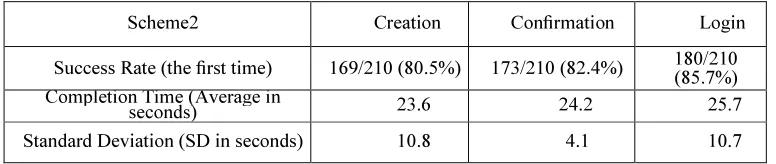
The success rate and average completion time for the step of creation and login in both Scheme1 and Scheme2 are presented in Table 2 and Table 3appropriately. The successrate in the step of Creation means that participants created their passwords without restarting, the success rate in the step of confirmation means that participants confirmed their passwords without restarting and failed attempts for the first time. At last, the success rate in the step of login means that participants, for the first time, pressed the login button andentered into the example system successfully.
565
Scheme1 Creation Confirmation Login
Success Rate (the first time) 185/210 (88.1%) 196/210 (93.3%) 198/210 (94.3%) Completion Time (Average in
seconds) 30.6 15.2 13.7
Standard Deviation (SD in
seconds) 8.8 9.1 5.9
Scheme2 Creation Confirmation Login
Success Rate (the first time) 169/210 (80.5%) 173/210 (82.4%) 180/210 (85.7%) Completion Time (Average in
seconds) 23.6 24.2 25.7
Standard Deviation (SD in seconds) 10.8 4.1 10.7
Scheme1 (MC--GAS) Confirmation Login
Success Rate (the first time) 196/210 (93.3%) 198/210 (94.3%) Success Rate (the second time) 207/210 (98.6%) 206/210 (98.1%)
Success Rate (the third time) 210/210 (100%) 210/210 (100%)
Scheme2 (DAS) Confirmation Login
Success Rate (the first time) 173/210 (82.4%)) 180/210 (85.7%) Success Rate (the second time) 199/210 (94.8%) 192/210 (91.4%)
[image:6.595.90.478.288.370.2]Success Rate (the third time) 208/210 (99.0%) 202/210 (96.2%)
Table 3. Success Rate and Average Time for the Step of Creation, Confirmation and login- in Scheme2 (DAS)
Table 4. Success Rates For The Step Of Confirmation & login In Scheme1 And Scheme2.
In Table 4, we conveyed the success rates for the second and third trial. For our Scheme1 (MC-GAS), in the Confirmation step, 3 trials were still failed for the second time. Moreover, in the Login step, 4 trials were still failed for the second time. Nevertheless, all failed participants can login the system successfully for the third time.
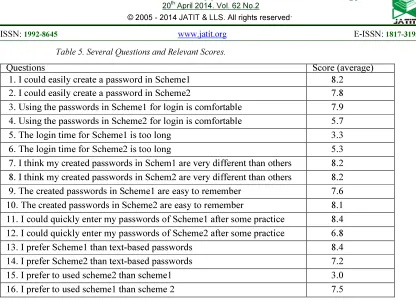
We totally used two feedback forms in the user study. Thesetwo forms mainly contain several questions about the use of Scheme1 (MC-GAS) and Scheme2 (DAS).
Ten-point scales were used in each question where 1-score indicates strong disagreement and 10-score indicates strong
566
Questions Score (average)
1. I could easily create a password in Scheme1 8.2
2. I could easily create a password in Scheme2 7.8
3. Using the passwords in Scheme1 for login is comfortable 7.9 4. Using the passwords in Scheme2 for login is comfortable 5.7
5. The login time for Scheme1 is too long 3.3
6. The login time for Scheme2 is too long 5.3
7. I think my created passwords in Schem1 are very different than others 8.2 8. I think my created passwords in Schem2 are very different than others 8.2
9. The created passwords in Scheme1 are easy to remember 7.6
10. The created passwords in Scheme2 are easy to remember 8.1
11. I could quickly enter my passwords of Scheme1 after some practice 8.4 12. I could quickly enter my passwords of Scheme2 after some practice 6.8
13. I prefer Scheme1 than text-based passwords 8.4
14. I prefer Scheme2 than text-based passwords 7.2
15. I prefer to used scheme2 than scheme1 3.0
[image:7.595.88.504.81.383.2]16. I prefer to used scheme1 than scheme 2 7.5
Table 5. Several Questions and Relevant Scores.
Signing Up Phase
[image:7.595.95.495.101.380.2]Let us consider a user trying to access a system for the first time. Hence, s/he requires to set up an account first. After taking the personal details of the user, the system will ask the user for choosing his/her authentication keys in three consecutive steps. At the first step the user has to select an image from the ones available in the system or may choose one of his own after uploading to the system.
Figure 3. Category of an image
This step poses the first layer of security in the proposed system. Let the user choose the category i from the set of n image categories as shown in figure 3. This set of n categories is further
subdivided into several subsets like n1, n2, n3,....,nn
each depicting a category of the images like nature, animals, sports etc. In future, the user must know which category his/her previously chosen picture falls to (selection of subset ni) and which image
[image:7.595.303.517.481.627.2]s/he chose (selection of image i) as shown in figure 4.
Figure 4. Selection of the image
If the user fails to properly recognize the exact subset and exact image, the system does not let the user access the system. In the background of the system, a simple index of the subsets and the images has to be maintained which will help the system recognize the user.
[image:7.595.87.293.527.675.2]567
Figure 5. Sequence of Clicking
At second stage, the selected image i is divided into k number of m × n blocks, each block is chosen such that it represents a particular region or sub region of an image as in figure 5. The dimension of each block is fixed by thesystem that chooses it based on the region information of the image. In this step, the user has to select one such block. Let the user select ki block (a region of
his/her choice) whose dimension is m × n. The block ki contains m × n number of pixels and the
system takes the average pixel value of the block to its nearest possible integer.
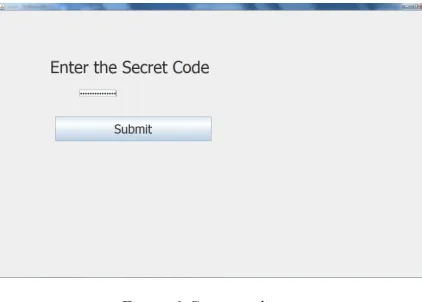
[image:8.595.88.299.491.642.2]Finally, the user is required to provide a textual numeric password of his own choice as described in figure 6.
Figure 6. Secret coding
Now, the user given password is simply XORed with the 24 bits average pixel value of the m × n number of pixels of block ki obtained from
previous step. The reason for choosing XOR function is that it is only XOR that generates unique bit stream while performed with a key. However, other cryptographic approaches are also allowed if the system wants higher level of security.
4.3 System Accessing Phase
During accessing phase, the system first lets the user find the subset ni he fixed up before. If
it is victorious, the system then lets him/her find the image i. If the user can successfully recognize the image i, the system asks him/her to find the region ki. Since each region is predefined by the system,
the users need not carry the dimension in mind, rather, he should just properly click on the particular region.
After successful recognition of the region, the user is asked to provide his secret key (password). The result is matched with the one stored in database. Whenever the database information agrees, the authentication process is completed and the user is allowed to access the system. If any selection or recognition at any step is failed, the system immediately blocks the user.
5. PRELIMINARYSECURITYANALYSIS
The password space of the proposed system is given as:
Password space = Bf+b
where f is the number of forward steps or levels, b is the number of backtracking involved during password creation phase.
B is the number of cells into which the image is divided at each level. “MC-GAS” scheme can be conveniently configured to balance the security and usability issues. By increasing B, password space can be increased exponentially. However, it is observed that dividing the image into smaller cells taxes the human memory.
Thus the unique feature of backtracking helps in increasing the password space without affecting the usability issues. Say, for example, the image is divided into 4x4 grid size then B=16; number of forward steps (levels), f=4 and number of backtracking involved i.e. b=3, then the password space shall be:
Password space = 164+3 = 167=270 million (approx.)
568 Security can further be enhanced by integrating two or more rounds of authentication in the system to be secured.
6. IMPLEMENTATION
The proposed system was implemented in Java. A Java program is compiled to a standard, platform-independent format called "byte code." The compiled byte code can be ex- ecuted without any change on any machine with a Java Virtual Machine. This platform independence makes Java the ideal language for developing applications. Java contains two nearly parallel sets of facilities for GUI programming: AWT and Swing. Graphical user interface (GUI) support and graphics drawing features were provided in the Abstract Window Toolkit (AWT) package. We have used both these facilities for the proposed system.
We believe that the proposed approach is promising and unique for two reasons:
• Password space is very large and can further be in- creased by backtracking.
• Easier to use and less vulnerable to brute force attacks.
7. CONCLUSION
User authentication is a fundamental component in most computer security contexts. Passwords based on graphical techniques are generating interest in the current research on authentication. To provide privacy services to the intended customer, it is a better option to use multi-level password generation and authentication technique. This technique helps in generating the password in many levels of organization so that the strict authentication and authorization is possible.
A number of schemes have been proposed in the recent times and in this paper a novel method of authentication “MC-GAS” is proposed. The scheme offers good security by providing large password space and at the same time is efficient, usable and suitable for implementation on Personal computers, hand-held devices, ATMs etc.
Future work could include a user study with larger and more varied participants to validate our collected results and a more detailed analysis of our scheme in the aspect of security by defining a formal attack model (i.e., further considering and discussing offline attacks). Besides, it may include a further analysis and survey on the click-patterns
that users are used to construct their secrets and evaluating the viability of our proposed potential improvements.
8. REFERENCES
[1] A. Adams and M. A. Sasse
,
”Users are not theenemy:why users compromise computer security mechanisms and how to take remedial measures,”
,
Communications of the ACM, vol.42, pp. 41-46, 1999.
[2] Ayannuga Olanrewaju O. and Folorunso Olusegun, “Graphic-Text Authentication of a Window-based Application,” International Journal of Computer Applications, Vol. 21, No. 6, pp. 36-42, May 2011.
[3] G. E. Blonder, “Graphical password”, U.S. Patent 559 961, Sep. 24, 1996.
[4] S. Chiasson, R. Biddle, and P.C. Van Oorschot, “A second look at the usability of click-based graphical passwords,” In: Proceedings of the 3rd Symposium on Usable Privacy and Security (SOUPS). New York, NY, USA: ACM, 2007, pp. 1–12.
[5] S. Chiasson, P.C. Van Oorschot, and R. Biddle, “Graphical password authentication using cued click-points,” In: Proceedings of the 12th
European Symposium On Research In
Computer Security (ESORICS). Berlin,
Heidelberg: Springer-Verlag, 2007, pp. 359– 374.
[6] D. Davis, F. Monrose, and M.K. Reiter, “On user choice in graphical password schemes,” In: Proceedings of the 13th conference on USENIX Security Symposium. Berkeley, CA, USA:
USENIX Association, 2004, pp. 151–164. [7] Dinesha H A, Agrawal V K, “Multi-level
Authentication Technique for Accessing Cloud Services”, 2013
[8] A.E. Dirik, N. Memon, and J.C. Birget, “Modeling user choice in the passpoints graphical password scheme,” In: Proceedings of the 3rd symposium on Usable privacy and security (SOUPS). New York, NY, USA: ACM, 2007, pp. 20–28.
[9]. R. Dhamija and A. Perrig, ”Deja Vu: A User Study Using Images for Authentication,” in Proceedings of 9th USENIX Security Sym-posium, 2000.
569 Computer and communications security (CCS). New York, NY, USA: ACM, 2007, pp. 36–47. [11] Gayathiri Charathsandran, “Text Password
Survey: Transition from First Generation to Second Generation,”
[12] .K. Gilhooly, ”Biometrics: Getting Back to Business,” in Comput erworld, May 2005. [13]. K. Golofit, “Click passwords under
investigation,” In: Proceedings of the 12th European Symposium on Research in Computer
Security (ESORICS). Berlin, Heidelberg:
Springer-Verlag, 2007, pp. 343–358.
[14] Horng-Twu L. and Chin-Laung L, “An efficient password authen- tication scheme based on a nit circle,” Computer and Security, Elsevier, Vol. 14, No. 3, pp. 220-220, 1995.
[15]. Huanyu Zhao and Xiaolin Li, “S3PAS:A Scalable Shoulder-Surfing Resistant Textual-Graphical Password Authentication Scheme,”. [16]. I. Jermyn, A. Mayer, F. Monrose, M.K. Reiter,
and A.D. Rubin, “The design and analysis of graphical passwords,” In: Proceedings of the 8th conference on USENIX Security Symposium. Berkeley, CA, USA: USENIX Association, 1999, pp. 1–14.
[17] D. Lin, P. Dunphy, P. Olivier, and J. Yan, “Graphical passwords & qualitative spatial relations,” In: Proceedings of the 3rd symposium on Usable privacy and security (SOUPS). New York, NY, USA: ACM, 2007, pp. 161–162.
[18] Mahmud Hasan and Kamruddin Md. Nuro, “A Novel 3-Layer User Authentication System for Remote Accessibility”, IEEE, 978-1-4673-4836-2/1,2012.
[19] Massimo Tistarelli and Mark S Nixon, “Advances in Biometrics,” SpringerLink, ISBN: 9783642017933 3642017932 9783642017926 3642017924, 2009.
[20] Mohammad Sarosh Umar1 and Mohammad Qasim Rafiq, “Select-to-Spawn: A Novel
Recognition-based Graphical User
Authentication Scheme”, IEEE 978-1-4673-1318-6/12/,2012
[21]. D. Nali and J. Thorpe, “Analyzing user choice in graphical passwords,” Technical Report. Careton University, 2004.
[22]. Ross, A. and Prabhakar, S., “An introduction to biometric recognition,” vol. 14, issue. 1, DOI:10.1109/TCSVT.2003.818349, pp. 4-20, January 2004.
[23] Siddhesh Angle, Reema Bhagtani and Hemali Chheda, “BIOMETRICS : A FURTHER ECHELON OF SECURITY,”
[24] C Singh and L Singh, “Investigating the Combination of Text and Graphical Passwords for a more secure and usable experience,” International Journal of Network Security & Its Applications, Vol. 3, No. 2, pp. 78-95, March 2011.
[25] X. Suo, Y. Zhu, G. S. Owen, “Graphical passwords: A survey,” in Proc. 21st Annual Computer Security Application. Conf. Dec. 5–9, 2005, pp. 463–472.
[26] A.F. Syukri, E. Okamoto, and M. Mambo, “A user identification system using signature written with mouse,” In: Proceedings of
Australasian Conference on Information
Security and Privacy (ACISP). London, UK: Springer-Verlag, 1998, pp. 403–414.
[27]. P.C. Van Oorschot, A. Salehi-Abari, and J. Thorpe, “Purely automated attacks on passpoints-style graphical passwords,” Trans. Info. For. Sec., vol. 5, pp. 393–405, September 2010.
[28] S. Wiedenbeck, J. Waters, J.-C. Birget, A. Brodskiy, and N. Memon, “Authentication using graphical passwords: Basic results,” in Proc. Human-Comput. Interaction Int., Las Vegas, NV, Jul. 25–27, 2005.
[29]. S. Wiedenbeck, J. Waters, J.C. Birget, A. Brodskiy, and N. Memon, “Passpoints: design and longitudinal evaluation of a graphical password system,” Int. J. Hum.-Comput. Stud., vol. 63, pp. 102–127, July 2005.
[30] Xiaoyuan Suo, Ying Zhu and G. Scott. Owen, “Graphical Passwords: A Survey”.
[31] Xiyu Liu, Lizi Yin and Zhaocheng Liu, “A Stroke-Based Textual Password Authentication Scheme,” First International Work-shop on Education Technology and Computer Science, vol. 3,DOI:10.1109/ETCS.2009.544, pp. 90-95, 2009.
[32] J. Yan, A. Blackwell, R. Anderson, and A. Grant, “Password memorability and security: Empirical results,” IEEE Security and Privacy, vol.2, pp. 25–31, September 2004.