TEL-14 TWO-CHANNEL TELEPHONE INTERFACE
I N S T R U C T I O N M A N U A L
CLEAR-COM ECLIPSE
TEL-14 Two-Channel Telephone Interface Instruction Manual
© 2007 Vitec Group Communications Ltd. All rights reserved.
Part Number 810308Z Rev. 3 Vitec Group Communications, LLC. 850 Marina Village Parkway
Alameda, CA 94501 U.S.A
Vitec Group Communications 7400 Beach Drive
Cambridge Research Park Cambridgeshire
United Kingdom CB25 9TP
Vitec Group Communications Room 1806, Hua Bin Building No. 8 Yong An Dong Li Jian Guo Men Wai Ave Chao Yang District
Beijing, P.R. China 100022
® Clear-Com, CellCom/FreeSpeak and the Clear-Com Communication Systems logo are registered trademarks of The Vitec Group plc.
CONTENTS
OPERATION
1-1
Introduction . . . 1-1 Description . . . 1-2 Operation . . . 1-6INSTALLATION
2-1
Introduction . . . 2-1 Description . . . 2-2 Wiring. . . 2-3 Setup . . . 2-4 Configuration . . . 2-14MAINTENANCE
3-1
Introduction . . . 3-1 Troubleshooting . . . 3-1 Block Diagram . . . 3-4SPECIFICATIONS
4-1
LIMITED WARRANTY
5-I
Warranty Period. . . 5-i Technical Support . . . 5-i Warranty Repairs and Returns . . . 5-ii Non-Warranty Repairs and Returns. . . 5-ii Extended Warranty . . . 5-ii Liability . . . 5-iii
IMPORTANT SAFETY INSTRUCTIONS
1. Read these instructions. 2. Keep these instructions. 3. Heed all warnings. 4. Follow all instructions.
5. Do not use this apparatus near water. 6. Clean only with dry cloth.
7. Do not block any ventilation openings. Install in accordance with the manufacturer’s instructions.
8. Do not install near any heat sources such as radiators, heat registers, stoves, or other apparatus (including amplifiers) that produce heat.
9. Only use attachments/accessories specified by the manufacturer. 10. Use only with the cart, stand, tripod, bracket, or table specified by the
manufacturer, or sold with the apparatus. When a cart is used, use caution when moving the cart/apparatus combination to avoid injury from tip-over. 11. Unplug this apparatus during lightning storms or when unused for long
periods of time.
12. Refer all servicing to qualified service personnel. Servicing is required when the apparatus has been damaged in any way, such as power-supply cord or plug is damaged, liquid has been spilled or objects have fallen into the apparatus, the apparatus has been exposed to rain or moisture, does not operate normally, or has been dropped.
13. WARNING: To reduce the risk of fire or electric shock, do not expose this product to rain or moisture.
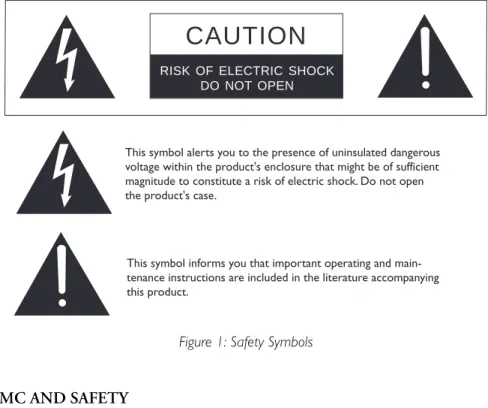
Please familiarize yourself with the safety symbols in Figure 1. When you see these symbols on this product, they warn you of the potential danger of electric shock if the station is used improperly. They also refer you to important operating and maintenance instructions in the manual.
Please read and follow these instructions before operating this product.
Figure 1: Safety Symbols
EMC AND SAFETY
The TEL-14 Telephone Interface meets all relevant CE and FCC specifications set out below:
EN55103-1 Electromagnetic compatibility. Product family standard for audio, video, audio-visual, and entertainment lighting control apparatus for
professional use. Part 1: Emissions.
EN55103-2 Electromagnetic compatibility. Product family standard for audio, video, audio-visual, and entertainment lighting control apparatus for
professional use. Part 2: Immunity.
And thereby compliance with the requirement of Electromagnetic
Compatibility Directive 2004/108/EC and Low Voltage Directive 2006/95/EC
This device complies with Part 15 of the FCC Rules. Operation is subject to the following two conditions: (1) this device may not cause harmful
interference, and (2) this device must accept any interference received, including interference that may cause undesired operation.
CAUTION
RISK OF ELECTRIC SHOCK DO NOT OPEN
This symbol alerts you to the presence of uninsulated dangerous voltage within the product's enclosure that might be of sufficient magnitude to constitute a risk of electric shock. Do not open the product's case.
This symbol informs you that important operating and main-tenance instructions are included in the literature accompanying this product.
OPERATION
INTRODUCTION
This chapter describes how to use the TEL-14 two-channel auto-nulling telephone interface. The TEL-14's panel controls and internal option switches can select any one of a large number of modes of operation. This chapter describes the five most common modes:
• Intercom-station telephone access • Self-service dial-in
• Manual call screening • Intercom-to-intercom • Party-line dial-in
Intercom station operators will normally access telephone lines with the TEL-14 in the “intercom-station telephone-access” mode. However, station operators may need to check with their system operator for further instructions if a TEL-14 has been configured in a mode not described here.
Technical personnel should refer to Chapter 2, “Installation,” for details on configuring the TEL-14's internal option switches for each of these modes (and any others possible).
The next section, “Description,” covers the basic features of the TEL-14, including its front-panel controls and indicators. The option switch settings are described for each mode, but they are covered more thoroughly in Chapter 2. The final sections cover the use of the TEL-14 in each of the five modes.
Important: When the TEL-14 is first connected to a new telephone line, its
automatic nulling process must be performed before it can be used. This
process consists of calling each line, depressing the Auto Answer button for 5
seconds, and then waiting several seconds while the automatic procedure is
carried out. It may not be possible to make outgoing calls on the telephone line until this procedure is performed. Refer to the Automatic Telephone Line Null section of this Operation Manual.
Note: Other configurations are possible, in addition to the configurations described here. However, certain configurations may result in undesirable crosstalk, as a result of the limitations of the TEL-14's circuitry. For example, consider a news reporter who calls into the matrix. You would like to provide the reporter with a program feed, and at the same time route his voice in through the matrix to a live broadcast. However, the TEL-14 cannot perfectly isolate his talk from his listen, so some of his outgoing program feed may leak into his incoming voice.
This chapter describes the five most common modes of operation.
Note: When using the TEL-14 with a speaker station, keep the panel mic gain low. In
general, keep all gain controls set to a level which is acceptable, but not excessive.
DESCRIPTION
The TEL-14 telephone interface can be installed in an IMF-3 or IMF-102 interface frame.
The TEL-14 allows two standard 2-wire POTS (Plain Old Telephone Service) telephone lines to be connected to ports in the Eclipse matrix. The TEL-14 can answer an incoming call automatically ("auto-answer") after either 1 or 4 rings, and it can be configured to send a call signal whenever it answers a call. The TEL-14 can be configured to be accessible to intercom station operators, or only to outside callers.
The front panel features for each telephone line a "ring/off-hook" LED, a "hook" button, a "send level" LED, a "send volume" control, a "receive volume" control, an "auto gain adjustable" LED, an "auto gain" button, an "auto gain fixed" LED, an "auto answer" LED, and an "auto answer" enable button. For more details see the "Controls and Indicators" section, below.
The TEL-14 occupies one slot in an interface frame. The TEL-14 provides transformer isolation between each telephone line and the matrix. The TEL-14 includes a "normally open" relay ("A" and "A1" contacts) for each line that closes when the line is in use (off hook). Connections to the matrix are via RJ-45 connectors, and connections to the telephone line and external relay connections are via DB-9M connectors. A secondary telephone set may be connected in series with each TEL-14 line. Clear-Com provides DB-9F to RJ-11 adapters (CC# 770025) that allow the use of common RJ-11 telephone jacks and cords.
CONTROLS AND INDICATORS
The front panel features:
• A bicolor "ring/off-hook" status LED • A "hook" ("line seize") button • A bi-color "send level" LED • A "send volume" control • A "receive volume" control • An "auto gain" button • "Auto gain" status LEDs • An "auto answer" button • An "auto answer" status LED
Install the TEL-14 in an interface frame. See the
Interface Frames Instruction Manual for more information.
"Ring/Off-Hook" LED
The "ring/off-hook" LED flashes red when the telephone line receives a ring signal. The LED is green while the line is answered and in use. The LED flickers yellow during the automatic hybrid nulling process. The LED is off when the line is on-hook and not ringing.
"Hook" Button
The "hook" button allows a local operator to manually toggle the TEL-14 line between "on-hook" (telephone line not in use) and "off-hook" (line "seized" -- that is, in use) status. If a line is seized at the interface by the "hook" button, that line cannot be released from an intercom station, even if the “matrix control” option switch is set. The line can be released only by either pushing the button again, or by auto-disconnect (if the auto-disconnect option switches are set).
"Send Level" LED
The bi-color "send level" LED lights green when the audio signal being sent to the telephone line is at a typical acceptable level. The LED lights red when the audio output signal level is too high. In normal operation, the LED should light green during speech and only flicker red intermittently. The “send volume” control adjusts the level indicated by this LED.
"Send Volume" Control
The "send volume" control sets the level of the signal that the TEL-14 sends to the telephone line by changing the AGC limiting level. It is only active when the
"auto gain" button is set to “adjustable.” The "send volume" control has a range
of 12 dB. Adjust ± the "send" control so that the "send level" LED always lights green with no more than occasional red flashes.
"Receive Volume" Control
The "receive volume" control sets the level of the signal that the TEL-14 receives from the telephone line by changing the AGC limiting level. It is only active
when the "auto gain" button is set to “adjustable.” The "receive volume" control
has a range of 12 dB.While setting the receive volume, listen to the output from the telephone line in normal use. Adjust the “receive” control until the telephone receive level is comparable to the volume level of other intercom listen paths.
"Auto Gain" Button
With the "auto gain" button set to fixed, the TEL-14 adjusts the audio gain to limit the send and receive telephone line signals to normal levels. In the fixed mode, the "send volume" and "receive volume" controls are disabled, but are in effect set to their center positions. When the "auto gain" button is set to “adjustable,” the TEL-14 adjusts the audio gain to limit the send and receive telephone line signals to levels defined by the "send volume" and "receive volume" controls. The TEL-14 remembers the setting of the "auto gain" button when power is turned off.
"Auto Gain" Status LEDs
These green and yellow LEDs indicate the currently selected “auto gain” mode. The yellow LED indicates that the “adjustable” mode is selected and the green LED indicates that the “fixed” mode is selected. Refer to the previous paragraph for an explanation of these modes.
"Auto Answer" Button
The front-panel “auto answer” button allows the local user to enable or disable the TEL-14's auto answering mode. The “auto answer” function, in conjunction with the “auto disconnect” function, allows a TEL-14 to automatically service incoming calls. An outside caller can automatically be connected to any matrix audio connection that has been pre-assigned from the Eclipse Configuration System, such as a party line or an IFB program feed.
Auto answer is enabled by using the "auto answer" button to turn ON the auto answer indicator LED. The interface will then automatically answer incoming calls after either 1 or 4 rings, as set by the "ring count" option switch. The TEL-14 remembers the setting of the "auto answer" button when power is turned off.
The “auto-answer” button can be overridden by the Eclipse matrix to allow the TEL-14 to auto-answer without the auto-answer button being set to enable. This will occur when a TEL-14 is configured in ECS to use Passcodes set up in the System Preferences “System Access Codes” tab as DTMF Passcodes. The use of DTMF passcodes is configured in Matrix Hardware under Advanced Settings and DTMF Settings as “Enable Passwords”.
Once a line is auto answered, it can only be released by auto disconnect, by the "hook" button, or from a matrix station that has "remote telephone-line release" enabled. Auto disconnect releases the line when a dial tone, busy tone, reorder tone, or loop current interruption appears on the line (if not disabled by the auto-disconnect option switches). The line cannot be released by deactivating any or all talk or listen paths from the intercom stations to the TEL-14. Flash hook signals from the matrix will also have no effect. This prevents intercom station operators from disconnecting the telephone line when it is in automatic use by outside callers, or in manual use by an intercom station operator who has access to the "hook" button.
The "auto answer" button can also be used to initiate an automatic nulling sequence. Refer to the following section.
"Auto Answer" Status LED
This green LED indicates the currently selected “auto answer” mode. If it is lit, the TEL-14 will automatically answer telephone calls. If it is not lit, incoming telephone calls can only be answered manually. Refer to the previous paragraph for further explanation of “auto answer” mode.
AUTOMATIC TELEPHONE LINE NULL
The TEL-14 features sophisticated automatic nulling circuitry, in addition to its integral echo cancellation system. This nulling capability is in two parts:
• The initial telephone line hybrid null is to be performed the first time a telephone line is connected to the TEL-14 or whenever a different telephone line is connected. This process is automatic, but must be initiated by the user. The way to do this is described later in this section.
• The continuous dynamic voice null takes place during each telephone call. It automatically "fine tunes" the null and cancels echoes.
The TEL-14 must null itself to the telephone line before normal operation is optimal. This procedure is to be performed once whenever the TEL-14 is connected to a different telephone line. Once this nulling procedure is
performed, the TEL-14 will remember the telephone line characteristics when it is removed from the frame or loses power. It is necessary to null (minimize) the sidetone (the sound of the operator's own voice in his or her headset) when an external telephone line is placed in an intercom environment. Ideally, there should be no portion of the talk signal in the listen signal. The TEL-14's sidetone nulling procedure is described here.
Before calling the TEL-14 to automatically null it, connect the external telephone line and any other devices that affect the line's impedance. These include other telephone extensions connected in parallel on the same line. The phone line must be active (turned on at the central telephone office) during the nulling process, and all local parallel phone sets must be plugged in but on-hook so the line is in its normal operating state.
1. Enable the "auto answer" function using the front panel button.
2. Call the TEL-14 interface from a standard telephone set or cellular phone. Do
not call the TEL-14 from another TEL-14 in an intercom.
3. Press and hold the "auto answer" button for 5 seconds. The green "auto answer on" LED will turn off and then turn on again after 5 seconds. When this happens, release the "auto answer" button.
4. Maintain silence on the telephone line. The TEL-14 will listen for one second of silence before beginning. The "ring/off-hook" LED will then flicker yellow and a series of tones will appear on the telephone line. These tones will be heard on the telephone line, but not on the intercom. Maintain silence during this process.
5. At the conclusion of the tones, the automatic nulling process is complete. After this initial automatic nulling adjustment has been made, the TEL-14 will remain adapted to this telephone line. There will be no white noise or tones at the beginning of each call, but instead the TEL-14 will use voices to dynamically adapt the interface to account for any residual nulling which may be needed. Typically, the TEL-14 will have adapted within 5 seconds of the start of the call. Before it has adapted, voices may temporarily sound hollow. This effect is normal, but may be minimized by reducing the send and/or receive volume settings. Throughout the call the TEL-14 will continue to perform continuous, automatic echo cancellation and adaptation to acoustic changes.
The above initial automatic nulling process should not need to be repeated, unless the telephone line connection is changed to a different telephone number or if there is reason to believe the telephone line impedance has changed
significantly--for example, if echoing or feedback occurs at a lower volume setting than before.
OPERATION
This section describes the operation of the TEL-14 in each of the following modes:
• Intercom-station telephone access • Self-service dial-in
• Manual call screening • Intercom-to-intercom • Party-line dial-in
INTERCOM-STATION TELEPHONE-ACCESS MODE
In “intercom-station telephone-access” mode, a call on a TEL-14 line can be answered by any intercom station with a selector key assigned to a TEL-14 port label. Intercom stations can originate a call by using the "dial phone" mode. If the call must originate at another station model, then this station must have a key programmed to activate a DTMF sequence. Another way to arrange this is for the operator to have access to a standard telephone set connected with the TEL-14 line (for further information, see "Manual Call Screening Operation" below).
The default settings of the TEL-14 allow “station access” mode.
If the “immediate manual disconnect” feature is disabled, there will be a period of 15 seconds between the time when you deactivate the path to the TEL-14 port and the time when the TEL-14 hangs up the line. This gives you time to transfer the call to another station, or to recover an accidental deactivation of the path to the TEL-14 without losing the call.
If your station is on the "preset call signal list" for the TEL-14 port, you will automatically receive a call signal whenever the TEL-14 answers an incoming telephone call. The call signal will continue for as long as the line is ringing.
SELF-SERVICE DIAL-IN MODE
In “self-service dial-in” mode, also referred to as "telephone IFB" mode, the TEL-14 will answer automatically whenever outside callers dial in. The caller will be automatically connected to a preset party-line, station, or program feed. Auto-disconnect will release the line automatically after the caller hangs up. This mode can also be used to implement "direct inward access" and "dial-up IFB". This mode is normally configured to "prevent stations from calling out" to leave the line available for dial-in use only.
If you are calling from an outside line in “self-service dial-in” mode, the audio paths are normally preset and available as soon as the TEL-14 answers your call. The TEL-14 will answer your call after either 1 or 4 rings, depending on how you configure it.
If you are calling in on a "direct inward access" line with no preset audio paths, you may need to enter passwords, selector codes, and/or control codes to activate audio paths.
Note: When you call a TEL-14 with access prompt enabled if you then go on-hook during or just after the Access Prompt is heard then the TEL-14 will remain off-hook. If the incoming caller waits about a second after the access prompt is heard before going on-hook then the TEL-14 will clear the call and go on-hook.
Without an access prompt then if the caller goes on-hook within 2 seconds of the last answering beep (or during the answering beeps) the TEL-14 stays off-hook
MANUAL CALL-SCREENING MODE
In “manual call-screening” mode, incoming calls can be answered by a "master" operator with physical access to the TEL-14 "hook" button. A standard
telephone, wired in series with the TEL-14, is used to initially pick up the call. When the telephone has been wired in series with the TEL-14, picking it up will not cause the interface to go off-hook, nor will this interfere with a call already in progress.
Once the master station operator determines which station should receive the incoming telephone call, he calls that station and informs them that a call is waiting. The operator then presses the "hook" button on the TEL-14, bringing it off-hook, disconnecting the telephone set, and making the incoming telephone call available to any station that has the TEL-14 assigned to a key. The
destination then accesses the call by activating the listen or talk key to the TEL-14. Once the Hook button has been activated, the operator hangs up the standard telephone.
When the call is complete, the destination station operator can inform the master operator, and the master operator can hang up the TEL-14 using the "hook" button. If the "auto-disconnect" option switches are set, the TEL-14 will release the telephone line automatically when the caller hangs up. The telephone line will not be released if the talk path to the TEL-14 port is deactivated. This prevents a station operator from inadvertently disconnecting an in-bound caller. The destination station operator can also use the “remote telephone-line release” feature to hang up the phone.
The operator can also originate outside calls on the standard telephone, and make them available to destinations within the matrix.
INTERCOM-TO-INTERCOM MODE
The TEL-14 may be used to connect two remotely located intercom systems through a telephone line. To set up the connection, one TEL-14 must originate a call to the other. An intercom station equipped with a keypad can originate the call by using the station's "dial phone" mode. If the operator of a station not
equipped with a keypad must originate the call, either he or she must have a key programmed to activate a DTMF sequence.
After the call is made, the distant TEL-14 goes off-hook and the incoming telephone call becomes available to the telephone keys the TEL-14 port is preset to.
PARTY LINE DIAL-IN MODE
Two TEL-14 lines may be programmed into the same party line. "Auto answer" should be enabled to allow people to call and automatically connect into the party line. The callers may then communicate with each other, as well as anyone on the party line. When a caller disconnects, the TEL-14 line will automatically disconnect after a short time, depending upon the response time of the telephone central office.
Note: When a TEL-14 is connected to an Eclipse system it will operate automatically in auto-answer mode even if Auto-Answer is not enabled on the TEL-14 hardware using the auto-answer button. This is to allow callers to enter a PIN code after dialling in before being connected to the system. See the Eclipse Configuration System manual for information on PIN codes for external callers.
INSTALLATION
INTRODUCTION
This chapter describes the TEL-14 two-channel auto-nulling telephone interface and its installation in the matrix, including setting internal option switches, wiring to external devices, operation of the front panel controls and indicators, and electrical and mechanical specifications. The following subjects are covered in this chapter:
• Description
• Installation in an interface frame • Wiring
• Setup
• Configuration
The TEL-14's panel controls and internal option switches can select any one of a large number of modes of operation for the TEL-14. For this reason, this section describes each option switch individually, and then describes the installation settings for five of the TEL-14's most common modes:
• Intercom-station telephone access • Self-service dial-in
• Manual call screening • Intercom-to-intercom • Party line dial-in
Note:Other configurations are possible, in addition to the configurations described here. However, certain configurations may result in undesirable crosstalk, as a result of the limitations of the TEL-14's circuitry. For example, consider a news reporter who calls into the matrix. You would like to provide the reporter with a program feed, and at the same time route his voice in through the matrix to a live broadcast. However, the
TEL-14 cannot perfectly isolate his talk from his listen, so some of his outgoing program
feed may leak into his incoming voice.
Note:When using the TEL-14 with a speaker station, keep the panel mic gain low. In
general, keep all gain controls set to a level which is acceptable, but not excessive.
Warning:The TEL-14 works with POTS (Plain Old Telephone Service) Central Office
(CO) lines. Analog station lines from some PABXs are not compatible.
DESCRIPTION
The TEL-14 allows two standard loop start POTS (Plain Old Telephone Service) lines to connect to ports in the Eclipse matrix. The TEL-14 dual telephone interface is installed in an interface frame.
The following functions are available for each line:
• Front panel indication of "ring" and "off-hook" with a single bi-color LED. • Front panel mounted manual "hook" switch button for manual operation of
the interface. The "hook" switch function can also be controlled from the matrix port the line is assigned to.
• Front panel indication of "send level" with a single bi-color LED. • Front panel "send volume" and "receive volume" controls are provided. • An "auto gain" button selects whether the automatic gain control limit is fixed
to a normal level or adjustable to other levels. The setting of this button is retained when the TEL-14 is removed from the frame or powered down. • Auto-answer of incoming calls is a front panel button selection. An option
switch selects answering each call after 1 or 4 rings. The setting of the front panel button is retained when the TEL-14 is removed from the frame or powered down.
• Front panel control for commanding automatic renulling of the telephone line hybrid.
• Automatic echo suppression DSP.
• Transformer isolation between the telephone line and intercom. • Occupies a single slot in the interface frame.
• Relay contacts are available to indicate externally an "off-hook" condition on each line ("A/A1" leads).
INSTALLATION IN AN INTERFACE FRAME
The TEL-14 module can be installed in any available slot in an interface frame.
To install the TEL-14 interface module: 1. Select a slot to install the interface in. 2. Remove the blank plate covering the slot.
3. Set the option switches for the desired mode of operation.
4. Install the TEL-14 in the slot and make sure the card is fully seated. 5. Tighten the TEL-14 assembly's front panel mounting screws.
WIRING
TEL-14 INTERFACE WIRING FOR AN IMF-3 INTERFACE FRAME
The TEL-14 line A circuit is connected to the matrix through the RJ-45 connector on the interface rear-panel assembly that the TEL-14 is connected to. The DB-9M connector immediately adjacent to the RJ-45 is used to connect to the telephone line. Similarly, the second RJ-45 and DB-9M connectors connect the TEL-14 Line B circuit. Clear-Com provides DB-9F to RJ-11 adapters (CC# 770025) that allow the use of common RJ-11 telephone jacks and cords.
Warning:The TEL-14 works with POTS (Plain Old Telephone Service) CO (Central
Office) lines. Analog station lines in some PABXs are not
compatible.
Internal Settings and Adjustments
For internal option switch settings and adjustments, refer to the “Setup” section in this chapter.
Connection To The Telephone Line
Connecting the telephone line can be accomplished with two methods. One is to use the RJ-11 to DB-9M adapters supplied by Clear-Com (CC#770025) with the TEL-14 interface. The second method is to directly wire each telephone line to a DB-9 connector using the pinouts in Figure 2-1.
Note the Clear-Com #770020 adapter, which may be alternately supplied, does not have the wiring to pins 1 and 6 of the RJ-11 connector. If it is necessary to use a series-connected telephone set with the TEL-14, contact the Service Department to obtain a CC#770025 adapter instead. Figure 2-1 shows the wiring diagram of the adapter for one line.
Figure 2-1: RJ-11 to DB-9 Adapter for TEL-14 Interface
The phone line must be an outside (POTS) line directly connected to the
telephone company central office, and isolated from in-house phone systems.A
standard telephone can be installed in parallel with this line if desired, but it should not be used while the TEL-14 is offhook. When the TEL-14 is
automatically adjusting its sidetone null, all additional standard telephones must be "on-hook". 1 2 3 4 5 6 1 2 3 4 5 6 7 8 9 RJ-11 TO DB-9F ADAPTER Clear-Com Part # 770025 PHONE (BLU) RELAY (YEL) LINE (GRN) LINE (RED) RELAY (BLK) PHONE (GRA) RJ-11 to Telephone Line DB-9F to TEL-14 LINE PHONE LINE RELAY RELAY PHONE
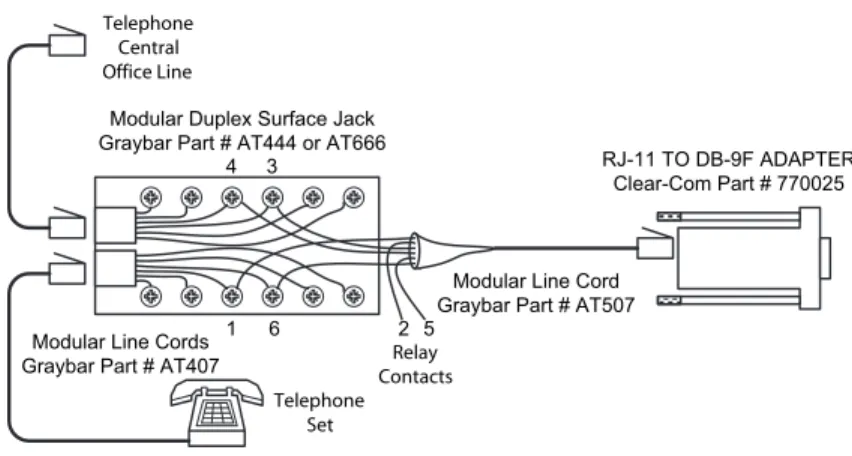
It is preferable to use a series-connected telephone set with the TEL-14. This will prevent the impedance of the telephone set from disturbing the telephone line impedance recognized by the TEL-14. It will also allow the TEL-14 to automatically disconnect the telephone when it comes offhook. A standard telephone may be installed in series with the TEL-14 by connecting it to pins 1 and 6 of the RJ-11 jack. Refer to Figure 2-2 for a diagram showing one way to connect the TEL-14 in series with a telephone.
Figure 2-2: Series Telephone Connection
RELAY CONTACTS
A pair of relay contacts for each line ("A/A1 leads") rated at 2A @ 24 VAC are available on the DB-9M connector or the RJ-11 adapter. This pair of contacts is normally open when the line is "on-hook" and closes when the TEL-14 goes "off-hook.” These contacts are not connected to any other circuitry inside the TEL-14 and can be used to energize a line-in-use indicator light on a standard multi-line phone set, or for any other low-power application.
SETUP
AUTOMATIC TELEPHONE LINE NULL
The TEL-14 features sophisticated automatic nulling circuitry, in addition to its integral echo cancellation system. This nulling capability is in two parts:
• The initial telephone line hybrid null is performed the first time a telephone line is connected to the TEL-14 or whenever a different telephone line is connected. This process is automatic, but must be initiated by the user. The way to do this is described later in this section and in Chapter 1, “Operation.” • The continuous dynamic voice null takes place during each telephone call. It
automatically "fine tunes" the null and cancels echoes.
The TEL-14 must null itself to the telephone line before normal operation is optimal. This procedure is to be performed once whenever the TEL-14 is
RJ-11 TO DB-9F ADAPTER Clear-Com Part # 770025 Telephone Central Office Line 1 2 3 4 5 6
Modular Duplex Surface Jack Graybar Part # AT444 or AT666
Modular Line Cord Graybar Part # AT507 Modular Line Cords
Graybar Part # AT407
Telephone Set
Relay Contacts
connected to a different telephone line. Once this nulling procedure is
performed, the TEL-14 will remember the telephone line characteristics when it is removed from the frame or loses power. It is necessary to null (minimize) the sidetone (the sound of the operator's own voice in his or her headset) when an external telephone line is placed in an intercom environment. Ideally, there should be no portion of the talk signal in the listen signal.
TEL-14'S SIDETONE NULLING PROCEDURE
Before calling the TEL-14 to automatically null it, connect the external telephone line and any other devices that affect the line's impedance. These include other telephone extensions connected in parallel on the same line. The phone line must be active (turned on at the central telephone office) during the nulling process, and all local parallel phone sets must be plugged in but on-hook so the line is in its normal operating state.
1. Enable the "auto answer" function using the front panel button.
2. Call the TEL-14 interface from a standard telephone set or cellular phone. Do
not call the TEL-14 from another TEL-14 in an intercom.
3. Press and hold the "auto answer" button for 5 seconds. The green "auto answer on" LED will turn off and then turn on again after 5 seconds. When
this happens, release the "auto answer" button.
4. Maintain silence on the telephone line. The TEL-14 will listen for one second of silence before beginning. The "ring/of- hook" LED will then flicker yellow and a series of tones will appear on the telephone line. These tones will be heard on the telephone line, but not on the intercom. Maintain silence during this process.
5. At the conclusion of the tones, the automatic nulling process is complete. After this initial automatic nulling adjustment has been made, the TEL-14 will remain adapted to this telephone line. There will be no white noise or tones at the beginning of each call, but instead the TEL-14 will use voices to dynamically adapt the interface to account for any residual nulling which may be needed. Typically, the TEL-14 will have adapted within 5 seconds of the start of the call. Before it has adapted, voices may temporarily sound hollow. This effect is normal, but may be minimized by reducing the send and/or receive volume settings. Throughout the call the TEL-14 will continue to perform continuous, automatic echo cancellation and adaptation to acoustic changes.
The above initial automatic nulling process should not need to be repeated, unless the telephone line connection is changed to a different telephone number or if there is reason to believe the telephone line impedance has changed
significantly--for example, if echoing or feedback occurs at a lower volume setting than before.
If an almost complete null cannot be obtained, it is likely something is wrong either with the wiring in the telephone line, or with one or more of the other devices attached to the telephone line. Refer to the “Option Switch” section of this manual for ways to use the TEL-14 options to improve its ability to adapt to poor conditions. Note that the null circuits in the TEL-14 are designed in accordance with North American standards, and require the signal levels and
impedance of the line be within these standards. The length of the telephone line between the TEL-14 and the Central Telephone Office should not be excessively long.
OPTION SWITCH SETTINGS
The TEL-14's panel controls and internal option switches can select any one of a large number of modes of operation for the TEL-14. The following subjects are covered in the following paragraphs:
• Default option switch settings • Matrix compatibility
• Individual option switch descriptions
• Option switch settings for 5 typical modes of operation
Default Option Switch Settings
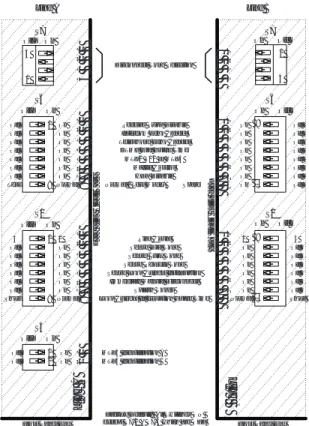
Figure 2-3 shows the option switches for each line in their factory set positions. The option switches are located on the lower edge of the Line A and B circuit boards, respectively, behind the auto answer buttons. The factory set position for each switch is the ON position, which is in the direction of the card edge for each line.
The option switch position numbers (1-8) are silkscreened on the circuit board.
Follow these position numbers rather than any which may appear on the
switches. The factory set positions (all ON except for S7-2 and S7-4 which are off ) are correct for the typical application of receiving calls from standard
telephone sets or cellular phones.You may change the switch settings based
upon their individual descriptions on the following pages, or upon one of the applications described.
The TEL-14 must be unplugged from the frame to access the option switches. The TEL-14 may be removed and inserted with the frame powered. With the exception of the normal/test mode switch and matrix identification switches, which are not used on Line B, the Line A and Line B switch numbering is identical. The TEL-14 will retain its telephone line settings while it is unplugged, so it is important to plug it back into the same slot.
Figure 2-3: TEL-14 Option Switches
Matrix Compatibility Option Switches
The TEL-14 is compatible with Matrix Plus II, Matrix Plus 3, and Eclipse intercom systems, although the option switches must be set for each system as follows:
Switches S5-1 and S5-2: Set the Matrix Identification option switches S5-1 and S5-2 to ON if you have a Matrix Plus 3 or Eclipse intercom system or to OFF if you have a Matrix Plus II intercom system. The factory default position is ON.
Switch S6-5: If you have a Matrix Plus II intercom system with software older than revision 12.x, set the Matrix Control option switch (S6-5) to OFF.
Individual Option Switch Descriptions and Settings
Note:The default position for each option switch is the ON position (except for S7-2 and S7-4 which are OFF). The ON position of each switch is set in the direction of the edge of the circuit board on both the Line A and Line B circuit boards. Leave each switch in the default position unless there is a specific reason to change it.
Switch S6-1 Receive Suppression Disable: It is generally advantageous to suppress incoming noise from the telephone line when the distant party is not
speaking. However, some users may want to leave the incoming sound on when the distant party is not speaking. This will enhance the sense that someone is on the other end of the telephone line, especially when intercom
Ring Count Sense Dial Tone Sense Busy Tone Sense Reorder Tone Sense Loop Current Interruption
Immediate Manual Disconnect Splash Tones HDX Disable S1 1 8 Off On S6 Matrix Control DTMF Dial Guard Time Normal / Test Mode*
MTX2 V12 or MTX3 Telephone Echo Cancel
Intercom Echo Cancel Receive Supp Disable
4 1 Off
Test Normal On
Factory Default: All Switches ON except S7-2 & S7-4 which are OFF Off Off Off Off Off Off On On On On On On 1 8 Off On On On On On On On Off Off Off Off Off Off
Short Normal Loop Current In terruption Guard Time
1 2 Off On S5 On On Off Off MTX3 Identification A MTX3 Identification B S1 1 8 Off On S6 4 1 Off On Off Off Off Off Off Off On On On On On On 1 8 Off On On On On On On On Off Off Off Off Off Off Short Normal 8 7 6 5 4 3 2 1 1 2 3 4 5 6 7 8 1 2 3 4 5 6 7 8 8 7 6 5 4 3 2 1 1 2 Spare On Off A e n i L B e n i L Line A Line B d r a o B t i u c r i C e h t f o e g d E d r a o B t i u c r i C e h t f o e g d E
Front Panel End Front Panel End
1 4 Off On S7 4 3 2 1 1 4 Off On 1 2 3 4 S7
headsets are used. However, if two TEL-14 lines were connected into the same party line, it would be advantageous to set Receive Suppression Disable to the OFF position. This prevents noise from one or more telephone lines from interfering with intercom communication and improves the stability of the connection. Refer to the “Party Line Dial-In Mode” section of this chapter. To leave the telephone line audio connected when the distant party is not speaking, set option switch S6-1 to ON. To mute the telephone line audio when the distant party is not speaking, set option switch S6-1 to OFF. The factory default setting is ON, causing Receive Suppression to be disabled. Switch S6-2 Intercom Echo Cancellation: Depending upon the system
configuration and room acoustics, audio communications may be improved by turning off the automatic intercom echo cancellation. Refer to the “Intercom-to-Intercom Mode” section of this chapter. Normally, however, leaving the automatic echo cancellation turned ON results in the best communications. To enable automatic intercom echo cancellation, set option switch S6-2 to ON. To disable automatic intercom echo cancellation, set option switch S6-2 to OFF. The factory default setting is ON, causing automatic intercom echo cancellation to be enabled.
Switch S6-3 Telephone Echo Cancellation: Depending upon the system
configuration and telephone line conditions, audio communications may be improved by turning off the automatic telephone echo cancellation. Refer to the “Intercom-to-Intercom Mode” section of this chapter. Normally, however, leaving the automatic echo cancellation urned ON results in the best
communications. To enable automatic telephone echo cancellation, set option switch S6-3 to ON. To disable automatic telephone echo cancellation, set option switch S6-3 to OFF. The factory default setting is ON, causing automatic telephone echo cancellation to be enabled.
Switch S6-4 DTMF Dial Guard Time: At the start of a call when the TEL-14 goes off hook the Echo Cancellation is frozen and the Receive Gain is reduced to allow distortion free DTMF dialling. With S6-4 set to its factory default position ON the DTMF Dial Guard Time is 4 seconds. With the S6-4 set to the optional position OFF the DTMF Dial Guard Time is extended to 10.2 seconds.
Switch S6-5 Software Compatibility: The Software Compatibility switch enables the TEL-14 to be backwards-compatible with Matrix Plus II software, revisions 10 and 11. When the TEL-14 is shipped as part of a system, this switch is set at the factory to match that system's software revision. If the TEL-14 is shipped individually, this switch is set to ON (compatible with Matrix Plus II, revisions 12 or higher, or with Matrix Plus 3). If the TEL-14 is to be installed in a Matrix Plus II system running revisions 10 or 11, you must set this switch to OFF.
Switch S6-6 Matrix Control: Note: This switch is normally only used in MatrixPlus II intercom systems using revision 11 software or earlier. In later releases,this function is controlled by the "Prevent Stations From Calling Out" option in the "Configure - Local Preferences" screen for the telephone port.
When Matrix Control is enabled, a telephone call can be initiated by any intercom station that has a TEL-14 port label assigned to a selector key. Matrix Control enables the station to activate talk paths to the TEL-14, which will cause
the TEL-14 to seize the line. The station can also pick up a call on the TEL-14 line.
When Matrix Control is disabled, stations cannot initiate telephone calls, and can only talk on the telephone line after the line has already been seized by the TEL-14. This may be desirable if the interface line is dedicated to manual operation, or to answering incoming calls automatically.
Matrix Control will be automatically disabled if:
• The telephone line is automatically answered at the interface.
• The telephone line is manually seized at the interface by pushing the "Hook" button.
To enable Matrix Control, set option switch S6-6 to ON.
Switch S6-7 Half-Duplex Disable:In extreme conditions involving very poor
telephone lines or conditions that cause instability and echo, acceptable performance can be obtained by enabling automatic switching to half-duplex conversation. In this mode the DSP controlling the echo canceling will automatically determine whether full-duplex or half duplex will result in better operation. To restrict operation to full-duplex, set option switch S6-7 to ON. To allow half- or full-duplex modes to be automatically determined, set option switch S6-7 to OFF. The factory default setting is ON, restricting operation to full-duplex.
Switch S6-8 Normal / Test Mode: This switch is only active on the Line A card, but serves both lines. Switch S6-8 should normally be left ON, enabling Normal Mode.
Switch S1-1 Auto Answer Ring Count: The Auto Answer Ring Count
determines the number of times the telephone line must ring before the TEL-14 automatically answers it. The ring count can be set to either 1 ring or 4 rings. To set the Auto Answer Ring Count to 1 ring, set option switch S1-1 to ON. To set the Auto-Answer Ring Count to 4 rings, set option switch S1-1 to OFF. The factory default setting is ON, providing an Auto Answer Ring Count of 1.
Switch S1-2 Sense Dial Tone: The TEL-14 can automatically disconnect from the telephone line when it senses dial tone. If necessary, this capability can be disabled. To enable automatic disconnects resulting from dial tone, set option switch S1-2 to ON. Dial tone disconnects are automatically disabled for the first 10 seconds of outgoing calls to allow time to begin dialing, regardless of this switch setting. To disable automatic disconnects resulting from dial tone, set option switch S1-2 to OFF. The factory default setting is ON, providing an automatic disconnect when the TEL-14 senses dial tone.
Switch S1-3 Sense Busy Tone: The TEL-14 can automatically disconnect from the telephone line when it senses busy tone. If necessary, this capability can be disabled. To enable automatic disconnects resulting from busy tone, set option switch S1-4 to ON. To disable automatic disconnects resulting from busy tone, set option switch S1-4 to OFF. The factory default setting is ON, providing an automatic disconnect when the TEL-14 senses busy tone.
Switch S1-4 Sense Reorder Tone: The TEL-14 can automatically disconnect from the telephone line when it senses reorder (fast busy) tone. If necessary, this capability can be disabled. To enable automatic disconnects resulting from reorder tone, set option switch S1-4 to ON. To disable automatic disconnects resulting from reorder tone, set option switch S1-4 to OFF. The factory default setting is ON, providing an automatic disconnect when the TEL-14 senses reorder tone.
Switch S1-5 Sense Loop Current Interruption: The TEL-14 can automatically disconnect from the telephone line when it senses the interruption in loop current that happens on most telephone lines shortly after the distant caller disconnects. If necessary, this capability can be disabled. To enable automatic disconnects resulting from an interruption in loop current, set option switch S1-5 to ON. To disable automatic disconnects resulting from interruption in loop current, set option switch S1-5 to OFF. The factory default setting is ON, providing an automatic disconnect when the TEL-14 senses an interruption in loop current.
Switch S1-6 Immediate Manual Disconnect: The TEL-14 can immediately disconnect a telephone call when the last station connected to it releases. Sometimes it is useful to delay disconnecting the telephone line when a station releases it. This allows the same or another station to pick up the line again and avoid losing the caller. The TEL-14 can automatically delay manual disconnects for 15 seconds. To enable immediate manual disconnects, set option switch S1-6 to ON. To delay manual disconnects, set option switch S1-6 to OFF. The factory default setting is ON, providing an immediate manual disconnect.
Switch S1-7 Splash Tones: Using "Splash Tones" the TEL-14 provides an indication to the caller that the call has been answered and provides an indication to the intercom that a caller is connecting. Depending upon requirements, these tones may be disabled. To enable splash tones, set option switch S1-7 to ON. To disable splash tones, set option switch S1-7 to OFF. The factory default setting is ON, providing splash tones at the start of each call.
Switch S1-8 Guard Time: In the first few seconds after the TEL-14 answers an incoming call, the telephone system may produce momentary interruptions in the current feeding the TEL-14. These interruptions may not occur in some telephone systems. When set to the Normal position, a guard time of about 5 seconds is in effect to prevent these interruptions from prematurely
disconnecting the call. Depending upon how the TEL-14 is used, it may be common to have very short telephone calls lasting less than 5 seconds. If the Guard Time switch S1-8 is set to Normal, the TEL-14 will not be able to detect the disconnect pulse at the end of these short calls. The Short setting of the Guard Time switch changes the guard time to about 0.25 seconds. If very short calls will be common and if the telephone system does not produce any
momentary interruptions at the start of a call, then the Guard Time switch S1-8 may be set to the Short setting. If the short setting is used and calls sometimes prematurely disconnect within the first few seconds, then the Normal setting must be used. The factory setting is Normal (ON).
Switch S5-1 & S5-2 Eclipse Identification: This switch will identify the card to a Matrix Plus II, Matrix Plus 3, or Eclipse Matrix System as a TEL-14. S5-1 and
S5-2 should always be operated in concert so that either both are ON or both are OFF. If the TEL-14 is used with a Matrix Plus 3 or Eclipse Matrix System, they should be set to the ON position. If the TEL-14 is used with a Matrix Plus II System, they should be set to the OFF position. The factory default setting is ON.
Switch S7-1, S7-2, S7-3 and S7-4 Disconnect tone Selection: These switches set
the frequency of the call progress tones that the TEL-14 will sense as an indication of a disconnected call. Call progress tones are the dial tones or busy tones often heard after the distant caller hangs up. These tones can be used by the TEL-14 as a means of detecting when a call is complete and must be
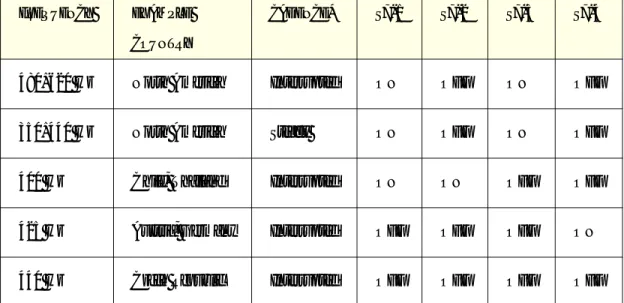
disconnected. These tones vary in different parts of the world and in different telephone systems. The factory default setting for S7 is for North America. The variety of possible settings is shown in the following table:
Table 2-1: Disconnect Tone Settings
*Note: The appropriate Tone Sense switches S1-2, S1-3, and S1-4 must be set to ON for 1 Hz cadence, 2 Hz cadence, or steady tones to be sensed as disconnects.
Ring Jumper J6 Ring Voltage Sensitivity: If the ring voltage from the telephone line is low and the TEL-14 will not answer to it, this jumper can be set to the 60V position. Low ring voltages are often encountered outside of the United States. The factory default setting is the 90V position, providing sensitivity to the typical 90 VAC ring found in the United States.
Option Switch Settings for Five Typical Modes of Operation
The TEL-14's panel controls and internal option switches can select any one of a large number of modes of operation for the TEL-14. The following paragraphs describe the settings for five of the most common of these modes:
• Intercom-station telephone access
FREQUENCY EXAMPLE COUNTRY
CADENCE* S7-1 S7-2 S7-3 S7-4
480+620 Hz North America Interrupted ON OFF ON OFF
350+440 Hz North America Steady ON OFF ON OFF
400 Hz Chile, Thailand Interrupted ON ON OFF OFF
425 Hz Austria, Germany Interrupted OFF OFF OFF ON
• Self-service dial-in • Manual call screening • Intercom-to-intercom • Party line dial-in
For operating instructions for these modes, see Chapter 1. For configuration
options refer to the Eclipse Configuration System Manual.
Intercom Station Telephone Access Mode
In “intercom-station telephone access” mode, a call on a TEL-14 line can be answered by any intercom station with a selector key assigned to a TEL-14 port label. Intercom stations can originate a call by using the "dial phone" mode. If the call must originate at another station model, then this station must have a key programmed to activate a DTMF sequence. Another way to arrange this is for the operator to have access to a standard telephone set connected with the TEL-14 line (for further information, see "Manual Call Screening Operation" below). The default settings of the TEL-14 allow “station access” mode.
Self-Service Dial-In Mode
In “self-service dial-in” mode (also referred to as "telephone IFB" mode), the TEL-14 will answer automatically whenever outside callers dial in. The caller can be automatically connected to a preset party-line, station, or program feed. Using "direct inward access" the caller can specify paths within the matrix. Auto disconnect will release the line automatically after the caller hangs up. To set the TEL-14 controls for self-service dial-in mode:
1. Set the "splash tones" option switch (S1-7) to OFF. This will prevent the TEL-14 splash tones from sounding. The matrix will supply tones to prompt inward dialing.
2. Set the remaining option switches to ON, the factory set position, or as otherwise required.
Manual Call Screening Mode
In “manual call screening” mode, incoming calls can be answered by a "master" operator with physical access to the TEL-14 "hook" button. A standard telephone, wired in series with the TEL-14, is used to initially pick up the call. When the telephone has been wired in series with the TEL-14, picking it up will not cause the interface to go off-hook, nor will this interfere with a call already in progress.
When the call is complete, the destination station operator can inform the master operator, and the master operator can hang up the TEL-14 using the "hook" button. If the "auto-disconnect" option switches are set, the TEL-14 will release the telephone line automatically when the caller hangs up. The telephone line will not be released if the talk path to the TEL-14 port is deactivated. This prevents a station operator from inadvertently disconnecting an in-bound caller. The destination station operator can also use the “remote telephone-line release” feature to hang up the phone.
The operator can also originate outside calls on the standard telephone, and make them available to destinations within the matrix.
To set the TEL-14's controls for manual call screening mode:
1. The "auto disconnect" option switches (S1-2 through S1-5) can be set either ON or OFF. This will determine whether the operator will be required to manually hang up the line after each call by using the "hook" button. It is recommended, however that the Loop Current Interruption option S1-5 be left in the ON position to avoid instability or feedback during open switching intervals on the telephone line at the end of a call.
2. Set the "immediate manual disconnect" option switch (S1-6) to OFF. This will prevent callers from being accidentally disconnected if they are transferred from one Matrix intercom station to another.
3. Set the "splash tones" option switch (S1-7) to OFF. This will prevent the TEL-14 splash tones from sounding.
4. Set the remaining option switches to ON, the factory set position, or as otherwise required.
Intercom-to-Intercom Mode
The TEL-14 may be used to connect two remotely located intercom systems through a telephone line. To set up the connection, one TEL-14 must originate a call to the other. Intercom station equipped with a keypad can originate the call by using the station's "dial phone" mode. If the operator of a station not equipped with a keypad must originate the call, either he or she must have a key programmed to activate a DTMF sequence.
After the call is made, the distant TEL-14 goes off-hook and the incoming telephone call becomes available to the telephone keys the TEL-14 port is preset to.
To set the TEL-14's controls for intercom-to-intercom mode:
1. The "auto disconnect" option switches (S1-2 through S1-5) should be at the factory set ON position. This will allow the TEL-14 to disconnect when the call ends.
2. Set the "immediate manual disconnect" option switch (S1-6) to OFF. (The
effect is described in the "Operation" section below.)
3. Set the "splash tones" option switch (S1-7) to OFF. This will prevent the TEL-14 splash tones from sounding.
4. Set the "intercom echo cancel" (S6-2) and "telephone echo cancel" (S6-3) option switches to OFF. This should be done to the TEL-14 on only one of the intercoms.
5. Set the remaining option switches to ON, the factory set position, or as
otherwise required.
In this type of connection, there is a possibility the echo canceller DSPs in the two TEL-14 cards will interfere with each other and cause instability. Note that setting the "intercom echo cancellation" (S6-2) and "telephone echo
cancellation" (S6-3) option switches to OFF on one of the TEL-14 cards will
PARTY LINE DIAL-IN MODE
Two TEL-14 lines may be programmed into the same party line. The TEL-14s should be set to "auto answer" and "auto disconnect" to allow people to use telephones or cellular phones to connect to and leave the party line at will. The callers may communicate with each other, as well as anyone on the party line. To set the TEL-14's controls for party line dial-in mode:
1.The “auto disconnect” option switches (S1-2 through S1-5) should be at the
factory set ON position. This will allow the TEL-14 to disconnect when the
call ends.
2. Set the “Receive Suppression Disable” option switch (S6-1) to OFF.
3. If using revision 11 Matrix Plus 3 intercom software, set the "Matrix Control" option switch (S6-5) to OFF. This will prevent intercom users from
disconnecting people who may be speaking from telephone line to telephone line.
4.Set the remaining option switches to ON, the factory set position, or as
otherwise required.
In this type of connection, there is a possibility that excess telephone line noise may interfere with communication on the intercom party line, or that poor telephone connections could cause instability in the two TEL-14 cards. For this reason it is recommended to turn OFF the “receive suppression disable” option switch S6-1 on each TEL-14 line programmed into the party line. This will allow the TEL-14 to automatically quiet the telephone line when there is no incoming voice.
CONFIGURATION
Refer to the Eclipse Configuration System Manual for more information on
MAINTENANCE
INTRODUCTION
This chapter provides a block diagram and a troubleshooting guide for the TEL-14 two-channel auto-nulling telephone interface. To view the diagram refer to the end of this chapter.
TROUBLESHOOTING
To help isolate any problems you may encounter, a list of possible symptoms and possible solutions is provided. Note that the most common option switch setting is with all switches in the ON position. This is also the factory default setting.
1. No front panel LEDs are lit.
• Press the Auto Gain or Auto Answer buttons.
• Check that the card is properly seated in the interface frame. Remove and reseat it.
• Check that the power cable from the interface frame is securely connected. • Check mains AC power to the matrix.
2. The TEL-14 will not answer the telephone line. The red Ring/Off Hook LED does not light when the line is called.
• Check that the telephone line is connected to the TEL-14. As a test, unplug the modular cable from the RJ-11 to DB-9F adaptor and plug it into a standard telephone set. Make sure the telephone set can make calls and rings when a call is received on this line. Plug the modular cable back into the RJ-11 to DB-9F adaptor.
• Set the Ring Jumper J6 to the 60V position if the ring voltage is low.
3. The TEL-14 will not automatically answer the telephone line. The red Ring/Off Hook LED lights when the line is called.
• Press the Auto Answer button. Make sure the green Auto Answer LED is lit to allow calls to automatically be answered.
• Make sure the Auto Answer Ring Count option switch S1-1 is set to the ON position to answer after the first ring. (This switch should be set to the OFF position to answer after the fourth ring.)
4. A telephone call to the TEL-14 cannot be answered from a station. The red Ring/Off Hook LED lights when the line is called.
• Check that the call can be answered by pressing the Hook button while the call is ringing. The Auto Answer LED should turn from red to green when a ringing call is answered.
• Check the Matrix programming to stations which cannot pick up the call.
5. When the Self-Service Dial-In feature of the Matrix intercom is used, additional tones are heard over the incoming call prompts.
• Set the Splash Tones option switch S1-7 to the OFF position to eliminate the tones that the TEL-14 produces at the start of a call.
6. Telephone calls cannot be placed from a station. The green Ring/Off Hook LED does not light when a call is attempted.
• Check that the telephone line can be seized by pressing the Hook button. The Auto Answer LED should light green when the line is seized.
• Make sure the Matrix Control option Switch S6-6 is set to the ON position. • Check the Matrix programming to stations which cannot seize the telephone
line to make a call. Refer to the Setup Menu and Interfaces Menu Sections of the Operation Manual.
7. Telephone calls cannot be placed from a station. The green Ring/Off Hook LED lights when a call is attempted. Dial tone is heard at the station.
• If DTMF dialing will not stop dial tone, press the Auto Gain button to light the yellow Auto Gain Adjustable LED. Increase the send volume just to the point where DTMF dialing will stop dial tone.
8. Telephone calls disconnect when transferring between Matrix stations.
• Set the Immediate Manual Disconnect option switch S1-6 to the OFF position to allow a delay of 15 seconds before disconnecting as a result of station release.
9. Telephone calls disconnect within 2 or 3 seconds after answering.
• Set the Sense Loop Current Interruption option switch S1-5 to the OFF position. This condition indicates that there is below normal DC current on the telephone line.
10.Excessive echo, background noise, or instability is heard during telephone calls or just at the start of a call.
• The TEL-14 will usually adapt within 5 seconds of the start of a call. Before it has adapted, voices may temporarily sound hollow. This effect is normal, but may be minimized by reducing the send and/or receive volume settings. • Press the Auto Gain button to light the yellow Auto Gain Adjustable LED.
Decrease the send and/or receive volume controls until acceptable operation is attained.
• If a speaker station is used, make sure the mic gain is set low and reduce the front panel volume level.
• TEL-14 must be made to renull the telephone line whenever it is connected to a different telephone number. Perform the renulling sequence described in Chapter 1.
• Set the Receive Suppression Disable option switch S6-1 to the OFF position. This will remove noise coming in from the telephone line.
• Set the Intercom Echo Cancel and/or Telephone Echo Cancel option switches S6-2 and S6-3 to the OFF position. Normally this is not necessary and it will result in an undesirable reduction of trans-hybrid loss. These switches should only be set to the OFF position if instability results in an TEL-14 to TEL-14 connection between two intercoms. Never do this to both TEL-14 lines in a connection between two intercoms.
• Set the HDX Disable option switch S6-6 to the OFF position. This is a drastic measure which will cure instability on poor telephone lines, but it will do this at the expense of full-duplex conversation. In this mode, conversation will be half-duplex unless the TEL-14 automatically detects that full-duplex conversation is possible.
11.Sound on the telephone line causes the line to disconnect. The TEL-14 incorporates a precise call progress tone detector, so it is unlikely to sense speech.
• If a steady sound seems to be causing the disconnect, set the Sense Dial Tone option switch S1-2 to the OFF position.
• If interrupted sounds seem to be causing the disconnect, set the Sense Busy Tone and/or Sense Reorder Tone option switches S1-3 and S1-4 to the OFF position.
Refer to the following figures located at the end of this chapter: 1. Block Diagram - TEL-14 Interface
BLOCK DIAGRAM
Figure 3-4: Block Diagram of TEL-14 Telephone Interface Ring Detect Line A Seize, Hold, Disconnect Contacts CO POTS Line A Line A DSP Audio From Intercom Audio To Intercom
Line A Microprocessor I/O
Microprocessor Level Detect Intercom Splash Tone Generator Nulling Tone Generator Telephone Splash Tone Generator Send Level Line A Front Panel LEDs, Switches, Volume Controls Line A Option Switches To Line A DSP / Tone Generators & Detectors
Line B Microprocessor I/O
Line B Front Panel LEDs, Switches, Volume Controls Hybrid Line B Seize, Hold, Disconnect Ring Detect Contacts CO POTS Line B To Line B DSP / Tone Generators & Detectors Line B DSP Audio To Intercom Send Level Telephone Splash Tone Generator Intercom Splash Tone Generator Nulling Tone Generator Audio From Intercom Line B Option Switches Test Interface
Level & Call Progress Tone Detect
Level Detect
Level & Call Progress Tone Detect Hybrid EEPROM Telephone Set A Intercom Control Telephone Set B Optical Isolation
SPECIFICATIONS
AUDIO
Frequency Response 300 Hz - 3500 Hz
Send Gain Control Range ± 12 dB
Send Gain (@ 0 dB setting) -12 dBv on intercom line produces -9 dBm on
telephone line
Receive Gain Control Range ± 12 dB
Receive Gain (@ 0 dB setting) -27 dBm on telephone line produces -12 dBv
on intercom line
Trans-Hybrid Loss > 40 dB, typical
RING DETECT SENSITIVITY
The TEL-14 will operate with most international telephone ring signal standards.
TELEPHONE DISCONNECT
Dial Tone* 350 Hz + 440 Hz, continuous
Busy Tone* 480 Hz + 620 Hz, 0.5 sec on / 0.5 sec off
Reorder Tone* 480 Hz + 620 Hz, 0.25 sec on / 0.25 sec off
Loop Current Interruption > 5 mS
* or as set according to Table I3-3
TELEPHONE LINE ISOLATION
Dielectric Strength 1500 VAC
Resistance >10 Meg ohms between each telephone line
and the Matrix Plus Interface Frame.
POWER SUPPLY
Supplied by the matrix interface module frame's power supply
Voltage Required Between ±8 and ±12 Volts DC Unregulated
Current Required 370 milliamps (positive supply, maximum)
130 milliamps (negative supply, maximum)
CONNECTORS
RJ-45 "To Matrix" Connector 2 for Intercom connection
DB-9M Connector 2 for Telephone Line, Telephone Set, and Relay
Contact connections (RJ-11 adapter supplied)
RELAY CONTACTS
Type Dry, Normally Open when TEL-14 is
On-Hook
Voltage 24 Volts AC
Current 2 Amps Maximum
OPERATING ENVIRONMENT
Temperature Between 0 and 70× C (32-150× F)
PACKAGE DIMENSIONS
Frame Slot Usage 1 slot of Matrix Plus Interface Frame
Height 5 1/16" (129 mm)
Width 1 3/8" (35 mm)
Depth 9 5/32" (233 mm)
Weight 0.78 lbs (0.32 kg)
Notice About Specifications
While Vitec Group Communications makes every attempt to maintain the accuracy of the information contained in its product manuals, that information is subject to change without notice. Performance specifications included in this manual are design-center specifications and are included for customer guidance and to facilitate system installation. Actual operating performance may vary.