Release latest
1 About PEtab 3
2 Documentation 5
3 Examples 7
4 PEtab support in systems biology tools 9
4.1 PEtab features supported in different tools. . . 9
5 Using PEtab 11 6 PEtab Python library 13 6.1 Library examples . . . 13
7 Getting help 15 8 Contributing to PEtab 17 8.1 PEtab data format specification . . . 17
8.1.1 Purpose . . . 17 8.1.2 Overview . . . 17 8.1.3 SBML model definition. . . 18 8.1.4 Condition table . . . 18 8.1.5 Measurement table . . . 19 8.1.6 Observables table . . . 21 8.1.7 Parameter table . . . 23 8.1.8 Visualization table . . . 25
8.1.9 YAML file for grouping files . . . 27
8.2 API Reference . . . 27 8.2.1 petab . . . 28 8.2.2 petab.composite_problem. . . 28 8.2.3 petab.core . . . 28 8.2.4 petab.conditions. . . 31 8.2.5 petab.C . . . 32 8.2.6 petab.lint . . . 32 8.2.7 petab.measurements. . . 37 8.2.8 petab.parameter_mapping. . . 40 8.2.9 petab.parameters . . . 46
8.2.12 petab.sbml. . . 54 8.2.13 petab.yaml. . . 58 8.2.14 petab.visualize.data_overview . . . 61 8.2.15 petab.visualize.helper_functions . . . 62 8.2.16 petab.visualize.plot_data_and_simulation . . . 69 8.2.17 petab.visualize.plotting_config . . . 70 8.3 PEtab changelog . . . 70 8.3.1 0.1 series . . . 70 8.3.2 0.0 series . . . 75 8.4 License . . . 76
8.5 PEtab logo license . . . 76
8.6 Examples . . . 77
8.6.1 Using petablint . . . 77
8.6.2 Visualization of data and simulations. . . 78
9 Indices and tables 85
Python Module Index 87
PEtabis a data format for specifying parameter estimation problems in systems biology. This repository provides extensive documentation and a Python library for easy access and validation ofPEtabfiles.
About PEtab
PEtab is built around SBMLand based on tab-separated values (TSV) files. It is meant as a standardized way to provide information for parameter estimation, which is out of the current scope of SBML. This includes for example:
• Specifying and linking measurements to models – Defining model outputs
– Specifying noise models
• Specifying parameter bounds for optimization
Documentation
Examples
A wide range of PEtab examples can be found in the systems biology parameter estimation benchmark problem collection.
PEtab support in systems biology tools
Where PEtab is supported (in alphabetical order): • AMICI(Example)
• A PEtab ->COPASI converter • d2d(HOWTO) • dMod(HOWTO) • MEIGO(HOWTO) • parPE • pyABC(Example) • pyPESTO(Example)
If your project or tool is using PEtab, and you would like to have it listed here, pleaselet us know.
4.1 PEtab features supported in different tools
The following list provides an overview of supported PEtab features in different tools, based on passed test cases of thePEtab test suite:
ID Test AM-ICI>=0. 10.20
Co-pasi
D2D dMod MEIGOparPEdeveloppyABC>=0. 10.1
pyPESTO>=0. 0.11
1 Basic simulation +++ +– +++ +++ +++ –+ +++ +++
2 Multiple simulation condi-tions
+++ +– +++ +++ +++ –+ +++ +++
3 Numeric observable parameter overrides in measurement ta-ble
+++ +– +++ +++ +++ –+ +++ +++
4 Parametric observable param-eter overrides in measurement table
+++ +– +++ +++ +++ –+ +++ +++
5 Parametric overrides in condi-tion table
+++ +– +++ +++ +++ –+ +++ +++
6 Time-point specific overrides in the measurement table
— — +++ +++ +++ — — — 7 Observable transformations to log10 scale +-+ +– +++ ++- +++ –+ +-+ +-+ 8 Replicate measurements +++ +– +++ +++ +++ –+ +++ +++ 9 Pre-equilibration +++ +– +++ +++ +++ –+ +++ +++ 10 Partial pre-equilibration +++ — +++ +++ +++ –+ +++ +++
11 Numeric initial concentration in condition table
+++ +– +++ +++ +++ –+ +++ +++
12 Numeric initial compartment sizes in condition table
— +– +++ +++ +++ — — —
13 Parametric initial concentra-tions in condition table
+++ +– +++ +++ +++ –+ +++ +++
14 Numeric noise parameter overrides in measurement table
+++ +– +++ +++ +++ –+ +++ +++
15 Parametric noise parameter overrides in measurement ta-ble +++ +– +++ +++ +++ –+ +++ +++ 16 Observable transformations to log scale +-+ +– +++ ++- +++ –+ +-+ +-+ Legend:
• First character indicates whether computing simulated data is supported and simulations are correct (+) or not (-).
• Second character indicates whether computing chi2 values of residuals are supported and correct (+) or not (-). • Third character indicates whether computing likelihoods is supported and correct (+) or not (-).
Using PEtab
If you would like to use PEtab yourself, please have a look atdoc/documentation_data_format.rstor at the example models provided in thebenchmark collection.
To convert your existing parameter estimation problem to the PEtab format, you will have to: 1. Specify your model in SBML.
2. Create a condition table. 3. Create a table of observables. 4. Create a table of measurements. 5. Create a parameter table.
If you are using Python, some handy functions of thePEtab librarycan help you with that. This include also a PEtab validator calledpetablintwhich you can use to check if your files adhere to the PEtab standard. If you have further questions regarding PEtab, feel free to post anissueat our github repository.
PEtab Python library
PEtab comes with a Python package for creating, checking, visualizing and working with PEtab files. This library is available onpypiand the easiest way to install it is running
It will require Python>=3.6 to run.
Development versions of the PEtab library can be installed using (replacedevelopby the branch or commit you would like to install).
When setting up a new parameter estimation problem, the most useful tools will be:
• ThePEtab validator, which is now automatically installed using Python entrypoints to be available as a shell command from anywhere calledpetablint
• petab.create_parameter_dfto create the parameter table, once you have set up the model, condition table, observable table and measurement table
• petab.create_combine_archiveto create aCOMBINE Archivefrom PEtab files
6.1 Library examples
Examples for PEtab Python library usage:• Validation • Visualization
Getting help
Contributing to PEtab
Contributions and feedback to PEtab are very welcome, see ourcontribution guide.
8.1 PEtab data format specification
Format version: 1This document explains the PEtab data format.
8.1.1 Purpose
Providing a standardized way for specifying parameter estimation problems in systems biology, especially for the case of Ordinary Differential Equation (ODE) models.
8.1.2 Overview
The PEtab data format specifies a parameter estimation problem using a number of text-based files (Systems Biology Markup Language (SBML)andTab-Separated Values (TSV)), i.e.
• An SBML model [SBML]
• A measurement file to fit the model to [TSV]
• A condition file specifying model inputs and condition-specific parameters [TSV] • An observable file specifying the observation model [TSV]
• A parameter file specifying optimization parameters and related information [TSV]
• (optional) A simulation file, which has the same format as the measurement file, but contains model simulations [TSV]
• (optional) A visualization file, which contains specifications how the data and/or simulations should be plotted by the visualization routines [TSV]
The following sections will describe the minimum requirements of those components in the core standard, which should provide all information for defining the parameter estimation problem.
Extensions of this format (e.g. additional columns in the measurement table) are possible and intended. However, while those columns may provide extra information for example for plotting, downstream analysis, or for more efficient parameter estimation, they should not affect the optimization problem as such.
General remarks
• All model entities, column names and row names are case-sensitive
• All identifiers must consist only of upper and lower case letters, digits and underscores, and must not start with a digit.
• Fields in “[]” are optional and may be left empty.
8.1.3 SBML model definition
The model must be specified as valid SBML. There are no further restrictions.
8.1.4 Condition table
The condition table specifies parameters, or initial values of species and compartments for specific simulation condi-tions (generally corresponding to different experimental condicondi-tions).
condi-tionId [condition-Name] parameterOrSpeciesOrCom-partmentId1 . . . parameterOrSpeciesOrCompart-mentId${n}
STRING [STRING] NUMERIC|STRING . . . NUMERIC|STRING
e.g. condi-tionId1 [condition-Name1] 0.42 . . . parameterId condi-tionId2 . . . . . . . .
Row- and column-ordering are arbitrary, although specifyingconditionIdfirst may improve human readability. Additional columns arenotallowed.
Detailed field description
• conditionId[STRING, NOT NULL]
Unique identifier for the simulation/experimental condition, to be referenced by the measurement table described below.
• conditionName[STRING, OPTIONAL]
Condition names are arbitrary strings to describe the given condition. They may be used for reporting or visual-ization.
• ${parameterOrSpeciesOrCompartmentId1}
Further columns may be global parameter IDs, IDs of species or compartments as defined in the SBML model. Only one column is allowed per ID. Values for these condition parameters may be provided either as numeric values, or as IDs defined in the SBML model, the parameter table or both.
– ${parameterId}
The values will override any parameter values specified in the model. – ${speciesId}
If a species ID is provided, it is interpreted as the initial concentration/amount of that species and will override the initial concentration/amount given in the SBML model or given by a preequilibration condi-tion. IfNaNis provided for a condition, the result of the preequilibration (or initial concentration/amount from the SBML model, if no preequilibration is defined) is used.
– ${compartmentId}
If a compartment ID is provided, it is interpreted as the initial compartment size.
8.1.5 Measurement table
A tab-separated values files containing all measurements to be used for model training or validation. Expected to have the following named columns in any (but preferably this) order:
observableId [preequilibrationConditionId] simulationConditionId measurement time
observableId [conditionId] conditionId NUMERIC NUMERIC|inf
(wrapped for readability)
. . . [observableParameters] [noiseParameters]
. . . [parameterId|NUMERIC[;parameterId|NUMERIC][. . . ]][parameterId|NUMERIC[;parameterId|NUMERIC][. . . ]]
. . . .
Additional (non-standard) columns may be added. If the additional plotting functionality of PEtab should be used, such columns could be
. . . [datasetId] [replicateId]
. . . [datasetId] [replicateId] . . . .
wheredatasetIdis a necessary column to use particular plotting functionality, andreplicateIdis optional, which can be used to group replicates and plot error bars.
Detailed field description
• observableId[STRING, NOT NULL, REFERENCES(observables.observableID)] Observable ID as defined in the observables table described below.
• preequilibrationConditionId [STRING OR NULL, REFERENCES(conditionsTable.conditionID), OPTIONAL]
TheconditionIdto be used for preequilibration. E.g. for drug treatments, the model would be preequili-brated with the no-drug condition. Empty for no preequilibration.
• simulationConditionId[STRING, NOT NULL, REFERENCES(conditionsTable.conditionID)] conditionIdas provided in the condition table, specifying the condition-specific parameters used for simu-lation.
• measurement[NUMERIC, NOT NULL]
The measured value in the same units/scale as the model output. • time[NUMERIC OR STRING, NOT NULL]
Time point of the measurement in the time unit specified in the SBML model, numeric value orinf(lower-case) for steady-state measurements.
• observableParameters[NUMERIC, STRING OR NULL, OPTIONAL]
This field allows overriding or introducing condition-specific versions of output parameters defined in the ob-servation model. The model can define observables (see below) containing place-holder parameters which can be replaced by condition-specific dynamic or constant parameters. Placeholder parameters must be named observableParameter${n}_${observableId}withnranging from 1 (not 0) to the number of place-holders for the given observable, without gaps. If the observable specified underobservableIdcontains no placeholders, this field must be empty. If it containsn > 0placeholders, this field must holdn semicolon-separated numeric values or parameter names. No trailing semicolon must be added.
Different lines for the sameobservableIdmay specify different parameters. This may be used to account for condition-specific or batch-specific parameters. This will translate into an extended optimization parameter vector.
All placeholders defined in the observation model must be overwritten here. If there are no placeholders used, this column may be omitted.
• noiseParameters[NUMERIC, STRING OR NULL, OPTIONAL]
The measurement standard deviation orNaNif the corresponding sigma is a model parameter.
Numeric values or parameter names are allowed. Same rules apply as forobservableParametersin the previous point.
• datasetId[STRING, OPTIONAL]
The datasetId is used to group certain measurements to datasets. This is typically the case for data points which belong to the same observable, the same simulation and preequilibration condition, the same noise model, the same observable transformation and the same observable parameters. This grouping makes it possible to use the plotting routines which are provided in the PEtab repository.
• replicateId[STRING, OPTIONAL]
The replicateId can be used to discern replicates with the samedatasetId, which is helpful for plotting e.g. error bars.
8.1.6 Observables table
Parameter estimation requires linking experimental observations to the model of interest. Therefore, one needs to define observables (model outputs) and respective noise models, which represent the measurement process. Since parameter estimation is beyond the scope of SBML, there exists no standard way to specify observables (model out-puts) and respective noise models. Therefore, in PEtab observables are specified in a separate table as described in the following. This allows for a clear separation of the observation model and the underlying dynamic model, which allows, in most cases, to reuse any existing SBML model without modifications.
The observable table has the following columns:
observableId [observableName] observableFormula
STRING [STRING] STRING
e.g.
relativeTotalPro-tein1
Relative abundance of Protein1
observableParameter1_relativeTotalProtein1 * (protein1 + phos-pho_protein1 )
. . . .
(wrapped for readability)
. . . [observableTransformation] noiseFormula [noiseDistribution]
. . . [lin(default)|log|log10] STRING|NUMBER [laplace|normal] . . . e.g.
. . . lin noiseParameter1_relativeTotalProtein1 normal
. . . .
Detailed field description • observableId[STRING]
Any identifier which would be a valid identifier in SBML. This is referenced by theobservableIdcolumn in the measurement table. Must be different from any existing model entity or parameter introduced elsewhere. • [observableName] [STRING, OPTIONAL]
• observableFormula[STRING]
Observation function as plain text formula expression. May contain any symbol defined in the SBML model (including model time time) or parameter table. In the simplest case just an SBML species ID or an AssignmentRuletarget.
May introduce new parameters of the form observableParameter${n}_${observableId}, which are overridden byobservableParametersin the measurement table (see description there).
• observableTransformation[STRING, OPTIONAL]
Transformation of the observable and measurement for computing the objective function. Must be one oflin, logorlog10. Defaults tolin. The measurements and model outputs are both assumed to be provided in linear space.
• noiseFormula[NUMERIC|STRING]
Measurement noise can be specified as a numerical value which will default to a Gaussian noise model if not specified differently innoiseDistributionwith standard deviation as provided here. In this case, the same standard deviation is assumed for all measurements for the given observable.
Alternatively, some formula expression can be provided to specify more complex noise models. A noise model which accounts for relative and absolute contributions could, e.g., be defined as:
noiseParameter1_observable_pErk + noiseParameter2_observable_pErk*pErk
with noiseParameter1_observable_pErk denoting the absolute and noiseParameter2_observable_pErk the relative contribution for the observ-able observable_pErk corresponding to species pErk. IDs of noise parame-ters that need to have different values for different measurements have the structure: noiseParameter${indexOfNoiseParameter}_${observableId} to facilitate automatic recognition. The specific values or parameters are assigned in thenoiseParametersfield of the measure-ment table (see above). Any parameters named noiseParameter${1..n}_${observableId}must be overwritten in the measurement table.
• noiseDistribution[STRING: ‘normal’ or ‘laplace’, OPTIONAL]
Assumed noise distribution for the given measurement. Only normally or Laplace distributed noise is currently allowed (log-normal and log-Laplace are obtained by settingobservableTransformationtolog, sim-ilarly forlog10). Defaults tonormal. Ifnormal, the specifiednoiseParameters will be interpreted as standard deviation (notvariance). IfLaplaceist specified, the specifiednoiseParameterwill be inter-preted as the scale, or diversity, parameter.
Noise distributions
FornoiseDistribution,normalandlaplaceare supported. ForobservableTransformation,lin, logandlog10are supported. Denote by𝑦the simulation,𝑚the measurement, and𝜎the standard deviation of a normal, or the scale parameter of a laplace model, as given via thenoiseFormulafield. Then we have the following effective noise distributions.
• Normal distribution: 𝜋(𝑚|𝑦, 𝜎) =√1 2𝜋𝜎exp (︂ −(𝑚−𝑦) 2 2𝜎2 )︂
• Log-normal distribution (i.e. log(m) is normally distributed): 𝜋(𝑚|𝑦, 𝜎) = √ 1 2𝜋𝜎𝑚exp (︂ −(log𝑚−log𝑦) 2 2𝜎2 )︂
• Log10-normal distribution (i.e. log10(m) is normally distributed): 𝜋(𝑚|𝑦, 𝜎) = √ 1 2𝜋𝜎𝑚log(10)exp (︂ −(log10𝑚−log10𝑦) 2 2𝜎2 )︂ • Laplace distribution: 𝜋(𝑚|𝑦, 𝜎) = 1 2𝜎exp (︂ −|𝑚−𝑦| 𝜎 )︂
• Log-Laplace distribution (i.e. log(m) is Laplace distributed): 𝜋(𝑚|𝑦, 𝜎) = 1 2𝜎𝑚exp (︂ −|log𝑚−log𝑦| 𝜎 )︂
• Log10-Laplace distribution (i.e. log10(m) is Laplace distributed): 𝜋(𝑚|𝑦, 𝜎) = 1 2𝜎𝑚log(10)exp (︂ −|log10𝑚−log10𝑦| 𝜎 )︂
The distributions above are for a single data point. For a collection𝐷 = {𝑚𝑖}𝑖 of data points and corresponding simulations𝑌 ={𝑦𝑖}𝑖and noise parametersΣ ={𝜎𝑖}𝑖, the current specification assumes independence, i.e. the full distributions is
𝜋(𝐷|𝑌,Σ) =∏︁ 𝑖
𝜋(𝑚𝑖|𝑦𝑖, 𝜎𝑖)
8.1.7 Parameter table
A tab-separated value text file containing information on model parameters. This tablemustinclude the following parameters:
• Named parameter overrides introduced in theconditions table, unless defined in the SBML model • Named parameter overrides introduced in themeasurement table
andmust notinclude:
• Placeholder parameters (seeobservableParametersandnoiseParametersabove) • Parameters included as column names in thecondition table
• Parameters that are AssignmentRule targets in the SBML model itmayinclude:
• Any SBML model parameter that was not excluded above • Named parameter overrides introduced in theconditions table One row per parameter with arbitrary order of rows and columns:
parame-terId [parameter-Name] parameter-Scale lower-Bound upper-Bound nominal-Value esti-mate . . .
STRING [STRING] log10|lin|log NU-MERIC
NUMERIC NUMERIC 0|1 . . .
(wrapped for readability) . . . [initializationPri-orType] [initializationPriorParame-ters] [objectivePri-orType] [objectivePriorParame-ters]
. . . see below see below see below see below
. . . .
Additional columns may be added.
Detailed field description
• parameterId[STRING, NOT NULL]
TheparameterIdof the parameter described in this row. This has to match the ID of a parameter specified in the SBML model, a parameter introduced as override in the condition table, or a parameter occurring in the observableParametersornoiseParameterscolumn of the measurement table (see above).
• parameterName[STRING, OPTIONAL]
Parameter name to be used e.g. for plotting etc. Can be chosen freely. May or may not coincide with the SBML parameter name.
• parameterScale[lin|log|log10]
Scale of the parameter to be used during parameter estimation. • lowerBound[NUMERIC]
Lower bound of the parameter used for optimization. Optional, ifestimate==0. Must be provided in linear space, independent ofparameterScale.
• upperBound[NUMERIC]
Upper bound of the parameter used for optimization. Optional, ifestimate==0. Must be provided in linear space, independent ofparameterScale.
• nominalValue[NUMERIC]
Some parameter value to be used if the parameter is not subject to estimation (seeestimatebelow). Must be provided in linear space, independent ofparameterScale. Optional, unlessestimate==0.
• estimate[BOOL 0|1]
1 or 0, depending on, if the parameter is estimated (1) or set to a fixed value(0) (seenominalValue). • initializationPriorType[STRING, OPTIONAL]
Prior types used for sampling of initial points for optimization. Sampled points are clipped to lie inside the parameter boundaries specified by lowerBound and upperBound. Defaults to parameterScaleUniform.
Possible prior types are:
– uniform: flat prior on linear parameters – normal: Gaussian prior on linear parameters – laplace: Laplace prior on linear parameters
– logNormal: exponentiated Gaussian prior on linear parameters – logLaplace: exponentiated Laplace prior on linear parameters
– parameterScaleNormal: Gaussian prior on original parameter scale – parameterScaleLaplace: Laplace prior on original parameter scale • initializationPriorParameters[STRING, OPTIONAL]
Prior parameters used for sampling of initial points for optimization, separated by a semicolon. Defaults to lowerBound;upperBound.
So far, only numeric values will be supported, no parameter names. Parameters for the different prior types are: – uniform: lower bound; upper bound
– normal: mean; standard deviation (notvariance) – laplace: location; scale
– logNormal: parameters of corresp. normal distribution (see: normal) – logLaplace: parameters of corresp. Laplace distribution (see: laplace) – parameterScaleUniform: lower bound; upper bound
– parameterScaleNormal: mean; standard deviation (notvariance) – parameterScaleLaplace: location; scale
• objectivePriorType[STRING, OPTIONAL]
Prior types used for the objective function during optimization or sampling. For possible values, see initializationPriorType.
• objectivePriorParameters[STRING, OPTIONAL]
Prior parameters used for the objective function during optimization. For more detailed documentation, see initializationPriorParameters.
8.1.8 Visualization table
A tab-separated value file containing the specification of the visualization routines which come with the PEtab reposi-tory. Plots are in general collections of different datasets as specified using theirdatasetId(if provided) inside the measurement table.
Expected to have the following columns in any (but preferably this) order:
plotId [plot-Name]
[plotTypeSimulation] [plotTypeData]
STRING [STRING]
[Line-Plot(default)|BarPlot|ScatterPlot]
[MeanAndSD(default)|MeanAndSEM|replicate;provided]
. . . .
(wrapped for readability)
. . . [datasetId] [xValues] [xOffset] [xLabel] [xScale]
. . . [datasetId] [time(default)|parameterOrStateId] [NUMERIC] [STRING] [lin|log|log10|order]
. . . .
. . . [yValues] [yOffset] [yLabel] [yScale] [legendEntry]
. . . [observableId] [NUMERIC] [STRING] [lin|log|log10] [STRING]
. . . .
Detailed field description
• plotId[STRING, NOT NULL]
An ID which corresponds to a specific plot. All datasets with the same plotId will be plotted into the same axes object.
• plotName[STRING, OPTIONAL] A name for the specific plot.
• plotTypeSimulation[STRING, OPTIONAL]
The type of the corresponding plot, can beLinePlot,BarPlotandScatterPlot. Default isLinePlot. • plotTypeData[STRING, OPTIONAL]
The type how replicates should be handled, can beMeanAndSD,MeanAndSEM,replicate(for plotting all replicates separately), orprovided(if numeric values for the noise level are provided in the measurement table). Default isMeanAndSD.
• datasetId[STRING, NOT NULL, REFERENCES(measurementTable.datasetId), OPTIONAL] The datasets which should be grouped into one plot.
• xValues[STRING, OPTIONAL]
The independent variable, which will be plotted on the x-axis. Can betime(default, for time resolved data), or it can beparameterOrStateIdfor dose-response plots. The corresponding numeric values will be shown on the x-axis.
• xOffset[NUMERIC, OPTIONAL]
Possible data-offsets for the independent variable (default is0). • xLabel[STRING, OPTIONAL]
Label for the x-axis. Defaults to the entry inxValues. • xScale[STRING, OPTIONAL]
Scale of the independent variable, can belin,log,log10ororder. Theordervalue should be used if values of the independent variable are ordinal. This value can only be used in combination withLinePlot value for theplotTypeSimulationcolumn. In this case, points on x axis will be placed equidistantly from each other. Default islin.
• yValues[observableId, REFERENCES(measurementTable.observableId), OPTIONAL] The observable which should be plotted on the y-axis.
• yOffset[NUMERIC, OPTIONAL]
Possible data-offsets for the observable (default is0). • yLabel[STRING, OPTIONAL]
Label for the y-axis. Defaults to the entry inyValues. • yScale[STRING, OPTIONAL]
• legendEntry[STRING, OPTIONAL]
The name that should be displayed for the corresponding dataset in the legend and which defaults to the value indatasetId.
Extensions
Additional columns, such asColor, etc. may be specified.
Examples
Examples of the visualization table can be found in the Benchmark model collection, for example in the Chen_MSB2009model.
8.1.9 YAML file for grouping files
To link the SBML model, measurement table, condition table, etc. in an unambiguous way, we use aYAMLfile. This file also allows specifying a PEtab version (as the format is not unlikely to change in the future).
Furthermore, this can be used to describe parameter estimation problems comprising multiple models (more details below).
The format is described in the schema../petab/petab_schema.yaml, which allows for easy validation.
Parameter estimation problems combining multiple models
Parameter estimation problems can comprise multiple models. For now, PEtab allows to specify multiple SBML mod-els with corresponding condition and measurement tables, and one joint parameter table. This means that the parameter namespace is global. Therefore, parameters with the same ID in different models will be considered identical.
8.2 API Reference
petab PEtab global
petab.composite_problem PEtab problems consisting of multiple models
petab.core PEtab core functions (or functions that don’t fit any-where else)
petab.conditions Functions operating on the PEtab condition table
petab.C This file contains constant definitions.
petab.lint Integrity checks and tests for specific features used
petab.measurements Functions operating on the PEtab measurement table
petab.parameter_mapping Functions related to mapping parameter from model to parameter estimation problem
petab.parameters Functions operating on the PEtab parameter table
petab.problem PEtab Problem class
petab.sampling Functions related to parameter sampling
petab.sbml Functions for interacting with SBML models
petab.yaml Code regarding the PEtab YAML config files
Table 1 – continued from previous page
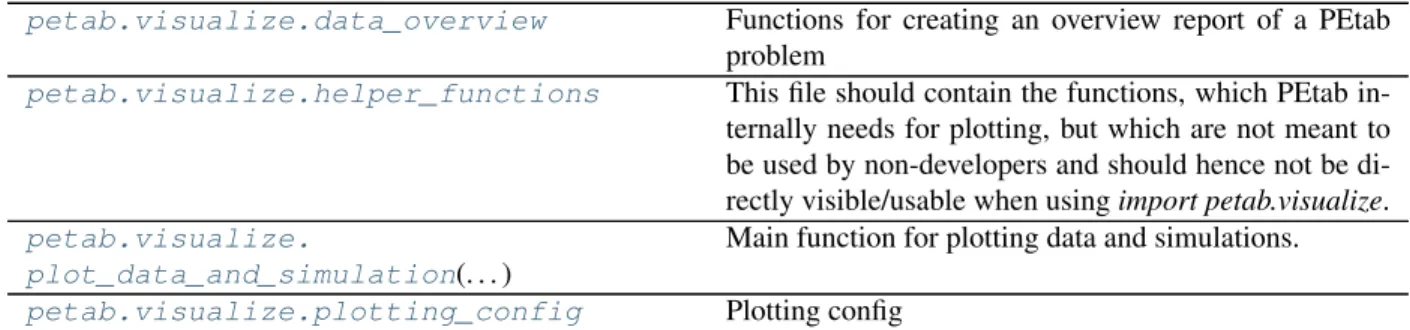
petab.visualize.data_overview Functions for creating an overview report of a PEtab problem
petab.visualize.helper_functions This file should contain the functions, which PEtab in-ternally needs for plotting, but which are not meant to be used by non-developers and should hence not be di-rectly visible/usable when usingimport petab.visualize.
petab.visualize.
plot_data_and_simulation(. . . )
Main function for plotting data and simulations.
petab.visualize.plotting_config Plotting config
8.2.1 petab
PEtab global
petab.ENV_NUM_THREADS
Name of environment variable to set number of threads or processes PEtab should use for operations that can be performed in parallel. By default, all operations are performed sequentially.
8.2.2 petab.composite_problem
PEtab problems consisting of multiple models
Classes
CompositeProblem(parameter_df, problems) Representation of a PEtab problem consisting of multi-ple models
class petab.composite_problem.CompositeProblem(parameter_df:
pan-das.core.frame.DataFrame = None, problems: List[petab.problem.Problem] = None)
Bases:object
Representation of a PEtab problem consisting of multiple models
problems
Listpetab.Problems
parameter_df
PEtab parameter DataFrame
static from_yaml(yaml_config: Union[Dict[KT, VT], str]) →
petab.composite_problem.CompositeProblem Create from YAML file
Factory method to create a CompositeProblem instance from a PEtab YAML config file Parameters yaml_config– PEtab configuration as dictionary or YAML file name
8.2.3 petab.core
Functions
concat_tables(tables, . . . ) Concatenate DataFrames provided as DataFrames or filenames, and a parser
create_combine_archive(yaml_file, filename, . . . )
Create COMBINE archive (http://co.mbine.org/ documents/archive) based on PEtab YAML file.
flatten_timepoint_specific_output_overridesFlatten timepoint-specific output parameter overrides.(. . . )
get_notnull_columns(df, candidates) Return list ofdf-columns incandidateswhich are not all null/nan.
get_observable_id(parameter_id) Get PEtab observable ID from PEtab-style sigma or ob-servableAssignmentRule-targetparameter_id.
get_simulation_df(simulation_file) Read PEtab simulation table
get_visualization_df(visualization_file) Read PEtab visualization table
is_empty(val) Check if the valueval, e.g.
to_float_if_float(x) Return input as float if possible, otherwise return as is
unique_preserve_order(seq) Return a list of unique elements in Sequence, keeping only the first occurrence of each element
write_simulation_df(df, filename) Write PEtab simulation table
write_visualization_df(df, filename) Write PEtab visualization table
petab.core.concat_tables(tables: Union[str, pandas.core.frame.DataFrame, Iter-able[Union[pandas.core.frame.DataFrame, str]]], file_parser: Op-tional[Callable] = None)→pandas.core.frame.DataFrame
Concatenate DataFrames provided as DataFrames or filenames, and a parser Parameters
• tables– Iterable of tables to join, as DataFrame or filename.
• file_parser– Function used to read the table in case filenames are provided, accepting a filename as only argument.
Returns The concatenated DataFrames
petab.core.create_combine_archive(yaml_file: str, filename: str, family_name: Optional[str] = None, given_name: Optional[str] = None, email: Op-tional[str] = None,organization: Optional[str] = None)→ None
Create COMBINE archive (http://co.mbine.org/documents/archive) based on PEtab YAML file. Parameters
• yaml_file– Path to PEtab YAML file
• family_name– Family name of archive creator • given_name– Given name of archive creator • email– E-mail address of archive creator
• organization– Organization of archive creator
petab.core.flatten_timepoint_specific_output_overrides(petab_problem:
petab.problem.Problem) →None
Flatten timepoint-specific output parameter overrides.
If the PEtab problem definition has timepoint-specificobservableParametersornoiseParametersfor the same observable, replace those by replicating the respective observable.
This is a helper function for some tools which may not support such timepoint-specific mappings. The observ-able tobserv-able and measurement tobserv-able are modified in place.
Parameters petab_problem– PEtab problem to work on
petab.core.get_notnull_columns(df: pandas.core.frame.DataFrame, candidates: Iterable[T_co]) Return list ofdf-columns incandidateswhich are not all null/nan.
The output can e.g. be used as input forpandas.DataFrame.groupby. Parameters
• df– Dataframe
• candidates– Columns ofdfto consider petab.core.get_observable_id(parameter_id: str)→str
Get PEtab observable ID from PEtab-style sigma or observableAssignmentRule-targetparameter_id. e.g. for ‘observable_obs1’ -> ‘obs1’, for ‘sigma_obs1’ -> ‘obs1’
Parameters parameter_id– Some parameter ID Returns Observable ID
petab.core.get_simulation_df(simulation_file: str)→pandas.core.frame.DataFrame Read PEtab simulation table
Parameters simulation_file– URL or filename of PEtab simulation table Returns Simulation DataFrame
petab.core.get_visualization_df(visualization_file: str)→pandas.core.frame.DataFrame Read PEtab visualization table
Parameters visualization_file– URL or filename of PEtab visualization table Returns Visualization DataFrame
petab.core.is_empty(val)→bool
Check if the valueval, e.g. a table entry, is empty. Parameters val– The value to check.
Returns Whether the field is to be considered empty. Return type empty
petab.core.to_float_if_float(x: Any)→Any Return input as float if possible, otherwise return as is
Parameters x– Anything
Returns xas float if possible, otherwisex
petab.core.unique_preserve_order(seq: Sequence[T_co])→List[T]
Return a list of unique elements in Sequence, keeping only the first occurrence of each element seq: Sequence to prune
Returns List of unique elements inseq
petab.core.write_simulation_df(df: pandas.core.frame.DataFrame,filename: str)→None Write PEtab simulation table
Parameters
• filename– Destination file name
petab.core.write_visualization_df(df: pandas.core.frame.DataFrame,filename: str)→None Write PEtab visualization table
Parameters
• df– PEtab visualization table • filename– Destination file name
8.2.4 petab.conditions
Functions operating on the PEtab condition table
Functions
create_condition_df(parameter_ids, condi-tion_ids)
Create empty condition DataFrame
get_condition_df(condition_file, . . . ) Read the provided condition file into a pandas. Dataframe
get_parametric_overrides(condition_df) Get parametric overrides from condition table
write_condition_df(df, filename) Write PEtab condition table
petab.conditions.create_condition_df(parameter_ids: Iterable[str], condition_ids: Optional[Iterable[str]] = None) → pan-das.core.frame.DataFrame
Create empty condition DataFrame Parameters
• parameter_ids– the columns • condition_ids– the rows
Returns Apandas.DataFramewith empty given rows and columns and all nan values petab.conditions.get_condition_df(condition_file: Union[str, pandas.core.frame.DataFrame,
None])→pandas.core.frame.DataFrame Read the provided condition file into apandas.Dataframe
Conditions are rows, parameters are columns, conditionId is index.
Parameters condition_file– File name of PEtab condition file or pandas.Dataframe petab.conditions.get_parametric_overrides(condition_df: pandas.core.frame.DataFrame)
→List[str] Get parametric overrides from condition table
Parameters condition_df– PEtab condition table
Returns List of parameter IDs that are mapped in a condition-specific way
petab.conditions.write_condition_df(df: pandas.core.frame.DataFrame, filename: str) → None
Write PEtab condition table Parameters
• filename– Destination file name
8.2.5 petab.C
This file contains constant definitions.
8.2.6 petab.lint
Integrity checks and tests for specific features used
Functions
assert_all_parameters_present_in_parameter_dfEnsure all required parameters are contained in the pa-(. . . ) rameter table with no additional ones
assert_measured_observables_defined(. . . ) Check if all observables in the measurement table have been defined in the observable table
assert_measurement_conditions_present_in_condition_tableEnsure that all (. . . )entries from measure-ment_df.simulationConditionId and measure-ment_df.preequilibrationConditionId are present in condition_df.index.
assert_model_parameters_in_condition_or_parameter_tableModel parameters that are targets of AssignmentRule(. . . ) must not be present in parameter table or in condition table columns.
assert_no_leading_trailing_whitespace(. . . )Check that there is no trailing whitespace in elements of Iterable
assert_noise_distributions_valid(observable_df)Ensure that noise distributions and transformations for observables are valid.
assert_parameter_bounds_are_numeric(parameter_df)Check if all entries in the lowerBound and upperBound columns of the parameter table are numeric.
assert_parameter_estimate_is_boolean(. . . )Check if all entries in the estimate column of the param-eter table are 0 or 1.
assert_parameter_id_is_string(parameter_df)Check if all entries in the parameterId column of the parameter table are string and not empty.
assert_parameter_prior_parameters_are_validCheck that the prior parameters are valid.(. . . )
assert_parameter_prior_type_is_valid(. . . )Check that valid prior types have been selected
assert_parameter_scale_is_valid(parameter_df)Check if all entries in the parameterScale column of the parameter table are ‘lin’ for linear, ‘log’ for natural log-arithm or ‘log10’ for base 10 loglog-arithm.
assert_unique_observable_ids(observable_df) Check if the observableId column of the observable ta-ble is unique.
assert_unique_parameter_ids(parameter_df) Check if the parameterId column of the parameter table is unique.
check_condition_df(df, sbml_model) Run sanity checks on PEtab condition table
check_ids(ids, kind) Check IDs are valid
check_measurement_df(df, observable_df) Run sanity checks on PEtab measurement table
check_observable_df(observable_df) Check validity of observable table
check_parameter_bounds(parameter_df) Check if all entries in the lowerBound are smaller than upperBound column in the parameter table and that bounds are positive for parameterScale log|log10.
Table 5 – continued from previous page
check_parameter_df(df, sbml_model, . . . ) Run sanity checks on PEtab parameter table
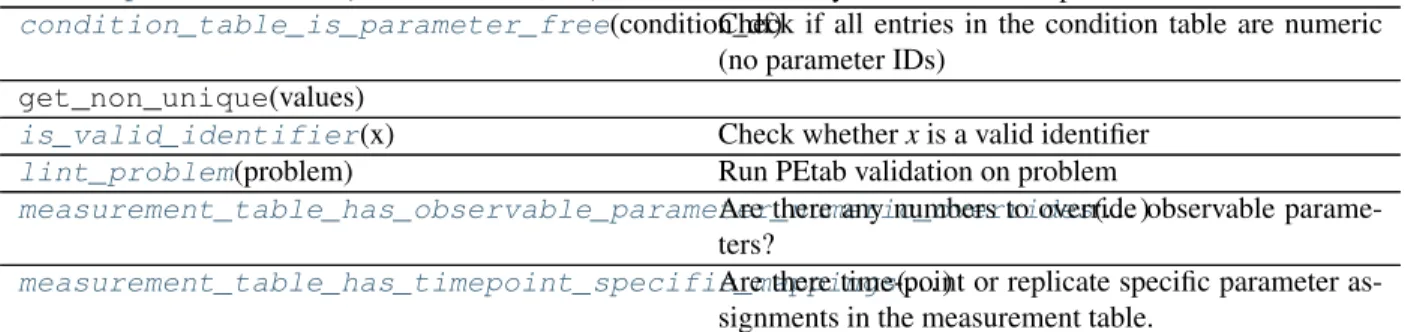
condition_table_is_parameter_free(condition_df)Check if all entries in the condition table are numeric (no parameter IDs)
get_non_unique(values)
is_valid_identifier(x) Check whetherxis a valid identifier
lint_problem(problem) Run PEtab validation on problem
measurement_table_has_observable_parameter_numeric_overridesAre there any numbers to override observable parame-(. . . ) ters?
measurement_table_has_timepoint_specific_mappingsAre there time-point or replicate specific parameter as-(. . . ) signments in the measurement table.
petab.lint._check_df(df: pandas.core.frame.DataFrame, req_cols: Iterable[T_co], name: str) → None
Check if given columns are present in DataFrame Parameters
• df– Dataframe to check
• req_cols– Column names which have to be present
• name– Name of the DataFrame to be included in error message Raises AssertionError– if a column is missing
petab.lint.assert_all_parameters_present_in_parameter_df(parameter_df: pan-das.core.frame.DataFrame, sbml_model: lib-sbml.Model, ob-servable_df: pan-das.core.frame.DataFrame, measurement_df: pan-das.core.frame.DataFrame, condition_df: pan-das.core.frame.DataFrame) →None
Ensure all required parameters are contained in the parameter table with no additional ones Parameters
• parameter_df– PEtab parameter DataFrame • sbml_model– PEtab SBML Model
• observable_df– PEtab observable table • measurement_df– PEtab measurement table • condition_df– PEtab condition table Raises AssertionError– in case of problems
petab.lint.assert_measured_observables_defined(measurement_df: pan-das.core.frame.DataFrame,
observable_df:
pan-das.core.frame.DataFrame)→None Check if all observables in the measurement table have been defined in the observable table
Parameters
• observable_df– PEtab observable table Raises AssertionError– in case of problems
petab.lint.assert_measurement_conditions_present_in_condition_table(measurement_df: pan-das.core.frame.DataFrame, condi-tion_df: pan-das.core.frame.DataFrame) →None
Ensure that all entries from measurement_df.simulationConditionId and measure-ment_df.preequilibrationConditionId are present in condition_df.index.
Parameters
• measurement_df– PEtab measurement table • condition_df– PEtab condition table Raises AssertionError– in case of problems
petab.lint.assert_model_parameters_in_condition_or_parameter_table(sbml_model: libs-bml.Model, condi-tion_df: pan-das.core.frame.DataFrame, param-eter_df: pan-das.core.frame.DataFrame) →None
Model parameters that are targets of AssignmentRule must not be present in parameter table or in condition table columns. Other parameters must only be present in either in parameter table or condition table columns. Check that.
Parameters
• parameter_df– PEtab parameter DataFrame • sbml_model– PEtab SBML Model
• condition_df– PEtab condition table Raises AssertionError– in case of problems
petab.lint.assert_no_leading_trailing_whitespace(names_list: Iterable[str], name: str) →None
Check that there is no trailing whitespace in elements of Iterable Parameters
• names_list– strings to check for whitespace • name– name ofnames_listfor error messages Raises AssertionError– if there is trailing whitespace
petab.lint.assert_noise_distributions_valid(observable_df: pan-das.core.frame.DataFrame)→None Ensure that noise distributions and transformations for observables are valid.
Parameters observable_df– PEtab observable table Raises AssertionError– in case of problems
petab.lint.assert_parameter_bounds_are_numeric(parameter_df: pan-das.core.frame.DataFrame)→None Check if all entries in the lowerBound and upperBound columns of the parameter table are numeric.
Parameters parameter_df– PEtab parameter DataFrame Raises AssertionError– in case of problems
petab.lint.assert_parameter_estimate_is_boolean(parameter_df: pan-das.core.frame.DataFrame) → None
Check if all entries in the estimate column of the parameter table are 0 or 1. Parameters parameter_df– PEtab parameter DataFrame Raises AssertionError– in case of problems
petab.lint.assert_parameter_id_is_string(parameter_df: pandas.core.frame.DataFrame) →None
Check if all entries in the parameterId column of the parameter table are string and not empty. Parameters parameter_df– PEtab parameter DataFrame
Raises AssertionError– in case of problems
petab.lint.assert_parameter_prior_parameters_are_valid(parameter_df: pan-das.core.frame.DataFrame) →None
Check that the prior parameters are valid.
Parameters parameter_df– PEtab parameter table Raises AssertionError in case of invalide prior parameters
petab.lint.assert_parameter_prior_type_is_valid(parameter_df: pan-das.core.frame.DataFrame) → None
Check that valid prior types have been selected
Parameters parameter_df– PEtab parameter table Raises AssertionError in case of invalid prior
petab.lint.assert_parameter_scale_is_valid(parameter_df: pan-das.core.frame.DataFrame)→None
Check if all entries in the parameterScale column of the parameter table are ‘lin’ for linear, ‘log’ for natural logarithm or ‘log10’ for base 10 logarithm.
Parameters parameter_df– PEtab parameter DataFrame Raises AssertionError– in case of problems
petab.lint.assert_unique_observable_ids(observable_df: pandas.core.frame.DataFrame)→ None
Check if the observableId column of the observable table is unique. Parameters observable_df– PEtab observable DataFrame Raises AssertionError– in case of problems
petab.lint.assert_unique_parameter_ids(parameter_df: pandas.core.frame.DataFrame) → None
Parameters parameter_df– PEtab parameter DataFrame Raises AssertionError– in case of problems
petab.lint.check_condition_df(df: pandas.core.frame.DataFrame, sbml_model: Op-tional[libsbml.Model])→None
Run sanity checks on PEtab condition table Parameters
• df– PEtab condition DataFrame
• sbml_model– SBML Model for additional checking of parameter IDs Raises AssertionError– in case of problems
petab.lint.check_ids(ids: Iterable[str], kind: str = ”)→None Check IDs are valid
Parameters
• ids– Iterable of IDs to check
• kind– Kind of IDs, for more informative error message Raises ValueError - in case of invalid IDs
petab.lint.check_measurement_df(df: pandas.core.frame.DataFrame, observable_df: Op-tional[pandas.core.frame.DataFrame] = None)→None Run sanity checks on PEtab measurement table
Parameters
• df– PEtab measurement DataFrame
• observable_df– PEtab observable DataFrame for checking if measurements are com-patible with observable transformations.
Raises AssertionError, ValueError– in case of problems
petab.lint.check_observable_df(observable_df: pandas.core.frame.DataFrame)→None Check validity of observable table
Parameters observable_df– PEtab observable DataFrame Raises AssertionError– in case of problems
petab.lint.check_parameter_bounds(parameter_df: pandas.core.frame.DataFrame)→None
Check if all entries in the lowerBound are smaller than upperBound column in the parameter table and that bounds are positive for parameterScale log|log10.
Parameters parameter_df– PEtab parameter DataFrame Raises AssertionError– in case of problems
petab.lint.check_parameter_df(df: pandas.core.frame.DataFrame, sbml_model: Op-tional[libsbml.Model] = None, observable_df: Op-tional[pandas.core.frame.DataFrame] = None,measurement_df: Optional[pandas.core.frame.DataFrame] = None, condition_df: Optional[pandas.core.frame.DataFrame] = None)→None Run sanity checks on PEtab parameter table
Parameters
• df– PEtab condition DataFrame
• observable_df– PEtab observable table for additional checks • measurement_df– PEtab measurement table for additional checks • condition_df– PEtab condition table for additional checks Raises AssertionError– in case of problems
petab.lint.condition_table_is_parameter_free(condition_df: pan-das.core.frame.DataFrame)→bool Check if all entries in the condition table are numeric (no parameter IDs)
Parameters condition_df– PEtab condition table
Returns True if there are no parameter overrides in the condition table, False otherwise. petab.lint.is_valid_identifier(x: str)→bool
Check whetherxis a valid identifier
Check whetherxis a valid identifier for conditions, parameters, observables. . . . Identifiers may contain upper and lower case letters, digits and underscores, but must not start with a digit.
Parameters x– string to check
Returns Trueif valid,Falseotherwise
petab.lint.lint_problem(problem: petab.problem.Problem)→bool Run PEtab validation on problem
Parameters problem– PEtab problem to check Returns True is errors occurred, False otherwise
petab.lint.measurement_table_has_observable_parameter_numeric_overrides(measurement_df:
pan-das.core.frame.DataFrame) →
bool Are there any numbers to override observable parameters?
Parameters measurement_df– PEtab measurement table
Returns True if there any numbers to override observable parameters, False otherwise.
petab.lint.measurement_table_has_timepoint_specific_mappings(measurement_df:
pan-das.core.frame.DataFrame) →bool
Are there time-point or replicate specific parameter assignments in the measurement table. Parameters measurement_df– PEtab measurement table
Returns True if there are time-point or replicate specific parameter assignments in the measurement table, False otherwise.
8.2.7 petab.measurements
Functions operating on the PEtab measurement table
assert_overrides_match_parameter_count(. . . )Ensure that number of parameters in the observ-able definition matches the number of overrides in measurement_df
create_measurement_df() Create empty measurement dataframe
get_measurement_df(measurement_file, str, . . . ) Read the provided measurement file into apandas. Dataframe.
get_measurement_parameter_ids(measurement_df)Return list of ID of parameters which occur in measure-ment table as observable or noise parameter overrides.
get_noise_distributions(measurement_df) Returns dictionary of cost definitions per observable, if specified.
get_rows_for_condition(measurement_df, . . . ) Extract rows inmeasurement_df forcondition accord-ing to ‘preequilibrationConditionId’ and ‘simulation-ConditionId’ incondition.
get_simulation_conditions(measurement_df) Create a table of separate simulation conditions.
measurements_have_replicates(measurement_df)Tests whether the measurements come with replicates
split_parameter_replacement_list(. . . ) Split values in observableParameters and noiseParame-ters in measurement table.
write_measurement_df(df, filename) Write PEtab measurement table
petab.measurements.assert_overrides_match_parameter_count(measurement_df: pan-das.core.frame.DataFrame, observable_df: pan-das.core.frame.DataFrame) →None
Ensure that number of parameters in the observable definition matches the number of overrides in measurement_df
Parameters
• measurement_df– PEtab measurement table • observable_df– PEtab observable table
petab.measurements.create_measurement_df()→pandas.core.frame.DataFrame Create empty measurement dataframe
Returns Created DataFrame
petab.measurements.get_measurement_df(measurement_file: Union[None, str, pan-das.core.frame.DataFrame]) → pan-das.core.frame.DataFrame
Read the provided measurement file into apandas.Dataframe.
Parameters measurement_file– Name of file to read from or pandas.Dataframe Returns Measurement DataFrame
petab.measurements.get_measurement_parameter_ids(measurement_df: pan-das.core.frame.DataFrame) → List[str]
Return list of ID of parameters which occur in measurement table as observable or noise parameter overrides. Parameters measurement_df– PEtab measurement DataFrame
Returns List of parameter IDs
petab.measurements.get_noise_distributions(measurement_df: pan-das.core.frame.DataFrame)→dict
Looks through all parameters satisfyingsbml_parameter_is_costand return as dictionary. Parameters measurement_df– PEtab measurement table
Returns Dictionary withobservableId=>cost definition
petab.measurements.get_rows_for_condition(measurement_df: pan-das.core.frame.DataFrame, condition: Union[pandas.core.series.Series, pan-das.core.frame.DataFrame, Dict[KT, VT]]) →pandas.core.frame.DataFrame
Extract rows inmeasurement_df forconditionaccording to ‘preequilibrationConditionId’ and ‘simulationCon-ditionId’ incondition.
Parameters
• measurement_df– PEtab measurement DataFrame
• condition– DataFrame with single row (or Series) and columns ‘preequilibrationCon-ditionId’ and ‘simulationCon‘preequilibrationCon-ditionId’. Or dictionary with those keys.
Returns The subselection of rows inmeasurement_dffor the condition condition.
petab.measurements.get_simulation_conditions(measurement_df: pan-das.core.frame.DataFrame) → pan-das.core.frame.DataFrame
Create a table of separate simulation conditions. A simulation condition is a specific combination of simulation-ConditionId and preequilibrationsimulation-ConditionId.
Parameters measurement_df– PEtab measurement table
Returns Dataframe with columns ‘simulationConditionId’ and ‘preequilibrationConditionId’. All-null columns will be omitted. Missing ‘preequilibrationConditionId’s will be set to ‘’ (empty string).
petab.measurements.measurements_have_replicates(measurement_df: pan-das.core.frame.DataFrame) → bool
Tests whether the measurements come with replicates Parameters measurement_df– Measurement table Returns Trueif there are replicates,Falseotherwise
petab.measurements.split_parameter_replacement_list(list_string: Union[str, num-bers.Number], delim: str = ’;’) →List[Union[str, float]]
Split values in observableParameters and noiseParameters in measurement table. Parameters
• list_string– delim-separated stringified list • delim– delimiter
Returns List of split values. Numeric values converted to float.
petab.measurements.write_measurement_df(df: pandas.core.frame.DataFrame, filename: str) →None
Write PEtab measurement table Parameters
• filename– Destination file name
8.2.8 petab.parameter_mapping
Functions related to mapping parameter from model to parameter estimation problem
Functions
get_optimization_to_simulation_parameter_mappingCreate list of mapping dicts from PEtab-problem to(. . . ) SBML parameters.
get_parameter_mapping_for_condition(. . . ) Create dictionary of parameter value and parameter scale mappings from PEtab-problem to SBML param-eters for the given condition.
handle_missing_overrides(. . . ) Find all observable parameters and noise parameters that were not mapped and set their mapping to np.nan.
merge_preeq_and_sim_pars(parameter_mappings, . . . )
Merge preequilibration and simulation parameters and scales for a list of conditions while checking for com-patibility.
merge_preeq_and_sim_pars_condition(. . . ) Merge preequilibration and simulation parameters and scales for a single condition while checking for compat-ibility.
petab.parameter_mapping._apply_condition_parameters(par_mapping: Dict[str, Union[str, numbers.Number]], scale_mapping: Dict[str, str], condition_id: str, condition_df: pandas.core.frame.DataFrame, sbml_model: libsbml.Model)→ None
Replace parameter IDs in parameter mapping dictionary by condition table parameter values (in-place). Parameters
• par_mapping– see get_parameter_mapping_for_condition • condition_id– ID of condition to work on
• condition_df– PEtab condition table
petab.parameter_mapping._apply_output_parameter_overrides(mapping: Dict[str, Union[str, num-bers.Number]], cur_measurement_df: pan-das.core.frame.DataFrame) →None
Apply output parameter overrides to the parameter mapping dict for a given condition as defined in the mea-surement table (observableParameter,noiseParameters).
Parameters
• mapping – parameter mapping dict as obtained from
get_parameter_mapping_for_condition
petab.parameter_mapping._apply_overrides_for_observable(mapping: Dict[str, Union[str, num-bers.Number]], ob-servable_id: str, over-ride_type: str, overrides: List[str])→None Apply parameter-overrides for observables and noises to mapping matrix.
Parameters
• mapping– mapping dict to which to apply overrides • observable_id– observable ID
• override_type– ‘observable’ or ‘noise’
• overrides– list of overrides for noise or observable parameters
petab.parameter_mapping._apply_parameter_table(par_mapping: Dict[str, Union[str, numbers.Number]], scale_mapping: Dict[str, str], parameter_df: Op-tional[pandas.core.frame.DataFrame] = None, scaled_parameters: bool = False, fill_fixed_parameters: bool = True) → None
Replace parameters from parameter table in mapping list for a given condition and set the corresponding scale. Replace non-estimated parameters bynominalValues(un-scaled / lin-scaled), replace estimated parameters by the respective ID.
Parameters
• par_mapping– mapping dict obtained fromget_parameter_mapping_for_condition • parameter_df– PEtab parameter table
petab.parameter_mapping._map_condition(packed_args) Helper function for parallel condition mapping.
For arguments see get_optimization_to_simulation_parameter_mapping
petab.parameter_mapping._map_condition_arg_packer(simulation_conditions, measure-ment_df, condition_df, param-eter_df, sbml_model, simula-tion_parameters, warn_unmapped, scaled_parameters,
fill_fixed_parameters) Helper function to pack extra arguments for _map_condition
petab.parameter_mapping._output_parameters_to_nan(mapping: Dict[str, Union[str, num-bers.Number]])→None
Set output parameters in mapping dictionary to nan
petab.parameter_mapping._perform_mapping_checks(measurement_df: pan-das.core.frame.DataFrame) → None
petab.parameter_mapping.get_optimization_to_simulation_parameter_mapping(condition_df: pan-das.core.frame.DataFrame, mea- sure-ment_df: pan-das.core.frame.DataFrame, pa- ram- e-ter_df: Op-tional[pandas.core.frame.DataFrame] = None, ob- serv-able_df: Op-tional[pandas.core.frame.DataFrame] = None, sbml_model: lib- s-bml.Model = None, sim- u- la-tion_conditions: Op-tional[pandas.core.frame.DataFrame] = None, warn_unmapped: Op-tional[bool] = True, scaled_parameters: bool = False, fill_fixed_parameters: bool = True) → List[Tuple[Dict[str, Union[str, num-bers.Number]], Dict[str, Union[str, num-bers.Number]], Dict[str, str], Dict[str,
Create list of mapping dicts from PEtab-problem to SBML parameters.
Mapping can be performed in parallel. The number of threads is controlled by the environment variable with the name of petab.ENV_NUM_THREADS.
Parameters
• measurement_df, parameter_df, observable_df (condition_df,) – The dataframes in the PEtab format.
• sbml_model– The sbml model with observables and noise specified according to the PEtab format.
• simulation_conditions – Table of simulation conditions as created by petab. get_simulation_conditions.
• warn_unmapped– IfTrue, log warning regarding unmapped parameters • scaled_parameters– Whether parameter values should be scaled.
• fill_fixed_parameters – Whether to fill in nominal values for fixed parameters (estimate=0 in parameters table).
Returns
Parameter value and parameter scale mapping for all conditions.
The length of the returned array is the number of unique combinations of simulationConditionId``s and ``preequilibrationConditionId``s from the measurement table. Each entry is a tuple of four dicts of length equal to the number of model parameters. The first two dicts map simulation parameter IDs to optimization parameter IDs or values (where values are fixed) for
preequilibration and simulation condition, respectively. The last two dicts map simulation parameter IDs to the parameter scale of the respective parameter, again for preequilibration and simulation condition. If no preequilibration condition is defined, the respective dicts will be empty. ``NaN is used where no mapping exists.
petab.parameter_mapping.get_parameter_mapping_for_condition(condition_id: str, is_preeq: bool, cur_measurement_df: pan-das.core.frame.DataFrame, sbml_model: libsbml.Model, condition_df: pan-das.core.frame.DataFrame, parameter_df: pan-das.core.frame.DataFrame = None, simula-tion_parameters: Optional[Dict[str, str]] = None, warn_unmapped: bool = True, scaled_parameters: bool = False, fill_fixed_parameters: bool = True) → Tuple[Dict[str, Union[str, num-bers.Number]], Dict[str, str]]
Create dictionary of parameter value and parameter scale mappings from PEtab-problem to SBML parameters for the given condition.
Parameters
• condition_id– Condition ID for which to perform mapping • is_preeq– IfTrue, output parameters will not be mapped
• cur_measurement_df– Measurement sub-table for current condition • condition_df– PEtab condition DataFrame
• parameter_df– PEtab parameter DataFrame
• sbml_model– The sbml model with observables and noise specified according to the PEtab format used to retrieve simulation parameter IDs.
• simulation_parameters – Model simulation parameter IDs mapped to parameter values (output of petab.sbml.get_model_parameters(.., with_values=True)). Optional, saves time if precomputed.
• warn_unmapped– IfTrue, log warning regarding unmapped parameters
• fill_fixed_parameters – Whether to fill in nominal values for fixed parameters (estimate=0 in parameters table).
Returns Tuple of two dictionaries. First dictionary mapping model parameter IDs to mapped pa-rameters IDs to be estimated or to filled-in values in case of non-estimated papa-rameters. Second dictionary mapping model parameter IDs to their scale. NaN is used where no mapping exists.
petab.parameter_mapping.handle_missing_overrides(mapping_par_opt_to_par_sim: Dict[str, Union[str, num-bers.Number]], warn: bool = True, condition_id: str = None) → None
Find all observable parameters and noise parameters that were not mapped and set their mapping to np.nan. Assumes that parameters matching “(noise|observable)Parameter[0-9]+_” were all supposed to be overwritten.
Parameters
• mapping_par_opt_to_par_sim– Output of get_parameter_mapping_for_condition • warn– If True, log warning regarding unmapped parameters
• condition_id– Optional condition ID for more informative output
petab.parameter_mapping.merge_preeq_and_sim_pars(parameter_mappings: Iter-able[Tuple[Dict[str, Union[str, numbers.Number]], Dict[str, Union[str, numbers.Number]]]], scale_mappings: Iter-able[Tuple[Dict[str, str], Dict[str, str]]]) → Tuple[List[Tuple[Dict[str, Union[str, numbers.Number]], Dict[str, Union[str, num-bers.Number]]]], List[Tuple[Dict[str, str], Dict[str, str]]]]
Merge preequilibration and simulation parameters and scales for a list of conditions while checking for compat-ibility.
Parameters
• parameter_mappings– As returned by petab.get_optimization_to_simulation_parameter_mapping • scale_mappings– As returned by petab.get_optimization_to_simulation_scale_mapping.
Returns The parameter and scale simulation mappings, modified and checked.
petab.parameter_mapping.merge_preeq_and_sim_pars_condition(condition_map_preeq: Dict[str, Union[str, numbers.Number]], condition_map_sim: Dict[str, Union[str, num-bers.Number]], condi-tion_scale_map_preeq: Dict[str, str], condi-tion_scale_map_sim: Dict[str, str], con-dition: Any) → None
Merge preequilibration and simulation parameters and scales for a single condition while checking for compat-ibility.
This function is meant for the case where we cannot have different parameters (and scales) for preequilibration and simulation. Therefore, merge both and ensure matching scales and parameters. condition_map_sim andcondition_scale_map_simwill ne modified in place.
• condition_map_sim(condition_map_preeq ,) – Parameter mapping as obtained fromget_parameter_mapping_for_condition
• condition_scale_map_sim (condition_scale_map_preeq ,) – Parameter scale mapping as obtained fromget_get_scale_mapping_for_condition
• condition– Condition identifier for more informative error messages
8.2.9 petab.parameters
Functions operating on the PEtab parameter table
Functions
create_parameter_df(sbml_model, . . . ) Create a new PEtab parameter table
get_optimization_parameter_scaling(parameter_df)Get Dictionary with optimization parameter IDs mapped to parameter scaling strings.
get_optimization_parameters(parameter_df) Get list of optimization parameter IDs from parameter table.
get_parameter_df(parameter_file, List[str], . . . ) Read the provided parameter file into a pandas. Dataframe.
get_priors_from_df(parameter_df, mode) Create list with information about the parameter priors
get_required_parameters_for_parameter_tableGet set of parameters which need to go into the param-(. . . ) eter table
get_valid_parameters_for_parameter_tableGet set of parameters which may be present inside the(. . . ) parameter table
map_scale(parameters, scale_strs) As scale(), but for Iterables
normalize_parameter_df(parameter_df) Add missing columns and fill in default values.
scale(parameter, scale_str) Scale parameter according to scale_str
unscale(parameter, scale_str) Unscale parameter according to scale_str
write_parameter_df(df, filename) Write PEtab parameter table
petab.parameters.create_parameter_df(sbml_model: libsbml.Model, condition_df: pan-das.core.frame.DataFrame, observable_df: pan-das.core.frame.DataFrame, measurement_df: pan-das.core.frame.DataFrame, include_optional: bool = False, parameter_scale: str = ’log10’, lower_bound: Iterable[T_co] = None, upper_bound: Iterable[T_co] = None)→pandas.core.frame.DataFrame
Create a new PEtab parameter table
All table entries can be provided as string or list-like with length matching the number of parameters Parameters
• sbml_model– SBML Model
• condition_df– PEtab condition DataFrame • measurement_df– PEtab measurement DataFrame
• include_optional– By default this only returns parameters that are required to be present in the parameter table. If set to True, this returns all parameters that are allowed to be present in the parameter table (i.e. also including parameters specified in the SBML model).
• parameter_scale– parameter scaling
• lower_bound– lower bound for parameter value • upper_bound– upper bound for parameter value Returns The created parameter DataFrame
petab.parameters.get_optimization_parameter_scaling(parameter_df: pan-das.core.frame.DataFrame) →Dict[str, str]
Get Dictionary with optimization parameter IDs mapped to parameter scaling strings. Parameters parameter_df– PEtab parameter DataFrame
Returns Dictionary with optimization parameter IDs mapped to parameter scaling strings. petab.parameters.get_optimization_parameters(parameter_df:
pan-das.core.frame.DataFrame)→List[str] Get list of optimization parameter IDs from parameter table.
Parameters parameter_df– PEtab parameter DataFrame Returns List of IDs of parameters selected for optimization.
petab.parameters.get_parameter_df(parameter_file: Union[str, List[str], pan-das.core.frame.DataFrame, None]) → pan-das.core.frame.DataFrame
Read the provided parameter file into apandas.Dataframe.
Parameters parameter_file– Name of the file to read from or pandas.Dataframe. Returns Parameter DataFrame
petab.parameters.get_priors_from_df(parameter_df: pandas.core.frame.DataFrame, mode: str)→List[Tuple]
Create list with information about the parameter priors Parameters
• parameter_df– PEtab parameter table • mode– ‘initialization’ or ‘objective’ Returns List with prior information.
petab.parameters.get_required_parameters_for_parameter_table(sbml_model: libsbml.Model, condition_df: pan-das.core.frame.DataFrame, observ-able_df: pan-das.core.frame.DataFrame, measure-ment_df: pan-das.core.frame.DataFrame) →Set[str]
Get set of parameters which need to go into the parameter table Parameters
• sbml_model– PEtab SBML model • condition_df– PEtab condition table • observable_df– PEtab observable table
• measurement_df– PEtab measurement table
Returns Set of parameter IDs which PEtab requires to be present in the parameter table. That is all {observable,noise}Parameters from the measurement table as well as all parametric condition table overrides that are not defined in the SBML model.
petab.parameters.get_valid_parameters_for_parameter_table(sbml_model: lib-sbml.Model, con-dition_df: pan-das.core.frame.DataFrame, observable_df: pan-das.core.frame.DataFrame, measurement_df: pan-das.core.frame.DataFrame) →Set[str]
Get set of parameters which may be present inside the parameter table Parameters
• sbml_model– PEtab SBML model • condition_df– PEtab condition table • observable_df– PEtab observable table • measurement_df– PEtab measurement table
Returns Set of parameter IDs which PEtab allows to be present in the parameter table.
petab.parameters.map_scale(parameters: Iterable[numbers.Number], scale_strs: Iterable[str])→ Iterable[numbers.Number]
As scale(), but for Iterables
petab.parameters.normalize_parameter_df(parameter_df: pandas.core.frame.DataFrame)→ pandas.core.frame.DataFrame
Add missing columns and fill in default values.