Ankit Ahuja, Ben Hanrahan and Manuel A. P´erez-Qui˜nones
Department of Computer Science, Virginia Tech, Blacksburg, VA U.S.A.{ahuja.ankit, hanrahan.ben}@gmail.com, [email protected]
Keywords: Information Fragmentation, Personal Information Management, Tool Integration, Web-based systems. Abstract: The web browser is a central workspace for knowledge workers, where they use cloud-based applications to
access their information. While this solution fits nicely within our diverse ecosystem of devices, it may reintro-duce and proliferate faults of the desktop, particularly information fragmentation. Information fragmentation is an increasingly important issue on the cloud as information is typically silo-ed within different applications. This results in users replicating storage and organization due to the lack of a unifying structure. As cloud applications become more rich, the need to investigate whether these faults of the past are still problematic becomes more important. To probe this question we createdContextinator, a tool for the web browser that assists in coordinating data for projects.Contextinatorenables knowledge workers to manage cloud-based in-formation and project artifacts in a centralized place, providing a unifying structure. In this paper, we discuss the design of our system, and the results of our mixed-method evaluation. Our findings contribute insight into the need for, and appropriateness of, projects as unifying structures for the web. Our results point to two types of projects we call ‘preparatory’ and ‘opportunistic’ based on when and why users create them.
1
INTRODUCTION
The web browser has emerged as a central workspace for knowledge workers. This cloud-based approach complements our diverse ecosystem of devices as most of the application data resides in a device ag-nostic remote storage. This trend is further strength-ened as mobile devices and web applications begin to match the functionality of desktop applications.
However, this remote storage comes at a cost, as data on the cloud is typically accessed through particular applications or services (e.g., Dropbox for files, Evernote for notes, Gmail for email). These applications create silos of data that are not always inter-operable with each other. These silos do not share a unifying structure and proliferate informa-tion fragmentainforma-tion, a problem previously identified by the Personal Information Management (PIM) com-munity (Karger and Jones, 2006). The siloing of data between different applications prevents the user from creating more salient groupings based on their real world relationships with the data.
Information fragmentation in this context has many undesired consequences. First, data is stored in separate applications and often only available through each particular application (e.g., an Evernote
note-book is not available in Gmail). Second, user-defined groupings are done in ad-hoc ways particularly if data for the group is scattered over different applications. For example, it is typical to find a Dropbox folder, a Gmail label/folder, and an Evernote noteboook for a particular project but these three individual items are stored in different applications and there is no easy way for users to group them under a user-meaningful name, like “home repair project.” Instead users end up duplicating organizational hierarchies between tools (Boardman and Sasse, 2004; Boardman et al., 2003).
This cloud-based information fragmentation leads to another problem. Users work on the web having many windows or tabs open to access these online ser-vice. This in turn exacerbates the problem by requir-ing more management of windows, tabs, and book-marks. Suspending and resuming work on a project, something we know is typical of today’s knowledge workers (Czerwinski et al., 2004), is made more diffi-cult by these disconnected tabs and windows.
We built Contextinator as a way to study these problems. Contextinatoris a tool that enables users to group their web sessions and cloud based artifacts into projects. Contextinatorwas built with compati-bility in mind and is compatible with the majority of existing web-based tools.
In this paper, we present the related work in the ar-eas of interest, ground our design decisions in previ-ous research, present the results of our mixed-method evaluation, and close with implications for future sys-tems. We not only find evidence that users need a way to group activities, but that the project metaphor is too restrictive. We have also gained insight into the com-plex way knowledge workers contextualize and think about their work.
2
RELATED WORK
Several areas of research are related to this work: Information Fragmentation, Task Management, Ac-tivity Based Computing, Multitasking, and Window Management. As such, we review the research for each of these areas and provide insight into how they shaped the design ofContextinator.
2.1
Information Fragmentation
Information fragmentation occurs when our personal information is scattered over different devices, stor-age systems, and online tools. Typically each of these have its own organizational structure and it is up to users to integrate information across these systems. Information fragmentation is considered a ‘pervasive problem in personal information manage-ment’ (Karger and Jones, 2006).
The siloing of information by applications is not a new problem unique to the cloud. In previous stud-ies users were found to use several methods to create groupings in spite of these silos. These methods in-clude: using multiple folder hierarchies to organize documents related to projects (Jones et al., 2005); us-ing a special folder (or tag) in an email client to hold messages related to a project (Gonz´alez and Mark, 2004); or using virtual spaces to separate windows of different projects (Henderson and Card, 1986).
A drawback with this ad-hoc approach is that users end up maintaining duplicate organizational hi-erarchies between tools, which are difficult to main-tain. Boardman et al. (Boardman and Sasse, 2004; Boardman et al., 2003) studied users’ PIM orga-nization strategies across different tools and iden-tified some of the problems caused by information fragmentation. Including: compartmentalization of data between distinct tools; difficulty in coordinat-ing across different tools; and inconsistencies be-tween equivalent functionality. To solve the second problem, Boardman et al. created a prototype to mir-ror folder structures between different PIM tools and
users found the sharing categories between tools intu-itive and compelling.
Bergman et al. (Bergman et al., 2006) framed the problem as project fragmentation, where information was fragmented into different collections without re-lation to the common activity uniting them. Their so-lution was to use a single hierarchy to store all files of different formats under the same folder. Similarly, Jones et al. (Jones and Anderson, 2011) suggested the development of a common structure that could be shared and manipulated by any number of tools.
Integrating information collections in the cloud is also being pursued in the commercial and open source tool space. However, most of these tools assist users in accessing information, and do not endeavor to cre-ate any structural link between them. For example, Cloudmagic1creates a unified search box to access information across tools. Attachments.me2 enables access to Dropbox files for creating attachments in Gmail. Neither application allows users to ‘group’ multiple open windows or tabs, the user is still left to manage those.
2.2
Task Management
Another area of research related to our work is Task Management, as knowledge workers typically have a list of pending actions for each project. Bellotti et al. (Bellotti et al., 2004) studied task management to inform the design of a task list manager. In their work, they suggested that a task manager should support in-formal priority lists, to ensure near-term execution of priority actions. Furthermore, tasks within each project can help knowledge workers prioritize and maintain their attention over different projects (Bel-lotti et al., 2004; Gonz´alez and Mark, 2004). Tasks can also act as good reminders when they appear in the wayand always visible in the working space (Bel-lotti and Smith, 2000; Bel(Bel-lotti et al., 2004; Gonz´alez and Mark, 2004).
2.3
Quick Capture
Knowledge workers often capture information and tasks while working and using different tools. Bergman (Bergman et al., 2003) suggested that cap-turing the context of an information item during inter-action assists the user to recall the information when it is later engaged with. Jones et al. (Jones et al., 2008) implemented quick capture as part of the per-sonal project planner, where users could create rich text project plans and reference documents, email
1https://cloudmagic.com 2https://attachments.me
messages, web pages, etc. Hanrahan et al. (Hanra-han et al., 2011) added a quick capture ability within the email client to move information to wikis where users could drag and drop content into a shared wiki space. Quick capture also exists as a feature in many commercial Getting Things Done (Allen, 2002) tools, such as OmniFocus3, Things4, and Remem-berTheMilk5.
2.4
Multitasking and Interruptions
One of the typical characteristics of today’s knowl-edge workers is that they are routinely interrupted, as a result workers are constantly multitasking and switching projects.
Czerwinski et al. (Czerwinski et al., 2004) per-formed a diary study with knowledge workers to char-acterize how they interleave multiple tasks amidst interruptions. They found that knowledge workers switch tasks a significant number of times, with an average of 50 shifts over the week. The projects that were returned to were more complex, significantly lengthier in duration, and were rated more difficult than shorter-term projects.
Gonz´alez and Mark (Gonz´alez and Mark, 2004; Mark et al., 2005) also found that knowledge work is highly fragmented, where workers spend an average of three minutes on a task and an average of 12 min-utes on a project. They found several ways in which workers manage their information to handle constant switching, including aggregating a project’s different types of information into a single artifact.
2.5
Activity Based Computing
Research in activity-based computing explores how to find a better mapping of real life projects to com-puting systems. Gonz´alez and Mark (Gonz´alez and Mark, 2004; Mark et al., 2005) introduced the con-cept of working spheres to explain how knowledge workers conceptualize and organize their basic units of work. Voida et al. (Voida and Mynatt, 2009) cre-ated an activity-based system where they linked orga-nization of application windows and documents of a project by associating files saved on the desktop of a virtual space with the currently active project.
2.6
Window Management
Rooms (Henderson and Card, 1986) introduced the concept of virtual spaces, which is now a part of
win-3https://www.omnigroup.com/omnifocus 4http://culturedcode.com/things/ 5http://www.rememberthemilk.com
dow management systems of modern operating sys-tems. Better management of space and sessions has also been explored for the web browser. Rajaman-ickam et al. (RajamanRajaman-ickam et al., 2010) created a task-focused web browser, where web pages were grouped into tasks. Morris et al. (Morris et al., 2008) created SearchBar, a tool that stored users’ search query and browsing histories, to support task resump-tion across multiple sessions.
Multitasking Bar (Wang and Chang, 2010) incor-porated the task concept into the browser providing a browser bar with a tab for each project. Jhaveri and R¨aih¨a (Jhaveri and R¨aih¨a, 2005) created a pro-totype tool called Session Highlights to aid cross-session task continuation. Mozilla Firefox now has the concept ofTab Groups, to group together similar tabs under a single label.
For web-based information systems, management of tabs and windows is a necessity. Suspending and resuming a task is problematic as it often requires ei-ther saving or reopening several independent pages from different websites.
3
DESIGN
Based on the state of the art for the various research domains, we designed our tool with the following principles in mind:
• knowledge workers organize information into projects (Gonz´alez and Mark, 2004; Mark et al., 2005);
• tools like email crosscut projects (Jones and An-derson, 2011);
• information is fragmented across different appli-cations (Bergman et al., 2006; Boardman and Sasse, 2004);
• there are structures replicated in collec-tions (Boardman et al., 2003); and
• users need an easy way to capture and restore the state of projects (Czerwinski et al., 2004; Gonz´alez and Mark, 2004; Mark et al., 2005) A full description of the tool and the implementa-tion details is available online at (Ahuja, 2013)6.
3.1
Projects
A project in Contextinator is a collection of the browser tabs opened in the same window, as well
6MS Thesis available at http://vtechworks.lib.vt. edu/handle/10919/23120
Figure 1: Project Home Page.
as a series of tasks (todo items), bookmarks, people (emails), and a series of links to external applications. Each project has aProject Homepage (see Figure 1) where project artifacts can be managed, for example the user can manage tasks, tabs, bookmarks, and links to external applications.
When a project is first started it begins as an empty browser window by creating the ‘File>New Win-dow’ command from Chrome. Any tabs that are added to this window, either by adding through the ‘File>New Tab’ or just opened via user control (e.g. with a pop up menu using the Open Link in New Tab) are automatically captured as part of a project. A project state is saved automatically and does not re-quire the user to provide a name.
Switching between projects is done by activating a different browser window. Contextinatorsaves the state of all windows, including all of the tabs opened and allows the user to switch between them. If a user closes a window,Contextinatorcan open it again restoring all of the tabs that were part of the project.
Users are able to see a preview of all their cur-rently open projects and switch between them us-ing either the Quick Switcher page (see Figure 2). Quick Switcher is similar to the approach taken in Gionarta (Voida et al., 2008). As projects are just reg-ular Chrome windows, users can also use any action from the operating system’s default window manager, such as minimizing a window or using Mission Con-trol on OS X.
Task resumption is enabled through the combina-tion of these features, in that we preserve the state of a project whenever it is closed and reinstate the previ-ous state whenever the project is opened again.
Global Overview
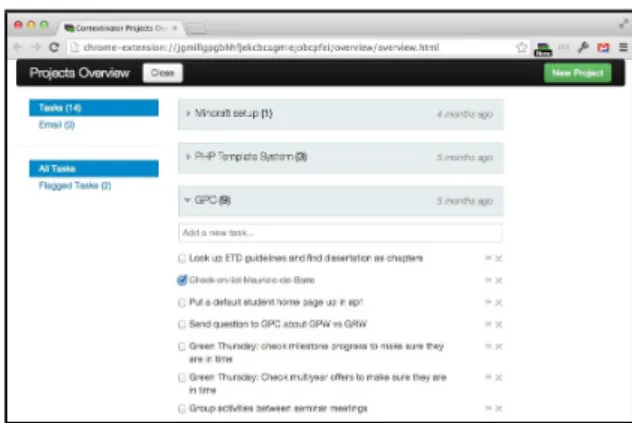
Each project also has pending tasks and related emails. Contextinator provides access to these in each project’s home view. We also provide a global overview of all the user’s todo and email (see Fig-ure 3) organized by projects. In the global overview window, users are able to see any unread email,
Figure 2: TheQuick Switchershowing two projects.
Figure 3: Global overview showing the tasks across all projects. This screenshot shows three projects with two of them collapsed.
work with any tasks, and directly switch to a specific project homepage.
3.2
Information Views
As users often have accounts in multiple systems where they store different collections of data and new or different services are frequently emerging, we found the need to have an easy way to incorporate new services into our tool. For example, a label in Gmail might be related to a notebook in Evernote and a folder in Dropbox. To support the grouping of data in these independent collections, we allow each project to have an information view for each of these external services. We accomplish this withInformation views, which provide a way to organize related information across different tools under a single project to reduce information fragmentation.
An information view is a unique URL that points to an internal location in an online collection. For ex-ample, a direct link to a folder in Dropbox produces, after user authentication, a view to that folder in Drop-box. The direct link eliminates the need for navigat-ing to the folder within the Dropbox collection.
Contextinatorstores links to external services and calls them ‘information views.’ Currently the soft-ware supports five external services, but there is no specialized code for these. In general, any online ser-vice that has a unique URL to an internal location can
be easily incorporated into aContextinatorproject. In addition, if users visit the application (e.g., Dropbox) directly in the web browser while having aContextinatorproject open, they are automatically redirected to the project’sinformation view eliminat-ing redundant navigation across tools (Bergman et al., 2006; Boardman et al., 2003).
A special case of this approach is the information view for email, as email plays a significant role in project management (Bellotti and Smith, 2000; Bel-lotti et al., 2004; Gonz´alez and Mark, 2004). In order to provide a way to integrate email with projects in Contextinator, we display a filtered view of the email inbox. The filter shows only unread messages from the people that are part of the project and allows the user to quickly follow an ongoing email conversation without switching context to another program (email in this case). In addition, we also provide a direct link to particular Gmail tag or folder.
4
METHOD
Evaluating personal information tools and practices presents several challenges. PIM is by definition per-sonal (Kelly and Teevan, 2007). The strategies that users follow tend to be very personal and specific to the attributes of their own collections. Thus it is very difficult to create a series of reference tests that can benaturalto all users. Controlled lab setting do not accurately reflect the reality of the use of the technol-ogy in PIM settings. Several alternatives have been proposed, from using diary studies (Czerwinski et al., 2004; Teevan et al., 2004),in-vivoresearch methods where researchers observe users with their own infor-mation, as well as deploying a tool and collect data from its use, as done by Whittaker et al. (Whittaker et al., 2011).
To study Contextinator, we employed a method similar to Whittaker et al. (Whittaker et al., 2011) where they investigated email usage by deploying a program within an organization and collecting data on its use. In our work, we deployedContextinatorin two stages: first, we deployed the tool to a set of test users where we logged usage and later interviewed them; and second, we deployedContextinator (with-out logging) in the Chrome Web Store where anybody could download it and install it. Several months later, we surveyed all users. This study was approved by the University IRB (#13-008). This combination of evaluation methods gives us a access to data reflect-ing a variety of users experiences and behaviors. We describe our research methods in stages.
4.1
First Stage: Limited Deployment
For our first stage, we recruited participants through local listservs used by computer science graduate stu-dents and faculty. We also announced the experiment in an undergraduate class where they were offered ex-tra credit for participation. The invitation contained a URL7where participants could download and install the tool. The website also included several videos ex-plaining the use of the tool. Upon installing the tool, participants were required to agree to an online con-sent form.
During this stage of the evaluation we logged in-formation about user interactions and recorded the majority of user actions with the tool (e.g. creating a new project, switching to a project, closing a project, creating a new task, flagging a task, marking a task as completed, creating a new bookmark, opening email, etc.). Each log item included the time stamp and rel-evant information about the event (e.g. the project or task name). We also conducted a semi-structured in-terview where we asked broad questions and followed up with specific questions about different areas of the tool (projects, tasks, information fragmentation, and tool usability).
Stage one provided us with detailed and rich data in regards to the use of the tool. At the same time, we interviewed a few heavy users to learn how they made use of the tool. Of the 30 participants that installed our tool, roughly one third of these were undergrad-uate students and the rest were gradundergrad-uate students. Of these 30 participants 15 of them used the tool a sig-nificant amount, the remaining 15 only created one or two projects named ‘testing’ or ‘something.’ As such, we decided to not use the data of the later group in our analyses. In the group of 15 active participants we identified 7 heavy users that created three or more projects. We interviewed 4 of our 30 participants, out of which 3 (U1, U2, U3) said they considered them-selves to be heavy users of the tool and 1 (U4) that said they did not use the tool very much.
4.2
Second Stage: Broader Deployment
After our first evaluation we released Contextinator in the Chrome Web Store for free. At the time of this writing, over 3000 users have installed Contexti-natorand there are 20 comments in the Chrome Web Store forContextinator. The project is also available on GitHub where it has 48 ‘stargazers’, 9 ‘watchers’, and has been forked 7 times.
In addition, we presented a survey to users of the tool upon their next activation of the software. The
survey was to gather feedback and to clarify ideas gathered on Stage 1. In particular, we wanted to get a better sense of what users of the tool thought of the notion of ‘projects’. It is worth noting that these users are not affiliated with our institution nor connected to our research group. Only those users older than 18 years old were surveyed, a restriction of our local IRB.
Stage two provided us with a much broader popu-lation and allowed us to gather information from real users of the tool. As of this writing, of the 20 com-ments on the Chrome Web Store, 14 are positive, 5 are negative, and 1 is neutral. Five of the messages are bug reports and 9 are requests for new features. Each of the messages with requests had more than one requested feature.
Overall, our evaluation provided a rich and var-ied collection of data. We have more than 3000 users that explored our tool, very rich user logs of about 7 users, interviews with 4 users, have more than 30 survey responses, and about 60 people that have ei-ther commented or followed our project in the two online repositories (Chrome Web Store and Github). The next section presents the results and our analysis of the evaluation.
5
RESULTS
5.1
Project Appropriation
In our analysis of how our participants and users made use of the project metaphor we found two in-teresting aspects. First, the scope of projects var-ied widely, both between and within users’ projects. Second, users thought quite differently about what a project was, again, both between and within users’ projects. These different scopes and appropriations of the project metaphor point to our naive assumption that ‘projects’ is the proper and complete metaphor for managing work.
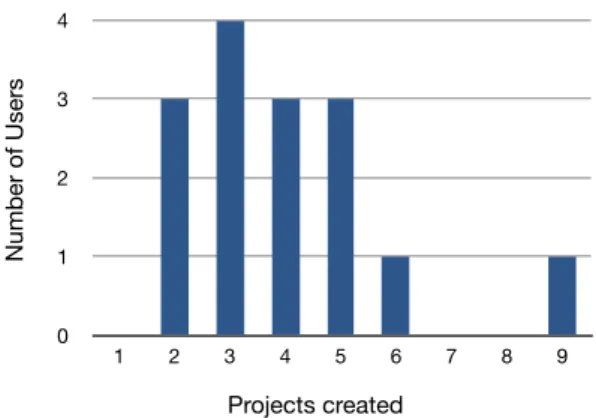
First, we see the different scope, or granularity, of projects in the number created by the participants of the first stage ( ¯x=4.5, Figure 4). When we asked users in our second phase how many projects they cur-rently had inContextinator, they reported an average of 8.59 projects (σ=7.13). Of the 18 responses in our
second stage, the maximum number of projects was 28, the variability in the number of projects among the users is illustrated by the high standard deviation in relation to the mean.
The different scopes that were used is more clearly illustrated in the names that participants in our first phase chose for their projects. Some projects are
0 1 2 3 4 1 2 3 4 5 6 7 8 9 Projects created Number of Users
Figure 4: Distribution of number of projects created by users inContextinator(stage 1).
clearly bounded as a specific task addressed, e.g. “Crypto project” and “German HW.” While there are other projects that, while also bounded, provide a grouping and represent an activity that will contain multipleprojects(at least as we envisioned them), ex-amples include “Algorithms” or “CS 3744”. There are even more broad projects that center around interests such as “Gardening,” as well as, projects that are even more general, e.g. “Life” or “General.” Examples of project names are shown below.
• Individual Projects: “Crypto project” “3114 Project 3”, “Tax Returns” and “German HW”
• Groups of Projects: “Algorithms”, “Usability”, “CS 3744”.
• Ongoing Activities: “Gardening”, “Web Develop-ment”, and “Shopping”.
• Catch All: “Life” and “General”
Probing further into how participants and users thought about a project gives further insight into the inadequacies of the project metaphor. During our in-terviews the confusion over the definition of a project was clear. Not surprisingly, the most confused partici-pant identified themselves as not using the tool much.
When I was first using it, the title project. . . it made me feel like it should be like a school project or a research project [. . . ] It definitely threw me initially (Participant U4).
A user from the Chrome Web Store, explained that they thought of projects as contextsinstead of projects:
I’d rather call it context. A context can be a project I am working on, a research topic or an otherwise combined series of tabs. For exam-ple: Everything related to geocaching, travel-ling. Some contexts only exist for the duration of the ‘project’, some I keep indefinitely.
A second user from the Chrome Web Store con-veyed a similar sense on their view of a project.
A set of related tabs that I need open at the same time – this means I might have multiple Contextinator projects for different stages of the same Project.
Both of these users consider projects not as a re-lated set of work items, but more as a contextual cap-ture of their current goals. Those goals might be im-mediate or longer term. The ‘projects’ in these two examples, are a more expansive view of organizing information. This sentiment was echoed by a partic-ipant in our test group where they also replaced the projectmetaphor with their own more flexible organi-zation.
I have pretty broad categories. I have a Gen-eral that I just throw stuff in. I have Web De-velopment, so any time I am looking up stuff on stack overflow. I have Shopping, for differ-ent stuff I am shopping for. . . (Participant U2). Another participant thought of projects more as lists of thingsto do. Yet another participant simply created projects for all his classes, enabling him to enter a context in his browser as he entered the corre-sponding physical context of the classroom:
The first thing I did was make a project for each class I am in. So, when i am in class, I can just open that project and have all the tabs. Esp. for Dr. XX’s class, there is like Moodle, Piazza, etc. (Participant U1).
However, regardless of what projects were to the user, nearly all of our participants found the ability to capture and resume the state of a window useful. This is illustrated by an additional appropriation of projects as a “bookmark for an entire window.”
I think of them as a bookmark for an entire window. In Chrome if you have a bunch of tabs open, and if I want to come back to all of them at once, bookmark it, make it a project (Participant U1).
Another participant found that projects enabled improved tab organization, and they began grouping their browser activity in a way that they had not pre-viously.
I would have 50 tabs open in my one window. This really helps to have 10 or less in five win-dows. It is really nice (Participant U2).
5.2
Project Transitions
In designing our system we also imagined that our users would purposefully initiate clean transitions be-tween projects (a context switch). However, in our
analysis we found that there was a somewhat clear separation between users that purposefullyswitched projects and users thatfoundthemselves in a project. In our interviews (stage one), three of the partic-ipants said that they did not use the tool to decide which project to work on, but it still made it easier to work on multiple projects at once. These partic-ipants switched projects in an emergent way, that is they found they needed to switch to or create a differ-ent project once they already had a few tabs open.
A lot of the times I would just open a bunch of new tabs, and not necessarily look for an ex-isting project first[. . . ] So right now I am not in a project. And then I start googling some-thing, and I have five tabs open. And then I realize, actually this should really go into the VTS project. . . (Participant U1).
We asked users from the Chrome Web store: “Why (or when) do your create a project?” The 18 responses can be grouped into two categories. The first group (10 responses) created projects before they started working on said ‘project.’ This group had a notion of project that was related to a goal, as if plan-ning for work to be done ahead. The second group (8 responses), however, used projects as a way to capture work done so far but not yet completed. This group used projects as a way to suspend work to be resumed later. The goal of the project was not particularly im-portant in the creation of the project itself.
5.3
Project Planning
In the first stage of our evaluation, 12 participants cre-ated at least one task. Overall, they crecre-ated an average of 5.9 tasks (σ=9.3). They compeleted 3.2 tasks on
an average (σ=6.7). Participants rarely used
flag-ging. On an average, each participant flagged 0.8 tasks (σ=1.9). Participants quick captured (added a URL or note to a task) 2.8 tasks on an average (σ=4.5).
We saw roughly two approaches to project plan-ning that mirrored the motivations cited by users for creating projects. The first, is a morepreparatory ap-proach (Whittaker et al., 2011), where the user creates tasks ahead of time and completes them over a longer period of time. An example of this is a user creat-ing a new project, quickly followed by the creation of several new tasks, and in a later session marks them as completed. This approach mirrored the users that created projects before they began working on that project.
The second approach was more opportunistic, where a user creates new tasks as and when required, marking them as completed in the near future (usually
in the same session). Here, the user does not have a specific planning phase of their session and instead plans and captures in situ. This approach mirrors the group of users that used projects to capture work that has not been completed yet.
5.4
Usage
We also asked users “Which of the following fea-tures are indispensable for your use of Contextina-tor?” Only one participant selected the ‘Task man-ager’, 5 selected ‘Save and reopen projects’ and 13 selected ‘Browser tab management.’ Clearly the sup-port of managing the windows/tabs in the browser is the most used feature in our tool.
The last four questions were a likert-scale ques-tions about their agreement/disagreement with fac-tual statements. The results are presented below. The choices were (with score values in parenthesis): Strongly Agree (1), Agree (2), Neither Agree nor Dis-agree (3), DisDis-agree (4), and Strongly DisDis-agree (5).
“With Contextinator, I am able to work on mul-tiple projects simultaneously.” Average 2.00 (Agree) and standard deviation of 0.7.
“With Contextinator, switching projects makes me lost, so I avoid switching unless it is absolutely neces-sary.” Average of 3.5 (close to neutral) and standard deviation of 0.9.
“With Contextinator, suspending or closing a project is easy because I don’t have to worry about losing data.” Average of 1.89 (Agree) and standard deviation of 1.0.
“With Contextinator, resuming a project is easy as I am able to quickly gather where I left off.” Average of 1.89 (Agree) and standard deviation of 0.6.
Based on these results, it is clear that the support for grouping related items, suspending and resuming work are the most salient features ofContextinator.
6
DISCUSSION
In this paper, we have presented the design and evalu-ation ofContextinator, a system built to assist people in managing their personal information stored in the cloud. The design ofContextinatorfocused on pro-viding users support in three areas. First, it allowed users to have their web related project information in one place (including emails, bookmarks, todos, peo-ple in a project, etc.). Second, it provided a way to group and manage windows and tabs as a single project. Finally, the tool provided a way to capture, save, and reopen a project. While there is support
for all of these features, our several rounds of evalua-tion only found strong evidence in favor of the third, the management of opening/closing projects. This we consider the “killer feature” of Contextinator. This was verified in our multi-method evaluation as it was routinely mentioned in our several rounds of evalua-tion and confirmed by the online comments and the survey to the current users.
The management of multiple tabs in a ‘project’ proved to be very valuable. Most users found this idea so compelling that they ranked the management of context switching within our tool the most valuable feature. Being able to organize their activity with tabs and being able to stop and resume work seems to suc-cessfully address the fragmentation that naturally oc-curs on the web as users access multiple websites for information.
We realize that we failed to address information fragmentation as it relates to users’ social circle. Sev-eral users wanted to be able to access the context in-formation from another computer8. Participant U4 (in stage one) used two computers (desktop and a lap-top) interchangeably, and wanted to be able to link them and have the same projects at both places.
In addition, two participants wanted to be able to share their projects with groups of people, and be able to accomplish tasks in a project together with their collaborators. Clearly the information fragmentation is not just across information silos and devices, but also across collaborators.
Thus, we can say that we solved the information fragmentation that we set about to study only par-tially. The project management features were clearly well received and might account for the broad use of the tool in the Chrome Web Store. Users liked being able to group tabs as a single unit and being able to save that group and reopened it later. The other set of features (e.g., integration of information with email, task and bookmarks) not only did not seem to get much comments, we found little evidence that users used it.
6.1
Implications for Future Work
With our study we also gained insights into other ar-eas that might allow future researchers and develop-ers to better address the problems we explored. We would like focus on two of them here. First is the idea of what a user considers a ‘project.’ The second is how ‘information views’ address information frag-mentation.
6.1.1 What is a project?
First, we provide some insight onto what users sider a ‘project.’ People have vastly different con-cepts as to what a ‘project’ is and designs of similar tools should provide for this variability. A system that seeks to improve support for knowledge work should be able to blend in with this existing ecosystem of tools.
There is a wide variability of what users call a project. Typically we consider a project as a set of re-lated activities with a particular goal in mind. But we found that users have a much broader definition. In some cases, users considered several ‘projects’ as all part of the same task at hand, thus requiring multiple active projects at once. In those cases, one or more of the projects were really collection of resources that were reused in similar tasks(e.g., having a project with reference websites for web development).
In addition, we have identified two types of ‘projects’ based on why and when users create them. ‘Preparatory’ projects are projects that allow users to organize their work, including creating tasks to be performed later in time. These projects are often cre-ated a priori of the work to be done. The second type of project, ‘opportunistic,’ are projects that emerge from work that is being done. These projects might or might not have a specific goal, and instead emerge from users’ work. Opportunistic projects seem to ben-efit from capturing the context of work for suspension and resumption of work.
6.1.2 Information Views
The second lesson learned is how ‘information views’ addresses the problem of information fragmentation. In our tool, we had three ways to integrate informa-tion.
The first and most simple form for information views to address information fragmentation is to develop a program that actually supports multiple sources of information all into one service. We did this for the collection of todos, bookmarks, and peo-ple. All of the information for those three categories were collected by our tool and stored locally in our tool. The problem with this approach is one of adop-tion. In our data, we found that most users did not use this feature. In the use logs that we captured, we found that most users did not even configure this fea-ture.
The second approach, exemplified by our presen-tation of email in the project page, is to show enough information from an external source without requiring going to other websites. This is the example used in the web today of ‘content embedding.’ Google Maps,
for example, allows users and developers to embed a map view in other sites. Instead of having a link and requiring navigation to another site/tool, the informa-tion is presented in place with some minor restric-tions. Our tool did this by presenting unread emails in the context of a project. This approach requires ex-ternal services to provide access to their data via some API or protocol (e.g., IMAP access to email).
The last one and the one that holds the most promise is to make use of direct links to outside repos-itories thus providing in different tabs direct access to related information. Our tool captured a direct link in each project to an external service (e.g., a link to a folder in Dropbox). These links are then presented as short-cuts in the project home page. But more inter-esting, within the context of the project, clicking on a generic top level to an external service is automati-cally redirected to the internal location for the project. The only requirement to integrate external tools with Contextinatoris to provide unique URLs to its inter-nal data.
These three approaches to building integrated in-formation views allow us to at least begin to address the information fragmentation that occurs on the web. A tool likeContextinator has the potential to create (or re-create) the context lost amid information frag-mentation in today’s web-based tools.
REFERENCES
Ahuja, A. (2013). Contextinator: Recreating the context lost amid information fragmentation on the web. Mas-ters thesis, Department of Computer Science, Virginia Tech.
Allen, D. (2002). Getting Things Done: The Art of Stress-Free Productivity. Penguin Books.
Bellotti, V., Dalal, B., Good, N., Flynn, P., Bobrow, D. G., and Ducheneaut, N. (2004). What a to-do: studies of task management towards the design of a personal task list manager. InProc. CHI ’04, pages 735–742, New York, NY, USA. ACM.
Bellotti, V. and Smith, I. (2000). Informing the design of an information management system with iterative field-work. InProc. DIS ’00, pages 227–237, New York, NY, USA. ACM.
Bergman, O., Bergman, O., Beyth-marom, R., and Nach-mias, R. (2003). The user-subjective approach to personal information management systems. Journal of the American Society for Information Science and Technology, 54:872–878.
Bergman, O., Beyth-Marom, R., and Nachmias, R. (2006). The project fragmentation problem in personal infor-mation management. InProc. CHI ’06, pages 271– 274, New York, NY, USA. ACM.
Boardman, R., Boardman, R., Spence, R., and Sasse, M. A. (2003). Too many hierarchies? the daily struggle for
control of the workspace. Proc. CHI ’96, pages 406– 412.
Boardman, R. and Sasse, M. A. (2004). ”stuff goes into the computer and doesn’t come out”: a cross-tool study of personal information management. InProc CHI ’04, pages 583–590, New York, NY, USA. ACM. Czerwinski, M., Horvitz, E., and Wilhite, S. (2004). A diary
study of task switching and interruptions. In Proc. CHI ’04, pages 175–182. ACM.
Gonz´alez, V. M. and Mark, G. (2004). ”constant, constant, multi-tasking craziness”: managing multiple working spheres. InProc. CHI ’04, pages 113–120, New York, NY, USA. ACM.
Hanrahan, B., Bouchard, G., Convertino, G., Weksteen, T., Kong, N., Archambeau, C., and Chi, E. H. (2011). Mail2wiki: low-cost sharing and early curation from email to wikis. InProc. C&T 2013, pages 98–107, New York, NY, USA. ACM.
Henderson, Jr., D. A. and Card, S. (1986). Rooms: the use of multiple virtual workspaces to reduce space con-tention in a window-based graphical user interface. ACM Trans. Graph., 5(3):211–243.
Jhaveri, N. and R¨aih¨a, K.-J. (2005). The advantages of a cross-session web workspace. InProc. CHI EA ’05, pages 1949–1952, New York, NY, USA. ACM. Jones, W. and Anderson, K. M. (2011). Many views,
many modes, many tools ... one structure: Towards a non-disruptive integration of personal information. InProc. Hypertext 2011, pages 113–122, New York, NY, USA. ACM.
Jones, W., Klasnja, P., Civan, A., and Adcock, M. L. (2008). The personal project planner: planning to organize personal information. InProc. CHI 2008, pages 681– 684, New York, NY, USA. ACM.
Jones, W., Phuwanartnurak, A. J., Gill, R., and Bruce, H. (2005). Don’t take my folders away!: organizing per-sonal information to get ghings done. InProc. CHI EA ’05, pages 1505–1508, New York, NY, USA. ACM. Karger, D. R. and Jones, W. (2006). Data unification in
personal information management. Commun. ACM, 49(1):77–82.
Kelly, D. and Teevan, J. (2007).Personal Information Man-agement, chapter Understanding What Works: Evalu-ating PIM Tools, pages 190–204. University of Wash-ington Press.
Mark, G., Gonzalez, V. M., and Harris, J. (2005). No task left behind?: examining the nature of fragmented work. InProc. CHI ’05, pages 321–330, New York, NY, USA. ACM.
Morris, D., Ringel Morris, M., and Venolia, G. (2008). Searchbar: a search-centric web history for task re-sumption and information re-finding. InProc. CHI ’08, pages 1207–1216, New York, NY, USA. ACM. Rajamanickam, M. R., MacKenzie, R., Lam, B., and Su, T.
(2010). A task-focused approach to support sharing and interruption recovery in web browsers. InProc. CHI EA ’10, pages 4345–4350, New York, NY, USA. ACM.
Teevan, J., Alvarado, C., Ackerman, M. S., and Karger, D. R. (2004). The perfect search engine is not enough:
A study of orienteering behavior in directed search. InProceedings of the SIGCHI Conference on Human Factors in Computing Systems, CHI ’04, pages 415– 422, New York, NY, USA. ACM.
Voida, S. and Mynatt, E. D. (2009). It feels better than filing: everyday work experiences in an activity-based computing system. InProc. CHI ’09, pages 259–268, New York, NY, USA. ACM.
Voida, S., Mynatt, E. D., and Edwards, W. K. (2008). Re-framing the desktop interface around the activities of knowledge work. InProc. UIST ’08, pages 211–220, New York, NY, USA. ACM.
Wang, Q. and Chang, H. (2010). Multitasking bar: pro-totype and evaluation of introducing the task concept into a browser. InProc. CHI ’10, pages 103–112, New York, NY, USA. ACM.
Whittaker, S., Matthews, T., Cerruti, J., Badenes, H., and Tang, J. (2011). Am i wasting my time organizing email?: a study of email refinding. InProc. CHI ’11, pages 3449–3458, New York, NY, USA. ACM.