D4.1.2-Cloud-based-Data-Storage-Prototype-2.docx Author: Ascora, TUDA Date: 2013-10-01 Page: 1 / 41 Copyright © ADVENTURE Project Consortium. All Rights Reserved.
<
D4.1.2 Cloud-based Data Storage
(Prototype II)
Authors: ASC, TUDA
Delivery Date: 2013-10-01 Due Date: 2013-08-31 Dissemination Level: PU
This deliverable provides a description of the second prototype implementation of task T4.1 Cloud-based Data Storage. As stated in the Description of Work (DOW), this is a prototype (software) deliverable. As such, this document is reduced in length and its only purpose is to briefly describe the prototype functionality, as well as to provide installation instructions and usage clarifications. This document is delivered with the software itself.
D4.1.2-Cloud-based-Data-Storage-Prototype-2.docx Author: Ascora, TUDA Date: 2013-10-01 Page: 2 / 41 Copyright © ADVENTURE Project Consortium. All Rights Reserved.
Document History Draft Version V0.1, ASC, August 7th, 2013 V0.2, ASC, August 19th, 2013 V0.3, ASC, August 24th, 2013 V0.4, ASC, August 29th, 2013 V0.5, ASC, September 1st, 2013 V0.6, ASC, September 13th, 2013 V0.7, ASC, September 19th, 2013 V0.1, ASC, September 27th, 2013 Contributions ASC - Sven Abels - Rafael Karbowski - Michael Krummen TUDA - Ronny Hans
Internal Review 1 Irena Pavlova, ISOFT, September 25th 2013 Internal Review 2 Filipe Ferreira, INESC, September 26th 2013
D4.1.2-Cloud-based-Data-Storage-Prototype-2.docx Author: Ascora, TUDA Date: 2013-10-01 Page: 3 / 41 Copyright © ADVENTURE Project Consortium. All Rights Reserved.
Table of Contents
Executive Summary ... 7
1 Introduction ... 8
1.1 ADVENTURE Project Aims ... 8
1.2 Deliverable Purpose, Scope and Context ... 8
1.3 Document Status ... 9
1.4 Target Audience ... 9
1.5 Abbreviations and General Terms ... 9
1.6 Document Structure ... 9
2 Scope and Relationship ... 10
3 Requirements & Preparations ... 12
3.1 For Users ... 12
3.2 For Administrators and Developers ... 12
4 Installation (Deployment) ... 13
4.1 Installing the Cloud Storage Server ... 13
5 Execution & Usage ... 14
5.1 Initialization ... 14 5.2 Create Bucket... 14 5.3 Delete Bucket ... 15 5.4 CRUD - Create ... 15 5.5 CRUD - Read ... 17 5.6 CRUD - Update ... 18 5.7 CRUD - Delete ... 19
5.8 Execute Advanced Query ... 20
5.9 Add Access Rights for User ... 21
5.10 Get Access Rights for User ... 22
6 Limitations & Further Developments ... 23
7 Summary ... 24
8 Appendix ... 25
8.1 Internal Interfaces ... 25
13.1.1 Add Access Rights for User or Group ... 25
13.1.2 Get Access Rights for User ... 26
13.1.3 Create Bucket ... 26
13.1.4 CRUD Create ... 27
13.1.5 CRUD-Operation: Update ... 28
13.1.6 CRUD Read ... 29
13.1.7 CRUDE Delete ... 31
13.1.8 Execute Advanced Query... 31
13.1.9 Delete Bucket ... 32
D4.1.2-Cloud-based-Data-Storage-Prototype-2.docx Author: Ascora, TUDA Date: 2013-10-01 Page: 4 / 41 Copyright © ADVENTURE Project Consortium. All Rights Reserved.
13.1.1 Enum Types and simple Objects ... 33
13.1.2 Data Transfer Objects (DTO) ... 34
13.1.3 Commands ... 37
D4.1.2-Cloud-based-Data-Storage-Prototype-2.docx Author: Ascora, TUDA Date: 2013-10-01 Page: 5 / 41 Copyright © ADVENTURE Project Consortium. All Rights Reserved.
List of Figures
Figure 1: Location of the Cloud-based Data Storage in the Project Context ... 10
Listings Listing 1: Source Code Example – Initialization of the Message Client and the Cloud Storage API ... 14
Listing 2: Source Code Example – API Method Signature for Create Bucket and the Usage of this Method ... 15
Listing 3: Source Code Example – API Method Signature to Delete a Bucket and the Usage of the Method ... 15
Listing 4: Source Code Example – Factory Method to Create a Test Data Object ... 16
Listing 5: Source Code Example – XSD Description for a Test Class ... 16
Listing 6: Source Code Example – API Method Signature for the CRUD-Operation Create and the Usage of this Method ... 17
Listing 7: Source Code Example – API Method Signature for the CRUD-Operation Read and the Usage of this Method ... 18
Listing 8: Source Code Example – API Method Signature for the CRUD-Operation Update and the Usage of this Method ... 19
Listing 9: Source Code Example – API Method Signature for the CRUD-Operation Delete and the Usage of this Method... 20
Listing 10: Source Code Example – API Method Signature for the Execute Advanced Query and the Usage of this Method ... 21
Listing 11: Source Code Example – API Method Signature to Grant Access Rights to a User for a Bucket and the Usage of this Method ... 21
Listing 12: Source Code Example – API Method Signature to Get Access Rights for a User and the Usage of this Method ... 22
Listing 13: Method Signature – Create Bucket ... 25
Listing 14: Message-Example for Get Access Rights for Bucket - Request... 25
Listing 15: Message-Example for Get Access Rights for Bucket - Respond ... 25
Listing 16: Method Signature – Create Bucket ... 26
Listing 17: Message-Example for Get Access Rights for Bucket - Request... 26
Listing 18: Message-Example for Get Access Rights for Bucket - Respond ... 26
Listing 19: Method Signature – Create Bucket ... 26
Listing 20: Message-Example for Create Bucket - Request ... 27
Listing 21: Message-Example for Create Bucket - Respond ... 27
Listing 22: Method Signature – CRUD Create ... 27
Listing 23: Message-Example for CRUD Create - Request ... 28
Listing 24: Message-Example for CRUD Create - Respond ... 28
Listing 25: Method Signature – CRUD Update ... 28
Listing 26: Message-Example for CRUD Update - Request ... 29
Listing 27: Message-Example for CRUD Update - Respond ... 29
D4.1.2-Cloud-based-Data-Storage-Prototype-2.docx Author: Ascora, TUDA Date: 2013-10-01 Page: 6 / 41 Copyright © ADVENTURE Project Consortium. All Rights Reserved.
Listing 29: Message-Example for CRUD Read - Request ... 30
Listing 30: Message-Example for CRUD Read - Respond ... 30
Listing 31: Method Signature – CRUD Delete ... 31
Listing 32: Message-Example for CRUD Delete - Request ... 31
Listing 33: Message-Example for CRUD Delete - Respond ... 31
Listing 34: Method Signature – Execute Advanced Query ... 31
Listing 35: Message-Example for Execute Advanced Query ... 32
Listing 36: Message-Example for Execute Advanced Query ... 32
Listing 37: Method Signature – Delete Bucket ... 32
Listing 38: Message-Example for Delete Bucket - Request ... 33
Listing 39: Message-Example for Delete Bucket - Respond ... 33
Listing 40: Message Format Description - BucketType ... 33
Listing 41: Message Format Description - CrudType ... 33
Listing 42: Message Format Description - Rights ... 34
Listing 43: Message Format Description - AccessRight... 34
Listing 44: Message Format Description - Bucket ... 35
Listing 45: Message Format Description - DTO ... 35
Listing 46: Message Format Description - ClassObject ... 36
Listing 47: Message Format Description - ClassInstance ... 36
Listing 48: Message Format Description - KeyValueObject ... 36
Listing 49: Message Format Description - Command ... 37
Listing 50: Message Format Description - CreateBucket ... 37
Listing 51: Message Format Description - DeleteBucket ... 37
Listing 52: Message Format Description - CrudOperation ... 38
Listing 53: Message Format Description - QueryOperation ... 38
Listing 54: Message Format Description - GetAccessRights ... 39
Listing 55: Message Format Description - AddAccessRights ... 39
Listing 56: Message Format Description - CloudRequest ... 40
D4.1.2-Cloud-based-Data-Storage-Prototype-2.docx Author: Ascora, TUDA Date: 2013-10-01 Page: 7 / 41 Copyright © ADVENTURE Project Consortium. All Rights Reserved.
Executive Summary
The goal of the Task 4.1 is to create a central Cloud Storage for all ADVENTURE platform components. It will provide independent Buckets to store binary, (semi-) structured and semantic data. The Buckets are independent databases that can be created for each component. This approach helps to separate the data of the components, so that they can work with their own database without the need to pay attention whether external data will be overwritten. Each component can create multiple Buckets. Buckets can be shared among different components and can restrict their access via simplistic access control mechnisms. The Cloud Storage supports simple CRUD (create, read, update, delete) operations for all Bucket types and advanced queries based on the database, e.g. SPARQL in conjunction with Sesame.
The Prototype D4.1.2 represents the main outcome of task T4.1 Cloud-based Data Storage for the second year. It allows other ADVENTURE components to store and retrieve data in Buckets.
As stated in the Description of Work (DOW), this deliverable is a prototype and as such it is Software. This document only provides the description for the second prototype implementation and hence is reduced in length. Its purpose is to briefly present the prototype functionality, as well as to provide installation instructions and usage clarifications. The document will be delivered together with the software itself.
D4.1.2-Cloud-based-Data-Storage-Prototype-2.docx Author: Ascora, TUDA Date: 2013-10-01 Page: 8 / 41 Copyright © ADVENTURE Project Consortium. All Rights Reserved.
1 Introduction
ADVENTURE – ADaptive Virtual ENterprise manufacTURing Environment – is a project funded in the Seventh Framework Programme by the European Commission. ADVENTURE creates a framework that enhances the collaboration between suppliers, manufacturers and customers for industrial products and services.
1.1 ADVENTURE Project Aims
The framework proposed by ADVENTURE provides mechanisms and tools that facilitate the creation and operation of manufacturing processes in a modular way. ADVENTURE combines the power of individual factories to achieve complex manufacturing processes. It provides tools for partner-finding, process creation, process optimization, information exchange as well as real-time monitoring combined with the tracking of goods and linking them to Cloud services.
There have already been several research projects that address the combination of different independent manufacturers to so-called virtual factories. Most of these research projects focus primarily on the business-side in general and on aspects like partner-finding and factory-building processes in special. However no proven tools or technologies exist in the market that provide the creation of virtual factories applying end-to-end integrated Information and Communication Technology (ICT). ADVENTURE is aiming to provide such tools and processes that will help to facilitate information exchange between factories and move beyond the boundaries of the individual enterprises involved. The collaborative manufacturing process will be optimised by enabling the integration of factory selection, forecasting, monitoring, and collaboration during runtime.
ADVENTURE builds on concepts and methods of Service-oriented Computing and benefits from the advancements in this field. The monitoring and governance of the collaborative processes will be supported by technologies from the Internet of Things such as wireless sensors. Existing tools and services that can be integrated will be considered during the development of the platform for ADVENTURE.
The increased degree of flexibility provided through ADVENTURE will benefit SMEs especially as it helps them to react quickly to changes and to participate in larger, cross-organizational manufacturing processes. Furthermore, ADVENTURE will help manufacturers in assessing the environmental friendliness of actual manufacturing processes and resulting products and services. Other objectives of ADVENTURE include research in areas such as service-based manufacturing processes, adaptive process management, process compliance, and end-to-end-integration of ICT solutions.
1.2 Deliverable Purpose, Scope and Context
The purpose of this deliverable is to accompany the second prototype implementation of task 4.1. As such, its main purpose is to briefly clarify the scope of the prototype and to show the download and installation instructions, as well as to illustrate the usage of the software API. The document is limited in length as the main focus of the task is the software itself rather than its accompanying document.
D4.1.2-Cloud-based-Data-Storage-Prototype-2.docx Author: Ascora, TUDA Date: 2013-10-01 Page: 9 / 41 Copyright © ADVENTURE Project Consortium. All Rights Reserved.
1.3 Document Status
As a second and complete version of the Cloud Storage, this document is listed in the DOW as ‘PU’.
1.4 Target Audience
This document presents the second prototype of the Cloud Storage component. In contrast to the previous version, the target audience of the document is not only internal, for the developers of the other infrastructure components, but also external, as ADVENTURE technology is attracting more and more interest beyond the consortium. .
1.5 Abbreviations and General Terms
A definition of general, common terms and roles related to the realization of ADVENTURE as well as a list of abbreviations is available in the supplementary document “Supplement: Abbreviations and General Terms” which is provided in addition to this deliverable.
Further information can be found at: http://www.fp7-adventure.eu/glossary
1.6 Document Structure
This deliverable is broken down into the following chapter:
• Chapter 1 provides an introduction to the context, purpose, scope and structure of this document.
• Chapter 2 clarifies the context and scope of the software prototype deliverable and its relationship with other architectural modules.
• Chapter 3 outlines the prerequisites for using the software prototype by the defined usage roles.
• Chapter 4 specifies the installation and configuration procedures for the software prototype.
• Chapter 5 provides details for the implemented usage scenarios.
• Chapter 6 lists the known limitations and defects and provides an outlook to further planned developments in next iterations.
• Chapter 7 briefly summarizes the status of the prototype deliverable.
• Chapter 8 is an Appendix of this document and contains the interfaces, as well as the message format descriptions.
D4.1.2-Cloud-based-Data-Storage-Prototype-2.docx Author: Ascora, TUDA Date: 2013-10-01 Page: 10 / 41 Copyright © ADVENTURE Project Consortium. All Rights Reserved.
2
Scope and Relationship
A short remainder of the functionalities of the ADVENTURE Cloud Storage:
• The Cloud Storage is the central data storage for all other ADVENTURE components.
• It provides independent Buckets to store binary, (semi-)structured and semantic data and supports simple CRUD (create, read, update, delete) operations for all Bucket Types and advanced queries based on the Bucket Type, e.g SPARQL for semantic data Buckets.
• Each component can create multiple Buckets. Buckets can be shared among different components and can restrict their access via simplistic access control options.
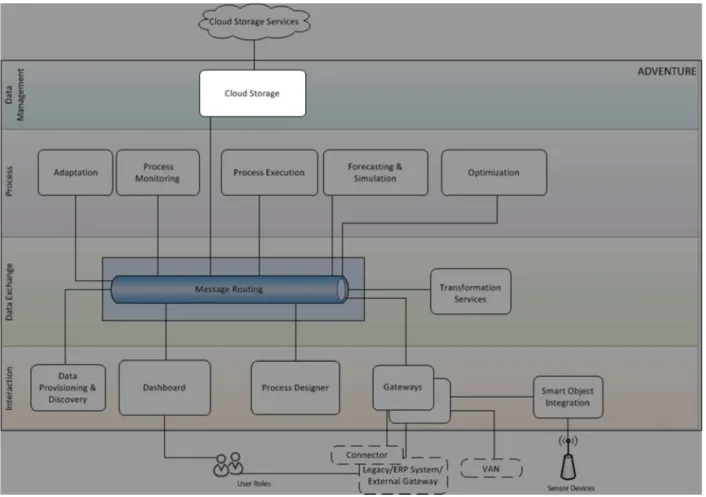
As shown in Figure 1 the Cloud Storage is located in the Data Management layer of the ADVENTURE architecture. The other components use the Cloud Storage as central data store. The communication is performed through the Message Routing component.
Figure 1: Location of the Cloud-based Data Storage in the Project Context
All ADVENTURE components can use the Cloud Storage to store structured, semi-structured, binary and semantic data. Contrary to the first prototype the second prototypes supports all four Bucket Types.
D4.1.2-Cloud-based-Data-Storage-Prototype-2.docx Author: Ascora, TUDA Date: 2013-10-01 Page: 11 / 41 Copyright © ADVENTURE Project Consortium. All Rights Reserved.
The ADVENTURE components are able to send or request data through the Message Routing. The XML-based message format (as defined in the Technical Specification D3.3) has been altered, in order to support a more generic approach. A reference for the new definition can be found in the Appendix (see chapter 8).
The Cloud Storage consists of four parts:
• The Cloud Storage core component, which provides the whole functionality to manage Buckets, as well as to store, retrieve and manage data
• The ADVENTURE Cloud Storage, which is the connection between the generic Cloud Storage core component and the XMPP-based Message Routing
• The XML message format for the requests and responds of the Cloud Storage component
• Cloud Storage API, which is a client library for Java, allowing an easy access to the Cloud Storage component
In addition to the functionality of the first prototype, the second prototype supports three more Bucket Types (structured, semantic and binary-data), as well as Access Control Lists, which enable the owner of a Bucket to share the content with other users (components). Thus, the complete set of the planned features of the Cloud Storage is now implemented.
D4.1.2-Cloud-based-Data-Storage-Prototype-2.docx Author: Ascora, TUDA Date: 2013-10-01 Page: 12 / 41 Copyright © ADVENTURE Project Consortium. All Rights Reserved.
3 Requirements & Preparations
3.1 For UsersUsers do not interact directly with the Cloud Storage. The Cloud Storage will be used by other components to store and retrieve data.
3.2 For Administrators and Developers
To use the second prototype of the Cloud Storage it is required to install the Java Runtime Environment 1.61 and Tomcat version 62 or newer.
The access to the following databases is required:
• MongoDB3
• MySQL4
• AWS5
• Sesame6
For communication between the components a Message Routing server is required, which is described in its own prototype description document (D4.4.1a).
1 http://www.java.com/en/ 2 http://tomcat.apache.org/ 3 http://www.mongodb.org/ 4 http://www.mysql.com/ 5 http://aws.amazon.com/ 6 http://www.openrdf.org/
D4.1.2-Cloud-based-Data-Storage-Prototype-2.docx Author: Ascora, TUDA Date: 2013-10-01 Page: 13 / 41 Copyright © ADVENTURE Project Consortium. All Rights Reserved.
4 Installation (Deployment)
To install the Cloud Storage Component the following steps are required. The preconditions are: access to a running MongoDB, as well as to the Messages Routing servers and valid user accounts for both systems. In order to use all features of the Cloud Storage component additional access to a MySQL, Sesame and/or AWS database(s) are necessary.
4.1 Installing the Cloud Storage Server
1. Retrieve the web application as WAR file for the Cloud Storage component from the ADVENTURE server:
a. Check out the source code from the ADVENTURE server7 and open the project in an IDE, e.g. Eclipse8. Export the project as WAR File
b. Download the latest version from the ADVENTURE Jenkins Server9
2. If changes in the settings of MongoDB or Message Routing are required, they have to be changed manually in the source code. The default URL for the MongoDB is “fp7-adventure.eu”. The default username and password for the message client is “adventure_cloudstorage”. The MongoDB port is 27017, the username for authentication is “CSUser” and the password is “adv4U”
3. Deploy the WAR file in the webapps directory of your Tomcat installation10 4. Start the tomcat server
5. The successful deployment can be validated by accessing the Cloud Storage component through the Cloud Storage API for Java. For this it is necessary to check out the source code for the API11 as well as for the Test12 of the API. The Test must be started as JUnit13 test.
7 http://fp7-adventure.eu/svn/repos/cloudstorage/Adventure%20CloudStorage 8 http://www.eclipse.org 9 http://www.fp7-adventure.eu:8080/jenkins/job/CloudStorageV2/ 10
Further installation instructions: http://tomcat.apache.org/tomcat-7.0-doc/appdev/installation.html
11 http://fp7-adventure.eu/svn/repos/cloudstorage/CloudStorageApi/ 12 http://fp7-adventure.eu/svn/repos/cloudstorage/CloudStorageApiTest/ 13 http://junit.org/
D4.1.2-Cloud-based-Data-Storage-Prototype-2.docx Author: Ascora, TUDA Date: 2013-10-01 Page: 14 / 41 Copyright © ADVENTURE Project Consortium. All Rights Reserved.
5 Execution & Usage
After a successful setup up of the Cloud Storage component, it can be used to store data in structured, semi-structured, semantic and binary Buckets. To achieve this, an ADVENTURE Message Routing client is needed for the communication. The following components are required for a Java application:
• the XMPP Client14 for the Message Routing
• the Cloud Storage Message Format15
• the Cloud Storage API16
The Cloud Storage API provides an implementation of a synchronous access to the Cloud Storage component. Internally the asynchronous messages from the Message Routing component are handled, in order to achieve a high usability for the user of the API.
5.1 Initialization
In order to use the Cloud Storage API an instance of the MessageClient class must be initialized. This client will be used for all communications with other components in the ADVENTURE environment. The MessageClient instance has to be passed as argument to the constructor of the CloudStorageSynchronApi class. The so initialized instance of the CloudStorageSynchronApi enables the access to the Cloud Storage component. In Listing 1(see below) attributes for a class using the API are defined and later initialized as described.
Listing 1: Source Code Example – Initialization of the Message Client and the Cloud Storage API
5.2 Create Bucket
For the creation of Buckets the API provides the method createBucket. The method has two parameters. The first defines the type of the Bucket to be created, the second is a user defined ID for the Bucket. The ID must be unique in the context of the user. In Listing 2 the signature of the method for creating a Bucket is shown, as well as an example for the usage of this method.
14
Can be downloaded at http://www.fp7-adventure.eu:8080/jenkins/job/MessageClient%20Java/
15
http://fp7-adventure.eu/svn/repos/cloudstorage/CloudStorageMessageFormat/
16
http://fp7-adventure.eu/svn/repos/cloudstorage/CloudStorageApi/
private CloudStorageSynchronXmppApi api; private MessageClient client;
…
//Create a MessageClient
client = new MessageClient(USER_NAME, PASSWORD, SERVER); api = new CloudStorageSynchronXmppApi(client);
D4.1.2-Cloud-based-Data-Storage-Prototype-2.docx Author: Ascora, TUDA Date: 2013-10-01 Page: 15 / 41 Copyright © ADVENTURE Project Consortium. All Rights Reserved.
Listing 2: Source Code Example – API Method Signature for Create Bucket and the Usage of this Method
The exemplary usage of the method at the bottom of Listing 2 will create a new Bucket for semi-structured data with the ID String of the constant BUCKET_TEST_ID. If the API call is successful a Bucket object will be returned, otherwise the result returned is null.
5.3 Delete Bucket
For the deletion of buckets the API provides the method deleteBucket. The method has one parameter, the ID of the bucket which shall be deleted. In Listing 3 the signature of the method to delete a bucket is shown, as well as an example for the usage of this method.
Listing 3: Source Code Example – API Method Signature to Delete a Bucket and the Usage of the Method
The exemplary usage of the method at the bottom of Listing 3 deletes the Bucket with the provided ID. If the API call is successful true is returned, otherwise false.
5.4 CRUD - Create
To create a new data object in a Bucket the API provides the method crudCreate. Listing 4 shows a factory method as example for a data object for this and all following examples, which require a data object. This method creates an instance of the test class MyTestClass. This class has valid JAXB-Annotations as well as a corresponding XSD file (see Listing 5).
/**
* @param type, bucket type of the bucket which shall be created
* @param bucketId, a user defined id for the bucket. The id must be unique in the
* context of the user
* @return on success a Bucket object, otherwise null
*/
public Bucket createBucket(BucketType type, String bucketId) …
//Creates a semi-structured bucket under with the id BUCKET_TEST_ID
Bucket bucket = api.createBucket(BucketType.SEMI_STRUCTURED, BUCKET_TEST_ID);
/***
* @param bucketId, the id of the bucket which shall be deleted
* @return true on success */
public boolean deleteBucket(String bucketId) …
//Deleted the bucket with the ID BUCKET_TEST_ID api.deleteBucket(BUCKET_TEST_ID);
D4.1.2-Cloud-based-Data-Storage-Prototype-2.docx Author: Ascora, TUDA Date: 2013-10-01 Page: 16 / 41 Copyright © ADVENTURE Project Consortium. All Rights Reserved.
Listing 4: Source Code Example – Factory Method to Create a Test Data Object
Listing 5: Source Code Example – XSD Description for a Test Class
The crudCreate method of the API has two parameters. The first identifies the Bucket in which the data object shall be stored. The second is the data object to be stored in the Bucket. The data object must be a Subclass of the DTO class (see Listing 45 in the Appendix). The class name DTO is derived from Data Transfer Object (DTO). In Listing 6 the signature of the method crudCreate is shown, as well as an example for the usage of this method.
//Creates an instance of MyTestClass. A class with valid JAXB-Annotations and an apt XSD file
private MyTestClass getTestClass() {
MyTestClass test = new MyTestClass(); test.setTestAttributeBoolean(true); test.setTestAttributeInt(INT_BEFORE); test.setTestAttributeString(STRING_BEFORE); return test;
}
<?xml version="1.0" encoding="UTF-8"?>
<xs:schema xmlns:xs=http://www.w3.org/2001/XMLSchema
elementFormDefault="qualified"
attributeFormDefault="unqualified"> <xs:element name="MyTestClass"
xmlns="http://www.ascora.de/xmlSchema/CloudStorage/CloudStorage.xsd"> <xs:complexType >
<xs:sequence>
<xs:element name="testAttributeString"
type="xs:string"
minOccurs="0" />
<xs:element name="testAttributeInt"
type="xs:int"
minOccurs="0" />
<xs:element name="testAttributeBoolean"
type="xs:boolean" minOccurs="0" /> </xs:sequence> </xs:complexType> </xs:element> </xs:schema>
D4.1.2-Cloud-based-Data-Storage-Prototype-2.docx Author: Ascora, TUDA Date: 2013-10-01 Page: 17 / 41 Copyright © ADVENTURE Project Consortium. All Rights Reserved.
Listing 6: Source Code Example – API Method Signature for the CRUD-Operation Create and the Usage of this Method
The exemplary usage of the method at the bottom of Listing 6 will store the created test data object in the Bucket for semi-structured data with the ID String of the constant BUCKET_TEST_ID. If the API call is successful the variable success is set to true.
5.5 CRUD - Read
To retrieve existing data objects from the Cloud Storage component the API provides the method crudRead. To do so, a query object of the same type as the data objects to be retrieved is necessary. As mentioned before, the factory method shown in Listing 4 will be used. This method creates an instance of the test class MyTestClass. This class has valid JAXB-Annotations, as well as a corresponding XSD file (see Listing 5).
The crudRead method of the API consists of three parameters. The first identifies the Bucket from which the data objects shall be retrieved. The second one is the query data object which is used to find corresponding data objects. The last parameter identifies the Java object class of the objects which shall be retrieved. The query object must be a Subclass of the DTO class (see Listing 45 in the Appendix). In Listing 7 the signature of the method for the CRUD-operation Read is shown, as well as an example for the usage of this method.
/***
* @param bucketId, the ID of the bucket in which the data object shall be created
* @param object, the data object which shall be stored in the bucket
* @return true on success */
public boolean crudCreate(String bucketId, DTO object) …
//Creates test data
MyTestClass testData = getTestClass();
//Call of a Helper Method. The Helper method is a factory method which creates //a DTO object. The Following arguments are required:
// -the URI to a valid XSD file describing the class of the object
// -the object instance itself
// -the package name of the class of the object
DTO test = Helper.GenerateGenericObject("res/TestSchema.xsd", testData, "junit.test.vo");
//Creates the data object "test" in the (with the ID) specific bucket boolean success = api.crudCreate(BUCKET_TEST_ID, test);
D4.1.2-Cloud-based-Data-Storage-Prototype-2.docx Author: Ascora, TUDA Date: 2013-10-01 Page: 18 / 41 Copyright © ADVENTURE Project Consortium. All Rights Reserved.
Listing 7: Source Code Example – API Method Signature for the CRUD-Operation Read and the Usage of this Method
The exemplary usage of the method at the bottom of Listing 7 creates a query object, which is used for the API call. The result list of objects is cast to the expected type. If no matching objects could be found in the specific Bucket the result list is empty.
5.6 CRUD - Update
To update attributes of existing data objects in the Cloud Storage component the API provides the method crudUpdate. For this a query object is necessary. This object must be of the same type as the data objects that should be updated as well as a data object with new values for the objects in question. As mentioned before, for this operation the factory method shown in Listing 4 will be used. This method creates an instance of the test class MyTestClass. This class has valid JAXB-Annotations as well as a corresponding XSD file (see Listing 5).
The crudUpdate method of the API consists of three parameters. The first identifies the Bucket in which the data objects shall be updated. The second one is the query data object used to find corresponding data objects. The last parameter is the data object with the new values for the found data objects in the Cloud Storage component. The query object as well as the object encapsulating the new values must be a Subclass of the DTO class (see Listing 45 in the Appendix). In Listing 8 the signature of the method
/***
* @param bucketId, the ID of the bucket from which the data objects shall be
* retrieved
* @param object, query object with attributes set to search for in the bucket
* @param clazz, java class of the object to be retrieved
* @return a ArrayList of object which matches the attributes of the query object
*/
public ArrayList<Object> crudRead(String bucketId, DTO object, Class<?> clazz) …
//Creates test data to query for data objects in the cloud storage MyTestClass testQuery = new MyTestClass();
//Changes the integer attribute of the test data object testQuery.setTestAttributeInt(INT_AFTER);
//Call of a Helper Method. The Helper method is a factory method which creates //a DTO object. The Following arguments are required:
// -the URI to a valid XSD file describing the class of the object
// -the object instance itself
// -the package name of the class of the object
DTO test = Helper.GenerateGenericObject("res/TestSchema.xsd", testQuery, "junit.test.vo");
//Creates a list for the results of the CRUD operation ArrayList<MyTestClass> list = new ArrayList<MyTestClass>();
//Retrieve the data objects from a specific bucket matching the query object ArrayList<Object> resultList = api.crudRead(BUCKET_TEST_ID, test ,
testQuery.getClass());
//Cast the generic result list of objects to the test class for (Object object : resultList)
D4.1.2-Cloud-based-Data-Storage-Prototype-2.docx Author: Ascora, TUDA Date: 2013-10-01 Page: 19 / 41 Copyright © ADVENTURE Project Consortium. All Rights Reserved.
for the CRUD-operation Update is shown as well as an example for the usage of this method.
Listing 8: Source Code Example – API Method Signature for the CRUD-Operation Update and the Usage of this Method
The exemplary usage of the method at the bottom of Listing 8 creates a query object and an object with new values for the data objects which shall be updated in the Cloud Storage component. If the API call is successful true is returned, otherwise false.
5.7 CRUD - Delete
To delete data objects in the Cloud Storage component the API provides the method
crudDelete. For this a query object is necessary. This object must be of the same type
as the data objects that should be. As mentioned before, the factory method shown in Listing 4 will be used. This method creates an instance of the test class MyTestClass. This class has valid JAXB-Annotations as well as a corresponding XSD file (see Listing 5).
The crudDelete method of the API consists of two parameters. The first identifies the Bucket from which the data objects shall be deleted. The second one is the query data
/***
* @param bucketId, the id of the bucket in which the datao bjects shall be updated
* @param object, query object with attributes set to identify the data objects to
* updated
* @param newValues, a data object with new values
* @return true on success */
public boolean crudUpdate(String bucketId, DTO query, DTO newValues) …
//Creates test data to query for data objects in the cloud storage MyTestClass testQuery = getTestClass();
testQuery.setTestAttributeString(null); //Creates test data with updated valued MyTestClass testData = getTestClass(); testData.setTestAttributeInt(INT_AFTER); testData.setTestAttributeString(STRING_AFTER);
//Double call of a Helper Method. The Helper method is a factory method which creates
//a DTO object. The Following arguments are required:
// -the URI to a valid XSD file describing the class of the object
// -the object instance itself
// -the package name of the class of the object
DTO query = Helper.GenerateGenericObject("res/TestSchema.xsd", testQuery, "junit.test.vo");
DTO newValues = Helper.GenerateGenericObject("res/TestSchema.xsd", testData, "junit.test.vo");
//Updates all attributes of objects found with the query object with the attributes
//of the newVlaues object
D4.1.2-Cloud-based-Data-Storage-Prototype-2.docx Author: Ascora, TUDA Date: 2013-10-01 Page: 20 / 41 Copyright © ADVENTURE Project Consortium. All Rights Reserved.
object used to find the data objects. The query object must be a Subclass of the DTO class (see Listing 45 in the Appendix). In Listing 9 the signature of the method for the CRUD-operation Delete is shown as well as an example for the usage of this method. Listing 9: Source Code Example – API Method Signature for the CRUD-Operation Delete and the Usage of this Method
The exemplary usage of the method at the bottom of Listing 9 creates first a data object with attributes to identify the data objects in the Cloud Storage component, which shall be deleted. If the API call is successful true is returned, otherwise false.
5.8 Execute Advanced Query
To execute any (advanced) Query on a Bucket the API provides the method executeAdvancedQuery. For this, a query String is necessary. The method has to be handled with great care because the query string will not be analyzed. Thereby the results of such query cannot be anticipated in advanced. In Listing 10 the signature of the method for the CRUD-operation Delete is shown as well as an example for the usage of this method.
/***
* @param bucketId, the ID of the bucket in which the data object shall be deleted
* @return true on success */
public boolean crudDelete(String bucketId, DTO object) …
//Creates test data to query for data objects which shall be deleted MyTestClass testQuery = new MyTestClass();
//Call of a Helper Method. The Helper method is a factory method which creates //a DTO object. The Following arguments are required:
// -the URI to a valid XSD file describing the class of the object
// -the object instance itself
// -the package name of the class of the object
DTO query = Helper.GenerateGenericObject("res/TestSchema.xsd", testQuery, "junit.test.vo");
D4.1.2-Cloud-based-Data-Storage-Prototype-2.docx Author: Ascora, TUDA Date: 2013-10-01 Page: 21 / 41 Copyright © ADVENTURE Project Consortium. All Rights Reserved.
Listing 10: Source Code Example – API Method Signature for the Execute Advanced Query and the Usage of this Method
The exemplary usage of the method at the bottom of Listing 10 defines at first a SQL statement as a String. The String is that passed to the method together with the bucketId. The result of this query is afterwards stored.
5.9 Add Access Rights for User
To grant users (or user groups, henceforth the word user is used as synonym for users and user groups in the context of access rights) access rights for a specific Bucket the API provides the method addAccessRight. The method consists of three parameters, the ID of the Bucket to which the access right shall be granted, an ID which identifies the user or a group of users and further the right, which shall be granted. In Listing 11 the signature of the method to add access rights for a user is shown, as well as an example for the usage of this method.
Listing 11: Source Code Example – API Method Signature to Grant Access Rights to a User for a Bucket and the Usage of this Method
The exemplary usage of the method at the bottom of Listing 11 grants the access right “READ” to the specific user for the Bucket with the provided id. If the API call is successful true is returned, otherwise false.
/**
* @param bucketId, the ID of the bucket to which the right will be granted
* @param query, the query string
* @return the result of the query as string
*/
public String executeAdvancedQuery(String bucketId, String query) …
//Define a SQL query to be executed on a structured Bucket
String query = "SELECT testAttributeInt from MyTestClass WHERE"+ " testAttributeString = "+STRING_AFTER;
//Find all testAttributeInt values of the objects of type MyTestClass //in the Bucket
String result = api.executeAdvancedQuery(BUCKET_TEST_ID, query);
/***
@param bucketId, the ID of the bucket to which the right will be granted
* @param id, the user or group ID to whom the access right should be granted
* the value NotSet will delete the access right
* @param right, the right to grand to the user or group for the bucket
* @return true on success */
public boolean addAccessRight(String bucketId, String id, Rights right) …
//adds the Read-AccessRight to the specific bucket for the specific user boolean success = api.addAccessRight(BUCKET_TEST_ID, SECOND_USER_NAME, Rights.READ);
D4.1.2-Cloud-based-Data-Storage-Prototype-2.docx Author: Ascora, TUDA Date: 2013-10-01 Page: 22 / 41 Copyright © ADVENTURE Project Consortium. All Rights Reserved.
5.10 Get Access Rights for User
In order to retrieve the access rights for a specific user the API provides the method
getAccessRights. The method has one parameter, the ID of the user of whom the
access rights shall be queried. In Listing 12 the signature this method is shown as well as an example of its usage.
Listing 12: Source Code Example – API Method Signature to Get Access Rights for a User and the Usage of this Method
The exemplary usage of the method at the bottom of Listing 12 retrieves the access rights for the user with the provided id. All found access rights are stored in the list.
/***
* @param id, the user or group ID of whom the access right should be queried
* @return a list of Rights for the user or group ID
*/
public ArrayList<Rights> getAccessRights(String id) …
//Retrieves the access rights for the specific user
D4.1.2-Cloud-based-Data-Storage-Prototype-2.docx Author: Ascora, TUDA Date: 2013-10-01 Page: 23 / 41 Copyright © ADVENTURE Project Consortium. All Rights Reserved.
6 Limitations & Further Developments
The following list gives an overview of current limitations and further development needs for the Cloud Storage component:
• The settings for Message Routing have to be shifted into separate configuration file or in the internal database of the Cloud Storage, in order to provide the possibility to change them easily without source code modifications
• An instruction manual with descriptions and examples, how to work with the Cloud Storage, has to be updated, in order to support developers to create their own components
• Furthermore, the Cloud Storage prototype has to be tested in-depth, in order to find and fix all possible bugs
D4.1.2-Cloud-based-Data-Storage-Prototype-2.docx Author: Ascora, TUDA Date: 2013-10-01 Page: 24 / 41 Copyright © ADVENTURE Project Consortium. All Rights Reserved.
7 Summary
The Cloud Storage prototype provides the capability to store and retrieve data in structured, semi-structured, semantic and binary data Buckets using the Message Routing component for communication. It provides a Cloud Storage Client Library for Java to simplify the dealing of the Cloud Storage messages. In addition, it provides an easy way to serialise objects to JSON and store them in the Cloud Storage. Furthermore, a test client for operations on the cloud storage is provided.
D4.1.2-Cloud-based-Data-Storage-Prototype-2.docx Author: Ascora, TUDA Date: 2013-10-01 Page: 25 / 41 Copyright © ADVENTURE Project Consortium. All Rights Reserved.
8 Appendix
8.1 Internal Interfaces
13.1.1 Add Access Rights for User or Group
Listing 13: Method Signature – Create Bucket
Parameter details:
• buckedId: String identifying the Bucket
• id: String identifying the user or group
• owner: String identifying the owner of the Bucket
• right: the right to grand the user or group for the Bucket
Return Value details:
• returns: Instance of CloudResponse with:
o success: A Boolean indicating the success of the request
o message: A String with additional information (human readable)
Remarks:
The Authentication of users has to be ensured beforehand.
Message-Example:
Listing 14: Message-Example for Get Access Rights for Bucket - Request
Listing 15: Message-Example for Get Access Rights for Bucket - Respond
public CloudResponse addAccessRight(String buckedId, String id, String owner, Rights right)
<?xml version="1.0" encoding="UTF-8" standalone="yes"?>
<CloudRequest xmlns="http://www.ascora.de/xmlSchema/CloudStorage/CloudStorage.xsd"> <command xsi:type="AddAccessRight" xmlns:xsi="http://www.w3.org/2001/XMLSchema-instance"> <bucket> <bucketId>TestCloudStorageSynchronXmppApi</bucketId> </bucket> <right> <Id>someUser</Id> <right>Read</right> </right> </command> </CloudRequest>
<?xml version="1.0" encoding="UTF-8" standalone="yes"?>
<CloudResponse xmlns="http://www.ascora.de/xmlSchema/CloudStorage/CloudStorage.xsd"> <success>true</success>
<message>erfolg</message> </CloudResponse>
D4.1.2-Cloud-based-Data-Storage-Prototype-2.docx Author: Ascora, TUDA Date: 2013-10-01 Page: 26 / 41 Copyright © ADVENTURE Project Consortium. All Rights Reserved.
13.1.2 Get Access Rights for User
Listing 16: Method Signature – Create Bucket
Parameter details:
• right: AccessRight object to be added to the Bucket
Return Value details:
• returns: Instance of CloudResponse with:
o success: A Boolean indicating the success of the request
o message: A String with additional information (human readable)
o object: A list of AccessRight objects with:
id: String identifying user or group these Access Rights are
applying to
right: the granted right (see Listing 42)
Remarks:
The Authentication of users has to be ensured beforehand.
Message-Example:
Listing 17: Message-Example for Get Access Rights for Bucket - Request
Listing 18: Message-Example for Get Access Rights for Bucket - Respond
13.1.3 Create Bucket
Listing 19: Method Signature – Create Bucket
Parameter details:
public CloudResponse getAccessRightsForId(String id)
<?xml version="1.0" encoding="UTF-8" standalone="yes"?>
<CloudRequest xmlns="http://www.ascora.de/xmlSchema/CloudStorage/CloudStorage.xsd"> <command xsi:type="GetAccessRights" xmlns:xsi="http://www.w3.org/2001/XMLSchema-instance"> <id>someUser</id> </command> </CloudRequest>
<?xml version="1.0" encoding="UTF-8" standalone="yes"?>
<CloudResponse xmlns="http://www.ascora.de/xmlSchema/CloudStorage/CloudStorage.xsd"> <success>true</success> <object xsi:type="AccessRight" xmlns:xsi="http://www.w3.org/2001/XMLSchema-instance"> <Id>someUser</Id> <right>Read</right> </object> </CloudResponse>
D4.1.2-Cloud-based-Data-Storage-Prototype-2.docx Author: Ascora, TUDA Date: 2013-10-01 Page: 27 / 41 Copyright © ADVENTURE Project Consortium. All Rights Reserved.
• bucket: Bucket instance with:
o bucketId: Generic String defined by the owner
o bucketType: the Bucket Type (see Listing 40)
• owner: Unique String that defines the owner of the Bucket
Return Value details:
• returns: Instance of CloudResponse with:
o success: A Boolean indicating the success of the request
o message: A String with additional information (human readable)
Remarks:
The access rights for the component will be set automatically by the Cloud Storage component in the ACL.
Message-Example:
Listing 20: Message-Example for Create Bucket - Request
Listing 21: Message-Example for Create Bucket - Respond
13.1.4 CRUD Create
Listing 22: Method Signature – CRUD Create
Parameter details:
• bucketId: Generic String identifying the Bucket
• object: Generic Java Object representing the data to be stored
• owner: Unique String that identifies the owner of the Bucket
Return Value details:
• returns: Instance of CloudResponse with:
o success: A Boolean indicating the success of the request
o message: A String with additional information (human readable)
Remarks:
<?xml version="1.0" encoding="UTF-8" standalone="yes"?>
<CloudRequest xmlns="http://www.ascora.de/xmlSchema/CloudStorage/CloudStorage.xsd"> <command xsi:type="CreateBucket" xmlns:xsi="http://www.w3.org/2001/XMLSchema-instance"> <bucket> <bucketId>TestCloudStorageSynchronXmppApi</bucketId> <bucketType>SemiStructured</bucketType> </bucket> </command> </CloudRequest>
<?xml version="1.0" encoding="UTF-8" standalone="yes"?>
<CloudResponse xmlns="http://www.ascora.de/xmlSchema/CloudStorage/CloudStorage.xsd"> <success>true</success>
<message>erfolg</message> </CloudResponse>
D4.1.2-Cloud-based-Data-Storage-Prototype-2.docx Author: Ascora, TUDA Date: 2013-10-01 Page: 28 / 41 Copyright © ADVENTURE Project Consortium. All Rights Reserved.
Only the owner of a Bucket can create new objects in a Bucket.
Message-Example:
Listing 23: Message-Example for CRUD Create - Request
Listing 24: Message-Example for CRUD Create - Respond
13.1.5 CRUD-Operation: Update
Listing 25: Method Signature – CRUD Update
Parameter details:
• bucketId: Generic String identifying the Bucket
• query: Generic Java Object with attributes to find all Objects in the database to be changed
• newValues: Generic Java Object representing the updated data to be stored
• owner: Unique String that identifies the owner of the Bucket
Return Value details:
• returns: Instance of CloudResponse with:
o success: A Boolean indicating the success of the request
o message: A String indicating the number of entries changed
Remarks:
<?xml version="1.0" encoding="UTF-8" standalone="yes"?>
<CloudRequest xmlns="http://www.ascora.de/xmlSchema/CloudStorage/CloudStorage.xsd"> <command xsi:type="CrudOperation" xmlns:xsi="http://www.w3.org/2001/XMLSchema-instance"> <bucket> <bucketId>TestCloudStorageSynchronXmppApi</bucketId> </bucket> <operation>Create</operation> </command> <object xsi:type="GenericObject" xmlns:xsi="http://www.w3.org/2001/XMLSchema-instance"> <classDescription> <classBinary>PD94[...]bWwg</classBinary> <namespace>junit.test.vo</namespace> </classDescription> <instance>PD94bWwgdmV[...]yc2lvbjIHN</instance> </object> </CloudRequest>
<?xml version="1.0" encoding="UTF-8" standalone="yes"?>
<CloudResponse xmlns="http://www.ascora.de/xmlSchema/CloudStorage/CloudStorage.xsd"> <success>true</success>
<message>erfolg</message> </CloudResponse>
public CloudResponse crudUpdate(String bucketId, Object query, Object newValues, String owner)
D4.1.2-Cloud-based-Data-Storage-Prototype-2.docx Author: Ascora, TUDA Date: 2013-10-01 Page: 29 / 41 Copyright © ADVENTURE Project Consortium. All Rights Reserved.
All objects with the equal attribute values as the query object (passed as argument encapsulated in the request) will be changed. Only the values of the attributes in the newValues object will be altered. It is not possible to search or change attribute of the type of Java primitives to their corresponding default values.
Message-Example:
Listing 26: Message-Example for CRUD Update - Request
Listing 27: Message-Example for CRUD Update - Respond
13.1.6 CRUD Read
Listing 28: Method Signature – CRUD Read
Parameter details:
• bucketId: Generic String identifying the Bucket
<?xml version="1.0" encoding="UTF-8" standalone="yes"?>
<CloudRequest xmlns="http://www.ascora.de/xmlSchema/CloudStorage/CloudStorage.xsd"> <command xsi:type="CrudOperation" xmlns:xsi="http://www.w3.org/2001/XMLSchema-instance"> <bucket> <bucketId>TestCloudStorageSynchronXmppApi</bucketId> </bucket> <operation>Update</operation> <query xsi:type="GenericObject"> <classDescription> <classBinary>PD94[...]bWwg</classBinary> <namespace>junit.test.vo</namespace> </classDescription> <instance>PD94bWwgdmV[...]yc2lvbjIHN</instance> </query> </command> <object xsi:type="GenericObject" xmlns:xsi="http://www.w3.org/2001/XMLSchema-instance"> <classDescription> <classBinary>PD94[...]bWwg</classBinary> <namespace>junit.test.vo</namespace> </classDescription> <instance>PD94FS3gdmV[...]yc2lvbjIHN </instance> </object> </CloudRequest>
<?xml version="1.0" encoding="UTF-8" standalone="yes"?>
<CloudResponse xmlns="http://www.ascora.de/xmlSchema/CloudStorage/CloudStorage.xsd"> <success>true</success>
<message>1</message> </CloudResponse>
public CloudResponse crudeRead(String bucketId, Object query, String owner, XmlObject objectDescription)
D4.1.2-Cloud-based-Data-Storage-Prototype-2.docx Author: Ascora, TUDA Date: 2013-10-01 Page: 30 / 41 Copyright © ADVENTURE Project Consortium. All Rights Reserved.
• query: Generic Java Object with attributes to find all Objects in the database to be read
• owner: Unique String that identifies the owner of the Bucket
• objectDescription: Class description of the returned object
Return Value details:
• returns: Instance of CloudResponse with:
o success: A Boolean indicating the success of the request
o message: A String with additional information (human readable)
o object: A list of objects matching the query
Remarks:
Which objects will be returned depends on the argument based on the DTO object encapsulated in the request.
Message-Example:
Listing 29: Message-Example for CRUD Read - Request
Listing 30: Message-Example for CRUD Read - Respond
<?xml version="1.0" encoding="UTF-8" standalone="yes"?>
<CloudRequest xmlns="http://www.ascora.de/xmlSchema/CloudStorage/CloudStorage.xsd"> <command xsi:type="CrudOperation" xmlns:xsi="http://www.w3.org/2001/XMLSchema-instance"> <bucket> <bucketId>TestCloudStorageSynchronXmppApi</bucketId> </bucket> <operation>Read</operation> </command> <object xsi:type="GenericObject" xmlns:xsi="http://www.w3.org/2001/XMLSchema-instance"> <classDescription> <classBinary>PD94[...]bWwg</classBinary> <namespace>junit.test.vo</namespace> </classDescription>
<instance>PD94bWwg[...] dmVyc </instance> </object>
</CloudRequest>
<?xml version="1.0" encoding="UTF-8" standalone="yes"?>
<CloudResponse xmlns="http://www.ascora.de/xmlSchema/CloudStorage/CloudStorage.xsd"> <success>true</success> <message>erfolg</message> <object xsi:type="GenericObject" xmlns:xsi="http://www.w3.org/2001/XMLSchema-instance"> <instance>PD94bWwgd[...]mVyc2lvb </instance> </object> </CloudResponse>
D4.1.2-Cloud-based-Data-Storage-Prototype-2.docx Author: Ascora, TUDA Date: 2013-10-01 Page: 31 / 41 Copyright © ADVENTURE Project Consortium. All Rights Reserved.
13.1.7 CRUDE Delete
Listing 31: Method Signature – CRUD Delete
Parameter details:
• bucketId: Generic String identifying the Bucket
• query: Generic Java Object with attributes to find all Objects in the database to be deleted
• owner: Unique String that identifies the owner of the Bucket
Return Value details:
• returns: Instance of CloudResponse with:
o success: A Boolean indicating the success of the request
o message: Number of deleted items
Remarks:
Only the owner should be allowed to delete a Bucket.
Message-Example:
Listing 32: Message-Example for CRUD Delete - Request
Listing 33: Message-Example for CRUD Delete - Respond
13.1.8 Execute Advanced Query
Listing 34: Method Signature – Execute Advanced Query
public CloudResponse crudDelete(String bucketId, Object query, String owner)
<CloudRequest xmlns="http://www.ascora.de/xmlSchema/CloudStorage/CloudStorage.xsd"> <command xsi:type="CrudOperation" xmlns:xsi="http://www.w3.org/2001/XMLSchema-instance"> <bucket> <bucketId>TestCloudStorageSynchronXmppApi</bucketId> </bucket> <operation>Delete</operation> </command> <object xsi:type="GenericObject" xmlns:xsi="http://www.w3.org/2001/XMLSchema-instance"> <classDescription> <classBinary>PD94[...]bWwg</classBinary> <namespace>junit.test.vo</namespace> </classDescription> <instance>PD94bWwgdHN0[...]YW5kYWxvbmU9In </instance> </object> </CloudRequest>
<?xml version="1.0" encoding="UTF-8" standalone="yes"?>
<CloudResponse xmlns="http://www.ascora.de/xmlSchema/CloudStorage/CloudStorage.xsd"> <success>true</success>
<message>1</message> </CloudResponse>
D4.1.2-Cloud-based-Data-Storage-Prototype-2.docx Author: Ascora, TUDA Date: 2013-10-01 Page: 32 / 41 Copyright © ADVENTURE Project Consortium. All Rights Reserved.
Parameter details:
• bucketId: Generic String identifying the Bucket
• query: String representation of the query
• owner: Unique String that identifies the owner of the Bucket
Return Value details:
• returns: Instance of CloudResponse with:
o success: A Boolean indicating the success of the request
o message: The result of the query
Remarks:
Only the owner is allowed to execute advanced queries.
Message-Example:
Listing 35: Message-Example for Execute Advanced Query
Listing 36: Message-Example for Execute Advanced Query
13.1.9 Delete Bucket
Listing 37: Method Signature – Delete Bucket
Parameter details:
• buckedId: Generic String identifying the Bucket
• owner: Unique String that identifies the owner of the Bucket
Return Value details:
• returns: Instance of CloudResponse with:
o success: A Boolean indicating the success of the request
public CloudResponse executeQuery(String bucketId, String query, String owner)
<?xml version="1.0" encoding="UTF-8" standalone="yes"?>
<CloudRequest xmlns="http://www.ascora.de/xmlSchema/CloudStorage/CloudStorage.xsd"> <command xsi:type="QueryOperation" xmlns:xsi="http://www.w3.org/2001/XMLSchema-instance">
<bucket>
<bucketId>TestCloudStorageSynchronXmppApi</bucketId> </bucket>
<query>SELECT testAttributeInt from MyTestClass WHERE testAttributeString = testString</query>
</command> </CloudRequest>
<?xml version="1.0" encoding="UTF-8" standalone="yes"?>
<CloudResponse xmlns="http://www.ascora.de/xmlSchema/CloudStorage/CloudStorage.xsd"> <success>true</success>
<message>23</message> </CloudResponse>
D4.1.2-Cloud-based-Data-Storage-Prototype-2.docx Author: Ascora, TUDA Date: 2013-10-01 Page: 33 / 41 Copyright © ADVENTURE Project Consortium. All Rights Reserved.
o message: A String with additional information (human readable)
Remarks:
Only the owner should be allowed to delete a Bucket.
Message-Example:
Listing 38: Message-Example for Delete Bucket - Request
Listing 39: Message-Example for Delete Bucket - Respond
8.2 Message Format Description 13.1.1 Enum Types and simple Objects
In this section the used enum types as well as the simple objects for the messages between the components and the Cloud-based Information Infrastructure will be listed. Listing 40: Message Format Description - BucketType
The enum BucketType represents the different Bucket Types. Listing 41: Message Format Description - CrudType
<?xml version="1.0" encoding="UTF-8" standalone="yes"?>
<CloudRequest xmlns="http://www.ascora.de/xmlSchema/CloudStorage/CloudStorage.xsd"> <command xsi:type="DeleteBucket" xmlns:xsi="http://www.w3.org/2001/XMLSchema-instance"> <bucket> <bucketId>TestCloudStorageSynchronXmppApi</bucketId> </bucket> </command> </CloudRequest> <CloudResponse xmlns="http://www.ascora.de/xmlSchema/CloudStorage/CloudStorage.xsd"> <success>true</success> <message>erfolg</message> </CloudResponse> <xs:simpleType name="BucketType"> <xs:restriction base="xs:string"> <xs:enumeration value="Structured" /> <xs:enumeration value="SemiStructured" /> <xs:enumeration value="Binary" /> <xs:enumeration value="Semantic" /> </xs:restriction> </xs:simpleType>
D4.1.2-Cloud-based-Data-Storage-Prototype-2.docx Author: Ascora, TUDA Date: 2013-10-01 Page: 34 / 41 Copyright © ADVENTURE Project Consortium. All Rights Reserved.
The enum CrudType represents the different CRUD operations. Listing 42: Message Format Description - Rights
The enumeration Rights represents the different Access rights for a Bucket.
13.1.2 Data Transfer Objects (DTO)
In this section the object will be listed which will be transferred between the components and the Cloud-based Information Infrastructure.
Listing 43: Message Format Description - AccessRight
<xs:simpleType name="CrudType"> <xs:restriction base="xs:string"> <xs:enumeration value="Create" /> <xs:enumeration value="Read" /> <xs:enumeration value="Update" /> <xs:enumeration value="Delete" /> </xs:restriction> </xs:simpleType> <xs:simpleType name="Rights"> <xs:restriction base="xs:string"> <xs:enumeration value="Denied" /> <xs:enumeration value="Read" /> <xs:enumeration value="Write" /> <xs:enumeration value="Super" /> </xs:restriction> </xs:simpleType> <xs:complexType name="AccessRight"> <xs:complexContent> <xs:extension base="tns:DTO"> <xs:sequence> <xs:element name="Id" type="xs:string" default="public" minOccurs="1" maxOccurs="1"/> <xs:element name="rights" type="tns:Rights" default="Denied" minOccurs="1" maxOccurs="1"/> </xs:sequence> </xs:extension> </xs:complexContent> </xs:complexType>
D4.1.2-Cloud-based-Data-Storage-Prototype-2.docx Author: Ascora, TUDA Date: 2013-10-01 Page: 35 / 41 Copyright © ADVENTURE Project Consortium. All Rights Reserved.
An AccessRight object represents the Access Right to a Bucket. Buckets can have any number of AccessRight objects. The id identifies the user or group to whom the AccessRight object grants the rights. The right specifies the Right (see Listing 42). Listing 44: Message Format Description - Bucket
A Bucket object represents a Bucket. A Bucket has a unique id to identify the user, a type (see Listing 40) and any number of AccessRight objects (see Listing 43).
Listing 45: Message Format Description - DTO
DTO (Data Transfer Object) is the super class for objects that will be transferred. Every DTO can have a description as well as a link. Both can be utilized to identify and handle the object. <xs:complexType name="Bucket"> <xs:complexContent> <xs:extension base="tns:DTO"> <xs:sequence> <xs:element name="bucketId" type="xs:string" minOccurs="1" maxOccurs="1"/> <xs:element name="bucketType" type="tns:BucketType" minOccurs="0" maxOccurs="1"/> <xs:element name="accessRights" type="tns:AccessRight" minOccurs="0" maxOccurs="unbounded"/> </xs:sequence> </xs:extension> </xs:complexContent> </xs:complexType> <xs:complexType name="DTO"> <xs:sequence> <xs:element name="description" type="xs:string" minOccurs="0" maxOccurs="1"/> <xs:element name="link" type="xs:string" minOccurs="0" maxOccurs="1"/> </xs:sequence> </xs:complexType>
D4.1.2-Cloud-based-Data-Storage-Prototype-2.docx Author: Ascora, TUDA Date: 2013-10-01 Page: 36 / 41 Copyright © ADVENTURE Project Consortium. All Rights Reserved.
Listing 46: Message Format Description - ClassObject
The ClassObject can be used to transfer generic class objects encoded in XSD and XML (in conjunction with ClassInstance (see Listing 47)).
Listing 47: Message Format Description - ClassInstance
The ClassInstance can be used to transfer generic class objects encoded in XSD and XML (in conjunction with ClassObject (see Listing 46)).
Listing 48: Message Format Description - KeyValueObject
<xs:complexType name="ClassObject"> <xs:complexContent> <xs:extension base="tns:DTO"> <xs:sequence> <xs:element name="classBinary" type="xs:base64Binary" minOccurs="1" maxOccurs="1"/> <xs:element name="namespace" type="xs:string" minOccurs="1" maxOccurs="1"/> </xs:sequence> </xs:extension> </xs:complexContent> </xs:complexType> <xs:complexType name="ClassInstance"> <xs:complexContent> <xs:extension base="tns:DTO"> <xs:sequence> <xs:element name="classDescription" type="tns:ClassObject" minOccurs="0" maxOccurs="1"/> <xs:element name="instance" type="xs:base64Binary" minOccurs="1" maxOccurs="1"/> </xs:sequence> </xs:extension> </xs:complexContent> </xs:complexType>