AN INNOVATIVE WEB APPLICATION FOR SATELLITE
DATA ORDERING
B.Lakshmi, B.Radhika, T.SaiKalpana,T.JayaSudha, S.Naseepjan, SobinaBhaumik, RichaGoyal, Amit Kumar Singh, D. Smitha, V.VenuGopal, M. ManjuSarma
Abstract
With the increase in the options for programmability of the sensors/satellites and the growing archives, increase in the users and their expectations and perception of data selec-tion and ordering, the satellite data ordering systems have become complex. User-friendly interactive web based online services for easy identification of scenes covering user’s area of interest followed by an automated dissemination are demands of users. Automation of backend workflows and easy configurability for new sensors and optimum utilization of imaging capabilities of the missions are the requirements of the backend. Instant messaging of order status through e-mail and SMSis the demand of the day. This paper describes the design and implementation aspects of an innovative web application developed using oracle database for data reposi-tory and RIA technologies for user friendly and dynamic screens. It provides minimum navigation and ensures session continuity across multiple login sessions.
Keywords: web services, systematic coverage, online dis-semination, quick looks
Introduction
Various remote sensing satellites are launched with sen-sors of different characteristics providing data with varying spatial, spectral and temporal resolutions. These satellites are programmed primarily for two types of users. The first category is the data users who request for data from future acquisitions for the specific area by the selected satellite and sensor combinations. The other category is the registered ground stations who request the data downlinks for their station based on their visibility and imaging options enabled to them. The requests from the first category of users result in acquisition of data as per the specific inputs and supply of products or supply of products selected from archives. This data gets scheduled for downlink at NRSC/ISRO owned ground stations either by direct real-time downlinks or by playback downlinks through onboard recording. The second category of user requests result in real-time downlink to the ground station. The data downlinked at NRSC/ISRO ground stations is processed to generate quick looks catalogs and products which are sent to this application for archival. The
quick looks and products (off-the-shelf products) catalogs are organized in a suitable format for efficient browsing and ordering. Services are provided to select the satellite data coverage for the area of interest, either from archives or through collections or through a combination, and subse-quent online product dissemination. All the supply is based on advance paid by the user. This paper described the de-sign, development and deployment of the web application which is called as the User Order Processing system. Key features of the application are
Easy access and navigation
Customized services based on the user profile
Selection procedure varying from simple to exhaus-tive
Map based frontend for easy visualization of select-ed area and scene footprints
Multiple options for marking area of interest
Provision to select multiple sensors to complete the AOI coverage
Identifying the AOI gaps while selection through archives and automating the collection requests by user choice
Drop down menus to eliminate entry errors
Segmenting provision to handle large AOI
Provision to visualize the AOI coverage while se-lection and dissemination
Generic design to enable easy addition of new sensors and products
The system is designed to handle two categories of func-tions. These are segregated based on the accessibility re-quirement. The first category of function is meant for the users/ground stations for placing data/downlink requests and is accessible through internet. The second category of func-tions is provided for internal use to carry out management functions and background processes which automate the workflow and event based messaging.
The internet accessible functions are
Online registration
User authentication
Data selection and data collection
93
Demos for system familiarization
Help for guidance The internal functions include Accounting
Invoice generation
Functional hierarchy creation
File maintenance
Quick look and product Archival
Failure indications
Mail and SMS intimation
Ftp posting of data
Work flow automation
Architecture
User order processing system is designed based on hybrid component based layered architecture. The component based architecture focuses on decomposition of design into logical components that bring forth well-defined interfaces contain-ing methods, events and properties. It manages mechanics of locating components and their interfaces, passing messages between components and maintaining state. The layered architecture focuses on grouping related functionality within the application into distinct layers stacked vertically and strong separation of concerns that enables flexibility and maintainability.
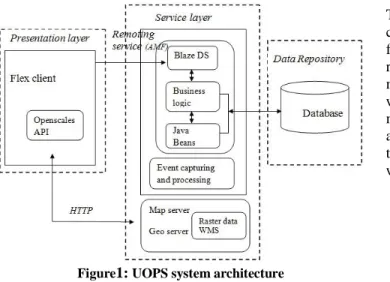
As it supports various user profiles and implements con-figurable business rules, the application is complex and the high level design requires layer segregation. Functional re-quirements are decomposed to create loosely coupled, con-text independent and extensible components. The interac-tions between these individual layers take place using asyn-chronous procedure calls. The system architecture is depict-ed in [Fig 1].
Figure1: UOPS system architecture
a.
Presentation Layer
It facilitates the user to interact with the system for browsing/ordering and arrive at the selection followed by visualization results. The presentation layer is designed to capture the user inputs which are customized based on the user profile and the outcome of the search resulted after ap-plying the business rules. The interactive and monitoring services are rendered through a rich graphical user interface. Visualization features for archived image/scene footprint display on satellite map are designed using OpenScales API [3], an open source mapping framework based on Action Script and Flex.
b.
Service Layer
The service layer is embedded with business logic, map server and the event processor.
Business logic consists of functional building blocks for processing the inputs captured by the presentation layer. The inputs received are channelized to various workflows with varying granularity, comprising of processing modules and Data Access Objects that manipulate the repository. The results are subsequently formatted as frames and made available to the presentation layer.
The map server [4] is responsible for rendering map visuali-zation to the presentation layer. It provides display of user’s area of interest and selected scene footprints.
The event processor captures an event, performs event-centric actions and subsequently notifies its occurrence.
c.
Repository
The repository [Fig 2] contains heterogeneous information comprising of quick look and product metadata, user pro-files, orders and data collection requests and the details of registered ground stations. The quick look and product metadata is organized using spatial feature to enable search with geometrical shapes. The user profiles contain infor-mation about the registered users for the services. The order and data collection requests database has information about the archived and demand based collections ordered along with products supplied and invoices generated.
Figure 2: UOPS Repository
Design
a.
Presentation Layer
The presentation layer is designed to provide user inter-face forordering from fresh collection and archived catalogs, status monitoring, related ancillary services, administrative and control functions.
The thrust while designing presentation was user friendliness, appealing GUI, easy navigation and built-in validations, enumerated context sensitive pull down options and flexibility for re-configuring. Custom built components are designed for dynamic tab creation for capturing satellite-sensor specific user inputs, filtering information on data grid, rendering hierarchical information and interactive drill down menus for macro to micro level detail [1][2]. Plugga-ble components are created for modularity and reuse. UI components are exploited to build customized column ren-derers for a single data grid. Validation of user inputs is done through selective entry and format and boundary checks. The application view is segregated and customized based on user profiles.
The GUI layout is managed to present blocks of infor-mation progressively within a single page minimizing navi-gation.XML is used for configuration files for flexibility, extensibility and interoperability. To enable persistence of the incomplete user session,XML based storage and retrieval for context datais designed. Visualization of selection is en-riched by providing display of user’s area of interest overlaid by annotated scene footprints.Status based scene foot print color coding is provided as a part of status monitoring ser-vice. The visualization services are made informative by adding administrative boundaries as layers with panning and zooming feature with a satellite map as background
b.
Service Layer
The service layer incorporates various components like the business logic, map server [4] and event processor. The business logic deals with real-world business rules and de-fines interactions between business objects. It executes the
workflows defined to process inputs captured and queries identified at presentation layer and sends results back to presentation layer.
The three layer architecture is implemented using MVC design pattern. Model-view-controllerisolates busi-ness logic representing workflows and rules for data ma-nipulation from user interface and controller to manage communication between the business logic and user inter-face by listening to events and routing them to the appropri-ate adapter and subsequently sends corresponding results back to the user interface for visualization. UOPS being a data and operations intensive application requires many transactions to be performed. As establishing a database connection for each transaction is costly, the Object Pool design is chosen to create and re-use a set of database con-nections. Also, to maintain a single activity log of the appli-cation usage and the workflows executed for monitoring and debugging, the Singleton pattern is chosen and implement-ed. Session termination after 60 idle minutes is implemented to prevent idling of resources.
XML is used to create standard interface file formats, customized satellite sensor specific tags, defining set of rules for validation, and interpretation of various satellite sensor characteristics.This enables future extensibility, interopera-bility, facilitating the comparison and aggregation of da-ta and provision to embed multiple dada-ta types in future. The application uses Adobe BlazeDS, an open source server based Java remoting and web messaging technology. It facil-itates effective integration of flex and Java by enabling re-mote procedure calls and message exchange between differ-ent platforms. Exchange of data between service layer and presentation layer is through remote objects. The serialized data is handled by POJOs at service layer and data binders at presentation layer.
The entire workflow right from future acquisition re-quest posting, catalog building to work order generation that drives production chain is managed by status change events. The status events from the scheduling system and product generation system are also received, consumed to notify the status through SMS, emails and notifications on presentation layer.
Ancillary functions and services are designed for the user management on Intranet which includes monitoring of user requests, manage internal functional hierarchy and in-formation such as product specification, price, and perform invoice and account operations.
c.
Repository
Large volumes of satellite data catalogs are archived over years since the first satellite (IRS 1A) launch in 1988. The
95 repository is designed considering the data to be stored,
transactions to be performed and their frequency. The data is organized into relations and its integrity and dependency is defined using primary key and reference constraints. Nor-malization up to the 3rd level is applied to remove redun-dancy and ensure data consistency. Spatial database is ex-ploited to store and retrieve geographical information for archival and querying process to improve performance. The extents of the scenes are stored as SDO_GEOMETRY data type, spatial index is created and spatial operator SDO_RELATE is used for fetching the data. Join queries are also used to fetch data across tables for statistical infor-mation and status reports.
d.
Work Flow
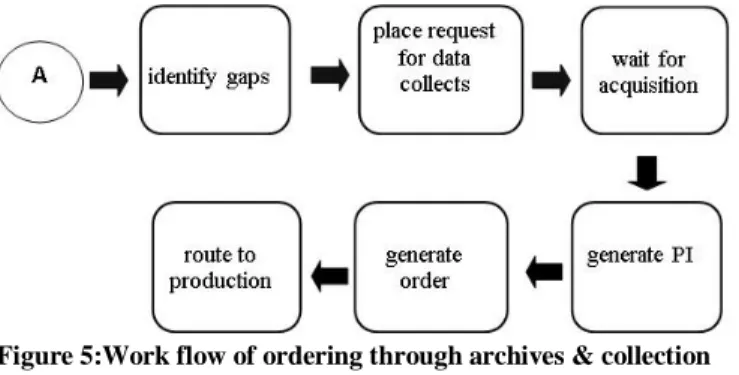
There are three types of basic work flows. The first one is ordering from archives [Fig 3]. Here the scenes are or-dered either by selecting through quicklook/product catalogs or both. The second workflow is ordering for data collection [Fig 4] and the third workflow handles the orders which are combination of archived scenes and collection [Fig 5]. For future collects the user specified area is programmed for acquisition, scheduled for downlink and after receiving the quick looks, the orders are routed for product generation.
Figure 3:Work flow of ordering from archives
Figure 4:Work flow of ordering through collection
Figure 5:Work flow of ordering through archives & collection The workflow from data selection to product dissemina-tion is automated to optimize the turnaround time of product delivery. Re-entry points have been defined at relevant stag-es of the workflow for easy rstag-esumption of the sstag-ession as shown in Fig 3. The data selection process can span across multiple sessions. The previous selection can be saved by adding selected scenes to cart / performa invoice. The inputs saved can be routed as a single order when it is not pertain-ing to different AOI. Durpertain-ing the course of multiple sessions, the working context can be restored.
e.
Security
As the application is exposed to public network, the vulner-ability of being attacked or security being breached becomes all the more pervasive. The Flash player executing this ap-plication runs inside a security sandbox [5] preventing the client from being attacked by malicious application code and allows only domain specific resource access i.e. a swf file from a specific Internet domain can always access all data from that domain. The security sandbox puts application’s assets in the same security grouping. Flexapplications also provides protections for client computer’s disk data and memory usage through memory and processor safeguards preventing application from taking control of excess system resources for indefinite period of time. Other aspects of se-curity are handled through the following measures
Proper authentication and authorization are achieved through password protected login mechanism and e-mail verification so that only valid users are allowed to access the application.
To ensure that the application is not vulnerable to cross-site scripting and SQL injection, input validations are done and drop-down menus are provided wherever relevant to prevent user from injecting any malicious code.
Captcha is implemented to ensure that only a human interaction is creating an event in the application.
The application server and database server has been put on separate network to provide extra layer of security
and preventing the database server security from being compromised.
Implementation
Front end components are designed using MXML and Ac-tion Script provided by Adobe Flex. Adobe Flex, used for front-end design for this application, is based on RIA (Rich Internet Application) technology that resides on client, pro-vides rich media, asynchronous communication, data persis-tence and reduced network consumption.Flex applications offload computation from server to the client minimizing network traffic and latency in fetching response for interac-tive user interfaces.It comprises of MXML, a markup lan-guage based on Extensible Markup Lanlan-guage for layout cre-ation and ActionScript for user interaction, complex data functionality, and any custom functionality not included in the Flex class library.Adobe BlazeDSis used for communi-cation between front end and the back end business logic using the remoting services. OpenScales, chosen for building
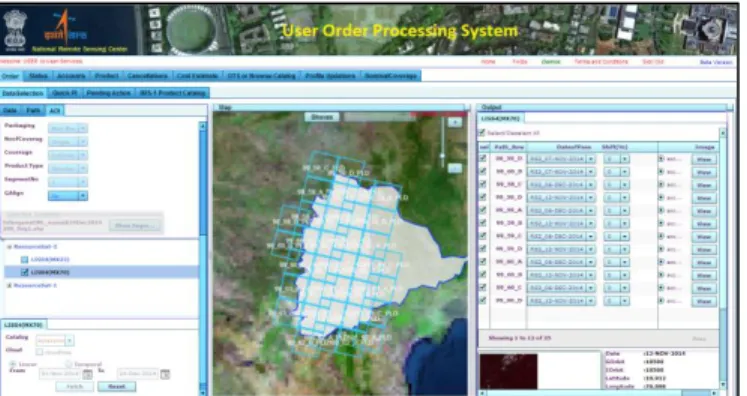
map based front end, is an Open Source mapping framework based on ActionScript 3 and Flex. It support different kind of layers and is OGC complaint, having drawing and fast vector rendering capabilities. The business logic is imple-mented in JAVA and open source libraries like JAXB, Geo Tools and Java Topology Suite are used. The data access objects are implemented as POJOs for transactions with the repository. The database is implemented in Oracle 10g. Spa-tial feature of Oracle is used to store and retrieve geograph-ical information using spatial queries. GeoServer [4] which is a java based, platform independent server is used as a map renderer, in which the word image and the administrative boundaries are published. OpenScales API is used to fetch the data from Geo Server using WMS/WFS protocol. Four sample screen shots [Fig 6, 7, 8, 9] of the application are shown below.
Figure 6:UOPS front page
Figure7:Data selection and ordering
Figure 8:Request for future collects
Figure9:Order status monitoring
Deployment
The application is deployed on two Linux based 2 CPU Blade Servers. The Deployment is shown in [Fig 10]. In order to manage the ever increasing load on application, both the servers are connected to load balancer. As the ap-plication is exposed to the public network, all the servers are within the organization firewall. The map server is deployed
97 on windows server and FTP server is used for product
dis-semination.This application is accessible in www.nrsc.gov.in
as a link ‘Order Satellite Data’.
Figure10: Deployment Diagram
Testing
The main aim of testing a web application is to verify the conformance of the application for the specified functional interface, performance and security requirements. As the application is vast with integrated functionalities, a separate test team and quality assurance (QA) team has been involved in carrying out the testing. Both Manual and automated test-ing procedures are followed to validate the functional and nonfunctional requirements of the web application.
The testing procedure was initiated early in the software development life cycle to systematically carryout unit, inte-gration and system testing [6]. The user interface is thor-oughly evaluated to uncover the errors pertaining to naviga-tion, aesthetics, syntax and semantics. Compatibility of the application with several browsers, operating systems and screen resolutions is manually verified.
Rational Functional Tester (RFT) tool is used to perform functional and regression testing, Rational Performance Tester (RPT) tool has been used to check the performance
by increasing the load on the server up to 50 concurrent us-ers.
The application is tested to ensure the security of data and resources from unauthorized access.
Conclusion and Future work
The application is realized with less navigation, rich GUI and faster response. The future plan is to extend this applica-tion to mobile devices. Knowledge based guided search for easier and user friendly navigation is also planned based on user’s previous requests and queries for the selected applica-tion area.
Acknowledgments
The authors would like to thank Director, NRSC for giv-ing us the opportunity to realize the product. The authors would like to acknowledge each and every individual in data processing area, NRSC Data Centre, Quality Assurance group and the internal users of the application for their criti-cal review to improve the product to meet the purpose for which it was envisaged.
References
[1] Using ADOBE® FLEX® 4.6 [2] blog.flexexamples.com
[3] www.webmapsolutions.com/openscales-arcgis-flex-api
[4] www.geoserver.org
[5] SreenivasaRaoBasavala, Dr.Narendra Kumar, Dr.AlokAgarrwal
Article: Finding Vulnerabilities in Rich Internet Ap-plications (Flex/AS3) Using Static Techniques, I.J.Modern Education and Computer Science, 2012, 1, 33-39 Published Online February 2012 in MECS [6] Ron Patton (PEARSON Education), Article: Software