Aruba Mobility Controllers
and Deployment Models
Validated Reference Design
Version 5.0
www.arubanetworks.com
1344 Crossman Avenue
Sunnyvale, California 94089
Phone: 408.227.4500
Fax 408.227.4550
Aruba Mobility Controllers and Deployment Models VRD | Solution Guide April 2012
Copyright
© 2012 Aruba Networks, Inc. AirWave®, Aruba Networks®, Aruba Mobility Management System®, Bluescanner, For Wireless That Works®, Mobile Edge Architecture®, People Move. Networks Must Follow®, RFprotect®, The All Wireless Workplace Is Now Open For Business, Green Island, and The Mobile Edge Company® are trademarks of Aruba Networks, Inc. All rights reserved. Aruba Networks reserves the right to change, modify, transfer, or otherwise revise this publication and the product specifications without notice. While Aruba uses commercially reasonable efforts to ensure the accuracy of the specifications contained in this document, Aruba will assume no responsibility for any errors or omissions.
Open Source Code
Certain Aruba products include Open Source software code developed by third parties, including software code subject to the GNU General Public License (“GPL”), GNU Lesser General Public License (“LGPL”), or other Open Source Licenses. The Open Source code used can be found at this site:
http://www.arubanetworks.com/open_source Legal Notice
ARUBA DISCLAIMS ANY AND ALL OTHER REPRESENTATIONS AND WARRANTIES, WEATHER EXPRESS, IMPLIED, OR STATUTORY, INCLUDING WARRANTIES OF MERCHANTABILITY, FITNESS FOR A PARTICULAR PURPOSE, TITLE,
NONINFRINGEMENT, ACCURACY AND QUET ENJOYMENT. IN NO EVENT SHALL THE AGGREGATE LIABILITY OF ARUBA EXCEED THE AMOUNTS ACUTALLY PAID TO ARUBA UNDER ANY APPLICABLE WRITTEN AGREEMENT OR FOR ARUBA PRODUCTS OR SERVICES PURSHASED DIRECTLY FROM ARUBA, WHICHEVER IS LESS.
Aruba Mobility Controllers and Deployment Models VRD | Solution Guide Contents | 3
Contents
Chapter 1
Introduction
7
Aruba Reference Architectures 7
Reference Documents 7
Chapter 2
Summary of Recommendations
9
Campus Deployments 9
Remote Deployments 11
Branch Offices 13
Small Offices with Single Sites 15
Chapter 3
Understanding the Aruba Mobility Controller and AWMS
17
Controller Overview 19
Aruba 6000 Chassis and M3 Blade 19
Aruba 3000 Series 19
600 Series 20
Next Steps 20
Understanding Mobility Controller Master/Local Model 20
Understanding the Master Mobility Controller 21 Understanding the Local Mobility Controller 23
Understanding the Role of the AirWave Wireless Management Suite 26
Mobility Controller Deployment Options 28
Campus Deployments 28
Stand-Alone Mobility Controller Operation 29
Branch Office Controller 30
RAP and IPsec Gateway 31
Wired Gateway 32
All Masters with AWMS 33
Distributed All Masters 33
Campus All Masters 34
Chapter 4
Controller Licensing
35
License Descriptions 35
Understanding the Functionality of PEF-NG and PEFV 36
Licensing Requirements and Recommendations 36
Matching AP-Based Licenses 36 Master Mobility Controller Licensing Requirements 37 Local Mobility Controller Licensing Requirements 37
Chapter 5
AP Forwarding Modes
39
Campus Deployments 40
Tunnel Mode 40
Decrypt-Tunnel Mode 41
Bridge Mode 42
Forwarding Mode Client Limits 43 Campus Forwarding Mode Recommendations 43
4 | Contents Aruba Mobility Controllers and Deployment Models VRD | Solution Guide
Tunnel Mode 44
Decrypt-Tunnel Mode 45
Bridge Mode 46
Policy-based Forwarding (Split-tunnel) Mode 47
Remote Forwarding Mode Recommendations 48
Control Plane Security 48
IPsec Connections and Certificates 49
Campus AP White List 51
AP and Controller Tunnels 52
Trust Anchors 53
Considerations in CPsec Deployments 54
Chapter 6
Physical Deployment Considerations
55
Mobility Controller Deployments 56
Data Center 56 Core 57 Distribution Layer 57 Access Layer 58 DMZ 59 AirWave Deployments 60
Local Data Center 60
Remote Data Center 60
Physical Deployment Considerations and Recommendations 60
Considerations for Local Mobility Controller Physical Deployments 60 Physical Deployment Recommendation 61
Chapter 7
Regulatory Compliance for International Deployments
63
Controller Compliance 63
Recommendations for International Deployments 64
Chapter 8
Logical Deployment Considerations
65
User VLANs 66
User VLANs in Tunnel and Decrypt-Tunnel Modes 66 User VLANs in CAP Bridge Mode 68 User VLANs in Remote AP Bridge Mode 68 User VLANs in Split-Tunnel Mode 69
Guest VLANs 70
Dedicated AP VLANs 73
Quarantine VLANs 75
VLAN Pools 77
Packet Sizing 79
Default Gateways and Routes 79
Layer 2 Deployments 79
Layer 3 Deployments 80
Static Routes and OSPF 81
Logical Design Recommendations 82
Campus Logical Design Recommendations 82
Chapter 9
Mobility
85
Layer 2 Mobility (VLAN Mobility) 85
Roaming Between APs in Bridge Mode 86
Layer 3 Mobility (Mobile IP) 87
Mobility Domains 87
Aruba Mobility Controllers and Deployment Models VRD | Solution Guide Contents | 5
Chapter 10
Redundancy Models
91
Master Redundancy 92
Local Redundancy 93
Active-Active (1:1) 93
Active-Standby (1+1) 95
Many-to-One (N+1) 96
Comparison of Local Redundancy Models 98
AirWave Redundancy 99
Data Center Redundancy 100
No Redundancy 103
Master Mobility Controller – No Redundancy 103 Local Mobility Controller – No Redundancy 105
AWMS – No Redundancy 105
Data Center – No Redundancy 105
Aruba Recommendations for Redundancy 105
Chapter 11
Mobility Controller Selection
107
Information Gathering 107
Controller Selection Formula – Local Controllers 108
Controller Scalability Table 108 Local Mobility Controller – Campus or Branch Deployment 109 Local Mobility Controller - Remote Access Point Deployment 110 Local Mobility Controller - VIA Deployments 111 Calculating RAP and VIA Clients on the Same Mobility Controller 111
Controller Selection Formula – Master Mobility Controller 112
Redundancy Considerations for Controller Count 112
When to Consider a Mobility Controller Upgrade 112
Mobility Controller 113
AWMS 115
Chapter 12
Putting It All Together
117
Appendix A
CPsec Scalability
119
Appendix B
AP Failover Times
121
Appendix C
Scalability in the All Masters Deployment Model
123
Appendix D
Aruba Contact Information
125
Contacting Aruba Networks 125
Contents
9
Aruba Mobility Controllers and Deployment Models VRD | Solution Guide Introduction | 7
Chapter 1
Introduction
Aruba Reference Architectures
The Aruba Validated Reference Design (VRD) series is a collection of technology deployment guides that include descriptions of Aruba technology, recommendations for product selections, network design decisions, configuration procedures, and best practices for deployment. Together these guides comprise a reference model for common customer deployment scenarios. Each Aruba VRD network design has been constructed in a lab environment and thoroughly tested by Aruba engineers. Our customers use these proven designs to rapidly deploy Aruba solutions in production with the assurance that they will perform and scale as expected.
The VRD in this guide discusses deployment models and mobility controller selection. This guide describes:
Operating modes for the mobility controller
Licensing
Forwarding modes
Logical and physical deployment
Redundancy
How to select the appropriate mobility controller based on scalability requirements
This guide will help you understand the capabilities and options you have when deploying an Aruba Mobility Controller. Other guides in the series will build specific deployments using the information in this guide.
Reference Documents
This VRD is the first in a series of new guides in a revised format, and it is intended to provide the most current information about the mobility controller technology and deployment models introduced in ArubaOS 5.0. Other guides in the series will cover 802.11n and AP deployments, user roles and firewall policies, outdoor deployments, and configurations for specific deployments such as campus or remote networks. This guide is a foundation-level guide, and therefore it will not cover the configuration of the Aruba system. Instead, it is intended to provide the baseline knowledge that a wireless engineer must use to deploy an architecture that is based on the mobility controller.
For specific deployment configuration details, see the 3.X series of VRDs on the Aruba website at http://www.arubanetworks.com/vrd. The existing VRDs will be updated to follow this new format.
The complete suite of Aruba technical documentation is available for download from the Aruba support site. These documents present complete, detailed feature and functionality explanations beyond the scope of the VRD series. The Aruba support site is located at:
https://support.arubanetworks.com/.
For more training on Aruba products or to learn about Aruba certifications, visit our training and certification page on our public website. This page contains links to class descriptions, calendars, and test descriptions: http://www.arubanetworks.com/training.php
Aruba hosts a user forum site and user meetings called Airheads. The forum contains discussions of deployments, products, and troubleshooting tips. Airheads is an invaluable resource that allows
8 | Introduction Aruba Mobility Controllers and Deployment Models VRD | Solution Guide network administrators to interact with each other and Aruba experts. Announcements for Airheads meetings are also available on the site: http://airheads.arubanetworks.com/
The VRD series assumes a working knowledge of Wi-Fi®, and more specifically dependent AP-based architectures. For more information about wireless technology fundamentals, visit the Certified Wireless Network Professional (CWNP) site at http://www.cwnp.com
Aruba Mobility Controllers and Deployment Models VRD | Solution Guide Summary of Recommendations | 9
Chapter 2
Summary of
Recommendations
This VRD explains the recommendations that Aruba provides for deploying a scalable, mobility controller-based wireless LAN (WLAN) system. The details of the system occasionally require lengthy explanations and diagrams to sufficiently convey the details of the solution. This section provides an overview of the Aruba recommendations for mobility controller deployments, which are explained in detail in the following sections.
Campus Deployments
Campus-based deployments are networks that require more than a single controller to cover a contiguous space. Examples of campus-based deployments are corporate campuses, large hospitals, and higher-education campuses. In these deployments, the WLAN is often the primary access method for the network, and it is typically used by multiple classes of users and devices.
Figure 1 Typical campus deployment with redundancy
arun_0279 Air Monitor Internet Local Mobility Controller Local Mobility Controller POS File RADIUS PBX Master standby Data Center Master active AWMS Server
10 | Summary of Recommendations Aruba Mobility Controllers and Deployment Models VRD | Solution Guide The following table summarizes the recommendations for campus-based deployments.
Table 1 Campus Deployment Recommendations
Feature or Function Recommendation
Master/local or all masters Use a master/local configuration.
Physical location of the master mobility controller
Put the master mobility controller in the network data center.
Master mobility controller redundancy Use master redundancy with a standby master.
Physical location of the local mobility controller
Put the local mobility controller in the distribution layer or the data center, depending on the traffic patterns in the organization and the location of the Internet drop.
Local mobility controller redundancy Use active-active with two mobility controllers and two instances of the Virtual Router Redundancy Protocol (VRRP). Each mobility controller should be the primary on one of the VRRP instances, and back-up for the other. Half of the APs should terminate on each of the two VRRP instances.
Local mobility controller load AP and user load to 40% capacity, which results in 80% load in a failure condition.
Control plane security (CPsec) Off by default, but when network administrators plan the network, ensure that future CPsec operation is possible.
AirWave Wireless Management Suite (AWMS)
Deploy AWMS for management, configuration, reporting, and troubleshooting. Deploy AWMS in the network data center.
Licenses AP capacity equal to the number of campus access points (CAPs) and air monitors (AMs) supported during a failover scenario.
Policy Enforcement Firewall – Next Generation (PEF-NG) for user roles, firewall policy equal to AP capacity supported during a failover scenario.
Wireless Intrusion Prevention (WIP) for advanced wireless intrusion protection and rogue detection, equal to AP capacity supported during a failover scenario.
Aruba Mobility Controllers and Deployment Models VRD | Solution Guide Summary of Recommendations | 11
Remote Deployments
For deployments that cover remote access, two solutions exist. The remote access point (RAP) provides secure, clientless access to the small branch, home office, and fixed telecommuter. These deployments are typically characterized by the need for multiple network components, such as Voice over IP (VoIP) phones, wireless printers, and local disk storage. For the highly mobile user, the Aruba Virtual Internet Access (VIA) IPsec client provides seamless connectivity without the need for local infrastructure. The VIA client works over Wi-Fi, Ethernet, and cellular connections.
Figure 2 Remote deployment with RAPs and VIA clients
arun_0208
RNSG_120
RAP-5 RAP-2WG
RAP-5WN
RAP-5WN Branch Office Sites
Medium Branch Small Branch
Remote Call
Center Agent Fixed Telecommuter Fixed
Telecommuter Sites
Public Access Sites
Internet or WAN Cable Provider Public Hotspot Broadband Carrier 3G EVDO/GSM Carrier 3G EVDO/GSM Carrier
From Data Center
Local active
Local active DMZ
12 | Summary of Recommendations Aruba Mobility Controllers and Deployment Models VRD | Solution Guide The following table summarizes the recommendations for RAP and VIA-based deployments.
Table 2 Remote Deployment Recommendations
Feature or Function Recommendation
Master/local or all masters Use a master/local configuration.
Physical location of the master mobility controller
Network data center: Put the master mobility controller in the network data center if the Aruba deployment is pervasive.
DMZ: Put the master mobility controller in the DMZ if Aruba is used only for remote networking.
Master mobility controller redundancy Use master redundancy with a standby master.
Physical location of the local mobility controller
Put the local mobility controller in the network DMZ.
Local mobility controller redundancy Use active-active, with two mobility controllers and two instances of the VRRP. Each mobility controller should be the primary on one of the VRRP instances, and back-up for the other. Half of the APs should terminate on each of the two VRRP instances.
Local mobility controller load AP and user load to 40% capacity, which results in 80% load in a failure condition.
VIA agents Use the VIA agent on laptops that need to communicate over untrusted connections where a RAP deployment is not feasible.
AirWave Wireless Management Suite Deploy AWMS for management, configuration, reporting, and troubleshooting. Deploy AWMS in the network data center.
Licenses AP capacity equal to the number of RAPs supported during a failover scenario.
PEF-NG for user roles, firewall policy, equal to the number of RAPs supported during a failover scenario.
PEF-V for VIA client firewall policy.
WIP for advanced wireless intrusion protection and rogue detection, equal to the number of RAPs supported during a failover scenario.
Aruba Mobility Controllers and Deployment Models VRD | Solution Guide Summary of Recommendations | 13
Branch Offices
The branch office is an extension of a larger organization. Typically, the branch office has a data center located at a remote site where additional services are provided. The branch office is characterized by being large enough to require multiple APs to service local clients. Often the branch office has a requirement for survivability in the event of a WAN outage.
Figure 3 Branch office controller deployment with guest access
VLAN 177 192.168.177.0/24 RAP IP Address Pool (Local DHCP) arun_0207 Guest SSID Pre-Shared Key SSID HTTPS Application Server Enterprise Wired Access Guest Wired Access Enterprise SSID Voice SSID Enterprise IP Address Pool DSL MPLS Frame Relay BOC 3G WWAN Internet or WAN To DMZ To Internet Destinations
14 | Summary of Recommendations Aruba Mobility Controllers and Deployment Models VRD | Solution Guide The following table summarizes the recommendations for branch office deployments, with the
assumption that a central corporate site exists elsewhere. Table 3 Branch Office Recommendations
Feature or Function Recommendation
Master/local or all masters Use an all masters configuration.
Location of the master mobility controller Put the master mobility controller in the networking closet.
Master mobility controller redundancy Use master redundancy using a standby-master, or N+1 for larger branches with private WAN connections.
Location of the local mobility controller N/A
Local mobility controller redundancy N/A
Local mobility controller load N/A
VIA agents Use the VIA agent on laptops that need to communicate over untrusted connections where a RAP deployment is not feasible.
AirWave Wireless Management Suite Deploy AWMS for management, configuration, reporting, and troubleshooting. Deploy AWMS in the network data center.
Licenses AP capacity equal to the number of RAPs supported during a failover scenario.
PEF-NG for user roles, firewall policy, equal to the number of RAPs supported during a failover scenario.
PEF-V for VIA client firewall policy.
WIP for advanced wireless intrusion protection and rogue detection, equal to the number of RAPs supported during a failover scenario.
Aruba Mobility Controllers and Deployment Models VRD | Solution Guide Summary of Recommendations | 15
Small Offices with Single Sites
In some cases, an organization is small enough that a single mobility controller is sufficient to handle the networking needs of the organization. Typical cases include doctors offices, law firms, design firms, and architects offices. Typically the organization either has no other site, or they are few in number and can be handled by RAPs and VIA clients that terminate on the same mobility controller.
Figure 4 Small branch deployment with a mobility controller onsite
The following table summarizes the recommendations for small organizations. Table 4 Small Office Deployment Recommendations
Feature or Function Recommendation
Master/local or all masters Use an all masters configuration.
Location of the master mobility controller Put the master mobility controller in the networking closet.
Master mobility controller redundancy Use master redundancy, using a standby-master if possible.
Location of the local mobility controller N/A
Local mobility controller redundancy N/A
Local mobility controller load N/A
VIA agents Use VIA agents on laptops that need to communicate over un-trusted connections where a RAP deployment is not feasible.
AirWave Wireless Management Suite (AWMS)
If possible, deploy AWMS for management, configuration, reporting, and troubleshooting. Deploy AWMS in the network data center. arun_0280 Air Monitor Master active Data Small Site
16 | Summary of Recommendations Aruba Mobility Controllers and Deployment Models VRD | Solution Guide
Licenses AP capacity equal to the number of RAPs supported during a failover scenario.
PEF-NG for user roles, firewall policy, equal to the number of RAPs supported during a failover scenario.
PEF-V for VIA client firewall policy.
WIP for advanced wireless intrusion protection and rogue detection, equal to the number of RAPs supported during a failover scenario.
Table 4 Small Office Deployment Recommendations (Continued)
Aruba Mobility Controllers and Deployment Models VRD | Solution Guide Understanding the Aruba Mobility Controller and AWMS | 17
Chapter 3
Understanding the
Aruba Mobility Controller
and AWMS
The Aruba Mobility Controller is the heart of the Aruba dependent access point (AP) WLAN
architecture. The mobility controller is responsible for many of the operations that traditionally would be handled by the AP in an autonomous AP deployment. The mobility controller acts as a command-and-control point for the network as a whole. The mobility controller operates as an access network with APs and as a wireless intrusion prevention (WIP) system with dedicated AMs that perform scanning and containment operations on the WLAN.
The Aruba Mobility Controller goes far beyond managing dependent APs. The mobility controller is capable of fulfilling many of the roles that traditionally were handled by dedicated appliances. The functionality that the mobility controller provides includes:
Acting as a user-based stateful firewall
Terminating user-encrypted sessions from wireless devices
Performing Layer 2 switching and Layer 3 routing
Providing clientless Layer 3 mobility
Acting as an IPsec virtual private network (VPN) concentrator for site-to-site and client-based VPNs
Providing certificate-based IPsec security to protect control channel information
Terminating Internet-based RAPs
Providing wired firewall services
Performing user authentication with 802.1X and captive portal authentication, among others
Providing guest access and provisioning services
Providing advanced RF services with Adaptive Radio Management (ARM) and spectrum analysis
Providing location services and RF coverage “heat maps” of the deployment
Performing rogue detection and containment
Providing self-contained management by way of a master/local hierarchy with one controller pushing configuration to other mobility controllers to reduce administrative overhead
Delivering AP software updates automatically when the mobility controller is upgraded
This level of seamless, integrated functionality eliminates many of the challenges experienced with traditional systems integration for these services. Network administrators need to learn only one interface, which reduces complexity and speeds problem resolution across a broad range of solutions. For larger or more distributed organizations, the Aruba AirWave Wireless Management Suite (AWMS) provides overall configuration and reporting capabilities to complement the management tools that are built into the controller. Features include configuration across multiple master/local clusters, long-term reporting, location services, and advanced rogue AP detection tools in a highly scalable solution.
18 | Understanding the Aruba Mobility Controller and AWMS Aruba Mobility Controllers and Deployment Models VRD | Solution Guide The Aruba system has a logical four-tier operating model that consists of four layers: management, network services, aggregation, and network access. Controllers operate at the network services and aggregation layers, APs operate at the network access layer, and AWMS operates at the management level. This model is used throughout the VRD program to describe the logical deployment of the Aruba solution.
Figure 5 Logical four-tier operating model
Retail_107 arun_0202 Air Monitor Air Monitor Control Data Local active Local active Master standby Data Center Master active Network Services Management Aggregation Network Access AWMS Server POS File RADIUS PBX
Aruba Mobility Controllers and Deployment Models VRD | Solution Guide Understanding the Aruba Mobility Controller and AWMS | 19
Controller Overview
The mobility controllers are available in modular chassis models and as network appliances that scale to meet the needs of the largest organizations. This section introduces the current generation of mobility controllers.
Aruba 6000 Chassis and M3 Blade
Figure 6 Aruba 6000 Chassis with four M3 Mobility Controller Blades
The Aruba 6000 Chassis is designed to address a wide range of wireless and wired network mobility, security, and remote networking requirements for corporate headquarters and large campus
deployments. The Aruba 6000 is easy to install without disrupting the existing wired network. Edge services are virtualized and implemented in cost-effective APs at the network edge. The APs move user traffic to data center controllers through secure IP tunnels over a public or private transport network. The Aruba 6000 runs the ArubaOS operating system and comes standard with advanced authentication, encryption, wireless radio management, secure enterprise wireless mesh, and Layer 2 and Layer 3 networking features. Optional ArubaOS software modules deliver additional functionality, including policy enforcement firewall, VPN server, remote access gateway, and WIP.
Aruba 3000 Series
Figure 7 Aruba 3000 Series Mobility Controllers
The Aruba 3200 Mobility Controller is designed for the small and branch offices, and the Aruba 3400 and Aruba 3600 Mobility Controllers are designed for medium and large enterprise or dense office
20 | Understanding the Aruba Mobility Controller and AWMS Aruba Mobility Controllers and Deployment Models VRD | Solution Guide deployments. Edge services are virtualized and implemented in cost-effective APs at the network edge. The APs move user traffic to data center controllers through secure IP tunnels over a public or private transport network. The Aruba 3000 Series runs the ArubaOS operating system and comes standard with advanced authentication, encryption, wireless radio management, secure enterprise wireless mesh, and Layer 2 and Layer 3 networking features. Optional ArubaOS software modules deliver additional functionality, including policy enforcement firewall, VPN server, remote access gateway, and WIP.
600 Series
Figure 8 651 Controller Branch Office Controller with Integrated AP
The Aruba 600 Series of controllers are integral components of the Aruba distributed enterprise network, which uses central controllers in the data center to manage complex and processing-intensive management and security functions. Edge services are virtualized and implemented in cost-effective edge devices, which move user traffic to data center controllers through secure IP tunnels over a public or private transport network. The Aruba 600 Series provides local wireless services when used in conjunction with any Aruba AP, or they can operate as wired-only devices. The controllers also include print server and network-attached storage capabilities to enable local network printing and mass storage.
Next Steps
The next three sections discuss the deployment operating modes and deployment options for the system components. The first section describes the different operating modes of the Aruba Mobility Controllers and explains the functions of the master and local controller. The second section explains the advantages of adding AWMS to the WLAN to increase management capabilities. Finally, the third section describes the various deployment models that allow Aruba WLANs to scale from the largest campus to the smallest home office.
Understanding Mobility Controller Master/Local Model
All Aruba Mobility Controllers are capable of assuming two operating roles in the system: master or local mobility controller. This hierarchy allows organizations to build scalable WLAN networks without requiring additional management platforms when the network is contained to a single master/local cluster.
The master mobility controller is the central point of coordination and configuration of the network. The master mobility controller processes all wireless security events and sends policy-based
Aruba Mobility Controllers and Deployment Models VRD | Solution Guide Understanding the Aruba Mobility Controller and AWMS | 21 configuration to the local mobility controllers. The local mobility controllers manage the CAPs, air monitors (AMs), RAPs, VPN clients, and devices attached to the WLAN. APs connect directly to the local mobility controller over an IP-based network, and in most deployments, all traffic from devices is sent to the local mobility controller for processing.
Understanding the Master Mobility Controller
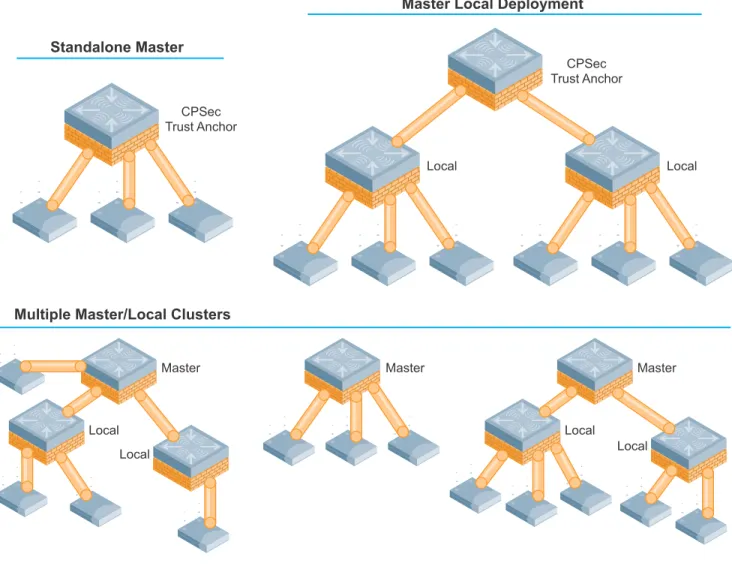
The role of the master mobility controller in an Aruba WLAN is to provide a single point of policy configuration and coordination for the WLAN in smaller deployments. The master mobility controller can receive configuration and coordination information from the AWMS for larger or more distributed deployments. A typical master/local cluster consists of one master mobility controller and one or more local mobility controllers. However, in smaller deployments the master also can handle all functions of the local. The communication channel between the master and locals is protected using IPsec. The master mobility controller typically does not terminate any clients or APs directly.
Figure 9 Network services layer
arun_0283 arun_042 Air Monitor Internet Local Mobility Controller Local Mobility Controller POS File RADIUS PBX Aggregation Network Access at the APs Master standby Data Center Master active Network Services Management AWMS Server
22 | Understanding the Aruba Mobility Controller and AWMS Aruba Mobility Controllers and Deployment Models VRD | Solution Guide Master mobility controllers are responsible for the following functions in the WLAN:
Policy configuration: Configuration in the Aruba solution is split between policy and local configurations. Local configuration deals with things such as physical interfaces, IP networking, and VLANs. Policy configuration is centered on the operation of APs and users, including AP settings such as the SSID name, encryption, regulatory domain, channel, power, and ARM settings. Policy configuration extends beyond APs and also covers user authentication, firewall policy, mobility domains (IP mobility), IPsec settings, and system management. The policy is pushed to all local mobility controllers in the form of profiles, and profiles combine to create the configuration for the dependant APs.
AP white lists: Two types of white lists exist in the system, one for RAPs and one for CAPs that use CPsec. These lists determine which APs can connect to the mobility controllers and in which method of operation. These lists give organizations additional levels of control. Unauthorized devices are prevented from connecting to the network, and provisioning of the system is simplified.
WIP coordination: Wireless intrusion prevention (WIP) activities involve looking for rogue (unauthorized) APs and monitoring for attacks on the WLAN infrastructure or clients. The master controller processes all data collected by Aruba Wi-Fi sensors known as AMs. Instructions to disable a rogue AP or blacklist a client from the network are issued through the master mobility controller.
Valid AP list: Separate from the concept of the white list, all of the legitimate APs operating on the WLAN must also be known to all mobility controllers in the network, and they must be marked as being valid APs. This list prevents valid APs from being falsely flagged as rogue APs when APs that are attached to two different local mobility controllers are close enough to hear each other’s transmissions on a single site. This list also helps ARM to differentiate between APs that generate noise (third-party or not under control of the mobility controller) and those that are part of the valid coverage area, but are generating co-channel interference. Unlike traditional wireless intrusion detection system (WIDS) solutions, the master controller automatically generates the valid AP list without network administrator intervention. All Aruba APs are automatically learned and added to the list, but valid third-party APs must be added manually. If more than one master/local cluster exists, AirWave should be deployed to coordinate APs between clusters.
RF visualization: Unlike traditional wired networks, RF requires additional tools to visualize network coverage. The Aruba RF visualization tools provide a real-time view of the network coverage. The entire network or coverage in a particular band, channel, or speed can be selected. This information is based on the AP channel and power settings and the data collected from AMs and APs listening to transmissions during their scanning periods. This information provides a realistic picture of the actual RF coverage as opposed to predictive planning tools. Predictive tools cannot provide anything more than a model of what should occur in the network based on estimates using AP placement and wall materials.
Location: Much like visualization, locating users in the WLAN is more difficult with mobile clients and IP mobility. The WLAN is not only serving clients but is also scanning off channel, so it is possible to triangulate users and rogue devices to within a small area. This information is displayed on the master and allows for devices to be located quickly, which is critically important for physical security and advanced services such as E911 calling.
Initial AP configuration: When an AP first boots up, it contacts its master mobility controller to receive the configuration generated by the master. The AP can use DNS lookup, DHCP option 43, broadcast, multicast, or static configurations to locate the master, which creates a “plug-and-play” experience when APs are added to the network. The master compares the AP name and determines its group assignment, and then redirects that AP to the proper local mobility controller. The most common methods are DNS and DHCP options, which allow changes to propagate quickly through the system and eliminate the need for Layer 2 connectivity to the master.
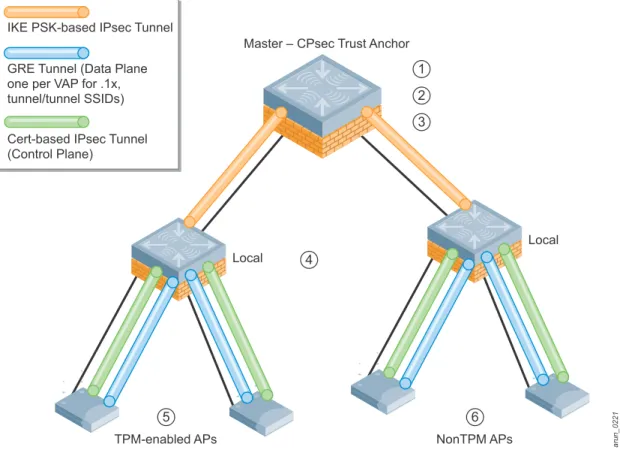
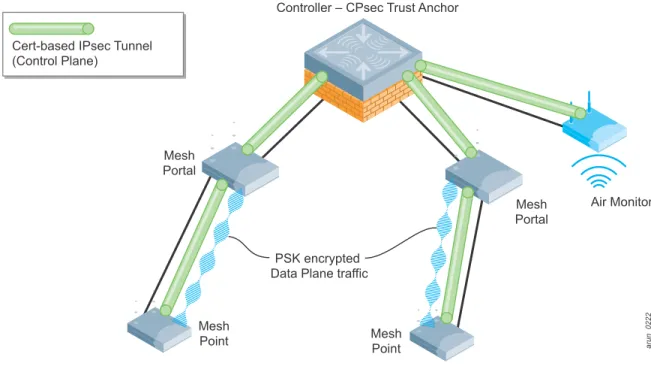
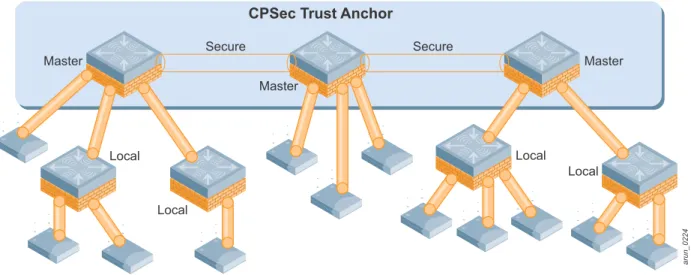
Control plane security: When CPsec is enabled, the master mobility controller generates the self-signed certificate and acts as the certificate authority (CA) for the network. The master mobility controller issues certificates to all local mobility controllers in the network as well. If more than one
Aruba Mobility Controllers and Deployment Models VRD | Solution Guide Understanding the Aruba Mobility Controller and AWMS | 23 master exists in the network, the network administrator assigns a single master as the trust anchor for that network. The trust anchor issues certificates to the other master controllers in the network.
Authentication and roles: User authentication methods and role assignments are created on the master mobility controller and then propagated to local mobility controllers throughout the network. A database exists to authenticate users in small deployments or for guest access credentials that can be leveraged by all the mobility controllers in the network. Additionally, the master can also proxy requests for the network to a RADIUS or LDAP server.
Understanding the Local Mobility Controller
The local mobility controller controls its logically attached APs and handles user sessions on the network. The locals process the majority of the traffic on the network. When the locals terminate CAPs, the locals are typically deployed either in the distribution layer or network data center, depending on the distribution of traffic in the enterprise. In the case of RAPs, Branch Office Controllers (BOCs), and VIA agents, the locals are typically located in the network DMZ.
Figure 10 Aggregation layer
arun_0205 Air Monitor Internet Local Mobility Controller Local Mobility Controller Aggregation Network Access at the APs POS File RADIUS PBX Master standby Data Center Master active Network Services Management AWMS Server
24 | Understanding the Aruba Mobility Controller and AWMS Aruba Mobility Controllers and Deployment Models VRD | Solution Guide Local mobility controllers are responsible for the following functions in the WLAN:
AP and AM configuration and software updates: All Aruba APs are dependent APs, which means they do not in most instances store configuration settings in the way that a traditional autonomous AP would. Instead, at boot time each AP downloads its current configuration from the local mobility controller. When changes are made in the system configuration, they are
automatically pushed to all APs. Whenever an AP boots, it will always have the current
configuration, and changes are reflected immediately throughout the network. When the software on the mobility controller is updated, the APs automatically download a new image from the mobility controller and upgrade themselves. This software check, like the configuration download, is part of the AP boot process, and it insures that each AP has the current operating image and configuration without user intervention.
AP and AM termination: The local mobility controller is the location where the AP terminates after it contacts the master mobility controller. The local upgrades the APs operating system as necessary, and it pushes the APs configuration to it. In the majority of campus deployments, all user traffic is sent from the AP to the local mobility controller and the local handles the decryption of the wireless frame. AMs also terminate on the local, but their traffic is sent directly to the master mobility controller to handle WIP coordination between AMs and APs. In an Aruba system, user traffic is sent over GRE tunnels to the local mobility controller. Control traffic also uses a protocol called PAPI, but if CPsec is enabled, control traffic uses an IPsec tunnel.
User session termination: An Aruba network is focused on the client devices, which are
commonly referred to as users. User sessions are any information transmitted from a client device across the WLAN, from actual human users on a wireless device to wireless IP cameras to medical equipment and scanner guns. Every user in an Aruba system is identified when they authenticate to the system (by WLAN, IPsec, or wired with captive portal), and their login information is used to place the user in the appropriate role based on that login. The user’s role defines what that user is allowed to do on the network. This definition is enforced by an ICSA 1certified stateful firewall, with a role-based policy applied to every user. By applying the policy to the individual users, Aruba eliminates the need to focus on ports as a security mechanism. Instead security moves to the user level, which allows multiple users to share a single AP or wired port and receive the appropriate level of security based on whom they are, not where they connect.
ARM assignments and load balancing: Aruba ARM controls aspects of AP and client
performance. All WLANs operate in unlicensed space, so the chance that something will interfere is very high. Aruba has developed a system to automatically work around interference and help clients have a better operating experience. These features include automatically tuning the WLAN by automatically configuring AP power and channel settings, as well as scanning for better settings and avoiding interference. ARM also handles AP load balancing and co-channel interference from other APs and clients, as well as airtime fairness to ensure that slower speed clients do not bring down the throughput of higher-speed clients. Using band steering, when the system detects a client is capable of operating on the 5 GHz band (the majority of modern clients), the system automatically attempts to steer that client to the cleaner band.
WIP enforcement and blacklisting: While the master handles the processing of WIP information, the local directs the actions of the AMs for enforcement of WIP policy. Enforcement can take different shapes, including containing rogue APs by performing denial-of-service (DoS) attacks wirelessly, ARP cache poisoning on the wire, shielding valid clients from connecting to rogue APs, and blacklisting clients so that they are unable to attach to the WLAN.
1. ICSA labs provides vendor neutral testing of products and certifies them in compliance with a set of common tests and criteria. ICSA is on the web at http://www.icsalabs.com/
Aruba Mobility Controllers and Deployment Models VRD | Solution Guide Understanding the Aruba Mobility Controller and AWMS | 25
CPsec AP certification: When CPsec is enabled in the WLAN, the AP and local mobility controller establish an IPsec tunnel between the two devices using certificates. The local mobility controller is responsible for issuing these certificates, and in some instances adding APs to the white list. When the AP boots up and tries to contact the local mobility controller, the certificates are used to build an IPsec tunnel between the devices.
Mobility: Supports both Layer 2 (VLAN) mobility as well as Layer 3 (IP) mobility, allowing users to seamlessly roam between APs on different mobility controllers without session interruption. This is a key component to support VoIP sessions, where sessions must be preserved.
Quality of service (QoS): The mobility controllers support QoS on the wired and wireless side. This support includes translating DiffServ and ToS bits set on packets into Wi-Fi Multimedia™ (WMM®) markings and back. The Aruba policy enforcement firewall (PEF) also allows the
administrator to mark packets with the appropriate level of QoS, and to change markings on packets entering the system.
26 | Understanding the Aruba Mobility Controller and AWMS Aruba Mobility Controllers and Deployment Models VRD | Solution Guide
Understanding the Role of the AirWave Wireless Management
Suite
The management framework built in to the master mobility controller was developed to allow small-scale networks to operate without the need of a dedicated management platform. When the system was first developed, Wi-Fi networks were convenience networks that were used only in meeting rooms and usually by guests. As Wi-Fi moved from providing only guest access to being the primary connection medium, the mission-critical nature demanded new tools to manage the network.
Figure 11 Management layer
arun_0204 arun_042 Air Monitor Internet Local Mobility Controller Local Mobility Controller POS File RADIUS PBX Aggregation Network Access at the APs Master standby Data Center Master active Network Services Management AWMS Server
Aruba Mobility Controllers and Deployment Models VRD | Solution Guide Understanding the Aruba Mobility Controller and AWMS | 27 The AirWave Wireless Management Suite (AWMS) fills this role by providing best-in-breed network management. AWMS enhances the features that are already delivered by the master controller and allows the WLAN to scale to much larger deployments. AirWave increases the functionality and usability of the Aruba Mobility Controller control plane in the following ways:
Historical data: The largest Aruba Mobility Controller contains 512 MB of flash memory, and an AirWave appliance contains multiple hard drives with 100+ GB of capacity. The Aruba Mobility Controller can typically store 1-4 days of data, and an AirWave appliance can store 1+ year.
Scalability: A master Aruba Mobility Controller can effectively manage up to 50,000 objects including APs, clients, and local mobility controllers. To avoid overloading a master mobility controller, time user information is also limited in larger networks. The controller polls for real-time data on-demand rather than continuously collecting it. The AirWave Master Console™ can be used to manage over 75,000 APs, hundreds of controllers, and hundreds of thousands of users. Data is collected continuously and in real time so that problems can be diagnosed after the fact by using historical data.
Reporting: To assess performance and network capacity, it is not enough to look at real-time network data in isolation. Trend data from months or years can help to determine how current conditions compare to previous levels and how changing usage patterns may impact network performance. AWMS provides up to 2 years of actionable information, including network
performance data and user roaming patterns. AWMS also provides the detailed capacity reports that are needed to plan for adequate coverage across the current network, network expansion, or 802.11n upgrades. Reports can be scheduled to run automatically and are emailed out, which eliminates the need to manually generate reports or log into the server to check status.
Alerting: Automated alerts can be sent using SNMP, syslog, or email, and the alerts can be configured to cover the entire system or only portions of the network. Alerting is available for a range of issues including radio state, user bandwidth, and rogue AP detection.
Advanced RF tools: AWMS can provide real-time views of the RF coverage in an organization and provide “heat maps” of that coverage on floor plans where APs and AMs are deployed. Additionally, these same maps can be used to locate client stations, rogue APs, and 802.11 RFID tags. Additional tools make it possible to plan network deployments using VisualRF Plan to do AP deployment planning software, without the need for more expensive manual surveys in many cases. This planning is backed up by VisualRF, which delivers a real-time view of the network as it operates.
Managing multiple master/local clusters: An AWMS can monitor and control multiple master Aruba Mobility Controllers and their associated local mobility controllers. Configuration auditing and reporting is also available to ensure that all devices are configured as expected, and that changes to the system are recorded. In addition, software can be pushed to the mobility controllers along with scheduled reboots to upgrade the system.
Executive and help desk monitoring views: The ArubaOS WebUI is primarily intended for network engineers to conduct configuration and monitoring. An AirWave Management Suite provides multiple customized interfaces appropriate to different roles in the organization. AWMS also allows for multiple user roles with different permissions on the system, as well as the ability to group devices to provide permissions to a subset of the network. Open APIs allow for integration into existing network management and trouble ticket systems.
Management of third-party devices – The AWMS is the premiere multivendor wireless
management suite on the market. Many large organizations have a mixture of wireless equipment, new and old, and are slowly migrating from one system to the other. The AWMS allows network managers to transition from legacy platforms to the Aruba solution using a single interface for management.
Wired network rogue AP scans: The AirWave RAPIDS module can scan networks for rogue APs even when no wireless sensors are present. When the RAPIDS module is combined with the ArubaOS WIP module, comprehensive rogue detection and containment is provided.
28 | Understanding the Aruba Mobility Controller and AWMS Aruba Mobility Controllers and Deployment Models VRD | Solution Guide
Wired network management: AWMS is capable of monitoring and managing wired switches and it can detect rogue APs and troubleshoot AP connection issues from a single, integrated platform.
Mobility Controller Deployment Options
With a solid understanding of master/local operation, it is now possible to look at the various
deployment models that the system allows. The mobility controller is flexible enough to be deployed in multiple settings. In some cases the master/local functionality is collapsed into a single device for a small deployment, and in other cases the mobility controller acts as a gateway for remote devices.
Campus Deployments
Campus deployments are extremely common for Aruba solutions. The highly scalable nature of the system allows for larger deployments of multiple systems, where users can roam between floors and buildings and remain connected. Advanced services such as voice and video distribution are often integrated into these networks, which delivers an experience previously possible only with wired devices. Most deployments involve multiple local mobility controllers with redundancy deployed either in the distribution layer or data center. These deployments also have redundant master mobility controllers and AWMS in the data center.
Figure 12 Campus deployment model
arun_0279 Air Monitor Internet Local Mobility Controller Local Mobility Controller POS File RADIUS PBX Master standby Data Center Master active AWMS Server
Aruba Mobility Controllers and Deployment Models VRD | Solution Guide Understanding the Aruba Mobility Controller and AWMS | 29
Stand-Alone Mobility Controller Operation
The stand-alone mobility controller option is a hybrid of the master and local mobility controller functionality. In this case, the mobility controller is configured as a master mobility controller, but it is also responsible for all local functionality. These devices are typically deployed in smaller organizations where only a single controller is required, and redundancy is not needed or cost effective.
Figure 13 Stand-alone mobility controller model
arun_0206 Master active Network Services Wireless Access Aggregation Data
30 | Understanding the Aruba Mobility Controller and AWMS Aruba Mobility Controllers and Deployment Models VRD | Solution Guide
Branch Office Controller
In the distributed enterprise network, branch offices of many sizes exist. When a branch office grows beyond the capabilities of a RAP deployment, a smaller scale mobility controller that can handle multiple APs can be deployed. The Aruba product line includes scaled versions of the mobility controller family with additional branch features to fill the need of the small branch office. These mobility controllers include additional functionality for local printers, NAS devices, and 3G dial backup connections using USB modems. These devices can be deployed in stand-alone mode, as local
controllers with a centralized master, or an independent master/local cluster that uses the AWMS to synchronize configurations across sites.
Figure 14 Branch office controller model
VLAN 177 192.168.177.0/24 RAP IP Address Pool (Local DHCP) arun_0207 Guest SSID Pre-Shared Key SSID HTTPS Application Server Enterprise Wired Access Guest Wired Access Enterprise SSID Voice SSID Enterprise IP Address Pool DSL MPLS Frame Relay BOC 3G WWAN Internet or WAN To DMZ To Internet Destinations
Aruba Mobility Controllers and Deployment Models VRD | Solution Guide Understanding the Aruba Mobility Controller and AWMS | 31
RAP and IPsec Gateway
The Aruba VIA agent, RAPs, site-to-site VPNs, and third-party IPsec clients typically terminate on local mobility controllers in the network DMZ. If this Aruba deployment is the only one in the organization, mobility controllers may be deployed in a master/local cluster in the DMZ. Smaller deployments may operate with redundancy between the local and the master, with APs and clients failing over to the master in the event of an outage. Much like how campus-based APs and AMs are terminated, these mobility controllers terminate these remote devices coming in over the Internet with IPsec-protected sessions.
Organizations may also provide guest access on an Aruba solution and want to have guest user sessions tunneled to an Aruba Mobility Controller over GRE. The RAP and IPsec gateway can fill that role. Guest user sessions are tunneled out of the internal network inside a GRE tunnel, and then routed normally from the DMZ.
Figure 15 Remote access model
arun_0208
RNSG_120
RAP-5 RAP-2WG
RAP-5WN
RAP-5WN Branch Office Sites
Medium Branch Small Branch
Remote Call
Center Agent Fixed Telecommuter Fixed
Telecommuter Sites
Public Access Sites
Internet or WAN Cable Provider Public Hotspot Broadband Carrier 3G EVDO/GSM Carrier 3G EVDO/GSM Carrier
From Data Center
Local active
Local active DMZ
32 | Understanding the Aruba Mobility Controller and AWMS Aruba Mobility Controllers and Deployment Models VRD | Solution Guide
Wired Gateway
The Aruba Mobility Controllers can also act as wired gateways. The mobility controller can be a dedicated wired gateway, or it can also service remote or campus clients at the same time. By deploying a wired gateway, the organization can provide the same role-based access control (RBAC) used on the wireless network for the wired side, including secure guest access and authentication. For wired gateways, Aruba recommends that the Aruba 6000 chassis with M3 blades be used for maximum throughput. The Aruba 6000 supports up to 20 Gbps of firewall throughput per M3, and it can reach a maximum of 80 Gbps per chassis when fully populated with four M3 mobility controllers.
Figure 16 Wired gateway model
arun_046mux arun_0209 Wired Switch Wired Switch GRE Tunnel
(1 per MUX port)
Control Data Local Server Master standby Data Center Master active Web File RADIUS PBX Network Services Aggregation Access Local Server VLAN 300 Guest VLAN 100 VLAN 300 Wired 802.1x Supplicant VLAN 200 Management AWMS Server
Aruba Mobility Controllers and Deployment Models VRD | Solution Guide Understanding the Aruba Mobility Controller and AWMS | 33
All Masters with AWMS
The Aruba concept of having master/local clusters was designed to give administrators a built-in mechanism for deploying scalable WLANs without additional tools. When AWMS is included, the network hierarchy of some deployments can be flattened by having all of the mobility controllers operate as master mobility controllers. This is not appropriate or recommended for all deployments at this time. The following sections outline how the solution is deployed.
Distributed All Masters
In distributed organizations where only a single controller will be at any one location, the preferred method of deployment is distributed all masters. This deployment essentially provides a stand-alone mobility controller that connects back to a central site. In this case, AirWave provides the consistent configuration and monitoring across the network that would have been provided by a traditional master mobility controller. This configuration simplifies the operation of the network. The site operates in a locally autonomous manner by providing local AP and device termination, but it still benefits from centralized configuration and monitoring.
Figure 17 An all masters deployment on, separate sites
arun_0210 Internet DMZ Core Switches Master Master Master Master Data Center AWMS Server IPsec Tunnels
34 | Understanding the Aruba Mobility Controller and AWMS Aruba Mobility Controllers and Deployment Models VRD | Solution Guide
Campus All Masters
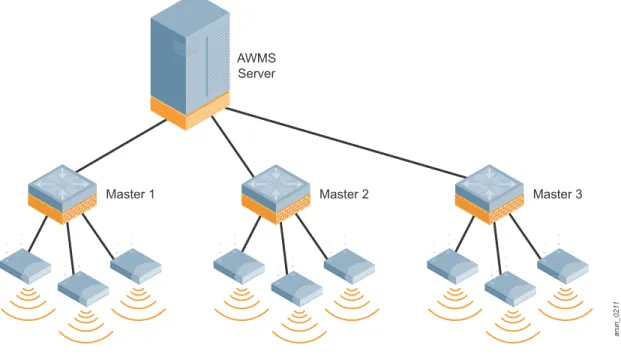
When two or more mobility controllers must coexist, additional challenges arise to the deployments if the mobility controllers are deployed as all masters. Today Aruba recommends only all master
networks where the controllers are not co-located, or where all of the APs and mobility controllers in the network can be managed by a single AWMS installation. Before considering a campus-based all-master network, see Appendix C, “Scalability in the All Masters Deployment Model” on page 123, which discusses the scalability and functionality of the WLAN in a co-located all master mobility controller network based on ArubaOS 5.0 and AWMS 7.0. If these features are not required and the total device count is less than the AWMS maximum, an all master deployment can be considered.
Figure 18 An all masters deployment, co-located controllers on a single campus
arun_021
1
Master 1 Master 2 Master 3
AWMS Server
Aruba Mobility Controllers and Deployment Models VRD | Solution Guide Controller Licensing | 35
Chapter 4
Controller Licensing
The ArubaOS base operating system contains many features and extensive functionality for the enterprise WLAN network. Aruba uses a licensing mechanism to enable additional features and to enable AP capacity on controllers. By licensing functionality, organizations are able to deploy the network and functionality in a manner that best suits their goals.
License Descriptions
AP Capacity: AP capacity relates to how many APs, AMs, RAPs, and mesh points that serve clients can connect to a particular mobility controller. This license covers any AP (campus, remote, and mesh) that will broadcast a user SSID and any AMs. For mesh APs, where wireless is used for wired traffic backhaul, the mesh links that do not broadcast an SSID are not counted against this license. If the AP acts as a mesh node and an access point for users, the AP counts against the AP capacity license. Controllers can be purchased with the AP capacity already installed, and it can be upgraded later as the network grows. When planning for redundancy, the AP capacity must match the maximum number of APs that could potentially terminate on the mobility controller.
Policy Enforcement Firewall–Next Generation (PEF-NG): The Aruba PEF-NG module for ArubaOS provides identity-based controls to enforce application-layer security, prioritization, traffic forwarding, and network performance policies for wired and wireless networks. Organization use PEF-NG to enforce network access policies that specify who may access the network, which areas of the network they may access, and the performance thresholds of various applications.
Administrators can build a unified, integrated system for network policy enforcement by leveraging the open APIs of PEF-NG to external services such as content security appliances, network access control (NAC) policy engines, performance monitors, and authentication/authorization servers. PEF-NG is licensed by AP count, and the number of licensed APs must be equal to the AP capacity license of the mobility controller. To enable PEF-NG on wired-only gateways, a single AP PEF-NG license is required.
Policy Enforcement Firewall–VPN (PEFV): The PEFV license provides the same features and functionality that PEF-NG does, but it is applied to users coming in over VPN connections as opposed to wireless users. The user role and policy are enforced on the mobility controller and thus only affects centralized traffic. Without this license, users of VPN software, either the Aruba VIA client or any third-party software, will be given what essentially amounts to an “allow all” role that cannot be modified. The PEF-VPN license is purchased as a single license that enables the
functionality up to the full user capacity of the mobility controller.
Wireless Intrusion Protection (WIP): The Aruba WIP module protects the network against wireless threats to network security by incorporating WIP into the network infrastructure and eliminating the need for a separate overlay system of RF sensors and security appliances. The WIP module is integrated into the WLAN system, so it provides unmatched wireless network visibility and simplicity of operation for network administrators, and thwarts malicious wireless attacks, impersonations, and unauthorized intrusions. Clients and APs are already a part of the system, so no valid AP or user list must be maintained, because the network already knows which users and devices belong there. Additionally, many of the traditional features and attacks that are reported by traditional WIDS vendors are unnecessary due to the WIP integration with the WLAN itself. WIP is licensed by AP count, and the number of licensed APs must be equal to the AP capacity license of the mobility controller.
36 | Controller Licensing Aruba Mobility Controllers and Deployment Models VRD | Solution Guide
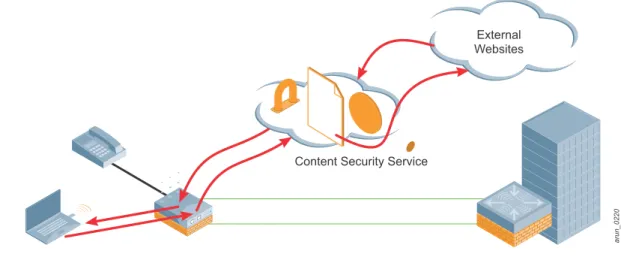
Content Security Service (CSS): Aruba CSS provides cloud-based security for branch offices and teleworkers. CSS seamlessly integrates with the RAP and BOC product families to provide high-throughput, low-latency content security with centralized reporting and management. CSS leverages data centers around the world and provides complete protection including advanced URL filtering, P2P control, anti-virus/anti-malware, botnet detection, and data loss prevention. High-speed web logs in CSS provide a flexible and powerful way to view broad trends and per-user drill-downs of Internet activity. CSS licensing is based on three components: total user count, feature bundles, and contract length (1 or 3 years). The CSS licenses are installed on the cloud-based service platform.
xSec (XSC): xSec is a highly secure data link layer (Layer 2) protocol that provides a unified framework for securing all wired and wireless connections using strong encryption and authentication. xSec provides a Federal Information Processing Standard (FIPS)-compliant
mechanism to provide identity-based security to government agencies and commercial entities that need to transmit extremely sensitive information over wireless networks. xSec provides greater security than other Layer 2 encryption technologies through the use of longer keys, FIPS–validated encryption algorithms (AES-CBC-256 with HMAC-SHA1), and the encryption of Layer 2 header information that includes MAC addresses. xSec was jointly developed by Aruba and Funk Software®, which is a division of Juniper Networks®. xSec is licensed on a per-user basis.
Understanding the Functionality of PEF-NG and PEFV
The functionality contained in the two different firewall licenses can be confusing. The following table highlights the features that are enabled by each of the firewall licenses as they are installed, and how they interact with one another.
Licensing Requirements and Recommendations
Different license capacities are required for cloud services and on each mode of mobility controller, depending on its operational requirements. Each license type should be reviewed to determine if the features and functionality meet the goals of the organization, and from there the feature licensing levels can be determined. For complete descriptions of the features enabled by these licenses, visit the Aruba website at http://www.arubanetworks.com/.
Matching AP-Based Licenses
AP-based licenses should always have the same AP count when in use. Licenses that are required for backup mobility controllers must be included in this count. These licenses are AP capacity, PEF-NG, and WIP. If the mobility controller is licensed for more than one of these functions, the licensing rule is: Table 5 PEF-NG and PEFV Comparison Chart
PEF-NG License PEFV License Wireless Users VIA/VPN Users Wired/ Third-Party AP Users Controller Port ACLs
Installed Not Installed Yes No Yes Yes
Installed Installed Yes Yes Yes Yes
Not Installed Installed No Yes No Yes
Not Installed Not Installed No No No Only MAC, EtherType, and Extended ACLs
are supported
Aruba Mobility Controllers and Deployment Models VRD | Solution Guide Controller Licensing | 37 As an example, if 64 AP capacity license was purchased and the organization wants to deploy PEF-NG and WIP, those licenses should be purchased to match the 64 AP capacity. The final license count would be 64 AP capacity, 64 PEF-NG, and 64 WIP.
Master Mobility Controller Licensing Requirements
The master mobility controller must manage the functionality for all other platforms, so the master must have the same license types as the local mobility controllers. Licensing unlocks configuration capabilities on the system. However, the master will not terminate APs or devices, so the master can be licensed at a much lower level than the local mobility controller where APs, AMs, and devices will be serviced.
The recommended licensing levels for masters that do not terminate users are listed in the following table. Note that only the functionality that is being enabled needs to be licensed. As an example, xSec is primarily only deployed in Federal Government and military installations, and it is not required unless it will be in use at the organization.
Local Mobility Controller Licensing Requirements
Local controllers must be licensed according to the number of devices or users that consume licenses. The license consumption table that follows describes how the different licenses are consumed on local mobility controllers that terminate user sessions and APs.
Mobility controllers should be licensed at the maximum expected capacity for that mobility controller. For instance, in a failover scenario the backup controller must be licensed to accept all the APs that it could potentially end up hosting if a failure occurs, even if that is not the normal operating level. As an example, a pair of Aruba 3600 Series Mobility Controllers is operating as local mobility controllers. Each terminates a 40% load of APs, but acts as the backup for the APs on the other controller. Each mobility controller must be licensed to 80% of maximum capacity. If one mobility controller fails, the other must be able to add the additional APs from the failed controller. Therefore, the mobility controllers must be licensed up to the maximum capacity.
Table 6 Master Mobility Controller Minimum Licensing Levels
License Capacity AP Capacity 0 PEF-NG 1 PEFV 1 WIP 1 CSS N/A xSec 1
Table 7 Local Mobility Controller Licensing Levels
License Capacity
AP Capacity Any AP (campus, mesh, or remote) broadcasting an SSID, or any active AM. Mesh APs that do not broadcast an SSID (such as a point-to-point bridge) do not count against this limit.
PEF-NG Any active AP (campus, mesh, or remote) or AM, this license must be equal to the AP capacity of the network.
38 | Controller Licensing Aruba Mobility Controllers and Deployment Models VRD | Solution Guide
PEFV PEF-VPN is licensed by box capacity, so licenses are not consumed by individual sessions. Instead, after the license is installed, all sessions up to the box limit will have a firewall policy applied to them.
CSS Users in the organization that have signed into the CSS service.
xSec User sessions using xSec.
Table 7 Local Mobility Controller Licensing Levels (Continued)