The MUSiC Performance Measurement Method
Miles Macleod, Rosemary Bowden and Nigel Bevan
National Physical Laboratory
Introduction and objectives
"Building usability into a system requires more than knowledge of what is good. It requires more than an empirical method for discovering problems and solutions. It requires more than support from upper management and an openness on the part of developers. It even requires more than money and time. Building usability into a product requires an explicit engineering process. That engineering process is not logically different than any other engineering process. It involves empirical definition, specification of levels to be achieved, appropriate methods, early delivery of a functional system, and the willingness to change that system. Together these principles convert usability from a 'last minute add on' to an integral part of product development. Only when usability engineering is as much part of software development as scheduling can we expect to regularly produce products in which usability is more than an advertising claim."
Dennis Wixon and John Whiteside (1985)
The list of ingredients for developing usable systems set out by Wixon and Whiteside in 1985 is as valid now as it was then. It complements the recommendations of Gould and Lewis (1983) for an early focus on users, interactive design, empirical user-based testing and iterative design. As Gould and Lewis (1983) observed, "'Reviewing' or 'demonstrating' a prototype system
to typical users and getting their reactions to it can result in misleading
conclusions. What is required is a usability test, not a selling job. Users should be given simple tasks to carry out, and their performance, thoughts and attitude recorded". Yet Gould and Lewis found a striking mismatch between the
principles they advocated and the expressed views of designers about their own practices. What may be disconcerting for the human factors, usability and HCI communities (and for users of interactive systems) is that the findings of Gould and Lewis about what designers think and the practice of commercial system development are echoed in the more recent findings of Dillon et al. (1993). Not only is insufficient being done about usability, but many developers appear still to have a limited knowledge of what can be done. While there may be an increased level of awareness of the need to develop systems with good usability,
developers too often appear unaware of how to go about it, and – justifiably – may have doubts about the practicality of many of the methods developed by HCI academics (Bellotti, 1988).
One vital ingredient for making usability engineering practicable is not included in Wixon and Whiteside's list: tools to enable methods to be used efficiently and cost-effectively. Without tools, many HCI methods are simply impractical in the timescale of commercial system development. Tools are principally a means of facilitating the correct application of user-centred methods. They can also focus the thoughts of developers and client organisations on user issues and usability. However, it is essential to recognise that the ownership and use of tools is not all that is required. Dieli, Dye, McClintock and Simpson (1994) warn of the
dangers of the object – in Microsoft's case the usability lab – being seen as the thing, rather than the usability process which it helps support. In our own
experience this is a very real danger. High-tech usability laboratories and the tools they contain are frequently seen by managers as the necessary focus of usability work, but there is a risk that they may be seen as sufficient in
themselves. The "Usability 'r' Us" phenomenon – where project managers buy superficially impressive usability tools in the belief that mere possession of the objects will improve the quality of use of the systems they develop or procure – is a trap we seek to avoid.
Design for usability first requires knowledge and awareness of users, their goals and their work environments, and methods for harnessing that knowledge in the production of useful and usable artefacts. Tools such as usability laboratories and evaluation software (e.g. DRUM – the Diagnostic Recorder for Usability Measurement – Macleod and Rengger, 1993) can provide invaluable support and draw the attention of managers and clients to usability issues. However, we emphasise at all times that they are secondary to the methods for usability engineering which they support.
The MUSiC approach
The principal aim in developing and evolving the Performance Measurement Method has been to provide a practical means of achieving the quantitative and qualitative data required to support usability engineering. That is, the
development or tailoring of interactive systems – in fixed timescales and at an agreed cost – which meet specified criteria for usability or quality of use. We emphasise that the aim has not been to provide a method for research or for 'experiments' conducted with the luxuries of relatively open-ended timescales, or with the possibility of arriving at the conclusion that 'further research is
required'. Readers may find it helpful to refer to the eloquent statement of differences between engineering and research, provided by Whiteside et al. (1988) drawing on the work of Winograd and Flores (1986).
So far in this chapter, we have considered performance and usability without explicitly relating the two. It will be clear from other chapters in this book (e.g. on usability standards) that usability can be viewed as quality of use. It can be defined operationally in terms of the effectiveness, efficiency and satisfaction with which specified users can perform specified work tasks in given
environments (see, for example, ISO 9241-11, ISO 1994). Effectiveness and efficiency are measures of performance in the given context of use. This may not be an intuitively obvious definition to those who view usability in terms of the apparent attributes or features of software. What is not in doubt is that performance of systems in context (i.e. in the hands of their users) is a primary concern for users, organisations and producers. While some features of software will significantly influence its usability, our concern in this chapter is with the detectable effects of those features on quality of use, and how that can be measured. Since software features are not equal in terms of their effects on quality of use, and interact with each other in complex ways, merely counting software features is highly unlikely to deliver measures which are useful indicators of usability. This of course is not to deny the value of more sophisticated analytic approaches to usability assessment.
Another question frequently raised concerns the relative merits of assessing how users get on with a product (performance), or assessing what they think of it (satisfaction). There is convincing evidence from a number of evaluations that performance and user satisfaction are not necessarily correlated. A system can be satisfying but not very efficient to use, or vice versa. Hence to gain a rounded picture there is great advantage in evaluating both. The MUSiC Performance Measurement Method tells you about the first of these fundamental components of usability, giving measures of indicators of operational usability, together with diagnostic data.
In judging what constitutes the 'state of the art' in usability evaluation, practicality and suitability for purpose must be key criteria. The MUSiC Performance Measurement Method has been evolved and refined to meet the demands of commercial application. It follows the basic principles of usability engineering and testing, which are well established in theory but too often absent in practice. It is supported by a range of tools which can be chosen and used according to specific development needs, budget and timescales. The method draws on Usability Context Analysis (described elsewhere in this book). Other supporting tools include the Performance Measurement Handbook (Rengger et al 1993), and DRUM software which facilitates management of evaluation data, task analysis, video protocol analysis and derivation of measures. The approach is backed by training and accreditation in the proper application of the method and the tools to support it. Where appropriate, it is also backed by consultancy on how to integrate method and tools into system development and evaluation, and by help in establishing a quality system for usability engineering.
The basic outputs, derived in all versions of the method, are measures of:
• Efficiency - effectiveness related to cost of performance (calculated as
effectiveness per unit of time)
Optional outputs of the full, video supported method include further measures and diagnostic data:
• Relative User Efficiency - an indicator of learnability (relating the efficiency
of specific users to that of experts)
• Productive Period - the proportion of time spent not having problems • Snag, Search and Help times - time spent overcoming problems, searching
unproductively through a system, and seeking help. These problem-related measures are valuable sources of diagnostic data about specific areas where designs fail to support adequate performance. In use, the method provides pointers to causes of problems.
The quantitative data enable comparison of user-based performance – at a prototype stage, or in acceptance testing – against performance with earlier versions of a system, with alternative designs, with competing products, or with other ways of achieving the same work goals. The diagnostic information helps in identifying just where improvements need to be made in further developing a prototype or future versions of a system. It also helps inform about the level and specific content of training required for particular classes of user.
The basic outputs (measures of effectiveness and efficiency) can be arrived at without use of video by following the minimal version of the method, the Basic MUSiC Performance Measurement Method. This relies on accurate observation in real time, and employs manual timing of task performance, together with assessment of task outputs. It takes less effort than the full method, but gives reduced diagnostic data. The Basic method may be employed in quick, small scale evaluations, or where the budget is very constrained. It has the
disadvantages of failing to capture an accurate, reviewable record of the specific incidents which reveal where users encounter problems.
The full, video supported version of the method can be tailored to individual evaluation needs, for example by choosing not to analyse productive period – thus reducing analysis time – or by adding specific measures such as counts of errors. While ad hoc additional measures may meet the requirements of individual evaluations, they should be interpreted with circumspection unless their validity and reliability have been assessed.
Other approaches to performance measurement
Analysing, refining and partially automating the performance of work tasks has played a significant role in the development of industrial societies. It is a topic of legitimate concern to people in many professional and academic disciplines, and provides an area for continuing debate concerning its economic, political, social, ethical, organisational and individual implications. However, it is not within the scope of this chapter to provide a critique of Taylorism and
neo-Taylorism. Suffice to say that there is an ethical dimension to the use of performance measurement in the field of human-computer interaction, and this should be acknowledged by usability professionals.
People developing or procuring information systems or interactive products are generally concerned about their effect on the efficiency of the work they support, especially where systems are designed specifically to support particular
workflows or transactions. Contracts for the development of bespoke systems may incorporate targets for efficiency (or productivity) of work supported by the new system, expressed in terms of times to achieve specific workflows when that system is rolled out. Management typically is seeking enhanced productivity and lower staffing levels for tasks which can be computer-supported. Most procuring organisations are also concerned with users' perceptions and staff satisfaction, and some may incorporate targets for 'ease of use' or user
satisfaction. Of course, performance targets are only meaningful when they can be expressed quantitatively. It must be possible to measure the efficiency or productivity of existing and new work practices, and to measure user
satisfaction, if such factors are to be part of the system specification.
Many established methods for work measurement involve collecting detailed measures of times taken to perform elements of work: specific activities. These are typically gained by observing and timing the performance of work by large numbers (hundreds or even thousands) of staff. Larger organisations may have their own work measurement teams who carry out long-term studies, with the intention of informing management decisions about anticipated future
requirements for staffing levels. The individual activities which are timed may be of only a few seconds duration. Measures relevant to office information systems often focus on clerical activities, and some methods (e.g. Clerical Work Measurement) draw on libraries of data about timings of common clerical tasks, collected from various organisations.
Such approaches may in some circumstances give very useful approximations of performance times, but they have immediately apparent disadvantages when applied to novel ways of performing work tasks. They are essentially 'bottom-up', yielding additive estimates of times for composite tasks simply from the sum of timings for their component activities. Typically they assume an idealised way of carrying out the task. An analogous approach in the field of human-computer interaction is the Keystroke-Level Model (K-LM: Card et al., 1980). This is a method for estimating task performance times for interaction between individuals and computer systems, which assumes error-free expert performance. The K-LM incorporates an explicit model of the user's cognitive processing time, represented by adding a time allowance for thinking at key points which the analyst must identify in the interaction. Clerical work measurement methods typically do not make explicit allowance for cognitive processes, although in some cases they may add a time element for error recovery. Alternatively, both these factors may simply be reflected in the mean performance times for some activities.
A major disadvantage of traditional approaches to performance measurement is that analysts must rely on historical performance data to draw inferences about future work performance with as-yet-unimplemented systems. However, the future performance will be affected by different contextual factors and higher cognitive factors in the users, which such methods simply ignore. From a user's viewpoint the quality of use of interactive systems and the productivity of computer-supported work are affected by specific design decisions at every level. Where new systems are being developed these traditional methods do little to help developers shape many key design decisions which will affect work efficiency and user satisfaction.
Performance assessment methods are widely used in a second area relevant to this chapter: training. The critical role of staff training in enhancing efficient work performance is recognised by most organisations. Assessment of the effectiveness of training may sometimes take the form merely of tests of knowledge – people's ability to recall or recognise facts and procedures in which they have been trained. There is a growing recognition of the need to assess the effects of training on performance.
In evaluating usability, the amount and nature of the training which users have received at the time of the evaluation can have major effects both on the
measured efficiency and user satisfaction. Where the approach advocated here is applied during system development, user training and support materials are iteratively developed and improved as part of the usability engineering process.
Applying the Performance Measurement Method
Any evaluation should have clearly stated aims. Since the outputs of the MUSiC Performance Measurement Method span a range of optional measures and diagnostic data, it is essential in applying the method to start with a set of specific evaluation objectives, and, if possible, performance targets. Data collection for its own sake has little merit in commercial usability work, where tight timescales and budgetary constraints demand tightly focused evaluations giving results which are specifically applicable in informing development, (re)design or selection of systems and alternative work practices.
Major considerations in applying the method are timing and resources, both human and financial. If the aim is simply comparison of available systems, or acceptance testing of an implemented system, then the method can be applied to use of a fully developed system either in a laboratory setting which reflects the intended context of use, or in a pilot implementation. This can provide valuable information about relative performance with different systems, and about required levels of training and user support. However, applying the method in this manner (when a design has been finalised) misses many of the benefits of shaping a system more closely to meet user needs, skills, capabilities and expectations.
The principal use of the method is as an integral part of development processes based around prototyping and iterative improvement. This means that the usability testing programme should run from early in development to final delivery. The diagnostic data inform the development, and the performance measures indicate the degree of progress towards meeting usability targets. The initial steps in the approach – and particularly the context analysis upon which the method draws – are best carried out before a prototype is produced. The involvement of development staff and user communities in the testing process gives significant benefits in informing developers about the performance of different designs in users' hands, and in building positive attitudes towards forthcoming systems in the minds of user communities.
One trade-off which exercises the minds of many usability professionals concerns timing and the degree of fidelity of prototypes. Evaluations early in development necessarily involve lower fidelity prototypes. Early evaluations offer many benefits. The earlier the evaluation, the easier it is to make changes in the design, yet less reliance can be put on the findings since the system tested will deviate more from a realistic context of use. This is not just a matter of the appearance of the prototype, but also the scope of its functionality, speed of response, the influences of other networked devices and access to on-line databases, etc., all of which can significantly affect usability. In general, early prototypes can inform about broader design considerations, but the detailed factors which affect final usability can only be assessed with high fidelity
prototypes or pilot implementations. However, if testing commences with a high fidelity prototype, this may fix design ideas in the minds of the development team which are subsequently more difficult to change. Ideally, the approach should embrace both low and high fidelity prototypes, with a progression from broad changes to fine tuning.
Define the product to be tested
Define the Context of Use
Carry out the user tests
Analyse the test data to derive and interpret the metrics
Produce a usability report
The DRUM Kit DRUM: Recording Logger
Tools
supporting the Method
Step 1 Step 2 Step 3 Step 5 Step 6 Step 7 Steps
in the Performance Measurement Method
Usability Context Analysis Guide
DRUM: Evaluation Manager DRUM:Evaluation Manager Specify the evaluation targets
and Context of Evaluation
Prepare an evaluation that meets the specified Context
of Evaluation
Step 4
Usability Context Analysis Guide
Performance Measurement Handbook DRUM: Scheme Manager Usability Context Analysis Guide
DRUM: Metrics Processor Performance Measurement Handbook
Figure 1
Steps and Tools used in the Performance Measurement Method
Figure 1 summarises the sequence of steps required to evaluate usability and derive measures by the Performance Measurement Method. The right hand column of the figure shows the MUSiC tools providing guidance and support at each stage, and outlining the necessary procedures. Steps 4 to 7 may be repeated as development progresses. Tests typically will involve only a subset of the whole system, and repeat tests with modified system designs may focus on those specific areas where a high priority need for improvement has been identified. For evaluations to be run smoothly and efficiently, it is most convenient for studies to be carried out in a usability laboratory, which allows prototype systems to be studied without undue disruption of client's commercial work. Alternatively, data can be captured in the workplace if, for example, key factors in an information system or its environmental setting cannot adequately be replicated in a laboratory. It is important to note that the method is not based around capturing spontaneously occurring samples of data, either in the workplace or the laboratory. That is a methodological minefield beyond the
scope of this chapter. The MUSiC approach to performance measurement is based on the analysis of pre-selected representative scenarios. Wherever the data are recorded, it is essential first to identify appropriate evaluation tasks and user profiles which meet the specific objectives of the evaluation. These are agreed as a result of a context study by the usability team, together with other
stakeholders, who also define assessment rules for task output, for determining correctness and completeness of task goal achievement.
A major practical consideration in planning an evaluation is the availability of users matching the required profile. Finding representative users is of great importance in any user-based evaluation, and may require careful pre-planning. It may, for example, be necessary to provide training in the use of a new or revised system, which matches the training users will have received on roll-out of the system. Typically, the usability team takes responsibility for user arrangements, and for preparing task instructions.
MUSiC Measures of Performance
As we have stated in the introductory sections of this chapter, the MUSiC Performance Measurement Method can deliver a range of measures indicating different aspects of usability, together with diagnostic data. All versions of the method deliver measures of effectiveness and efficiency; the other measures are derived only where appropriate.
Effectiveness and measures from analysis of task output
Evaluating effectiveness requires analysis of task output, typically hard copy or information displayed on screen during an evaluation. The analyst applies the agreed evaluation-specific assessment rules to the output, to arrive at measures of Quantity and Quality (analogous to completeness and correctness) of goal achievement.
• Quantity: the proportion of the task goals represented in the output of a task which have been attempted
• Quality: the degree to which the task goals represented in the output have been achieved
Measuring Quantity and Quality of task goal achievement can involve a degree of subjective judgement. The judgmental criteria should be decided before analysis commences, by more than one person familiar with the task and the requirements of the product. The criteria must be documented, and implemented as a scoring procedure to be followed by the analyst.
To evaluate performance tasks must be chosen which have an outcome that can be assessed. For example:
• when evaluating an information retrieval system the user might retrieve specific items of information. This output is then analysed to measure how
many of the specified items the user retrieved, and how well all the retrieved items met the original requirements.
• when testing a drawing package, the user might reproduce a picture
composed of different shapes. The output is then analysed to measure how many of the shapes the user reproduced, and how well those shapes match those in the original picture.
• when evaluating an electronic process controller the user might set a fixed number of control parameters to specified values. The output is the state of the controller at the end of the task. The analyst can see how many of the parameters have been altered from their default settings and how accurately they have been set to the specified values.
Effectiveness
The effectiveness with which users employ an IT product to carry out a task is defined as a function of two components, the quantity of the task attempted by the users, and the quality of the goals they achieve.
Effectiveness= ƒ(Quantity,Quality)
Task Effectiveness
A value for the Task Effectiveness (TES - effectiveness for a specific task) achieved by a user is obtained by measuring the Quantity and Quality components independently, and then applying the following formula:
TES= (Quantity×Quality)
100 %
Efficiency and cost of task performance
In engineering, the term 'efficiency' is uncontentiously understood as the ratio of useful energy output to energy input. For example, Timoshenko and Young (1937) define the efficiency of a machine as the ratio of the useful work performed to the total energy expended. Put simply,
Efficiency=output input
For a work system in which a human is interacting with a computer, the effectiveness with which the user and the computer working together
successfully complete a task is a measure of the useful work performed, or the output. However, the nature of the output is quite different from the input, and no meaningful equivalence formulae are apparent (unlike physics, where there are repeatable equivalencies of energy in different forms). Hence it is not possible to express efficiency of task performance as a ratio.
This does not mean that we cannot express efficiency of task performance numerically, simply that efficiency measures will be expressed in units.
However, those units will be initially unfamiliar, which can a disadvantage when presenting reports for a general audience. The nature (and hence units) of the measures of input of effort required to carry out a task will depend upon the purpose of the evaluation, or the viewpoint of the evaluator:
From a user's viewpoint, the amount of effort input may be quantified in terms the time spent carrying out the task, or the mental/physical effort required to complete the task. These two types of input produce two different definitions of efficiency which can be stated as:
UserEfficiency= Effectiveness TaskTime HumanEfficiency= Effectiveness
Effort
However, from the viewpoint of the organisation employing the user, the input to the work system is the cost to the organisation of the user carrying out the task, namely the:
• labour costs of the user’s time
• cost of the resources and the equipment used • cost of any training required by the user In this case, efficiency can be stated as:
CorporateEfficiency= Effectiveness TotalCost
User Efficiency is defined below as a MUSiC performance-based usability metric.
Human Efficiency is a metric in the MUSiC Cognitive Workload toolkit. User Efficiency
The efficiency with which users make use of an IT product is defined in the MUSiC Performance Measurement Method as their Effectiveness in carrying out their task divided by the time it takes them to complete the task.
UE= Effectiveness TaskTime
where Effectiveness is measured as described previously, and Task Time, the time spent by a user completing a task, being measured by the technique described in the NPL Performance Measurement Handbook.
This metric provides a measure of User Efficiency in a particular context. It is task-specific. By itself, its value has little meaning unless there is another measure of efficiency against which to compare it.
For example, it can be used to compare the efficiency of two or more:
• similar products, or versions of a product, used in the same context, i.e. by the same user groups for the same tasks in the same environments
• types of users using the same product for the same tasks in the same environment
• ways of achieving given task goals when carried out by the same users on the same product in the same environment.
Optional Measures
Productive and Unproductive Actions
The specific actions undertaken during the task depend on the nature of the system. It is useful to distinguish between task actions which are productive in that they contribute to task output, and those which are unproductive in that they do not contribute to task output.
In MUSiC, actions are considered productive if they:
• produce items that can be seen in the task output - for example, producing a line in a diagram
• are necessary to produce such items - for example, selecting the line drawing tool
• acquire information that helps produce task output - for example, checking the currently selected line width
Even if the user has not used the optimum sequence of actions to achieve a result, the actions are counted as productive if they contribute to the task output. Less than optimum methods will lead to longer Task Times, and will therefore be accounted for in the User Efficiency metric.
It is generally easier to identify the time spent in actions that make up the Unproductive Time rather than productive actions. Unproductive actions are categorised into three types, to give more detailed information about the way time is spent during the task. These are:
Help Actions
The user obtains information about the system, for example by: • referring to the on-line help
• reading an instruction manual • looking at a reference card
• asking a supervisor or analyst for advice • talking to an appointed expert on the telephone
Search Actions
The user explores the structure of the system – displaying parts that are not currently accessed – without activating any of the parts that are presented. Examples of search actions include:
• displaying one or more menus without activating an item
• reeling through listings or icons of files without opening any of them • opening then cancelling a print dialogue box
• moving through sections, modules, or screens of a software package without activating any of the functionality.
Although help and search actions may indirectly help the user to carry out the task by providing more knowledge about the system, they are still considered to be unproductive actions. This is because help and search actions do not produce items that can be seen in the task output; neither are they a necessary prerequisite to producing such items.
Snag Actions
The user or system performs an action that does not contribute directly or indirectly to the task output, and that cannot be categorised as a help or search action. There are three types of snag action - negating actions, cancelled actions, and rejected actions. All three types indicate that the user or system has met some hindrance in trying to produce the task output. The actions are known collectively as snag actions, because they provide an objectively identifiable measure of the problems that have arisen during the usability session.
• Negating Actions
User actions that completely cancel or negate previous user or system actions. They always cause cancelled actions.
• Cancelled Actions
User or system actions that are completely negated by the user or the system. • Rejected Actions
User actions that are rejected or ‘ignored’ by the system, and that consequently have no effect.
Examples of snag actions are:
• Typing characters and then deleting them by backspacing • Performing an action and then selecting the function ‘undo’ • The system crashing, followed by actions to recover lost data • Entering commands to which the system fails to respond
Productive Time
Productive Time is therefore defined as the Task Time remaining after Help, Search, and Snag periods have been removed. It is the time a user spends
progressing towards the task goals, irrespective of whether the goals are eventually achieved.
Productive Period
The Productive Period is the Productive Time expressed as a percentage of the Task Time.
Examples of the method in use
The MUSiC Performance Measurement Method is applicable in a wide range of interactive system development and testing scenarios. NPL, working
collaboratively with commercial organisations outside MUSiC since the beginning of the MUSiC Project's second phase, has guided and contributed to its use in testing many kinds of system, including:
• shrink-wrap office software products • bespoke information systems
• multimedia walk-up-and-use systems • medical information systems
• interactive control devices
Organisations applying the method include: • PC software developers
• PC software procurers and reviewers • IT departments in public utilities • public sector administration
• companies in the financial services sector • retail organisations
• consultancy firms developing information systems for clients
All evaluations have involved staff in the client organisations (essential to gain contextual validity and give maximum benefit through effective feedback into development). The degree of involvement depends upon the approach taken. The simplest approach has been to provide an evaluation service, involving the minimum number of client staff required to carry out an evaluation with
adequate contextual validity (see the chapter on context analysis). Our preferred approach where possible is to enable clients to exploit the advantages of greater involvement in the usability evaluation and engineering process, by providing training for client staff in the skills required to carry out evaluations, and subsequently give guidance in the conduct of evaluations to ensure acceptable quality. This requires commitment from decision makers typically at a level above IT department managers.
The following sections illustrate how the approach has been used in the financial services sector, and is based on a number of evaluations conducted as part of
bespoke information system development for European banking and financial institutions. The method is particularly suitable for bespoke system
development, where the user and environmental characteristics are more uniform than is typically found with shrink-wrap products, and the work supported by the system can be clearly defined. The composite data presented below are realistic and representative, being a synthesis of various separate findings. They are not the data of any one organisation.
Development objectives
Many financial service providers are modernising their branch computer systems. The systems being replaced typically have evolved and been added to over the past fifteen years, and are command line or screen menu based. Current developments focus on using client-server systems with graphical user
interfaces. The primary objectives in the development of these new systems are to improve the level of productivity and satisfaction in the work context (i.e. while counter staff are engaged in serving customers).
Specific objectives may be:
• staff productivity should increase – they should be able to process more business transactions in a given time period and with the required accuracy • the new system should be perceived to be easier to use than the old system • the new system should be easy to learn
Defining the Contexts of Use and Evaluation
The evaluation is based around the use of information systems supporting the processing of customer transactions, which represent a major element of the daily branch business activity. As explained in the chapter on Usability Context Analysis, the foundation of the evaluation is an analysis of the characteristics of:
1. Users
2. Job and Task
3. Organisational Environment 4. Technical Environment 5. Physical Environment
Once the context of use has been characterised, with the participation of key stakeholders, the next steps are to identify which characteristics of users, tasks and environment may be relevant to usability, and then to select representative users, tasks and environment for the evaluation.
Users
Branch staff who reflect the characteristics of the group – and who are available and willing to participate in the evaluation sessions – are selected from
branches. This can be a major logistical and politically sensitive aspect of any evaluation. There is a tendency for managers to assign staff who are supervisors
or unusually enthusiastic. The importance of getting a suitable, representative cross-section must be emphasised at all times.
Tasks
A set of frequent and critical tasks is defined and agreed with the client, drawing on the results of context analysis and client's evaluation requirements. The choice of tasks for an evaluation may be constrained by the limitations of the functionality of a prototype system. Preferably, the scope of the functionality of a prototype should be guided by the evaluation requirements, and in practice we find this is usually quite feasible. In financial services the tasks may involve carrying out 15-30 transactions with 8-15 customers over a period of about 30 minutes to 1 hour. For each transaction, rules are agreed for assessing the quantity and quality of task outputs.
Environment
This should simulate the essential characteristics of the workplace, in this case a branch environment. Key factors are the physical work space (the counter) and the peripheral devices which are required to support transactions. These include items such as card-readers, printers, cash tills and support for any paper elements of the work. An ideal solution is a 'model office' with a built-in observation area and discreetly positioned cameras. Alternatively, a counter and the relevant equipment can be set up in a usability lab. Either solution enables the work context to be recreated with some realism; the transactions to be discreetly observed by stakeholders, and all the evaluations to be videotaped (with both real time and retrospective analysis of performance). It is not usually possible to record data about use of a prototype system in a working branch because of disruption to customer service.
Evaluation design
Baseline measures are obtained by first evaluating use of the old system. Typically, around 12 branch counter staff participate in an evaluation. In this composite example, each is presented with frequent or critical transactions – some transactions being repeated with different parameters, to give a total of 20 tasks – first with the old system and at a later date with the prototype new system. The tasks are presented in the same way they occur in the workplace, the branch staff responding to requests and enquiries from 'customers' acting out scripts.
The prototype new systems are backed by local databases tailored for the evaluation. Users are given training in using the prototype system to carry out their familiar work tasks, prior to the evaluation session. This training may typically last from one to four hours, and is a first pass design of the training which will be given to all users of the new system.
In formal terms this is a repeated measures design. Practical constraints and timescale usually make it impossible for the evaluation design to overcome order effects. In practice, staff are usually highly skilled at using existing systems, because of their daily experience of working with them, and any order effect in the evaluation is likely to be outweighed by this depth of experience. The key issues are how well they can use the new system at roll out, and their perception of its usability. In addition to the measures, the participants are interviewed to elicit their opinions on the system as a whole and any specific aspects of interest.
Measures
The evaluation measures are of both performance and satisfaction (perceived usability). The following performance measures are analysed:
• Task Effectiveness - how completely and accurately a user achieves the goals of each task (overall Effectiveness across tasks is also calculated) • Task Times for each task (i.e. each different transaction)
• User Efficiency for each task [Task Effectiveness / Task Time]
• Snag, Search and Help Times - used for identifying unproductive periods, and as a diagnostic aid
• Relative User Efficiency [User Efficiency / Expert User Efficiency]
-indicating level of performance of staff after short training, relative to experts For satisfaction measures the SUMI questionnaire is administered after using each system, the old and the new. SUMI gives measures of perceived usability across all the tasks performed.
Performance results
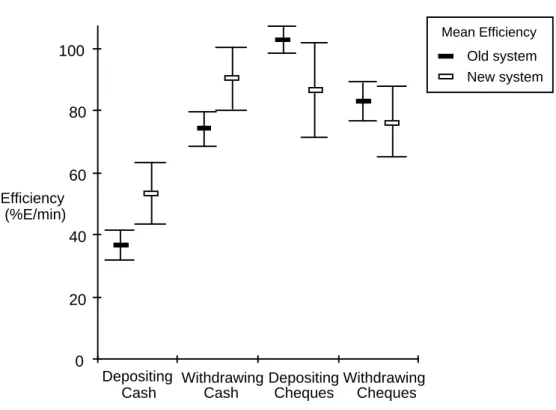
For the purposes of this example, a subset of the measures taken will be considered here. Among the transactions considered were depositing and withdrawing cash, and depositing and withdrawing cheques. Figure 2 shows the mean task times. Figure 3 shows the Efficiency measures for those same tasks.
Old system New system Mean Times Task Times (minutes) 0 0.5 1 1.5 2 2.5 Depositing Cash Withdrawing Cash Depositing Cheques Withdrawing Cheques
Figure 2. Mean Task Times, with 95% confidence intervals Efficiency (%E/min) 0 20 40 60 80 Depositing Cash Withdrawing Cash Depositing Cheques Withdrawing Cheques 100 Old system New system Mean Efficiency
Figure 3. Mean Efficiency by task (percentage effectiveness per minute)
It can be seen from the graphs that the new system shows improvements for cash transactions. Statistical tests on the cash transaction performance results – Task Times and Efficiency – of the sample of users show a significant difference at the 95% level. That is, there is at least a 95% probability that we would find a difference in performance between the two systems for these tasks if we were to test the whole user population, assuming contextual validity. The differences between the new and old system for cheque transactions were considerably less, and are not significantly different at the 95% level. This means that the cheque transaction results must be interpreted more circumspectly: the means for performance with the new system are slower and less efficient than with the old, after the given amount of training. It may be considered worthwhile to test the level of significance of these differences, even though they are less than 95%. Much useful diagnostic data can be obtained from closer inspection of the results, and the further measures: Snag, Search and Help Times and Productive period, plus the data from individual users (not shown here). There is a larger
variance in performance with the new system, indicating that while some users were able to work relatively efficiently, others found it slower and less efficient at this point in their learning curve.
The Effectiveness results (not shown) indicate more minor errors in task output with the new system, which is not unusual where a new system has a radically different interface, with some workflows re-engineered. Any critical errors are a cause for concern. Study of the evaluation video record and interview data helps identify specific causes. Study of the Snag, Search and Help data helps pinpoint specific areas of difficulty, which together with data from post test interviews enables the evaluators to feed back suggestions for specific potential
improvements into the design both of the system and the training.
One factor in poorer than hoped for performance may be technical difficulties encountered with the prototypes, for example peripheral devices for reading cards and cheques. Assuming these are rectified, the performance level for such transactions can be expected to improve in the next prototype stage.
Presenting results - a word of caution
In reporting evaluation findings which give numerical data, it is essential to include guidance on interpretation, and caveats about the strength of inferences which can safely be drawn. Audiences without a background in experimental design and statistics may draw strong and unjustifiable inferences from numbers. Presenting means – even in an executive summary – without clearly stated caveats therefore risks being positively misleading. Equally, development staff invited to observe part of an evaluation, while gaining invaluable insights into how users get on with their design, may come away with fixed ideas based on a sample of only one or two users. It is essential to inform them of the wider picture, for example by putting together a 'video highlights' tape showing a balanced picture of areas of difficulty and success. It should also always be noted that the type and quality of the information gained is dependent upon the accuracy of the analysis of context of use, the accuracy of the context of
measurement, the scope of the chosen measures and the quality of the evaluation. While measures are important – to quantify the progress of system development and training in terms of resulting efficiency, effectiveness and satisfaction – the diagnostic data gained from such evaluations are invaluable in the iterative improvement of prototypes. Evaluations such as this enable the development team to become informed as to where difficulties lie, and how the system may be improved.
Support for the method
Products and services supporting the use of the MUSiC Performance
Measurement Method are available from NPL, providing a flexible approach to supporting the development and evaluation of interactive systems. NPL works
with organisations to clarify usability requirements and subsequently support evaluation of usability at appropriate points during design. NPL has helped establish and train usability teams in a number of large organisations, applying the method in the development and testing of systems, and helping integrate the specification and evaluation of usability into quality management systems.
Training and accreditation
To ensure the correct application of the method by organisations and individuals new to the approach, NPL provides training in usability evaluation and
Performance Measurement Method, with full support materials and follow-up guidance in its use. Training courses are flexible and are tailored to meet clients’ needs. Typical courses last two days and introduce methods for setting up and conducting user-based evaluations. Guidance is then available in the conduct of evaluations, tapering off as acceptable levels of individual competence for the various stages of the evaluation process are achieved. NPL can provide assistance in setting up a quality system to ensure correct application by staff accredited in the relevant competencies. Alternatively, NPL can apply the method on behalf of clients.
Products
The following products supporting the method are available from NPL: • Usability Context Analysis Guide: used to specify usability requirements
and to select the tasks and contexts for which usability should be evaluated. • Performance Measurement Handbook: provided with training, this reference
source details procedures to be followed to design and run evaluations to provide reliable performance measures of usability.
• DRUM (see below): video analysis software available in conjunction with the Performance Measurement Method.
DRUM, the Diagnostic Recorder for Usability Measurement
DRUM (Macleod and Rengger, 1993) is a software tool providing a broad range of support for video-assisted observational studies following the MUSiC
Performance Measurement Method for usability evaluation. Evaluation sessions are recorded on video, and subsequently analysed with the help of DRUM; a first pass analysis can be performed in real time during recording. DRUM greatly speeds up the analysis of video recordings. Where possible, activities are automated entirely. DRUM helps the analyst build up a time-stamped log of each evaluation session, and calculates measures and metrics. DRUM delivers evaluation data in a format compatible with spreadsheets and statistical
packages, for further analysis and graphical display. DRUM assists the generation and delivery of diagnostic feedback to a product’s designers concerning usability defects.
Iteratively developed over three years – in collaboration with a number of
commercial organisations – to meet the needs of usability testing in development and procurement, DRUM is now in version 3.3. DRUM requires an Apple Macintosh computer (e.g. FX, Quadra, Performa, PowerPC) with a 14” or larger monitor (i.e. 640 x 480 pixel); an extended keyboard; System 7; and
HyperCard 2.1 (allocated at least 2.4 MB RAM). DRUM drives the following VCRs: Sony U-Matic VO 7000 and 9000 series, with BKU 701 computer interface and FCG-700 frame code generator; Sony UVW 1400/1400P; and the Panasonic AG-7350 or AG-7355 SuperVHS with AG-IA232TC RS-232 board and time code generator/reader.
DRUM supports for the MUSiC Performance Measurement Method in the following ways:
Organising evaluations
The DRUM Evaluation Manager makes it easy to organise data from all stages of usability evaluation. It gives you quick and simple access to evaluation data about:
• users - the people being observed in an evaluation
• tasks - analytic schemes describing the tasks which users perform • video recordings of evaluation sessions
• logs of user and system activities, created by DRUM
• measures - derived from analysing logged task performance (times, problems, etc.)
• usability metrics - calculated values for individual users and groups • reports of evaluation findings
DRUM uses ASCII files for data storage, allowing flexible compatibility with word processors, spreadsheets and statistics packages.
Identifying significant events
You may wish to look out for many different kinds of event when studying a video record of an evaluation session. DRUM gives you a basic set of event types, significant to the use of a system. With the DRUM Scheme Manager, you can add and edit your own event types, and even create complete descriptions of the tasks to be performed by users during evaluation sessions. Each activity is represented on screen as an event button, with associated editable definition and comments. DRUM supports hierarchical task analysis at up to five levels of detail.
Analysing video records
The DRUM Recording Logger helps you, quickly and efficiently, to build up a time-stamped log marking all the significant events observed on a video. You can enter comments about individual events.
Logging can be carried out in real time during recording, or retrospectively. Logs can be stored for subsequent analysis or further editing. DRUM gives full
control of the video recorder, including a variable speed shuttle, and offers automated location and playback of any logged event on the video: simply point and click on the event in the log display.
Deriving measures and metrics
The DRUM Log Processor provides automated calculation from logs in the DRUM database of performance measures and performance-based usability metrics, including:
• Task Time
• Snag, Search and Help Times • Efficiency
• Relative Efficiency • Productive Period
Measures and metrics are presented in tabular and graphical displays. Results for individual users can be grouped, and exported to a spreadsheet or statistics package for further analysis.
It should be emphasised that the validity of the MUSiC usability measures derived by DRUM in any evaluation depends upon the contextual validity of the evaluation, and on the evaluators applying the MUSiC Performance
Measurement Method for collecting and analysing the data. Because of the risks of analysis of contextually invalid data or misinterpretation of usability measures in untutored hands, DRUM is usually licensed to organisations in conjunction with training in the MUSiC Performance Measurement Method.
Further information
For further information on the method and the supporting products and services, contact:
Rosemary Bowden or Nigel Bevan National Physical Laboratory DITC HCI Group
Teddington, Middlesex, TW11 0LW, UK
Tel: +44 181-943 7019 or 6993 (from UK 0181-943 7019 or 6993) Fax: +44 181-977 7091 (from UK 0181-977 7091)
Acknowledgements
Thanks are due to Ralph Rengger for material on performance measures, and to Mary Corbett for her contribution to preparation of the case study material used in this chapter. NPL's work in the development of Usability Context Analysis and the MUSiC Performance Measurement Method was jointly funded by the Commission of the European Communities and the UK Department of Trade and Industry.
References
Bellotti, V. (1988). Implications of current design practice for the use of HCI techniques; in Jones and Winder (Eds), People and Computers IV (Proc. of
the 4th BCS HCI Conf, Manchester, 5-9th Sept 1988), Cambridge, Cambridge
University Press, pp 13-34.
Card, S., Moran, T.P., and Newell, A., (1980), The keystroke-level model for user performance time with interactive systems, Communications of the ACM, 23,7 (July) 396-410.
Dieli, M., Dye, K., McClintock, M. and Simpson, M. (1994). The Microsoft Corporation Usability Group. In M. E. Wiklund (ed.) Usability in Practice, AP Professional, Boston, 327-358.
Dillon, A., Sweeney, M. and Maguire, M. (1993). A survey of usability engineering within the European IT industry In: JL Alty et al. (eds.) People and
Computers VIII (Proc. of HCI'93 Conf., Loughborough UK, September 1993).
Cambridge: CUP,
Gould, J.D. and Lewis, C. (1983). Designing for usability – key principles and what designers think. In: A. Janda (Ed) Human Factors in Computing
Systems (Proc. of ACM CHI'83 Conf., Boston, December 1983). Cambridge:
ACM Press, 50-53.
ISO (1994), International Standards Organisation DIS 9241-11, Ergonomic requirements for office work with visual display terminals (VDTs), Part 11: Guidance on usability.
Macleod, M. and Rengger, R. (1993). The development of DRUM: a software tool for video-assisted usability evaluation. In: JL Alty et al. (eds.) People and
Computers VIII (Proc. of HCI'93 Conf., Loughborough UK, September 1993).
Cambridge: CUP, 293-309.
Maissel, J., Macleod, M., Thomas, C., Rengger, R., Corcoran, R., Dillon, A., Maguire, M. and Sweeney, M. (1993), Usability Context Analysis: a practical
guide, V3.0. National Physical Laboratory DITC, Teddington, UK.
Porteous, M., Kirakowski, J. and Corbett, M., (1993). SUMI User Handbook. Human Factors Research Group, University College Cork, Ireland. Rengger, R., Macleod, M., Bowden, R., Drynan, A. and Blayney, M. (1993),
MUSiC Performance Measurement Handbook, V2. NPL, Teddington, UK.
Timoshenko and Young (1937), Engineering Mechanics - Statics, McGraw-Hill. Whiteside, J., Bennett, J. and Holtzblatt, K. (1988), Usability engineering: our
experience and evolution. In: M. Helander (ed.) Handbook of Human-Computer Interaction, (Elsevier, Amsterdam), 791-817.
Winograd, T. and Flores, F. (1986). Understanding Computers and Cognition: A New Foundation for Design; Wokingham, UK, Addison Wesley
Wixon, D. and Whiteside, J. (1985), Engineering for usability: lessons from the user-derived interface. In: L. Borman and W. Curtis (eds) Human Factors in
Computing Systems (Proc. of ACM CHI'85 Conf., San Francisco, April 1985).