Social networking sites, Web 2.0 technologies and
e-learning
by
Guorong XU
A thesis submitted in partial fulfilment of the requirements for the degree
of Master of Computing at Unitec Institute of Technology, 2011.
Department of Computing
Supervisors: Dr. Xiaosong Li
Abstract
The purpose of this research study is to attain an understanding of the use of social networking sites and Web 2.0 technologies by computing students for e-learning. Social networking sites have mostly been accepted by university students, and such sites are influencing many aspects of university student life. E-learning is also increasing in the tertiary industry, which is changing the way students learn and teachers instruct. In this thesis, the researcher has investigated attitudes, behaviours and knowledge of computing students towards the use of social networking sites in e-learning. Data has been collected from online survey and interviews, and analyzed to discover the current tendencies for the use of social networking sites in e-learning by computing students. In this research, an understanding of how social networking sites are being used in e-learning, why this group of students use these sites and how they use these sites is sought. Analysis and discussions in this research is aimed at answering eight research questions:
1. What social networking sites are used by computing students?
2. What is the history development status and acceptance of social networking sites? 3. What is the history development status and acceptance of e-learning?
4. What is the current status of the use of social networking sites in e-learning? 5. What are the attitudes of computing students in relation to the use of social
networking sites for e-learning?
6. How will these factors affect the use of social networking sites for e-learning on campus?
7. What features of social networking sites and Web 2.0 technologies facilitate e-learning?
8. What is the perception of computing students about the future use of social networking tools in e-learning?
After investigation and doing some research, the researcher found that FaceBook is the most popular social networking site that computing students use it for e-learning to achieve their study goal.
Keywords
Web 2.0, e-learning, web2.0 technologies, social networking
Acknowledgements
I would like to thank my mum and dad who support me to finish my master degree and complete my thesis.
My sincere thanks are to my supervisors Dr. Xiaosong Li and Kathiravelu Ganeshan. They helped me construct my thesis, and gave me some suggestions about what I should do in the next step. They also read my draft thesis carefully and provided much valuable feedback for me.
I thank all of the survey respondents who completed the online survey questions, and also the interview participants who took the time to complete the interview questions for this research.
I would also like to give special thank Professor Kay Fielden who helped me do final proof reading on my thesis and checked my English grammar errors.
My finial thanks is to my partner Wendy Li who encouraged and supported me to finish my thesis.
Table of Contents
Abstract ... 2
Keywords ... 4
Acknowledgements ... 5
List of Abbreviations and Notations ... 8
List of Figures ... 9
List of Tables ... 10
1. Introduction ... 11
1.1. Overview... 11
1.2. Background ... 11
1.3. Outline of the Project ... 13
2. Literature Review ... 15
2.1. Overview... 15
2.2. Literature ... 15
2.2.1. E-learning ... 15
2.2.2. E-learning Using Web2.0 Technologies ... 28
2.2.3. E-learning using Social Networking Sites ... 34
2.2.4. Current Issues regarding E-learning using Social Networking Sites ... 40
2.3. Literature Map ... 43
2.4. Summary ... 45
3. Research Methodology ... 46
3.1. Chosen Research Method ... 46
3.2. Survey Process ... 48
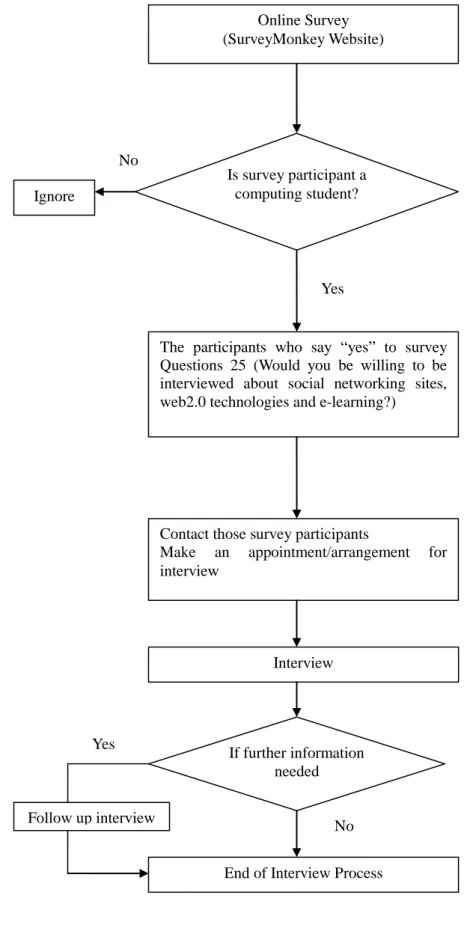
3.3. The Interview Process ... 49
3.4. Data Collection Method ... 51
3.5. Data Analysis Method ... 53
3.6. Summary ... 55
4. Data Collection ... 56
4.1. Introduction ... 56
4.3. Interview Data ... 70
4.4. Summary ... 95
5. Data Analysis and Discussion ... 96
5.1. Popular social networking sites used by computing students ... 98
5.2. History, development status and acceptance of e-learning ... 100
5.3. History, development status and acceptance of social networking sites ... 103
5.4. Current status of the use of social networking sites in e-learning ... 106
5.5. Attitudes of computing students in relation to the use of social networking sites for e-learning ... 109
5.6. Factors that affect the use of social networking sites for e-learning on campus 114 5.7. Features of social networking sites and Web 2.0 technologies that help facilitate e-learning ... 115
5.8. Perception of computing students about the future of the use of social networking tools in e-learning ... 117
5.9. Summary ... 121
6. Conclusions, Limitation and Recommendations ... 122
6.1. Limitation of the Research ... 122
6.2. Conclusion ... 122
6.3. Recommendations for Further Research ... 124
References ... 126
Appendices ... 135
Appendix A: Information for Participants ... 135
Appendix B: Consent Form ... 137
Appendix C: Survey Questionnaire ... 138
List of Abbreviations and Notations
SNS: Social networking sitesLMS: Learning management system
CBT: Computer-Based Training
List of Figures
Figure 2.3.1: Flow-chart Literature Map
Figure 3.1: The interview process
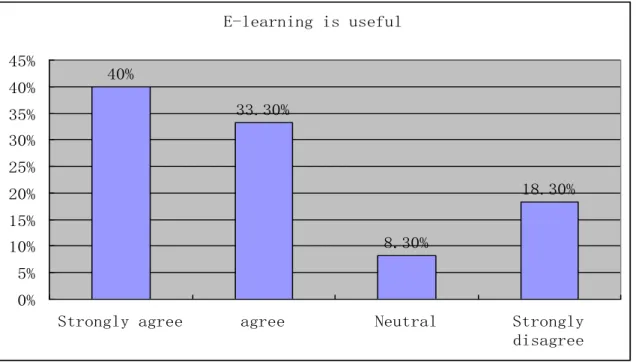
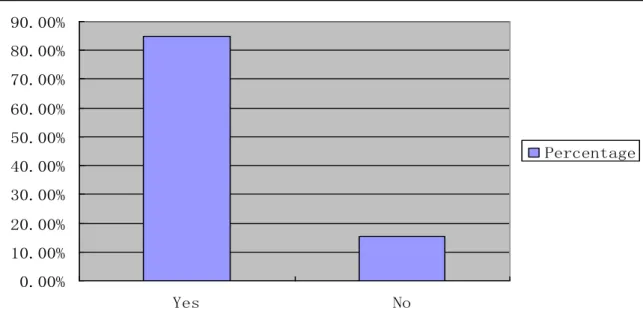
Figure 4.2.3: Percentage of respondents who believe that e-learning is useful
Figure 4.2.5: Percentages of respondents who often use social networking sites
Figure 4.2.6: The number of year of respondents who have been using social networking sites
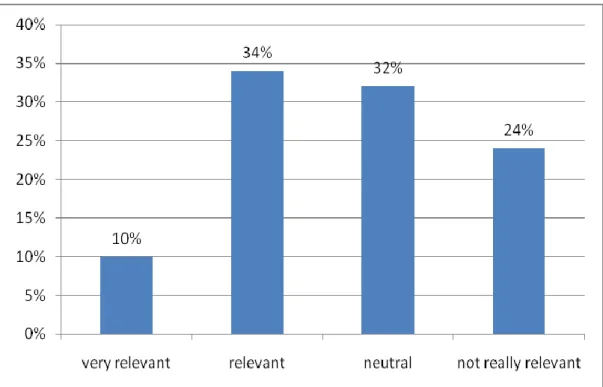
Figure 4.2.7: Relevance of social networking sites for e-learning
Figure 4.2.9: The way of discussing course related topics with others
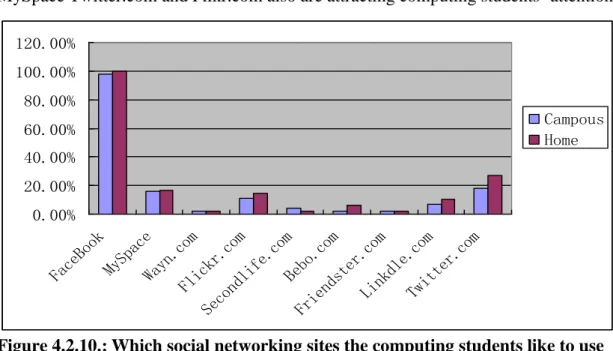
Figure 4.2.10: Which social networking sites the computing students like to use
Figure 4.2.12: Factors that affect the use of social networking sites in e-learning on campus
Figure 4.2.13: Features of Web2.0 that facilitate e-learning
Figure 4.2.15: Features of social networking websites that facilitate e-learning
Figure 4.2.16: Opinions of the use of social network site(s) in e-learning help in one course or more than one course
Figure 4.2.18: Ways of finding the answers when students need to answer a question related to their course
Figure 4.2.19: Reasons of preventing students from using social networking sites for learning
Figure 4.2.20: Opinions of the use of social network tools in e-learning playing an important part in studying at tertiary level in the future
Figure 4.2.21: Opinions of tertiary institutions making use of more e-learning in the future
List of Tables
Table 2.2.1: The six types of e-learning
Table 2.2.2: The differences between Web2.0 and Web1.0:
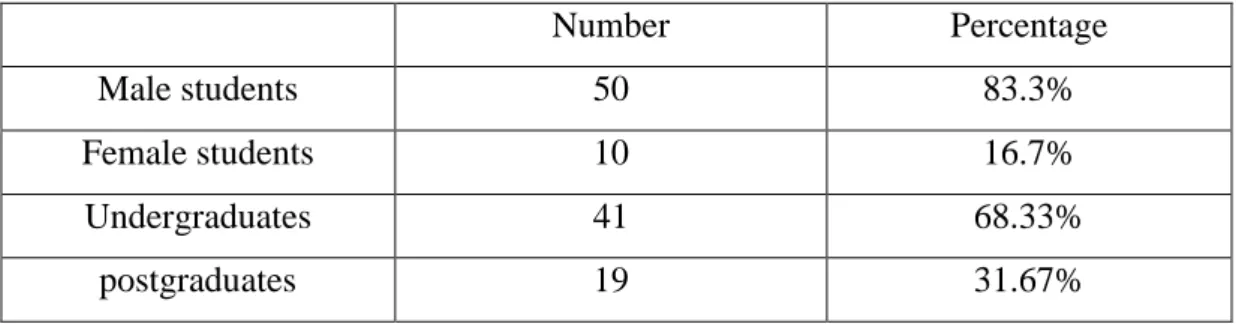
Table 4.2.1: Basic information of survey respondents
Table 4.2.2: The percentage of respondent who were aware that e-learning service were available on campus
Table 4.2.4: Awareness of Web2.0 technologies among the respondents
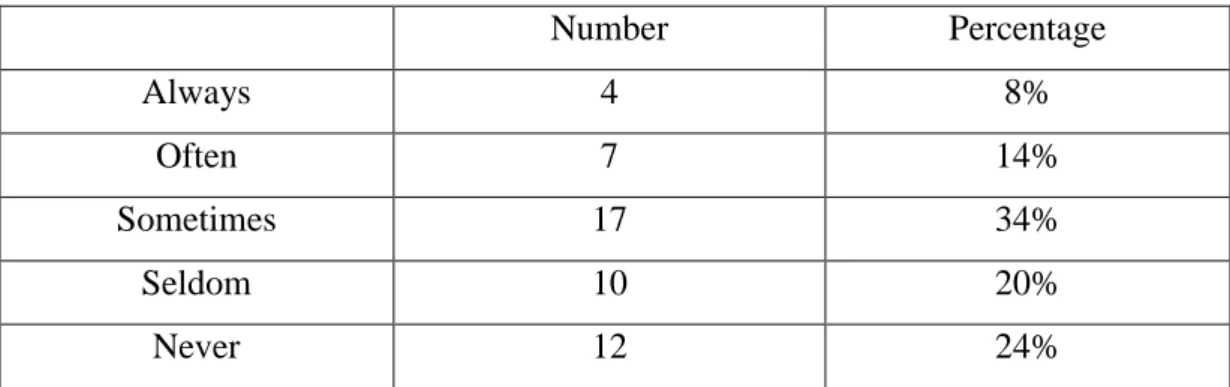
Table 4.2.8: Frequency of the use social networking sites to discuss course related topics with classmates
Table 4.2.9: Ways of discussing course related topics with others
Table 4.2.11: Frequency of the use of social networking sites to find students to study with
Table 4.2.14: Features of websites (including social networking websites) that facilitate e-learning
Table 4.2.17: Attitudes of being willing to use social networking sites for e-learning
Table 5.1: The relationship between research questions and survey questions and interview questions
1.
Introduction
1.1.
Overview
This section introduces the topic and outlines the research conducted by the researcher. In this section is discussed the emergence of web2.0 technologies, the development of online learning and the factors that encouraged the researcher to take a serious interest in doing research in this area.
A significant part of this study is the investigation and discussion of web 2.0 technologies, e-learning and social network sites and how this helps with online learning. The objective of this study is to attain an understanding of the use of social networking sites and Web 2.0 technologies by computing students for e-learning. This research is defined by eight research questions and this research study will seek to answer these research questions.
A mixed research methodology has been chosen as the research methodology. The forms were designed and tested and a target population was identified and contacted. Data was collected using online survey and interviews. The survey was conducted using Survey Monkey.
Collected data was analysed to find answers to the research questions. Limitations of study are listed and conclusions drawn. Ideas for further research in this area are also in this thesis.
1.2.
Background
With the emergence of web2.0 technologies in the last few years, social network sites have become a popular way of sharing information and discussing certain issues.
There are many social websites such as FaceBook, Flickr and MySpace that people use to create networks of friends. A massive amount of information and content are collected, shared and disseminated through social network sites. ―Every minute, ten hours of video are uploaded to YouTube; Flickr contains over two billion photos”. (Cha, Mislove, & Gummadi, 2009) Consequently these social network sites have been exploited as a well-liked platform for information sharing, communication and dissemination. ―Millions of people are using social network sites to connect, meet, and share. The users of the most popular sites on the Internet, MySpace.com, Facebook.com, Bebo.com, and Orkut.com, are predominantly young-twenties, college students, and teenagers.‖ (DiMicco et al., 2008)
Worldwide, the term ―e-learning‖ has been used in a diversity of contexts. ―e-learning‖ is also known as, or closely related to ―telelearning,‖ ―online learning‖ ―distance learning,‖ ―open learning,‖ ―computers in education,‖ and ―flexible learning.‖ All these terms have a common purpose, to allow people to communicate with each other to achieve and enhance their educational opportunities (Campbell, 2004). According to Carliner and Shank (2008), the university sector is a strong candidate for the greater use of e-learning.
E-learning provides another useful way for learners to achieve their study purposes rather than the traditional education mode (face to face in classroom). E-learning offers learners 24/7 access to study material and often support without having to commute, which encourages developing independent study culture. With the emergence of Web 2.0 technologies, a very large variety of online tools (blogs, wikis, podcasts and social bookmarking sites) have been assembled so that a highly personalized learning environment is built up by the learner. Downes (2005) suggested that this phase of e-learning in combination with Web 2.0 (current development trend in e-learning) is called e-learning 2.0. This phase powerfully focuses on the collaborative nature of e-learning, like learners creating their own studying contexts and contents, and collaborating with others to form a learning
network with distributions and responses. Along with the development of Web 2.0 technologies social networking sites, such as Facebook.com, MySpace.com and Twitter, have become more and more popular. According to DiMicco et al. (2008), tertiary students, teenagers and young people are the main users of social networking sites. Social networking sites provide professional platforms where the participants could build up connections, share their ideas, events and actions within their individual network. Learning management systems (e.g. Blackboard and Moodle) are being widely used in e-learning at tertiary level and social networking sites are being adopted as a way of studying communication between tertiary staff and students. It means that connections are being set up between social networking sites and e-learning.
The author of this study found that many tertiary students like to use social networking sites to share their interests, activities and events. In the meantime, some computing students would like to take advantage of the features of social networking sites helping their study. Thus, the researcher thought that these areas are very interesting and decided to investigate and research the use of social networking sites in e-learning by computing students. A suitable research topic was identified and research questions were formulated in accordance with the identified research objective. The researcher expected that some valuable information would be obtained after this research study, which could help computing students improving the use of social networking sites for e-learning.
1.3.
Outline of the Project
The purpose of this research study is to attain an understanding of the use of social networking sites and Web 2.0 technologies by computing students for e-learning. It seeks to identify which social networking sites they often use in e-learning, why they use these sites and how they use these sites. The research questions are:
2. What is the history development status and acceptance of social networking sites? 3. What is the history development status and acceptance of e-learning?
4. What is the current status of the use of social networking sites in e-learning? 5. What are the attitudes of computing students in relation to the use of social
networking sites for e-learning?
6. How will these factors affect the use of social networking sites for e-learning on campus?
7. What features of social networking sites and Web 2.0 technologies facilitate e-learning?
8. What is the perception of computing students about the future use of social networking tools in e-learning?
The objective of this research is to gain useful data and information to answer the research questions and achieve the aims of the project. All of the questions above are used to elicit response from computing students from their own viewpoint using surveys and interviews. Most survey questions require quantitative answers and interview questions need qualitative answers. Therefore the methodology of this project is designed as a mixed research method. The process of data collection is composed of literature review, survey and interview.
This thesis consists of six chapters, which includes introduction, literature review, research methodology, data collection, analysis and discussion, conclusions, limitations and recommendations.
2.
Literature Review
2.1.
Overview
The purpose of the literature review chapter is for the author of this research to extract related information from academic literature (books, electric database, journals,and conference proceedings) in order to investigate, summarize and review the issue of e-learning, web2.0 and social networking sites. There are four parts in this chapter: Overview, Literature, Literature Map and Summary. In the following section 2.2 Literature, the researcher will review all selected literature relevant to e-learning, Web2.0 technologies, and social networking sites defining these, tracing their history, development status and acceptance. The aim of the process of Literature Review is to help find some answer to the research questions and lay the foundation to this research. The Literature Map is presented in section 2.3 and the Summary of the Literature Review is in section 2.4.
2.2.
Literature
2.2.1.
E-learning
Definition
Worldwide, the term ―e-learning‖ has been used in a diversity of contexts. ―e-learning‖ is also known as ―telelearning,‖ ―online learning‖ ―distance learning,‖ ―open learning,‖ ―computers in education,‖ and ―flexible learning.‖ All these terms have a common purpose, to allow people to communicate with each other to achieve and enhance their educational opportunities (Campbell, 2004). According to Carliner and Shank (2008), the university sector is a strong candidate for greater use of e-learning. In addition, Higher Education Funding Council for England (2005) defined e-learning as encompassing: ―Flexible learning as well as distance learning,
and the use of ICT as a communications and delivery tool between individuals and groups, to support students and improve the management of learning.‖ Garrison and Anderson (2003, p6) argued that the most important feature of e-learning is ―its capacity to facilitate communication and thinking and thereby construct meaning and knowledge‖. Turvey (2009) emphasises that the key of e-learning is on communication and interaction based on the concept of evolving e-learning above. Mason and Rennie (2006) indicated that e-learning can be described as an effective learning process made by combining digitally delivered content based on service and support. They also referred to e-learning as an element of flexible learning that employ any available electronic media in order to approach the way of professional education and training. According to Fallon and Brown (2003, p4), ―Any learning, training or education that is facilitated by the use of well known and proven computer technologies, specifically networks based on Internet technology.‖ Piskurich (2004, p4) defined e-learning as: “any form of learning that utilizes a network for delivery, interaction, or facilitation. The network could be the Internet, a school or college LAN or even a complete WAN. The learning could take place individually or as part of a class. Online class meet either synchronously or asynchronously, or some combination of the two.‖ In other words, e –learning is learning using computing tools and communication, with the learners being able to learn anywhere, anytime. Such tools may include computing hardware and software, and mobile device. The communication technologies may include the Internet and wireless technologies.
History, Development and Future
Anttonen, Onnela, and Terho (2006, p8) stated that ―Since the 1990s there has been a vogue for e-learning in most disciplines of higher education. During our research it has become obvious that history is among those disciplines where e-learning has not been widely adopted. Nevertheless, it has become equally clear that there are great advantages in certain learning situations, with specific pedagogical cases and with certain history-specific themes.‖ Early E-learning systems were based on
Computer-Based Training (CBT) that endeavour to replicate autocratic teaching styles in order to achieve the goal of transferring knowledge. As early as 1993, Graziadei described an online computer-delivered lecture, tutorial and assessment project developed by him over the past few years, which is called Virtual Instructional Classroom Environment in Science (VICES). These VICES can be created by the instructor and students through electronic mail, VAX Notes conferences and Gopher/Lynx together with a few software programs.
Graziadei, Gallagher, Brown, and Sasiadek (1997) described ―a process of evaluating products and developing an overall strategy for technology-based course development and management in teaching-learning. The product(s) (currently Web-based) had to be easy to use and maintain, portable, replicable, scalable, and immediately affordable, and they had to have a high probability of success, with a long-term cost-effectiveness.‖ With the emergence of new technologies today, there are plenty of technologies suitably used in e-learning includes blogs, virtual classrooms, collaborative learning software etc. Most current e-learning management systems in education use a combination of these technologies.
Buzzetto-More (2008) stated that ―Learning that is facilitated by electronic technologies (tools), otherwise known as e-Learning, can be either fully online, mixed mode (also known as hybrid), or web assisted.‖ Regardless of the delivery method, a number of tools are employed by students and instructors. Buzzetto-More also argues that ―students find course Websites to be helpful resources that enhance the understanding of course content, and that these Websites will continue to have an impact on higher education in the future. The strongest preference noted in this study was towards the online submission of assignments, with students overwhelmingly noting that they like having the ability to check their assignment grades online.‖ E-learning management systems are a collection of online tools that can support teaching and learning. Heinrich, Milne, Crooks, Granshaw, and Moore (2006) claimed that ―Today‟s widely used learning management systems (LMS) such as
Blackboard and Moodle, provide basic support around the management of assignments. These systems allow the lecturer to setup an assignment definition, the students to submit their assignments, the lecturer to access the student submissions and to return marked assignments, and the students to retrieve their marked assignments. Setting up an assignment definition includes the specification of parameters for due dates, extension periods or multiple submissions. The LMS relieves the individual lecturer of the responsibilities for secure access and safe storage. The student prepares the assignment outside the LMS, using general purpose tools, submits the assignment and receives results via a web-browser interface.‖ Ball (1990) suggested that education in the 21st century must be developed in more innovative and wide-ranging ways. He pointed out that the way of traditional education should be changed from passive learning to active participation. Forman, Nyatanga and Rich (2002) suggested that ―E-learning is an important development in education. It recognizes the shift from teaching to learning and puts the learner before the institution. Institutions, equally, have to change their mental set and move away from traditional learning modes to more innovative, and participative ones.‖ Even if e-learning is unlike other forms of education, it has been gradually accepted by the education industry on the whole. According to Greer (2010), there is exciting news that the value of e-learning in the global market had reached US$27.1 billion by 2009. They forecasted and analysed that ―The demand is growing by a five-year compound annual growth rate (CAGR) of 12.8% and revenues will reach $49.6 billion by 2014.North America will be the top distance learning buyers throughout the 2009-2014 forecast period. In the 2009 market, Western Europe accounted for the second highest expenditures,by 2014, Asia will overtake Western Europe and account for the second highest global expenditures on online education after North America.‖ According to report by Ambient Insight (2009), it predicted that North America would keep on being the largest e-learning market during the next five years. At the
same time, Asia would overtake Western Europe in the following five years, with an incredible development, to reach the No.2 position.
Mason and Rennie (2006) explained that student‘s acceptance of e-learning is playing a significant role in fuelling the growth of e-learning. The results of recent investigations of student satisfaction with e-learning are usually affirmative. For example, a survey study of college students‘ internet use in US showed (Jones and Madden, 2002) that more than 79% students agreed that the use of Internet was becoming more and more important in their academic studying experience. Approximately 50% of college students thought that online communication provide enhanced opportunities for them to discuss course related ideas with their teachers compared with traditional face to face classrooms. Hisham, Campton and FitzGerald (2004) presented some facts affecting students‘ satisfaction with the use of e-learning, such as personalised feedback, content, interface and learning communication. They concluded that ―Well structured, high quality content that is presented in an easy to understand format along with receiving personalised feedback on their progress are important elements of effective e-learning. Coupled with these factors is the need to learn in a community and the ability to select resources from the asynchronous e-learning system to suit their personal needs.‖
Fallon and Brown (2003) indicated that: ―E-learning can be classified into two broad categories, synchronous and asynchronous.‖ Synchronous e-learning allows participants at different locations to interact with each other at the same time using Internet technologies. There are some special collaboration tools used in synchronous e-learning, such as interactive online chat and electronic whiteboard. It is interesting that some collaboration tools used in e-learning can allow interactive session or presentations to be recorded for later watching, thus turning these into asynchronous e-learning. To put it simple, Asynchronous e-learning is ―the web-based version of computer-based training, which is typically offered on a CD-ROM or across an organization‟s local area network‖ (Fallon & Brown, 2003). It is helpful for lecturers
and learner when they wish to work and study at different times and from different places. For example, the learning contents and courseware (the combination of text, images, animation, sound or movies) are normally kept on a web-server that is available to learner 24 hours per day and 7 days per week, which is managed and monitored by e-learning management systems such as Moodle and Blackboard. Using their personal username and password, learners can take courses at any place and any time by accessing the resource on the web-server through any workstation connected to the local area network (campus network) or the Internet. Lecturers also can do their teaching work at any time and any place through the e-learning management system. Chadha and Kumail (2003) stated that ―The role of technology in e-learning has so far been that of an enabler. All the investments have been towards shifting traditional classroom on-line. Be it traditional net-based training or the more recent phenomenon of virtual classrooms or live learning, technology has been used to simulate traditional learning events. When e-learning first came to fore, it was believed that the technology would change the way people learn.‖ The mobile Internet is taken as one of most important tools of e-learning to push significant content to the student, anywhere and anytime. Although the technology of mobile Internet is still in its early stages today, a few knowledge building tools allow students to receive messages regarding their studies on their personal mobile phone through SMS. As mobile technologies evolve further in the near future, students will configure their preferences in their mobile phone so that they can receive useful e-learning contents, materials they actually want to learn, in addition to message related to their studies. Chadha and Kumail (2003) also mentioned that ―the future without doubt, belong to just-in-time leaning, with a little help from pervasive computing.‖ It allows learners easy access to their courses related information stored on network and enables them to study anywhere, anytime, which will result in the performance of just-in-time learning. Welsh, Wanberg, Brown and Simmering (2003) identified that there are four themes regarding the future of e-learning:
2. prevalence of blended solutions; 3. improved technology and access; and
4. integration of information provision, performance support, peer collaboration, and training.
As the technologies develop and improve, synchronous learning will be becoming more and more prevalent. Meanwhile, they predicted blended learning solutions also enlarge with the trend of increasingly synchronous learning. With the technologies improved, the use of e-learning would boost and go further.
Delivery Method for E-learning
Delivery method ―means by which a course is accessible to the student; can be television at a remote site, cable TV, videotape, via the Internet, CD ROM, computer disk or by standard mail. Many distance education courses have a F2F (face-to-face) component as well.‖ (NETnet, 2010) Tertiary education makes use of different delivery method to support teaching and learning. The regular method of teaching is traditional face-to-face classroom instruction. With the emergence of new technologies and e-learning, tertiary education is developing a number of delivery methods to meet e-learning needs. E-learning is said to involve the use of technologies to allow learner to study in many different times and sites. To support these diverse learning demands, a few e-learning delivery methods will be required. Kolås and Staupe (2004) claimed that: ―E-learning systems are often dedicated to one or a few delivery methods.‖ Internet Time Group (2009) stated that ―eLearning is not a method of training; it's a framework that invites the use of whatever method best fits the situation at hand.‖ They classified e-learning delivery methods, as shown as below:
Classroom, instructor-led training: instructors & learners in same place at same time
Virtual class: same time, different places. Two-way audio, generally shared application space, sometimes shared video. 15 to 20 learners maximum.
Virtual lecture: same time (although can be recorded for replay later), different places. Often have email to lecturer, intra-group chat, poll taking.
Self-paced: anytime, anywhere. Learner controlled. Could be web-based training, reading, lab exercise, streaming video, web tour.
Mentoring: one-to-one assistance & coaching. Can be email, phone, in person, instant messaging. if scheduled in advance, it's "office hours."
Discussion board, threaded discussion: any time.
Chat: real-time online "conversation." ephemeral--if you miss it, it's gone. Usually gets off track fast.
Real-time discussion: can be expert-led or confined to a single topic. Unlike a chat, the discussion may be archived for future reference.
Study group or buddy system: can be as simple as two people working at one computer (often more effective than studying solo).
Help desk: on demand. 1:1 problem-solving advice. Can be phone or email or Instant Messaging.
Email: the modern equivalent of a phone call or chance encounter in the hall. (Just make sure everyone's got the email addresses they need.)
Kolås and Staupe (2004) noted that there is focus on ―blended learning‖ in some education institutes, which combine online and offline delivery methods in e-learning programmes. Blended learning has been widely performed in some school as it helps instructors and learners achieve their study goals. A number of models have been developed and perfected as require. Overall, the aim of these models is to make it easy for both instructor and learner to choose the correct applications (tools) for their studying purpose. Almashaqbeh (2006) emphasized that ―distance education by using electronic mail, video conferencing, and online software such as Blackboard, will surely help students to better communicate with their teachers.‖ It seems that Blackboard offers good opportunities for instructors to reach a broad learners audience. Learners were required to use many of functions of Blackboard to employ studying such as digital drop box, discussion board, viewing assignments, and course related material posted by the teacher. It is a useful tool that could be used as a web-based delivery platform in terms of e-learning. Moreover, learners would be motivated to employ this tool as a delivery tool for e-learning.
Learning Tools (sites) For E-learning
E-learning systems are becoming more and more useful resources to provide learners with good opportunities for learning. Therefore, features of e-learning environments and e-learning tools should include access to students with various abilities or disabilities. Freire, Linhalis, Bianchini, Fortes, and Pimentel (2010) advocate ―a course site where users can access several e-learning tools, such as schedule,
announcements, portfolio, chat, whiteboard, instant messenger, and so on.‖ Nowadays more and more e-learning tools are created for online instruction in the field of education technology, to create a collaborative learning environment. Bonk and Wisher (2000) stated that ―E-learning tools refer to Internet-based programs designed for instructional purposes, such as interactive multimedia displays or threaded electronic messaging. Web-based collaborative environments are a special category of e-learning tools that support a group of learners in achieving a common learning goal.‖ C4LPT(2009) classified top 100 tools for learning that include a few famous websites and course management system such as Twitter, Youtube, Moodle, Wikipedia and FaceBook. Hence, those websites can be used as individual learning tools, as well as collaborative learning environment by students. As a result, Learning Tools (sites) for E-learning could be classified as computer conferencing, Email, Instant Messenger, Online Chat and Forum, Online learning Management System (Blackboard or Moodle), and Website. As described above, it can be clearly found that some learning tools have intersected with e-learning delivery method such as e-mail, online chat, forum and learning management systems (Blackboard & Moodle).
Collaborative E-Learning
Smith and MacGregor (1992) said that ―Collaborative learning is an umbrella term for a variety of educational approaches involving joint intellectual effort by students, or students and teachers together. Usually, students are working in groups of two or more, mutually searching for understanding, solutions, or meanings, or creating a product. Collaborative learning activities vary widely, but most centre on students‟ exploration or application of the course material, not simply the teacher‟s presentation or explication of it.‖ Collaborative learning is normally described as groups of learners studying together to explore for understanding, which includes collaborative writing, group discussion and joint problem solving, and some other activities. In short, collaborative learning refers to a situation where two or more students attempt to study together.
The intersection between collaborative learning and e-learning is collaborative e-learning. Salmons (2006) defined collaborative e-Learning as ―Constructing knowledge, negotiating meanings and/or solving problems through mutual engagement of two or more learners in a coordinated effort using Internet and electronic communications.‖ This is a good approach to e-learning that employs collaboration skills to contribute to e-learning process. E-learning in a collaborative environment can happen at anytime and anywhere while individual students are in discussion group through the Internet or electronic communications. Anderson (2010) mentioned that ―collaborative and cooperative learning increases learning effectiveness, motivation, persistence and develops interpersonal and communications skill collaborative. Social software allows groups of students to efficiently schedule their activities, meet online via text chat, audio, video or immersion technologies and to engage collaboratively in a variety of brainstorming, mind mapping, group games, simulations, project management, and other types of organisational, administrative and learning activities.‖ Social networking applications with sites such as FaceBook and MySpace have been incredibly popular. Those networked tools on social networking sites that provide more efficient and motivating ways to encourage learning from traditional classroom instruction to an online interaction environment whilst keeping individual control learning time, space and activity. Anderson (2010) mentioned that ―Like all technologies, the use of social networking presents both opportunities and challenges to educators and learners. Social networking learning designs will prove more effective, efficient and motivating ways to support learning than any previous forms – including both traditional campus based and distance education.‖ Educational applications could be guided by instructors in their courses, which provide opportunities for learners and instructors to find out and evaluate how the social networking tools utilized on their learning.
E-learning Classification
Garrison and Anderson (2003, p43) pointed out ―e-learning technologies have developed to the extent that quality teacher-student activities can be supported either
among groups or individually, and in either real time (synchronously) or in delayed time (asynchronously).‖ Therefore, Sher (2009) identified that there are three types of interaction supported through e-learning.
Teacher-student interaction: refers to the interaction between instructor and learner such as delivering knowledge, ask question and provide feedback.
Student-student interaction: it is collaborative and co-operation learning among students in absence of the instructor, which normally take the form of exchange information and idea, group studying and discussion.
Students-content interaction: it is the way that the learner gets the knowledge from the course content. The course content can be presented by either audio, videotape, in the form of text, CD-Rom, or online resource.
The author of this research is going to add another type of interaction supported through e-learning on the basis of current development of e-learning to Sher‘s (2009) three types listed above. This fourth type of interaction added by the author is:
Students-other people with required knowledge: it means that the learner gets required knowledge from other people. For example, a student can discusses course contents with his classmate through FaceBook. Consequently, he/she is going to learn how to use FaceBook and ask his/her friend for help. His/her friend is good at using FaceBook and willing to impact enough knowledge about FaceBook to the learning student. As a result, the student acquires adequate skills in the use of FaceBook and then starts to contact his/her classmates to discuss course content using a number of functions of FaceBook.
During the last decade of e-learning development, e-learning has begun transforming the forms of learning and education. Based on different forms of e-learning, it can be classified into several categories. E-learning classification could help researcher distinguish learning efficiency from different formats, and recognize how it change the learner studying experience. Falch (2004) advised four kinds of e-learning classifications: ―e-learning without presence and without communication, e-learning
without presence but with communication, e-learning combined with occasional presence, and e-learning used as a tool in classroom teaching.‖
Model A: E-learning where the teacher and the students never meet physically, and where no dialogue between students or students and the teacher takes place.
Model B: E-learning where the teacher and the students never meet physically, but where the dialogue between the participants is supported by use of IT based communication services.
Model C: E-learning where parts of the learning takes place in a class room and parts of the learning is done elsewhere, where the students work on a computer on their own. e.g. at home or at their place of work.
Model D: E-learning where all teaching is done in a classroom, and where computers are used as a learning tool.
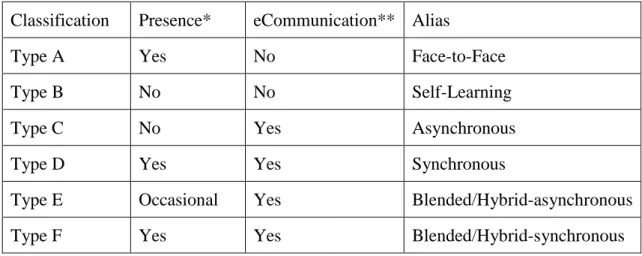
According to Falch‘s (2004) presence/communication classification for e-learning, Negash and Wilcox (2008) proposed that e-learning could be expanded to six types to distinguish between virtual presence and physical presence. The following table shows the six types of e-learning:
Classification Presence* eCommunication** Alias
Type A Yes No Face-to-Face
Type B No No Self-Learning
Type C No Yes Asynchronous
Type D Yes Yes Synchronous
Type E Occasional Yes Blended/Hybrid-asynchronous Type F Yes Yes Blended/Hybrid-synchronous
Table 2.2.1: The six types of e-learning
* Presence is defined as real-time presence where both instructor and learner are present at the time of content delivery; it includes physical and virtual presence
** E-communication refers to whether the content delivery includes electronic communication or not.
Type A: e-learning with Physical Presence and without e-communication (face-to-face)
Both teacher and student are physically present in the same place (classroom) that apply e-tools such as video clips, PowerPoint slides, and multimedia to deliver course contents.
Type B: e-learning without Presence and without e-communication (self-learning)
This format of e-learning is a method of self –learning. Students typically obtain the course related contents and study by themselves. This kind of e-learning is learning contents delivered on a particular paper/subject or application through recorded multimedia such as DVD, CD-ROM or social networking sites.
Type C: e-learning without Presence and with e-communication (asynchronous)
Neither physical nor virtual presences do not need to be done during studying contents delivery between the instructor and learner. The instructor prepares the course materials like lecture notes, PowerPoint slides, and assignment schedules in advance, and then publishes online for students. Learners access course materials posted online at a later time. The communication between instructor and learners is frequently made using one or more e-learning tools (technologies). Most people think this type of e-learning as ―online learning‖.
Type D: e-learning with virtual Presence and with e-communication (synchronous)
This format of e-learning can be called ―real-time‖ e-learning. Although the teacher and student do not need to meet physically, virtual meetings should take place during course content delivery. Many technologies are applied in this format of e-learning such as chat, ―Live‖ video/audio, instant messaging and so on.
Type E: e-learning with occasional Presence and with e-communication (blended/hybrid-asynchronous)
This format of e-learning is called bended/hybrid-asynchronous e-learning that is a combination of asynchronous e-learning and face to face e-learning. In this format, course content is delivered by occasional physical meetings that are face to face,
which is possibly held once a week, or a month. For example, the teacher and students make the exact meeting time through email.
Type F: e-learning with Presence and with e-communication (blended/hybrid-synchronous)
This kind of e-learning is called blended/hybrid e-learning that requires the instructor and leaner meeting at the same time during the course content delivery. Presence could be either physical or virtual. Therefore, some class sessions are held with physical presence like a traditional classroom setting (face to face), the rest of the class sessions are set with virtual presence like synchronously. Overall, it is a combination of synchronous and face to face e-learning.
2.2.2.
E-learning Using Web2.0 Technologies
The Definition of Web2.0
The term "Web 2.0" was firstly coined by Darcy DiNucci in 1999, and her ―use of the term deals mainly with Web design, aesthetics, and the interconnection of everyday objects with the Internet; she argues that the Web is "fragmenting" due to the widespread use of portable Web-ready devices.‖ (Ruiz, 2008) The term Web 2.0 emerged as a new Web technology that began with a conference brainstorming session between Tim O'Reilly and MediaLive International in 2003 (O‘Reilly, 2005). Web 2.0 is perceived as a second generation of web-based communities and hosted services, such as social networking sites, which provide easy to use tools for users to contribute content and share information (Carliner & Shank, 2008). Nowadays, Web 2.0 technology has become popularised and widely adopted, and has changed people‘s styles for online learning. O'Reilly (2006) said: ―Web 2.0 is the business revolution in the computer industry caused by the move to the Internet as a platform, and an attempt to understand the rules for success on that new platform.‖ It is on interface that allows internet users to interact with any contents of the WebPages, and with any other users.
McAfee (2006) pointed out that the feature of web2.0 technology can be summarized as SLATES:
Search: to find out information through keyword via the Internet
Links: a brilliant guide to connect information together among WebPages
Authoring: Many of collaborative working would perform rather than a few of web authors. For example, posts and comments are made up in personal blog
Tags: contents on sites will be categorized by means of tag (one word description)
Extensions: it is easy for user to sort the contents of websites through application software
Signals: the use of powerful tool is applied, such as RSS to inform user the change of contents on sites.
Web 2.0 History Development and Future
Nowadays more social sharing and communication applications are transforming the Internet from a read-only to read-write web-based environment that is also called change from Web 1.0 to Web2.0. It is said that Web2.0 is the next stage of the Internet usage after the first stage Web1.0.
Brügger (2009) stated that a website is the collection of WebPages, images, videos etc. with the same domain name. For example, Amazon.com is a website that contains the collection of Web pages needed to set up this site. ―Web 1.0 (1991-2003) is a retronym which refers to the state of the World Wide Web, and any website design style used before the advent of the Web 2.0 phenomenon. Web 1.0 began with the release of the WWW to the public in 1991, and is the general term that has been created to describe the Web before the "bursting of the Dot-com bubble" in 2001, which is seen by many as a turning point for the internet‖(Wikipedia, 2010). In other words, it is called ―static‖, without any users‘ interaction, which like a magazine or poster. You can buy many of them, read, enjoy or dislike them, but they keep the contents unchanged until the publisher modifies them.
Web2.0 technologies have become popular over the past several years, Web 2.0 is said to be a second stage web development that overtaking and dominates in numerous web-based applications and services in the traditional publishing model (Web1.0). Tredinnick (2006) observed that: ―there are particular kinds of information and communications applications, such as the wiki, the blog, and RSS, and peer-to-peer networks. These applications generally put more power in the hands of users to select, filter, publish, and edit information and participate in the creation of information resources.‖ Since that time, the term Web 2.0 began its rise in popularity and found a place in the dictionary.
In short, comparing with Web1.0, Web 2.0 encourages and allows users to do more than read information and retrieve information from websites. Many user-interfaces have been provided through their browser, and users can publish data online through Web 2.0 tools as simply as they read online. Anyone could not only read available data from the Web but also write data to the Web. These Web2.0 applications allow users to interact, share and collaborate their available data (for instance, files, photos, video) with other users. Gillmor (2004) said, ―In the past 150 years we‟ve essentially had two distinct means of communication: one-to-many (books, newspapers, radio, and TV) and one-to-one (letters, telegraph, and telephone). The Internet, for the first time, gives us many-to-many and few-to-few communications.‖ The following table is
shown the differences between Web2.0 and Web1.0:
Web2.0 Web1.0
Active user Passive user
Write Read
Personalisation Lack of differentiation Participation Representation
Rosen and Nelson (2008) identified three unique features of Web2.0 tools, which are useful to facilitate social sharing:
(1) user-initiated publishing of information
(2) social-sharing options with privacy controls that allow users to choose with whom information is shared, ranging from one-to-one to small, controlled groups to large-scale public sharing; and
(3) social networking options (i.e., the possibility of developing an Internet-based community around specific topics, publicly sharing, discussing, and collaborating on content, whether text, pictures, movies, or other media). With the increased social interactivity that a Web 2.0 environment provides, information and experiences can be shared and published in many ways
Web 2.0 tools include weblogs, wikis, e-library, and Flickr that primarily allow users to transform their individual networking activities into social networking activities. These changes mainly range from note taking, calendars, photo albums, and other personal events----into interactive, collaborative group sharing and discussion activities(text, photo, audio, video) on web-based communities, and demand for much less computing technical skill and knowledge in contrast to the precursor Web 1.0 tools.
If Web2.0 is second phase of Web development than Web1.0, the future of Web2.0 (the third generation Web development system) is Web 3.0. ―Beyond the Web2.0, a vision for the Web3.0 - the Semantic Web – has already emerged, which consists of enriching data on the web with metadata conveying its meaning.‖ (Abadie, Maghiros, & Pascu, 2008) Meanwhile, Gillmor (2005) claimed that ―the emerging Web3.0 would allow machines talk as much to each other as humans talk to machines or other humans‖ , and Yang (2009) declared that ―Web 3.0 is defined as the creation of highquality content and services produced by gifted individuals using Web 2.0 technology as an enabling platform.‖ Briefly said, Web3.0 (the Semantic Web) provides an incredible data resource after integrating across a giant space of
information, and accelerates the Web 2.0 solution further, which seeks to organize the global information in a radically more logical way rather than Web2.0.
Web2.0 Technologies With E-Learning
Rosen (2009, p125) indicated that: ―e-learning is a subset of the web, all trend, technologies, and services that are found on the web can be applied to e-learning.‖ He identified four types of latest web2.0 technologies, which are described as below:
Rich site summary (RSS): a simple service that has enabled web2.0 functionality
Podcasts: digital media files compressed
Web Techniques: like Instant messaging (IM), Blogs, Wikis, Voice-over Internet protocol (VoIP)
HTML and XML.
Furthermore, Carliner and Shank (2008, p275) also noted that Web2.0 technologies include:
Blogs: which are dated online journals that are frequently updated by their authors, who are often called bloggers
Wikis: which, like blogs, are easy to use web publishing tools and are web applications that allow a group of users to collaboratively add and edit web content without any programming knowledge
Social bookmarking application: which allow users to easily save and categorize collections of their bookmarks of webpages using keywords called tags
Voice over Internet protocol (VoIP): a group of technologies that facilitate transmission of voice conversations over a data network
Podcasting: a methodology for publishing multimedia file
Instant messaging (IM): a tool for real time, synchronous communication and collaboration through the Internet or a network
Mashups: which pull together content from more than one source to create completely new online services.
The functions of web2.0 are being improved as the needs of learner. It is time to consider improving the nature of e-learning as web2.0 arisen. A Kaiser Family
Foundation (2003) found that many young children are developing their digital literacy. It is critical for them that the Internet is a part of their lives. They are using social networking sites such as FaceBook and MySpace, Instant messaging tools like MSN and Yahoo Messager, in order to share information, communicate with each other, have fun, and so on. Children also shared tips and advice when doing their assignments. As a result of these experiences, these children could feel empowered to keep in touch with anyone, learn about everything, anywhere and anytime.
Renner (2006) claimed that ―second generation web applications (web2.0) are transforming e-learning and opening new frontier for learner empowerment, control and engagement. New online technologies allow individuals to filter and control existing content (aggregation), easily create new content (personal publishing) and rapidly communicate, inform and distribute this information with peers through online social service.‖ With a very large variety of online tools (blogs, wikis, podcasts and social bookmarking sites) assembled, a highly personalized learning environment is built up by the learner. Downes (2005) suggested that this phase of e-learning in combination with Web 2.0 (current trend in e-learning) is called e-learning 2.0. It powerfully focuses on the collaborative nature of e-learning, like learner creates studying contents, and collaborates with others to form a learning network with distributions and responses. E-learning 2.0 approaches to personalization that utilizes diverse tools including courseware, search, online reference, and collaboration is more oriented to the social network service. In other words, effective e-learning 2.0 is taking advantage of social network service where students can share their idea and discuss course contents with peers. Social space can be created based on existing social networks. Take Wiki as example, it provides a full-featured platform for students to post and edit each other's content. Without time and space constraints, online communities can link up people from all over the world, which transform the traditional classroom into virtual classroom, and extending into the wider community. With the help of online community, students at a certain place could communicate with their classmates and friends far from their classroom.
2.2.3.
E-learning using Social Networking Sites
The Definition of Social Networking Sites
Social networking sites (SNS) are examples of Web 2.0 technologies, which can help people find connections that may be hidden in the real world. ―A social network is a social structure consisting of individuals or organizations that are like-minded and are tied by specific types of interests, values, visions, friendships, kinships, lifestyles, etc.‖ (Northern Illinois University, 2009). Social networking sites are not only creating connections between people, but also providing great value for the educational sector and other organisations. Current popular social networking sites include FaceBook, MySpace, Hi5, Bebo, Friendster, Twitter, and Windows Live Space.
Boyd and Ellison (2007) defined social networking sites (SNS) as ―web-based services that allow individuals to (1) construct a public or semi-public profile within a bounded system, (2) articulate a list of other users with whom they share a connection, and (3) view and traverse their list of connections and those made by others within the system. The nature and nomenclature of these connections may vary from site to site.‖ Most social networking sites allow users to upload profile photos, add or change multimedia contents on their profile. Other sites such as FaceBook encourage their users to upload and display information about themselves and their friends. That is to say, social networking sites provide a service that reflects social relations among people through the internet, which means users can interact with each other using services such as instant messaging. In short, social networking sites provide professional platforms where the participants could share their ideas, events and actions within their individual network.
Boyd and Ellison (2007) present the feature of social networking sites as ―Beyond profiles, Friends, comments, and private messaging, social networking sites vary
greatly in their features and user base. Some have photo-sharing or video-sharing capabilities; others have built-in blogging and instant messaging technology.‖ Boyd (2008) emphasized that ―Most social network sites support private messaging so that people can contact other members directly. Some sites support blogging and posting of videos. MySpace and Friendster have a bulletin feature where participants can post messages that all of their Friends can read. Other features that appear on social network sites include instant messaging, teacher ratings, message boards, groups, and classified ads. Exactly how these features are implemented differs by site.‖ In other words, it consists of social interaction, personalization, data portability and privacy. Social interactions mean how people find the social network sites and make a connection, and communicate with other people through a social network such as online discussion forum. Personalization signifies that people can design and decorate their own page (personal profile and blog) on social networking site to show it as a form of self-expression. Data portability indicates that users have the opportunity to import and export information from social network sites anywhere, anytime provided Internet access is available. Privacy means it can keep users‘ social activities private as required. For instance, if the user does not want his friends to know what he is doing on the social networking sites, his friend cannot know it.
The History and Development of Social Networking Sites
Raphael (2007) briefly described a time line of the history of social networking, which is presented below:
1995 = Classmates.com founded
1997 = Six Degrees of Separation founded
1999 = Circle of Friends founded
2002 = Friendster.com founded
2003 = MySpace.com founded
2004 = Orkut.com founded
2004 = Facebook.com founded
The author of this research is going to add another period (2006-2011) of the history of social networking based on current development of social networking to Raphael (2007) time line listed above. This period of social networking development added by the author is:
2006-2011: FaceBook being most popular social networking sites in the world According to the above, the first identifiable social networking site was founded in 1995. Before that era, it was called The Infant Years of social networking sites. It tracked back to the BBS (Bulletin Board System), which allowed users to download and upload files and games, communicate with other users, read news and bulletin and so on. BBSs were popular among computer users in the 80s and 90s. In the mid-nineties, social networking reached adolescence with the booming of the Internet. The first site (Classmates.com) to fulfil the definition of social networking site was born. With a free membership of Classmates.com, users can create their unique profile and search their previous and currently classmates from kindergarten to college period. Nickson (2009) reported that ―social networking hit really its stride with the launch of Friendster in 2002.‖ People enjoy posting message and blogging, keeping in touch with their friends through Friendster.com. As is known to all by few of years, many social networking sites were launched with a biz growing up. The most famous social networking sites are FaceBook and MySpace. FaceBook has current features similar to Friendster, which focused on the university and college communities. To become a member of FaceBook, users must have a working email. MySpace is a pleasurable and artistic social networking site that allows users to share their favourite music, music videos etc. after creating their personal profiles. However, the leading social networking site in the world is the ubiquitous FaceBook. It was founded in 2004 with opening to a campus-oriented area, and finally opened to the public in 2006. FaceBook experienced rapid growth in its first two years. At present FaceBook is serious business with many millions US dollar invested. (Nickson, 2009) ―Supported by Web 2.0, now if anyone wants to „know‟ they are more likely to go to Google or Wikipedia. Many, particularly young, consumers of news are cynical about
what they read in newspapers or see on television. They read blogs from people on the scene, get personal opinions from postings on Myspace or Facebook, become immerse in virtual worlds on Second Life, interact on Twitter, see pictures on Flickr or videos on Youtube.‖ (Hasan & Ghose, 2009). The initial motivation to build social networking sites on the web was to reconnect with former school friends. With the vigorous development of social networking and enormous popularity, it expanded to sharing message (information), videos and music with others. In particular, they shared thoughts and perspectives of their culture and life interests by means of social networking.
Along with the development of Web 2.0 technologies, social networking sites, such as Facebook.com, MySpace.com and Twitter, have become more and more popular. There are millions of people, who are using social networking sites to share their stories, meet new friends, and catch up with old friends. In addition to the features of any other websites, social network website is different from ―Old Web‖ that used web1.0 technologies. Cormode and Krishnamurthy (2008) said that: ―there is a clear separation between a set of highly popular Web 2.0 sites such as Facebook and YouTube, and the “old Web”. These separations are visible when projected onto a variety of axes, such as technological (scripting and presentation technologies used to render the site and allow user interaction); structural (purpose and layout of the site); and sociological (notions of friends and groups).‖ To put it simply, social network sites enable users to share and exchange their ideas, event and activities. They allow users to take part in online social activities. Social networking sites facilitate the participation of the users such as personal blogs and e-commerce websites that provide many opportunities for each user to publish their ideas, actions and events in social network websites.
The Future of Social Networking Sites
Along with the development of website technologies, social networking sites will become even more important in the future. The expansion of social networking
platforms (MySpace, FaceBook) will make our life easier and more convenient. Much change has already been taking place on a small scale since a few businesses were already exploiting social networking actively. Mobility is one of the important features of the future of social networking sites, along with using of 3G phones; the function of mobility for social networking sites will be developed and expanded gradually. It means people would have social networking sites in the pocket and travel with you anywhere. Location awareness is another feature for the future social networking websites; your friends would be able to see your location by using the global position systems (Harvey, 2008).
Social networking sites are becoming smarter. By memorising user behaviour, such as websites browsed, music listened to, friends talked to and articles read. Social websites will understand the basic interests of the person. According to Schmugar (2008): ―Next-generation sites, called Social Networking 3.0, may in fact be perceived as spooky in the level of accuracy of this „artificial intelligence.‖ Schmugar also mentioned that: ―social bookmaking site functionality such as Digg will be married with social networks and enhanced with self-learning technology.‖
Social networking sites can lead to more efficient learning, for example, people can study online, chat with classmates, ask questions on the social websites and review other students‘ comments, etc. As well as the increased benefits, there will be some risks such as personal privacy on social networking will become a big concern by using the social networking sites. People‘s life will become more transparent, there will be no secrets. Regardless social networking sites are rapidly expanding; more function is being added on the sites, and the number of users growing.
Social Networking Sites With E-Learning
According to DiMicco et al. (2008), tertiary students, teenagers and young people are the main users of social networking sites. Because the predominant users of social