Content- Based Image Retrieval (CBIR)
System
By
Nur Sarhanah Rosli
Dissertation submitted in partial fiilfillment of
the requirement for the
Bachelor of Technology (Hons) (Business Information System)
Universiti Teknologi PETRONAS
Bandar Seri Iskandar
31750 Tronoh Perak Darul Ridzuan
Approved By,
sa Mr. Jale Ahmad
CERTIFICATION OF APPROVAL
Content- Based Image Retrieval System
By
Nur Sarhanah Rosli
A Project Dissertation submitted to the
Business Information System Programme
Universiti Teknologi PETRONAS
In partialfulfillment of the requirement for the
BACHELOR OF TECHNOLOGY (HONS)
(BUSINESS INFORMATION SYSTEM)
UNIVERSITI TEKNOLOGI PETRONAS
TRONOH, PERAK July 2009
CERTIFICATION OF ORIGINALITY
This is to certify that I am responsible for the work submitted in this project, that the original work is my own except as specified in the references and acknowledgements, and that the original work contained herein have not been undertaken or done by unspecified sources or
persons.
y4^
ABSTRACT
As a partial fulfillment of the Final Year Project, this project explores of Content- Based Image Retrieval (CBIR), also known as Query by Image Content (QBIC) and Content- Based Visual Information Retrieval (QBVIR). It is a computer vision application which image retrieval is relies on actual contents of the image. "Contenf' of the image can be color, shape, texture or any other information that can be derived from the image itself CBIR is a technology that invented to improve the most traditional method used in image retrieval, which is text annotation. Text annotation also known as image tagging is a method to retrive images from the database that based on descriptions, captions or key- words of the image. This project paper also focuses on research and development activity that will be carried out.
ACKNOWLEDGEMENTS
Firstly, I would like to thank Allah (S.W.T) for giving me opportunity and strength to fulfill all requirement of this Final Year Project. I would like to give my special thanks to my family for their non- stop support and motivation. I am deeply indebted to my supervisor Mr. Jale Ahmad whose help, stimulating suggestion and encouragement helped me in the all time for my project. I want to express my gratitude to Mr. Theodoros Giannakopoulos, a research fellow in the Department of Informatics and Telecommunications, University of Athens for his assistance and support. Finally, I would like to express my sincere thanks to all the people who have contributed for completion of this project.
LIST OF FIGURES LIST OF TABLE CHAPTER 1: CHAPTER 2: CHAPTER 3: TABLE OF CONTENTS INTRODUCTION Background of Study Problem Statement Objectives Scope of Study LITERATURE REVIEW Image Processing Image Retrieval System
Content- based Image Retrieval (CBIR) Feature Extraction and Integration Similarity Functions Similarity Calculation METHODOLOGY Prototyping Methodology Project Architecture System Uniqueness i n iv 1 1 2 2 2 3 3 3 7 7 13 17 17 18 19
CHAPTER 4:
CHAPTER 5:
REFERENCES
APPENDIXES
Tools
RESULT AND DISCUSSION Method Description
Use case Diagram
CONCLUSION AND RECOMMENDATION Conclusion Recommendation n 19 20 20 22 23 23 24 25 26
LIST OF FIGURES
Figure 1-1 A basic image retrieval system architecture 4
Figure 1-2 (a) Image retrieval system using textual 5 annotation
(b) Image retrieval system using CBIR 5 Figure 1-3 Screenshot of Google Image Search Engine 6
that using Traditional Image Annotation
Figure 1-4 RGB (red-green-blue) cube. 9
Figure 1-5 HSV Color spaces 9
Figure 1-6 The extraction process of CLD 10
Figure 1-7 Example of color segmentation 10 Figure 1-8 Fabric images with similar texture 11
Figure 1-9 Example of multi texture 12
Figure 1-10 Images with very similar shape 13 Figure 1-11 More examples for shape similarity retrieval 13
Figure 1-12 Prototyping methodology 17
Figure 1-13 Expected system design 18
Figure 1-14 Image searching 21
Figure 1-15 Image result 22
Figure 1-16 Use case diagram 22
LIST OF TABLE
Table 1-1 Attributes' distances 14
CHAPTER 1
INTRCTOCriON
1.1 Background of Study
Currently the information storage and retrieval have been done well through the traditional database management system (DBSM), which organizes collections of
interrelated data. However, mixture of media object size, data type, format and also
difficulties in extract semantic meaning of data make DBMS technology not completely support some kind of information, such as multimedia. In order to overcome this circumstance, technology has to come out with a well-organized and an efficient method for storage, browsing, indexing and retrieval of data.
Database management and computer vision are two foremost research communities that actively research on image retrieval field, since 1970s. Their researches on image retrieval are focusing on; text based and visual properties of data. On late of 1970s, under text- based image retrieval, images that retrieved from database are annotated by key- words and stored in database as retrieval key. In other words, search engine working in textual domain, either using keywords or full text. For this situation, text-based retrieval algorithms was applied to the annotated images including keywords, caption of image, text surrounding image, entire text of the containing page,
1.2 Problem Statement
Currently, the increasing amount of digitally make text- based techniques for image retrieval can capture high level abstraction, but the limited ability of these techniques comes when text description is sometime too subjective or incomplete [1]. Text- based techniques also cannot depict complicated image features very well and cannot accept pictorial queries (query by example).
The emergence of large- scale image collection force content- based image retrieval (CBIR) proposed as a way to overcome these difficulties, in the early 1990s [2].
1.3 Objective
1. To perform research on Content- Based Image Retrieval system (CBIR) and to
analyze features that can implement for CBIR.
2. Develop a prototype for CBIR system based on color distribution of the image using
Query by Example (QBE) model.
1.4 Scope of Study
Idea for this project is to develop an implementation of CBIR using color
distribution (color- based image retrieval system). For the implementation of this
project, a simple search engine interface together with Query by Example (QBE) model was planned to be used. Users can upload their own picture as a sample for image query process. For this project, image processing technique will consider color features of the
sample image. 3-D histogram of the query image will be calculated. Users also need to
specify number of image outputs that they want the system to display. Only then, final query result will be displayed as a thumbnail. This method is expect will improve precision of query result, cut down time consuming for image processing and can get
CHAPTER 2
LITERATURE REVIEW
2.1 Image Processing
Image processing is set of computational techniques for analyzing, enhancing, compressing and reconstructing for images [3]. Its main component are, importing,
analysis and manipulation and output [4]. For example, an image will captured through
scanning. Then, the image will analyze and manipulated using various specialized software application. After analysis and manipulation process have done, the processed image will sent to printer or monitor.
2.2 Image Retrieval System
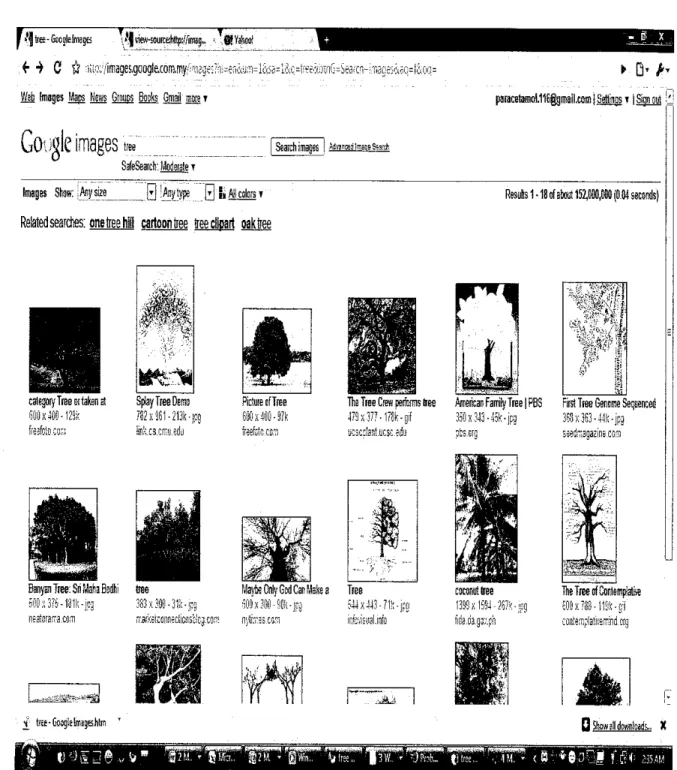
Image retrieval system is a computer system for searching, retrieving and browsing images from a large database that stored digital images. Most traditional and
typical method in image retrieval is using annotation texts or words by assigning key
words, captions or description to the images. Manual image annotation, also known as image tagging is expensive, time- consuming and laborious. One of the method for
image retrieval, that planned can minimize these weaknesses of manual image
annotation is, content- based image retrieval (CBIR). CBIR is a web- based image
annotation tools that have inspired to avoid the use of textual descriptions and instead
retrieves images based on their visual similarity to a supplied query image or
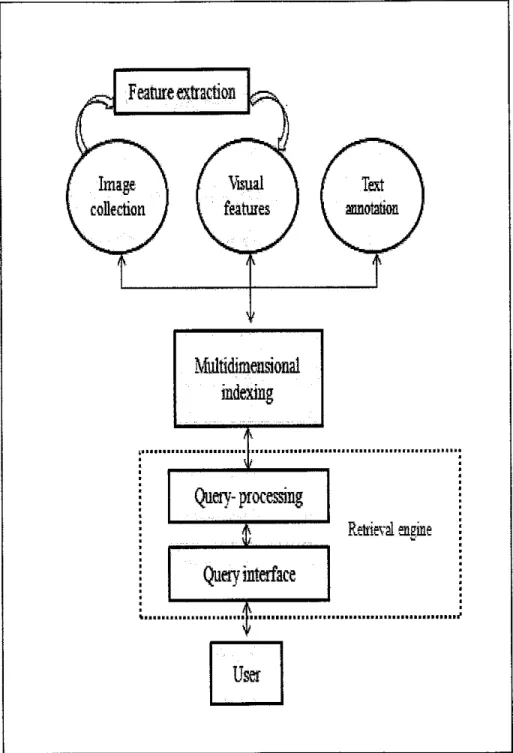
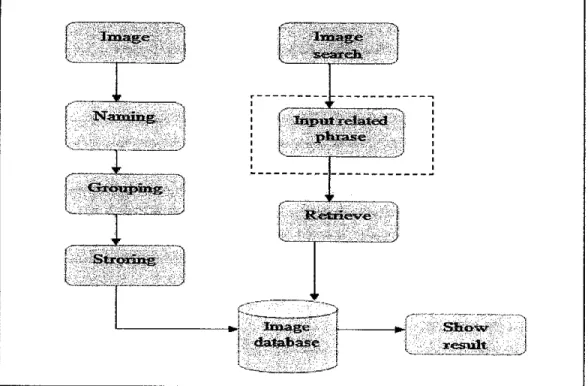
A typical image retrieval system is depicted in Figure 1-1 [1]. Comparison of the process
flows between image retrieval system based on textual annotation and content- based image retrieval system are shown in Figure l-2(a) and Figure l-2(b).
Feature extraction
Query- processing
Retrieval engine
User
Jiaaage
. ' '
baemge se»r«3i.
i r
Naaoaiiig 1 Input related
phrase i r Grxou^plnig' ' k- S h o w r e s u l t - ™ 'J ' ' c ~ ~ -:
^^da^ft^^";;-"
Figure l-2(a): Image retrieval system using textual annotation
Image
-H
Image processing----"l
--f i " 3NTaanaiiig
|
i ' GxopKcpiag i l ^ r Image s e a r t i iI
I^..•._::j^a^^0:: Image p r o c e s s i a E:i:
R e t r i e v e d a t a b a s e S h o w r e s u l t_ •>•••""•"•""-- ... —•. —
I'ltreE-GooglelmBge \>\n'ew-50urcehttp://imBg,.. •• .fjffahoo!
f •> C # iLto^'/image&googf&ram.my/:^iegeE?-i:=erio«jjn=1&S6=14c.=ts_ee«oinG=Seafen-iTdge^iq: Web Images Maps Hews Groups Books Gmaii more t
Google images
treeSafeSearch: Moderate t
Search images! &m&tim®!$is&
Images Show: .Any size Q! Anytype [*] Bti AH colars t Related searches: onetree hiil cartoon tree ireeciipart oaktree
paiaralamol.11Gfgmail.MmiMiri|ST ISign out b
Results 1•18 of about 152,000,000 (0.04 seconds)
category Tree or taken at 600x4IIO-12Sk freefctocois
SpJay Tree Demo 7S2 x "361 - 213k -s iink.cs.craedi]
Picture ofTfee
Jx4tl0-»
ifcic ccn
The Tree Crew performs tree American Family Tree |PBS First Tree Genome Sequenced
479 x377 •178k -gif 350 x343 •45k •jpg Mx363 •44!; •jpg
usscr'ant.ucsc edti pts.crg 35i=d-rr:3gazme cgh!
Banyan Tree: Sri Maha Bsdhi 500 j; 376 -131k -jc-g rr8atcraiTa.com •iJ tfie-Googlelmsg&hSni ' tree 383 k300 -31fe- ipg rr.sfxeiconneciiensb!C3-C0rr Maj-teCtilyGodCanfMea Tree 6OQx3O0-90k-jrg ;4ix443-?1!;-|?G n;ti.?=s cgsi in&isijimfo
.•At
coconut tree 1339 x 1594 - 267^^ iitJa.da.isv.f'h
•ffl2M.. r rQHa„, ' S?M. i•rH^PWW^r PfflWW^1 h^UJftfSIWiJH')P(?L t)tr;e... '' •, Hi *
TheTreeofContemplafa SOBxTSS-HSk-gl eoittercplaferrind erg
D Show all download;,,, X
Figure 1-3: Screenshot of Google Image Search Engine that using Textual Image
2.3 Content- Based Image Retrieval (CBIR)
Other well- known names for Content-based image retrieval (CBIR) are query by
image content (QBIC) and content-based visual information retrieval (CBVIR). It is a
computer vision application that applied to solve the problem of searching digital images in large database (image retrieval). "Content-based" means that the search will analyze the actual image contents. The word 'content' in term "Content- based" might refer colors, shapes, textures, or any other information that can be derived from the image itself. Without the ability to examine image content, searches must rely on metadata such as captions or keywords, which may be laborious or expensive to produce [5].
2.4 Feature Extraction and Integration
Feature extraction is the base of CBIR. Two categories of features are, first is
general; which include sketch, color, deformation, texture, and shape [5]. Whereas the second category is domain specific features, that applicable in domain specialization such as, fingerprint recognition and face recognition [5]. Each feature may have several depictions. For example, image color feature represent by color histogram and color moments. Color that content in an image is a recognizable element. It attribute that invariance with respect to image scaling, translation and rotation make it as one of useful feature extraction elements for image retrieval.
The most important matter in color feature extraction includes color spaces, color quantization and similarity functions. RGB, YCbCr, HSV, CIELAB, CIEL*u*v*, and Munsell spaces are some of color spaces that used frequently. CIEL*u*v* and CIELAB color spaces can give a better performance. An image color resolution can be reduces using color quantization. Vector quantization, uniform quantization and tree- structured vector quantization are types of color quantization schemes that commonly used, similarity function can be define as a mapping between pairs of feature vectors and a
positive real- valued number, which is chosen to be representative of the visual similarity between two images [6].
Normally, existing CBIR system use shape, color, texture and spatial features all
together or few from these.
2.5 Similarity Functions
A research has been performed in three main features that currently used widely in
CBIR technology, there are, color, texture and shape.
2.5.1 Color
Image retrieval by color similarity may concern the specified color in an assigned proportion that contains in an image. Images whose colors are similar to
those of an example image (complete similarity [score = 0.0] and no similarity
[score = 100]) and also color regions as specified in a query that content inimages also will be concerned. Color- based retrieval may finding images
containing a known object based on its color properties and searching images
certain color- induced effects. Color searches will commonly involve comparing
color histograms. Distribution of colors in an image can be representing by color
histogram. Distribution of color will be derived by counting the number of pixel
of each of given set of color ranges in two- dimensional (2D) or
Figure 1-4: RGB (red-green-blue) cube [7]
Hue
a t i o n
Value
Figure 1-5: HSV Color spaces.
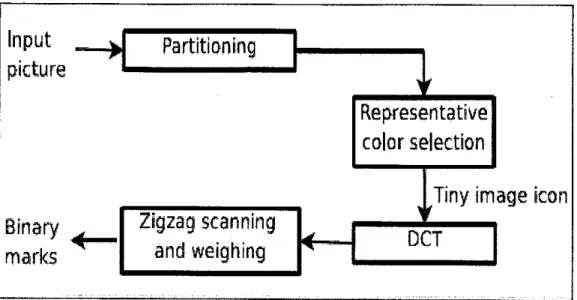
Based on [11], spatial distribution of color in an image can be represented by Color Layout Descriptor (CLD) and assist in making color extraction process become more effective and easy as well as fast searches in database. Figure below shown four stages in CLD's extraction process.
Input
w
picture
Binary rf
marksPartitioning
*
Representative
color selectionTiny im
age icon
Zigzag scanning
and weighing
DCTFigure 1-6: The extraction process of CLD.
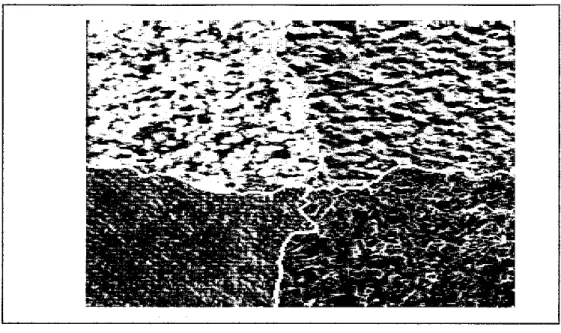
Figure1-7: Example of color segmentation
2.5.2 Texture
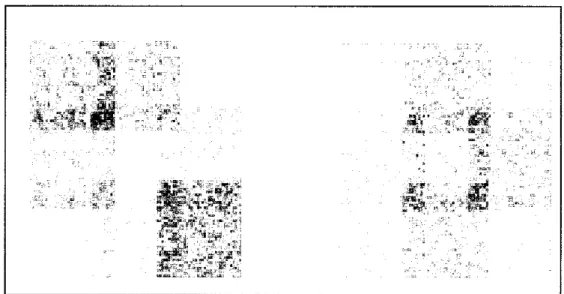
The texture feature set effectiveness was evaluated using the image retrieval based on texture content as an example. Texture refers to visual patterns with properties of homogeneity that do not result from the presence of only a
single color or intensity [4]. Texture is most useful for images which full with textures, such as catalogs of wood grains, marble, sand, or stones. These images
are hard to categorize using keywords alone due to limited of human vocabulary for textures. In some cases or situations, texture can be used effectively alone,
without color for pure textures, but also with a little bit of color for some kinds of
textures, like wood or fabrics [8]. Texture features usually contain information
about the surfaces structural arrangement. Texture and location specified
compare texture and location of the textured regions in the image.
^v*S
~&1
S%" -^j- i°W
Figure 1-8: Fabric images with similar texture.
fit**-Figure 1-9: Example of multi texture.
2.5.3 Shape
Shape represents appear of shapes in the image. Shapes are determined by identifying regions of uniform colours, not refer to shape of the images. Shape is useful to capture objects such as shapes of buildings and shapes of trees. Shape is very useful for querying on simple shapes (like circles, polygons, or diagonal lines) especially when the query image is drawn by hand [8].
Figure 1-10: Images with very similar shape.
* &
K 5 mmm
fe ^r^r^Mri
r ^ l
^^^HBkk f i9e^^^^^^|.^^^•^^^^^Hi^^l
i? r^^^^^^^^^^^^^^^^^^^^^^H1
^JrHEir^^H|HHH
,\
i^^^^Hr^r^r^r^r^Hr^H
jjr^Br^KEf,J^
^^^^^^^^^^^^^^r^^^H
" 'Figure 1-11: More examples for shape similarity retrieval
2.6 Similarity Calculation
After images are matched, the measure of similarity depends on a weighted sum reflecting the weight and distance of all three of the image attributes with combination of location of the comparison image and the test image.
Below is an example of algorithm that applicable for image retrieval that based on color, texture and shape features.
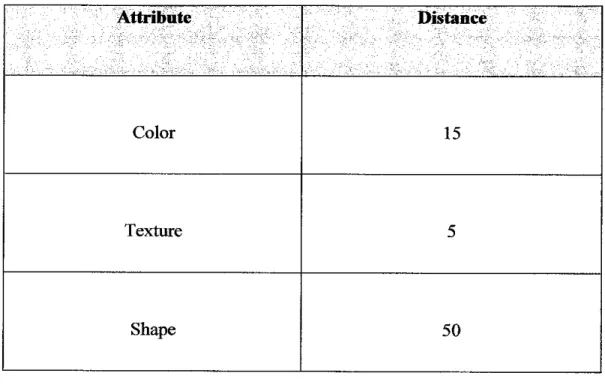
For example, assume that for the comparison image (Image 1) and one of the
images being tested for matching (Image 2); Table 1-0 lists the relative distances between the two images for each attribute.
Attribute Distance
Color 15
Texture 5
Shape 50
Table 1-1: Attributes' distances
In this example, the two images are most similar with respect to texture (distance = 5)
and most different with respect to shape (distance - 50), as shown in Table 1-0.
Assume that for the matching process, the following weights have been assigned to each
visual attribute:
• Colour-0.7 • Texture - 0.2
• Shape = 0.1
The weights are supplied in the series of 0.0 to 1.0. Within this range, a weight of 1 shows the strongest emphasis, and a weight of 0 point to the attribute should be
ignored. The values you supply are automatically normalized such that the weights total
1.0, still maintaining the ratios you have supplied.
The following method is used to compute the weighted sum of the distances, means to determine the degree of similarity between two images:
weighted sum = colorweight * colordistance +
texture_weight * texturedistance +
shapeweight * shape_distance+
In this case, the degree of similarity between two images is calculated as:
0.7*c_distance + 0.2*tex_distance + 0.1*shape_distance
By using the supplied values, the formula becomes:
(0.7*15 + 0.2*5 + 0.1*50) - (10.5 + 1.0 + 5.0) - 16.5
To illustrate the effect of different weights in this case, assume that the weights for
colour and shape were reversed. In this case, the degree of similarity between two
images is computed as:
0.1*c_distance +0.2*tex_distance + 0.7*shape_distance
That is:
* Note: Formulain this example is referring to Oracle interMedia User's Guideand References
for CBIR.
CHAPTER 3 METHODOLOGY
3.1 Prototyping Methodology
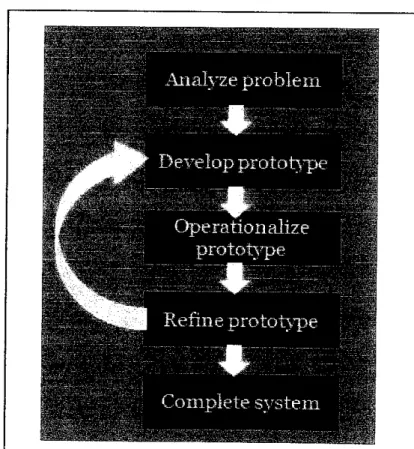
The implementation of this project is based on prototyping methodology.
Prototyping methodology has been choosen because it can reduce the development time,
development cost and its result is higher user satisfaction. Prototype can be refined and
anypoblems and defects that encounter can be fixed before the real system is completely
develop.Figure 1-12: Prototyping methodology
3.2 Project Architecture
Framework of this project is referring to content- based image retrieval (CBIR)
architecture below.
^'•^^^^^^•^••l
Figure 1-13: Expected System Design
Images will keep in database called image database. After preprocessing, images will
segmented based on color. Only the dominant segments are considered for feature
extraction namely color histogram features, this would speed up the calculation and may
not significantly affect the end result. Then a single feature vector is constructed and
stored in the feature database. When a query image is submitted by the user, the same work is done as explained above to get its feature vector. For similarity comparison
between the query image and the database image, the measurement is based on two
threshold and defined as S (i) = L2 * average (D3) / (L3A2). Using an appropriate
threshold, images that are semantically closer are retrieved from the database and displayed as a thumbnail [3].
3.3 System Uniquesness
In order to improve the effectiveness of CBIR system, this project will allow user to interact with the system by upload image as an input, to be a sample for system to
perform image query.
Besides that, user can set the number of images that they expect the system to retrieve as result. Implementation of color segmentation in develop this project can reduce the time consuming. The calculation of 3-D histogram of the query images is only taking almost 0.5 seconds for an 800x600 color image.
3.4 Tools
MATLAB is used in development of the whole process of this project, because it is easy to use and its capability in accessing low level image processing.
CHAPTER 4
RESULT AND DISCUSSION
4.1 Method Description
4.1.1 Training
During the training process, almost 1000 images have been used. 3-D histogram
of HSV values for each image is computed. All 3D HSV histograms are stored
in a same .mat file after the training process is ended.
4.1.2 Steps to retrieve query resuItsQuery
1. The system will compute the 3D HSV histogram of the query image.
Then, by means of interpolation, the number of bins in each direction is
duplicated.
2. In the database, for each image i: • Its histogram Hist (i) is loaded.
•
To duphcate the number of bins in each direction, interpolation will be
used.
•
Compute the distance (D) between the hist of the query image and the
i-Th database image for each 3-D hist bin
•
For the respective hist bins of the query image are larger than a
predefined threshold T (let L2 the number of these distances), keep only
distance (D2).•
Find the distance (D3) values which are smaller than T2 by using a
second threshold. Let L3 be the number of such values.
•
The similarity measure: S (i) = L2 * average (D3) / (L3A2).
*Note: This project is apphed algorithm that was created by Mr. Theodoros
Giannakopoulos.
3. System will sort the similarity vector. Lastly, images which have the M
smaller S values will displayed to user.
Ffc lit Vim fcitrt Tool! Dulfcp «M» Kdp
0 fSBSfft;*! !i;os!nD
Reaaenaft. Tltssyslemoffl oeffldmj.
Figure 1-14: Image searching
fifr &* Win hurt Tools Data? WndoB tWp
d # h si ft ^ o, a ®: sg• n"i~rB~n"
Imago samplepro>iit«I by
rwi^-fifnria-'-aiiiartBair^lLBia Figure 1-15: Image result
4.2 Use Case Diagram
(Refer appendixes Figure 1-16: Use case diagram)
CHAPTER 5
CONCLUSION AND RECOMMENDATION
5.1 Conclusion
The need to find a desired image from a collection is shared by many professional groups of people. While the requirements of image users can vary considerably, it can be useful to characterize image queries into three levels of abstraction: primitive features, logical features, and abstract attributes. While CBIR systems currently work only at the lowest of these levels, most users require higher levels of retrieval.
Users needing to retrieve images from a collection come from a variety of domains, including medicine, architecture, and publishing. Extremely little has yet been
published on the way such users search for and use images, even if attempts are being
made to classify users' behaviour in the hope that this will allow their needs to be better met in the future.
As a conclusion, despite its current limitations, CBIR Is a fast-developing
technology with considerable potential, and one that should be exploited where
5.2 Recommendation
This project should be enhanced by using few more features in processing the images, such as texture and shape. The results expected will be more accurate. Besides that, more research should be done and the progress of the project must follow the workflow and timeline to ensure the project can be completed according to the
timeframe given.
REFERENCES
[1] Victorio Castelli, Lawrence D. Bergman, 2002 "Image Databases, Search and
Retrieval ofDigital Imagery", John Wiley & Sons, Inc., New York.
[2] Alberto Del Bimbo, 1999 "Visual Information Retrieved99, Morgan Kaufmann Publishers, Inc. San Fracisco, California.
[3] S. Nandagopalan, Dr. B. S. Adiga, and N. Deepak, Proceeding of World Academy of Science, Engineering and Technology Vol. 36, Dec 2008, "A
Universal Modelfor Content- Based Image Retrieval.
[4] Horst Bunke, Terry Caelli, 2001 "Hidden Markov Models Application in
Computer Vision", World Scientific Publishing Co. Pte. Ltd.
[5] Remco C. Veltcamp, "Content Based Image Retrieval Systems", A Survey,
Technical Report UU-CS-2000-34.
[6] Mustafa Ozden and Ediz Polat, "Image Segmentation using Color and Texture features".
[7] Zhe Ming Lu, Su- Zhi Li, Hans Burkhardt, International Journal of Innovative
Computing, Information and Control ICIC International Volume 2, Number 4,August 2006, "A Content- based Image Retrieval Scheme in JPEG
Compressed Domain".
[8] Simone Santini, 2001 "Exploratory Image Databases Content- Based
Retrieval", Academic Press.
[9] Bill Green, 2002 "Edge Detection Tutorial".
[10]
OracleinterMedia User's Guide, "6 Content- based Retrieval Concept".
APPENDICES
APENDIX- A: Use Case Diagram
Figure 1-16: Use case diagram
y _s
Content- based linage Retrieval
(CB1K) Srsscra
y
!=&*!**• y;_ _.. A intaisx!, g
^
itSCLS^ X
;stet#^i"aL
APENDIX- B: Source Code
Matlab codes: searchlmageHist
function searchlmageHist{imageName, modelName, nResults)
% function searchlmageHist(imageName, modelName, nResults)
% Image retrieval m-file
% %
% load train model:
load(modelName);
% compute 3-D image histograms (HSV color space):
fprintf('Computing 3-D (HSV) histogram for query image ...\n'); [Hist, RGBQ] = getlmageHists(imageName);
% number of training samples:
Nfiles = length(Hists); % decision thresholds: t = 0.010; t2 = 0.8; fprintf{'Searching...\n'); range = 0.0:0.1:1.0; rangeNew = 0.0:0.05:1.0; [x,y,z] = meshgrid(range) ; [x2,y2,z2] = meshgrid(rangeNew) ; Hist = INTERP3(x,y,z,Hist,x2,y2,z2) ; Similarity = zeros{Nfiles, 1) ;
for (i=l:Nfiles) % for each file in database:
% compute (normalized) eucledean distance for all hist bins:
HistT = INTERP3(x,y,z,Hists{i},x2,y2,z2);
DIFF = abs(Hist-HistT) ./ Hist;
% keep distance values for which the corresponding query image's
values
% are larger than the predefined threshold:
DIFF = DIFF(Hist>t);
% keep error values which are smaller than 1:
DIFF2 = DIFF(DIFF<t2) ;
L2 = length(DIFF2);
% compute the similarity meaasure:
Similarity(i) = length(DIFF) * mean(DIFF2) / (1,2*2);
% (interface): plot images with small similarity measures:
plotThres = 0.5 * 10 / length(DIFF);
if (Similarity(i) < plotThres)
% fprintf('%70s %5.2f %5d %5d\n', files{i}, median(DIFF2),
% length(DIFF), L2);
subplot(2,2,1);imshow(RGBQ); title('Query image');
RGB = imread(files{i}) ;
subplot(2,2,2);imshow(RGB);
title('A similar image ... Still Searching ...');
subplot(2,2,3); plot(DIFF) if (length(DIFF2)>1) subplot(2,2,4); plot(DIFF2); axis([l length(DIFF2) 0.2 1]) end drawnow e n d end
% find the nResult "closest" images:
[Sorted, ISorted] = sort(Similarity);
NRows = ceil({nResults+1} / 3);
% plot query image:
subplot(NRows,3,1); imshow(RGBQ); title('Query Image');
% ... plot similar images:
for (i=l:nResults)
RGB = imread(files{ISorted(i) }) ;
str - sprintf('Im %d: %.3f',i,100*Sorted(i));
subplot{NRows,3,i+1); imshow(RGB); title(str);
end
fprintf('Done\n');
Matlab codes: getlmageHist
function [Hist, RGBt] = getlmageHists{imageName, PLOT)
% read RGB data:
RGB = imread(imageName);
RGBt = RGB;
RGB = rgb2hsv(RGB);
% get image size:
[M,N,ttt] = size(RGB);
range = 0.0:0.1:1.0;
Hist = zeros (length (range),length(range),length(range)) ;
for (i=l:M) for <j=l:N) % Nl = histc(RGB(i, j,l), range); % N2 = histc{RGB{i,j,2) , range); % N3 = histc{RGB(i,j,3), range); % nnl = find(Nl==l); % nn2 - find{N2==l); % nn3 = find(N3==l); nnl = round{RGB{i,j,l) * 10)+1 nn2 = round{RGB{i,j,2) * 10)+1 nn3 - round(RGB(i, j,3) * 10)+1 Hist(nnl, nn2, nn3) = Hist{nnl, nn2, nn3) + 1; e n d end Hist = Hist / (M*N); 29
![Figure 1-4: RGB (red-green-blue) cube [7]](https://thumb-us.123doks.com/thumbv2/123dok_us/87285.2509947/19.864.171.710.90.315/figure-rgb-red-green-blue-cube.webp)