Multimodal Human-Machine Interaction
for Service Robots in Home-Care Environments
Stefan Goetze1, Sven Fischer1, Niko Moritz1, Jens-E. Appell1, Frank Wallhoff1,2
1Fraunhofer Institute for Digital Media Technology (IDMT), Project group
Hearing, Speech and Audio Technology (HSA), 26129 Oldenburg, Germany
2Jade University of Applied Sciences, 26129 Oldenburg, Germany
{s.goetze,sven.fischer,niko.moritz,jens.appell,frank.wallhoff}@idmt.fraunhofer.de
Abstract
This contribution focuses on multimodal in-teraction techniques for a mobile communi-cation and assistance system on a robot plat-form. The system comprises of acoustic, vi-sual and haptic input modalities. Feedback is given to the user by a graphical user interface and a speech synthesis system. By this, mul-timodal and natural communication with the robot system is possible.
1 Introduction
The amount of older people in modern societies constantly grows due to demographic changes (Eu-ropean Commision Staff, 2007; Statistical Federal Office of Germany, 2008). These people desire to stay in their own homes as long as possible, however suffer from first health problems, such as decreased physical strength, cognitive decline (Pe-tersen, 2004), visual and hearing impairments (Rud-berg et al., 1993; Uimonen et al., 1999; Goetze et al., 2010b). This poses great challenges to the care systems since care services require a high amount of temporal and personnel efforts. Furthermore, older people living alone may suffer from social isolation since family members, friends and acquaintances may live at distant places and frequent face-to-face communication may be hard to realize.
It is nowadays commonly accepted that support by means of technical systems in the care sector will be inevitable in the future to cope with these challenges (Alliance, 2009). Examples for such as-sistive devices are reminder systems (Boll et al.,
2010), medical assistance and tele-healthcare sys-tems (Lisetti et al., 2003), personal emergency re-sponse systems, accessible human-machine interac-tion (Rennies et al., 2011) or social robotics (Chew et al., 2010).
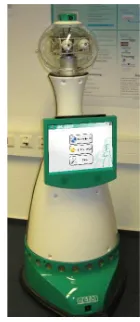
[image:1.612.387.457.495.656.2]This contribution describes the human-machine interaction modalities for a social robot called ALIAS (adaptable ambient living assistant) that is depicted in Figure 1. ALIAS is a mobile robot plat-form to foster communication and social interaction between the user and his/her social network as well as between the user and the robot platform. The aim of ALIAS is to ensure the maintenance of existing contacts to prevent social isolation instead of making human-to-human communication obsolete. ALIAS is supposed to act as a companion that encourages its owner to cultivate relationships and contacts to the real world.
Figure 1: ALIAS robot platform.
Instead of classical interaction techniques solely
by using mouse and keybord, multi-modal human-machine interaction techniques allow for more natu-ral and convenient human-machine interaction (Ovi-att, 1999; Jaimes and Sebe, 2007; Goetze et al., 2010a). Especially for technology in the domain of ambient assisted living (AAL) which is mostly in-tended to be used by older users - these users often are less technophile than younger users (Meis et al., 2007) - multi-modal interaction strategies including modalities like speech and touch pads show high ac-ceptance (Boll et al., 2010).
A touch display and a robust speech recognition and synthesis system enable the ALIAS robot plat-form to interact with the user via speech or using the mounted touch display (cf. Figure 1). Besides communication with the robot by speech input and output, communication with relatives and acquain-tances via telephone channels, mobile phone chan-nels and the internet is a central goal. An automatic reminder system motivating the user to participate actively in social interaction is developed. In ad-dition, the user is encouraged to perform cognitive activities in order to preserve quality of life.
The following Section 2 briefly describes the sys-tem components of the ALIAS robot platform be-fore Section 3 focuses on the multi-modal user-interaction strategies.
2 System Components and Applied Technologies
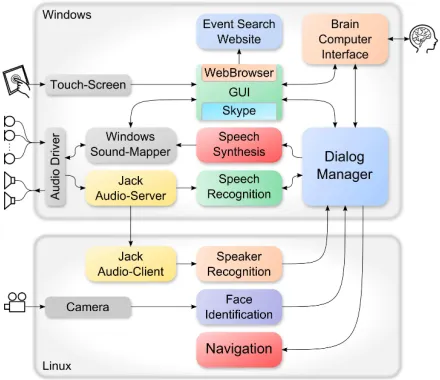
The ALIAS robot system has a variety of human-machine communication features and sensors. Fig-ure 2 shows the general overview of the robots soft-ware modules which will be briefly introduced in the following.
[image:2.612.314.534.70.260.2]The dialogue manager (DM) is the robot’s most central component since it is the software module which is responsible for all decisions the robot has to take. Therefore, it is connected to almost every other module. The DM collects inputs and events from all these modules, interprets them, and decides which actions to perform, i.e. commands to send to which modules. It may move the robot to check on its user, initiate a video telephone call, or ask for a game of chess. The dialogue manager runs on the Windows computer, which is one of the two computer systems in the ALIAS system.
Figure 2: Overview of the ALIAS robot’s software mod-ules, distributed on two computers.
The graphical user interface (GUI) has a close link to the dialogue manager since it integrates sev-eral applications and receives user inputs of the Win-dows computer’s operating system. Thus, it reacts to touch input and displays menus and all software modules with graphical output. (Section 3.1 pro-vides more detailed information on the GUI.)
The automatic speech recognition (ASR) mod-ule enables the robot to understand and react on spo-ken commands (Moritz et al., 2011). It receives recorded audio signals from the Jack audio-server and converts it to a textual representation of spoken words. This list of recognized words will be sent to the DM for interpretation (cf. Section 3.2 for de-tails).
since there’s no need to reach out for the robot’s dis-play unit in order to interact with it.
A link to the world-wide web is established by integration of an easy-to-use web browser which is seamlessly integrated into the GUI. To counter-act isolation an event search web service was real-ized (Khrouf and Troncy., 2011) that visualizes var-ious events and corresponding pictures to the user that have taken place or will take place close to the user’s location. To achieve this the robot connects to an online event search service. The service will provide him/her with a personalized selection of so-cial event near his/her current location and personal preferences.
An input modality suitable for users that are unable to touch the robot’s screen or to verbal-ize a speech command (e.g. after a stroke) is the brain computer interface (BCI) of the robot (Hin-term¨uller et al., 2011). It uses a set of electrodes placed on the user’s skull to measure electrical re-sponses of the brain. These electrical potentials are evoked by means of visual stimuli, e.g. flashing im-ages on a control display. By focusing on certain items on the BCI control display the user’s brain ac-tivity can control the GUI of the robot. The BCI may also be used for writing text messages which can be sent using the integrated Skype™ chat functionality of the robot.
To distinguish between its owner and other per-sons, the robot uses an acoustic speaker recogni-tion module. This provides ALIAS with addirecogni-tional information which can be used to differentiate be-tween persons and interprete multiple speech inputs according to their individual context.
In order to achieve more human-like character-istics, the robot uses a face identification module. So it is able to adjust its eyes to face the person it’s talking to. The face detection algorithm utilizes the robot’s 360° panorama camera located on top of the robot’s head, and thus covers the robots surround-ings, completely.
The navigation module handles the actual move-ment, collision prevention, and odometry of the robot. It drives ALIAS by plotting waypoints on a pre-recorded map. Obstacles are detected using ultra-sonic sensors, the laser scanner, and the front camera. In case the robot’s path is blocked, the nav-igation module will plot an alternative route in order
to reach the designated target location, evading the obstacle (Kessler et al., 2011). The navigation mod-ule may also be remotely controlled by another per-son in order to check on the robot’s owner in case an accident has been detected or the owner has re-quested for help.
3 Multimodal Interaction Strategies
The robot’s user interface features different input modalities; speech commands, the BCI, or the touch screen (GUI). For speech input, the ASR mod-ule processes the recorded speech commands and translates them into multiple textual representations, which are then sent to the DM for interpretation.
BCI and GUI include a display unit to provide feedback to the user. Thus they require an addi-tional pathway for receiving commands from the DM. In case of the BCI, available items on its con-trol screen may be switched by the DM to reflect the current dialogue state, i.e. a selection of audio books if the audio book module has been accessed. For the GUI, which integrates several software applications into one single module, there is also the possibility of non-user related events, such as incoming phone calls from the integrated Skype module. The GUI has to relay these events to the DM for decision.
All user inputs and relevant system events are gathered by the DM. As the ALIAS system’s cen-tral control unit, the DM keeps track of all active robot modules and relevant sensor data. It merges all provided inputs, puts them into context, inter-prets them, and decides which actions to perform. Whereas some inputs may be redundant, others may be invalid or highly dependent on the context.
For example, pushing a button on the touch screen is most likely related to the application that is run-ning on the screen. Whereas the spoken phrase “on the right” could mean that the user wants ALIAS to push a button that is located on the right hand side of its screen. Another interpretation would be that the user wants the robot to turn to the right and move aside. Or the user was talking to another person in the room, possibly even on ALIAS’ video telephone, and the spoken statement is not to concern the robot at all.
their design.
3.1 Graphical User Interface
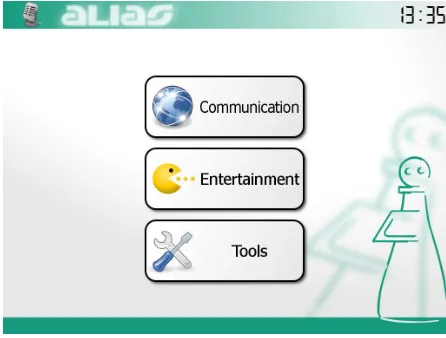
The GUI consists of a series of menus containing a few large buttons, each of them leading to another menu or starting an application, i.e. an integrated software module. The GUI’s main menu is shown in Figure 3.
The GUI uses a minimalistic design, including some light gradients and blur for non-essential back-ground components. Whereas the actual buttons fea-ture comprehensive icons and text labels with large fonts, enclosed by high-contrast black frames. This eases distinction between buttons and background.
[image:4.612.75.298.366.535.2]Taking visual impairments into account the GUI remains usable, while still being visually pleasing for people with unimpaired vision. Due to each users individual color perception, colors are used sparsely and mustn’t be the sole cue to carry es-sential information. Instead combinations of colors, shapes, and labels are preferred.
Figure 3: ALIAS robot’s main menu.
The GUI depends on animations; buttons flash in a different (dark) colors when pressed and menus sliding on and off the screen when switched. Such animations provide visual feedback to user inputs and are unlikely to be missed by the user, since they involve the whole screen, usually.
The GUI makes a clear distinction between menus and application modules, though both are supposed to look quite similar on the screen. Menus provide access to sub-menus and integrated software
mod-ules i.e. applications, using a tree-like menu struc-ture which is defined by a configuration file.
Application modules implement their very own individual layouts, buttons, features, and remote-control capabilities for the DM. By this, some fea-tures are available after the related application has been started, only. The GUI features a selection of integrated application modules, like a Skype™-based video telephone, a web-browser, a television module, an audio book player, a selection of serious games, and access to the robot’s Wii gaming con-sole.
The GUI processes two kinds of user inputs; di-rect inputs and indidi-rect inputs. Both input types will be further outlined below.
3.1.1 Direct Inputs
The GUI accepts normal user inputs, as they are provided by the host computer’s operating system. In case of the ALIAS robot the main source of such inputs will be the touch screen. These inputs are considered as direct inputs, since they are provided by the computer’s operating system and are handled by the GUI directly.
More generally every input falls into the group of direct inputs if the GUI is directly receiving it. Accordingly even an incoming phone call is a di-rect input, because it is triggered by an integrated GUI module. So, unless properly handled and prop-agated, no other module would ever know about it. Thus, most direct inputs also need to be relayed to the dialogue manager that takes over the role of a state machine to keep all modules on the robot syn-chronized. If, for example, any input in the current situation is not allowed or even undesirable the DM can intervene and reject those inputs.
3.1.2 Indirect Inputs
A second kind of user inputs is represented by the group of indirect inputs. Indirect inputs are system messages, received by the GUI. Basically indirect inputs are inputs that are handled by another mod-ule, but require a reaction by the GUI. Typically such indirect inputs are generated by the Dialogue Man-ager, as response to a speech input for example.
into a sampled audio signal that is redirected by the Jack Audio Server to the speech recognition mod-ule. The speech recognition module converts the audio signal to a textual representation that will be interpreted and processed by the dialogue manager. In case the dialogue manager finds a contact named ’Britta’ in its data base, it sends a series of network messages to the GUI, containing the required com-mands to bring up the telephone application and ini-tiate the phone call.
3.1.3 Multi-modal Input
[image:5.612.313.535.282.403.2]Most parts of the GUI can be controlled by touch display as well as by spoken commands. Further-more, a control by the BCI is possible for parts of the GUI (currently Skype chat and entertainment such as audio books).
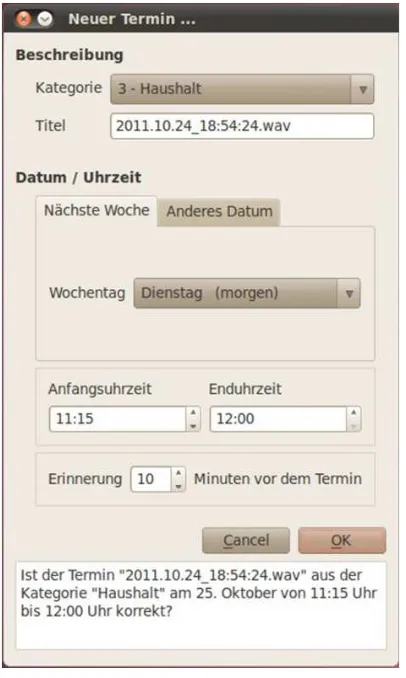
Figure 4: Multi-modal input dialog for appointments.
An example for a multi-modal interaction is the appointment input window depicted in Figure 4. It
contains information about the category, the title, the start and end time of the appointment and a possibil-ity to set a reminder. The interface can be controlled by mouse and keyboard as well as via speech com-mands following a structured dialogue. By this, the used is free to chose if he/she wants to use mouse and keyboard as a fast way to enter an appointment or speech if he/she is not close enough to the robot’s touch display and is either not willing or not capable to reach it.
3.2 Speech Recognition
[image:5.612.87.290.306.645.2]Creating an automatic speech recognition (ASR) de-vice requires different processing steps. Figure 5 il-lustrates exemplary the structure of such a system.
Figure 5: Schematic technical design of the ASR system.
A very important step is to collect a sufficiently large amount of speech data from many different speakers. This speech data is used to train the acous-tic models, which in this case are hidden Markov models (HMM), and described in terms of well-known Mel frequency cepstral coefficients (MFCCs) (Benesty et al., 2008). Besides the HMM models of known words also so-called garbage models are trained, since the ASR device needs to be capable to distinguish not only between words that were trained from the training utterances but also between known and out-of-vocabulary (OOV) words.
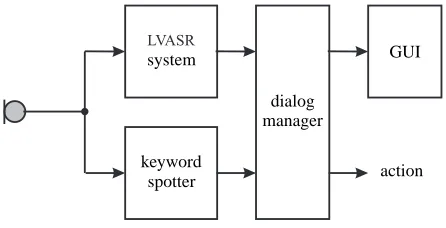
different grammatical rules (cf. Figure 6). The first ASR system uses a non-statistical language model that is typically used for ASR systems with small vocabulary size and very strict input expectations. This ASR system can be considered as a keyword spotter. In contrast, N-gram models can also be used for continuous speech recognition systems, where the grammatical information can get a lot more com-plex. Thus, the second recognizer uses statistical grammar rules (N-gram) which consists of a 2-gram forward and 3-gram backward model and enables the system to make a more soft decision on the rec-ognized sentence.
By this two-way approach, the keyword spotting system can do a reliable search for important catch-words, whereby the second recognizer tries to under-stand more context from the spoken sentence. This ensures an even broader heuristic processing for the DM.
LVASR
keyword spotter system
dialog manager
[image:6.612.76.299.329.443.2]action GUI
Figure 6: Two-way ASR system.
With the acoustic models and a valid language model the speech recognition device is now able to operate. The user utters any command, which is picked up by a microphone. Since in real-world sce-narios the microphones do not only pick up the de-sired speech content but also disturbances like ambi-ent noise or sounds produced by the (moving) robot system itself, the microphone signal has to be en-hanced by appropriate signal processing schemes (H¨ansler and Schmidt, 2004; Goetze et al., 2010a; Cauchi et al., 2012) before ASR features (MFCCs) are extracted from the speech input.A The extracted features are then transferred to the decoding system where the content of speech is analyzed.
ASR processing deals in terms of probabilities. Although speech recognition has been identified as a highly desired input modality for assistive systems
(Goetze et al., 2010a) the acceptance drastically de-creases if the recognition rate is not sufficiently high. For every acoustic input there are multiple recog-nition alternatives, with varying probabilities. In-stead of using only the most probable recognition for output, the ASR module provides the DM with a few additional alternatives. This allows the DM a more thorough analysis and thus a more precise in-terpretation of the provided speech input to decide for an output on the GUI or an action (e.g. moving the roboter).
4 Conclusion
This paper presented multimodal interaction strate-gies for an robot assistant which has its main fo-cus on support of communication. This includes both, fostering of human-to-human communication by providing communication capabilities over dif-ferent channels and reminding on neglected relation-ships as well as communication between the techni-cal system and its user by means of speech recogni-tion and speech output.
Acknowledgments
This work was partially supported by the project AAL-2009-2-049 ”Adaptable Ambient Living As-sistant” (ALIAS) co-funded by the European Com-mission and the Federal Ministry of Education and Research (BMBF) in the Ambient Assisted Living (AAL) program and the by the project Design of En-vironments for Ageing (GAL) funded by the Lower Saxony Ministry of Science and Culture through the Niederschsisches Vorab grant programme (grant ZN 2701).
References
The European Ambient Assisted Living Innovation Al-liance. 2009. Ambient Assisted Living Roadmap.
VDI/VDE-IT AALIANCE Office.
J. Benesty, M.M. Sondhi, and Y. Huang. 2008. Springer
handbook of speech recognition. Springer, New York.
S. Boll, W. Heuten, E.M. Meyer, and M. , Meis. 2010. Development of a Multimodal Reminder System for Older Persons in their Residential Home. Informatics
for Health and Social Care, SI Ageing & Technology,
B. Cauchi, S. Goetze, and S. Doclo. 2012. Reduction of Non-stationary Noise for a Robotic Living Assistant using Sparse Non-negative Matrix Factorization. In
Proc. Speech and Multimodal Interaction in Assistive Environments (SMIAE 2012), Jeju Island, Republic of
Korea, Jul.
Selene Chew, Willie Tay, Danielle Smit, and Christoph Bartneck. 2010. Do social robots walk or roll? In Shuzhi Ge, Haizhou Li, John-John Cabibihan, and Yeow Tan, editors, Social Robotics, volume 6414 of
Lecture Notes in Computer Science, pages 355–361.
Springer Berlin / Heidelberg.
European Commision Staff. 2007. Working Document. Europes Demografic Future: Facts and Figures. Tech-nical report, Commission of the European Communi-ties, May.
S. Goetze, N. Moritz, J.-E. Appell, M. Meis, C. Bartsch, and J. Bitzer. 2010a. Acoustic User Interfaces for Ambient Assisted Living Technologies. Informatics
for Health and Social Care, SI Ageing & Technology,
35(4):161–179, December.
S. Goetze, F. Xiong, J. Rennies, T. Rohdenburg, and J.-E. Appell. 2010b. Hands-Free Telecommunication for Elderly Persons Suffering from Hearing Deficien-cies. In 12th IEEE International Conference on
E-Health Networking, Application and Services (E-Health- (Health-com’10), Lyon, France, July.
S. Goetze, J. Schr¨oder, S. Gerlach, D. Hollosi, J.-E. Ap-pell, and F. Wallhoff. 2012. Acoustic Monitoring and Localization for Social Care. Journal of Computing
Science and Engineering (JCSE), SI on uHealthcare,
6(1):40–50, March.
E. H¨ansler and G. Schmidt. 2004. Acoustic Echo and
Noise Control: a Practical Approach. Wiley,
Hobo-ken.
C. Hinterm¨uller, C. Guger, and G. Edlinger. 2011. Brain-computer interface: Generic control interface for so-cial interaction applications.
A. Jaimes and N. Sebe. 2007. Multimodal human-computer interaction: A survey. Comput. Vis. Image
Underst., 108(1-2):116–134, October.
J. Kessler, A. Scheidig, and H.-M. Gross. 2011. Ap-proaching a person in a socially acceptable manner us-ing expandus-ing random trees. In Proceedus-ings of the 5th
European Conference on Mobile Robots, pages 95–
100, Orebro, Sweden.
H. Khrouf and R. Troncy. 2011. Eventmedia: Visual-izing events and associated media. In Demo Session
at the 10th International Semantic Web Conference (ISWC’2011), Bonn, Germany, Oct.
C. Lisetti, F. Nasoz, C. LeRouge, O. Ozyer, and K. Al-varez. 2003. Developing multimodal intelligent affec-tive interfaces for tele-home health care. International
Journal of Human-Computer Studies, 59(1-2):245 –
255. Applications of Affective Computing in Human-Computer Interaction.
M. Meis, J.-E. Appell, V. Hohmann, N v. Son, H. Frowein, A.M. ¨Oster, and A. Hein. 2007. Tele-monitoring and Assistant System for People with Hearing Deficiencies: First Results from a User Re-quirement Study. In Proceedings of European
Confer-ence on eHealth (ECEH), pages 163–175.
N. Moritz, S. Goetze, and J.-E. Appell. 2011. Ambi-ent Voice Control for a Personal Activity and House-hold Assistant. In R. Wichert and B. Eberhardt, ed-itors, Ambient Assisted Living - Advanced
Technolo-gies and Societal Change, Springer Lecture Notes in Computer Science (LNCS), number
978-3-642-18166-5, pages 63–74. Springer Science, January.
S.T. Oviatt. 1999. Ten myths of multimodal interaction.
Communications of the ACM. ACM New York, USA,
42(11):74–81, Nov.
R.C. Petersen. 2004. Mild Cognitive Impairment as a Diagnostic Entity. Journal of Internal Medicine,
256:183–194.
J. Rennies, S. Goetze, and J.-E. Appell. 2011. Consid-ering Hearing Deficiencies in Human-Computer Inter-action. In M. Ziefle and C.R¨ocker, editors,
Human-Centered Design of E-Health Technologies: Concepts, Methods and Applications, chapter 8, pages 180–207.
IGI Global. In press.
M.A. Rudberg, S.E. Furner, J.E. Dunn, and C.K. Cassel. 1993. The Relationship of Visual and Hearing Im-pairments to Disability: An Analysis Using the Lon-gitudinal Study of Aging. Journal of Gerontology,
48(6):M261–M265.
Statistical Federal Office of Germany. 2008. Demo-graphic Changes in Germany: Impacts on Hospital Treatments and People in Need of Care (In German language: Demografischer Wandel in Deutschland -Heft 2 - Auswirkungen auf Krankenhausbehandlungen und Pflegebed¨urftige im Bund und in den L¨andern). Technical report.
P. Taylor. 2009. Text-to-Speech Synthesis. Cambridge University Press.