AN APPLICATION FOR CHARACTER RECOGNITION ON ANDROID BASED MOBILE PHONES
Department of Computer Science and Engineering, Greater Noida Institute of Technology
ARTICLE INFO ABSTRACT
5G is a technology used in research papers and projects to denote the next major phase of mobile telecommunication standards beyond the 4G/IMT
any specification or official document yet made public by telec standardization bodies such as 3GPP, WiMAX Forum, or ITU
are in progress by standardization bodies, but at this time not considered as new mobile generations but under the 4G umbrella.
Mobile Phones. An image which is containing some text is given or can be captured by the camera and our task is to extract text from the image.
Copyright © 2015 Sonia Arora. This is an open access article distributed under the Creative Commons Att distribution, and reproduction in any medium, provided the original work is properly cited.
INTRODUCTION
The idea of character recognition is old in computer’s point of view but it’s quite new in smart phones.
enhanced performance of the smart phones, the text recognition applications are gaining the attentions from the application developers as well as the researchers. Considering the fast popularization of Android smart phones, we’ve developed application for Android based mobile phones. texts in the captured image can be extracted and used according to individual needs. With the popularization enhancements of the overall capabilities of smart phones in recent, it is possible to run Optical Character Recognition (OCR) application on mobile platforms.
A mobile phone (also known as a cellular phone, cell phone, and a hand phone) is a device that can make and receive telephone calls over a radio link while moving around a wide geographic area. It does so by connecting to a cellular network provided by a mobile phone operator, allowing access to the public telephone network. By contrast, a cord
used only within the short range of a single, private base station. In addition to telephony, modern mobile phones also support a wide variety of other services such as text messaging,
*Corresponding author: Sonia Arora,
Department of Computer Science and Engineering
ISSN: 0975-833X
Article History:
Received 26th March, 2015
Received in revised form
12th April, 2015
Accepted 29th May, 2015
Published online 30th June,2015
Key words:
WiMAX, 4G,
Android Mobile,
Character Recognition and SDK.
Citation:Sonia Arora, 2015. “An application for
Research, 7, (6),17357-17365.
RESEARCH ARTICLE
AN APPLICATION FOR CHARACTER RECOGNITION ON ANDROID BASED MOBILE PHONES
*Sonia Arora
Department of Computer Science and Engineering, Greater Noida Institute of Technology
ABSTRACT
5G is a technology used in research papers and projects to denote the next major phase of mobile telecommunication standards beyond the 4G/IMT-Advanced standards. 5G is not officially used for any specification or official document yet made public by telec
standardization bodies such as 3GPP, WiMAX Forum, or ITU-R. New standard releases beyond 4G are in progress by standardization bodies, but at this time not considered as new mobile generations but under the 4G umbrella. To develop an application for Character Recognition on Android based Mobile Phones. An image which is containing some text is given or can be captured by the camera and our task is to extract text from the image.
access article distributed under the Creative Commons Attribution License, which distribution, and reproduction in any medium, provided the original work is properly cited.
The idea of character recognition is old in computer’s point of view but it’s quite new in smart phones. With the enhanced performance of the smart phones, the text recognition applications are gaining the attentions from the as the researchers. Considering the fast popularization of Android smart phones, we’ve developed application for Android based mobile phones. The texts in the captured image can be extracted and used according to individual needs. With the popularization and enhancements of the overall capabilities of smart phones in recent, it is possible to run Optical Character Recognition
A mobile phone (also known as a cellular phone, cell phone, that can make and receive telephone calls over a radio link while moving around a wide geographic area. It does so by connecting to a cellular network provided by a mobile phone operator, allowing access to the public telephone network. By contrast, a cordless telephone is used only within the short range of a single, private base In addition to telephony, modern mobile phones also support a wide variety of other services such as text messaging,
Computer Science and Engineering
MMS, E-Mail, Internet access, short
communications (Bluetooth, Infrared), GPS connectivity, business applications, gaming and photography. Mobile phones that offer these and more general computing capabilitie referred to as smart phones. By 2009, it had become clear that, at some point, 3G networks would be overwhelmed by the growth of bandwidth-intensive applications like streaming media. Consequently, the industry began looking to data optimized 4th-generation technologies, with the promise of speed improvements up to 10
technologies. The first two commercially available technologies billed as 4G were the WiMAX standard (offered in the U.S. by Sprint) and the LTE standard.
Features of Mobile Phones
All mobile phones have a number of features in common, but manufacturers also try to differentiate their own products by implementing additional functions to make them more attractive to consumers. This has led to great innovation in mobile phone development over the past 20 years. common components found on all phones are:
• A battery, providing the power source for the phone functions.
• An input mechanism to allow the user to interact with the phone. The most common input
but touch screens are also found in some high phones.
International Journal of Current Research
Vol. 7, Issue, 06, pp. 17357-17365, June 2015
INTERNATIONAL
An application for character recognition on android based mobile phones”,
AN APPLICATION FOR CHARACTER RECOGNITION ON ANDROID BASED MOBILE PHONES
Department of Computer Science and Engineering, Greater Noida Institute of Technology
5G is a technology used in research papers and projects to denote the next major phase of mobile Advanced standards. 5G is not officially used for any specification or official document yet made public by telecommunication companies or R. New standard releases beyond 4G are in progress by standardization bodies, but at this time not considered as new mobile generations an application for Character Recognition on Android based Mobile Phones. An image which is containing some text is given or can be captured by the camera
ribution License, which permits unrestricted use,
Mail, Internet access, short-range wireless communications (Bluetooth, Infrared), GPS connectivity, business applications, gaming and photography. Mobile phones that offer these and more general computing capabilities are By 2009, it had become clear that, at some point, 3G networks would be overwhelmed by the intensive applications like streaming media. Consequently, the industry began looking to
data-eration technologies, with the promise of speed improvements up to 10-fold over existing 3G technologies. The first two commercially available technologies billed as 4G were the WiMAX standard (offered in the U.S. by Sprint) and the LTE standard.
All mobile phones have a number of features in common, but manufacturers also try to differentiate their own products by implementing additional functions to make them more attractive to consumers. This has led to great innovation in ile phone development over the past 20 years. The common components found on all phones are:
A battery, providing the power source for the phone
An input mechanism to allow the user to interact with the phone. The most common input mechanism is a keypad, but touch screens are also found in some high-end smart
INTERNATIONAL JOURNAL OF CURRENT RESEARCH
• Basic mobile phone services to allow users to make calls and send text messages.
• All GSM phones use a SIM card to allow an account to be swapped among devices. Some CDMA devices also have a similar card called an R-UIM.
• Individual GSM, WCDMA, iDEN and some satellite phone devices are uniquely identified by an International Mobile Equipment Identity (IMEI) number.
• Low-end mobile phones are often referred to as feature phones, and offer basic telephony. Handsets with more advanced computing ability through the use of native software applications became known as smart phones.
Background Knowledge
Many software packages exist today that can perform digital image processing. Notable examples are not limited to Adobe Photoshop, GIMP (GNU Image Manipulation Program), and MATLAB which is highly used tool for recognition purpose (Cabaj, 2012). However, these programs developed for personal computers which lack portability. With their increasing power and portability, it makes sense that the future medium for such applications should be mobile devices. However, there aren’t nearly as many implementations on mobile devices as on a personal computer. Android OS has image processing applications thanks to their well-developed marketplace that has been active for years. iOS also has different image processing applications available as well (Chin
et al., 2011). A study anticipate that projected number of
mobile apps downloaded in 2012 was 36 billion i.e. 5 applications per person over the globe. Another study exemplifies that 428 million mobile devices were sold worldwide in 2011 Q1, a 19 % increase from the previous year. This rapid propagation has dramatically increased the need and growth of mobile application development. Developing mobile application is similar to desktop application but there are certain factors that make mobile applications different from desktop applications (Reto Meier, 2012).
The most critical difference between mobile application and desktop application is the way people use it. Mobile applications are usually small in size and are designed in a way that they use less power. So quality metrics for mobile applications also change due to these factors. Quality of mobile application is almost same as user experience of quality as life time of mobile applications are much less then desktop applications i.e. 3 to 4 weeks. So user will delete or change the application if it is not according to his needs and perception of quality. The term digital image processing refers to processing of a two dimensional picture by a digital computer. In other words, it implies digital processing of any two dimensional data (Singhal et al., 2013). Image processing can be described as every possible action performed on an image. This can be as simple as cropping an image, increasing contrast or scaling. Ever since digitalization of images came into the computer world, there was demand for image recognition. Image recognition is a classical problem in image processing. While humans can easily extract objects from an image, computers can’t. For a computer an image is no more than a matrix of pixels. The artificial intelligence is required for recognizing objects in this matrix. This has to be created by a programmer
using different technologies and algorithms. Automatic reading of text in natural scenes and the recognition of individual characters in such scenes is solved de Campos et al. OCR technology allows the conversion of scanned images of printed text or symbols into text or information that can be understood or edited using a computer program. Any Optical Character
Recognition (OCR) engine or system eases the barrier of the
keyboard interface between a man & a machine to a great extent, and help in office automation with huge saving of time and human effort (Rakshit et al., 2009). While doing survey we’ve gone through many applications based on character recognition in MATLAB as well as for mobile devices. Most of the applications which are for mobile devices are commercial and they don’t share the technologies which they’ve used in those applications. Now we will see some research based application based on Android based mobile phones. WebP Conversion and MICR Scan Android Application (Trevor Bliss, 2012): This Android application was created for a company to mobilize their desktop software. This app was made to successfully scan images of checks for the MICR code. The MICR code is located at the bottom left corner of a check which consists of two parts. The first 9 digits make up the routing number that maps the check to the issuing bank. The next set of numbers is the specific customers account number.
Character Recognition
Whenever we talk about character recognition, we simply talk about images because input is always in the form of an image which contains some readable text. The characters are recognized and output comes in the form of editable text. The Character Recognition algorithm relies on a set of learned characters or we can say trained data. It compares the characters in the captured image file to the character in this learned set (Jain and Yu, 1998). Learned set requires an image file with the desired characters in the desired font be created, and a text file representing the characters in this image file. The trained data should contain the details of each letter in different styles so that we would be able to get good accuracy.
Optical Character Recognition (OCR) Research Review
The use of Optical Character Recognition technology is increasing day-by-day. There has been lot of research done for character recognition since 1970-80. OCR refers to a process where printed documents or textual images are transformed into ASCII files for the purpose of editing, information retrieval, and other file manipulations through the use of computer. OCR is a combination of several complex algorithms that involves the intensive uses of mathematical formulae in order to translate the texts in image into the texts format that computers can manipulate.
Development Tools Research Review
Android is an open source operating system developed by Google and the Open Hands et al. liance on which interesting and powerful new applications can be quickly developed and distributed to many mobile devices. There is a large, growing community of Android developers and a vast selection of Android devices, which includes smart phones, tablets, and TV setup boxes. The OS was created by the start-up of the same
name, which is owned by Google since 2005. Stylish, small and versatile, modern mobile devices have become powerful tools that incorporate Touch screens, cameras, media players, Global Positioning System (GPS) receivers, and Near Field Communications (NFC) hardware. With the introduction of tablets and Google TV, Android has expanded beyond its roots as a mobile phone operating system, providing a consistent platform for application development across an increasingly wide range of hardware. As technology has evolved, mobile phones have become about much more than simply making calls. In Android, native and third-party applications are written with the same APIs and executed on the same run time. These APIs feature hardware access, video recording, location-based services, and support for background services, relational databases, map-based activities, inter-application communication, Bluetooth, NFC, and 2D and 3D graphics (6). Android SDK and NDK are the main development tools for the Android applications. Android SDK provides the necessary tools and APIs for the Android applications development. The development will be conducted in modified Java programming language.
Features of Android
An operating system based on Linux kernel that provides a low-level interface with the hardware, memory management, and process control, all optimized for mobile and embedded devices (http://developer.android.com).
Open-source libraries for application development, including SQLite, WebKit, OpenGL, and a media manager.
A run time used to execute and host Android applications, including the Dalvik Virtual Machine (VM) and the core libraries that provide Android-specific functionality.
A set of core pre-installed applications.
A user interface framework used to host and launch applications.
A Software Development Kit (SDK) is used to create applications, including the related tools, plug-ins, and documentation. Here we will be using NDK also.
Architecture Details
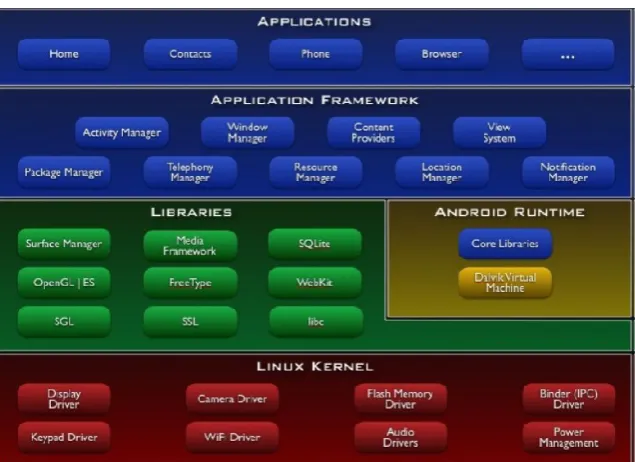
The architecture of Android consists of five layers:
The Linux kernel 2.6 which includes useful drivers that allows for example WiFi or Bluetooth.
The library written in C and C++ that provides higher level functionality such as an HTML engine, or a database (SQLite).
A runtime environment for applications based on a virtual machine, made for inefficient machines such as telephones. The aim is to translate Java in machine language understood by Android.
A Java framework that allows applications running on the virtual machine to organize and cooperate.
The user applications written in Java.
Android SDK Features
As an application-neutral platform, Android gives us the opportunity to create applications that are as much a part of the phone as anything provided out-of-the-box (Reto Meier, 2012). Android SDK has supported accessing the built-in hardware camera on phones to capture images (Every, 2009). The following list highlights some of the most noteworthy Android features:
GSM, EDGE, 3G, and 4G networks for telephony or data transfer, enabling you to make or receive calls or SMS messages, or to send and retrieve data across mobile networks
Comprehensive APIs for location-based services such as GPS and network-based location detection.
Full support for applications that integrate map controls as part of their user interfaces.
Wi-Fi hardware access and peer-to-peer connections.
Full multimedia hardware control, including playback and recording with the camera and microphone.
[image:3.595.143.461.528.759.2]Architecture of Android
Background Services, applications, and processes.
Media libraries for playing and recording a variety of audio/video or still-image formats.
IPC message passing
APIs for using sensor hardware, including accelerometers, compasses, and barometers.
Libraries for using Bluetooth and NFC hardware for peer-to-peer data transfer.
Shared data stores and APIs for contacts, social networking, calendar, and multi-media.
Home-screen Widgets and Live Wallpaper.
An integrated open-source HTML5 Web Kit-based browser.
An application framework that encourages the reuse of application components and the replacement of native applications.
Mobile-optimized, hardware-accelerated graphics, including a path-based 2D graphics library and support for 3D graphics using OpenGL ES 2.0.
The application which we have developed uses Tesseract OCR engine which is developed in C/C++ language. So we require Android NDK to use its libraries with our main java code.
Android NDK/JNI
The Android Native Development Kit (NDK) works in conjunction with the Standard Development Kit (SDK) to allow developers to run native C/C++ code with their standard Java code. Native code is placed in the <root>/jni/ folder of the project directory and compiled using an Android.mk file. This make file sets compiler flags and links any other libraries we are using in our code. The native C code will be compiled into a shared library, which can be imported into an Android
project, and from there it is possible to call native functions from Java code. Java Native Interface (JNI) is used as a link between native code and the Android APIs (http://java.sun. com/docs/books/jni/html/types.html). JNI is also used for conversion of types between languages.
Application Developments
Creating an Android Application
To begin with Android application development I needed some basics, because some elements are very different and new. Even if programming an application in Android uses the Java language which is object oriented programming language. In an Android application, there is no main method. Android Runtime contains one of the most important parts of Android which is Dalvik Virtual Machine. This Virtual Machine uses Dex-files. These files are byte codes resulting from converting .jar files at build time. Dex-files are built for running in limited environments.
They are ideal for small processors, they use memory efficiently, their data structures can be shared between different processes and they have a highly CPU-optimized byte code interpreter.
Basic Components of an Application
While developing an Android application, one has to study these components in details.
Activity
[image:4.595.55.545.286.564.2]An activity is a user interface that allows the user to interact with the screen, to perform any action.
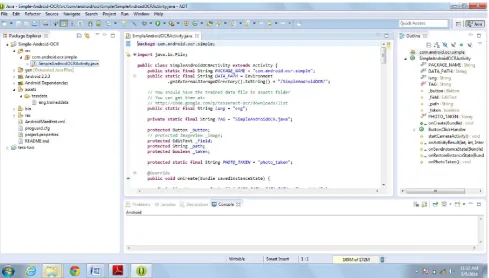
Figure 2. Screenshot of Android SDK while development of application
For example, applications like Text Messaging app could have an activity that displays a list of contacts to send messages. Once a contact is selected, the activity sends information to a second activity that could serve to send the message to the contact. When an application is launched, what it displays is the result of an activity. At the code level, for creating an activity, we must create a class that extends the Activity class. An activity has a required on Create () method. It is the main method. To interact with the program, through the activity, there must be something displayed, that is why the activity, contains what is called views.
View
A View is the basic building block for user interface components. A View occupies a rectangular area on the screen. View is the base class for widgets, which are used to create interactive UI components (buttons, text fields, etc.).There are different kinds of views, for example a List View is able to display only an interactive list of what we want to display, while a Web View allows you to to display a web page. As said before, a view occupies a rectangular area on the screen. To organise these rectangles on the screen, there is a text file written in XML for every different screen.
XML
XML means Extensible Markup Language. Android provides a straight forward XML vocabulary that corresponds to the View classes and subclasses. The goal of using Android's XML vocabulary is to quickly design UI layouts and the screen elements they contain, in the same way that we use in creating web pages in HTML, with a series of nested elements.
Intent
An activity can of course start another one, but to do this, it will need a special object called Intent. Intent is basic description of an operation to be performed. It can launch an Activity, send a broadcast Intent to any interested Broadcast Receiver components, and communicate with a background Service. Intent performs binding between the codes in different applications. It can be thought of as the link between activities.
Android Manifest
AndroidManifest.xml is necessary file for all android applications and must have this name in its root directory. In this manifest we've essential information about the application for the Android system, information that the system must have before it can run any of the application's code. Here is what we can find in the Android manifest:
The name of the Java package for the application. The package name serves as a unique identifier for the application.
The description of the components of the application such as activities, services, broadcast receivers, and content providers that the application is composed of and under what conditions they can be launched.
The processes that will host application components.
The permissions the application must have in order to access protected parts of the API and interact with other applications.
The permissions that others are required to have in order to interact with the application's components.
The list of the Instrumentation classes that provide profiling and other information as the application is running. These declarations are present in the manifest only while the application is being developed and tested; they're removed before the application is published.
The minimum level of the Android API that the application requires.
The list of the libraries that the application must be linked against.
To develop an Android application all these components are necessary. Now I’ll explain the application which I’ve developed.
Application Overview
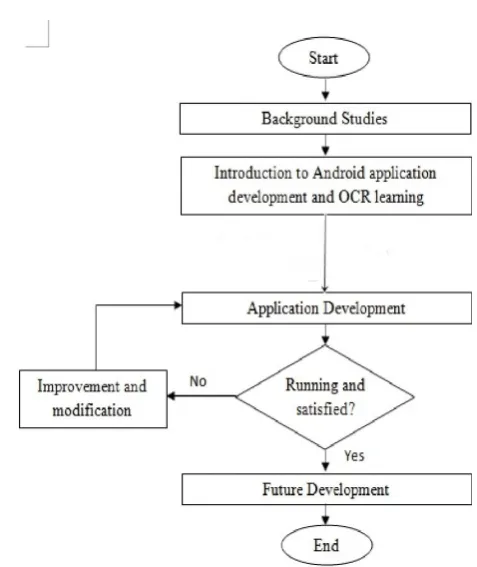
Before starting to develop the Android’s application we should know about some basics and follow some particular steps. Firstly, we’ve developed a flow chart so that we can follow the process of development step by step. Then we studied all the required tools in details.
[image:5.595.314.553.381.665.2]Basic Flow Chart
Figure 3. Flow chart for process and activities throughout the project
Application Basics
before that the character recognition is based on image which means that the input is always going to be an image. In mobile devices there are two ways to get an image, one is by using built-in gallery and another is by using built-in camera. In our application we are using built-in camera so that any user can take picture anywhere, anytime. The image taken by user should contain readable text.
Working Procedure
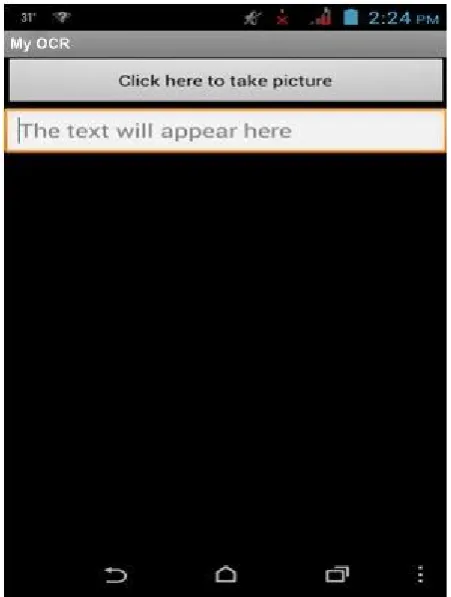
[image:6.595.51.277.226.525.2]The application is very user friendly. When the application is opened, the user has to click on the button to take a picture using the camera. The image will go for certain steps involved in our project and finally the text will be shown on the screen.
Figure 4. The first screen user will view
Steps involved in Application Development
Taking an image by using built-in camera
The image can be colored image or can be grayscale
Then image is converted into binary image
Proper setting of rotation of the image
Converting image into ARGB color format
Passing it to Tesseract OCR
Tesseract OCR
Tesseract OCR engine is an open source engine that was developed at HP between 1984 and 1995. Tessreact OCR was developed in C/C++ language. Currently, it can recognize a
wide variety of languages and fonts and it is one of the most accurate OCR available in the market. The Tesseract
OCR engine had been selected for this project because it is an
open source and free of charge. Cross-compiling of the Tesseract OCR engine is needed in order to be compatible with the Android platform. Besides that, it is possible for the application to perform OCR in offline mode by building a Tesseract native Android library during the development of the application. The following steps describe the workflow of Tesseract OCR (Ray Smith, 2005):
1. The input image can be grayscale or colored image. 2. Adaptive Thresholding is carried out on the input image
and it is converted into the binary image.
3. The character outlines in the binary image are analyzed and gathered together into Blobs through the process of Connect Component Analysis.
4. The Blobs are organized into text lines and then broken into words.
5. Those words are then preceded with two round of the recognition process.
[image:6.595.309.555.283.423.2]6. Producing the output text.
Figure 5. Working model of Tesseract OCR engine (Ray Smith, 2005)
We have made the application for English language. Now we require trained data for English language. Trained data is available online by Google for many languages as ‘language name. trained data’ file. In our case we need ‘eng. traineddata’ file. This file must be there in the ‘assets’ folder of the project. There are set of Android APIs available by Tesseract OCR engine for character recognition process. The coding is as shown below:
Tess Base API base Api = new Tess Base API (); base Api. Init (DATA_PATH, lang);
base Api. set Image (bitmap);
String recognized Text = base Api. get UTF 8 Text (); base Api. end ();
Here ‘lang’ stands for language which is set as ‘eng’ in case of English language.
RESULTS
Results Overview
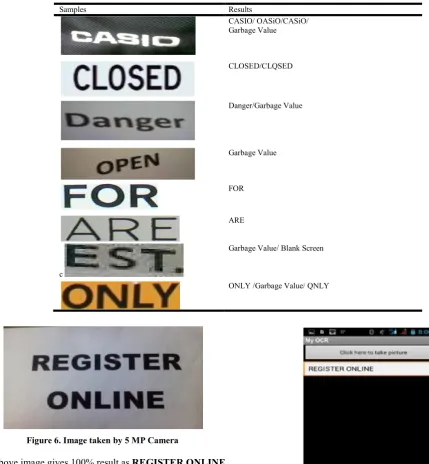
The proposed project was tested and evaluated on different devices based on Android OS. Different images were taken to test the project. In results we will see that for a single image there are lots of variations in the result. Sometimes we get the
text as it is and sometimes the accuracy of the text is not good. This happens because we are using different mobile devices. Some mobiles are having a 5 mega pixel camera and some are having 8 mega pixel camera. Some devices have auto-focus feature in the camera and some don’t. The devices with good quality camera results in good quality of images and this result in good accuracy of the recognition of characters. One thing should be noted that we can’t take two images exactly same by one device as there will be at least one difference in them. Differences may be of brightness, contrast, size of image, resolution, etc. So we find variations in results. Now we’ll see some samples for single words with their results.
Figure 6. Image taken by 5 MP Camera
The above image gives 100% result as REGISTER ONLINE
The output of this image was not 100% accurate but was above expectations.
The result came out to be like this: ‘Tne accuracy ol any rocognltion system is alwas issue So the accuracybcan be
improved in future we can be able to get proper desired text. The toxt further can be edited. We can check its m onlme, and tne text can be used for lnformation r many ways. We can
develop such applications for oter olatfo ’. As we’ve seen that
the accuracy depends on the quality of an image and most important the type of font, size of font, etc.
Calculations of Accuracy
The accuracy of character recognition can be calculated using different formulas. Accuracy in character recognition is calculated in two ways that are Character level accuracy and Word level accuracy Helinski et al.
Figure 7. Output result of image shown in 4.1 Table 1. Results of single words using different devices
Samples Results
CASIO/ OASiO/CASiO/ Garbage Value
CLOSED/CLQSED
Danger/Garbage Value
Garbage Value
FOR
ARE
c
Garbage Value/ Blank Screen
Figure 6. Image having different size of fonts taken by 5 MP camera without auto-focus
A = (1 – (e/c))*100 A = (1 – (e/w))*100
Here ‘A’ stands for accuracy, ‘e’ stands for error in character or words, ‘c’ stands for total characters and ‘w’ stands for total number of words.
In image 4.1, we are getting 100% result. Now we will check the accuracy of image 4.3. Since our image is containing many words so we will calculate word level accuracy. We can also calculate character level accuracy.
Total number of words (w) = 55 Error in words (e) = 11
A = (1- (11/55)) * 100 A = 80%
Therefore we are getting accuracy of 80% and we can see that the image was having different font sizes and in different color combinations, so this accuracy is above satisfaction. Accuracy mostly depends on the size of the letters. Now we will look at the image shown in Figure 4.1 again and its accuracy results from various users.
Table 2. Output of same image using different devices by different users resulting in 100% accurate output
Users Outputs
User 1 REGISTER
ONLINE
User 2 REGISTER
ONLINE
User 3 REGISTER
ONLINE
User 4 REGISTER
ONLINE
Conclusion
Overall tests of our application gave results on an average using Tesseract OCR engine. It is observed that for good images results are very good. Increase in font size results in good accuracy. The proposed project doesn’t require internet connection during its operation mode. This application works only for English language. The application can be installed on any mobile device having Android OS of version 2.3 or above. The output which we get in the developed application is editable text. This text can be used in many ways for information retrieval. It can be used for number plate recognition systems while passing of automobiles at any toll plaza. Character recognition applications can be used for
automatic signature recognition which is widely used in industrial and security areas. For such purposes we’ve to develop proper trained data and modify it according to the desired results.
Future Work
The accuracy of any recognition system is always an issue and a big challenge. In future the accuracy can be improved to get proper results. Further this application can be modified in many ways like we can add speech recognition also. After recognizing text we can also listen to the text which is recognized. We can do some more pre-processing of image like noise removal, blur reduction, etc. but to achieve this we have to use Open CV libraries in our project. Currently, the proposed model is made for English language. We can develop for other languages also. We can develop such types of applications for other platforms also.
REFERENCES
Android’s developer site, (online). Available: http://developer. android.com.
Bellavista, P., A. Corradi and C. Stefan Elli, 2000. "Protection and Interoperability for Mobile Agents: A Secure and Open Programming Environment," IEICE Trans. Comm., pp. 961-972.
Cabaj, J. 2012. “A real time Image Processing Application for Windows Phone OS”, University of Wisconsin-Madison, ECE 533.
Chin, Erika, A. P. Felt, K. Greenwood and D. Wagner, 2011. “Analyzing inter-application communication in Android”,
Proceedings of the 9th international conference on Mobile
systems, applications, and services, ACM, New York,
USA, pp. 239-252.
de Campos, T.E., B.R. Babu and M. Varma. “Character Recognition in Natural Images”, (online). Available: http://research.microsoft.com/˜manik/.
Every, S.V. 2009. “Introduction to Android Imaging”, Pro
Android Media, Paul Manning.
Helinski, M., M. Kmieciak and T. Parkola. “Improving Access to Text, IMPACT”, Report on the comparison of Tesseract and ABBYY Fine Reader OCR Engines, Poznan Supercomputing and Networking Center, Poland.
Jain, A.K. and B. Yu, 1998. “Automatic Text Location in Images”, Pattern Recognition, vol. 31, no. 12, pp. 2,055-2076.
JNI Types, The Java Native Interface Programmer’s Guide and Specification, 5 Jun. 2011, (online). Available: http://java. sun.com/docs/books/jni/html/types.html.
Mobile Subscribers Worldwide, (online). Available: http://mobithinking.com/mobile-marketing-tools/latest-mobile-stats/a.
Park, J., J. Choi, B.K. Seo and J.I. Park, 2013. “Fast Stereo Image Rectification using Mobile GPU”, The Third
International Conference on Digital Information
Processing and Communications, United Arab Emirates,
pp. 485-488.
Pedersen, M.V. and F.H.P. Fitzek, 2012. "Mobile Clouds: The New Content Distribution Platform", Proceedings of the IEEE, pp. 1400 – 1403, vol. 100.
Rakshit, S., A. Kundu, M. Maity, S. Mandal, S. Sarkar and S. Basu, 2009. “Recognition of handwritten Roman Numerals using Tesseract open source OCR engine”, Proceedings of International Conference on Advances in Computer Vision
and Information Technology, pp. 572-577.
Rastogi, V., Y. Chen and X. Jiang, 2014. “Catch Me If You Can: Evaluating Android Anti-Malware against Transformation Attacks”, IEEE Transactions on
Information Forensics and Security, vol.9, no. 4, pp.
99-108.
Ray Smith, 2005. “An Overview of the Tesseract OCR Engine”, Google Inc.
Reto Meier, 2012. Developing for Android, Professional
Android 4 Application Development, John Wiley & Sons,
Inc.
Salman, A. G., B. Kanigoro, Rojali, Kevin and Santy, 2012. “Application Hiding Messages in JPEG Images with the Method of Bit-Plane Complexity Segmentation on Android-Based Mobile Devices”, International Conference on Advances Science and Contemporary Engineering 2012,
Procedia Engineering 50, Jakarta, Indonesia, vol. 50, pp. 314-324.
Singhal, A., C. Jain and M. Bansal, 2013. “Research in Blur Reduction Using Fuzzy Logic in Image Processing”,
International Journal of Research In Computer
Engineering And Electronics, vol. 2, no. 2, pp. 1-7.
Stump, M., G. Tsagkatakis, R. Melton, G. Behm and G. Sterns, 2012. “Low Vision Assistance Using Face Detection and Tracking on Android Smartphones”, Circuits and Systems (MWSCAS), IEEE 55th International
Midwest Symposium, pp. 1176-1179.
Trevor Bliss, 2012. Check Image Processing: WebP Conversion and MICR Scan Android Application.