A Model for Contextual Data Sharing in
Smartphone Applications
Harshvardhan J Pandit
ADAPT, Trinity College Dublin, Dublin, Ireland
Adrian O’Riordan
Computer Science, University College Cork, Cork, Ireland
Abstract
Purpose - The purpose of this paper is to introduce a model for identi-fying, storing, and sharing contextual information across smartphone apps that uses the native device services. We present the idea of using user input and interaction within an app as contextual information; and how each app can identify and store contextual information.
Design/methodology/approach - Contexts are modelled as hierarchical objects that can be stored and shared by applications using native mech-anisms. A proof-of-concept implementation of the model for the Android platform demonstrates contexts modelled as hierarchical objects stored and shared by applications using native mechanisms.
Findings - The model was found to be practically viable by implemented sample apps that share context and through a performance analysis of the system.
Practical implications - The contextual data-sharing model enables the creation of smart apps and services without being tied to any vendors cloud services.
Originality/value - This paper introduces a new approach for sharing con-text in smartphone applications that does not require cloud services.
Keywords Mobile middleware, Context, Context-aware, Context manage-ment, Database, Android
1
Introduction
Smartphone apps offer a large variety and choice of options to perform dedi-cated tasks such as movie booking or messaging. Their convenienve in terms of functionality form the core of the user’s smartphone experience. Such apps often compete on features and functionality based on how well they can help the user perform a particular task. Apps that offer more functional-ity have a higher chance of user adoption. With market saturation of apps with similar functionality, app developers are increasingly looking to cre-ate smart apps(Elgan 2013) that can adapt to the user’s requirements and provide better services. Such apps use contextual information to model ser-vices and present information to the user. Personal assistants such as Google Now(Google Now 2014) and Siri(Siri 2014) use the available contextual infor-mation to present targeted services to the user. For example, Google Now can show weather and traffic information for upcoming events identified within the user’s emails. This gives an incentive to use such apps and services and requires other app developers to develop comparable services for their apps to remain viable.
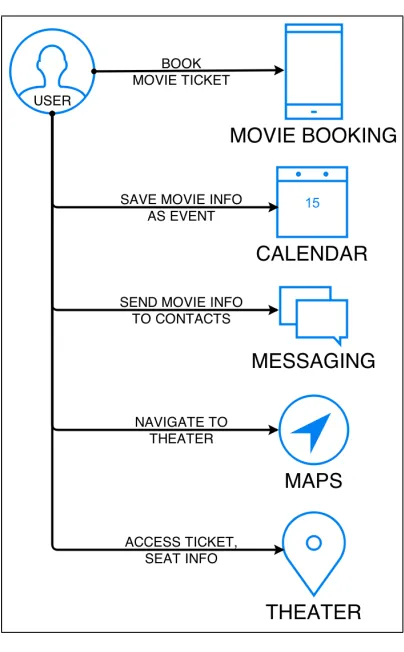
The basis of creating a smart app or a smart service is the availability of contextual information, which is then used to model or predict information that is most useful to the user. Without access to contextual information, apps and services can only offer a rigid functionality that does not adapt to the user’s tasks. As a consequence of this, the user experience becomes disjoint when using several apps. An example of this is presented in Fig. 1 where tasks commonly associated with watching a movie are presented along with the user experience when using different apps within the given context. A key problem identified through this example is the inability of applica-tions to share data with each other due to the sandboxing (Au et al. 2011) security model. The user is forced to duplicate information represented in the form of information or even a set of choices as in the case of adding the movie event to the calendar, or sharing the ticket details with friends. Cer-tain apps that provide such services, for example Google Now, require the user to be a member of their ecosystem of services. This limits the choice for the user to choose different services, and is detrimental to other developers who lack access to the aggregated contextual information.
Figure 1: Movie Use Case
such as Facebook and Wunderlist, which are popular amongst users. It also provides navigation features for locations stored within events, though this requires the user to go through the app to access this feature. Reminders from only supported services are synced and shown within the calendar. This reduces the user’s choice, and increases the pressure on app developers to integrate more services. The lack of a framework supporting implicit sharing of information forces each app developer to depend on explicitly knowing another app’s services in order to use them. This has led to efforts such as X-Callback-Url (x-callback-url - iOS interapp communication 2014) that provides documentation for an app’s services that can be integrated in other apps, but does not provide a way to share contextual information.
frame-work that supports apps to declare and use contexts within the smartphone environment. The contextual model described is motivated by three key chal-lenges in the area of context-awareness: identifying and accessing contexts along with defining a practicle and usable contextual data store for use by apps. An implementation for the model is demonstrated using Android and native technologies, and is shown to be practically viable and effective.
2
Background and Related Information
The background and related work is divided into sub-sections based on the three key challenges mentioned at the end of Section 1. Section 2.1 shows the previous work done in defining context and context-aware computing. Sec-tion 2.2 discusses the various ways to share data in mobile operating systems and its impact on contextual sharing. Section 2.3 discusses utilizing cloud to offer contextual services. Section 2.4 contains a comparison of different ways for representing contexts.
2.1
Context-aware computing
The termcontext-aware computing was first introduced by Schilt et al. (Schilit, Adams, and Want 1994) in 1994 and was defined as “software that adapts according to its location of use, the collection of nearby people and objects, as well as changes to those objects over time”. The word context, derived from Latin con meaning with or together, and textere meaning to weave, denotes context not just as a profile, but as an active process dealing with the way humans weave their experiences within their whole environment to give it meaning.
define how the task itself is also part of the context as it characterizes the situation of the user. This central role of task is shared by Crowley et al. (Crowley et al. 2002) and Kofod-Petersen et al. (Kofod-petersen and Cassens 2006), who assume that the user’s actions are generally goal driven. Hen-ricksen (HenHen-ricksen and Indulska 2006) makes task central in her definition of context. Abowd et al. (Abowd et al. 1999) discuss how context has been considered not simply as a state, but as part of a process in which users are involved.
Surveys and comparisons of context-aware systems and models are pre-sented in (Bolchini et al. 2007). Chihani and Bertin (Chihani, Bertin, and Crespi 2011) give a new approach for classifying context-aware communica-tion systems, where adaptacommunica-tion is performed based on how context is used. They identify services as Instant or Deferred and On Device or On Cloud based on their implementation instead of their functionalities. They discuss how high level knowledge can be derived from raw contextual information to give a better understanding of the user. Yau et al. (Yau et al. 2002) describe RCSM, a system that creates ad hoc communication between devices to fa-cilitate information exchange. They present two categories of middleware in pervasive computing based on interaction between devices or entities.
The fact that information such as user input and choice, which is inter-preted and stored by apps can also represent actionable contexts has not been given much attention. The various approaches that enable interpreting raw contextual information such as time and location to form higher or complex contexts do not actively share it with other apps. This places a limit on the amount of contextual information an app can utilize, and has a direct effect on the nature of contextual services it provides.
2.2
Data Sharing in Mobile Operating Systems
- iOS interapp communication 2014; Chin et al. 2011) which provide features specifically developed for other apps to use. This increases the effort as ser-vices need to be integrated within an app, and exposes potential instability as used third-party APIs and services can change in the future.
2.3
Context and Cloud
Much of the research done previously on contextual models has been cloud-based, where the cloud is utilized to offer services not possible on a mobile device and to share information between multiple devices. Offloading work to the cloud enables services not previously possible on mobile devices (Chun et al. 2011; Cuervo et al. 2010; Fahim, Mtibaa, and Harras 2013; Fernando, Loke, and Rahayu 2013; Kumar and Lu 2010). One such approach related to this research is COSMOS (Sankaranarayanan, Hacigumus, and Tatemura 2011), which describes a cloud-based PaaS system that provides infrastruc-ture for mobile apps to share data. The authors emphasize the incentive for mobile apps’ to share information with one another on a large scale through a service based in the cloud and hosting the mobile apps’ datasets. They pro-vide an implementation model that hosts app data in the cloud and propro-vides seamless experience by sharing that data with multiple apps. An example provided is that of a user going to a conference, where his conference date and location is used to book airline tickets and the hotel room. The COSMOS data sets provide all the information required without the user specifying these requirements. For all services to work, the app must be hosted in COSMOS and must use its architecture.
3
Contextual Sharing Model
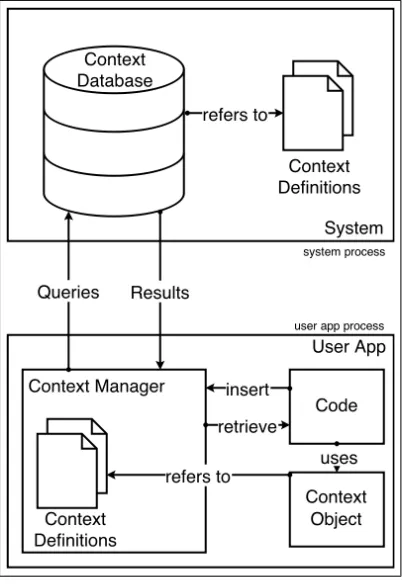
The Contextual Data Sharing Model as depicted in Fig. 2 consists of three parts - the Context Database that stores the contexts, the Context Manager
that acts as middleware between the app and the Context database, and the
[image:7.612.205.406.222.516.2]Context Definitions that provide a uniform representation of contexts.
Figure 2: System Model
3.1
Context Definition
Movie - c o n t e x t
‘ extends ’ Event - c o n t e x t T i t l e
D a t e / T i m e
‘ embeds ’ L o c a t i o n - c o n t e x t P l a c e n a m e
Co - o r d i n a t e s
‘ embeds ’ C o n t a c t s - c o n t e x t { ... }
URI
T i c k e t I D S e a t s O f f e r s
Listing 1: Movie context information
For all apps to store contexts and query information in an uniform way, each app must represent context in the same way irrespective of how it has been generated or acquired. Different types of context have different schema based on the information they represent. Each schema has a unique name and a fixed set of fields, which becomes its definition. Apps use this definition to instantiate context objects for that particular type of context. This allows identification and usage of different types of context across apps.
In Listing 1, the Movie context schema or definition is divided into two parts with some fields designated under Event context. Contextually,Movie
is anEvent, which means that some information related toMoviealso belongs toEvent. Therefore, we can say that Movie is anextension of Event or that the Movie context has been extended from the Event context. This means that all the fields within Event schema are implicitly included in the Movie
schema.
services handled by a parent context to all its children.
Figure 3: Extending Contexts
A context can embed other contexts in its schema. These are called
sub-contexts. The schema for Movie contains a reference to the Location
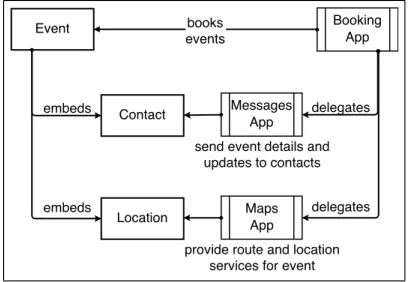
schema, which makes Location a part of Movie definition, and therefore its sub-context. It is important to note the difference between extend and em-bed, where extend is used to add additional information or generalize another context, an embed is used to add a context as a field in another context’s def-inition. This can be more clearly demonstrated by how information is related when we say the contextual information related to a Movie is an Event, and a Movie contains a Location. Fig. 4 depicts how different apps use the Con-tact and Location sub-contexts within the Event context to provide services related to the user’s task.
[image:9.612.203.407.493.634.2]We can create a hierarchy of contexts based on how other contexts embed them. The contexts that do not embed any other contexts are called Simple
contexts; and those that are further down the tree are called Complex con-texts. Using a complex context requires knowledge about all the sub-contexts it embeds. Conversely, an app handling a simple context does not need to be aware of how other contexts embed it. Therefore, apps that provide services for a particular context can provide services to all contexts below it in the hierarchy without being aware of those contexts.
Apps can access a context without knowledge of how other contexts em-bed it. For example, Map applications (Apple Maps 2014;Google Maps2014) that handle theLocation context do not need to know aboutEventandMovie
contexts that embed it in order to provide them with location services. This allows re-use of functionality without requiring the app or context schema to be modified. In general, an app that targets its services for contexts higher in the hierarchy can provide its services to all contexts situated below it. This allows for some apps to handle common contexts and specialized apps to target specific contexts. Apps that target contexts further down in the hierarchy can re-use the services related to contexts situated above it in the hierarchy. Such apps only have to provide services for the fields added or changed from the context it was extended from.
In the Movie ticket booking use case, the Booking app would instantiate a context object of type Movie, and fill in the Movie title, date, time, theater location, ticket and seat information. Apps such as Calendar (Calendar Apps on Google Play 2014), that can provide notifications and management features for Event contexts, will also provide these same services to Movie contexts due to Movie being extended from the Event context. Since the app sees the Movie context object as an Event context, it has access to the fields (title, date, time and location) declared in the Event schema but not to the other fields (ticket and seats) from Movie schema.
3.2
Context database
We use a Context database that stores contexts centrally for sharing between smartphone applications. Having a central repository makes it easier for apps to query and use contexts. The Context database is a system-managed data store located outside the locality of an app, which maintains independence from any particular app, and allows the persistence of contexts even after the app has been uninstalled. Being a system-managed database also safeguards against any malicious process that may corrupt data.
Since apps will constantly access the Context database, operations and complex queries can affect the user experience with respect to the time they take. This restricts the database type and operations permissible on a device, and requires the implementation of simple designs that will not impact the system performance.
Apps can insert or query contexts from the database, but are prohibited from deleting them explicitly. The system manages deletion of contexts from the database when required. This is done to prevent malicious apps from deleting contexts, and also to prevent an app from deleting a context when it might be useful for another app.
All access from apps to the Context database is through the Context Manager, which acts as a mediator between the apps and the database. The Context Manager’s responsibility is to perform the query on the Context database and to interpret the response in a format requested by the app. It is also responsible for performing any checks and verifications on the correctness of a context. Instead of implementing the Context Manager as a middleware service, it is embedded in the app itself as a module or a library. This makes each app hold its own instance of the Context Manager, and creates greater abstraction between apps and the contextual processes. The Context Manager is executed as part of the app, which leads to all faults and errors being generated in the app’s process. This increases the stability and security of the context sharing.
Going back to the movie example used in section 1, the Context database will hold all information related to theMovie context. The Booking app that generates the movie context object stores it in the Context database. This will then be queried by other apps to access contextual information such as seat information and the theater location.
It becomes necessary in such cases to trim the database to an acceptable size to keep the query time in an acceptable range. The time taken by a query to successfully execute depends on number of records, device configuration and app usage. A high specification device can execute complex queries faster than a comparably lower specification device. Multiple apps accessing the Context database simultaneously will also have an impact on its performance. Taking such effects into considerations a policy to delete contexts must be implemented whenever the size of the database or the number of contexts reaches some threshold value t that determines the maximum size of the database for which query times are acceptable. The valuetwill vary between devices depending on the specification, use of apps and available space.
The contextual sharing model discussed in this paper does not recommend the use of any particular database software as long as it provides the features and services required by the model.
3.3
Contextual Sharing Model
Apps that wish to use the contextual data sharing model will need to use the Context Manager to store and retrieve contexts from the Context database. All means of sharing will be indirect, so the apps do not have to interact directly with one another, but through the Context database whose purpose is to share the contextual information across applications. The contextual sharing model enables the collection of information related to a context in a single structure, and enables apps to provide services using context. This allows users to seamlessly carry over tasks across different apps by sharing contextual information related to their actions.
In the Movie booking example discussed in section 1, the task required the use of several apps, with each app requiring duplication of information and effort. With the contextual sharing model, each app can design its services to let the user choose a particular context, or provide services related to the context most likely to be used. Once the booking app has created the Movie context, other apps can access it and provide services based on the information saved within it.
to the user’s task, and hence more useful. The messaging app can provide a way to insert the Movie context details such as title, date and theater location in the message similar to how contact details can be inserted. To make it easier for the user to access required information, the messaging app can provide access to recently used contexts. By providing information in an easily usable format, the user is more likely to complete the task in fewer steps. When the user opens the Maps application, it can provide a list of upcoming Events and utilize the Location embedded within them to provide routes to the destination selected by the user. This would save searching and typing the address as all information is stored within the relevant context.
Some calendar applications (Fantastical 2014; Sunrise Calendar 2014) that provide a map in their interface do so only in interactions with the application. A map application that provides routes for upcoming events requires fewer steps to accomplish the same goal, while giving a user the freedom to change the route or perform other map-related actions, which are not possible when other apps embed maps in their interface. At the theater location, an app that provides location-based reminders can show a notification containing the Ticket and Seat information with a link to open it in the Booking app. For the user, the default screen of the app changes to reflect the task they are most likely to perform, and if the user chooses, they can perform other actions in the app not related to the context.
The Context Manager queries the database to retrieve context objects requested by the app. By providing a limiting parameter the queries can be used for specific needs in apps which leads to more services, and allows apps to specify the nature of contexts they require from the Context database. For example, an app that generates a daily planner can query for Event contexts occurring on the current date, or a restaurant app can query the Context database to check for events and their location to provide recommendations in a nearby area. By filtering contexts, apps can tailor specific services based on the results. Another example, mentioned previously with reference to the messaging app, was to show recently added contexts to the user, which would limit the contexts based on the time of when they were added to the database.
apps to modify contexts and update information without changing the entire context that embeds it. For example, a Map app can update the Location context and modify its co-ordinates to a more accurate value, and all contexts that use that particular location will contain the updated values. This allows any app to update its part of the context information, while still providing all apps with the updated information.
The contextual nature of information stored in the Context database can lead to security concerns such as maintaining privacy and preventing corruption of data. Permissions can be utilized to restrict use of contexts and accessing the Context database. We propose that apps be required to provide explicit read-write permissions for each kind of context they intend to use so that the system and the user are aware of applications’ access to information before installation. By separating read and write permissions, apps that want to use context, but are not generating them will be prevented from writing to the Context database. A malicious app can still take advantage of the security system and corrupt the app, but by enforcing permissions, an app can be scrutinized more carefully.
4
Implementation
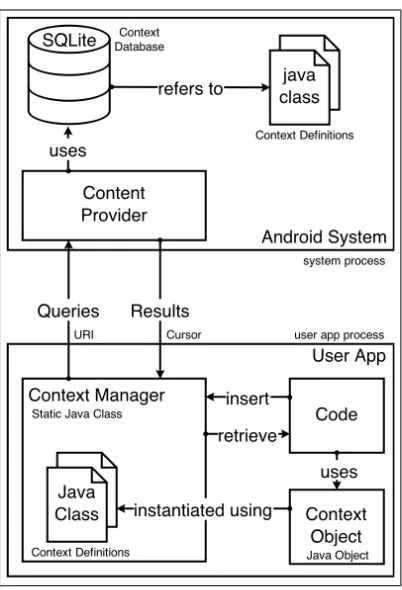
We built a proof-of-concept model as depicted in Fig. 5 for demonstrating the contextual data sharing using Android as the implementation platform. The choice of mobile operating system was made given the openness and ease of modification which Android provides. It uses Java classes to model the context definitions, SQLite for the Context database and a static Java class for the Context Manager. The model is platform independent and can be ported with minor adjustments to other platforms. A link to the code repository of this project can be found here.1
4.1
Context Definition
Contexts can be represented and implemented in a number of ways on a smartphone device as long as the entire context is provided as a single ob-ject that can be serialized and used natively in the code. We represent the context definitions through Java Classes which are then instantiated into
Java Objects. This simplifies the code as there is no parsing or extraction,
Figure 5: Android Implementation
and all related functions such as error-checks and marshaling can be en-capsulated into the class itself. Since Android has a native Java runtime environment, using Java objects for contexts provides better management of code and memory during execution and makes it easier for developers to use data structures and manage code.
Apps such as Calendar that handle Event contexts also provide services for contexts such as Movie, Lunch, Meeting, etc. that extend it. Specific apps like Movie Booking will offer services for the particular type of context that they use. When the user books a movie ticket through the app, the contextual information is shared to Calendar, which provides notifications, reminders and planning features for the movie designated as an event. This allows one app to focus its services on the contextual information it has access to, while other apps can provide different services related to the same context.
re-usability of code in applications and allows the creation of apps that target contexts higher in the hierarchy, but work for all contexts that are below it. This allows functions written to accept Event objects to work with Movie
objects as the system casts Movie toEvent during runtime.
A field that stores URI links is defined in some context definitions, and is used for storing links to related information. A URI in Android can refer to websites as well as apps. For Events, the link can point to the event website or an app that holds this information. Apps that want to handle a particular URI scheme need to register it in the manifest. The system reads the manifest during installation and associates the app with that particular scheme. For example, an app registering the URI scheme http:// will be opened every time the user visits a web page. Similarly, apps can store a URI linking the context to some information or service they provide. For example, a restaurant booking app can link the URI in a dinner context to the booking information. Clicking the link will take the user to the app’s user interface elements related to that particular booking. These URI’s can be opened or triggered inside any app as the system opens the correct app to handle the context. This allows apps to provide links to information stored within other apps and allows the use of related services without explicitly switching apps.
4.2
Context Database
Android’s Content Providers (Android - Content Provider 2014) provide ac-cess and encapsulation of structured data and provide mechanisms for defin-ing data security. The Context database in our implementation of the model utilizes SQLite version 3.7.11, which is pre-installed in Android version 4.4.4 (Kit-Kat).
The SQLite database is instantiated with a distinct table for every context type. In cases where a context extends another context, only fields that were added or changed are stored in the extended context’s table, with the rest of the fields stored in the parent context’s table. This allows a query to receive all kinds of events without implementing joins or multiple queries. This increases the usability of contexts and services an app can provide by being compatible with newer contexts that may be introduced. Where a context includes a sub-context in its definition, each relation is stored in a separate table to keep information distinct belonging to different contexts.
contexts to avoid the cost of retrieving all objects in every query, and en-courages apps to only query contexts that are relevant. For example, a query can request Events occurring in the current week in or around a particular location by providing the date and location range values.
4.3
Context Manager
The Context Manager is a static Java class instantiated in the user app’s process and is responsible for querying the Context database through the Content Provider and to interpret the results returned. Every app has its own instance of the Context Manager, which acts independent of the Con-text database. All apps use the API for methods in ConCon-text Manager to insert or retrieve contexts. Except for the actual database queries, all other operations such as field-checking, marshaling and error-checks are performed by the Context Manager in the user app’s process. This reduces the burden on the database system and allows faster, simultaneous access by multiple apps. Also, any errors resulting from an operation are handled in the user app’s process, which prevents affecting other ongoing operations. This also provides a level of security by shifting potential crashes in Context Manager from the system to the user app.
4.4
Demonstration of concept
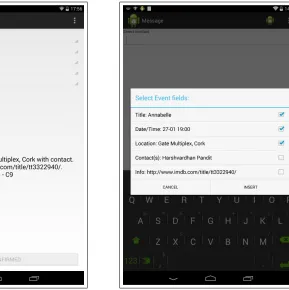
In our demonstration, we show the movie booking use case using apps that interact with the Context database. The movie booking app (Fig. 8) accepts user input and creates a new Movie context containing the movie title, the date/time of the show, the theater’s location, the ticket and seat information and a link to information websites such as IMDb. It then adds theMovie to the Context database through the Context Manager. This information is now available to other apps that can retrieve it by querying the Context database. The calendar app queries the Context database to retrieve upcoming events. The results include the movie event added by the booking app, which the user can edit to change the date/time and add contacts. This saves the user the effort of entering the information as the app retrieves it from the database, and also allows contacts to be added to the contextual information of the movie event. The messaging app (Fig. 9) allows inserting contextual information in messages by querying contexts in the Context database. The user can choose the fields to be inserted from a list of contexts displayed in a menu. If a context contains contacts, these contacts are added to the
recipient field and the information from other fields is added to the message body. By selecting the movie context from the list, the user can send the movie details to all contacts attending the movie without having to type the information in the message.
Figure 6: Booking app saves Movie Context
Figure 7: Messaging app can send Movie info
the Context database, and receive context objects as results which they use to provide services. The user has to enter significantly less information as the apps retrieve the related contextual information from the Context database. Since the information is generated and consumed by apps installed on a smartphone, having the Context database situated on the device is beneficial as all related information is generated, stored and consumed in the same ecosystem. It is possible to use cloud offloading to offer more functionalities and resources based on contexts not stored in the device database, but such functionality will form an extension to the model.
4.5
Privacy and Security
Figure 8: Maps app can show up-coming event locations
Figure 9: Calendar can show con-textual notifications
and telephony through its manifest. When the app requests access to that particular resource, the system checks the permissions at runtime and grants access to the specified resource. The user is made aware of these permissions during the installtion of the app.
sys-tem component that connects to the Context Database, it would be easy to achieve a fine granularity of control over the information made available to apps.
5
Metrics and Performance
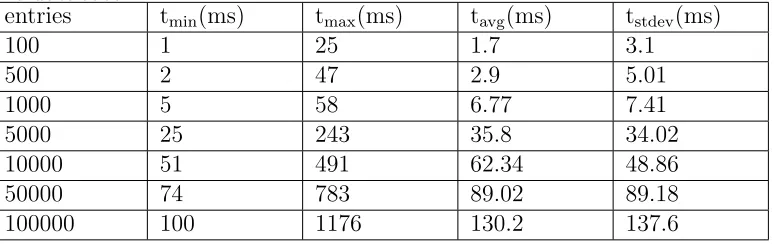
The proof-of-concept experiments were carried out on a Nexus 7 running Android version 4.4.4 (KitKat). Test results were gathered using timestamps from logging at important points in the code. The number of entries (records) in the Context Database have an impact on the time required to complete each operation.
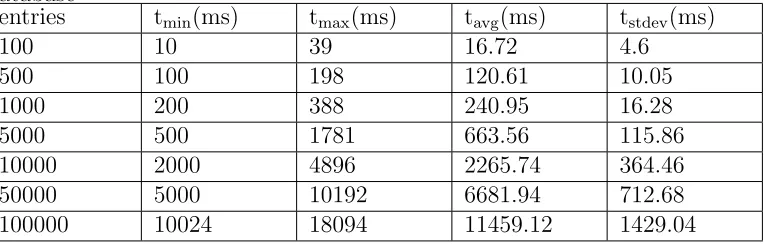
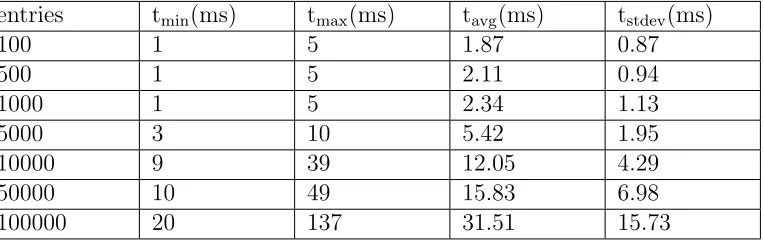
The following tables show the time taken for various operations to com-plete for different number of Event entries in the database. The operations were run multiple times (n = 100) in standard operating conditions. In the tables, tmin depicts the minimum value, tmax the maximum value, tavg the
average, and tstdev the standard deviation.
[image:21.612.115.502.513.635.2]Table 1 shows the time taken to insert one Event object using Context Manager. The total time is inclusive of the time spent performing error and validation checks, IPC between user app and Content Provider, checking for duplicates, and inserting the entry in the database. Table 2 shows the time taken for Context Manager to retrieve Event entries from the database. This includes the time required to execute the database query, perform IPC between Content Provider and user app, and instantiate theEvent objects.
Table 1: Time taken by Context Manager to insert one Event object into the database.
entries tmin(ms) tmax(ms) tavg(ms) tstdev(ms)
100 1 25 1.7 3.1
500 2 47 2.9 5.01
1000 5 58 6.77 7.41
5000 25 243 35.8 34.02
10000 51 491 62.34 48.86
50000 74 783 89.02 89.18
Table 2: Time taken by Context Manager to retrieve Event entries from the database
entries tmin(ms) tmax(ms) tavg(ms) tstdev(ms)
100 10 39 16.72 4.6
500 100 198 120.61 10.05
1000 200 388 240.95 16.28
5000 500 1781 663.56 115.86
10000 2000 4896 2265.74 364.46
50000 5000 10192 6681.94 712.68
100000 10024 18094 11459.12 1429.04
Table 3 shows the time required to execute the query for inserting one
Event entry in the database. The total time is inclusive of the time required for unmarshalling values, inserting Contact, Location, Event entries in their respective tables, creating relational entries in various tables, and checking for duplicates. Table 4 shows the time taken to execute the query for retrieving all Event entries from the database. The query performs joins over the
[image:22.612.112.500.473.593.2]Event, Contact, Location and relation tables to put all associated information together in the result.
Table 3: Time required to execute query for inserting oneEvent context into the database.
entries tmin(ms) tmax(ms) tavg(ms) tstdev(ms)
100 1 5 1.65 0.81
500 1 5 1.72 1.02
1000 1 5 2.03 1.14
5000 2 9 4.21 1.6
10000 4 19 6 2.28
50000 9 49 12.19 6.51
100000 20 119 42.55 12.08
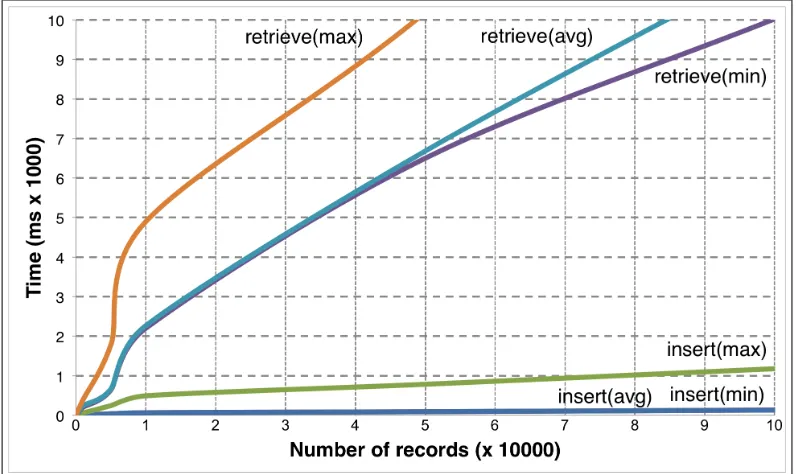
A comparison of insert and retrieval times forEventobjects using Context Manager is given in Fig. 10. The graph shows a range of values containing the minimum (tmin), maximum (tmax) and average time (tavg) required for
Table 4: Time required to execute query for retrieving Event entries from the database
entries tmin(ms) tmax(ms) tavg(ms) tstdev(ms)
100 1 5 1.87 0.87
500 1 5 2.11 0.94
1000 1 5 2.34 1.13
5000 3 10 5.42 1.95
10000 9 39 12.05 4.29
50000 10 49 15.83 6.98
100000 20 137 31.51 15.73
the graph shows how the cost of inserting objects increases almost linearly with the number of entries in the database. While tmin and tavg at large
the database sizes are within an acceptable range for responsiveness in UI (0-100ms (Jovic and Hauswirth 2010)), the variations can be seen through tmax. The time required to retrieveEvent objects from the database increases
much more rapidly with the size of the database. The value of tavg reaches
5000ms with 35000 entries in the database, which is outside the range of acceptable values. If the number of entries is restricted to 100, tavg equals
120ms, which is just outside the acceptable range. Further analysis of these values can be used to limit the number of entries returned in response to a query in order to keep the performance of the operation under permissible values.
The CPU load resulting from Context Manager requesting 10000 Event
objects from the database is shown in Fig. 11. The horizontal axis depicts the running time given in seconds, and the vertical axis depicts the CPU usage in percent. The app that is responsible for the request draws Event
objects on screen using a list view. At about t = 3.1s, the app requests the Context Manager to retrieve all Event objects. The Context Manager sends this request to the Content Provider in the database’s process. the database executes the appropriate queries from t = 3.2s to t = 3.5s and retrieves all
Figure 10: Comparison of time required to insert/retrieveEvent objects with number of entries in the database.
t = 7.5s, which is well outside the acceptable range for UI interactions. If the number of entries retrieved from the database is restricted to 100 using the analysis of Fig. 10, it would further reduce the CPU time and memory used and would allow more fluid user interactions. The average CPU load at all times is well below 50%, which can be considered as not being under stress. This allows the CPU to run other apps and operations in the background.
6
Conclusion and Future Works
In this paper, we introduce a Contextual Data Sharing Model for smartphone applications that structures contexts using definitions and shares contexts through a Context Database. Apps query the Context Database to retrieve contextual information which saves the effort of entering related information in multiple apps used within the same context. This leads to better fea-tures and an improved user experience due to the availability of contextual information across apps.
Figure 11: CPU load caused by ContextManager creating 10000 Event ob-jects retrieved from the database
data sharing model. It uses Java classes for Context Definitions, which pro-vide uniform context representations across apps and devices, and are in-stantiated as Java objects on device. The Context Database uses Android’s Content Provider interface with SQLite as the storage backend for context entries. The Context Manager acts as a middleware between apps and the Context Database is implemented as a static Java class in the app’s pro-cess. The Context Definitions and the Context Manager class are bundled together into a library which the developers can include in their project to use contexts and interact with the Context Database.
The time required to complete various database operations relative to the size of the database in the implementation is analyzed to identify its impacts on performance and usability. Conclusions regarding optimization of performance regarding queries are also discussed. The impact of running operations on device was analyzed and presented no hindrance to other apps on the device.
adapting Android’s security and permission model for the contextual data sharing model is also discussed.
The main goal of this research is to enable apps to query contextual infor-mation stored on the device to access contextual inforinfor-mation. This allows the apps to present users with services they most likely require and saves the ef-fort of entering related information multiple times. By offloading operations and Context Database to the cloud, additional features such as analyzing and mediating contexts between different devices can be achieved. More powerful and useful services can be developed in the cloud using contextual information accessible from various sources. This can be used to provide users access to services or information that is relevant to their contexts, but not present on the device. The local datastore on the device can act as a cache for the datastore based in the cloud, allowing operations that execute faster by querying the local datastore, and will also allow the app to work without network dependence.
The Context Database used can be optimized based on the nature of queries being performed. A NoSQL graph database for mobile devices can be used to store relations between contexts, which can lead to new and interesting features. Utilizing database features like narrowing search results and ordering based on parameters give apps more ways to utilize contexts.
By introducing or re-using more use cases in the Context Definitions, new services based on the user’s context can be created that were not previously possible. For example, by including weather and traffic information within an Event context, apps can present this information without querying for weather or traffic data themselves. This allows apps to share services present on the device to provide related information in more useful ways.
References
Abowd, Gregory D. et al. (1999). “Towards a Better Understanding of Con-text and ConCon-text-Awareness”. In: Proceedings of the 1st International Symposium on Handheld and Ubiquitous Computing. HUC ’99. Karlsruhe, Germany: Springer-Verlag, pp. 304–307.isbn: 3-540-66550-1.url:http: //dl.acm.org/citation.cfm?id=647985.743843.
Android - Content Provider (2014). url: https : / / developer . android . com/guide/topics/providers/content-providers.html.
Au, Kathy Wain Yee et al. (2011). “Short Paper: A Look at Smartphone Permission Models”. In:Proceedings of the 1st ACM Workshop on Secu-rity and Privacy in Smartphones and Mobile Devices. SPSM ’11. Chicago, Illinois, USA: ACM, pp. 63–68. isbn: 978-1-4503-1000-0. doi: 10.1145/ 2046614 . 2046626. url: http : / / doi . acm . org / 10 . 1145 / 2046614 . 2046626.
Bolchini, Cristiana et al. (2007). “A Data-oriented Survey of Context Mod-els”. In: SIGMOD Rec. 36.4, pp. 19–26. issn: 0163-5808. doi: 10.1145/ 1361348 . 1361353. url: http : / / doi . acm . org / 10 . 1145 / 1361348 . 1361353.
Calendar Apps on Google Play (2014). url: https://play.google.com/ store/search?q=calendar&c=apps.
Chihani, B., E. Bertin, and N. Crespi (2011). “A comprehensive framework for context-aware communication services”. In:Intelligence in Next Gen-eration Networks (ICIN), 2011 15th International Conference on, pp. 52– 57. doi: 10.1109/ICIN.2011.6081102.
Chin, Erika et al. (2011). “Analyzing Inter-application Communication in Android”. In: Proceedings of the 9th International Conference on Mo-bile Systems, Applications, and Services. MobiSys ’11. Bethesda, Mary-land, USA: ACM, pp. 239–252. isbn: 978-1-4503-0643-0. doi: 10.1145/ 1999995 . 2000018. url: http : / / doi . acm . org / 10 . 1145 / 1999995 . 2000018.
Chun, Byung-Gon et al. (2011). “CloneCloud: Elastic Execution Between Mobile Device and Cloud”. In: Proceedings of the Sixth Conference on Computer Systems. EuroSys ’11. Salzburg, Austria: ACM, pp. 301–314. isbn: 978-1-4503-0634-8. doi: 10.1145/1966445.1966473. url: http: //doi.acm.org/10.1145/1966445.1966473.
Cortana (2014). url: http : / / www . windowsphone . com / en - US / how - to / wp8/cortana/meet-cortana.
Crowley, James L. et al. (2002). “Perceptual Components for Context Aware Computing”. In:Proceedings of the 4th International Conference on Ubiq-uitous Computing. UbiComp ’02. Goteborg, Sweden: Springer-Verlag, pp. 117– 134. isbn: 3-540-44267-7. url: http://dl.acm.org/citation.cfm?id= 647988.741482.
10 . 1145 / 1814433 . 1814441. url: http : / / doi . acm . org / 10 . 1145 / 1814433.1814441.
Dey, Anind K. (2001). “Understanding and Using Context”. In: Personal
Ubiquitous Comput.5.1, pp. 4–7.issn: 1617-4909.doi:10.1007/s007790170019. url:http://dx.doi.org/10.1007/s007790170019.
Elgan, Mike (2013). Smart apps think (so you don’t have to). url: http : //www.computerworld.com/article/2496110/mobile- apps/smart-apps-think--so-you-don-t-have-to-.html.
Fahim, Afnan, Abderrahmen Mtibaa, and Khaled A. Harras (2013). “Mak-ing the Case for Computational Offload“Mak-ing in Mobile Device Clouds”. In:
Proceedings of the 19th Annual International Conference on Mobile Com-puting & Networking. MobiCom ’13. Miami, Florida, USA: ACM, pp. 203–205. isbn: 978-1-4503-1999-7. doi: 10.1145/2500423.2504576. url:http://doi.acm.org/10.1145/2500423.2504576.
Fantastical (2014).url: https://flexibits.com/fantastical-iphone. Fernando, Niroshinie, Seng W. Loke, and Wenny Rahayu (2013). “Mobile
cloud computing: A survey”. In: Future Generation Computer Systems
29.1. Including Special section: AIRCC-NetCoM 2009 and Special sec-tion: Clouds and Service-Oriented Architectures, pp. 84–106. issn: 0167-739X. doi: http : / / dx . doi . org / 10 . 1016 / j . future . 2012 . 05 . 023. url: http://www.sciencedirect.com/science/article/pii/ S0167739X12001318.
Google Maps (2014). url: https : / / play . google . com / store / apps / details?id=com.google.android.apps.maps&hl=en.
Google Now (2014). url: https://www.google.com/landing/now/.
Henricksen, Karen and Jadwiga Indulska (2006). “Developing Context-aware Pervasive Computing Applications: Models and Approach”. In:Pervasive Mob. Comput. 2.1, pp. 37–64. issn: 1574-1192. doi: 10.1016/j.pmcj. 2005.07.003. url: http://dx.doi.org/10.1016/j.pmcj.2005.07. 003.
Data Management in iOS (2014). url: https://developer.apple.com/ technologies/ios/data-management.html.
Jovic, M. and M. Hauswirth (2010). “Performance Testing of GUI Appli-cations”. In: Software Testing, Verification, and Validation Workshops (ICSTW), 2010 Third International Conference on, pp. 247–251. doi:
10.1109/ICSTW.2010.27.
International Workshop, MRC 2005, Revised Selected Papers. Volume 3946 of Lecture Notes in Computer Science. Springer Verlag, pp. 1–17. Kumar, Karthik and Yung-Hsiang Lu (2010). “Cloud Computing for Mobile
Users: Can Offloading Computation Save Energy?” In: Computer 43.4, pp. 51–56. issn: 0018-9162. doi: 10 . 1109 / MC . 2010 . 98. url: http : //dx.doi.org/10.1109/MC.2010.98.
Sankaranarayanan, J., H. Hacigumus, and J. Tatemura (2011). “COSMOS: A Platform for Seamless Mobile Services in the Cloud”. In: Mobile Data Management (MDM), 2011 12th IEEE International Conference on. Vol. 1, pp. 303–312.doi: 10.1109/MDM.2011.68.
Schilit, B., N. Adams, and R. Want (1994). “Context-Aware Computing Applications”. In: Proceedings of the 1994 First Workshop on Mobile Computing Systems and Applications. WMCSA ’94. Washington, DC, USA: IEEE Computer Society, pp. 85–90. isbn: 978-0-7695-3451-0. doi:
10.1109/WMCSA.1994.16. url: http://dx.doi.org/10.1109/WMCSA. 1994.16.
Siri (2014).url: https://www.apple.com/ios/siri/.
Sunrise Calendar (2014).url: https://calendar.sunrise.am/.
Venners, Bill (1998). Designing with interfaces : One programmer’s struggle to understand the interface.url:http://www.javaworld.com/article/ 2076841/core-java/designing-with-interfaces.html.
x-callback-url - iOS interapp communication (2014).url: http://x-callback-url.com/.
Yau, S.S. et al. (2002). “Reconfigurable context-sensitive middleware for per-vasive computing”. In:Pervasive Computing, IEEE 1.3, pp. 33–40.issn: 1536-1268.doi: 10.1109/MPRV.2002.1037720.