MakeCode and CODAL: Intuitive and Efficient
Embedded Systems Programming for Education
James Devine
Lancaster University, UK [email protected]Joe Finney
Lancaster University, UK [email protected]Peli de Halleux
Microsoft, USA [email protected]Michał Moskal
Microsoft, USA [email protected]Thomas Ball
Microsoft, USA [email protected]Steve Hodges
Microsoft, UK [email protected]Abstract
Across the globe, it is now commonplace for educators to engage in the making (design and development) of embed-ded systems in the classroom to motivate and excite their students. This new domain brings its own set of unique re-quirements. Historically, embedded systems development requires knowledge of low-level programming languages, lo-cal installation of compilation toolchains, device drivers, and applications. For students and educators, these requirements can introduce insurmountable barriers.
We present the motivation, requirements, implementation, and evaluation of a new programming platform that enables novice users to create software for embedded systems. The platform has two major components: 1) Microsoft MakeCode (www.makecode.com), a web app that encapsulates an entire beginner IDE for microcontrollers; and 2) CODAL, an effi-cient component-oriented C++ runtime for microcontrollers. We show how MakeCode and CODAL provide an accessible, cross-platform, installation-free programming experience for the BBC micro:bit and other embedded devices.
CCS Concepts ·Software and its engineering→ Em-bedded software;Runtime environments;Integrated and vi-sual development environments;
Keywords education, classroom, embedded systems
ACM Reference Format:
James Devine, Joe Finney, Peli de Halleux, Michał Moskal, Thomas Ball, and Steve Hodges. 2018. MakeCode and CODAL: Intuitive and Efficient Embedded Systems Programming for Education. In Proceedings of 19th ACM SIGPLAN/SIGBED Conference on Languages, Compilers, and Tools for Embedded Systems (LCTES’18).ACM, New York, NY, USA,12pages.https://doi.org/10.1145/3211332.3211335
Permission to make digital or hard copies of part or all of this work for personal or classroom use is granted without fee provided that copies are not made or distributed for profit or commercial advantage and that copies bear this notice and the full citation on the first page. Copyrights for third-party components of this work must be honored. For all other uses, contact the owner/author(s).
LCTES’18, June 19ś20, 2018, Philadelphia, PA, USA
© 2018 Copyright held by the owner/author(s). ACM ISBN 978-1-4503-5803-3/18/06.
[image:1.612.318.557.218.290.2]https://doi.org/10.1145/3211332.3211335
Figure 1. Example projects undertaken within education: Rishworth School sent a micro:bit to space [19] (left); The micro:bit placed in a custom-built rocket car for teleme-try [20,21] (right).
1
Introduction
Recent years have witnessed expansive growth in the popu-larity and ubiquity of embedded systems. This growth can be primarily attributed to the emergence of new application domains ranging from wearables, to home automation, indus-trial automation, and smart grids ś a phenomenon broadly referred to as the Internet of Things (IoT). As the IoT con-tinues to grow, it has become more pervasive ś far beyond the realm of domain experts and into the everyday lives of the public. This has led to growth in non-expert developers actively creating software for embedded systems. Small to medium sized businesses now create new products through rapid prototypingof embedded devices. Hobbyistmakers cre-ate novel technical projects to inspire themselves and society. And now, more than ever before,educatorsare making exten-sive use ofphysical computingdevices as a direct means to teach and inspire a generation of students ś and to prepare them for a society where IoT will be the norm. These new developers all share a common characteristic:they are not professional software developers[9,10,16].
Figure1highlights two example educational projects based on the BBC micro:bit. The first is a data gathering experiment, where multiple sensor data was recorded to non-volatile memory as the device was launched into near space (32.5km altitude), along with an externally interfaced camera and GPS unit. The second highlights a live data telemetry appli-cation, where acceleration data was streamed in real-time via Bluetooth Low Energy to enable the profiling of chemical-rocket powered model vehicles. These projects are highly sophisticated and were undertaken by high school educators and their students.
We introduce an open-source1 platform for embedded
devices such as the micro:bit that enables the development of embedded applications by non-expert programmers. This platform consists of two major components: 1) Microsoft MakeCode (www.makecode.com), a web app providing a beginner IDE for embedded systems; and 2) CODAL (Component-Oriented Device Abstraction Layer), an efficient C++ runtime with high-level programming abstractions.
In the remainder of the introduction, we present the major design challenges in bringing embedded systems into edu-cation, briefly describe the architecture of our solution, and give an overview of the paper and our results.
1.1 Design Challenges
Enabling novice programmers to successfully develop em-bedded applications is a non-trivial task. Throughout our research we have identified a number of design challenges that we address through MakeCode and CODAL.
High Level Languages: Programming languages for micro-controller units (MCUs) have not kept pace with advances in hardware. Despite active research in the field, the C/C++ languages remain the standard for embedded systems: they provide a familiar imperative programming model, with com-pilers that produce highly efficient code, and enable low level access to hardware features when necessary. The Arduino project (www.arduino.cc), started in 2003, and ARM’s Mbed platform (www.mbed.org) both rely heavily on a C/C++ pro-gramming model [6,24]. However, the limitations of using C/C++ as an application programming language for inexpe-rienced developers are well understood [8].To address this, higher level languages such as JavaScript, Python, and even visual programming languages are required.
Zero Installation Architecture:The development environ-ment for existing embedded systems typically requires the installation of code editors, custom device drivers, com-piler toolchains, and even additional programming hardware (such as a JLink programmer). For many, particularly in the field of education, this presents a high adoption barrier as in many schools, custom hardware and software is simply not
1MakeCode is open-source athttps://github.com/microsoft/pxt; CODAL is
open-source athttps://github.com/lancaster-university/codal.
Table 1.Example microcontroller devices in relationship to a typical PC. Device abbreviations: Uno (Arduino Uno), micro:bit (BBC micro:bit), CPX (Adafruit Circuit Playground Express), PC (Personal Computer).
Word CPU
Device RAM Flash Size Speed CPU
Uno 2 kB 32 kB 8 16MHz AVR
micro:bit 16 kB 256 kB 32 16MHz ARMv6-M
CPX 32 kB 256 kB 32 48MHz ARMv6-M
PC 16 GB 1 TB 64 3GHz x86-64
permitted by policy and/or access to the necessary technical support is not present.An effective solution must therefore provide a fully transparent, platform agnostic, zero installation experience to developing embedded software.
Optimization for Code Efficiency:The projects of Figure1 are enabled by small, highly resource-limited programmable MCUs, which may have as little as a few kilobytes of RAM and FLASH memory. Table1compares the core capabilities of the class of MCU-based devices typically used in the edu-cation domain to a typical PC. Note that these devices have a proportionallylarge amount of processing power, relative to their storage. Consider the BBC micro:bit vs. a typical PC: the micro:bit has about 100 times less CPU power, but 106times less RAM, and 106times less storage.A language/runtime should therefore not only seek to provide high code density and spatial efficiency, but actively trade off temporal for spatial efficiency where possible.
Asynchronous and Concurrent Programming:It is al-ready well understood that novice programmers benefit from event-based programming paradigms [17,18,26]. This is in-creasingly relevant for embedded systems due to the typically asynchronous nature of their hardware. MCUs still follow Moore’s law, but this additional capacity is not typically in-vested in speeding up processors. Instead, more independent peripherals (such as Bluetooth/WiFi radio modules, audio inputs/output processors, etc.) are integrated onto the same package as the CPU as asystem-on-chip. Such peripherals often operate independently of the main CPU.An effective language/runtime should directly support an asynchronous interaction model designed to cooperate with the independent nature of peripherals while remaining highly intuitive to the programmer.
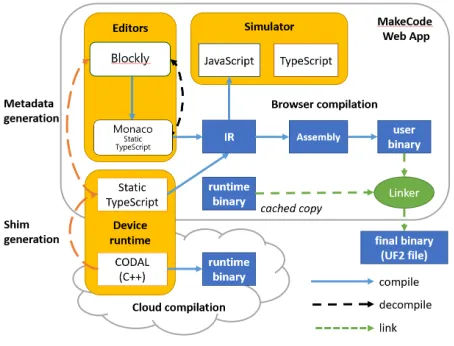
Figure 2.The MakeCode and CODAL Architecture
1.2 Architecture
Figure2illustrates the architecture of our platform. The MakeCode web app is the primary entry point for the end-user. MakeCode supports the simplified programming of MCUs via editors for visual blocks and the textual Type-Script2language. CODAL is a component-oriented, event-driven, fiber-based C++ runtime environment that bridges the semantic gap between the higher-level languages (such as TypeScript) and the hardware (bottom-left of the Figure). Enabling the flashing of the microcontroller is UF2, a new file format and bootloader for the simplified transfer of binaries to the device over USB (bottom-right).
MakeCode can be accessed from any modern web browser and cached locally forentirely offline use. The MakeCode web app incorporates the open-source Blockly3and Monaco4
editors left), an in-browser device simulator (upper-right) for testing programs before transferring them to the physical device, as well asin-browser compilationof Type-Script to machine code and linking against the pre-compiled CODAL C++ runtime (lower-left).
MakeCode devices appear as USB pen drives when plugged into a computer, thanks to UF2. After a user has finished de-veloping a program, the compiled binary is “downloadedž locally to the user’s computer (lower-right) and then trans-ferred (flashed) to the MCU by a simple file copy operation. This works out-of-the-box on any OS with built-in support for USB pen drives (MacOS, Windows, Linux, ChromeOS).
1.3 Overview
The remainder of the paper describes the design, implemen-tation, and evaluation of MakeCode (Section2), the CODAL C++ runtime (Section3), and the UF2 bootloader (Section4).
2https://www.typescriptlang.org 3https://github.com/google/blockly
[image:3.612.58.285.77.250.2]4https://github.com/microsoft/monaco-editor
Figure 3.Screen snapshot of the MakeCode web app.
Section5shows that combined, these technologies enable simplified programming while maintaining a relatively high degree of temporal and spatial efficiency. We demonstrate up to 50x better performance than other state-of-the-art im-plementations, in some cases nearing the performance of native C++. MakeCode has been live since the fall of 2016, at first supporting just the micro:bit, but now supporting many more devices, most of which are based on CODAL. Section6 discusses related work and Section7concludes the paper.
2
MakeCode
The key technical contribution of MakeCode is to provide users with a basic environment to write programs for MCUs, enabling a simple progression from visual block-based pro-gramming to text-based propro-gramming in Static TypeScript (STS), while leveraging C++ on the backend for efficient use of MCU resources. MakeCode uses the open-source Blockly and Monaco editors to allow the user to code with visual blocks or STS. The editing experience is parameterized by a fully-typed device runtime, which provides a set of catego-rized APIs to the end-user.
Figure3 is a screenshot of the MakeCode web app for Adafruit’s Circuit Playground Express (CPX) device5. The web app has five sections: (A) the menu bar allows switching between the two editors; (B) the simulator shows the CPX board and provides feedback on user code executed in the browser; (C) the toolbox provides access to device-specific APIs and programming elements; (D) the programming can-vas is where editing takes place; (E) the download button invokes the compiler, producing a binary executable.
The web app encapsulates all the components needed to deliver a programming experience for MCUs, free of the need for a C++ compiler for the compilation of user code. The web app is written in TypeScript and incorporates the TypeScript compiler and language service as well. The app
is built from a MakeCode “targetž which parameterizes the MakeCode framework for a particular device. The remaining subsections describe the essential components of the web app in Figure2.
2.1 Static TypeScript
TypeScript is a typed superset of JavaScript designed to en-able JavaScript developers to take advantage of code comple-tion, static checking and refactoring made possible by types. As a starting point, every JavaScript program is a TypeScript program. Types can be added gradually to JavaScript grams, supported by type inference. While TypeScript pro-vides classes and interfaces with syntax like Java/C#, their semantics are quite different as they are based on JavaScript. Classes are simply syntactic sugar for creating objects that have code associated with them, but these objects are indeed JavaScript objects with all their dynamic semantics intact.
Static TypeScript (STS) is closely related to StrongScript [23], which extends TypeScript with a type constructor for con-crete types, allowing the programmer to choose between untyped, optionally-typed, and concretely typed code. This provides traditional type soundness guarantees, as in Java and C#. STS can be seen to be StrongScript where every vari-able and expression has a concrete type. As in StrongScript, classes are nominally typed, which permits a more efficient and traditional property lookup for class instances. Currently, STS goes further than StrongScript by outlawing downcasts.
2.2 Device Runtime and Shim Generation
A MakeCode target is defined, in part, by its device runtime; which is a combination of C++ and STS code, as shown in the lower-left of Figure2. All the target’s C++ files are precompiled (by a C++ compiler in the cloud) into a single binary, which is stored in the cloud as well as in the HTML5 application cache. Additional runtime components may be authored in STS, which allows the device runtime to be extended without the use of C++, and permits components of the device runtime to be shared by both the device and simulator runtimes. The ability to author the device runtime in both STS and C++ is a unique aspect of MakeCode’s design. Whether runtime components are authored in C++ or STS, all runtime APIs are exposed as fully-typed TypeScript definitions. A fully-typed runtime improves the end-user ex-perience by making it easier to discover APIs; it also enables the type inference provided by the TypeScript compiler to infer types for (unannotated) user programs.
MakeCode supports a simple foreign function interface from STS to C++ based on namespaces, enumerations, func-tions, and basic type mappings. MakeCode uses top-level namespaces to organize sets of related functions. Preceding a C++ namespace, enumeration, or function with a comment starting with//%indicates that MakeCode should map the C++ construct to STS. Within the//%comment, attributes
specify the visual appearance for that language construct, such as for the input namespace in C++ for the CPX:
1 / / % c o l o r = " # B 4 0 0 9 E " w e i g h t = 9 8 i c o n = " \ u f 1 9 2 "
2 namespace i n p u t { . . .
Figure3(C) shows the toolbox of API and language cat-egories, where the categoryINPUT corresponding to the namespaceinputcan be seen (second from the top).
Mapping of functions and enumerations between C++ and STS is straightforward and performed automatically by MakeCode. For example, the following C++ function onLight-ConditionChangedin the namespaceinputwraps the more complex C++ needed to update the sensor and register the (Action) handler with the underlying CODAL runtime:
1 / / % b l o c k = " on l i g h t % c o n d i t i o n "
2 void o n L i g h t C o n d i t i o n C h a n g e d ( L i g h t C o n d i t i o n c o n d i t i o n , A c t i o n h a n d l e r ) {
3 auto s e n s o r = &g e t W L i g h t ( )−> s e n s o r ;
4 s e n s o r−> u p d a t e S a m p l e ( ) ;
5 r e g i s t e r W i t h D a l ( s e n s o r−> i d , (i n t) c o n d i t i o n ,
h a n d l e r ) ; 6 }
MakeCode generates TypeScript declaration file (here called a shim file) to describe the TypeScript elements corre-sponding to C++ namespaces, enumerations and functions. Since the C++ function above is preceded by a//%comment, MakeCode adds the following TypeScript declaration to the shim file and copies over the attribute definitions in the com-ment. MakeCode also adds an attribute definition mapping the TypeScript shim to its C++ function:
1 / / % b l o c k = " on l i g h t % c o n d i t i o n "
2 / / % shim = i n p u t : : o n L i g h t C o n d i t i o n C h a n g e d
3 f u n c t i o n o n L i g h t C o n d i t i o n C h a n g e d ( c o n d i t i o n : L i g h t C o n d i t i o n , h a n d l e r : ( ) => void) : void;
Since the //%comment also contains ablock attribute, MakeCode creates a block (named “on lightž), which can be seen in the upper-left of Figure3(D).
To support the foreign function interface, MakeCode de-fines a mapping between C++ and STS types. Boolean and void have straightforward mappings from C++ to STS (bool →boolean, void→void). As JavaScript only supports num-ber, which is a C++ double, MakeCode uses TypeScript’s support for type aliases to name the various C++ integer types commonly used for MCU programming (int32, uint32, int16, uint16, int8, uint8). This is particularly useful for sav-ing space on 8-bit architectures such as the AVR. MakeCode also includes reference-counted C++ types for strings, lamb-das (Action in C++, with up to three arguments and a return type) and collections, with mappings to STS.
2.3 Browser Compilation
When a user requests a download of the compiled binary, MakeCode first invokes the TypeScript language service to perform type inference and type checking on the user’s pro-gram, the device runtime written in STS, and the TypeScript declarations corresponding to the C++ device runtime. It then checks that the combined TypeScript program is within the STS subset through additional syntactic and type checks over the typed AST. Assuming all the above checks pass, MakeCode then performs tree shaking of the AST to remove unused functions. The reduced AST is then compiled to an intermediate representation (IR) that makes explicit labelled control flow among a sequence of instructions with condi-tional and uncondicondi-tional jumps, heap cells, field accesses, store operations, and reference counting.
There are three backends for code generation from the IR. The first backend generates JavaScript, for execution against the simulator runtime. A second backend, parameter-ized by processor type, generates assembly code. Currently supported processors include ARM’s Cortex class (Thumb in-structions) and Atmel’s ATmega class (AVR inin-structions). A separate assembler, also parameterized by an instruction en-coder/decoder, generates machine code and resolves runtime references, producing a final binary executable. A third back-end generates bytecode instructions. MakeCode can encode the resulting binary in several formats, including Intel’s HEX format [13] and the UF2 format, documented in Section4.
The MakeCode compiler supports the STS language subset of TypeScript with two compilation strategies: untagged and tagged. Under the untagged strategy, a JavaScript number is interpreted as a C++intby default and the type system
is used to statically distinguish primitive values from boxed values. As a result, the untagged strategy is not fully faithful to JavaScript semantics: there is no support for floating point, and thenullandundefinedvalues are represented by
the default integer value of zero. The untagged strategy is used for the micro:bit and Arduino Uno targets.
In the tagged strategy, numbers are either tagged 31-bit signed integers, or if they do not fit, boxed doubles. Special constants likefalse, nullandundefinedare
distin-guished by specific values. The tagged execution strategy has the capability to fully support JavaScript semantics and is used by all ATSAMD21 targets, including the CPX.
3
The CODAL Runtime
CODAL is a lightweight, object-oriented, componentized C++ runtime for microcontrollers designed to provide an efficient abstraction layer for higher level languages, such as JavaScript. CODAL has five key elements:
1. a unified eventing subsystem(common to all compo-nents) that provides a mechanism to map asynchro-nous hardware and software events to event handlers;
1 # i n c l u d e " C i r c u i t P l a y g r o u n d . h " 2 C i r c u i t P l a y g r o u n d c p l a y ; 3
4 void o n B r i g h t ( ) { / / u s e r d e f i n e d c o d e }
5
6 i n t main ( ) {
7 c p l a y . messageBus . l i s t e n ( ID_LIGHT_SENSOR , LIGHT_THRESHOLD_HIGH , o n B r i g h t ) ;
8 }
Figure 4.Example of the CODAL MessageBus.
2. a non-preemptive fiber schedulerthat enables concur-rency while minimizing the need for resource locking primitives;
3. a simple memory management systembased on refer-ence counting to provide a basis for managed types; 4. a set of drivers, that abstract microcontroller hardware
components into higher level software components, each represented by a C++ class;
5. a parameterized object model composed from these components that represents a physical device. There are discussed in detail below.
3.1 Message Bus and Events
CODAL offers a simple yet powerful model for handling hardware or user defined events. Events are modeled as a tuple of two integer values - specifying anid(namespace) and avalue. Typically, an id correlates to a specific software component, which may be as simple as a button or some-thing more complex as a wireless network interface. The value relates to a specific event that is unique within the id namespace. All events pass through the CODAL MessageBus. Application developers can thenlistento events on this bus, by defining a C/C++ function to be invoked when an event is raised. Events can be raised at any time simply by creating anEventC++ object, which then invokes the event handlers of any registered listeners.
3.2 Fiber Scheduler
CODAL provides anon-preemptivefiber scheduler with asyn-chronous semantics and a power efficient implementation. CODAL fibers can be created at any time but will only be descheduled as a result of an explicit call to yield(), sleep() or wait_for_event() on the MessageBus. The latter enables condition synchronization between fibers through a wait/no-tify mechanism. A round-robin approach is used to schedule runnable fibers. If at any time all fibers are descheduled, the MCU hardware is placed into a power efficient sleep state.
The CODAL scheduler makes use of two novel mecha-nisms to optimize for MCU hardware. Firstly, CODAL adopts a stack paging approach to fiber management. MCUs do not support virtual memory and are heavily RAM constrained, but relatively cycle rich. Therefore, instead of overprovision-ing stack memory for each fiber (which would waste valuable RAM), we instead dynamically allocate stack memory from heap space as necessary and copy the physical stack into this space at the point at which a fiber is descheduled (and similarly restored when a fiber is scheduled). This copy oper-ation clearly incurs a small CPU overhead, but brings greater benefits of RAM efficiency - especially given that MCU stack sizes are typically quite small (~200 bytes is typical).
Secondly, the CODAL scheduler supports transparent APCs. Any function can beinvokedas an APC. Conceptually, this is equivalent to calling the given function in its own fiber. How-ever, the CODAL runtime provides a common-case transpar-ent optimization for APCs we callfork-on-block- whereby a fiber will only be created at the point at which the given function attempts a blocking operation such as sleep() or wait_for_event(). Functions which do not block therefore do not incur all of the context switch overhead.
When invoking an APC, the scheduler snapshots the cur-rent processor context and stack pointer (but not the whole stack). If the scheduler is re-entered before the APC com-pletes, a new fiber context is created at the point of deschedul-ing, and placed on the appropriate wait queue. The previ-ously stored context is then restored, and execution contin-ues from the point at which the APC was first invoked. This mechanism provides potentially high RAM savings for the processing of MessageBus event handlers in particular.
CODAL’s scheduling and eventing models are shared by both high and low level languages, and therefore handled uniformly. As a result, when a foreign function call is mapped to C++, that C++ function is capable of blocking the calling fiber without infringing on the concurrency model of the higher level language. This enables, for example, a C++ de-vice driver to block a JavaScript program when awaiting data without changing the behavior of other JavaScript code acting asynchronously (as in Figure3).
3.3 Memory Management
CODAL implements its own lightweight heap allocator, in-troducing reentrant versions of the libc malloc family of functions, permitting universal access to heap memory in user or interrupt code. The heap allocator is flexible and reconfigurable, allowing the specification of multiple heaps across memory and it is optimized for repeat allocations of memory blocks that are commonplace in embedded systems. CODAL also makes use of simple managed types, built using C++ reference counting mechanisms. C++ classes are provided for common types such as strings, images, and data buffers. A generic base class is also provided for the creation of other managed types. This simple approach brings the benefits of greater memory safety for application code, but with the expense of suffering from the issues related to circu-lar references. We take the view that such scenarios are rare in MCU applications, justifying this approach over a more complex garbage collection scheme and its overhead.
3.4 Device Driver Components
CODAL drivers abstract away the complexities of the under-lying hardware into reusable, extensible, easy-to-use compo-nents. For every hardware component there is a correspond-ing software component that encapsulates its behavior in a C++ object. CODAL has three types of drivers:
1. A hardware agnostic abstract specification of a driver model (e.g. a Button, or an Accelerometer). This is provided as a C++ base class.
2. The concrete implementation of the abstract driver model, which is typically hardware specific. This is implemented as a subclass of a driver model, such as a LIS3DH accelerometer, as manufactured by ST Microelectronics.
3. A high level driver that relies only on the interfaces specified in a driver model (e.g. a gesture recognizer based on an Accelerometer model).
This approach brings the benefits of abstraction and re-usability to CODAL, without losing the hardware specific benefits seen in flat abstraction models where every MCU is made to look the same, even though their capabilities are different (as in the Arduino and mbed APIs, for example).
MakeCode is further supported by an annotated C++ li-brary (MakeCode wrappers) defining the mapping from CO-DAL to TypeScript and Blockly. The use of MakeCode wrap-pers ensures that different MakeCode targets that use CO-DAL share a common TypeScript and block API vocabulary6.
4
UF2
The UF2 bootloader enables efficient, universal microcon-troller programming through a USB pen drive interface Ð no drivers are required, as operating systems support pen drives out of the box. The UF2 bootloader builds upon the work of DAPLink [3], but offers a simpler implementation via a new flashing format, UF2.
DAPLink exposes a small virtual 512-byte block FAT file system (VFS), with an empty file allocation table and root directory. When the OS tries to read a block, DAPLink com-putes what should be there. During file system writes, DAP-Link detects blocks of files in Intel HEX format [13], decodes them, and flashes the file’s contents into the target micro-controller’s memory. Other file system writes are ignored.
DAPLink implements many heuristics to deal with quirks of FAT file system implementations in various operating systems (order of writes, various meta-data files that are created and need to be ignored, etc.). However, we have found that the heuristics are fragile with respect to operating system changes, which are not infrequent.
Our new file format, UF2, consists of one or more 512-byte self-contained blocks (aligned to the block size of the VFS), removing the need for the complex heuristics. The blocks have magic numbers, the payload data to be written to flash, and the address where it should be written. Thus, on every 512-byte write via the USB controller, the bootloader can quickly and easily check if the block being written is part of a UF2 file (by comparing magic numbers) and if so, write it immediately in a streaming fashion.
For simplicity, the 512-byte UF2 blocks usually contain 256 bytes of payload data. While 50% density might seem low, the industry standard 16-byte-per-line HEX format has a density of around 35%. However, the files are small by modern computer standards (under 1000k) and we have not found the lower density to be a problem. On the MCU side, the bottleneck there is speed of flash erase, not the USB bus (which reaches 1000k/s).
The minimal implementation of the UF2 bootloader con-sumesjust 1-2 kB of flash memory andless than 100 bytes of RAM, with some variability due to the microcontroller instruction set and USB hardware interfaces in use.
5
Evaluation
Our platform has been actively deployed for over a year, bringing the benefits of a safe programming environment for MCUs to hundreds of thousands of active users. In this
6Seehttps://github.com/microsoft/pxt-common-packages
section we provide a broad, quantitative evaluation of the cost at which these benefits are realized. We do this with several micro-benchmarks that give insight into the perfor-mance of MakeCode and CODAL across the Uno, micro:bit, and CPX devices. We break down results by layer (CODAL and MakeCode) to give an insight into how each performs.
5.1 Benchmarks, Devices, and Methodology
To analyze the performance of our solution, we have written a suite of programs to evaluate different aspects of MakeCode and CODAL on a representative selection of real hardware devices. Throughout, we use the C++ CODAL benchmarks as a baseline; the STS benchmarks show the overhead added by MakeCode. These programs were written in both C++ and STS, and evaluated on the three devices listed in Table1: The micro:bit (Nordic nRF51 MCU), the CPX (Atmel ATSAMD21 MCU), and the Uno (Atmel ATmega MCU).
The Uno is the simplest of these devices, consisting of an 8-bit processor running at 16 MHz, with only 2kB of RAM and 32kB of flash. The micro:bit has a 32-bit Cortex-M0 clocked at 16MHz, with 16kB RAM and 256kB of flash. The CPX is a 32-bit Cortex-M0+, which offers greater energy efficiency and performance; it clocks at 48 MHz, has 32kB of RAM and 256kB of flash. The Uno and micro:bit MakeCode targets use the untagged compilation strategy, while the CPX target uses the tagged strategy (see Section2.3). The benchmarks are classified into two types, each with their own methodology: 1. Performance Analysis: Tests that capture time taken to perform a given operation. For these benchmarks, we toggle physical pins on the device at key points in the test code. We then measure the time to execute the operation, by using a calibrated oscilloscope observing these pins. This allows us to derive highly accurate real time measurements without biasing the experiment. 2. Memory Analysis: Tests that capture the RAM or FLASH
footprint of a certain operation. A map of memory is logged before and after the execution of an operation, allowing us to compute the cost. A serial terminal cap-tures the output of these tests.
Note that memory and performance analysis are done in separate runs to ensure logging does not affect time-related measurements.
5.2 Tight Loop Performance
Table 2. A comparison of execution speed between: native C++ with CODAL; MakeCode compiled to native machine code; MakeCode compiled to AVR VM; MicroPython; and Espruino. The first line lists the C++ time, while subsequent lines are slowdowns with respect to the C++ time. The 6.4x slowdown of MakeCode VM compared to native MakeCode on the Uno is compensated with 5x better code density.
UNO micro:bit CPX
CODAL 171ms 102ms 31ms
MakeCode 2.4x 2.1x 7.3x
MakeCode VM 15.3x -
-MicroPython - 101x 183x
Espruino - 1139x
-To give an indicative general case execution time cost of each solution, we created a simple program that counts from 0 to 100,000 in a tight loop in each solutions’ respective language; the results are shown in Table2. On AVR we count to 25,000 (to fit within a 16 bitint) and scale up the results.
For MicroPython and Espruino on the micro:bit, the run is two or more orders of magnitude slowerthan a native CODAL program. MakeCode performs only 2x slower. The slowdown reflects the simple code generator of our STS compiler. It should be noted that MakeCode for the CPX uses the tagged approach, which allows for seamless runtime switching to floating point numbers, resulting in a further 3x slowdown. For both devices, we can observe that MakeCode outper-forms both the VM-based solutions of MicroPython and Espruino by at least an order of magnitude.
MicroPython and similar environments cannot run on the Uno due to flash and RAM size limitations. We also ran into these limitations, and as a result, developed two compilation modes for AVR. One compiles STS to AVR machine code, and the other (MakeCode VM) generates density-optimized byte code for a tiny (~500 bytes of code) interpreter. The native strategy achieves code density of about 60.8 bytes per statement, which translates into space for 150 lines of STS user code. The VM achieves 12.3 bytes per statement allow-ing for about 800 lines. For comparison, the ARM Thumb code generator used in other targets achieves 37.5 bytes per statement, but due to the larger flash sizes we did not run into space issues.
5.3 Context Switch Performance
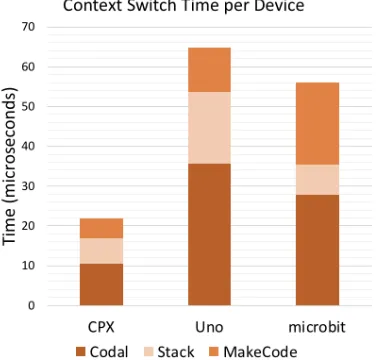
To evaluate the performance of CODAL’s scheduler we con-ducted a test that created two fibers, continuously swapped context, and measured the time taken to complete a context switch. We performed this test in both STS and C++ and the resulting profiles can be seen in Figure5, which breaks the context switch down into three phases: (1) CODAL, the time it takes to perform a context switch in CODAL; (2)
[image:8.612.82.267.165.245.2]Figure 5.Base context switch profiles per device.
Figure 6.Time taken to perform a context switch against stack size.
Stack, the time taken to page out the MakeCode stack; and (3) MakeCode, the overhead added by MakeCode.
[image:8.612.320.557.307.446.2]Table 3. Flash consumption of a MakeCode binary (kB) CPX micro:bit Uno
MakeCode 20.46 12.14 7.79
CODAL 29.85 34.35 13.7
Supporting Libraries 14.99 24.28 -C++ Standard Library 43.14 24 1.03
5.4 Performance of Asynchronous Operations To gauge the cost of asynchronous operations in CODAL, we tested three commonly used code paths, designed to deter-mine the efficiency of CODAL’sfork-on-blockAsynchronous Procedure Call (APC) mechanism that underpins all event handlers in MakeCode and CODAL. We measured the RAM and processor cost of: (1) creating a fiber; (2) handling a non-blocking APC call; and (3) handling a non-blocking APC call. We used the CPX for this experiment.
Non-blocking APC calls, the best case, have a small over-head of 32 bytes of RAM and 4.01 microseconds of processing time. Blocking APC calls, the worst case, incur a large over-head of 204 bytes of RAM and 32.4 microseconds of processor time. Creating a fiber costs 136 bytes of RAM and 35.4 mi-croseconds of processing time. These results highlight the performance gains of the opportunistic fork-on-block mech-anism over a naive approach that would execute every event handler in a separate fiber.
5.5 Flash Memory Usage
MCUs make use of internal non-volatile FLASH memory to store program code. Table3shows the per device flash con-sumption of each software library used in the final MakeCode binary. To obtain these numbers, we analyzed the final map file produced after compilation. The ordering of the table aligns with the composition of the software layer: MakeCode builds on CODAL which builds on the C++ standard library and supporting libraries. MakeCode and CODAL consume 108 kB of flash, whereas CircuitPython consumes 201 kB, MicroPython consumes 228 kB, and Espruino consumes 142 kB of flash. This means that users can write sizeable appli-cations in MakeCode, without the worry of running out of flash memory.
From the bottom up, the profile of the standard library changes dramatically for each device: The Uno has a very lightweight standard library; the micro:bit uses 64-bit inte-ger operations (for timers) which requires extra standard library functions; and the CPX requires software floating point operations pulling in more standard library functions. The size of CODAL and MakeCode scales linearly with the amount of functionality a device has, due to the compo-nent oriented nature of CODAL and transitively MakeCode. For instance, the Uno has few onboard components when compared to the CPX and micro:bit. The modular composi-tion of CODAL allows us to support multiple devices with a variety of feature sets, while maintaining the same API at the MakeCode layer.
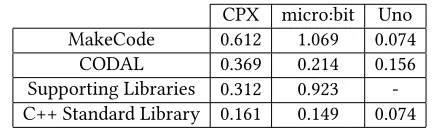
Table 4.Static RAM consumption of a MakeCode binary (kB) CPX micro:bit Uno
MakeCode 0.612 1.069 0.074
CODAL 0.369 0.214 0.156
Supporting Libraries 0.312 0.923 -C++ Standard Library 0.161 0.149 0.074
5.6 RAM Memory Usage
Table4 shows the per device RAM consumption of each software library used in the final MakeCode binary. To obtain these numbers, we analyzed the final map file produced after compilation. At runtime, MakeCode dynamically allocates additional memory: 1.56 kB for the CPX, 560 bytes for the micro:bit, and 644 bytes for the Uno. We also can see that in all cases, the RAM consumption of MakeCode and CODAL is well within the RAM available of each device.
MakeCode and CODAL consume a small amount of re-sources in comparison: CircuitPython (a derivative of Mi-croPython) consumes 12.8 kB, MicroPython consumes 9.5 kB, and Espruino consumes 5.3 kB of RAM. On the micro:bit, the Bluetooth stack requires 8 kB of RAM to operate. Due to MicroPython’s RAM consumption this means that Bluetooth is inoperable. Comparatively, Espruino does enable the Blue-tooth stack, but users have just ~300 bytes available for their programs due to the overhead incurred.
5.7 Compiling Static TypeScript
During compilation, the entire STS program (including the STS runtime) is passed to the TypeScript (TS) language ser-vice for parsing. Then, only the remaining part of the pro-gram (after code shaking) is compiled to native code. On a modern laptop, using Node.js, TS parsing and analysis takes about 0.1ms per statement, and MakeCode compilation to native code takes about 1ms per statement. While the TS compiler has been optimized for speed, MakeCode’s native compilation process has not. For example, the CPX TS pass is dominated by compilation of the device runtime and takes about 100ms, whereas the MakeCode pass typically only in-cludes a small user program and a small bit of the runtime, resulting in less than 100ms. Thus, compilation times are under 200ms for typical user programs of 100 lines or less.
5.8 Extensibility
[image:9.612.67.278.86.150.2]6
Related Work
6.1 Novice Programming Environments
Arduino [24] is an environment for programming micro-controllers, aimed at novices. However, its C++ based APIs introduces barriers for novice programmers [8]. Scratch [22] is a widely adopted, event-based visual programming en-vironment designed to introduce novice programmers to computer science concepts. Extensions enable the program-ming of physical devices with Scratch. However, devices require constant tethered connections to operate, restricting potential projects [10]. ArduBlock [2] brings visual program-ming to the Arduino, but it lacks the event-based blocks Scratch users are familiar with.
With the environments above, additional software must be installed Ð this creates barriers for novice users in restrictive environments. MakeCode and CODAL requireno installation to support a diverse user base and supportevent-based higher-level languagesto help beginners get a head start in the world of the microcontroller.
6.2 Virtual Machine-based Languages
Recently, virtual machines supporting most of the semantics of higher level languages like JavaScript, Java, and Python, have been ported to 32-bit microcontrollers by maker com-munities [10]. Examples include: MicroPython [12], Circuit-Python, and Espruino [29]. These VMs consume a large amount of RAM and flash memory, and run significantly slower than native languages.
The research community has worked to bring higher level languages to microcontrollers [14,25,28]. Rather than run-ning a full-featured VM, others enable higher level languages to run efficiently by stripping out advanced language fea-tures, in favor of efficient, native execution [27]. Comparing these solutions to our solution is challenging due to a mis-alignment in evaluation metrics and microcontrollers. For example, the PICOBit uses an 8-bit MCU, and evaluates the cost of a VM, without the cost of a runtime environment. Simply accounting for a 32-bit MCU in this case, results in factor of 4 multiplication of most metrics.
Our approach bears most similarity to [27], where we compile higher level languages to anoptimized, event-driven C++ runtime (CODAL).
6.3 Embedded Runtime Environments
Arduino [24] is an example of a simple platform where the developer uses high-level APIs to control hardware; there is no scheduler and memory management is discouraged, with a heavy emphasis on the use of global variables.
TinyOS [15], Contiki [11], RIOT OS [7], Mynewt [4], mbed OS [6], and Zephyr [5] are RTOS solutions known widely in the systems community. The majority focus on the network-ing features of sensor based devices and commonly adopt a preemptive scheduling model, which leads to competition
over resources resolved using locks and condition synchro-nization primitives. Contiki has a cooperative scheduler but uses proto-threads to store thread context Ð local variables are not allowed as the context of the stack is not stored.
Although the platforms above are widely used by C/C++ developers, none of these existing solutions align well with the programming paradigms seen in higher level languages. CODALbridges the semantic gap between the higher level language and the microcontroller, offering appropriate ab-stractions and higher level primitives written natively in C++.
6.4 Flashing Microcontrollers
There are two common ways to transfer a program to the flash of a microcontroller: for embedded developers, a spe-cialized debugger chip; for hobbyists, a custom serial proto-col [1]. Both approaches require operating system drivers. ARM’s mbed platform provides DAPLink [3], firmware that presents itself to an external computer as a USB pen drive. DAPLink exposes a virtual file system that caters for normal file system behavior and handles the decoding of Intel HEX files [13] Ð the firmware consumes 66 kB of flash and 13 kB RAM. UF2 contributes a new file format thatgreatly simpli-fiesthe virtual file system approach, reducing complexity of the firmware and code size.
7
Conclusion
We have presented MakeCode: ano installation, web-based programming environment, that supports novice program-mers withblock-based and text-based higher-level languages, and compiles programsin the browser. So as to not compro-mise the spatial efficiency of the microcontroller, we created CODAL: a C++ runtime thatbridges the semantic gap be-tween higher level languages in MakeCode and C++. To transfer programs compiled by MakeCode to the microcon-troller without the installation of any drivers, we created UF2: a new bootloader and file format that enables thesimplified, driverlessprogramming of microcontrollers.
Combined, our approach to running higher level languages on microcontrollers is up to 50x more performant compared to other approaches. Further, by using modern tooling, and higher level languages, our approach lowers the barrier to entry for microcontroller programming.
Acknowledgements
A
Artifact appendix
Submission and reviewing guidelines and methodology: http://cTuning.org/ae/submission.html
A.1 Abstract
This artifact allows others to reproduce the results seen in this paper for MakeCode and CODAL, using the BBC mi-cro:bit. The artifact contains an offline build environment for CODAL and MakeCode, allowing evaluators to test and build programs locally. In addition, we also provide espru-ino and micropython virtual machines to further increase repeatability of our results. Evaluators should download the virtual machine containing all pre-requisite tools, and use an oscilloscope to observe wave forms (used for timing) gener-ated by the micro:bit, and a serial terminal to observe results reported from the micro:bit over serial.
A.2 Artifact check-list (meta-information)
• Program:MakeCode & CODAL • Compilation:arm-none-eabi-gcc
• Binary:espruino, and micropython binaries included; others compiled during testing
• Run-time environment:CODAL • Hardware:BBC micro:bit
• Output:Waveforms, and serial output • Publicly available?:Yes
• Artifacts publicly available?:Yes • Artifacts functional?:Yes • Artifacts reusable?:Yes • Results validated?:Yes
A.3 Description A.3.1 How delivered
The artifact is available hosted on GitHub:
https://lancaster-university.github.io/lctes-artefact-evaluation/
Alternately, the latest release is available for download:
https://doi.org/10.5281/zenodo.1242627
Finally, a virtual machine, based on debian, containing all the re-quired software to reproduce our results is available here:
https://doi.org/10.5281/zenodo.1242605
A.3.2 Hardware dependencies
• A BBC micro:bit • An oscilloscope
• A computer capable of running a virtual machine
A.3.3 Software dependencies
• A virtual machine obtained from the URL above. • A serial terminal.
A.4 Installation
Use virtual box to install the image located at:
https://drive.google.com/open?id=1nxiorz6NRqjen89G59RCOEMkl qAyaUv7
and the VirtualBox extension pack:
https://www.virtualbox.org/wiki/Downloads
A.5 Experiment workflow
Tests generally follow the following sequence of steps:
1. Perform small program modifications. 2. Compile the program.
3. Transfer program to the micro:bit (flashing).
4. Observe either a waveform generated by the micro:bit using an oscilloscope, or serial output from the micro:bit using a serial program.
A.6 Evaluation and expected result
We expect the results to be the same as those reported in the pa-per. The observed waveforms may differ in time due to different compilers, oscilloscopes, and oscilloscope calibration.
A.7 Experiment customization
All tests provided have a clear set of corresponding instructions that evaluators should follow to observe the same results. Any steps involving customisation have been minimised.
A.8 Notes
The virtual machine contains a folder named ‘evaluators’ which is placed in the home directory of the lctes user. The username for the virtual machine is:lctesand the password is:lctes2018. To become super user, typesuin a terminal, and enter the same password (lctes2018).
Once logged in, and in the ‘evaluators’ directory, you can view the tests as markdown files in the ‘docs’ directory. Alternately, these markdown documents can also be viewed on the web by running ‘mkdocs serve’ in the evaluators folder, or browsing to:
https://lancaster-university.github.io/lctes-artefact-evaluation/
Which is a pre-built, and hosted version produced from the same source.
We recommend that you add the micro:bit usb device using the machine settings tab in virtual box as shown in the image below:
‘lctes-vm-dir’ and run ‘sh mount.sh’ (contained in evaluators) as a super user to mount the shared folder to vb-share (also contained in evaluators). Shared folder creation in VirtualBox is pictured below:
References
[1] 2010. AVRDUDE - AVR Downloader/UploaDEr.https://www.nongnu .org/avrdude/. (2010). (Accessed on 02/22/2018).
[2] 2012. Ardublock | A Graphical Programming Language for Arduino.
http://blog.ardublock.com/. (2012). (Accessed on 02/22/2018). [3] 2013. GitHub - ARMmbed/DAPLink.https://github.com/ARMmbed
/DAPLink. (2013). (Accessed on 02/22/2018).
[4] 2015. Apache Mynewt.https://mynewt.apache.org/. (2015). (Accessed on 11/16/2017).
[5] 2017. Home - Zephyr Project.https://www.zephyrproject.org/. (2017). (Accessed on 11/16/2017).
[6] ARM. 2017. The Arm Mbed IoT Device Platform. (2017). https: //www.mbed.com/
[7] Emmanuel Baccelli, Oliver Hahm, Mesut Gunes, Matthias Wahlisch, and Thomas C Schmidt. 2013. RIOT OS: Towards an OS for the In-ternet of Things. InComputer Communications Workshops (INFOCOM WKSHPS), 2013 IEEE Conference on. IEEE, 79ś80.
[8] Paulo Blikstein. 2013. Gears of our childhood: constructionist toolkits, robotics, and physical computing, past and future. InProceedings of the 12th International Conference on Interaction Design and Children. ACM, 173ś182.
[9] Rebecca F Bruce, J Dean Brock, and Susan L Reiser. 2015. Make space for the Pi. InSoutheastCon 2015. IEEE, 1ś6.
[10] Dale Dougherty. 2012. The maker movement.innovations7, 3 (2012), 11ś14.
[11] A Dunkels, R Quattlebaum, F Österlind, G Oikonomou, M Alvira, N Tsiftes, and O Schmidt. 2012. Contiki: The open source OS for the Internet of things.Retrieved October13 (2012), 2015.
[12] Damien George. 2017. MicroPython. (2017).http://micropython.org/
[13] Intel. 1988. Hexadecimal Object File Format Specification. (1988).https://web.archive.org/web/20160607224738/http://microsym .com/editor/assets/intelhex.pdf
[14] Joel Koshy and Raju Pandey. 2005. VMSTAR: synthesizing scalable runtime environments for sensor networks. InProceedings of the 3rd
international conference on Embedded networked sensor systems. ACM, 243ś254.
[15] Philip Levis, Sam Madden, Joseph Polastre, Robert Szewczyk, Kamin Whitehouse, Alec Woo, David Gay, Jason Hill, Matt Welsh, Eric Brewer, et al. 2005. TinyOS: An operating system for sensor networks.Ambient intelligence35 (2005), 115ś148.
[16] Mirjana Maksimović, Vladimir Vujović, Nikola Davidović, Vladimir Milošević, and Branko Perišić. 2014. Raspberry Pi as Internet of things hardware: performances and constraints.design issues3 (2014), 8. [17] John Maloney, Mitchel Resnick, Natalie Rusk, Brian Silverman, and
Evelyn Eastmond. 2010. The scratch programming language and environment.ACM Transactions on Computing Education (TOCE)10, 4 (2010), 16.
[18] John H Maloney, Kylie Peppler, Yasmin Kafai, Mitchel Resnick, and Natalie Rusk. 2008. Programming by choice: urban youth learning programming with scratch. Vol. 40. ACM.
[19] The micro:bit Educational Foundation. 2016. micro:bit : Blast off: School launches BBC micro:bit into space!https://www.microbit.co. uk/rishworth-space. (2016). (Accessed on 05/13/2017).
[20] The micro:bit Educational Foundation. 2016. micro:bit : Use the BBC micro:bit in the BLOODHOUND Rocket Car contest.https://www.mi crobit.co.uk/bloodhound-rocket-car. (2016). (Accessed on 05/15/2017). [21] Microsoft. 2016. 20160705_microsoft_bloodhound_0409 - Microsoft News Centre UK. https://news.microsoft.com/en-gb/2016/07/07/ 26785/20160705_microsoft_bloodhound_0409. (2016). (Accessed on 05/15/2017).
[22] Mitchel Resnick, John Maloney, Andrés Monroy-Hernández, Natalie Rusk, Evelyn Eastmond, Karen Brennan, Amon Millner, Eric Rosen-baum, Jay S. Silver, Brian Silverman, and Yasmin B. Kafai. 2009. Scratch: programming for all. Commun. ACM52, 11 (2009), 60ś67.
http://doi.acm.org/10.1145/1592761.1592779
[23] G. Richards, F. Z. Nardelli, and J. Vitek. 2015. Concrete Types for Type-Script. In29th European Conference on Object-Oriented Programming, ECOOP 2015. 76ś100.https://doi.org/10.4230/LIPIcs.ECOOP.2015.76
[24] Charles R. Severance. 2014. Massimo Banzi: Building Arduino.IEEE Computer47, 1 (2014), 11ś12.https://doi.org/10.1109/MC.2014.19
[25] Vincent St-Amour and Marc Feeley. 2009. PICOBIT: a compact scheme system for microcontrollers. InInternational Symposium on Implemen-tation and Application of Functional Languages. Springer, 1ś17. [26] Franklyn Turbak, Mark Sherman, Fred Martin, David Wolber, and
Shaileen Crawford Pokress. 2014. Events-first programming in APP inventor.Journal of Computing Sciences in Colleges29, 6 (2014), 81ś89. [27] Ankush Varma and Shuvra S Bhattacharyya. 2004. Java-through-C
compilation: An enabling technology for java in embedded systems. InDesign, Automation and Test in Europe Conference and Exhibition, 2004. Proceedings, Vol. 3. IEEE, 161ś166.
[28] Benoît Vaugon, Philippe Wang, and Emmanuel Chailloux. 2015. Pro-gramming Microcontrollers in Ocaml: the OCaPIC Project. In Inter-national Symposium on Practical Aspects of Declarative Languages. Springer, 132ś148.
![Figure 1. Example projects undertaken within education:Rishworth School sent a micro:bit to space [19] (left); Themicro:bit placed in a custom-built rocket car for teleme-try [20, 21] (right).](https://thumb-us.123doks.com/thumbv2/123dok_us/9324066.434332/1.612.318.557.218.290/figure-example-projects-undertaken-education-rishworth-school-themicro.webp)