Drawtool
Toby Jaffey [email protected]
December 2, 1999
Contents
1 Drawtool 2
1.1 What is it? . . . 2
1.2 What can I do with it? . . . 2
1.3 Data format . . . 2
2 Logo 3 2.1 Language features . . . 3
2.1.1 Primitives . . . 3
2.1.2 Repeat statements . . . 3
2.2 Simple geometric figures . . . 4
2.3 Trees . . . 4
2.4 Star figures . . . 6
2.5 Command line options . . . 7
3.1.1 Everything comes out upside-down . . . 9
3.2 Examples . . . 9
List of Figures
1 A non-symmetrical figure . . . 5
2 Tree with a depth of 6 and an angle of . . . 6
1
Drawtool
1.1
What is it?
Drawtool is a simple Gtk application which reads in vector geometry from stdin. It has a range of display
options and has been designed to be extensible with pre-processors such as logo. Drawtool can also has a range of simple painting tools with which the user can mark a canvas. This data is send out on stdout.
1.2
What can I do with it?
It can be used as a networked whiteboard using netcat.
nc -l -p 1234 -u | drawtool | nc -p -u first.host.com 1235 nc -l -p 1235 -u | drawtool | nc -p -u second.host.com 1234
It can be used to rapidly prototype graphical ideas. For example, only using the standard C libraries and a pipe, it is possible to plot pictures using drawtool. For example, in the distribution diffuse does just this.
It can be used like a notepad to quickly scribble down ideas when all pens are lost deep in the desktop cruft.
drawtool | compress -c > MyGreatIdea.Z cat MyGreatIdea.Z | uncompress -d | drawtool
1.3
Data format
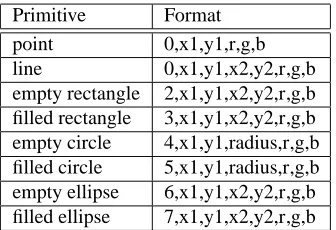
Drawtool reads lists of comma separated integers of various lengths ended with the newline character. The first number dictates the graphic primitive to be drawn, this is followed by appropriate coordinates and radii and ended with a red, green and blue colour triplet.
Primitive Format point 0,x1,y1,r,g,b line 0,x1,y1,x2,y2,r,g,b empty rectangle 2,x1,y1,x2,y2,r,g,b filled rectangle 3,x1,y1,x2,y2,r,g,b empty circle 4,x1,y1,radius,r,g,b filled circle 5,x1,y1,radius,r,g,b empty ellipse 6,x1,y1,x2,y2,r,g,b filled ellipse 7,x1,y1,x2,y2,r,g,b
Table 1: Formats of graphic primitives
2
Logo
Logo is a pre-processor for drawtool. It takes strings in an approximation of the LOGO language and
trans-lates them into commands for drawtool. The program itself has no knowledge of how to draw, it only uses the standard C libraries, this makes it portable to other front-ends supporting the drawtool language.
2.1
Language features
2.1.1 Primitives
The fundamentals of logo are the commands to turn and move. As humans prefer positive numbers these commands are FD (forward), BK (backward), LT (left turn) and RT (right turn). Movement commands are followed by a distance measured in pixels. So, FD 42 will move the turtle on by 42 pixels according to the current bearing. This bearing begins at logical North. Calling RT or LT with an angle in degrees will cause movement clockwise or anti-clockwise respectively.
Many logo systems actually involve a robot turtle which literally makes the moves it is instructed to. These systems usually trace their path with a pen, for this reason we find the commands PU (pen up) and PD (pen down). While the pen is up, the turtle moves without marking a path.
2.1.2 Repeat statements
Repeat statements are supported in logo. These simply repeat a series of commands many times. However, the commands have no access to the repeat counter. For example
is equivalent to the much neater
echo "repeat 4 [fd 50 rt 90]" | logo | drawtool
At present there are problems with the way in which repeat statements are parsed. Negative numbers come out positive, and nested repeat statements will generally fail. This can be easily worked around by outputting logo commands from another language such as perl
#!/usr/bin/perl for ($i=0;$i<4;$i++) {
print "FD 10\n"; print "RT 90\n"; }
Simply pipe this through logo then onto drawtool.
2.2
Simple geometric figures
Using logo in conjuction with drawtool it is straightforward to draw simple geometric figures. For example,
echo "repeat 4 [fd 50 rt 90]" | logo | drawtool
will give a square. More generally
echo "repeat n [fd x rt m]" | logo | drawtool
will draw a regular geometric shape where m multiplied by n is equal to 360.
It is also possible to use simple repeat statements to produce more complex shapes. For example, this non-symmetrical wheel
REPEAT 36 [FD 100 RT 190 RT 45 FD 10 BK 10 LT 45]
2.3
Trees
Figure 1: A non-symmetrical figure
#!/bin/sh
# Usage: tree maxDepth angle distance
# Internally: (Usage: tree currentDepth maxDepth angle distance)
# Not enough args if [ -z $3 ] then
echo Usage: $0 maxDepth angle distance echo for example
echo "honeycomb: $0 8 60 20"
echo "tree: $0 6 25 10"
echo "spider in web: $0 8 112 30" echo
exit 0 fi
# if called by a user, start at depth 0 if [ $# = "3" ]
then
$0 0 $1 $2 $3 exit 0
fi
count=‘expr $1 + 1‘
if [ $count != $2 ]
then
echo LT $3 echo FD $4
$0 $count $2 $3 $4
# -- Go back a step and draw right ones ---echo KT
echo RT $3 echo FD $4
$0 $count $2 $3 $4 else
exit 0 fi
So, to draw a tree six levels deep, with a branch length of 10 and an inter-branch angle of call the shell script like so
tree 6 25 10 | logo -t 5 | drawtool
logo -t 5 sets the stack to a maximum of 5 items, which in this is at minimum the tree depth decremented by
one.
Figure 2: Tree with a depth of 6 and an angle of
2.4
Star figures
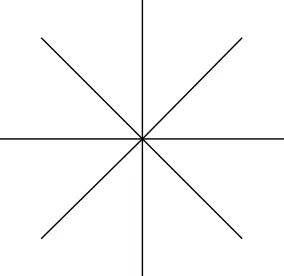
Without the stack feature of logo drawing a star figure would require back-tracking over previously drawn paths. We can simply type
echo "repeat 8 [ht fd 100 kt rt 45]" | logo -t 1 | drawtool
This is not much faster than the more obvious
However, if we were to draw a complex figure on each arm of the star it would stop the need for backtracking and greatly increase speed.
Figure 3: A simple 8 point star
2.5
Command line options
Various features of logo can be enabled from the commandline.
Logo -- Copyright Toby Jaffey 1999 Bug reports to [email protected]
Usage: logo options:
-h --help this help
-c --commands list commands
-t --turtles maximum turtles to be hatched
-x --xpos starting x coordinate
-y --ypos starting y coordinate
-v --tox point to x coordinate
-w --toy point to y coordinate
-m --macro use macro for output
-x and -y define the turtle origin
-m filename causes all lines to be drawn using one of the drawtool macros -v and -w cause the turtle to start up
pointing at a position. This can be very useful for writing drawtool macros which utilise logo. For example, one way to draw an arrow between two points ($1,$2) and ($,$2) would be as follows
# Calculate distance between x1,y1 and x2,y2
DIST=$(echo "sqrt(($3-$1)*($3-$1)+($4-$2)*($4-$2))"|bc -l) # # Start at x1,y1 and point at x2,y2
# # Draw a line from x1,y1 to x2,y2 and 2 little lines logo -t 1 -x $1 -y $2 -v $3 -w $4 -m ./line<<+++ PC $5,$6,$7 FD $DIST HT RT 135 FD 20 KT LT 135 FD 20 +++
However, anyone can clearly see that this is sick.
Running logo -c gives us
Commands
--FD x - Move ForwarD x points
BK x - Move BacKward x points
LT x - Left Turn x degrees
RT x - Right Turn x degrees
HT - Hatch Turtle
KT - Kill Turtle
PU - Pen Up off the pad
PD - Pen Down onto the pad
PC r,g,b - Pen Colour r,g,b (where 0 < [rgb] < 65536)
Most of these commands have already been covered earlier. However, PC r,g,b modifies the pen colour to the
rgb triplet specified.
3
PSDrawtool
PSDrawtool is an alternative display driver conforming to the earlier defined drawtool protocol. Being that
all of the graphic elements are expressed in terms of vectors and points, rather than bitmaps, I have written a display driver which uses the mother of all vector graphics, PostScript.
3.1
Known bugs
3.1.1 Everything comes out upside-down
Drawtool assumes that positive y extends from the top of the screen downwards. Postscript has the positive y
moving from the bottom upwards. This means that all vertical values are rendered upside down in Postscript. This cannot sensibly be remedied without knowing the page height. Therefore, a small script called flip.pl is provided with PSDrawtool which does this job. The script assumes A4 page size unless another is specified as its first argument (in points).
3.2
Examples
All of the figures in the document were generated using PSDrawtool before being converted to eps files with
ps2epsi, in fact this was originally why it was developed.
PSDrawtool is used in exactly the same way as regular Drawtool, but it requires a viewer of some sort.
For example,
tree 6 10 10 | logo t 5 x 300 y 300 | flip.pl | psdrawtool.pl | gv
-draws a tree of depth six using logo with a stack size of 5 and an origin of (300,300). This is then flipped about the centre of the page (assuming A4 size), converted to Postscript then finally viewed.
The star diagram from earlier was generated with,