.,1" .0'
' .... . :' , I
'. , ' '~ ,
':2 ' . :' .. OSIMP·4.1C Rel~se and 'InstaI~ationNotes
~,' I '
..
" , . . . . I .",;,
. ' , ' • 4': . "J r ' , . . , ,\
. \ .~ " . ' ~, . \ '. '. . ',. ':
.
s~I:liOu~e,S~'IJ~Ume comp~er, Seri~, Se~,
Serles5E,~rleS6.~el7cio.
Madei
~. ~.MocIeI810.
Model 820.. ' (. ,..od,el 410; Kbu8; ,O~P, and the Solboume logo B:re. all, trademarks: or' registered. trademarks of Solbo~rne Co~puter, lric;:: ',',
.. VMEbus isa trademarkoftheVMEbusManufact~rers Group. .:, :.: :,.",~:, , ' "j: , , " " , ' ,., . ' . , ' . : ' '
;UNIX'is ~r~gisteredtrademark of U~IXSystem :Laboratories~ Inc.;':,:, .':: .;: .... ':. '; , I , ' . ' .
Allott"!er product or service names 'mentioned herein are trademarks,9f thei~respectiv~ own~rs., ' .
• ' , ' • . ; , I • . , • '~ '. . . ' . ; . . , ' . ' , " , ~"
,'.1
,' .... ~
• .~.' f •
·.,i ,.,"
.' '.
~ ::
' . J :
. ' I ~.
"" ; . ' .
' . ". ',. ' " ,
I,.'; I,', ,
I.: I , .. "
1 ' . '
" . ~. .. ;."
,'" .
"
Cop~right
@'1:
99~':
bySOlbmjrneCO~Plrter,
Inc.' AUrights·r~served.
Nc>
part~fth~~'publica~ion
may·~~'r~~todu~ed, ~tored i~'
any'.' media or in-,any,typ~'ofretri~val system,transmitted irHlnyform·(e.g." electrOnic, mechanical, photocopying, "recording) or,translated
.' into', any :language. orcon,puter,)anguags', without the prior, wntten permission' ~f 'Solb~urne'Computer, Inc~,'
HmO
Pike. ~Road": Longmont, Colorado 8050l. There is no right to, reverse erigin~er,: decompile; or disassemble the information contained hereinoi' in
. theaccorrpan}'.it:"9 so~are .. · ,,', '" " ' . :' '. ' .. ,.\.', ':, , .' ::,: ;,' ' , ' : , ' ' : : ' :, '.'." ",', ,".: , : ",",' '" " :,':.'. ,':~.'
S~lb~~rne
Computer, Inc:rese~~~
the right to revise thispublicatio~
and~~
make changes from timei~"time
without obligation tonotify any person. of suc,h revisions. " < ..': . . I , ' . ' ' . ' . . , ' J.
" : . ' . ' . . . ' ", .~ .... ~
,. ~.
' , : ' , ' .' ' . " . . . , , " . ,J ' . '
Limited/Restricted Rights Legend.: ~·f ',',: " ,'; . '. ' . ." ,
,~s~:· d~pii~ation.
and' disc;os'ureb~
·the
Gove"rn'me~t
.is'SUbj~cfto 'restrictio~sas ~et
'forlh i:n,F~R:5~.227-:14;:,
DFARS~252.227
-;013,'. ,', . 'siJccesso~ regulations, or co~parable regulations of 'other' Govemm~ntagenciesas appropri,ate, regarding "Limited' Rights pata". If ,.'
: this is documentation':for "software; ,it' is provided with "Restricted Righ,ts", pursuanf1to'FAR 52.227-.,19,'and (for NASA) as '
. 'slipple~entedin'NASA FAR1~.52~227~86'·"Jlursuantto subparagraph ,(c)(1)(ii)" of th~ Rights 'in Techhical Data'.andCompl:lter,
... SoftWar~c:Jatise of DFARS. 252.227· 7013, or c'omparable regulations of, other Government agencies' as appropi'h~te;' "Solbo.ume, "
Computer,' Inc., :1900 Pike Road; Longmont,'CO.80501. This legend shall be included on any reproduction hereof,' hi' whole or part;,,, .
•.•. : ... "r ;.,;,.' ','.,';' ~ ,~~ •• ".",,':. , •• ' • • \ '. ~ • .'. '. ••.• ~! .:,.,... " : r " . , ' ,. ' I I , • . • , ' ~:. •
. . /
•• < , , "
, "
, "
'~ . :, ' ' I '
'.
r:-,". '
, ;: : ... ..,
. ,
~ :' '. ' " .' .... ' \ ' , ; ..
'., .
, ' I ' ' , . " ."
':'. '
...
OS/MP 4.1 C Release and Installation Notes
Table of Contents
Introduction ... 7
Documentation Conventions ... 7
Definitions ... 8
Physical Elements of this Release ... 8
Contents of the OSIMP 4.1 C Release Media ... 9
Customer Support Information ... 11
Customer Support Information ... 11
SOLIS - Solbourne On-Line Information System ... 12
Patches via FfP ... 14
Patch Information via Solbourne News Group ... 15
Solpatch ... 16
OSIMP
4.1 C Enhancements and Miscellaneous Software Information ... 17OSIMP 4.1C Enhancements ... 17
Clock Changes ... 17
LEDs ... 18
fsck Enhancement ... 19
Hardware Clock Synchronization ... 19
Support for up to 768 Pseudo-Terminals (ptys) ... 21
SPL Changes ... 22
Processor Affinity Changes ... 22
oncpu Command ... 22
Page Allocation Changes ... 23
Reduction of False Sharing ... 23
SCSI Command Queueing Changes ... 23
Testability and Reliability Changes ... 24
Parallel Networking ... 24
Parallel Softcalls ... 24
Parallel NFS and OVERLAPPED Writes ... 24
Support for Large (> 2 Gbytes) Physical Memory ... ~ ... 25
Parallel FDDI Driver ... 25
Boot and Install From Tape or CD-ROM Drive on First BoSSTM Controller ... 25
Miscellaneous Software Information ... 26
Layered Products ... 26
Perfmon ... 27
Kernel Configuration ... 27
Example Kernel Configuration ... 28
ROM Features ... 29
Setting the BootROM Environment ... 29
Unsupported Software Features ... 33
System Architectures ... 33
2 OSIMP 4.1C Release and Installation,Notes
Supported Hardware ... , ... 35
CPU Boards ... 35
Memory Boards ... 36
Supported Disk Drives ... 36
Banks of SCSI Storage (BoSSTM) ... 37
Drive Controllers ... 37
Tape Drives .. ' ... 38
Floppy Disk Drives ... , ... 39
Network Controllers ... 40
Serial Multiplexers ... 41
Keyboards and Consoles ... 42
Keyboards ... 42
LI-A Key Sequence ... 43
Serial Port Consoles ... 43
Multiple-Display Consoles ... , ... 45
Known Bugs with OSIMP 4.1C ... 47
OSIMP Bugs Fixed in OSIMP 4.1C ... 51
Solbourne OS/MP 4.lB bugs fixed in OS/MP 4.lC ... 51
SunOS 4.1.2 bugs fixed in Solbourne OS/MP 4.1 C ... 58
KernellDriver Bugs Fixed ... 58
System Administration Bugs Fixed ... 59
Network Bugs Fixed ... 59
Library Bugs Fixed ... 59
POXIX (library) ... : ... 59
POSIX (Kernel) ... 59
Link-editor Bug Fixes ... 60
Patches Included in
OSIMP
4.1C ... 61Solbourne OS/MP 4.lB patches in OSIMP 4.lC ... 61
SunOS 4.1.2 patches in Solbourne OS/MP 4.lC ... 64
OS/MP 4.1 C Release and Installation Notes 3
Installing OSIMP 4.1C on a Standalone System ... , ... 67
Before Installing ... , ... 67
Installing preinstall ... 67
Using preinstall ... , ... 68
Installing ... , ... 69
Installing on a Series5, Series5E or Series6: ... 69
Loading the Ramdisk ... 69
Loading the Ramdisk via a Local Tape Drive ... 69
Loading the Ramdisk via a Local CD-ROM Drive ... , ... 70
Diskful Installation ... 71
Install Software ... 73
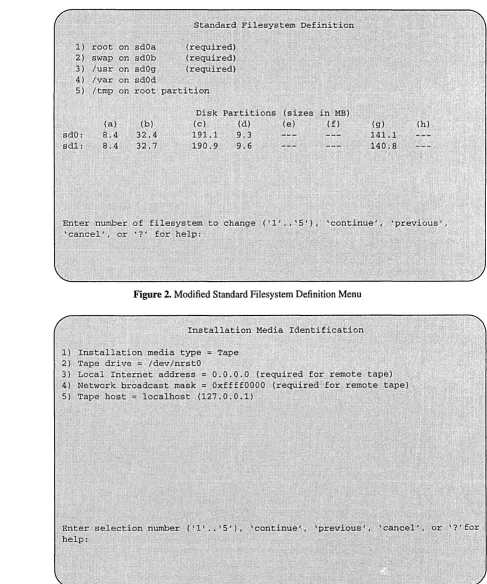
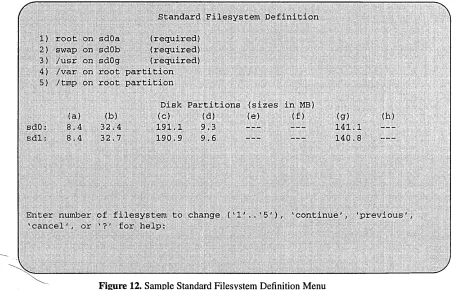
Standard Filesystem Definition ... , ... 74
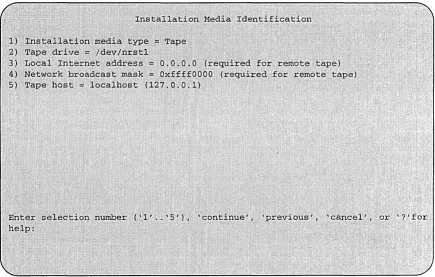
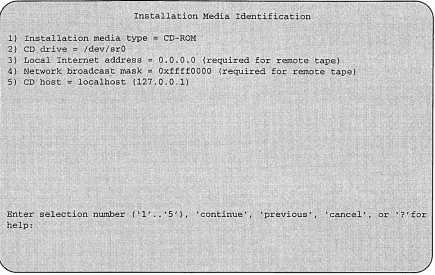
Installation Media Identification Menu ... , ... 75
Tape Installation ... , ... 77
Local CD-ROM Installation ... 77
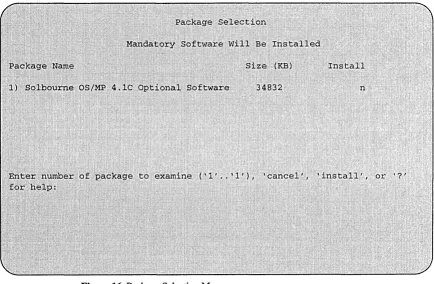
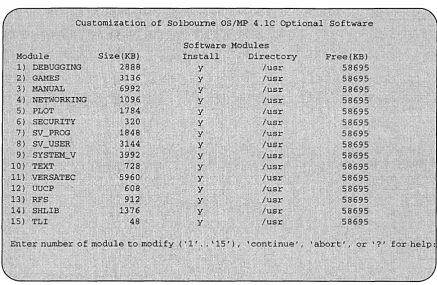
Package Selection Menu ... , ... 77
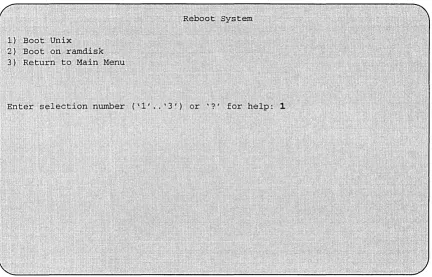
Rebooting from the Ramdisk ... 84
After Installing ... 86
Initial Boot System Configuration ... , ... 86
Reconfiguring the System ... r .... ' ... 88
Installing on a Series S4000 ... 89
Loading the Ramdisk ... , ... 89
Loading the Local Ramdisk via a Local Tape Drive ... " ... 89
Loading the Ramdisk via a Local CD-ROM Drive ... 1 ... ' 89
Diskful Installation ... , ... , .... 90
Software Installation from the Ramdisk ... , ... 93
Standard Filesystem Definition ... , ... 93
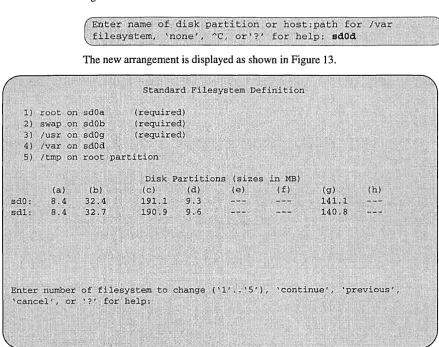
Changing an entry at the Standard Filesystem Definition ... 94
Installation Media Identification Menu ... 95
Tape Installation ... 96
Local CD-ROM Installation ... 96
Package Selection Menu ... , ... , .... 96
Rebooting from the Ramdisk ... , ... 104
After Installing ... 106
Initial Boot System Configuration ... 106
Reconfiguring the System ... 108
Installing OSIMP 4.1C on a Standalone using reinst_sys ... 109
Before Installing... . ... 110
Installing preinstall ... 110
Using preinstall ... III Extracting reinst_sys ... 112
Extracting reinsCsys via a Local Tape Drive ... 112
Extracting reinsCsys via a Local CD-ROM Drive ... 112
Installing ... , ... 113
Installing Software ... 114
Installation Media Identification Menu ... 117
Installing from a Local Tape Drive ... , ... 117
Local CD-ROM Installation ... 118
4 OS/MP 4.1 C Release and Installation Notes
Installing OSIMP 4.1C on a Server ... 127
Before Installing ... 127
Installing preinstall ... 127
Using preinstall ... ; ... 129
Modifying the Hosts Database ... 130
Installing ... 131
Installing on a Series5, Series5E or Series6: ... 131
Loading the Ramdisk ... 131
Loading the Ramdisk via a Local Tape Drive ... ; ... 131
Loading the Ramdisk via a Remote Tape Drive ... 132
Loading the Ramdisk via a Local CD-ROM Drive ... : ... 133
Loading the Ramdisk via a Remote CD-ROM Drive or the Network ... 134
Diskful Installation ... 136
Install Software ... 138
Installation Media Identification Menu ... ; ... ; ... 140
Local Tape Drive Installation ... ; ... 142
Remote Tape Drive Installation ... 142
Local CD-ROM Installation ... ; ... ; ... ; ... ; ... 142
Network and remote CD-ROM Installations ... 142
Package Selection Menu ... ; ... ; ... 145
Rebooting from the Ramdisk ... 152
Disabling tftp ... ; ... ; ... 153
After Installing ... 154
Initial Boot System Configuration ... 154
Reconfiguring the System ... ; ... 156
Installing on Series S4000 ... 157
Loading the Ramdisk ... 157
Loading the Local Ramdisk via a Local Tape Drive ... 157
Loading the Ramdisk via a Remote Tape Drive ... ; ... 157
Loading the Ramdisk via a Local CD-ROM Drive ... 159
Loading the Ramdisk via a Remote CD-ROM Drive or the Network ... 160
Diskful Installation ... 162
Install Software ... 164
Standard Filesystem Definition ... 165
Installation Media Identification Menu ... 166
Local Tape Drive Installation ... 167
Remote Tape Drive Installation ... 167
Local CD-ROM installation ... 168
Network and remote CD-ROM Installations ... 168
Package Selection Menu ... 171
Actual Installation ... 177
Rebooting from the Ramdisk ... 177
Disabling tftp ... 178
After Installing... .. ... 179
Initial Boot System Configuration ... 179
-Reconfiguring the -S ystem-:-:-:-:=:::::::::.::.:~::.-.. ~:::.:.:. ::: ... ::.: .. ::::-.-.:.-.-.::: ...
-181--Installing Diskless Clients on Stin and Solbourne Servers ... 182
Installing config_server ... 182
Configuring the Server ... 184
Installing Clients ... 186
OS/MP 4.1 C Release and Installation Notes 5
Installing OSIMP 4.1 C on a Server using reinst_sys ... 189
Before Installing... . ... 190
Installing preinstall... . ... 190
Using preinstall ... 191
Extracting reinst_sys ... 192
Extracting reinsCsys via a Local Tape Drive ... 192
Extracting reinscsys via a Remote Tape Drive ... 192
Extracting reinscsys via a Local CD-ROM Drive ... 193
Extracting reinscsys via a Remote CD-ROM Drive or the Network ... 193
Installing ... 194
Installing Software ... 195
Installation Media Identification Menu ... 198
Installing from a Tape Drive ... 198
Installing From a Remote Tape ... 199
Local CD-ROM Installation ... 200
Network and remote CD-ROM Installations ... 200
Package Selection Menu ... 201
Installing OSIMP 4.1 C on a Dataless Client ... 211
Before Installing... .. ... 211
Installing ... 211
Installing preinstall... .. ... 211
Using preinstall ... 213
Installing on a Series5, Series5E, or Series6: ... 214
Loading the Ramdisk ... 214
Loading the Ramdisk via a Local Tape Drive ... 214
Loading the Ramdisk via a Remote Tape Drive ... 214
Loading the Ramdisk via a Local CD-ROM Drive ... , ... 21p Loading the Ramdisk via a Remote CD-ROM Drive or the Network ... 217
Dataless Installation ... 219
After Booting Ramdisk ... 219
Software Installation from the Ramdisk ... 221
Standard Filesystem Definition ... 222
Changing an entry at the Standard Filesystem Definition ... 222
The Dataless Install Identification Menu ... 224
Installation Media Identification Menu ... 225
Installing from a Tape Drive ... 225
Local CD-ROM Installation ... 227
Network and remote CD-ROM Installations ... 227
Root Files Installation ... 229
Rebooting from the Ramdisk ... 229
Disabling tftp ... 231
After Installing ... 232
Initial Boot System Configuration ... 232
6 OS/MP 4.1C Release and Installation Notes
Installing on a Series S4000 ... 1 . . . ,. . . 235
Loading the Ramdisk ... , ... , ... 235
Loading the Ramdisk via a Local Tape Drive ... 235
Loading the Ramdisk via a Remote Tape Drive ... 236
Loading the Ramdisk via a Local CD-ROM Drive ... 237
Loading the Ramdisk via a Remote CD-ROM Drive or the Network ... 238
Dataless Installation ... ~ ... ,.240
After Booting Ramdisk ... 1 ... 240
Software Installation from the Ramdisk ... 242
Standard Filesystem Definition ... 243
Changing an entry at the Standard Filesystem Definition ... 243
The Dataless Install Identification Menu ... ; ... 245
Installation Media Identification Menu ... 246
Installing from a Tape ... 246
Local CD-ROM Installation ... 248
Network and remote CD-ROM Installations ... 248
Root Files Installation ... 250
Rebooting from the Ramdisk ... 250
Disabling tftp ... 252
After Installing... .. ... j ••• 253 Initial Boot System Configuration ... 253
Reconfiguring the System ... 255
Installing OSIMP 4.1C on a Diskless Client ... 257
Before Installing ... , ... , ... 257
Installing ... , .. , ... 258
Setting BootROM Variables ... , ... 258
After Installing ... 260
Reconfiguring the System ... ; ... 262
Changing Disk Partitioning ... , ... 1 ... 263
Partition or Review Disk ... 265
Resizing Partitions ... ; ... 1 ... 1 ... 266
Changing Mount Points ... 269
Templates ... 271
Documentation
Conventions
Introduction 7
Introduction
This document describes the release and installation of OSIMP 4.1 C.
OSIMP 4.lC is a "full" installation that you can use to:
o
install OSIMP 4.1 C on a Solboume systemo
add support to a server for an OSIMP 4.1 C cliento
repartition a hard disk driveThis release applies to the following Solboume architectures: Series5, Series5E, Series6, and Series S4000 systems. In these release notes, the term "Series S4000," or simply "S4000," refers to all Solbourne S4000, S4000DX, and S3000 systems; "Series5" refers to both Series5 and Series5E architectures; also "Series6" refers to both the 33 and 50 mhz Series6 speeds.
OSIMP 4.1 C offers basic binary application compatibility with SunOS 4.1.2 and
4.1.3. and prior OSIMP releases.
***NOTE***
Some layered products running on OSIMP 4.1C require revision upgrades. Refer to "OSIMP 4.1 C Enhancements and Miscellaneous Software Information" for de-tails.
In the body of this document, commands and file names are presented in boldface
and command parameters for which you substitute a value are italicized. User input
instructions and examples are presented in a constant width font. In these notes, the following convention is followed:
o
Information displayed by the system is given in normal constantwidth.
o
Information you enter is displayed in bold constant width.o
Variables for which you substitute a value are shown in oblique8 Introduction
Definitions
Physical Elements of this
Release
local A device that is physically connected to the system being installed. For ex~
ample, a local disk drive.
remote A device that is physically connected to a system other than the system be-ing installed. For example, a remote tape drive.
package The components of a distribution are referred to as packages. Examples
of packages are FORTRAN 1.4, X Windows, and Solbourne OSIMP Optional
Software for S4000.
ramdisk image The ramdisk image is a special UNIX kernel with a built-in RAM disk that contains the installation software.
server A system that is on a network and may provide NFS disk services.
client A system that uses NFS services provided by another system. A diskful
sys-tem with root(l), swap, and
lusr
on a local disk.diskless A system whose root(l), swap, and
lusr
filesystems are provided by aserver, instead of a local disk.
dataless A system whose /usr filesystem is on a remote disk and whose root (I) filesystem and swap disk partition are on a local disk.
standalone A system that has no networking. It also does not depend on a server
for its root, swap, or
lusr
filesystems.filesystem A set of files and directories that reside on one disk partition. The term is also used to refer to the swap area, even though the swap area does not actually contain files and directories.
hostnumber The host portion (the last number of a class C address) of the Internet Protocol address. For example, if the Internet address is 192.1.3.42, the hostnum-ber is 42.
This release contains the following items:
Table
1.
Physical Elements of the OSIMP 4.1 C ReleasePart Number Description
106550 - -1I4-irichQIC":150 OSIMP 4.1C tape, or 106552 8mm Exabyte OSIMP 4.1C tape, or 106507 CD-ROM OSIMP 4.1 C disk
. Contents of the
OSIMP4.1C
Release Media
File # 0 1 2 3 4 5 6 7 8 9 10 11 12 13 14 15 16 17 18 19 20 21 22 23 24 25 26Table 2. Contents of OSIMP 4.1 C Tape
File
Table of Contents
Package Description File for Full 4.1 C installation
Series5 Installation Kernel
Series6 Installation Kernel
S4000 Installation Kernel
Tools files
. Miniusr
Root files
Series5 kvm files
Series6 kvm files
S4000 kvm files
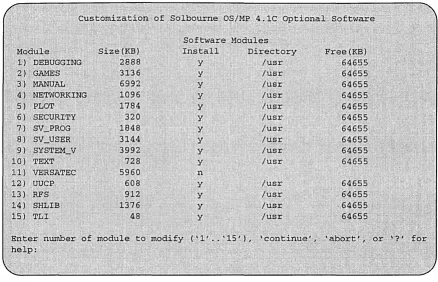
Usr files debugging files games files man files networking files graphics files security files
sun view _programmers files
sunview _users files
system_ v files
text files versatec files uucp files rfs files shlib_custom files tli files
Introduction 9
Size
Format (KB)
dd 2
dd 2
dd 6826
dd 6882
dd 6479
tar 288
dd 18432
tar 6856
tar 11632
tar 11760
tar 10224
tar 33384
tar 2888
tar 3136
tar 7504
tar 1096
tar 1784
tar 320
tar 1848
tar 3144
tar 3992
tar 728
tar 5960
tar 608
tar 912
tar 1376
Customer Support
Information
Customer Support Information 11
Customer Support Information
If you have problems installing or using the features included in the Solbourne
OSIMP 4.1 C release, call the Solboume toll free support number, 1-800-447-2861,
if you are within the United States. Customers outside the U.S. should call their
lo-cal Solboume representative. If you have purchased a support contract that
in-cludes support for OSIMP 4.1 C from Solboume, this service is provided. When
you call, please be prepared to give the following information about your system:
o
Model number (such as Series6/902 or S4000)o
Serial numbero
Solboume OSIMP release number (4.1 C)The system's model number and serial number can usually be determined using the eeprom(8) command, as in the following:
To check the Solboume OSIMP release number, enter the cat command as shown
12 Customer Support Information
SOLIS - Solbourne
. On-Line Information
System
Following is a description of the. various ways customers obtain the latest patches for the Solboume operating system and unbundled software products.
SOLIS, Solboume's On-Line Information Service, allows users access to available Solboume patches via emjlil.
• " f '
The Information Service is based on the public domain "discussion listserv"
pro-gram written by Ari'astasios Kotslkonas.· .
To access the service, simply email [email protected]. Command keywords are used in the body of the mail message (leave the subject line plank).tp invoke the desired operations of the Information Service program. Requests .are not case sensitive.
o
To ge.t ~ listi:Qg ~f recognized requests:help"
e~ample_:
o
To obtain an index ofth.e files ~n a specified archive:index; [archive ..
I
path-to-archive]example:
,
.
o
To obtain a copy of the actual index file which gives a brief description of eachpatch:
Customer Support Information 13
To request a file from a specified archive:
get <archive
I
path-to-archive> <file> [parts]example:
To request all patches from a specified archive:
example:
An archive file will be in one of two formats: an ascii file or multiple parts which should be concatenated (removing mail headers first), uudecoded, and tar extracted.
Currently available archives are: OS/MP 4.1B, 4.1C, c++, openwindows, pdb2.2, x2.1, x3.0.
If you have comments or other categories of archiv~s you would like to see
14 Customer Suppor:t Information
Patches via FfP
Patches are also available via anonymous ftp from the Solbourne archive machine,
ftp.solbourne.com (internet address 141.138.2.2). Each patch directory contains
an index file and the individual patches which are in a compressed tar file format.
Some patch directories also contain README files which provide specific
in-structions for that patch directory. The Solpatch utility MUST be used to install all OS/MP 4.1C patches.
Directions:
Patch Information via Solboume News Group
Customer Support Information 15
The solboume.info USENET mailing list is also updated regularly when patches are released. Patches cannot be obtained from the news group but it is a good source for finding out when patches are released.
To subscribe to this news group:
email: [email protected], and ask to be placed on the
subscribers list.
If none of the above options is available to you, please contact National Technical
16 Customer Support Information
Soipatch
Solpatch is a software utility that provides easy installation, tracking, and removal
of official Solboume released patches for the OSIMP and other unbundled software
products.
Solpatch was available as a patch in OSIMP 4.1B and is bundled into OSIMP 4.1 C.
To use Solpatch:
1. Become root
2. Make sure that the PATH variable for the root login account contains the
foUowing directories:
• lusr/bin
• lusrlsbin
• lusrlsadmlinstaillbin
3. To invoke solpatch:
patch_spooldir is where the patches reside and patch_logflle is where
solpatch logfile resides (default is Ivar/admlpatch_logfile). These arguments
can also be specified by setting the environment variables
PATCH_SPOOLDIR and PATCH_LOGFILE.
Refer to the solpatch man page for additional information. In addition, on-line
OSIMP4.1C
Enhancements
Clock Changes
OSIMP 4.1 C Enhancements and Miscellaneous Software Information 17
OS/MP 4.1 C Enhancements and
Miscellaneous Software Information
This section explains the enhancements provided by OSIMP 4.1C and other useful
software information such as kernel reconfiguration and setting BootROM envi-ronment variables.
OSIMP 4.1C incorporates many improvements. These improvements were
ob-tained by multithreading kernel subsystems that were previously single-threaded, improving already multithreaded subsystems, and optimizing critical code paths.
In looking at customer performance problems a large degree of variability in per-process user and system time was noted. This discrepancy was caused by the way clock ticks were processed. For each clock tick from the hardware, the software "relayed" the tick to all other CPUs. When a tick was received it charged the pro-cess running for all the time that had elapsed since the last tick was received on that processor (based on whether it was in system or user mode when the tick was de-livered). Because of some of the SPL problems detailed below a processor could miss many relayed ticks in a row and then charge all the missed time as a lump sum to either system or user. Also, there was no synchronization of missed ticks across
a context switch in prior OSIMP releases, which could cause the wrong process to
18 OS/MP 4.1 C Enhancements and M~scellaneous Software Information
All of these problems have been fixed in OSIMP
4.1
C. A new method of dealing
with clock ticks which does not require relaying clock ticks to slaves is used. The
processor which receives the hardware clock tick does all the billing for all CPUs.
CPUO
CPU1
CPU2
CPU3
CPUO
CPU1
CPU2
CPU3
10msec
RELAYED TICKS ~200usec
4.1B clock processing
i _ i I I
. I
i I ~200usec
10msec4.1 C clock processing
-Also, the micro-second timer on Series6 boards is now used to provide high reso ..
luti~n
time (to 1 usec) to tiser level applications; For example,
4.1B
allows time res ..
olution to the 10msec level. For other CPU types, the 10 msec resolution still
ap-pli,es.
.
LEDs
.one side effect of ali the "clock tick" changes is that the CPU board LEDs no
longer "b9unce" (or toggle) the same. "Bouncing" is an interesting side effect of
system behavior that was commonly used to verify normal operations; this pattern
has changed. Now, bouncing LED displays only happen when clock ticks are
re-ceived by a CPU. Since clock ticks are not rere-ceived by all CPU's, not all CPUs will
have bouncing LEDs.
The "F4" code displayed on a CPU running
OSIMP4.1B indicated that the CPU
was idle on a process.
OSIMP4.1C no longer uses "F4" for idle states, and now
fsck Enhancement
Hardware Clock Synchronization
OS/MP 4.1 C Enhancements and Miscellaneous Software Information 19
The utility fsck(I)'s preen mode has been modified to avoid aborting due to insuf-ficient swap space availability. Preen mode minimizes file system checking time by looking at file systems in parallel. This results in several instances offsck(l) running at once, one per file system being checked. The memory requirements for
each fsck(l) depend on the siz~ of the file system involved. The previous behavior
was that a memory allocation failure would cause fsck(l) to believe the file system was corrupted in a way that can not be corrected manually, causing the system to sit in single-user mode until a manual check of the file systems has been done. The new version of fsck(l) notices when a memory allocation failure occurs when checking a particular file system. The number of checks to be done in parallel is reduced, and the checks are repeated for the file systems that weren't able to be checked due to memory shortages. This procedure is repeated until all file systems have been checked, or the number of checks to run at once reaches zero. In the latter case, there is not sufficient swap space to check a particular file system at all when in preen mode.
When the number of parallel checks to run is reduced, fsck(l) prints the message:
If the concurrency value is reduced many times, this is a good indication that the
primary swap partition of the system is too small. It should either be enlarged, or a
different, larger partition should be named in the BootROM environment variable DEFAULTDUMP.
Using a network time synchronization utility can cause erratic time behavior under
OSIMP 4.1 C. This happens because the kernel, by default, attempts to synchronize
with the hardware time-of-day clock, rather than forcing the hardware clock to agree with the kernel's idea of what time it is. One example of a utility to provide synchronized time across a network is xntpd, which is part of a program suite that implements the Network Time Protocol (it is available via the Internet).
20 OSIMP 4.1 C Enhancements and Miscellaneous Software Information
It may also be set in the kernel config area, so that all new kernels will be built with the desired value:
Finally, it can be set at boot time, avoiding any problems with installing any pos-sible future patches to IsyslkbusfOBJfclock.o by losing the modification to do-synctodr. This can be accomplished by adding the following line near the end of letclrc.local:
It will result in these two lines being printed to the console during boot:
This can be considered a reminder that hardware clock synchronization has been
disabled. It can be suppressed by putting a slightly different command into
Support for up to 768 Pseudo-Terminals (ptys)
OS/MP 4.1C Enhancements and Miscellaneous Software Information 21
The system can now support up to 768 pseudo-terminals (ptys). This support in-cludes the following modifications:
o
,The system utilities that use ptys (in.rIogind(8), script(1), in.telnetd(8), andrexd(8)) now take advantage of the greater available number of ptys.
o
The file /devIMAKEDEV can create all of the relevant /dev/pty* and/dev/tty* entries, using MAKEDEV ptyN, where N is between 0 and 47
inclusive. Each Nnumber represents 16 devices.
o
The macro nonuserO in the C header file /usr/incIude/utmp.h will scan all ofthe possible tty names.
o
Entries have been added to /etc/ttytab for all of the new tty names.The GENERIC kernel only supports 48 ptys. To enable kernel support for more,
the appropriate config file in /sys/kbus/conf or /sys/idt/conf must be modified.
Modify the line:
to list the number of ptys wanted. For instance, to support 128 ptys:
22 OSIMP 4.1 C Enhancements and Miscellaneous Software Information
SPLChanges
Processor Affinity Changes
oncpu Command
SPLs (Set Priority Level) in the kernel which were trying to block all device inter-rupts were also blocking clock ticks. This was a result of the way the System Board and MCAB delivered VME level 7 interrupts. To resolve this problem, support for VME level 7 interrupts was dropped, allowing the kernel to block all device inter-rupts without preventing clock ticks from being delivered.
Another optimization made in 4.1 C was to keep a shadow copy of the processor priority in the per-cpu structure, avoiding the overhead of reading this value from the hardware. Also, unnecessary reads of the priority level were eliminated alto-gether.
Processor affinity refers to the tendency of a process to keep running on the same CPU rather than wandering from one to another at each context switch. With a 16Mb cache there is potentially a lot of data cached on the Series6 L3 cache. If a process is allowed to wander at will it can generate significant Kbus traffic as its
working set tries to follow it. OSIMP 4.1 B had algorithms which prevented process
migration if the number of runnable processes was less than or equal to the number of CPU s, or if the number of runnable processes was much bigger than the number
of cpus. OSIMP 4.1 C incorporates algorithms to maintain good process to
proces-sor affinity when the load is in the middle; the number of runnable processes is greater than the number of CPUs, and less than 4 times the number of CPUs.
The effectiveness of processor affinity can be monitored with vrnstat -p. This dis-plays the ratio of context switches to a process which last ran on this cpu, to the total number of context switches.
Processor affinity can be disabled by patching the kernel variable enable_pam_affinity to a value of zero and rebooting:
The on cpu command is new in OS/MP 4.1 C. This command lets you control which processors a process can run on in a multi-CPU system. Byusing oncpu to force certain critical processes to run on particular CPUs, you can improve caching char-acteristics and overall system performance.
Page Allocation Changes
Reduction of False Sharing
SCSI Command Queueing Changes
OS/MP 4.1 C Enhancements and Miscellaneous Software Information 23
The selection of pages to allocate to a process when a large direct indexed cache is present can result in unnecessary physical aliases in the cache if all free pages are kept on a single free list. Maintaining a free list of pages for each page aliases in the cache and managing alias allocations on a per process basis can significantly reduce misses in the cache, thus improving performance and reducing traffic on the system bus. This technique, called "bin hopping" is described in KESSI.
False sharing occurs when private per-cpu data structures are allocated in the same cache block. False sharing results in unnecessary bus traffic. The following areas of code were modified to minimize false sharing: Global File Table allocation, sta-tistics, and scheduling.
To achieve maximum performance with the latest generation SCSI-2 disks, host-adaptor drivers now support SCSI-2 tagged command queueing. SCSI-2 command queueing allows mUltiple commands to be issued to a drive at the same time. Each of these commands has an associated "tag" which allows the drive and the host driver to synchronize their operations. Tagged commands address many of the same problems on the per-drive basis that SCSI-l's disconnect-reconnect feature addressed on a per-SCSI bus basis. The benefits of tagged commands are:
o
The latency from the end of one operation to the beginning of the next isminimized.
o
Tagged commands allow the drive to implement 2-dimensional seekoptimizations (cylinder distance, rotational distance), completing commands out of order while preserving the semantics.
1 KESSLER, HILL: Page Placement Algorithms for Large Real-Indexed Caches. ACM Transactions on
24 OSIMP 4.1 C Enhancements and Miscellaneous Software Information
Testability and Reliability Changes
Parallel Networking
Parallel Softcalls
Parallel NFS and OVERLAPPED Writes
New testability features have been added to 4.1C:
D Software was added to generate SECC and MECC errors. This improves the reliability and testability of handling memory errors.
D Special kernels were configured (from source) to simulate resource depletion. This helped uncover software errors which would not occur if resources were available.
The processing of network protocols has now been placed under its own lock called the domain lock. This allows file system service to occur in parallel with protocol processing.
The kernel can now perform softcalls in parallel. This is used for the processing of soft-clock ticks and for the initiation of protocol processing of incoming packets (netisr's).
The service of NFS requests has been made parallel up to the point of calling into the file-system layer. These changes provide faster NFS support by several mech-anisms:
D overlapped buffer writes: NFS has a bottleneck when writing multiple blocks of the same file across the network. Although the write requests could be transmitted in parallel by the client-side biods, the server-side nfsds serialized the writes because of the requirement for each write to write to the buffer holding the file's inode as well as writing the actual data. In 4.1C this
bottleneck is removed w a different locking mechanism is used for the inode
buffer writes, permitting the data writes to occur in parallel.
D process synchronous writes: similarly, the prior implementations of NFS caused parallel write requests to the same file to become serialized because the inode itself was locked sequentially (as opposed to the memory buffer holding that inode). By changing the nfs daemons to use process synchronous writes, they are able to parallelize multiple writes to the same file (in ode) arbitrarily, as long as all those writes are complete at the point the nfsd sends
acknowledgment back to the client side.
D event counters: new kernel primitives were added to 4.1C to support waiting for certain values in a counter (permitting a greater degree of parallelism).
Support for Large (> 2 Gbytes) Physical Memory
Parallel FDDI Driver
Boot and Install From Tape or CDROM Drive on First
BoSS TM Controller
OS/MP 4.1 C Enhancements and Miscellaneous Software Information 25
OSIMP 4.1 B supported a maximum of 2 Gbytes of physical memory in one system.
This limit is extended to 4Gb in OSIMP 4.1 C.
The pg fddi driver has been parallelized. This allows the driver to receive and
trans-mit packets while the system is doing file system operations.
GENERIC and INSTALL kernels have been modified in OSIMP 4.1 C so that the
first SCSI bus on the first BoSS controller channel (sv2) supports two tape drives
(st2 and st3) and a cdrom (srI). In order to boot and install from BoSS, you need
26 OSIMP 4.1 C Enhancements and Miscellaneous Software Information
Miscellaneous Software
Information
Layered Products
This section contains the following information:
0 Layered Products
0 Perfmon
0 Kernel Configuration
LJ ROM features
0 Setting the bootROM environment
0 Unsupported software features
0 System architectures
0 SunView™
Layered products running on OSIMP 4.1C may require revision upgrades. The
fol-lowing table lists the layered product and the required revision level for operation
with OSIMP 4.1 C. Attempts to run previous revisions of these software products
may produce unexpected results and is not supported. Please contact Solbourne if you do not have the current versions of these products.
Table 3. Layered Product Revision Requirements with OS.MP 4.1C
Layered Product Revision Level
SVM 1.3
hsNFS 2.2
DES 4.1C
Perfmon
Kernel Configuration
OS/MP 4.1 C Enhancements and Miscellaneous Software Information 27
Perfmon (Rev. 1.0.1) is required for OS/MP 4.1 C This revision is based on patch number p93102501 which is available from Technical Support. Please contact Sol-bourne Technical Support to obtain this patch.
There is a workaround for users that wish to run Perfmon 1.0 on OS/MP 4.1 C in the interim. The workaround is to execute the following commands as root:
This creates a symbolic link that allows Perfmon to recognize the collect_stats pro-cess on OS/MP 4.1 C.
The type of kernel you can configure depends on the kernel architecture of the ma-chine, which may be determined using the arch -k command.
To configure a Series S4000 kernel, change directory to
Isys/idt/conf
and usecon-fig(8). The generic kernel configuration file is named GENERIC. Refer to the file
Isys/idt/confIREADME
for more information on customizing a kernel.To configure a Series5, Series5E, or Series6 kernel, change directory to
Isys/kbus/-confand use config(8). The generic kernel configuration file is named GENERIC.
Refer to the file
Isys/kbus/confIREADME
for more information on customizing akernel.
The kernel configuration files from previous OS/MP releases are not compatible with the kernel configuration files for OS/MP 4.1 C. Compare your previous kernel configuration file with the generic OS/MP 4.1 C kernel configuration file and make the corresponding changes to the OS/MP kernel configuration file.
The generic kernel does not provide configuration information for the Multi-Chan-nel Accelerator Board. Refer to the System and Network Administration manual and the Release Notes for the Multi-Channel Accelerator Board.
The GENERIC config file does provide configuration information to support two VMEbus Cougar controllers (sv2 through sv5) and two BoSS enclosures. Refer to the BoSS Release Notes and Update Pages (part number 106181).
One major change between the OSIMP 4.lB GENERIC config file and the OS/MP
28 OS/MP 4.1 C Enhancements and Miscellaneous Software Information
OSIMP 4.1 C GENERIC config file comments out the previous lines and added
these:
Notice that the OSIMP 4.1C GENERIC config file has added two tape devices
(st2 and st3) and a CDROM device (sri). These additions make it possible to boot from Cougar controller channel sv2. Also note that these devices are using the addresses previously used by disks sd24, sd25, and sd26.
Example Kernel Configuration
The following is an example of how to change the kernel back to supporting sd2 4,
sd2 5, and sd2 6 on Cougar controller channel sv2.
1. Create a kernel configuration file to edit:
2. Edit the BACKTODISKS file.
a. Go to the lines that contain:
b. Comment out these three lines by inserting a # symbol at the beginning of
each line.
c. Go to the lines that contain:
d. Remove the # symbol at the beginning of each line.
ROM Features
Setting the BootROM Environment
OS/MP 4.1 C Enhancements and Miscellaneous Software Information 29
4. Build the kernel:
VME_RORA ROM Variable:
A ROM variable called VME_RORA is available to inform the kernel that there is a VME Release on Register Access (RORA) interrupter on the VME bus. By
set-ting this variable to 1, the OS will call the interrupt handlers routines immediately.
By default, the OS will queue VME interrupt requests and process them later. This algorithm works fine with Release on AcKnowledge (ROAK) VME boards, which
is type the Solboume sells. If one sees a console message, WARNING: swi
tch-ing to RORA interrupt mode, then the OS has seen many unanswered interrupt requests and has automatically turned on the VME_RORA interrupt han-dling. Turning on VME_RORA will slow cumulative response times for busy VME systems.
UNAME ROM Variable
UNAME is a new ROM variable that allows a system administrator to toggle the
command uname's output. By setting the UNAME to sun, uname will return a
sun compatible output like SunOS test3 4.1.3 3 sun4. Some SPARe soft-ware packages use uname during installation to figure out the system architecture. The following are examples of setting the UNAME ROM variable from the Unix prompt and the ROM prompt respectively:
30 OS/MP 4.1 C Enhancements and Miscellaneous Software Information
Empty parentheses
0
or empty fields (,,) default to O. protocol is required forSCSI devices and Ethernet devices. For SCSI, the legal protocols are sd and st. For
Ethernet, the legal protocol is tftp.
o
The disk unit number corresponds to the disk's SCSI address. devid describespartitions for disks (0 to 7 corresponding to partition a to h)
o
Tape unit numbers are determined by adding 4 to the number in the Idev entry.In other words, the unit number for stO is 4, and stt is 5. The tape devid is the
file on tape (the first file being number 0).
o
Ethernet unit should always be O. The devid is the IP host number of the systembeing contacted. On Series S4000 machines with an SBUS™ Ethernet controller, the ctlr field should contain the slot number of the controller. The
controller on the motherboard is represented by a value of
o.
The bootROM environment variables listed in Table 4 must be set. The values shown in the table are correct for using sdO (with the 110 ASIC controller) as the boot disk and using a frame buffer.
Table 4. BootROM Environment Variables
Variables Value Meaning
DEFAULTROOT sd.siO root filesystem disk and partition sd.sv(2,1) BoSS example
DEFAULTSWAP sd.si("l) swap disk and partition sd.sv(2,3,6) BoSS example
DEFAULTDUMP sd.si("l) kernel dump device
DEFAULTBOOT vmunix kernel to boot
DIAGBOOT sd.si(,,6)kvrnlst diagnostic to boot when in diag
andldg mode
BOOTMODE manual/auto automatic reboot off
INSTALLED Oor 1 1
=
mandatory files alreadyinstalled
NOSPINNER
o
or 1 1=
suppress "N pages left" in dumps, savecoreINPUT-DEVICE keyboard, ttya, console input (Series S4000 only) ttyb
OUTPUT-DEVICE screen, ttya, console output (Series S4000
-ttyb only)
CONSOLE bwO, egO, zsO, monitor type (Series 5, 5E, or 6
ortbO only)
OS/MP 4.1 C Enhancements and Miscellaneous Software Information 31
To print the bootROM environment, use the command:
The command to set a bootROM environment variable is:
There is a space (not an equal sign) between variable and value.
For Series S4000, begin by setting the INPUT-DEVICE variable. For example:
This sets the console input to the keyboard on a Series S4000.
If OUTPUT-DEVICE is set to screen, the last frame buffer found in the system
will be used as the output device. If frame buffers are installed in Sbus slot 1 and
Sbus slot 3, the console output would be displayed on the frame buffer in Sbus slot 3. Normally the Sbus slots are probed in numerical order (where slot 1 is the nearest to the power supply). This default probe order can be changed by setting the bootROM environment variable PROBE-LIST. By'setting
SBUS-PROBE-LIST to 231, the console output would be displayed on the frame buffer in Sbus slot 1.
While the DEFAULTDUMP variable is normally set to a disk device, it can be set
instead to a tape device, for example st . si ( , 4, ) . This is primarily intended for
creating a tape to send to Solboume for investigating a crash. Customers wishing to examine this tape themselves can read the contents of the tape with the dd com-mand. An input block size of 8k must be specified, for example:
After changing the bootROM environment, the bootROM must be reset to make the changes take effect:
Using reset warm forces reinitialization of the system. If reset cold is used, the
32 OSIMP 4.1 C Enhancements and Miscellaneous Software Information
Table 5 describes some examples of boot devices.
Table 5. Examples of Boot Devices
value partition/file description
sd,siO a SCSI disk 0 (sdO)
sd.si(,,6) g SCSI disk 0 (sdO)
sd.si(,l,) a SCSI disk 1 (sd1)
xd(,3,) a IPIISMD disk3 (xd3)
st.si(,4,) 0 SCSI tape 0 (stO)
st.si(,5,1) 1 SCSI tape 1 (st!)
sd.sv(2,3,6) g SCSI disk 3 on BoSS
(sv2)
from system with host tftp.ei (,,34) Ipath/name Ipath/name number 34 on local
sub net
The usage format for SCSI disks is as follows:
For example, the command to set the DEFAUL TROOT unit to SCSI disk 1 and the partition to a ("sdla", in Unix terms) follows:
For IPI and SMD disks, use the following command syntax:
The controller value should be 0 if there is only a single controller. The default root and default swap must use controller 0 and unit 0-3 to boot properly with generic kernels.
A ROM environment variable has been added that allows the "slowing down" of the SCSI bus by limiting the maximum synchronous transfer rate that will be ne-gotiated. This may be useful with long SCSI bus cables or bus timeouts. The 5Mb/-sec transfer rate results in 200nslbyte. Setting the ROM environmental
SI_N-SPERBYTE to 300 will slow down the transfer rate to a maximum transfer rate
Unsupported Software Features
System Architectures
SunView™
OS/MP 4.1 C Enhancements and Miscellaneous Software Information 33
Similar problems on the Cougar controller can be addressed by setting the ROM environment variable:
See the sv(4) man page for more details.
The following software and hardware features are not supported in OSIMP 4.1 C.
o
Cgfour color frame bufferso
VME controllers which interrupt at VME priority level 7.o
DES encryption facilities are supported through a separately available releasetape.
• lusrlbinlcrypt
• lusrlbinldes
o
Loadable modules are not supported.o
Device drivers are not binary compatible with SunOS 4.1.2 or 4.1.3.o
There is no support for new hardware with extended VME addressing.o
"Special" drivers, including any and all device drivers from third-partyvendors, mayor may not work with OSIMP 4.1 C. If "special" drivers are
installed on your machine, contact the vendor(s) that supplied them.
o
The following files are not included in OSIMP 4.1 C:• lusr/etc/gpconfig
• lusrllib/* .ucode
Solbourne systems have an application architecture of "sun4". This is the output
printed by arch( 1). The kernel architecture is either "Series5", "Series6", or
"S4000." These are the outputs printed by arch -k. The exit code for arch sun4
is 0; for other argument values, the exit code is 1.
Version 1.8 of Sun View is included with OSIMP 4.1 C. This is the same version
CPU Boards
Supported Hardware 35
Supported
Hardware
The OSIMP 4.1 C release supports the hardware listed in this section. Solboume
provides installation instructions with each supported peripheral.
New hardware supported by OSIMP 4.1 C include the Series6 50Mhz CPU and the
2 Gbyte 3-1I2-inch SCSI Disk Drive.
Software support for Solboume's new Series6 50Mhz CPU board is introduced in
OSIMP 4.1C. In addition to the Series6 50Mhz CPU, the software also supports
Sbus products (S3000 and S4000) and the Kbus products (Series5, Series5E, and Series6 33Mhz CPUs).
The Series6 33Mhz and 50Mhz CPU board may only be installed in Model 700 and Model 900 systems.
* * *
CAUTION* * *
When using the romcopy command to upgrade bootROMs in Series6 CPUs, make sure the master CPU has the latest BootROM revision level of all CPUs
in the system. If by accident a lower BootROM revision level is copied from an
older CPU master, the system may not boot.
Please refer to the Series6 50Mhz CPU Board Release Notes (106532), the
Se-ries6 Release Notes and Update Pages (part number 106145), and the man
36 Supported Hardware
Memory
Boards
Supported
Disk
Drives
The following memory boards are supported with
OSIMP4.1C. Notice that the 16
Mbyte and 32 Mbyte memory boards are no longer sold by Solboume.
Table 6. Memory Boards
Memory Discontinued
16 Mbyte Memory Board Yes
32 Mbyte Memory Board Yes
128 Mbyte Memory Board No
256 Mbyte Memory Board No
512 Mbyte Memory Board No
OSIMP
4.1 C supports more that 2Gbytes physical memory . Refer to the'
'OSIMP4.1 C Enhancements and Miscellaneous Software Information" section for details.
Software support for the 2 Gbyte 3 .. 1I2 .. inch SCSI Disk Drive is introduced with
OSIMP 4.1 C. Table 7 lists all the disk drives supported in the OSIMP 4.1 C release.
Table 7. Supported Disk Drives
Device
Bus
Name
830 Mbyte SMD Hard Disk Drive VMEbus
xd
1040 Mbyte SMD Hard Disk Drive· VMEbus
xd
1.2 Gbyte IPI Hard Disk Drive VMEbus
xd
2.7 Gbyte IPI Hard Disk Drive VMEbus
xd
327 Mbyte Hard Disk Drive (5 .. 114-inch) SCSI sd
661 Mbyte Hard Disk Drive (5-1I4-inch) SCSI
sd
2 Gbyte Hard Disk Drive (5-1I4-inch) SCSI sd
1.3 Gbyte Hard Disk Drive (5-114-inch) SCSI sd
1 Gbyte Hard Disk Drive (3-1/2-inch) SCSI sd
2 Gbyte Hard DiskDrive (3-1I2-inch) SCSI sd
500 Mbyte Hard Disk Drive (3-112-inch) SCSI sd
200 Mbyte Hard Disk Drive (3-112-inch) SCSI sd
1.44 Mbyte Floppy Disk Drive (3-1/2-inch) SCSI fdO
Banks of SCSI Storage
(BoSSTM)
Drive Controllers
Supported Hardware 37
The LXT213 entry in letclformat.dat is not supported by Solbourne. The LXT200
entry should be used instead. Solbourne treats the LXT200 and LXT213 drives
identically and formats both types to 200 Mbytes before shipping. Solbourne may ship one type as a replacement for the other.
The floppy disk drive is available only on Series S4000 machines. Other non-SCSI devices are not available on Series S4000 machines.
All hard disk drives are shipped with a default partition.
Not only is BoSS supported in OSIMP 4.1 C, but the enhancement to boot from
BoSS has been added as well. GENERIC and INSTALL kernels have been
modi-fied in OSIMP 4.1 C so that the first SCSI bus on the first BoSS controller supports
two tape drives (st2 and st3) and a cdrom (srI). See the OSIMP Enhancements
sec-tion for more informasec-tion.
Table 8 lists the SCSI Controllers supported in the OSIMP 4.1 C release.
Table ~. Supported SCSI Controllers
Device Type Name
System Board SCSI si
Cougar SCSI-II controller SCSI-II sv
Multi-Channel Accelerator Board (MCAB) SCSI (or with sil controller:
SCSI-II, or IPI)
IPI Controller IPI xdc
SMD Controller SMD xdc
The System Board only supports SCSI-I type interface. The Multi-Channel Accel-erator Board (MCAB) supports both SCSI-I and SCSI-II (SCSI-II is supported only if Cougar Board is installed in MCAB) type interfaces. The Cougar controller only supports the SCSI-II type interface.
OSIMP 4.1C has been enhanced to support booting from sv2. sv2 is the first of
eight SCSI-II channels in the kernel configuration file. See the OSIMP
38 Supported Hardware
Tape Drives
Table 9 lists the tape drives supported in the OSIMP 4.1 C release.
Table 9. Supported Tape Drives
Tape Drive Bus Name
QIC-150 SCSI 8t
8mm Cartridge (8200/8500) SCSI 8t
Tape drives are accessed via entries in /dev, all tape drives are on the SCSI bus.
MAKEDEV creates mt devices by making hard links to the corresponding st
de-vice; /dev/rstO is identical to /dev/rmtO and either name can be used to access the tape. For devices that support multiple densities, consult the st(4) manual page for information on how to manipulate the unit number to access the various densities. Tape operations are on the character (raw) device, such as /dev/rstO; /dev/stO is the block device.
(n) r s t
no rewind
- j
11_
raw
L
tape
SCSI
The dump and restore commands were modified prior to 4.1 C to use a media da-tabase, /etc/media. The M option causes dump and restore to consult the database to determine the blocking factor, length and density to maximize the tape use. Use the following command to dump file systems:
where medi a is the media type described below and f i 1 esys t em is the file
sys-tem to dump. Use /dev/nrst9 if the tape drive is set to SCSI id Ox5 (stl).
Table 10 gives a sampling of the different media types described in the/etc/media file, Additional media types may be added by editing /etc/media. Refer to the me-dia( 5) man page for details of this database.
Table 10. Examples of Media Types
Media Format Description
..
Q150_600 QIC-150 114-inch 600-foot XTD tape
Floppy Disk Drives
Supported Hardware 39
***NOTE***
dump indicates it is rewinding the tape even when using a no-rewind name. Ignore the message.
For example, the following command gives the maximum tape use for a QIC-150 with a 600 XTD tape:
The generic kernel supports two SCSI tape drives. To add a first or second tape drive, power down the system, plug in the drive and reboot. One drive must be set to SCSI id Ox4, while the other drive must be set to SCSI id OxS to be recognized. See the hardware installation manual for the device to determine how to set the drive to the appropriate SCSI ID.
To add more tape drives, the kernel must be reconfigured. A maximum of eight tape drives may be configured. See the OSIMP 4.1 C Enhancements and
Miscella-neous Software Information section for details.
The following list gives specific information about the supported tape drives:
QIC-150 The QIC-150 drive has the capacity to store 150 Megabytes
when using 3M™ 600 XTD tapes. When reading tapes using the QIC-150 drive, the tape format (QIC-150, 120,24, or 11) is automatically detected by the tape unit; therefore, tapes created with a QIC-24 drive can be read with the QIC-150 drive. The drive always writes QIC-150 format.
8mm Cartridge This drive has the capacity to store 2 Gbytes on the 8200, and
5 Gbytes on the 8500, when used with P6-120 8mm cartridge tapes.
Series S4000 machines contain an optionaI3.5-inch floppy drive. This drive sup-ports two different densities. The low density is 720K (formatted) and the high den-sity is 1.44Mb (formatted). Diskettes may be interchanged with Sun SPARCstation
systems. Solbourne provides a utility, penfs, to read and write
MS-DOS-compati-ble diskettes.
Several OS/MP 4.1C commands work with the floppy drive. Please refer to the ap-propriate manual pages for details.
D fdformat(1) is used for formatting a diskette. By default fdformat assumes
that a high density diskette is in the drive. If a low density diskette is being
formatted, the -1 (for "low") option should be used.
D ejeet(1) is used to remove the diskette from the drive.
D bar(l) can be used to dump a file or files to the diskette that normally would
40 Supported Hardware
Network Controllers
The Idev entries for the floppy are shown in Table 11:
Table 11. Floppy /dev Entries
Device Partition
/dey/rfdOa partition A on the raw disk
/dey/rfdOb partition B
/dey/rfdOc partition C
/dey/rfdO same as partition C
/dey/fdOa partition A on the diskette using block mode
/dey/fdOb partition B
/dey/fdOc partition C
/dey/fdO same as partition C using block mode
Table
12
lists the Network controllers supported in the OSIMP 4.lC release.Table 12. Supported Network Controllers
Device Name
System Board Ethernet controller eiO
Sbus Ethernet controller (Series S4000) eil
Multi~Channel Accelerator Board (MCAB) Ethernet Controller eil
VMEbus Ethernet controller ega
VMEbus FDDI controller pgO
VMEbus X.2S Controller (see X.2S Release Notes) veO
The System Board Ethernet controller is a standard component. The Sbus Ethernet controller (usable on the Series S4000) is available from third-party vendors. To add the Sbus Ethernet gateway, install the card in the system and make the indicat-ed changes to these files:
file add following
/etc/hosts internet_address gatewaynameline containing 'localhost'
/etc/hostname.eil gatewayname (create new file)
Serial Multiplexers
Supported Hardware 41
The I/O ASIC Ethernet controller is standard on Series 5, 5E, and 6 systems. To add the VMEbus Ethernet or FDDI gateway on one of these systems, install the controller in the system and make the indicated changes to these files:
file add following
fete/hosts internet_address gatewayname line containing 'localhost'
fetcfhostname.egO gatewayname (create new file)
***NOTE***
If your network uses Network Information Service (NISTM), the internal_address and gateway must be added to the maps on the NIS/YP master as well as the local fete/hosts file.
gatewayname is the name for the Ethernet interface, often hostname_gw, it must
be distinct from the name used for the onboard interface. The Sbus Ethernet con-troller is configured into the generic kernel. After you have made these changes, reboot the system.
The generic kernels for Kbus systems (Series5, Series5E, and Series6) support four serial mux controllers. Each serial mux controller supports 16 lines. Modify the MAXUSERS setting on the kernel depending on the number of serial mux control-lers in the system. To modify MAXUSERS, edit the appropriate kernel
configura-tion file in Isys/khus/conf and set MAXUSERS equal to the quantity
«number_of_serial_mux_boards
*
16) + 8). After you have modified42 Supported Hardware
Keyboards and Consoles
Keyboards
OS/MP 4.1 C supports the international keyboard layouts provided in SunOS 4.1.2, and supports two keyboard styles: a PC-style keyboard and an engineering-style keyboard.
The international keyboards provided are installed by setting the ROM
environ-ment variable KBD_LA YOUT to the appropriate hex value, x (shown in Table
13). For example:
Table 13. Country hex values
Country Hex Value
US 00
FRANCE_BELGIUM 02
CANADA_FRENCH 03
DENMARK 04
GERMANY 05
ITALY 06
NETHERLANDS 07
NORWAY 08
PORTUGAL 09
SPAIN_LATINAMERICA Oa
SWEDEN_FINLAND Ob
SWITZERLAND_FRENCH Oc
SWITZERLAND_GERMAN Od
UK Oe
JAPAN 20
The PC-style keyboard is compatible with Sun's Type·A keyboard.OS/MP 4.1C maps the PC-style keyboard so it is identical to Sun's Type-4 keyboard. Applica-tions that expect the Type-4 keyboard, such as editors, will recognize the PC-style keyboard as a Type-4.
Multiple-Display Consoles
Supported Hardware 45
board/mouse is assigned to the device Idev/ttycl. The devices Idev/fbl,
Idevlk-bdl, and Idev/mousel refer to this board. Additional color frame buffer boards
would be assigned to Idev/ttyc2 or Idev/ttyc3.
On Series5, Series5E, and Series6 systems, the I/O board contains a bwtwo
mono-chrome frame buffer and keyboard interface. It is assigned to the next console
de-vice, either Idev/ttycl, Idev/ttyc2, or Idev/ttyc3, depending upon how many color
frame buffer devices exist.
The screenblank(l) command now accepts a -u option for use when a serial port
is used as the console, or when two graphics displays are in use. The argument to
-u indicates the unit number (1-3) of the display to be blanked.
With this configuration, Solboume supports running a windowing system, either
Sun View
™
or X. If started from a normal login running on /dev/ttycl, then thecommand suntools is all that is required, since the alternate kbd and mouse devices allow the kernel to reopen the correct kbdl and mousel devices. A console window can be invoked, and any output to/dev/ttycl will appear in this window. The/dev/-console always refers to the serial port.
If more than one frame buffer exists, the OSIMP adjacentscreens( l) utility is
sup-ported. For instance, the following commands would start SunTools
™
and extendthe windowing system to the second frame buffer:
To connect the displays, use the following command:
Known Problems in OSIMP 4.1C 47
Known Bugs with
OS/MP
4.1C
In previous releases of this document, the bugs were listed by Category. The term Category is now referred to as Component.
Bug# Component Sub-component Summary
B910S08466 Diagnostics ROM S4000 stand-alone clock driver doesn't return correct date/time. B910S10198 Diagnostics ROM 3.4 SeriesS BootROMs don't deassert sysfail on warm starts. B911218009 Diagnostics POST 3.S SeriesS ECC RAM test in the POST does not enable ECC
checking.
B920814008 Diagnostics DG Disk write/read test fails when prompted.
B921113002 Diagnostics MDG Shared Memory Test fails.
B930629002 Diagnostics Sysdiag sysdiag fpu error report format B930914001 Diagnostics Sysdiag vmem only tests 40 kilobytes.
B931110001 Diagnostics MDG MDG will fail test 8 if master CPU is in slot 1. B910S08309 Documentation Manual problem in SysAdmin Manual "Adding a modem" B910S08428 Documentation Kernel mt ret of Exabytes do not work.
B910S084SS Documentation Man pages sd man page should describe SCSI disk cmd optimization. B910S084S7 Documentation Man pages The eeprom man page shouldn't mention CONSOLE variable. B910S084S8 Documentation Man pages The eeprom man page should describe defaultdump.
B910S10046 Documentation Manual page 4-7 of the adb tutorial has a 68020 assy. example. B910S10068 Documentation Man pages /usr/man/man3IList.
*
files missingB910S10188 Documentation Manual QIC-1S0 tape drive.
B910S10189 Documentation Man pages tunefs man page needs more info on -a option. B910619003 Documentation Release Notes boot of remote ramdisk may result in rarp timeout. B920618002 Documentation Manual device drivers man. incorrect about vme32 master to kbus
transactions
B920710001 Documentation Manual The burst data transfer rates are incorrect in the SOO Installation manual.
B920811001 Documentation Manual documentation omission in System Admin Manual
B92081700S Documentation Manual Installation guide for Interphase ethernet board has switch setting discrepancy.
B921210002 Documentation Man pages man page for config command needs to be updated to include Series6. B921210004 Documentation Man pages config_server man page should include reference to Series6.
B92121000S Documentation Man pages install_client man page should be updated in reference to OS examples.
B921210006 Documentation Man pages boot man page missing B921210007 Documentation Man pages kadb man page missing
48 Known Problems in OSIMP 4.1 C
Bug# Component Sub-component Summary
B930205002 Document&tiop. R,elease Notes Installation and release notes are missing remote install for Sbus machines.
B930312002 Documentation Release Notes need remote installation instructions in the stand-alone section B930322001 Documentation Manual No software config info for FDOi in docs fpr 900/7001FDDI B930406005 Documentation Man pages No Gust. info, concerning how to utilize Hi Den mode on EXA-8500 B930412002 Documentati<:m Other Enhancement to System 110 board notes
B930412004 Documentation Man pages eistat man page has strange comment B930422002 Documentation Man pages man pag~ says telnetd limits ptys to 64 B930513001 Documentation R.~lease Notes SVM release notes incomplete
B930525001 Documentation Man pages loadkeys -e contlict$ with Solboume usage in /~tc/rc.single
B930903001 Documentation Man pages config_server man page does not list all options B930920002 Document:;tti(lO Release Notes Instructions for datales& install incomplete
B930921002 Documentation Release Notes f~mote CDROM installation instructions are not in OSIMP 4.1B Release Notes
B930928003 Documentation Manual Power Components PSU should be added to the 900 Service Manual. B931020001 Documentation M.an pages spray(8) usage incorrect
B931029001 Documentation Man pages Man page on vi isn't clear on encryption requirements for the -x and -C options.
B921207001
as
File system df of device shows out-of-date informationB931029004
as
File system formatd&t entry for Seagate ST11200N 1.2Gb 3 112" drive wrong B931214001as
File system unable to mountNFS
disksB910508404
as
Kernel The label of an IPI disk may be overwritten by a swap om C partition B910510235as
Kernel Problem with incoming and outgoing modem on same port.B911106002
as
Kernel s4000 maxusers greater than 24 will cause system to reset due to double trapB920925003
as
Kernel eiO eiread mbuf allocation failure on low end Series5 B921022003as
Kernel low-memory system starves processesB921119002
as
Kernel Dat& fallit panic running mmt test on Series5B921130001
as
Kernel keyboard state not being set properly for keyboard resend B921211002as
Kernel io_tests hangs up on multi-cpll systemB921