Abstract — Enterprise systems have traditionally managed network security with firewalls, virtual private networks (VPNs), antivirus software, and computers imaged and deployed from within the enterprise system (on premises). This implies a fortress model, in which a clear boundary lies between what is inside the fortress and what is outside. Those assets inside are protected from the outside. This model does not match the current world. Mobile devices, which are outside the traditional fortress, are now a part of everyday life and thus a part of everyday business. Such devices are not add-ons to a managed core but instead are part of the core of the enterprise. A modern enterprise depends on collaboration and communication across devices regardless of platform, and security requires all devices to be registered and managed with mobility in mind. Trade-offs are made in allowing devices with varying pedigrees to participate in enterprise activities. A poor or unknown pedigree may result in rogue devices accessing enterprise resources. An evaluation of choices for enterprise participation is presented with a range of device pedigrees.
Index Terms — BYOD, Device Selection, End-point, Enterprise Level Security, High Assurance, Mobile Devices
I. INTRODUCTION
The current model of device security is based on a fortress approach with well-defended entry points. When mobile devices began to proliferate, and in forms that were unanticipated, it became apparent that a separate management system was needed to secure the multitude of devices that were not under control of the computing center. Within the computing center a legion of administrators maintained servers, keeping them updated, patched, and in proper configuration, but the mobile devices were not always on and connected and were often nowhere near the administrators of the computing system. Several designs for mobile device management (MDM) were provided [1-3], and many of these included provisions for devices provided by the enterprise members, known as bring your own device (BYOD) [4].
This paper discusses device options within enterprise-level security (ELS) as an end-point management problem. Devices and end-points within the computer center (on premises) may be managed separately from mobile devices or by the same processes used for mobile devices, reducing the need for administrator actions.
___________________________
Manuscript received 1 February 2019; revised 15 March 2019. This work was supported in part by the U.S. Secretary of the Air Force and the Institute for Defense Analyses (IDA). The publication of this paper does not indicate endorsement by any organization in the Department of Defense or IDA.
Kevin E. Foltz is with the Institute for Defense Analyses. (e-mail:
William R. Simpson is with the Institute for Defense Analyses, 4850 Mark Center Drive, Alexandria, Virginia 22311 USA, and is the corresponding author phone: 703-845-6637, FAX: 703-845-6848 (e-mail:
This includes mobile and non-mobile devices, as well as any device that can be an end-point within enterprise. The ELS design is based on a set of high-level tenets that are the overarching guidance for every decision made, from protocol selection to product configuration and use [5]. From there, a set of enterprise-level requirements is formulated that conforms to the tenets and any high-level guidance, policies, and requirements.
II. DEVICES TO BE CONSIDERED
Within the enterprise there are many devices, falling into two categories.
The first category consists of the enterprise infrastructure devices. For the most part, these devices are on premises and maintained by competent professionals. They may be in the cloud through Infrastructure as a Service (IaaS). Administrators maintain servers and hardware storage modules for infrastructure services, keeping them updated, patched, credentialed, and in proper configuration. In the cloud, we may rely on others to do this work, but the enterprise will specify how and when these activities take place. But many other devices within the enterprise need be considered: stand-alone work stations, firewalls, load balancers, routers, and network information devices. All of these may be on premises or in the cloud [6-9].
The second category consists of the mobile devices used for accessing enterprise services. Almost any device can be mobile, including laptops, smart phones, tablets, and others. This category also includes secondary services that are not on premises or in the cloud. These may be hosted by enterprise individuals or contract parties.
III. OPTIONS FOR DEVICE CHOICES
From the standpoint of the enterprise, there are four major choices for devices:
• Purchased by the enterprise – Hardware and software are configured by the enterprise, and required updates and configuration control are mandated. • Leased by the enterprise as part of a cloud operation –
Hardware and software are configured by the enterprise and required updates and configuration control are specified in the cloud contacts.
• BYOD – Purchased by the individual user of the device. Hardware and software are primarily default at time of purchase. Additional software may be controlled by that user, and basic guidelines may be provided by the enterprise, but they are not easily enforced because of the range of devices and capabilities.
• Hybrid approaches – Many are possible: subsidized BYOD when the device meets certain requirements, registration and configuration by the enterprise, and others.
End-point Device Choices for the Enterprise
IV. THE ISSUE
Current approaches use a fortified gateway to keep unwanted traffic out of the enterprise. This approach is typified by a series of devices screening incoming traffic. These devices include advanced firewalls, intrusion detection devices, packet inspection devices, application filtering devices, and others.
The fortress model – hard on the outside, soft on the inside – assumes that the boundary can prevent all types of penetration [10], but this assumption has been proven wrong by a multitude of reported network-related incidents. Network attacks are pervasive, and nefarious code is present even in the face of system sweeps to discover and clean readily apparent malware.
ELS is a distributed capability designed to counter adversarial threats by protecting applications and data with a dynamic claims-based access control (CBAC) solution. Many of today’s enterprise solutions involve a combination of devices that are located within the computing center or elsewhere, making the distinction of mobile devices somewhat blurred. An aircraft may have several servers running onboard inflight, and a command post set up for a temporary period may also have such an array of capabilities. Users may access these from an office, at home, in a partner’s facility, or on the road. ELS helps provide a distributed high-assurance environment in which information can be generated, exchanged, processed, and used.
V. DEVICE EVALUATION FACTORS
Device management within ELS is viewed as an end-point management problem. Devices and end-end-points within the computer center are managed by the same processes used for mobile devices, reducing the need for administrator actions and allowing for greater automation. The enterprise considered does not include customer interfaces or point-of-sale (POS) capabilities [11, 12]. Inclusion of these activities involves protecting the enterprise from those types of interfaces.
From there, we formulate a set of enterprise-level requirements that conforms to the tenets and any high-level guidance, policies, and requirements. It is in this context that we evaluate device characteristics and where the devices may be used. Many of the factors for evaluation do not have a numeric value, so we use a stoplight evaluation approach in which green represents a good value and red represents an unacceptable value.
The evaluation of devices will be undertaken using 10 factors:
• Cost – This is an overarching requirement in many enterprises, and a return on investment analysis must be made. For this analysis, a low cost will evaluate as green and a high cost will evaluate as red. This element is the highest weighted factor in many enterprises. The BYOD costs were initially evaluated as green, but subsequently placed at yellow because of the costs associated with mitigations as discussed in section VIII.
• Monitoring – Enforcement of activity and forensics.
The ability to understand the use of a device is a requirement for insider threat evaluation. An ability to monitor any and all activity will be green. Deficiencies will result in a yellow value, and inability or uncertainty will be red.
• Control – Includes everything from enforcement of
policies to updates to software and preventing unwise usage. An ability to enforce all of the above will be green. Deficiencies will result in a yellow value, and inability or uncertainty will be red.
-
Access Control – The ability to control accessand privilege over space and time and context. A high assurance of no unauthorized access or privilege results in a green value. Some uncertainty results in a yellow value, and a large uncertainty results in a red value.
- Policy Enforcement – A specific control that is given emphasis by this factor. Policy often protects the security of the enterprise. Ability to enforce policy at all times is a green evaluation. Inability to enforce policy at times results in a yellow value and inability to enforce at all or uncertainty about that ability will result in red. • Confidentiality – Encryption of data in transit and at
rest, as well as in display. The ability to provide confidentiality for all of these is evaluated as green and is probably only complete on-premises or in some versions of cloud. Deficiencies will result in a yellow value, and inability or uncertainty will be red.
• Integrity – On a transactional basis, messages
received are verifiable as the messages sent; data are unaltered by any entity before an enterprise individual or entity can process that data. The ability to maintain these factors in all communications results in a green value. Some uncertainty results in a yellow value, whereas a large uncertainty results in a red value.
• Availability – Device availability to the user and the enterprise. Mobile devices have no availability to either the user or the enterprise when they are not connected. And they have reduced availability when in a low bandwidth or a weak connection state. A value of green will mean connectivity within a service level agreement (SLA) that may be specified by the enterprise. Yellow will be assigned when some lack of connectivity may prevent either the user or the enterprise from conducting enterprise business. Red implies that availability is poor or unknown.
• Data Security – The ability to prevent data leakage (encrypted or not). No data leakage would be green, and an inability to protect the data will be a red. Some leakage from screens may be inevitable for mobile devices and is evaluated as yellow.
• Overall Security – For ELS, this overrides other
maintain ELS security properties results in a green value. Some loss in ELS security properties results in a yellow value. Inability to provide ELS security properties results in a red value.
VI. ENTERPRISE DEVICE REQUIREMENTS
Some devices inside the enterprise are directly within physical boundaries that are controlled by enterprise personnel, such as devices that host servers for web applications and web services, utility devices to host network monitoring, load balancers, routers, and domain name service resolvers. These devices are fully in the control of the enterprise. The hardware, software, and networking are all enterprise-owned and registered.
With increasing computation power in smaller devices, many of the functions traditionally implemented on fixed-location devices are now hosted on mobile devices. For simplicity and consistency, all active entities use enterprise-registered devices to access or provide secure services within the enterprise. This includes servers, desktops, laptops, tablets, phones, watches, network appliances, and any other computation device capable of web interactions within the enterprise. These types of devices are enterprise-registered regardless of whether or not they are mobile. It is impossible to determine whether an end-point is mobile based on its function, so all functions and devices are assumed to be mobile unless registered as fixed enterprise assets confined to an enterprise computing center, such as the devices hosting back-office services, and managed accordingly.
The primary requirement for enterprise-registered devices is to be enterprise-approved hardware containing a tamper-proof method (preferably hardware) for secure key storage and use (SKSU) with attestation. One such standard for this function is the trusted platform module (TPM) [13]. SKSU is the starting point of trust for enterprise-registered devices. The SKSU manages a public/private key pair in which the latter cannot be removed or copied from the SKSU. The public key is recorded in the device registry when the device is issued to a user. All future communications with the device are tied back to this key pair. The device proves ownership of the private key in order to provide validated information about the device and its properties, such as installed or connected hardware, installed operating system, installed software, and configuration settings. The SKSU is integrated into the operating system in order to properly account for application and configuration changes. The SKSU is implemented at a sufficiently low level to prevent software attempts to subvert it. This is necessary in particular to prevent leakage of the private key. The SKSU on a mobile device has provisions for storage of public key infrastructure certificates for authorized users and temporary
certificates for guests [14].
In order to properly use the SKSU for management functions, a software agent is installed on the device to communicate with enterprise services, establish secure connections, and provide proof that the device is in compliance with enterprise security rules and settings. Without communication from the agent, the claims-based process is interrupted, and access to enterprise services is denied. The agent itself does not provide security functions, and it is not a trusted end-point, so it could be compromised without harm to the enterprise. It is installed initially by the enterprise, and it is considered an untrusted agent that provides potentially trusted information (i.e., a passive entity). It is simply a functional unit to provide SKSU information and other verifiable information from the device to the enterprise services using the proper formats and protocols. The agent itself can be validated by sending an SKSU-signed attestation of the software on the device. The agent thus asserts its validity through the SKSU.
Registered devices are enterprise working devices and allowed for restricted personal use. Download of applications is restricted by the enterprise to approved applications, and enterprise-related software is maintained by the enterprise. A special browser is provided for communication with the enterprise, and it is white-list controlled. The point device can be disabled by the end-point device manager for any number of reasons including suspicious history, corruption of the software set, or improper use.
VII. EVALUATION MATRIX
Data have been developed for the 10 evaluation elements described in section V and in four basic device characteristics (listed below):
• BYOD – Bring your own device. The enterprise has no say in the device characteristics, usage, or software configuration. The enterprise may make recommendations but has little in the way of enforcement capability.
• Issued for On-premises Use – The enterprise purchases, configures, and maintains the devices for life and controls them in a computing center or through contract with an IaaS provider.
• Issued for Off-premises Use – The enterprise purchases, configures, and maintains the devices for life but allows them to be used outside of a computing center under the control of a trusted enterprise individual.
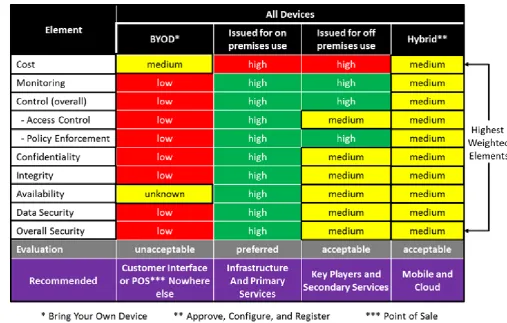
Table 1. BYOD* versus Issued versus Hybrid** Approach
From the data provided in Table 1, it is apparent that none of the options meet the ELS and other requirements with a totally green evaluation. The most ELS compatible set of device characteristics belongs to those issued for on-premises use (purchased by the enterprise, configured, and maintained by the enterprise). The cost here is prohibitive, and it eliminates the use of mobile devices completely. The least desirable is the BYOD, which essentially has only low cost in its favor. However, the use of BYOD is absolutely necessary in some enterprises. The burden here shifts from protecting the enterprise from the generic threat to protecting the enterprise from the BYOD threat discussed in the next section.
The following recommendations are made for each of the categories of Table 1.
• BYOD – Not recommended for any enterprise application except where line-of-business and/or monetization requires. Under these circumstances, BYOD is recommended for use in customer interface or POS operations and nowhere else with specific precautions as described in the next section.
• Issued for On-premises Use – Recommended for
use in infrastructure and primary services to include back-office operations for identity and access control, device management, monitoring devices, and maintenance of the enterprise knowledge base, as well as other key enterprise functionality.
• Issued for Off-premises Use – Recommended for
use by key players and secondary services where
on-premises only is too restrictive and where it will be maintained by trusted enterprise individuals.
• Hybrid – Recommended for use in mobile and cloud
developments.
VIII. PROTECTING THE ENTERPRISE FROM BYOD The low security values of Table 1 present a difficult choice for most enterprises. There exists a set of enterprises that must allow BYOD in order to monetize their operations. Many users feel comfortable doing business this way and would not tolerate strong restrictions on their devices. This mobility transformation has occured relatively suddenly and appears to be irreversible at this point. In this case, the burden shifts from enterprise protection to enterprise protection from the possibility of nefarious or compromised BYOD.
• Openness. Let your customers know the process and
effects that they will encounter for the protection of their data as well as your data and resources [15].
• Policy.Establish enterprise policy on BYOD usage in
order to shape each of the bullets below and provide for the bullet above [16].
• Configure. Not all devices may be configured. Those
that can may be configured to enterprise security, helping to mitigate some vulnerability [15].
refreshing. The DMZ will contain mirrors of enterprise data and services that are not linked back to the enterprise. These mirrors are periodically (overnight or more or less frequently depending on the business model) refreshed from enterprise resources. Less frequently, the services themselves are rebuilt from enterprise resources [17].
• Separate. Parse data into personal and enterprise
transactional data. Discard personal data after the session is complete [18].
• Transactional. The customer interactions are
recorded on a transactional basis and then executed against the DMZ data bases. The user is warned that online and other forms of statements may have a delay (notionally 24 hours) to reflect these transactions [19].
• Analyze. Record and analyze the users, usage,
devices, etc. to refine the elements of this list [15].
• Cleaning and Reviewing. During the refresh, the
transactions are cleansed and reviewed for nefarious behavior. Those that pass muster are imported into the enterprise and executed against the enterprise data bases. Those that do not trigger an alert to the customer (if known) that the transaction was rejected (you can use corrupted data as an excuse) and that transaction must be re-entered to take effect [20].
• Point of Sale. Unless you are in this business, use a provider and record the sale and POS provider confirmation as transactions. This avoids liabilities for maintaining credit and other personal information while allowing a swift monetization [21, 22].
• Incident Response. Establish an incident response team, and exercise its scenarios from time to time. Incidences are likely with BYOD, but incidence response is required whether or not BYOD is a factor [23, 24].
• Insurance. If you use BYOD, the probability of
being compromised is high. Insurance can help in the recovery. Insurance should be considered whether or not BYOD is a factor [25, 26].
Based on the analysis of these defensive measures for BYOD, the stoplight value for cost changed from green to yellow.
IX. CONCLUSIONS
Deployment of end-point devices with varying characteristics may be required for operational and other considerations. Security and efficiency are key elements in deciding where and how to deploy such devices. In a high-assurance environment, maintaining tight control of both devices and users is mandatory. Although BYOD may be unavoidable in certain enterprises, particular care must be taken that the enterprise is not placed in a vulnerable situation. For enterprise devices, a hybrid approach between BYOD and tightly controlled, issued devices is taken. In the hybrid approach, certain devices owned by the user may be
approved if they meet enterprise requirements and are enterprise configured and registered. The formulation is new and being applied to devices within our enterprise. This work is part of a body of work for high-assurance enterprise computing using web services. Basic elements of this work are described in [27]. Advanced techniques are described in [28-34].
REFERENCES
[1] IBM Corporation, web reference, “Mobile Device Management (MDM),”
https://www.ibm.com/security/mobile/maas360/mobile-device-management, last accessed on 18 November, 2017.
[2] AT&T Business, web reference, “CYBERSECURITY SOLUTIONS: Mobile Security,”
https://www.business.att.com/solutions/Family/cybersecurity/ mobile-security/, last accessed on 18 November, 2017.
[3] PC Magazine, web reference, The Best Mobile Device Management (MDM) Solutions of 2017,
https://www.pcmag.com/article/342695/the-best-mobile-device-management-mdm-software, last accessed on 18 November, 2017.
[4] MindWireless – Strategic Telecom Management, web reference, “Enterprise Mobility Management,”
https://mindwireless.com/services/enterprise-mobility-management, last accessed on 18 November, 2017.
[5] Technical Profiles for the Consolidated Enterprise IT Baseline, release 4.0. Not available to all,
https://intelshare.intelink.gov/sites/afceit/TB.
[6] Mell, Peter and Timothy Grance, NIST SP 800-145 Draft: Cloud Computing, Computer Security Division, Information Technology Laboratory, National Institute of Standards and Technology, Gaithersburg, MD 20899-8930, January 2011,
http://csrc.nist.gov/publications/drafts/800-145/Draft-SP-800-145_cloud-definition.pdf.
[7] Jansen, Wayne and Timothy Grance, NIST SP 800-144 Draft: Guidelines on Security and Privacy in Public Cloud Computing, Security Division, Information Technology Laboratory, National Institute of Standards and Technology, Gaithersburg, MD 20899-8930, January 2011,
http://csrc.nist.gov/publications/drafts/800-144/Draft-SP-800-144_cloud-computing.pdf
[8] Catteddu, Daniele and Giles Hogben, European Network Information Security Agency (ENISA), Cloud Computing Risk Assessment, November 2009,
http://www.enisa.europa.eu/act/rm/files/deliverables/cloud-computing-risk-assessment
[9] Cloud Security Alliance, Security Guidance for Critical Areas of Focus in Cloud Computing V2.1, December 2009,
https://cloudsecurityalliance.org/csaguide.pdf
[10]Konieczny, Frank, Eric Trias, and Nevin Taylor, “SEADE: Countering the Futility of Network Security,” Air and Space Power Journal, Sep–Oct 2015, Vol 29, No. 5, p. 4.
[12]Williams, Bill, The Role of Customer Interface in Customer Experience Management, blog 23 May 2013,
http://usan.com/omnichannel/the-role-of-customer-interface-in-customer-experience-management/ accessed on 18 June 2018.
[13]TPM Main Specification Version 1.2, Revision 116, 1 March 201, TCG Published, available at:
https://trustedcomputinggroup.org/wp-content/uploads/ TPM-Main-Part-1-Design-Principles_v1.2_rev116 _01032011.pdf
[14]Ferraiolo, H., et al., NIST Special Publication 800-157, “Guidelines for Derived Personal Identity Verification (PIV) Credentials, December 2014, available at:
http://dx.doi.org/10.6028/NIST.SP.800-157
[15]IBM Corporation, IBM Security, “Ten rules for bring your own device (BYOD) - How to protect corporate data on personal devices used for work”,
https://www.slideshare.net/ibmmobile/ten-rules-for-bring-your-own-device-byod, January 2018, accessed on 26 June 2018.
[16]ESET Corporation, “7 Tips to Tighten Mobile Security”,
https://business.eset.com/bring-your-own-device-security, accessed on 26 June 2018.
[17]The Channel Co., CRN Magazine, CRN Staff, “How to Avoid the Five Biggest BYOD Mistakes”, available at:
https://www.crn.com/blogs-op-ed/channel- voices/240006736/how-to-avoid-the-five-biggest-byod-mistakes.htm, accessed on 26 June 2018
[18]Tzur-David, Shimrit, Secret Double Octopus, “Making BYOD Work in the Era of GDPR”,
https://doubleoctopus.com/blog/making-byod-work-in-the-era-of-gdpr/, April 24th, 2018, accessed on 26 June 2018
[19]Long, William, Computer Weekly, “BYOD: data protection
and information security issues”,
https://www.computerweekly.com/opinion/BYOD-data-protection-and-information-security-issues, accessed on 26 June 2018
[20]South Carolina Enterprise Information System (SCEIS), “SCEIS Data Cleansing General Guidelines”,
http://sceis.sc.gov/documents/data_cleansing_guidelines_v2.d oc, accessed on 26 June 2018
[21]“Top POS Systems”, https://www.top10bestpossystems.com/, accessed on 26 June 2018.
[22]Software Advice, “What Is a Point of Sale System?”
https://www.softwareadvice.com/resources/what-is-a-point-of-sale-system/, accessed on 26 June 2018.
[23]Drinkwater, Doug, EMEA content director at IDG,.CSO from IDG, “10 steps for a successful incident response plan,”
https://www.csoonline.com/article/3203705/security/10-steps-for-a-successful-incident-response-plan.html, June 26, 2017, accessed on 26 June 2018.
[24]Lord, Nate, Digital Guardian, “What is Incident Response,”
https://digitalguardian.com/blog/what-incident-response, 28 September 2015, accessed on 26 June 2018.
[25]STOPit, “STOPit Insurance Solutions,”
http://www.stopitsolutions.com/stopit-solutions-insurance, accessed on 26 June 2018.
[26]McCarthy, Neal, Secureworks, ‘Integrate Cyber-Insurance into Your Cybersecurity Incident Response Plans,”
https://www.secureworks.com/blog/integrate-cyber-insurance-cybersecurity-incident-response-plans, 16 January 2017, accessed on 26 June 2018.
[27]Simpson, William R., CRC Press, “Enterprise Level Security – Securing Information Systems in an Uncertain World,” by Auerbach Publications, ISBN 9781498764452, May 2016, 397 pp.
[28]Simpson, William R., and Kevin E. Foltz, “Enterprise Level Security: Insider Threat Counter-Claims,” Lecture Notes in Engineering and Computer Science: Proceedings of The World Congress on Engineering and Computer Science 2017, 25–27 October, 2017, San Francisco, USA, pp. 112–117.
[29]Simpson, William R. and Kevin E. Foltz, Proceedings of the 22nd International Command and Control Research and Technology Symposium (ICCRTS), “Escalation of Access and Privilege with Enterprise Level Security,” Los Angeles, CA. September 2017, pp. TBD.
[30]Simpson, William R. and Kevin E. Foltz, Proceedings of the 19th International Conference on Enterprise Information Systems (ICEIS 2017), Volume 1, pp. 177–184, Porto, Portugal, 25–30 April, 2017, “Enterprise Level Security with Homomorphic Encryption,” SCITEPRESS – Science and Technology Publications.
[31]Foltz, Kevin E. and William R Simpson, “Enterprise Considerations for Ports and Protocols,” Lecture Notes in Engineering and Computer Science: Proceedings of The World Congress on Engineering and Computer Science 2016, 19–21 October, 2016, San Francisco, USA, pp.124–129.
[32]Foltz, Kevin E. and William R Simpson, “Simplified Key Management for Digital Access Control of Information Objects,” Lecture Notes in Engineering and Computer Science: Proceedings of The World Congress on Engineering 2016, 29 June–1 July, 2016, London, U.K., pp. 413–418.
[33]Foltz, Kevin E. and William R. Simpson, Proceedings of The 20th World Multi-Conference on Systemics, Cybernetics and Informatics: WMSCI, “Enterprise Level Security – Basic Security Model,” Volume I, WMSCI 2016, Orlando, Florida, 8–11 March 2016, pp. 56–61.