Application of
NFS
Servers
to Strategic Internet/
Intranet Website Design
Roy Chua, Dave Berger, Rich Hall, Jeff Lok and Jim Richardson
Technical Report 13 2nd
Abstract
This paper describes the ongoing emergence of strategic websites that warrant the scalable power, capacity, and reliability of an Auspex NetServer. It describes the functions and benefits of a hierarchical server architecture which is gaining increased acceptance for large-site construction; Auspex customer experiences are included as illustrations. Some future trends are discussed, especially the potential of WebNFS to serve large communities of “websurfers” better than HTTP or FTP do today and CIFS as a potential service for the NT community.
Document # 300-TC042
Revision 2.0.
Auspex Systems Inc.
5200 Great America Parkway Santa Clara, California 95054 USA
Phone: 408/986–2000 · Fax: 408/986–2020 Email: [email protected]
Table of Contents
1 Introduction...1
2 Identifying Strategic Websites...2
2.1 Target Opportunities 2
2.2 Strategic Corporate Websites 2
2.3 Internet Supersites 3
2.3.1 Supersite Examples 3
2.4 Internet Service Providers 4
2.4.1 ISP-specific Business Issues 4
2.5 Intranets 5
2.5.1 Why the Intranet Side Will Dominate 5
2.5.2 Early and Serious Intranet Adopters 6
2.5.3 Intranet Technology and Applications Still Maturing 6
2.6 The Strategic Website’s Appetite for Disk 7
3 A Hierarchical Architecture for Large and/or Mission-Critical Websites...8
3.1 Digression: A “Close But Not Quite Right” Alternative Approach 10
3.2 Scaling 11
3.3 Assigning and Balancing Web Loads 11
3.3.1 Static Assignment 12
3.3.2 Dynamic Top-level Webpage 13
3.3.3 HTTP Redirection 14
3.3.4 Client-based Round-Robining 14
3.3.5 DNS Round-Robining 15
3.3.6 CiscoAdvantage LocalDirector 16
3.4 Fault Tolerance 17
3.4.1 Fault-Tolerance at the Front-end 17
3.4.2 Fault-Tolerance at the Back-End 18
3.5 Benefits of the Hierarchical Approach 19
3.5.1 Scalability 19
3.5.2 Availability 20
3.5.4 Managed-cost 20
3.6 An Added Benefit from the Use of NetServers 21
4 Future Trends ... 20
4.1 Increased Network-Centricity 22
4.2 Webnfs™ 22
4.2.1 What is WebNFS? 22
4.3 CIFS 25
5 Conclusion... 26
1 Introduction
The explosion of the public Internet—especially the hyperlinked World Wide Web—and web-technology’s ability to provide an easy, client-platform-independent interface to internal systems has caused both information system designers and technology vendors to take a serious look at construction techniques for strategic websites. Website architects have come to understand that criteria such as performance, scalability, reliability, availability, and administration are key in the design and construction of strategic websites. Auspex NetServers evaluate very well against these criteria; and their ability to reliably consolidate and deliver large volumes of data over high-bandwidth IP communications lines has inspired website designers to place NetServers at the center of strategic Internet technology (WWW, FTP, mail) sites.
This paper begins by describing the ongoing emergence of strategic websites, sites that will benefit from the scalable power, reliability, capacity and easy administration of a NetServer. It then describes the functions and benefits of a hierarchical server architecture which is gaining increased acceptance for strategic-site construction; Auspex customer experiences are included as illustrations. A concluding discussion examines future trends, including the potential of WebNFS and CIFS to serve large communities of “websurfers” better than HTTP or FTP do today.
2 Identifying Strategic1 Websites
2.1 Target Opportunities
Notwithstanding the fact that the majority of today’s websites are implemented on single, standalone workstations or personal computers, small but significant numbers of strategic multi-computer websites are surfacing inside and outside corporate firewalls. We observe four key opportunities:
■ Corporations which consider their publicly-accessible websites strategic because their
marketing, sales, and/or product delivery mechanisms depend heavily—and in some cases, entirely—on the Internet2.
■ Large websites which observe an extremely high hit-rate—we shall call such sites Internet
supersites. These sites require scalable architectures which can deal with such high access rates.
■ Internet Service Providers (ISPs), a special case of the above, are serving large communities of
dial-in accounts and also hosting websites for corporations preferring to outsource their web presence.
■ Looking at their private IP networks, some IT managers want to consolidate onto departmental or enterprise websites the pages authored by individuals and groups. They are motivated by many of the same issues that have inspired consolidation of the contents of small NFS servers onto Auspex NetServers.
2.2 Strategic Corporate Websites
With increasing attention being paid to and dependence being placed upon corporate websites on the I-way, attention inevitably turns to how a company’s image will be affected by their website’s quality. The website’s content, and the site’s availability and reliability are factors which can and will affect the company’s image, for better or for worse. As a consequence, forward-looking website designers put availability and scalability at the top of their lists in both system design and component selection phases of website construction.
1 This report will not attempt to define strategic in terms of the market potential for any given computer technology manufacturer. We recognize, however, that some readers may wish to place this mostly technical discussion in some business—dollars and cents—perspective. Unfortunately, at the time of this writing, market research firms have not yet begun to define what strategic, operationally critical, small, medium, or large mean for websites or webservers, let alone size the market potential for each. However, even if we conservatively assume that today’s market potential for strategic websites is a small subset of the overall Internet space, we can easily be looking at many millions of dollars of revenue. Consider that Zona Research in Redwood City, CA projects the Internet/Intranet market (combining server connectivity, on-line services, servers, software, consulting, etc.) will grow to $41.9 billion by 1999 [Zona96]. Zona shows the server hardware portion alone rising from $2 billion in 1996 to $8 billion in 1999. By 1999, 105 million Internet-capable seats will be served; fully 90% of which will be web-capable. [An Internet-capable seat is equipped with a TCP/IP stack and software by which to execute some Internet application. A web-capable seat specifically runs an HTTP browser.] In light of these statistics, we believe an investigation into architectures for strategic webservers is more than an academic exercise.
Take the case of www.fujitsu.co.jp, Fujitsu’s corporate website. Prior to installing a NetServer to handle their data storage requirements, they were constantly experiencing problems with keeping the servers up. In addition, as their website grew, Fujitsu had to experiment with various configurations involving an increasing number of individual workstations and had to deal with tuning their hardware parameters. Many corporations will face similar growing pains in their quest to stake out a parcel of land in the Internet space; a hierarchical solution, such as the one we present in this paper, will prove a boon to such corporations.
2.3 Internet Supersites
A supersite is typically characterized by webpage-hit rates in the hundreds of thousands or millions per day. Supersites began to emerge in early 1995, right about the time Netscape introduced its first commercial release (Netscape itself has become such a site; see below). Let us begin by estimating the number of public Internet sites that might become candidates for architectures capable of such high access rates.
Zona Research [Zona96] estimates there are 55 million Internet-capable seats today. However, supersites represent or serve large communities drawn from these 55 million. Consequently, some metric other than total web-capable clients is needed to identify potential collection points for these communities. We go to the very definition of the word Internet for our answer. The Internet is an interconnection of networks, each typically mapping one-to-one to a public or private sector organization. In its latest (Jan96) survey Network Wizards (http://www.nw.com) counted approximately 94,000 such networks. Apart from inevitable additions to this number, these are candidate locations for supersite construction.
Many believe commercial operations are more likely to attract large numbers of users than public sector organizations. To size the commercial space, one resource is Open Market’s Commercial Sites Index (http://www.directory.net/dir/statistics.html). As of the end of June 1996, the Index contained approximately 32,000 self-proclaimed “commercial” listings, with upwards of 700 being added weekly.
If our 55 million Internet users were evenly distributed over all 94,000 public and private sector networks, either as residents or as web-borne visitors, no single network/website would have great demands placed on it. But we know from our websurfing experience the opposite is true. Hotspots with supersite potential develop when some uniquely valuable content draws above-average crowds to a network, examples of which are listed below. Restricting ourselves only to commercial sites, if even a single percent of the 32,000 candidates attract heightened levels of attention, it’s clear supersite candidates will number in the hundreds; they will be candidates for the architecture discussed later in this paper.
2.3.1 Supersite Examples
None of the Web’s hottest sites rely on a single server to satisfy the heavy loads placed upon them. Following are just three examples of multi-system sites whose contents have become “hits” on the ‘Net.
■ Netscape’s website is reputedly the Web’s most heavily hit, at roughly 80 million hits/day. Downloads for Netscape’s products are satisfied by clicking on one of a collection of FTP hyperlinks. In May 1996 Sequent announced Netscape’s intention to purchase two Symmetry Series machines by which to begin the consolidation of this service onto fewer numbers of higher performing FTP engines. However, at last count there were still 20+ distinct FTP servers housed by Netscape itself, plus a handful more at cooperating universities.
index; its 10 processors satisfy most requests in under one second. The News Indexer is much smaller—its narrower focus enables it to survive with “just” 13 GB of disk. A collection of AlphaStation 500 workstations handle all external traffic to the site, running a custom multi-threaded Web server which sends queries to the Web Indexer and News Indexer.
■ In one day Rick Smolan’s 24 Hours in Cyberspace project (http://www.cyber24.com) recorded
more than 4 million hits. This on-line “coffee-table picture book” was implemented on a large array of clients and servers. Collectively, the site had 11,000 MB of RAM and 300 GB of mass storage.
2.4 Internet Service Providers
For obvious reasons, ISPs, which have no existence off the Web, view their choice of website equipment and architecture as absolutely strategic. ISPs were among the very first sites on the ‘Net challenged by scaling issues. Many small ISPs provide only basic service—a modem connection, news, and POP email—to several hundred dial-in customers in close geographical proximity. The needs of such ISPs can be met by just a handful of UNIX workstations. However, the regional and national ISPs each serve communities numbering in the tens or hundreds of thousands (a leading national provider claimed 400,000 subscribers in April 1996). In addition to basic service, many ISPs include several megabytes of private disk space with each dial-up individual account. Webhosting1 is a second popular option ISPs offer to companies preferring to outsource their website; this can be a very significant—and week to week unpredictable—contributor to disk and CPU consumption at the ISP’s site.
Because the successful ISP serves a large and diverse community, it is regularly confronted with all manner of functional requirements and growth pains. Its proximity to the Internet’s backbone means an ISP’s potential for heavy inbound loads is not gated by the speed of a single leased T1 line (1.5 Mbps). The big players connect to the Internet backbone via one or several T3 (45 Mbps) lines. Such ISPs must be able to grow along three axes: communications bandwidth, CPU power, and disk storage. As an example of how lopsided that growth can be, consider this example from CERFnet, which was recently asked to take over a first-run movie site from another provider which had proven insufficient to handle the task. CERFnet’s scalable architecture and well-established new-site procedures enabled all logistics to be handled in under 3 hours. Once up, the movie site—whose total content was contained within a modest 100 MB—began to reel in the webpage hits—averaging 1.7 million hits/day, 1 terabyte was delivered to Netizens in a four-week span!
To size the ISP sector we once again go to the Web itself. Mecklermedia—producers of the Internet World trade shows, Internet World and WebWeek magazines—sponsors http://thelist.iworld.com/, a catalog of ISPs organized by geographic region. In November 1995 TheList reported 1,584 Internet Service Providers (ISPs) in 68 countries. By July 1996 this rose to 2,950 ISPs in 91 countries, representing more than 100% growth on an annualized basis. As of March 1997, it stood at 5,021 ISPs in over 200 countries. As one might infer by the numbers, the technological barriers to entry into this business are not high. No doubt, a significant fraction of these 5,021 are small operations with more of a “Gold Rush” mentality than a solid business plan. Notwithstanding the steady increase month to month of entries on TheList, many pundits are predicting a shakeout in the ISP market, driven by the largest regional and national ISPs. Such consolidation would simply put greater pressure on the surviving ISPs to master large-website design so as to take on the loads from displaced users and orphaned hosted websites.
2.4.1 ISP-specific Business Issues
An ISP’s need for a scalable and reliable large-website architecture is driven by factors not necessarily shared by companies in other sectors:
1. Many argue that only the largest ISPs will survive as the industry matures. Whereas most companies need to grow to survive, for ISPs, fast growth is arguably the single most important ingredient for success—more important even than profitability. When the anticipated flurry of mergers and acquisitions begins, the ISPs with the largest customer constituencies will command the highest prices. Scalable websites are essential to rapidly building that constituency.
2. Once built, that constituency must be preserved. One Internet America employee put it this way: “Our philosophy around here is that if we don’t take care of the customer, somebody else will.” This reflects the hard reality that a customer dissatisfied with the availability of an ISP’s services can very easily switch to another, with little or no financial penalty. To avoid that switch, ISPs need to embrace a “24 * 7” philosophy and embrace architectures and suppliers who deliver it.
2.5 Intranets
Definitions vary, but for the purposes of this paper, we’ll define an intranet as a collection of Internet component technologies—communications media, computers, IP protocols, client- and server-side software—isolated from public view. Even within this definition there are some variations. Some think of an intranet as a single-campus LAN ending at the firewall that (optionally) interfaces it to the public Internet. Others broaden the definition to include topologies using private, leased communications lines to interconnect LANs located at multiple, geographically dispersed sites within the same corporation. The broad geographic range of such an intranet makes it a microcosm of the public Internet. Virtual private networks (VPNs) are yet another flavor of intranet that mixes public and private components. To avoid the high cost of private leased lines, yet preserve privacy, a VPN uses encrypted IP tunnels through the public Internet to connect geographically dispersed sites. These tunnels run from firewall to firewall (for LAN-LAN connections) or from a nomadic client to a firewall.
2.5.1 Why the Intranet Side Will Dominate
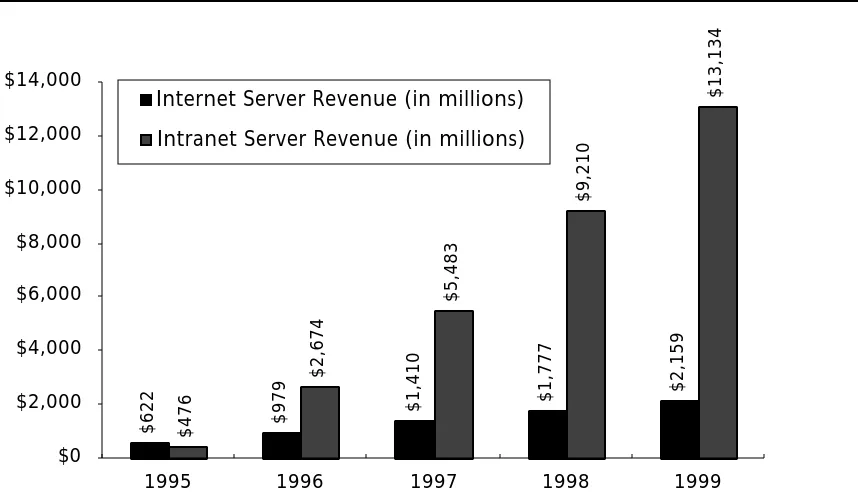
Though they may differ on definitions, most industry pundits agree over time there will be far greater investments on intranet than Internet infrastructure. As appendix A elaborates, Zona Research’s prediction for 1999 is that $13 billion will be spent on intranet servers, six times Internet server revenue for that year. Below are some qualitative reasons to explain this widening gap. These should be considered especially from the perspective of installing webserving systems, software, and authoring tools, which is more of a leap for individuals and corporations than simply making their clients web-capable.
■ More bandwidth: Whereas there are millions of PCs in the home from which pages might be
■ Bigger audience: Until a significant fraction of the population begins to work from home, it’s not clear they’ll have much to say worth serving from home. At work, however, there are more things legitimately worth serving1 and a greater likelihood of finding a receptive audience.
■ Easily solves existing problems: Use of intranet technology usually does not require a
strategic, enterprise-wide consensus or decision (the availability of freeware helps!). Consequently, large pent-up demand within corporations for new applications can be and is being satisfied by intranet technology.
■ No management resistance: As a corollary to the above, most MIS departments are at worst
neutral, and at best very receptive to having grass-roots development relieve them of some of their new-application development burden.
■ Co-exists well: Using “connector” software, corporations are building web-browser-based
front-ends to legacy applications to give users a unified, easy-to-use look and feel for all applications.2
The prediction here is that although in the beginning we may point to more strategic sites on the visible Internet, increasingly strategic sites will emerge on secure, invisible (to the casual websurfer) intranets.
2.5.2 Early and Serious Intranet Adopters
Technology companies were understandably the first to make heavy use of intranets, but they are being joined by “normals.”
■ Digital Equipment: By late 1995, 297 of their 300 websites were internal.
■ Xerox: The company has given 15,000 employees access to a new internal “WebBoard.” Xerox
plans to increase that number to 60,000 in the near term.
■ Schlumberger: 51,000 employees are spread around 450 locations in more than 100 countries.
They have access on their intranet to over 200 servers, at least half of which run on individual desktops.
■ Levi Strauss: Drawing the parallel with an ISP, this clothing giant’s IT group provides a hosting service to internal customers. They have installed three mid-range UNIX servers in Singapore, Brussels, and San Francisco onto which they consolidate webpages crafted by individual departments.
2.5.3 Intranet Technology and Applications Still Maturing
Though demand for webservice over intranets is already substantial and increasing, use of the technology is still maturing. Currently, most intranet websites are being put up ad hoc on PCs and workstations, often on personal desktops3. This parallels the early deconsolidated days of NFS, and brings similar problems related to performance, scalability, reliability, and administration. As corporations begin to encounter these problems in an intranet context, they will begin constructing large internal websites. Some contributors to consolidation will be:
1 As for what there is to serve, Zona reported Intranet uses in Inter@ctive Week, November 13, 1995: 40% access manuals and procedures, 38% post personal Web pages, 38% access product and marketing data, 30% post internal job offerings, 27% revise and approve documents, 24% access employee information, 18% access schedules, calendars, and timelines, and 12% access existing databases.
2 Just three examples of many emerging legacy-data enabling tools: Microsoft’s Internet Database Connector resides as an API on the Internet Information Server and submits SQL statements through ODBC. FTP Software’s Esplanade webserver includes Esplanade Database Connector, also based on ODBC. Sybase Web SQL links HTTP servers with its own and other vendors’ databases.
■ Increased adoption of 100 Mbps technologies: This will make it possible to deliver concentrated loads to fewer numbers of larger internal sites.
■ Increased interest in multimedia data types: Even with compression, real-time voice- and
video-based training will require large data stores. As an example, Progressive Networks’ (http://www.realaudio.com) RealAudio 2.0 release includes Macromedia Shockwave integration, supports the OLE and Netscape plug-in standards, and enables servers to deliver URLs embedded in the audio stream, like a time-release capsule.
■ Concern about uncontrolled growth: Some IT managers already realize, as will the rest in the
near future, that valuable corporate data is being spread to fringes of the corporation without concern for security or backup. There will be pressure to reel this data in.
2.6 The Strategic Website’s Appetite for Disk
Up to now we have discussed four environments that would be considered strategic—corporate websites, WWW supersites, ISPs, and intranets. We have suggested—at least in the case of the supersite category—that such a website might be characterized by hundreds of thousands or millions of hits per day (a limit mostly gated by communications bandwidth and CPU power). It is now appropriate to conclude our characterization of the strategic site by considering its appetite for disk. Let’s look at each category:
■ Strategic corporate websites may not have large storage needs. It usually depends on the size
of the corporation, and the amount of information that a corporation chooses to make available on their website. Data capacity may not prove an issue for every corporation, but data availability is invariably a major concern. Nevertheless, observe that the accelerating trend of using disk-hungry multimedia data (audio, video, and interactive presentations like Shockwave) to spice up corporate websites will definitely result in increased storage requirements.
■ Supersites’ disk storage needs can vary widely. It may seem counterintuitive, but disk capacity
may not be an issue at some supersites. Consider that Netscape doesn’t really need to store a vast amount of data—it merely needs to offer the same data to a phenomenal number of concurrent clients. To meet the intense CPU requirement, Netscape’s practice has been to replicate that small amount onto numerous request servers. On-line newspapers and magazines, on the other hand, pray for hit rates high enough to make CPU loading an issue1. But they also have to store large amounts of data for back issues (text and graphics). Their websites have to grow large along both axes. Note that supersites will have the same need, as corporations do, for high data availability.
■ Intranet websites’ disk needs are mostly a function of industry segment. Auspex NetServers
already store vast quantities of data at engineering and industrial companies. To the extent that drawings, test results, captured videos of chemical experiments and the like will in the future be linked and viewed by web browsers, the very same sites will require massive intranet servers.
■ ISPs’ disk requirements are somewhat more predictable. Storage is allocated for email, news, shell accounts, hosted customer websites, and ancillary storage, e.g., internal development and accounting databases.
■ Network news storage can easily consume 2–3 GB, is normally fairly compact text, but grows
considerably when “binaries” news groups are also carried—these typically contain images; an average GIF is 200-800 KB. Big ISPs may be expected to archive more than one
worth of network news. Currently, ISPs report newfeeds of about 2-3GB a day (including binary newsgroups).
■ Disk space for mail storage can be more modest. Apart from the occasional large attachment, it’s characterized mostly by text. An in-box per registered mail user is allocated; I/O to it is characteristic of frequent appends for incoming mail, and less frequent sequential reads when users download that mail to their desktops. SMTP mail storage collected by the POP mailserver does not grow beyond bound because a user typically configures his desktop’s mailreader to download and then delete email from the POP server. However, occasionally an ISP can be very generous, allowing its customers to archive mail on the ISP’s disks.
■ Several ISPs include on the order of 5 MB of disk storage with each individual shell account;
individuals typically use this space to store personal home pages. If a 20,000-user ISP1 extends this offer, they must be prepared to budget up to 100 GB! ISPs report actual disk consumption is less than a simple multiplication would predict because only a fraction of all users take advantage of the free disk space to establish their own websites.
■ Storage consumed by hosted websites clearly varies. An ISP might assume 5 MB/website at the
minimum, but, without disk quotas applied, would be hard pressed to predict upper bounds. At the time of this writing, CERFnet reported its webhosted customers consume a total of 24 GB of mirrored disk space (48 GB physical); more capacity is planned.
■ Ancillary storage can be very significant. For instance, CERFnet says customer-accessible logs related to webhosted activity occupy a greater fraction of the 24 mirrored gigabytes than actual hosted content.
3 A Hierarchical Architecture For Large and/or Mission-Critical Websites
The website architecture described in this section is already in service today at several Auspex installed sites. It derives its name from the fact that IP requests received from clients are satisfied by a hierarchy—albeit very shallow—of servers. Adopters typically cite two key reasons—scalability and availability—for embracing this architecture, but other benefits will also be detailed.
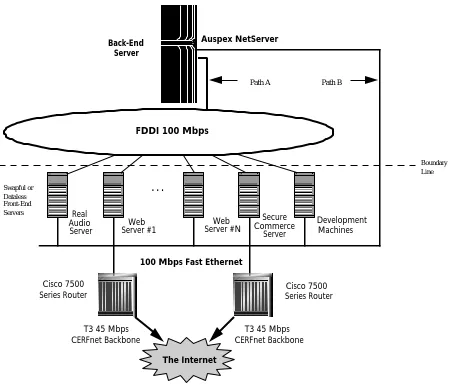
The architecture is illustrated in Figure 1, fashioned after the topology at CERFnet’s “World Wide Web Server Farm” at the time of this writing. There is a clear division of responsibility between the front-end servers and the back-end server:
■ Front-end servers, optimized for application processing, receive requests from and reply to IP applications (e.g., WWW, FTP, news, mail, CGI-script execution) running on Internet or intranet clients; the front-end servers execute the appropriate software processes1 (e.g., CERN HTTPD, Netscape Commerce Server, NNTPD, etc.).
■ The back-end server, optimized for moving raw data between disks and networks, exports NFS
filesystems which the front-end servers mount. The back-end provides a common access point and disk pool for HTML pages, CGI scripts, mailspool files, news, and the like.
■ Optionally, if a front-end server must run some non-Internet ancillary application (e.g., doing user accounting), that application may likewise choose to store its data on the NFS back-end.
CERFnet’s configuration is a bit more advanced than minimally the architecture needs to be:
■ For redundancy and extra bandwidth, two routers are shown connecting to the client world (in
CERFnet’s case, the Internet).
■ A dedicated secure commerce server is configured separately from the more generic “web server
#1” through “web server #N,” illustrating this ISP’s desire to offer heightened security for certain hosted websites.
■ A redundant path to the NetServer is available. Front-end servers normally take Path A to the NetServer to access their data. However, Path B into the NetServer guarantees all parties can communicate if a failure develops on the FDDI ring.
Though these embellishments may be considered overkill in certain environments, CERFnet—whose rapidly growing business is predicated on “always available Web access”—accommodates more than 20,000 dial-up accounts and receives millions of hits on its Web service daily, justifying extra measures of redundancy and bandwidth.
FDDI 100 Mbps
100 Mbps Fast Ethernet
Auspex NetServer
Real Audio Server
Web Server #1
Web Server #N
Secure Commerce
Server
Development Machines
Cisco 7500 Series Router Cisco 7500
Series Router
T3 45 Mbps CERFnet Backbone
T3 45 Mbps CERFnet Backbone
. . .
The Internet Back-End
Server
Path A Path B
Boundary Line
[image:14.612.75.524.62.450.2]Swapful or Dataless Front-End Servers
Figure 1: The hierarchical approach to large website construction is illustrated by CERFnet’s World Wide Web server farm. Computationally capable front-end servers process inbound IP requests (e.g., WWW, FTP, NEWS, mail, CGI-script execution) , while a back-end server optimized to move data between disks and networks handles the file system component (e.g, HTML pages, CGI scripts, mailspool files, news, user-accounting logs). CERFnet has added an extra measure of performance and availability to the basic two-tier architecture by configuring two Cisco 7500 Series routers and redundant communications paths to the NetServer.
3.1 Digression: A “Close But Not Quite Right” Alternative Approach
The hierarchical architecture is essentially one step away from another approach to scaling a site. There are indicators that this alternative is being systematically rejected by those who have tried to make serious use of it.1 We introduce it for the sake of comparison.
Since WWW hyperlinks shield the user from cryptic-looking names and addresses, designers have suggested that when a website grows beyond a single machine’s capacity to serve its pages, a second, third, nth similar server be added. A second figure is not needed; just imagine the front-ends beefed up with disks and the back-end server gone (simply cut off the FDDI ring and NetServer
1 As CERFnet reports, prior to consolidating their data onto an NS 7000/200, “over 15 different servers with local disks required individual backup and maintenance.” The site suffered from: “(1) inefficient and inflexible disk utilization among these servers and (2) slow service and operational nightmares.” With consolidation, CERFnet now “(1)
appearing above Figure 1’s horizontal boundary line). What you now have is a flat topology with essentially independent servers, each responsible for a particular application or subtree of the webpage hierarchy. One variation on the theme calls for some servers to replicate webpages of other servers within the set, for the sake of additional request-handling capacity or fault tolerance. Another variation gives the illusion of a pool of shared disk data; it calls for the servers to cross-mount each other’s filesystems, so that they can process the same set of requests without actually duplicating the data. To get a preview of some of the benefits of the two-tier hierarchical approach, consider just some of the most often reported problems with this flat, cluster-like topology1:
■ Individual servers are asked to do more than they’re optimized for (the design goal for workstations is usually fast computation, not disk I/O). The result is a net increase in the total count of systems (beyond what might suffice in a hierarchical approach wherein front-ends are required solely to compute).
■ Reliability is decreased as each server’s working set increases to perform both IP-request and filesystem processing. Even worse, if cross-mounts are used, system interdependencies increase and with that, the number of failure modes goes up.
■ There is no single point of disk backup. Multiple tape drives or a network-based backup scheme
must instead be embraced. Network-based backup can be especially onerous to a World Wide Website. Twenty-four hours a day, some time zone is in prime time—it’s hard to pick a good time to steal network cycles away from webserving to collect data to a tape subsystem.
■ Disk utilization is inefficient, since there is no truly sharable pool.
■ Load-balancing techniques (see a subsequent section in this report) are less easily applied, since there is no clean way to divorce filesystem processing from IP-request processing.
3.2 Scaling
Separation of IP-request processing from filesystem processing significantly contributes to the scalability of the hierarchical architecture. We need not go into great detail here on the scalability of Auspex NetServers per se; their superiority for the back-end server function is well known and discussed in other documents [Trautman96]. However, to summarize the current product offering:
■ An NS 7000/250 Series machine may be equipped with up to six 100 Mbps (FDDI or 100Base-T)2 network connections and thirty-five 4.29 GB disks (150 GB total).
■ An NS 7000/700 Series machine may be equipped with up to fifteen 100 Mbps (FDDI or
100Base-T) network connections and two-hundred ten 4.29 GB disks (900 GB total).
As for scaling the front-ends, when collective CPU load and/or response times rise to unacceptable levels, the alternatives are:
A. Redirect load from overloaded front-ends to underloaded request servers,3 B. Add additional front-end servers, or
C. Retire the old, low performance front-end servers, replacing them with current generation.
Alternative C may not seem elegant, but it is a realistic possibility—no computer platform remains viable forever. With computational power doubling every 18 months, one must be prepared to
1 These problems will sound familiar to the Auspex-knowledgeable reader; they have surfaced before in the server-per-subnet context.
2ATM is also possible, but FDDI and 100Base-T are today’s most popular attachment methods in Internet/intranet environments.
decommission computing equipment. Fortunately, this particular architecture enables the customer to minimize the financial impact of compute server retirement—front-end costs are reasonably low since the machines are dataless (perhaps diskless)—and benefit from the volume economies associated with desktop computers.
Alternatives A and B are more frequently taken. Both beg the question of how to balance IP-request loads across the front-ends, the subject of the next section.
3.3 Assigning and Balancing Web Loads
The hierarchical website architecture typically focuses all file system load on one consolidated server (perhaps more, if multiple failover back-ends are used or storage capacity requirements are extraordinarily high). The architecture requires some regimen by which to route incoming IP-request load to one of the front-end servers. This section discusses the pros and cons of several techniques.
3.3.1 Static Assignment
Though this method is simple, it has gained a following, especially among ISPs. Via the domain names made known to requesting clients, load is directed to particular front-ends—in other words, a static assignment of function to server is made1.
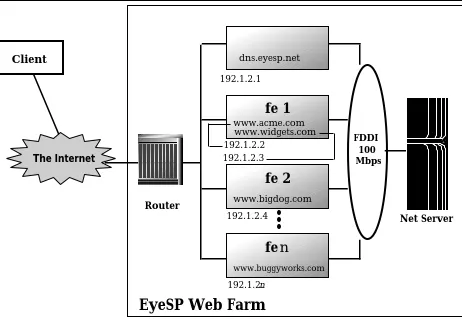
As an example, Figure 2 is a simplified topology diagram for EyeSP, a fictitious ISP providing webhosting services to small- to medium-sized companies. As part of the sign-up procedure, EyeSP asks for the company’s desired domain name, for example acme.com. Verifying first with the InterNIC2 that this domain name is not already taken (or otherwise offensive!), it requests it from the InterNIC on behalf of Acme Corporation, and then declares its own Domain Name System (DNS) server, called dns.eyesp.net, to be the authoritative name server for the acme.com domain (and hence, for all domains subordinate to acme.com). Consequently, when an Internaut clicks on a link with the URL http://www.acme.com/top_page.html, his browser ultimately relies on dns.eyesp.net to refine the top-level domain name acme.com into the specific numeric IP address for www.acme.com (192.1.2.2). Subsequent requests by the client for pages in the www.acme.com page hierarchy go directly to front-end fe1—the client efficiently bypasses a DNS name-to-number resolution. Observe that fe1 actually has two IP addresses, one associated with www.widgets.com and another with www.acme.com. With the current version of HTTP (version 1.0), it is impossible for the web server to tell which site a client is trying to access through the HTTP protocol; therefore, it has to rely on the IP address indicated in the incoming request to differentiate between the multiple “virtual web sites” that it is currently hosting. The next version of the HTTP protocol (version 1.1) will contain a method for the server to identify by what name it is being addressed.
Note that although other front-ends are configured at EyeSP’s site, they don’t get to participate in the service of webpages for Acme, nor can they in this most simple static case—they have not mounted the necessary file systems and their IP addresses have not been associated with the name www.acme.com.
Note further that Acme, Inc. and Widgets, Inc. share the same machine, fe1. We trust that EyeSP’s engineers sized the need fairly well, i.e., that one front-end could easily satisfy the hit rates on both hosted websites. Or perhaps Acme and Widget both decided they had insufficient budget to command exclusive rights to a front-end, as has BigDog, Inc. (sole resident of fe2).
1 When more than one domain name is associated with a single physical host, this static assignment technique is usually termed “virtual hosting.”
Can this simplistic scheme work? Indeed, it can and does at many ISPs. Practically speaking, no single small company is likely to attract very high hit rates with its first presence on the ‘Net. Recognizing this, the ISP configures its DNS to have many small-company domains point to one front-end, thus loading many hosted websites onto it. If the ISP does a good job of metering loads, it can make reasonably intelligent static assignments—loads will be fairly apportioned for long periods of time without having to be manually rebalanced. Aggregating many small sites onto a single front-end enables the ISP to keep its entry-level webhosting prices reasonable.
Static assignment can take on other forms. As just one other example, imagine that hits on www.bigdog.com exceed the capacity of fe2 to handle them. A few key HTML files can be slightly rewritten to refer to a different front-end—websurfing clients will never know the difference. Imagine: a webpage returned by www.bigdog.com (fe2) contains a hyperlink whose URL reads http://www2.bigdog.com/the_new_world. The user probably won’t realize what’s happened, but after a single, silent DNS name-to-number resolution, the websurfing client will find herself on another front-end.
fe
n
fe 2
fe 1
FDDI 100 Mbps
dns.eyesp.net
www.acme.com www.widgets.com
www.bigdog.com
www.buggyworks.com 192.1.2.1
192.1.2.3 192.1.2.2
Net Server 192.1.2.4
192.1.2.n Router
Client
[image:17.612.78.540.255.574.2]EyeSP Web Farm
The InternetFigure 2: Static assignment of clients to front-end servers. ISPs offering web hosting service often statically assign customers to front-ends with the cooperation of the Domain Name System. The authoritative DNS at the ISP’s site can give the illusion that each customer owns its own machine, when in fact they are shared.
3.3.2 Dynamic Top-level Webpage
Some master front-end server is assigned the task of responding to all top page requests (e.g., a hit on http://www.acme.com/). The page returned is not some static HTML file. Rather, in response to this first hit, www.acme.com, the master server, dynamically crafts a page, the URLs of which are subtly different from hit to hit, e.g., http://192.1.2.5/next for one client hit, and http://192.1.2.6/next for a different client whose hit arrives immediately thereafter. Use of hard-coded numeric IP addresses in URLs is perfectly legal and frees clients from having to do additional DNS look ups. All deeper pages contain URLs with relative pathnames so that the inquiring clients will continue to go back to their dynamically assigned front-end. The result is more or less balanced loading. The master server can pick itself 1/Nth of the time, if the webmaster so configures it (all servers must be kept busy!). Choice of the next server can be based on any number of criteria (next in line, least loaded, etc.), limited only by the programming creativity of the webmaster. Furthermore, using heart-beat processes, the master can omit from its list of candidate front-ends those that have not recently responded, injecting a bit of fault tolerance into the website.
The reader should be aware of shortfalls in this approach:
■ Though it straightforwardedly balances access for webpage access because the webmaster has
easy access to all the HTML, the technique doesn’t translate to services like mail and news.
■ If clients bookmark pages subordinate to the top-level “switching” page, when they
subsequently access the site via the bookmarks, the resultant bypass of the top-level page undermines the round-robin effect and provides no recourse in the event of a down front-end server.
3.3.3 HTTP Redirection
HTTP redirection is similar to the dynamic top-level webpage technique described in the previous section, but it is implemented differently. Rather than return a dynamically crafted webpage of URLs to the client, the master front-end server takes advantage of a feature of the HTTP protocol: it responds to a request with a status code commanding the client to automatically retry the request (which must be a GET or HEAD) to a different front-end. With the cooperation of the client’s browser, the second operation lands on the front-end server destined to actually fulfill the request. Some have compared this user-transparent behavior to the call-forwarding offered by a phone company.
By choice of status code returned, the master server can indicate that the resource requested has been permanently or temporarily moved to another front-end server, the location of which needs obviously to be returned by the server as part of the initial redirect response. The receipt of a “moved permanently” redirection status code has the advantage of allowing the client to bypass redirection in subsequent accesses, with the attendant disadvantage that the particular client’s load has now been statically assigned to a particular resource server. The receipt of a “moved temporary” status code affords more granular dynamic load balancing, since clients keep returning to the master server to learn the current location of the desired resource.
3.3.4 Client-based Round-Robining
If one
a. has complete control of which browser is used by all clients (as one might in an intranet environment),
b. access to that browser’s source, and
c. can predict the addresses of a particular set of front-end servers,
technique only load-balances from clients which agree to use a particular browser to access a particular supersite.
Netscape “popularized” this technique when it employed it to balance load on a very popular public website (www.netscape.com). Its effectiveness hinged on the obvious—a large percentage of Internet clients could be counted upon to run Netscape Navigator! Unfortunately, (a) Navigator offers no hook by which another set of front-end servers may be specified and (b) most sites are not ready to undertake custom-client writing. These facts combine to make this technique most rare (we know no other examples of its use). It is mentioned here for the sake of completeness.
3.3.5 DNS Round-Robining
This technique is very commonly cited in load-balancing discussions. As we’ve already suggested, the Internet’s Domain Name System’s (DNS) name servers (yet another hierarchy!) translate textual server names (e.g., www.companyname.com) into numeric Internet address (e.g., 198.95.224.2). This dot-delimited address enables the underlying IP software and hardware to route a client’s packets to their rightful destination. The challenge is to have clients transparently direct IP requests to one location (e.g., www.companyname.com), and yet have the request satisfied by one of the front-end servers—each necessarily having its own unique numeric IP address. The “round-robin” features of the 4.9.X release of Berkeley Internet Name Domain (BIND) software accomplishes this.
At Fujitsu, this technique (using BIND 4.9.3) is currently employed to balance their HTTP load over three SparcStation 5s (SS5s), with plans to add 4 SS20s in the near future. Their front-end servers are backed by a NetServer 7000/210, with two 100Base-T connections and 40 GBs of storage.
3.3.5.1 How Round-Robining Works
On the site’s name server(s), the administrator defines www.companyname.com with multiple “A records,” each A record defining the IP address of a different front-end server (these all have access to identical webpages, mounted off the NetServer). BIND returns all the IP addresses, not just one, to the client requesting name resolution. One benefit in receiving a list is that an intelligent client can choose an alternative IP address if the first is down or fails over time. As long as all the front-end servers are healthy, websurfing clients will target the first server on the list. When the administrator turns on BIND’s round-robin feature, with each query to the name server, the order of the addresses is shifted, so that a different one from the set is always “on top.” Since it’s based purely on the average number of outstanding requests, the mechanism is both simple (reliable) and efficient. An additional advantage is that scaling is easy: just add another IP address (“A” record) to the name server’s list.
A positive experience is reported by CERFnet’s system administrator, who uses DNS round-robining for POP3 mail, news and Web front-end servers. Extensive metering (of all kinds, not just performance) indicates that the front-ends are largely well-balanced. “If DNS caching is perturbing the balance, it is at most on the order of 5-10%.”
3.3.5.2 The Downside of DNS Caching
DNS caching is essential for high-performance domain-name-to-numeric-IP-address translation. However, caching tends to diminish the advantages of the load-balancing effect we desire. Observe:
■ Caching can make round-robining decisions long lived. Bad load-balancing decisions don’t dissipate quickly enough. Offsetting this effect is the fact that large sites typically run multiple nameservers, so different customers randomly hit different caches (and thus, different address list sequences).
member in a set of servers is assigned to a given client for each access it makes to the site. With the caching turned off, all requests inexorably return to the authoritative server for name resolution, and round-robining is at its most equitable. Unfortunately, the resulting added latency per website hit becomes counterproductive. For this practical reason, it is unlikely that anyone turns off DNS caching for the sake of apportioning load fairly.
■ When an ISP caches the IP address of one particular server and another, smaller site caches another, there is a load imbalance. In other words, redirection may not be reflective of true incoming load.
■ The design is not fault tolerant. Suppose a front-end server goes down, and there are others
ready to take up its load. Since the website has no way to rapidly invalidate all cached entries for a particular down server, it cannot force clients to discover the IP address of an alternate front-end server.
3.3.6 CiscoAdvantage LocalDirector
The techniques so far described for assigning and balancing load among front-end servers have their deficiencies. Thankfully, the emergence of increasingly large for-profit websites has inspired improved commercial solutions to the load-balancing, website-scaling problem.
CiscoAdvantage™ LocalDirector is a recent and very promising approach to the problem; see Figure 3. It is a purpose-built hardware-software combination which behaves like a commutator switch for TCP/IP servers. On one of its Ethernet (10/100Base-T) ports, LocalDirector can assume the address of a large website (e.g., www.bigsite.com). Using what Cisco has dubbed Inverse Multiplexing Mode (IMM) LocalDirector then transparently routes inbound requests to one of N downstream servers in an IMM group, with which the administrator has associated a single virtual address. These servers are attached to LocalDirector by an Ethernet LAN connected to its second 10/100Base-T Ethernet port. Transparent to users, applications and domain name servers, LocalDirector rewrites the destination addresses contained within the incoming request packets, substituting the real IP addresses of the downstream servers.
Since members of an IMM group can be a heterogeneous mix of hardware and operating systems, performance will vary among them. Accordingly, on a per-TCP-connection basis, LocalDirector monitors response time to determine how well each server is performing. Its Session Distribution Algorithm (SDA) uses a dynamically derived performance index to weight the servers. At startup, servers are assumed to be performance equals, but as requests arrive, the faster servers earn higher performance indices, and LocalDirector routes more work to them. The end result is a very fair apportionment of load, with correspondingly high throughput and low response time.
Figure 3 illustrates LocalDirector’s flexibility to support multiple, even overlapping IMM groups. Note how two IMM groups have been defined, referred to by clients on the outside as www.bigsite.com and ftp.bigsite.com. For whatever reason—perhaps it is a stronger machine than the others—front-end server fe2 has been assigned both web- and FTP-serving duties.
Performance is one very important contribution to the equation, but LocalDirector also complements Auspex’s highly available back-end file service by addressing the front-end CPU component of website availability:
■ If additional compute power is required for IP service (WWW, FTP, mail), front-end servers can be
dynamically added and removed from IMM groups—analogous to the NetServer’s dynamically configurable striped virtual partitions for growing data volumes.
■ If a member of an IMM group fails, its response time goes to infinity, and the LocalDirector restricts incoming load to the N-1 survivors within the group.
(13 Kbyte) secure real-time kernel on a Pentium processor equipped with 32 MB of RAM and 512 KB of flash RAM. It is a diskless design, except for the 3.5-inch diskette it uses for software loads.
■ An extra LocalDirector may be setup as a hot-spare, taking over from the primary LocalDirector if it should, for any reason, fail.
fe 1
fe 2
fe 3
fe n
100BaseT
2-member IMM group ftp.bigsite.com
CiscoAdvantage LocalDirector
Requests for ftp.bigsite.com
Requests for www.bigsite.com
n-1 member IMM group
www.bigsite.com
Front-End Servers 100Base-T
NetServer
[image:21.612.78.540.153.397.2]• FTP files • Web Pages
Figure 3: CiscoAdvantage™ LocalDirector is a wire-speed real-time “black-box” for balancing loads across IP servers. Administrators define a number of Inverse Multiplexing Mode (IMM) groups; IP clients address these by virtual address, e.g., www.bigsite.com; LocalDirector disperses IP-request load across the IMM’s members using Session Distribution Algorithm (SDA), which performs dynamic load-balancing based on actual response times of each member in an IMM group. The two network interfaces shown are 100Base-T connections—commensurate with the throughput and response time of an Auspex NetServer; 10Base-T is also supported.
3.4 Fault Tolerance
Fault tolerance is often a design criterion for the strategic website. Redundancies are built-in where warranted, feasible, and cost-justifiable. In Figure 1 we saw examples of redundant communications—alternate paths into the site (via two T3 lines) and alternative paths to the end NetServer. In this section we’ll discuss steps to increase the availability of front-end and back-end functions.
3.4.1 Fault-Tolerance at the Front-end
to another front-end can be arranged. Imagine there were a spare (n+1)th front-end.1 Consider the following scriptable recovery scenario. It might be invoked manually, or, with heart-beat monitoring, might be invoked automatically:
1. If it’s not already up, boot the spare (cold standby) front-end.
2. Re-assign the IP address of the downed front-end to the network interface of the spare.
3. Download down front-end’s configuration files onto the spare. Have it NFS mount filesystems previously mounted by the down server.
4. Force router R to flush any recollection of the old MAC address (unless it has forgotten already by virtue of a low enough time-out value).
3.4.2 Fault-Tolerance at the Back-End
Basic features of the NetServer as well as the Continuous Data Service products contribute markedly to system availability. To review some important basics:
■ Intrinsic to FMP is the removal of UNIX from the critical path of file system data delivery.
■ As illustrated by CERFnet’s webhosting practice, filesystems may be mirrored.
■ WarmStart lets administrators skip Power On Self Test (POST) on the HP and NP boards when it is not needed, reducing reboot time substantially.
■ Filesystem faults are isolated from the rest of the system.
Redundant power supplies are an option. Two optional steps may be taken by sites demanding increased levels of protection. Within a single NetServer, DataGuard software isolates host processor failures, decreasing unplanned downtime to approximately one hour per 10,000. ServerGuard, available in no other file server implementation, is the ultimate step. It is being considered by ISPs such as Internet America, whose management quantifies the cost of downtime in thousands of dollars per minute. A strategic website would use ServerGuard as follows:
■ Identify those filesystems which are most critical to ongoing operations.
■ Allocate disk space on two NetServers for those filesystems alone.
■ Associate the identified, replicated filesystems with a “virtual” server to which has been
assigned a multicast MAC-level address.
■ Have all front-end servers mount the ServerGuarded filesystems off the “virtual” server as they
would filesystems from any other servers.
The front-end servers address the virtual server via its multicast address; some multicast-capable router or switch in the path between the front-ends and the back-end ServerGuard pair automatically directs NFS operations to both. Consider steady-state operation first: For a read operation, the primary server responds unconditionally. Meanwhile, the secondary does not respond—it can tell the primary is healthy via a MAC-layer unicast inter-server “heartbeat” protocol (this Fault Tolerant NFS—FTNFS—is mostly the responsibility of software running in the NPs). Both servers fulfill write operations; the primary waits for the secondary to unicast back to the primary that it has completed its write before the primary confirms to the requesting client that the write has completed. This write overhead has an estimated 20% latency penalty which can be mitigated substantially with the use of NFS Version 3— NFSv3 allows (larger than 8 KB) negotiated block sizes and also allows clients to perform multiple writes before asking the server to commit the data. In any event, so many Web operations are reads that this latency should not cause undue concern. Because writes on a particular filesystem generate loads on both NetServers, and reads only on one,
it is appropriate to designate each NetServer primary for half the filesystems. Thus, in the steady state, both can contribute to aggregate read performance.
Failover is fast, automatic, and generally occurs under two scenarios.
1. Given the base reliability of NetServers, most often it will be the case that one system explicitly informs the other that it plans to go down for some reason (e.g., a system upgrade); this is called a declarative failover.
2. Less frequently, there will be an implied failover—heartbeats may have ceased, or one server may detect many retries from a particular client, and thus infer the partner NetServer is unreachable from that client.
In either event, one survivor continues alone, satisfying all requests presented by its clients. Upon notification that the opposite NetServer has come up, a resynchronization of filesystems is typically initiated (but it can be deferred to a later time if the administrator so desires). If the intervening outage has been protracted, the most efficient resynchronization technique could very well be a full dump/restore cycle. More typically, however, a relatively small amount of data falls out of synchrony and a multi-pass on-line recovery is used. A small number of resynchronizing passes takes place, in which changes made since the previous pass are reflected onto the NetServer to be restored. Meanwhile, live writes from the client world are written to the single, active member (the more current one, the one which never went off-line). During the final pass, filesystems on this active member are locked out briefly while the two NetServers complete the synchronization.
3.5 Benefits of the Hierarchical Approach
The hierarchical approach is completely congruent with FMP’s concept of functional specialization. Furthermore, it is essentially a variation on the NFS-mounted compute-server theme that has proven successful for applications in Auspex’s traditional markets[Trautman96]. Expectedly, the same set of benefits accrue: scalability, availability, ease of administration, and managed cost. These benefits are summarized below.
3.5.1 Scalability
The hierarchical approach lets designers scale and tune front-end web request servers—HTTP, FTP, news, mail—separately from the back-end web page server(s). The scalability of the overall architecture and the NetServers themselves has been singled out as an essential benefit by corporate sites like Fujitsu and ISPs such as CERFnet, DIGEX, and Internet America.
■ Increasing volumes of HTTP requests do not always equate to increasing storage requirements. However, in many environments, the increased request load is focused on the same storage— the hierarchical approach permits additional request processors to efficiently access that storage.
■ A given hardware vendor’s workstation offering may be very attractive from a processing standpoint, but lag in disk subsystem performance or lack a robust feature set (e.g. NetServers perform bit-level disk checking, a feature not supported by all vendors). Segregating the CPU function from the storage function gives designers freedom to choose the best components.
■ A particular implementation of webserver code (Netscape, Microsoft, Apache, OpenMarket, CERN, etc.) may run better/faster/cheaper on one OS-CPU combination than another (indeed, this performance advantage can flip-flop over time from release to release). The hierarchical approach gives the designer freedom to optimize, and re-optimize.
■ In ISP or intranet webpage hosting environments, the customer can start small, utilize freeware
(e.g., CERN HTTPD) and work within a modest budget. If performance and functional demands outstrip the original configuration, the front-end server can easily be swapped out for a more powerful one—no disk data needs to be relocated.
3.5.2 Availability
When Fujitsu was using a single-server approach, rebooting the server when it went down took a long time. In fact, Fujitsu has indicated that, prior to moving to the hierarchical architecture, their HTTP service was down about a third of the time. Currently, by having their Auspex manage all their storage needs, the reboot time for their front-end machines has been dramatically reduced (less than 30 seconds), and their HTTP service uptime has improved. The high availability that the hierarchical approach provides is essential to strategic websites, whether internal or external.
■ The architecture is resilient to total front-end server failures, since N-1 surviving peers can carry on, all the while mounted to the shared NFS data.
■ Compartmentalization of function isolates failures and makes problems easier to identify and faster to resolve. For example, UNIX reboots are faster when there’s no disk on the front-end servers to fsck.
■ The elimination of UNIX—or any complex general-purpose operating system, for that matter—
from the net-to-disk access path makes file service more stable.
■ Narrower, more specialized work is given to the front ends. They have a smaller working set
and thus are statistically less likely to trip over bugs.
■ The ability to scale disk storage on-line reduces the need for planned outages. Use of a
NetServer makes the following an irrelevant question: “Do my HTTP servers support hot-pluggable drives?”
■ The designer may upgrade to ServerGuard to drive downtime closer to zero. On average, a single NetServer will experience one hour of downtime per 10,000. Field experience shows a ServerGuarded system pair may be expected to provide continuous file service for all but mere minutes of unplanned downtime per year.
3.5.3 Ease of Administration
■ All data comes out of a pool; small chunks of free disk space are no longer scattered across
numerous web request servers.
■ Backup is consolidated onto a central repository.1 SCSI-attached stackers and libraries mate well with the NetServer’s SCSI-attached disks. There is neither a need to consume network bandwidth to back up individual disk-rich standalone servers, nor must each be equipped with its own backup device.
■ The configuration of front-end servers is simplified and rendered more generic. CERFnet has taken this to the limit by restricting its thirteen front-end servers to Solaris platforms (SS20s and UltraSPARC 2s). In their “cookie cutter” approach, one reference system image is available for new or rebooted front-ends.
■ Loosely-coupled scaling means each configured front-end server can continue to be productive for a longer period of time, contributing to serving the application load as best it can. This, in turn, reduces pressure on the administrator to continually evaluate (and re-evaluate) all the workstation vendor offerings as they furiously leap-frog one another other’s price-performance.
3.5.4 Managed-cost
■ The hierarchical approach gives the architect the freedom to save money on request-processing by buying commodity-priced headless front-end servers. Thus, CPUs may be cost-effectively churned as fast as they improve. Pentium-based platforms are increasingly popular. Among the operating system choices for Pentium freeware are LINUX, FreeBSD, and NetBSD. Those with the budget to buy often choose BSDI (http://www.bsdi.com). This Colorado-based company sells a complete ISP-optimized package including the Apache webserver and several months of technical support. Though ISPs tend to have a bias toward UNIX variants, and have more in-house UNIX than Windows expertise, with the advent of some very good performers like Microsoft Internet Information Server (IIS is bundled with NT) and O’Reilly Website, NT may gain some ground with the ISPs.
■ The architect is free to amortize over multiple years the proportionally higher investment in a quality back-end data server whose (1) price can be justified given the value of the contents and the features delivered (redundant power supplies, mirroring, striping, hot-pluggability) and (2) price/performance rides a much shallower curve than the commodity desktops which are routinely obsoleted every 12-18 months.
■ The administrator may recycle out-moded desktop machines.
3.6 An Added Benefit from the Use of NetServers
4 Future Trends
4.1 Increased Network-Centricity
As suggested elsewhere in this report, use of Internet-inspired technologies will markedly increase, especially on intranets. As this occurs, more and more websites, inside and outside the corporate firewall, will be labeled “strategic.” In the future, expect the following:
■ All Microsoft applications will become Internet-aware. As an example, millions of MS Office 97 users—many of whom were not generating significant load on their LAN connections—will unwittingly find themselves accessing data on their intranets. Microsoft realizes that it must re-invent Windows for the Internet, otherwise Netscape+Java could rule.
■ The network computer/thin-client style of computing will gain mindshare, even if there is not a widespread deployment of NC devices themselves. This is because IT departments welcome any practical means to simplify their support of thousands of desktops. Using Internet/intranet technologies, they can already see ways to keep complexity down on the desktop, ease administrative burden, and simultaneously increase customer satisfaction. Of course, they will need to plumb their intranets accordingly, and equip them with the required data warehouses, but that will prove less daunting—and politically more correct—than the prospect of increasing the responsibilities of desktop machines and their users.
■ In keeping with the NC style of computing, Java and ActiveX will prosper, further reflections of the desire to consolidate data and code inward. Java’s file system and applet downloader could be WebNFS (see below).
■ ADSL and/or cable modems will eventually deliver Ethernet-like speeds to the home and thus
permit a more network-centric approach to home computing and entertainment, but realistically one can’t expect widespread deployment until the 1998-2000 timeframe. Still, relatively plentiful bandwidth (at 100 Mbps and likely beyond) on intranets will keep technology vendors busy until the consumer’s infrastructure literally comes up to speed.
4.2 WebNFS™
Via browsers, mail and news readers, Internauts transparently use protocols like HTTP, SMTP, POP3, and NNTP to communicate with application servers at the other end of a network. We have shown how a hierarchical architecture relegates the application processing load to a collection of front-end servers which speak those protocols. Although there will be an ongoing need for high application function on the server side, we also realize that much of what occurs on the Web today requires no more than a robust, WAN-capable, browsable file system. As an example, consider clicking on a hyperlink which points to a graphical image. Is an application absolutely required on server end to simply transfer the image file to the user? Our experience in the NFS world dictates the answer, “Absolutely not.”
4.2.1 What is WebNFS?
4.2.1.1 WebNFS Addresses the Issues
■ Security is less of an issue on intranets, inside the firewall, but is critical on the Internet, where
it might be desirable to allow controlled access from the outside through a firewall. NFS need not but typically does use UDP. Packet-filtering firewalls typically screen out UDP protocols because they don’t effectively deal with UDP’s vulnerability to replay attacks; firewalls don’t commonly track (and thus render secure) the port negotiations that result when the RPC-based MOUNT protocol tries to obtain a filehandle (MOUNT is a necessary precursor to READ and WRITE operations). WebNFS addresses security by having clients connect directly to well-known port 2049. It defines a public filehandle (with corresponding Web directory) that obviates the need to go through the potentially insecure port negotiation.
■ Performance is more an Internet (WAN) than intranet (LAN) issue for NFS. WebNFS can and does
profit from the performance improvements NFS Version 3-enabled clients and servers enjoy (e.g., larger negotiated transfer size, faster writes via the COMMIT operation, more efficient READDIRPLUS request). Apart from that, WebNFS employs its very own speed-up techniques. (1) A WebNFS client can bypass the MOUNT protocol by using the public filehandle. (2) The iterative evaluation of long filesystem pathnames (i.e., many directory names, as in /d1/d2/d3/d4/filename) is an expected artifact of a standard NFS LOOKUP—it would inject intolerable latency in a WAN environment. Using Multi-Component Lookup (MCL), a WebNFS server can evaluate an entire pathname in one step when the NFS LOOKUP operation is relative to the public filehandle.
4.2.1.2 Generic Advantages of WebNFS over HTTP and FTP
With a single click on an HTTP or FTP URL, today’s user can easily download data from a Webserver. Easy as it appears, a closer examination indicates areas for improvement:
■ Connection overhead: An FTP client first establishes a TCP-based control connection with its
server; thereafter, each file transferred requires a separate TCP connection. In regard to connection overhead, HTTP is only subtly more efficient than FTP—it does not require the initial control connection. While HTTP does support multi-part MIME documents, that speedup is rarely used by Web browsers. Thus, with HTTP, n file transfers require n TCP connections1. WebNFS is much simpler: a single connection, shared for both control and data, is amortized across all file transfers until the client breaks the connection. WebNFS’ more efficient treatment of connections will be especially valuable in heavy Java environments: When a hyperlink click downloads a single applet, the applet’s need for additional classes referenced in its Java import declarations triggers a flurry of downloads. In the WebNFS world, these follow-on downloads come over the TCP connection already set up for the applet.
■ Treatment of interruptions: If an FTP GET request is broken because of a network or server
outage, the download cannot easily be resumed; most often, it is restarted from the beginning.2 In contrast, WebNFS fractures a single download into a more recoverable series of READ operations. If a connection is broken, it is re-established and READ operations resume from the last successful one. For large multimedia data types, the time savings are substantial.
■ Functionality: HTTP and FTP are fine for what they do, but they don’t support functionality one
would consider basic for filesystem access, such as providing random access to data within a file and returning file “metadata” such as creation and modification times and file size. Thus, HTTP and FTP are inadequate underpinnings for a filing system for Java applets or data such