Links in the Palm of your Hand: Tangible Hypermedia
using Augmented Reality
Patrick A. S. Sinclair, Kirk Martinez, David E. Millard, Mark J. Weal
Intelligence, Agents, Multimedia GroupDepartment of Electronics & Computer Science University of Southampton,SO17 1BJ, UK
fpass99r, km, dem, [email protected]
ABSTRACT
Contextualised Open Hypermedia can be used to provide added value to document collections or artefacts. However, transferring the underlying hyper structures into a users conceptual model is often a problem. Augmented reality provides a mechanism for pre-senting these structures in a visual and tangible manner, translating the abstract action of combining contextual linkbases into physical gestures of real familiarity to users of the system.
This paper examines the use of augmented reality in hypermedia and explores some possible modes of interaction that embody the functionality of open hypermedia and contextual linking using com-monplace and easily understandable real world metaphors.
Keywords
Augmented Reality, Tangible Interfaces, Adaptive Hypermedia, Con-textual Hypermedia
1.
INTRODUCTION
Augmented Reality systems combine real world scenes and vir-tual scenes, augmenting the real world with additional information. This can be achieved by using tracked see-through head mounted displays. Rather than looking at a desktop or hand-held screen, visual information is overlaid on the objects in the real world.
Tangible Augmented Reality [19] applies tangible user interface techniques [20], using real objects as input and output devices, to augmented reality environments. This has resulted in systems where the intuitiveness of physical input devices can be combined with the enhanced display possibilities provided by virtual image overlays [24, 25].
The complexity of hypermedia structures has resulted in a wide va-riety of visualisation tools being used to obtain different perspec-tives on the hypermedia information. One of the earliest systems was the Intermedia project [29], which used map views to provide overviews of the link and node structures. More recently, the rapid
advances of desktop VR systems and standards such as VRML have led to a number of projects examining the 3D visualisation of hypermedia structures such as VR-VIBE [4] and StarWalker [9]. These systems are only visualisations though, with the user being presented with a view with which they can only interact through the system interface, i.e. the desktop. Tangible Augmented Reality takes this one stage further, placing these visualisations in the real world and allowing users to manipulate them physically.
Rich hypermedia has a broad range of links and could overwhelm the user without some kind of filtering or adaptation. The field of Adaptive Hypermedia specifically focuses on altering the hy-permedia based on the user’s profile, preferences, access patterns or location which can all help to ensure that the relevant informa-tion is provided. Techniques used in adaptive hypermedia systems include tailoring the content of the information (adaptive presen-tation) and the navigational structure (adaptive navigational sup-port) [8]. These have been implemented in systems such as AHA [7], MANIC [28] and WebMate [10]. In an augmented reality scenario the amount of text that can be displayed is restricted due to the na-ture of the displays and the 3D nana-ture of the environment, so there is a strong need to employ some of the techniques used in adaptive hypermedia to clarify the information and guide the user through the environment.
In addition the nature of augmented reality technologies compli-cates embedding links (´a la HTML). Open Hypermedia Systems (OHSs) such as Chimera [3], DHM [17] and Microcosm [16] sep-arate links from documents. This allows for more advanced link structures (such as n-ary and bi-directional links) but also allows links to be applied to more sophisticated media, such as video, au-dio and, in our case, augmented reality.
In recent years Open Hypermedia research has turned to the issue of interoperability between different OHSs, in particular the devel-opment of the Open Hypermedia Protocol (OHP) [12] and subse-quent models such as FOHM [23]. This later work adds notions of context and behaviour to traditional link structures [22], allowing OHS systems to address the kind of adaptive hypermedia problems described above.
In this paper we will show how we have used adaptive hyperme-dia in an augmented reality context. Besides augmenting VRML models with links, this also involves implementing a contextual dy-namic linking environment and designing novel user interfaces.
2.
AUGMENTED REALITY
ENVIRONMENT
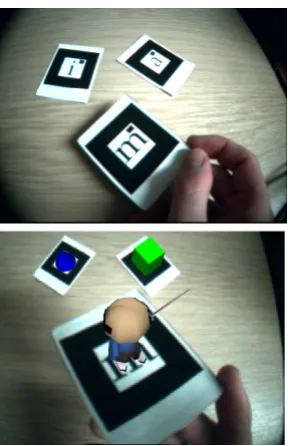
[image:2.595.102.246.244.467.2]The ARToolKit library developed at the University of Washington is designed for the rapid development of augmented reality applica-tions [5, 6, 18]. It provides computer vision techniques to calculate a camera’s position and orientation relative to marker cards so that virtual 3D objects can be overlaid precisely on the markers. Figure 1 shows the system in action: the virtual objects, i.e. the cube, the cone and the cartoon figure (bottom), are overlaid on the black and white marker cards (top). The ARToolKit can distinguish between the different marker card patterns so that it knows which virtual object should be placed on which physical marker.
Figure 1: ARToolKit markers are overlaid with virtual objects
In a typical ARToolKit application, users wear a head-mounted dis-play (HMD) with a camera mounted onto the HMD. Video from the camera is displayed on the HMD providing the illusion of the display being transparent. Graphics are overlaid by the system on any visible marker cards. The system is also responsible for track-ing the marker cards ustrack-ing the camera information. Users will often sit at a desk, providing a comfortable workspace to manip-ulate the ARToolKit marker cards in front of them. Alternatively, users might wear a lightweight version of the system as they moved around a museum space. An ARToolKit application can also use the marker cards’ physical properties, such as their orientation and position relative to other cards, to trigger events. For example, bringing two cards together could make the virtual objects inter-act.
As users have a private display, information being presented can be adapted personally to each individual. The selection and pre-sentation of the information can be adapted according to the user’s goals, preferences, knowledge and interests. This is important as users will be interested in different types of objects and they might be interested in different aspects of an object. Two users could
therefore view the same physical marker card but have different in-formation overlaid on to it. One user’s perspective does not have to be intrusive on another users, which can be important in public spaces such as museums.
3.
HYPERMEDIA METAPHORS
Metaphors are a powerful way to make complex information spaces more intuitive to the user [13] [27]. Using known manipulation paradigms greatly enhances the user’s feeling of control, for exam-ple holding a 3D object and moving the viewpoint by tilting and turning the object is more natural than using series of button con-trols as found on typical 3D interfaces.
A number of tangible interfaces could be envisaged for interacting with hypermedia information. In the following sections we will discuss a number of possible interfaces.
3.1
Labelling
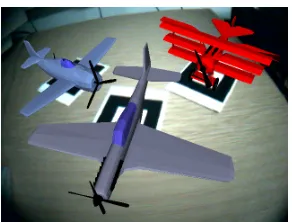
When users bring marker cards in front of them, objects are laid onto the markers. For example, Figure 2 shows a triplane over-laid onto the marker card.
[image:2.595.316.556.297.476.2]Figure 2: Holding a triplane
[image:2.595.318.555.513.692.2]Figure 4: Sprinkling labels onto an object
Users may want to know about specific details of an object or there might be interesting features that they might not notice. One ap-proach to this problem is to annotate the object’s features with dy-namic labels resulting in a 3D version of a labelled diagram, shown in Figure 3. Overlaying the object with augmented information clearly presents the relationship between the data and the object; it is important for the information to be displayed over or alongside the objects. There are several existing augmented reality systems that use the labelling of objects to present information. These in-clude an engine annotation system presented by Rose et al [26], an augmented reality photocopier instruction manual [14] and a tourist guide [15].
Each label is normally used to describe a feature of an object; in the triplane example there are labels for the guns, wings, propeller and so on. A line is drawn connecting each feature with its respective label.
Labels can be either specific or generic. Specific labels describe an object’s unique features; for example there could be a label de-scribing the exact engine model used in the triplane in Figure 3. This label is only relevant to this particular triplane object. Generic labels can be used to describe a feature present in several objects. For instance, there could be a label explaining what an engine does in an aircraft. This label could then be applied to all aeroplanes with engines. Generic labels are extremely useful for objects with similar features as generic descriptions can be applied to all simi-lar objects without having to explicitly author descriptions for each object. New objects can then be labelled without any material hav-ing been specifically written about them providhav-ing the sub-parts of the object are suitably tagged.
Different labels can be used depending on a user profile of the indi-vidual user viewing the object. For example, the information pre-sented to adults might be more detailed than that shown to children. Likewise, there might be experts in the field who will want to view highly detailed descriptions of objects and other users who want a straightforward overview of the object. Similarly, the language to use for the labels might be part of the user’s preferences.
3.2
Sprinkling labels
An alternative metaphor to the static labelling based on user profile would be that of sprinkling the labels onto the models.
(a) Three object markers
(b) Three spice pile markers with one object marker in background to convey scale
Figure 5: Types of marker cards in the system
When the user first picks up an object on a marker card, there are no labels attached to it. A mechanism is required that allows users to add labels that are relevant to their interests.
[image:3.595.364.510.253.364.2]Figure 6: Evolution of a label as context is sprinkled on
people to physically manipulate the linkbases alongside the objects being labelled then they can tailor the labels that they are shown.
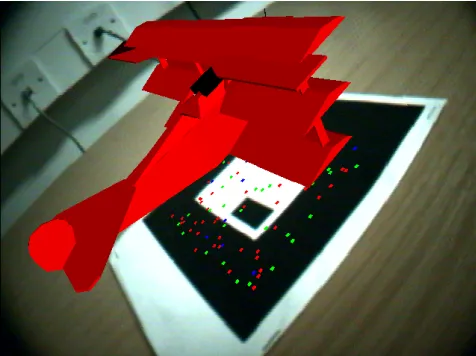
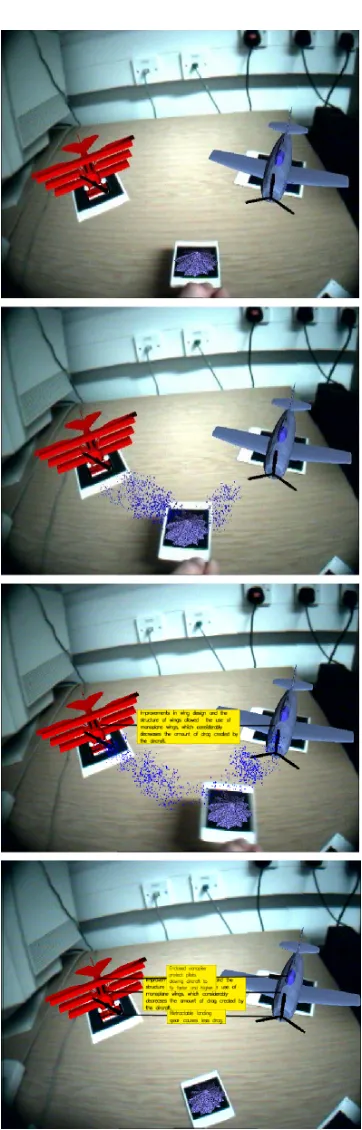
One way to accomplish this is to provide two types of markers: ob-ject markers and ‘spice pile’ markers. Obob-ject markers are used to display objects while each spice pile represents a different linkbase of labels. When the user picks up a spice pile and shakes it, small particles drop from it and fly onto the visible objects. These parti-cles represent the information labels that pop up on the object when the particles land. This process is illustrated in Figure 4.
A problem with this approach is that users may sprinkle too many labels onto the object, causing label overload. If this happens, users can pick up the object and shake it, causing the labels on the object to start to fly off and disappear. The order that the labels fly off could be in the reverse order that they were put on. Users can keep shaking an object until there are no labels left, leaving the user free to sprinkle a completely different set of labels on.
As each spice pile represents a different information area, the type of label that is added to the object depends on which pile has been sprinkled. There are many possible subjects that could be used for a spice pile: in our aircraft example we might imagine a ‘glossary pile’, a ‘technical pile’, an ‘aerodynamics pile’ and so on.
3.3
Sprinkling to modify
In the sprinkling metaphor a spice pile represents a linkbase of la-bels. As different linkbases are sprinkled onto an object their com-bined labels form a particular information view of that object.
The restriction here is that the effect of combining linkbases is al-ways cumulative, the user can only ever add more labels to their view. The ability to shake labels off a model allows the user to backtrack and somewhat alleviates the information overload prob-lem but it does not overcome the restriction.
What might be desirable to a user is evolving information, labels that change and might even disappear as the user sprinkles. This requires a shift in metaphor, away from sprinkling labels, towards sprinkling context. In this metaphor each spice pile would rep-resent a certain contextual element, for example there might be a ‘technical context pile’ and a ‘historical context pile’. As these are sprinkled onto an object the context of that object would change. As the object’s context changes it will request new labels that re-flect its new context. The labels could be stored in a single linkbase but have contextual restrictions that determine when they appear, and also when they disappear.
For example, Figure 6 shows a sequence where a user is sprinkling context from an ‘armament context pile’. Initially, the aeroplane has a simple label on it that indicates the ‘Gun’ on the model. As the user sprinkles more context on, the objects context changes to reflect the fact that it should be shown more in the context of arma-ments. Consequently, the label evolves to ‘Machine Guns’ and then into a label stating the type of gun used on that specific aeroplane. As the context increases labels can also disappear completely; for example, it may be appropriate to label a group of features, such as an aeroplane’s landing gear, with one label at first. As the user re-quests more technical detail, sub features such as the wheels, would be labelled and the group label would disappear.
Sprinkling context also allows a more sophisticated relationship be-tween the different kinds of labels. For example a particular label might require a certain level of technical context as well as a cer-tain level of historical context before it would appear, such as a label describing when a particular engine was first introduced. If the user was simply sprinkling labels, this would pose the question, in which linkbase should the label reside?
3.3.1
Visually Marking Context
A problem arises in providing the user with a mechanism to modify the context of an object by sprinkling context information onto it. That is, how to inform the user of what the current context of an object is.
[image:4.595.317.555.514.692.2]To solve this problem, each of the spice piles is allocated a different colour and the particles falling onto the objects are the same colour as the pile from which they were sprinkled. When particles land on an object, the particles gather at the object’s base so that users know how much of that context has been sprinkled on. Mixing different contexts will produce a mixture of coloured particles at an object’s base so that users have a visual clue as to the mixture of contexts that have been created.
The spice piles shown in Figure 5 actually have a 3D model re-sembling a pile of dust to represent the spice pile. To help the user identify the context represented by each pile of dust, more relevant models could be used instead. In the aeroplane example, an oil drum could be used for mechanical information, a gun or an ammu-nition box might be used for information on an airplane’s armament and a book could represent the glossary. When these are shaken the particles falling down onto the card could be related to their respec-tive context object. For example, drops of oil would fall from the oil drum, bombs and spent ammunition cases from the ammunition box and pages or words from the glossary book. These particles could gather at the object marker card base as before, resulting in a more straightforward identification of the context mixture.
3.4
Dipping
Sprinkling is just one of a number of possible metaphors for adding labels and links to 3D models. Instead of having labels in particle form, we could view them as sitting in big vats of liquid, with a particular linkbase represented by a 3D vat. In order to add labels to the model you pick it up and dip it in the vat. When it comes out, the model will be covered with labels that are relevant to the vat it was dipped in. This ‘sheep dip’ metaphor could be used with multiple vats, where the effect could be one of a number of possible outcomes.
Dipping in a second vat might replace the labels on the model
with those relevant to the second vat. This is akin to dipping a real model in different coloured paint pots, the new colour replacing the old.
The second vat augments the labels already on the model in
a cumulative fashion.
After a second dipping, the labels might reflect a
combina-tion of the two. i.e. A ‘blue’ tub and a ‘yellow’ tub results in ‘green’ labels.
Repeated dips in the same vat result in increasingly complex
labels. For example, a vat containing technical labels will re-sult in increasingly more technical labels appearing the more the model is dipped in the vat.
By using a dipping metaphor, it might be easy for the user to grasp some of the combinatory effects such as colour combining. Also, the ‘vats’ could be fixed objects in the scene, so the user only has to manipulate the object marker card rather than an object card and a spice pile.
3.5
Selecting links
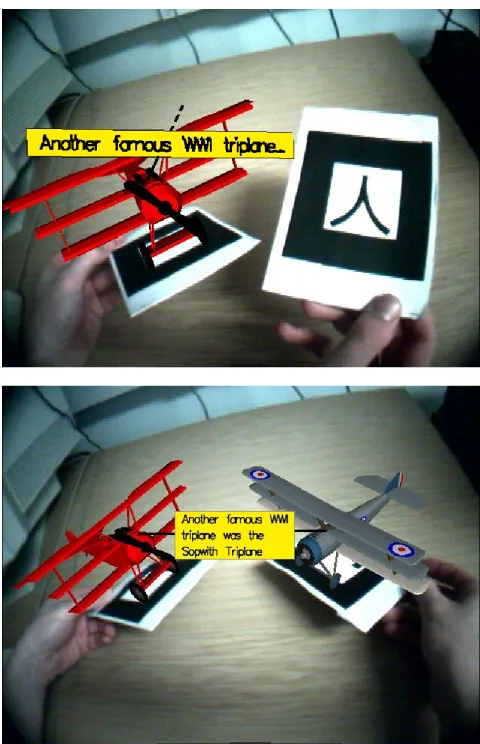
So far we have only discussed descriptive labels, which simply de-scribe an object feature. There are also link labels, which act as link anchors that users can select and follow. Descriptive labels are drawn with white backgrounds while link labels have yellow
[image:5.595.316.556.92.464.2]backgrounds. Link labels also have a hashed line protruding out of them, appearing to continue the line connecting the object’s feature to the label. This can be seen in Figure 8.
Figure 8: A link is selected (top) and the destination object is loaded
Users select a link to follow by rotating the object so that the link label they are interested in is the one closest to them. They then hold up an empty object marker card to the side of the current ob-ject, which triggers the destination object to be loaded on the new marker. In this way the user has followed a link to a new object, which is displayed on the new object marker card.
The two objects, the source and destination anchors, are now vis-ible side by side; any links between the two objects are shown by drawing an elastic line between the two anchors. This line has a text label in the middle describing the link.
3.6
Sprinkling Links
Figure 9: Sprinkling links onto several objects
the scene, link lines are created dynamically and drawn between two objects. As before, a label is placed on the link line describing the link.
3.7
Combining objects
The metaphors we have looked at so far have centred around marker cards representing objects and marker cards representing context or linkbases being used together. An alternative method for altering context would be to make the context of an object dependant on the context of other objects around it. For example, the user picks up a triplane object. Labels appear which reflect the basic context of the object, perhaps influenced by the user profile of the user. The user then picks up a second object, a toolbox, and moves it closer to the plane. The context of the plane is modified by the context of the toolbox so that it is now being viewed in a more technical context.
To use a different example, a model of a modern fighter is intro-duced to the scene by the user. The context of the triplane might now change to a more historical perspective as within the scene the overall context reflects both modern and historic aircraft. The labels on the triplane might change to indicate the differences be-tween modern and historic capabilities of aircraft.
In this metaphor, an overall scene is created and the context of the labels in the scene is derived from the combining of the objects within it.
4.
STRUCTURES TO SUPPORT TANGIBLE
HYPERMEDIA
The metaphors for interaction described above allow the user to interact with and manipulate hypermedia structures partially hidden from them by the abstraction of the interface. As a mechanism for discussing the underlying structures we will use the Fundamental Open Hypermedia Model (FOHM) [23].
4.1
FOHM
The Fundamental Open Hypermedia Model (FOHM) grew out of the Open Hypermedia Protocol (OHP) developed by the Open Hy-permedia Systems Working Group (OHSWG) [11].
The basic FOHM model is constructed from four core objects. These are
Data objects, which serve as wrappers for any piece of data
held outside of the model.
Associations, representing relationships between data objects
(or other associations).
References, which are used to point at data objects and
asso-ciations.
Bindings, which are used to attach the references to the
asso-ciation structure.
In addition to these four first class objects, FOHM also has
con-text objects that can be attached to any of the first class objects.
When the structures are retrieved only those structures whose con-text matches that of the query are returned, parts of the structures that do not match are pruned.
4.2
Structures
Figure 10: The four FOHM first class objects.
4.2.1
Labels
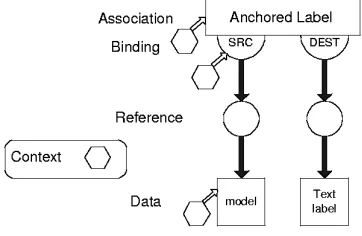
[image:7.595.332.529.113.218.2]Labels can be represented in a number of ways using FOHM. The simplest way is to have each label stored as a data object. Figure 11 shows an example label. A context is attached to the data object to scope the label to only being visible at certain times.
Figure 11: A label represented using FOHM
This is just one possible way of representing a label in FOHM and in practice more complex structures such as the concept structure discussed later, might be used to hold the information.
Figure 12: Attatching a label to a model
The label object would then be attached to a model using an associ-ation. The structure used for this is shown in Figure 12. This would anchor the label to a particular part of a model. Instead of anchor-ing to a specific model, the association might anchor the label to a generic term such as ‘wing’ allowing the label to be attached to any model that requires a label for the term ‘wing’.
4.2.2
Links
Navigational link structures can be represented using FOHM in a number ways. The example shown in Figure 13 represents a link association, which is bound to a single source, an explanation label and a destination.
In FOHM, context objects can be attached to the structure on any of the first class objects. In our example, context has been placed on
[image:7.595.100.247.281.323.2]the association, on the destination binding, and on the source data object. By placing context on the destination bindings, different destinations may be presented to the user depending on the query context.
Figure 13: A navigational link structure
4.2.3
Concepts
Concept structures can be used to collect together multiple rep-resentations of the same object or idea. For example, Figure 14 shows several different textual descriptions collected together in a concept. The context placed on the bindings can be used to se-lect which of the representations is most appropriate in the current query context. The contexts might be structured to be mutually ex-clusive, or to allow for multiple representations to be applicable at any given time. For instance in our textual example each text frag-ment might be written in a different language, thus the language shown depends on the user’s context.
Figure 14: A concept structure
4.3
Query Context
The term context has been used when describing the metaphors for interaction. A number of different types of context can be identi-fied.
User context - Used to reflect the interests and knowledge of the user of the system. When labels are requested, the user con-text can be used to restrict the type of labels to those that are appropriate to the user. In Adaptive Hypermedia terms this might also be described as a User Model or Profile.
[image:7.595.333.540.396.507.2] [image:7.595.81.262.404.522.2]Scene context - The scene could have a context representing the overall information. This might be constructed from the con-texts of all the objects in the current scene, or perhaps a com-bination of the contexts of all of the users present. Alter-natively, a scene might have its own context that user’s can introduce objects to.
4.4
How the hyperstructures map to metaphors
Having discussed a number of different hypermedia structures that can be used to structure the underlying information of our exam-ple system, we can now look at how these structures map to the metaphors described previously.
4.4.1
Labelling
The labelling process requires that the objects are split up into their respective sub objects or features. For example, the triplane in Fig-ure 3 has wings, a fuselage, an engine and so on. FeatFig-ures can be treated individually, such as the fuselage, or put into groups. For example, the triplane has three wings.
Each feature or group of features is given an identifier. A FOHM linkbase is used to match a feature’s identifier to one or more labels or a concept containing labels. This approach is useful as often different sources use different names or terminology. The labelling can be adapted to each application by using different linkbases or by changing the context.
When the linkbase is queried to obtain the labels and links, a con-text is passed along with the query. This concon-text will scope the labels that are returned from the linkbase. In the simple case, the context will be that of the user, in the form of a user profile giving preferences for the type of labels to be displayed.
It is also possible to query the FOHM linkbases to obtain generic descriptions about a certain type of feature. Generic labels, where the source anchor contains the feature’s name and the destination anchor describes the feature, are also stored in the linkbase. Once a feature’s name has been determined, the linkbase can be queried for detailed descriptions of that feature.
4.4.2
Sprinkling context
As described in Section 3.2, when a spice pile is shaken particles fly off towards any visible objects. A particle landing on an object alters the object context. When an object’s context changes, the system sends a new query to the linkbase to get labels based on its new context.
4.4.3
Dipping
Although the dipping metaphor interaction is very different from that of sprinkling context on the objects, the underlying hypermedia querying is very similar. When the object is dipped, the context of the object is modified. This causes the system to query the link server to ask for a new set of labels and links reflecting the object’s new context.
4.4.4
Linking
Applying links to objects is very similar to adding labels. The dif-ference being where the source and destination objects are both visible within the scene. As can be seen in Figure 9 the system has an awareness of when both ends of a link are visible within a
scene and will display a line between the two anchors, accompa-nied by the appropriate link description, which may or not be part of a concept.
5.
IMPLEMENTATION
The examples used above are drawn from a demonstration system produced to examine the practical use of metaphors. The follow-ing section briefly covers some of the more important technologies used in the demonstrator.
5.1
ARToolKit
The demonstration system is implemented with the ARToolKit de-veloped at the University of Washington. The ARToolKit facili-tates the creation of augmented reality applications by providing the complex computer vision techniques required to track the marker cards. Virtual objects, such as the 3D models shown in Figure 5, can then be accurately overlaid on the markers.
Each 3D model is stored in both VRML and X3D format [2]. VRML is a protocol for creating navigable, hyperlinked 3D spaces on the Web. X3D is a next generation, extensible 3D graphics specifi-cation in XML. X3D extends the capabilities of VRML. As X3D is based on XML, files are easy to parse and manipulate; objects are stored in the X3D files with their features split into sub objects. These files can be parsed to determine which sub features belong to an object and their position, allowing the labels to be drawn in the right place. The VRML file is solely used for loading and viewing the object in the ARToolKit as this does not support X3D.
Interaction elements of the augmented reality environment, such as particles flying from the spice piles and the labels, are implemented using OpenGL [1], a widely used graphics standard for implement-ing interactive 2D and 3D graphics applications.
5.2
Auld Linky
Auld Linky [21] is a stand-alone link service that serves FOHM structures according to contextual queries, filtering out the parts of the FOHM structures that do not match the context of the query. For our implementation we authored a linkbase of Labels, Links and Concepts (as described above) in XML and then loaded this linkbase into Linky.
Linky is queried via an XML pattern matching language commu-nicated over HTTP. Each query is accompanied by a context object represented using FOHM. In our implementation context is con-stantly changing requiring efficient ways to query Linky to provide these links.
The na¨ıve choice is to make a query each time the context changes. This can result in hundreds of queries, especially if context is rated with a fine granularity - such as a percentage. Instead we chose cer-tain query thresholds, when the context level of an object crossed these we made a query to Linky and randomly ordered the results. As the user continued to sprinkle the results are gradually rendered until the next threshold is reached and another query is generated.
6.
FUTURE WORK
The handling of objects of dramatically different scales.
Cur-rently the object models are chosen to be of similar dimen-sions, but the system might have to cope with users compar-ing diverse objects; in our example perhaps a triplane and a Boeing 747.
Currently the links presented in the system are anchored on
objects, or sub objects. Where labels become more com-plex however it is possible to imagine links being anchored within the text of labels. The displaying of such links would certainly be possible but the selection mechanism for them would need to be more complex than the current selection metaphor.
The current models are static once loaded by the system. It is
possible that part of the interaction metaphor might include animated parts of the model as the user selects them. For example, as the user selects the propeller of the triplane it is animated and spins around. This provides a non-textual way of illustrating the model.
7.
CONCLUSION
Augmented reality systems combine real world scenes and virtual scenes, allowing users to manipulate 3D objects in a natural way. As well as allowing users to view 3D models from different per-spectives, augmented reality can be enhanced by adding a hyper-media system that provides contextual information in the form of labels and links. The context used to select these labels could be a user profile or information selected from within the system.
A number of mechanisms have been presented here for allowing the user to tangibly affect the context of the system. These have included sprinkling information from spice piles to building up contexts by placing models together in a scene environment. The choice of which metaphor to use might be left up to the user, al-though arguably certain metaphors will lend themselves better to certain environments.
As well as labelling objects, hypermedia links can be used to aug-ment the 3D models. The displaying of the links proves to be less of a problem than providing a mechanism for selection. Because the user has the ability to rotate the object and accompanying links, this can be used as a simple selection mechanism, with the link closest being the link currently active. Alternative selection mech-anisms will be possible, and additional devices such as pointers or remote control style devices might be imagined.
Such tangible interfaces driven by context ask questions about the nature of context in the system. User context or profiles are heav-ily used in areas of adaptive hypermedia and the experience of that community will inform ongoing work in this area. Object context and scene context provide interesting new avenues for investiga-tion, with the combining of objects to create effects opening up novel and exciting possibilities.
The demonstrator produced to illustrate the ideas in this paper shows that not only can augmented reality and hypermedia be successfully integrated, but that their combination provides new mechanisms for delivering contextual information. Formal user trials of the demon-strator are being planned and initial reactions from those exposed to the system have been enthusiastic for the approach. More than just putting links into augmented reality, the combination provides a platform for both experimentation with subtle human interface
techniques and provides an environment highly suitable for the ex-ploration of contextual hypermedia.
8.
ACKNOWLEDGEMENTS
This research is funded in part by EPSRC IRC project ‘EQUATOR’ GR/N15986/01.
9.
REFERENCES
[1] Opengl.org web site, http://www.opengl.org.
[2] Web3d consortium, http://www.web3d.org.
[3] ANDERSON, K. M., TAYLOR, R. N.,ANDWHITEHEAD, E. J. Chimera: Hypertext for Heterogeneous Software Environments. In ECHT ’94. Proceedings of the ACM
European conference on Hypermedia technology, Sept. 18-23, 1994, Edinburgh, Scotland, UK (1994), pp. 94–197.
[4] BENFORD, S. Information Visualisation, Browsing and Sharing in Populated Information Terrains. In Proceedings of
the Seminar Series on New Directions in Software
Development : The World Wide Web (Mar. 1995), University
of Wolverhampton.
[5] BILLINGHURST, M.,ANDKATO, H. Collaborative mixed reality. In Proceedings of International Symposium on Mixed
Reality (ISMR ’99). Mixed Reality - Merging Real and Virtual Worlds (1999), pp. 261–284.
[6] BILLINGHURST, M., KATO, H., WEGHORST, S.,AND
FURNESS, T. A mixed reality 3d conferencing application. Tech. Rep. R-99-1, Human Interface Technology Laboratory - University of Washington, 1999.
[7] BRA, P. D.,ANDCALVI, L. Aha! an adaptive hypermedia architecture. The New Review of Hypertext and Multimedia 4 (1998), 115–139.
[8] BRUSILOVSKY, P. Adaptive hypermedia. User Modeling and
User-Adapted Interaction Ten Year Anniverary Issue 11
(2001), 87–129.
[9] CHEN, C., THOMAS, L., COLE, J.,ANDCHENNAWASIN, C. Representing the semantics of virtual spaces. IEEE
Multimedia 6, 2 (1999), 54–63.
[10] CHEN, L.,ANDSYCARA, K. Webmate: Personal agent for browsing and searching. In Proceedings of the 2nd
International Conference on Autonomous Agents (May
1998), pp. 132–139.
[11] DAVIS, H. C., MILLARD, D. E., REICH, S., BOUVIN, N., GRØNBÆK, K., N ¨URNBERG, P. J., SLOTH, L., WIIL, U. K.,ANDANDERSON, K. M. Interoperability between hypermedia systems: The standardisation work of the OHSWG. In Hypertext ’99, The 10th ACM Conference on
Hypertext and Hypermedia, Darmstadt, February 21-25, 1999 (Feb. 1999), ACM, pp. 201–202.
[12] DAVIS, H. C., RIZK, A.,ANDLEWIS, A. J. OHP: A Draft Proposal for a Standard Open Hypermedia Protocol. In
Proceedings of the 2nd Workshop on Open Hypermedia Systems, ACM Hypertext ’96, Washington, D.C., March 16-20. Available as Report No. ICS-TR-96-10 from the Dept. of Information and Computer Science, University of California, Irvine (1996), U. K. Wiil and S. Demeyer, Eds.,
[13] ERICKSON, T. D. Working with Interface Metaphors. In The
Art of Human Computer Interface Design, B. Laurel, Ed.
Addison Wesley, 1990, pp. 65–74.
[14] FEINER, S., MACINTYRE, B.,ANDSELIGMANN, D. Knowledge-based augmented reality. Communications of the
ACM 36, 7 (July 1993), 52–62.
[15] FEINERS, S., MACINTYRE, B.,ANDHOLLERER, T. A touring machine: Prototyping 3d mobile augmented reality systems for exploring the urban environment. In Proceedings
of The First International Symposium on Wearable Computers (ISWC ’97) (1997), pp. 74 –81.
[16] FOUNTAIN, A. M., HALL, W., HEATH, I.,ANDDAVIS, H. C. MICROCOSM: An Open Model for Hypermedia With Dynamic Linking. In Hypertext: Concepts, Systems and
Applications (Proceedings of ECHT’90) (1990), A. Rizk,
N. Streitz, and J. Andr´e, Eds., Cambridge University Press, pp. 298–311.
[17] GRØNBÆK, K.,ANDTRIGG, R. H. Design issues for a Dexter-based hypermedia system. Communications of the
ACM 37, 3 (Feb. 1994), 40–49.
[18] KATO, H.,ANDBILLINGHURST, M. Marker tracking and hmd calibration for a video-based augmented reality conferencing system. In Proceedings of the 2nd IEEE and
ACM International Workshop on Augmented Reality (1998).
[19] KATO, H., BILLINGHURST, M., POUPYREV, I., IMAMOTO, K.,ANDTACHIBANA, K. Virtual object manipulation on a table-top ar environment. In Proceedings of the International
Symposium on Augmented Reality (ISAR 2000) (October
2000).
[20] LAB, M. M. Tangible media group
-http://tangible.www.media.mit.edu/groups/tangible.
[21] MICHAELIDES, D. T., MILLARD, D. E., WEAL, M. J.,
ANDROURE, D. C. D. Auld leaky: A contextual open hypermedia link server. S. Reich and K. M. Anderson, Eds.
[22] MILLARD, D.,ANDDAVIS, H. Navigating Spaces: The Semantics of Cross Domain Interoperability. In OHS6 and
SC2, Proceedings of the ..., Published in Lecture Notes in Computer Science, (LNCS 1903), Springer Verlag, Heidelberg (ISSN 0302-9743) (2000), S. Reich and K. M.
Anderson, Eds., pp. 129–139.
[23] MILLARD, D. E., MOREAU, L., DAVIS, H. C.,AND
REICH, S. FOHM: A Fundamental Open Hypertext Model for Investigating Interoperability Between Hypertext Domains. In Proceedings of the ’00 ACM Conference on
Hypertext, May 30 - June 3, San Antonio, TX (2000),
pp. 93–102.
[24] POUPYREV, I., BERRY, R., KURUMISAWA, J., NAKAO, K., BALDWIN, L., SHIGEO, I., BILLINGHURST, M.,AND
KATO, H. Augmented groove. In Proceedings of the ACM
SIGGRAPH 2000 Conference Abstracts and Applications
(2000).
[25] POUPYREV, I., BILLINGHURST, M., TAN, D., KATO, H.,
ANDREGENBRECHT, H. A tangible augmented reality interface for prototyping instrument panels. In International
Symposium on Augmented Reality IEEE ISAR2000, Munich, Germany (Oct. 2000).
[26] ROSE, E., BREEN, D., AHLERS, K., GREER, D., CRAMPTON, C., TUCERYAN, M.,ANDWHITAKER, R. Annotating real-world objects using augmented vision. In
Computer Graphics International ’95 (1995).
[27] SELIGMANN, D. D., LAPORTE, C.,ANDBUGAJ, S. V. The Message is the Medium. In Proceedings of the Sixth
International World Wide Web Conference, Santa Clara, California, USA (Apr. 1997), pp. 631–641.
[28] STERN, M.,ANDWOOLF, B. Curriculum sequencing in a web-based tutor. In Proceedings of Intelligent Tutoring
Systems (1998).
[29] YANKELOVICH, N., HAAN, B. J., MEYROWITZ, N. K.,
ANDDRUCHER, S. M. Intermedia : The concept and the construction of a seamless information environment.