Some Examples to Show That Objects Be Presented by
Mathematical Equations
The Minh Tran
Department of Mathematics and Statistics, Bowling Green State University, Bowling Green, USA Email: [email protected]
Received March 30,2012; revised June 16, 2012; accepted June 24, 2012
ABSTRACT
We have often heard remarks such as “We can plot graphs from the mathematical equations”, including equations of lines, equations of curves, and equations of invisible and visible objects. Actually, we can present each object by mathematical equation and we can plot graphs from equations. Equations not only show visible objects but also can show invisible objects such as wave equations in differential equations. In fact, the change of equations is also to con- duce the change of objects and phenomena. This paper presents mathematical equations, methods to plot the graphs in 2D and 3D space. The paper is also a small proof of this conclusion have been provided and addressing visualization problem for any object. The novelty of this paper presents some special equations of objects and shows the ideas to build objects from equations.
Keywords: Graph, Equation; Visible and Invisible Object
1. Introduction
In this section, we will briefly review some basic and special equations in 2D and 3D space. In 2D space, we will plot graphs of simple linear equations, equation of circles, and some special equations as equation of heart in Cartesian coordinates and Polar coordinate to show the attitude of objects. In 3D space, we have a change from equations in two variables in 2D space to equations in three variables in 3D space. We use some special func- tions in Mathematica to plot graph of objects, including sphere, hearts, apple, and wave equations. In addition, we can plot an object in two different coordinate systems to present mathematical methods and functions in Mathe- matica.
1.1. In 2D Space
1.1.1. In Cartesian Coordinates We can plot linear equation as follows:
yax b
0
yax bxc a
0
yax bx cxd a
2
2 2The graph of this equation is a line.
We also plot the graph of higher order equations such as Quadratic equation:
2
Cubic equation:
3 2
And higher order equations. Graph of these equations are
curves.
1.1.2. In Polar Coordinate
We can plot some graphs in this coordinate. We will use two variables in the equation.
Generally, we will introduce the equation of circles with the form:
x a y b r
cos sin x r y r
We will vary from Cartesian coordinate to Polar coor-dinate by using form:
2
2
2 21.2. In 3D Space
In this section, we will plot equations in two coordinate systems and will show equation of sphere in the two mathematical methods
1.2.1. In Cartesian Coordinates
We will plot some objects in 3D space to see a relation- ship between equations and graphs. We will use equation in three variables.
Generally, we rewrite equation of sphere with the fol-lowing form:
, ,
I a b c
sin cos sin sin cos
is center of the sphere. where
1.2.2. In Polar Coordinate
We can vary equation of sphere to polar coordinates as follows :
x u v
y u v
z u
, 0, 2π
u v
.
: where
2. Some Equations in Cartesian Coordinates
2.1. Linear EquationWe see that linear quation with the following form:
yax b
, , 10,10x
, 10,10
x x
, 10,10
x x
0
bxc a
With a = 0, we have the equation y = b, with b = 2 or b
= −2.
Using Mathematica software to plot these graphs In Mathematica
Input: Plot
2, 2
Press “Shift-Enter”} at the end of the command line. See Figure 1.
We have the graphs of the equations:
Where a > 0, we will plot the equation y = 2x. Input:Plot 2 ,
Press “Shift-Enter”} at the end of the command line. See Figure 2.
Where a < 0, we will plot the equation y = −2x. Input:Plot 2 ,
Press “Shift-Enter”} at the end of the command line. See Figure 3.
2.2. Quadratic Equation
We know that the graph of the quadratic equation has the form:
2
yax
In Mathematica
[image:2.595.307.539.83.390.2]Where a > 0, we can plot the equation
Figure 1. The graphs of the equations y = 2 and y = −2.
Figure 2. The graph of the equation y = 2x.
Figure 3. The graph of the equation y = −2x. 2
2 3 5
y x x
2
2x 3x 5, , 11,10x
.
Input:Plot
Press “Shift-Enter”} at the end of the command line. See Figure 4.
Where a < 0, we can plot the equation
2
2 3 5
y x x
2
2x 3x 5, , 10,12x
.
Input:Plot
Press “Shift-Enter”} at the end of the command line. See Figure 5.
2.3. Cubic Equation
We know that the graph of the cubic equation:
3 2 0
yax bx cxd a
3 2
2 3 4 5
y x x x
is a curve. In Mathematica
Where a > 0, we can plot the equation
3 2
2x 3x 4x 5, , 10,10x
.
Input:Plot
Press “Shift-Enter”} at the end of the command line. See Figure 6.
Where a < 0, we have the graph of
3 2
2 3 4 5
y x x x
3 2
2x 3x 4x 5, , 10,10x
.
Input:Plot
[image:2.595.60.285.556.726.2]Figure 4. The graph of the equation y = 2x2 + 3x + 5.
Figure 5. The graph of the equation y = −2x2 + 3x + 5.
Figure 6. The graph of the equation y = 2x3 + 3x2 + 4x + 5.
Figure 7. The graph of the equation y = −2x3 + 3x2 + 4x + 5.
2.4. Some Higher Order Equations
Quartic equation [1]
4 3 2 0
yax bx cx dxe a
4 3 2
6 12 3 13
y x x cx x
4 3 2
6x 12x cx 3x 13, , 2, 2x
Plot graph of the equation:
Input:Plot
Press “Shift-Enter”} at the end of the command line. See Figure 8.
Quintic equation
5 4 3 2 0
yax bx cx dx ex f a
5 4 2
2 6 8 3
To plot graph of the equation:
y x x x x
5 4 2
2x 6x 8x x 3, , 1.8,1.8x
Input:Plot
Press “Shift-Enter”} at the end of the command line. See Figure 9.
Plot graph of the equation:
100 6 50 8 10 3 yx x x x
100 6 50 8 10 3, , 1,1
x x x x x
Input:Plot
Press “Shift-Enter”} at the end of the command line. See Figure 10.
3. Some Equation in Polar Coordinates
3.1. Circle EquationsGenerally, we will introduce the equation of circles
[image:3.595.57.285.84.424.2]Figure 8. The graph of y = −6x4 + 12x3 + cx2− 3x + 13 [1].
[image:3.595.310.537.458.722.2]Figure 10. The graph of y = x100 + 6x50− 8x10 + x− 3.
as
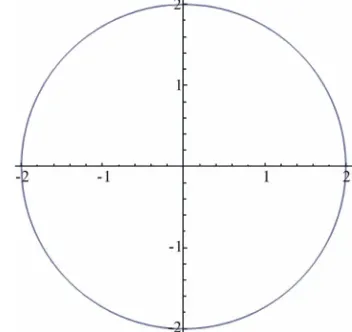
follows:Figure 11. The graph of the circle in Cartesian coordinates.
2
2 2x a y b r
2 2 4 x y
Choose r = 2, a = b = 0. We have the equation
We can directly plot with the command. Input:ContourPlot
2 2
2 2
4, , 2, 2 , , 2, 2 "THE CIRCLE 4
x y x y
x y
, Plot Label
Press “Shift-Enter” at the end of the command line. See Figure 11.
We can vary to polar coordinates, where x
0, 2π
2cos 2sin: Set:
x x
y x
, ,0, 2
x π
, 4sin
Plot graph of the equation in Mathematica. Figure 12. The graph of the circle in polar coordinates.
Input:ParametricPlot
2cos x , 2sin x
Press “Shift-Enter”} at the end of the command line. See Figure 12.
3.2. Elliptic Equations
In this section, we will plot the equations of three circles
x = 3cost, y = 3sint; x = 2cost, y = 2sint; x = cost, y = sint
and the equation of two elliptics:
4cos , sin ; cos
x t y t x t y t
Input: ParametricPlot
, 2sin ,
sin ,
t t
t
3cos ,3sin , 2cos
4 cos ,sin , cos , 4
cos ,sin , ,0, 2π
t t
t t t
t t t
Press “Shift-Enter”} at the end of the command line.
[image:4.595.331.507.294.460.2] [image:4.595.309.536.486.717.2]3.3. The Equations of Heart [3]
From the general form, where x
0, 2π
cos sin
:
x r x
y r x
2 2sin cos 2 2sin sin
We can revise the equation system to plot graph of heart
x u u
y u u
where x 0, 2π
. Input: ParametricPlot
2 2sin cos , 2 2sin sin
PlotStyle Thick, Color Function F
, , , 2 ,
Color Function Scaling False
u u u
x y u Hue u
, ,0, 2π ,
unction
u u
3 2 31 x y 0
3
3 2 2
1.5 1
2,3 , " ,
y
y
[image:5.595.309.537.84.548.2]
2
2
2 2Figure 14. The graph of the heart.
Press “Shift-Enter” at the end of the command line. See Figure 14.
3.4. The Equation of Wedding [4]
From Eugen Beutel equation :
2 2
x y
We will create a new equation in a command line to build two intersectional hearts in the graph.
We can set a name of the equation with title: “Song Hy Equation”.
Input: ContourPlot
2 2 2 3
2 3
1 ,
1.5 , 2, 3 , , PlotLabel "SONG HY-ContourStyle Red
x y x y x
x y x
喜喜 Figure 15. The graph of wedding (SONG HY-喜喜).
We can directly plot with the command. Input: ContourPlot3D
Press “Shift-Enter”} at the end of the command line.
See Figure 15.
2 2 2
2 2 2 4, , 2, 2 , , 2, 2 , , 2, 2 ,
PlotLabel "THE SPHERE 4"
x y z x y z
x y z
4. Some Equations in 3D Space
Press “Shift-Enter” at the end of the command line. See Figure 16.
4.1. The Equation of Sphere
, 0, 2π
u v :
We can vary to polar coordinates, where Generally, we will write the equation of sphere with form
a y b z c r
, ,
sin cos sin sin cos
x , where I a b c
2 2 2 4
x y z
is centre of the sphere.
x u v
y u v
z u
[image:5.595.68.266.480.595.2]Figure 16. The graph of sphere in Cartesian coordinates.
Plot graph of the equation in Mathematica. Input: ParametricPlot3D
sin sin ,sin cos
, 0, 2π , ,0, 2π
u v u
u v
v ,cos u
,
sin cos sin sin cos
Press “Shift-Enter” at the end of the command line. See Figure 17.
4.2. The Equation of Apple
From the equation of sphere in polar coordinates as fol-lows:
x u v
y u v
z u
where u v, 0, 2π
in cos sin sin
cos
We will vary the coordinates of x and y to create new coordinates system in 3D space.
2 2s 2 2 2 3.5
x v u
y v u
z v
where u v, 0, 2π
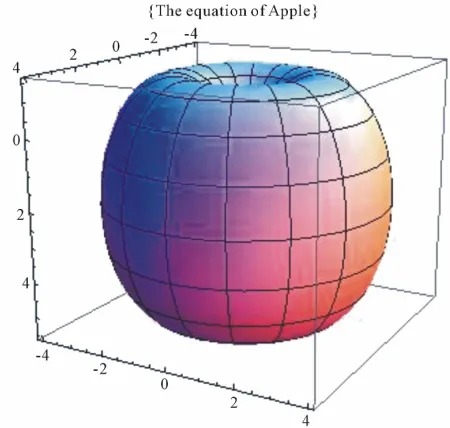
.The change of the equation shows that a new object has been created. The graph of new equation can be observed in the figure below. It is the same an apple and is called
with title: “The equation of Apple”. Input: ParametricPlot3D
2 2sin cos , 2 2sin sin , 2 3.5cos , ,0, 2π , ,0, 2π , PlotLabel "The equation of Apple"
v u v u
v u v
Press “Shift-Enter” at the end of the command line. See Figure 18.
[image:6.595.310.536.208.471.2]Figure 17. The graph of sphere in polar coordinates.
[image:6.595.310.535.503.717.2]4.3. The Equation of Donuts Cakes [3]
According to Polar coordinates in 3D space, we can be plotted an object. By the change of the coordinates of equations, we can built the different attitude of objects From the combine of equations, we have plotted the rings in different colors in 3D space. These figures have called with title: “Donuts cakes”.
Input: ParametricPlot3D
4 3 cos sin , 4 3 c 4 sin , 8 3 cos cos ,3 4 3 cos sin , 12 3 co 4 3 cos cos , 4 sin16 3 cos cos ,3 sin , 4 3 cos sin , ,0, 2π
PlotStyle Red, Green, Blue, Yel
v u
v v
v u
v u v
v u v
v u u
os cos , sin , s sin ,
[image:7.595.312.535.88.214.2], ,0, 2π , low v u u v v u v
Figure 19. The graph of donuts cakes.
Press “Shift-Enter” at the end of the command line. See Figure 19.
4.4. The Wedding Equation [4]
From Gabriel Taubin equation:
3 1 2 3 2 30 x z y z 2 2 2
2 1
10 x y z
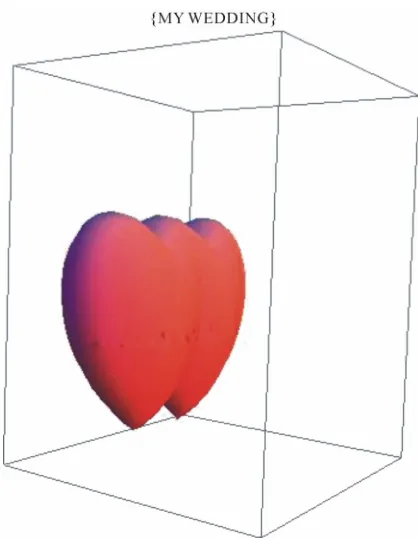
We can vary and combine two equations in a command line to build a new object with the figure of two intersec-tional hearts.
We can set a name of this equation with title: “Wedding Equation”. Input: ContourPlot3D
2 32 2 3 2 3
,
1
, 2.5 , ink, .5 , ,.8 , y z
32 2 2 2 3
3 2 2 1 2 1 10 1
2 1 1
10 , 0.9, 2.5 , , 1.2, 2.5 , , 1.2 Contours 0 , ContourStyle P Axes False, ViewPoint 2,.1, Mesh None, BoxRatios .6,.6
PlotLab
x y z x z
x y z x
x y
el "MY WEDDING"
z y z
z
Figure 20. The graph of the wedding in space.
tan
0y x y x , with initial condition
0 1,
0 0y y
.
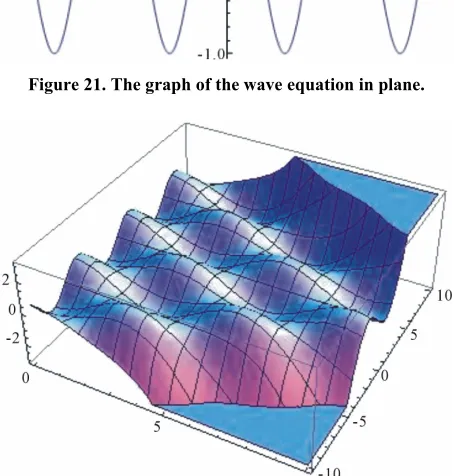
Using Mathematica software to plot the wave form of the equation as follows:
Input:
wave1 tan 0, 0 1, 0 0 ;
sol wave1, , , 10,10
y x y x y y
y x
NDSolve
Input: Plot Press “Shift-Enter” at the end of the command line.
See Figure 20.
4.5. The Wave Equation in Plane [3]
We have the following differential equation:
. , , 10,10
y x sol x
Press “Shift-Enter” at the end of the command line. See Figure 21.
4.6. The Wave Equation in Space [3]
We have the differential equation [5]
,
,tt xx
[image:7.595.317.526.241.510.2]Figure 21. The graph of the wave equation in plane.
Figure 22. The graph of the wave equation in space.
0, sin
u x x
u
0,x 0
, , , 0 ,
u t x x
x
, .
Evaluate , .wave2 , ,0,10 , , 10,10
u t x
t x
Plot3D
Press “Shift-Enter” at the end of the command line. See Figure 22.
5. Conclusions
This paper has shown some visible and invisible figures of the equations. In the paper, we have also discussed the equations and have presented the graphs of mathematical equations in 2D and 3D space. Each change of an equa-tion is shown the change of object, so we will have a stronger understanding in relationship between equations and objects.
Indeed, we can plot any graphs from equations; con-tradictorily, from the objects are known, we can also find equations of these objects and how we can find these equations. I think, that is the future of work, which we can do to determine equations by softwares, mathemati-cal modeling.
This paper also kindles new ideas about the change of equation. The use of Mathematica in this paper illustrates the important role of technology in research in mathe-matical equations. It not only help in providing a com-puting platform but also serves as a useful tool for plot-ting visual images resulplot-ting from the equation.
REFERENCES
[1] The Knowledge in Mathematica 7.0 Softwave,Wolfram as Gabriel Taubin Equation, and Others.
[2] The Minh Tran, “Using Scientific Calculators to Solve the Mathemtical Problems for Excellent Students,” Cal-culator Company, 2009.
x
Using Mathematica to plot the wave form of this equa-tion.
Input:
wave2 , , ,
0, sin , Derivative 1,0 0, , ,0,10 , , 10,10
D u t x t t D
u x x u
u t x
NDSolve x,
[3] R. J. Lopez, “Advanced Engineering Mathematics,” Ad-dison Wesley, Boston, 2000.
[4] R. T. Smith and R. Minton, “Calculus,” 3rd Edition, McGraw-Hill Companies, Inc., New York, 2011.

![Figure 8. The graph of y = −6x4 + 12x3 + cx2 − 3x + 13 [1].](https://thumb-us.123doks.com/thumbv2/123dok_us/9949490.496477/3.595.292.545.77.687/figure-graph-y-x-x-cx-x.webp)