A Facilitated Interface to Generate a Combined Textual
and Graphical Database System Using Widely Available
Software
Corey Lawson, Kirk Larson, Jonathan Van Erdewyk, Christopher Smith, Al Rizzo, Landon Ross, Marc Rendell
Creighton University School of Medicine, Omaha, USA. Email: [email protected]
Received August 9th, 2012; revised September 11th, 2012; accepted September 23rd, 2012
ABSTRACT
Data-Base Management System (DBMS) is the current standard for storing information. A DBMS organizes and main-tains a structure of storage of data. Databases make it possible to store vast amounts of randomly created information and then retrieve items using associative reasoning in search routines. However, design of databases is cumbersome. If one is to use a database primarily to directly input information, each field must be predefined manually, and the fields must be organized to permit coherent data input. This static requirement is problematic and requires that database ta-ble(s) be predefined and customized at the outset, a difficult proposition since current DBMS lack a user friendly front end to allow flexible design of the input model. Furthermore, databases are primarily text based, making it difficult to process graphical data. We have developed a general and nonproprietary approach to the problem of input modeling designed to make use of the known informational architecture to map data to a database and then retrieve the original document in freely editable form. We create form templates using ordinary word processing software: Microsoft In-foPath 2007. Each field in the form is given a unique name identifier in order to be distinguished in the database. It is possible to export text based documents created initially in Microsoft Word by placing a colon at the beginning of any desired field location. InfoPath then captures the preceding string and uses it as the label for the field. Each form can be structured in a way to include any combination of both textual and graphical fields. We input data into InfoPath tem-plates. We then submit the data through a web service to populate fields in an SQL database. By appropriate indexing, we can then recall the entire document from the SQL database for editing, with corresponding audit trail. Graphical data is handled no differently than textual data and is embedded in the database itself permitting direct query approaches. This technique makes it possible for general users to benefit from a combined text-graphical database environment with a flexible non-proprietary interface. Consequently, any template can be effortlessly transformed to a database system and easily recovered in a narrative form.
Keywords: Graphical Database Systems; InfoPath; SQL; Data Mining
1. Introduction
Data-Base Management System (DBMS) is the current standard for storing information. A DBMS organizes and maintains a structure of storage of data. Databases make it possible to store vast amounts of randomly created in- formation and then retrieve items using associative rea-soning in search routines. It has even been suggested that DBMS offer the optimal approach to create information, superseding the structured narratives of the past [1]. This view is contested by those who feel that DBMS systems surrender the innate structure of information possessed by narrative forms [2]. Databases collect individual data items but not the operational associations which exist
among these items. It is rightly argued that the optimal database construct has to be designed to maintain the coherency between data and the structure into which it is inputted [3].
recreate a database architecture which matches the origi-nal structure. There have been advances in developing workflow models with mapping to databases. Utilitarian programs such as Adobe’s Life Cycle Designer and Mi-crosoft’s InfoPath are coming into increasing use to per-mit a more natural approach to creating forms which then map directly to associated databases. These techniques have been used to send textual information to databases. Although this represents an advance, it is still far from the multimedia comprehensive DBMS envisaged by Manovich. At present, there is no general solution to the problem of conserving well characterized graphical struc- ture in a transform to a database, let alone multimedia input. Moreover, data mapping has been unidirectional in terms of sending items from the narrative domain to the database. Of course, it is possible to retrieve data entries, but reconstruction of the original document is difficult, requiring programs to re-establish structure.
We have been interested in a general and entirely non-proprietary approach to the problem of input modeling designed to make use of the known informational archi-tecture to map data to a database and then retrieve not only the data but the original document itself for editing. A first example is the design of an approach for integra-tion of ordinary graphics and text based data into a user friendly interface to a database. Although conceptually simple, there are practical constraints which make this a non trivial endeavor. Combination graphical and text databases have not been highly developed due to the in-congruity of text based and long binary datasets. Binary objects, such as photographs, are problematic to store and retrieve alongside text based items [4,5].
We proposed to develop an integrated interface to a database which would handle both graphical and text ba- sed data and permit easy retrieval. We further imposed a much more limiting constraint that our system be devel-oped using popularly available software with a minimum of proprietary code. Herein we describe the results of our attempt to achieve these goals using ordinary Microsoft programs: InfoPath as a front end which then communi-cate to an XML (extensible markup language) constructed in SQL. XML has become the standard database storage structure due to the intuitive organization provided by its standard syntax [6].
2. Methods
2.1. Hardware Components
The system is comprised of an array of Tablet Computers, a Database Server, a Main File Server and Backup File Server, an Active Directory Server, an Archiving Hard Drive Array (Raid 5), Fax Servers and Printers all con-nected via a closed systems network. The closed system
consists of a Firewall and Routers allowing for a secure connection to the Internet. There are no proprietary com- ponents since each hardware item is commercially avail-able.
2.2. Software Components
The software programs and services used for our system are all commercially available without any proprietary code and include the following:
1) Microsoft Windows XP Tablet PC Edition 2005 (SP3): This is a commercial tablet based operating sys-tem intended for Tablet PC’s. Tablet PCs allow for hand- written notes, signatures and handwriting recognition through the use of a pen stylus;
2) Microsoft Office InfoPath 2007: InfoPath is a com- mercial software program used to design user friendly form templates, published to and accessed from a com-mon network location, allowing users to fill out forms for exportation to a database program;
3) Microsoft SQL Server 2008: MSSQL is a commer-cial Data-Base Management System (DBMS) program used to store data in a collection of tables with typed columns allowing for the retrieval of information through queries designed to organize and structure the data;
4) Microsoft Windows Server 2008 R2 Edition: Win-dows server is a commercial server operating system installed on the database server, active directory server, main file server and backup file server;
5) Active Directory Account Manager: This allows for server role management, group policy handling and ad-ministration, and multiple instance function of the direc-tory server;
6) Internet Information Services: Internet Information Services (IIS) 7.5 is a dynamic web service application manually enabled in Microsoft Windows Server allowing the user to connect to a centralized intranet environment in order to handle XML forms;
7) Microsoft Visual Studio Professional 2005: Visual studio is a commercial integrated development environ- ment (IDE) used to create dot net framework enabled applications including the asp.net web service used to relay data from the InfoPath form to the database.
2.3. Programming Components
We utilize standard coding techniques and programming practices with minimal proprietary code using the follow- ing:
2) ASP.Net Framework Version 2.0: ASP.NET is a collection of libraries designed by Microsoft for use in general purpose programming. This framework is acces-sible with different Microsoft languages using the Visual Studio Suite, including Visual C# and Visual Basic.
3. Results
3.1. Form Design
Documents are created using ordinary word processing, in this case Microsoft Word. The documents are exported directly to form templates in Microsoft InfoPath 2007. Each field in the form is given a unique name identifier in order to be distinguished in the database by placing colon at the beginning of any desired field location. In-foPath then captures the preceding string and uses it as the label for the field. Each form can be structured in a way to include any combination of these fields, in any order. These include: Text Box Fields are used to enter any amount of plain text information. This can be done in a single line or can be manually enabled to allow for multiple line input, wrapping the text box to self-expand the form or showing a scroll bar when multiple lines are entered. The text can also be validated with rules to re-quire specific types of input or values.
Rich Text Box Fields are like regular text box fields but automatically allow for multiple line input. The user can also add different formatting styles to the text such as font, size, color, bold, italics, underline alignment, and spacing. These fields allow for direct input of images into the form.
Combo Box Fields are a unique form of data entry, al-lowing the user to select from a dropdown list of prede-fined values. Before or after the selection the user also has the ability to edit the list item, or manually enter unique information.
Date Picker Fields allow the user to select a date from a calendar display, and can also be enabled to pass the current time for a timestamp.
Check Box Fields are used to define true/false or yes/ no values to key elements of a form. This field can be cleared or checked at its default state and can assign value to the element as 0, 1, true, or false.
Option Button Fields allow the user to select from a predefined set of values similar to a dropdown box. Each value is mutually exclusive of the other, allowing only one selection to take on the value of the entire field.
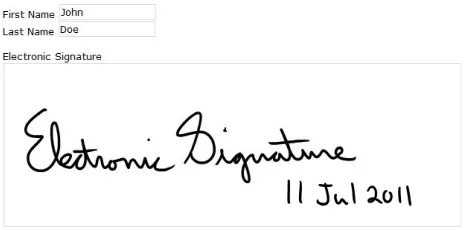
[image:3.595.307.543.95.210.2]Ink Picture Fields are used to allow for pen stylus in-put for signatures, free form drawings and handwritten notes. Each ink picture field can be resized to allow for adequate room to sign or draw on a canvas style field (Figure 1). Digitally signing the form can limit the use and distribution by locking it as read only. It can be de-
Figure 1. Signature example.
fined to allow for single or multiple signatures. Multiple signatures can be used independently to co-sign or to counter-sign in order of precedence. InfoPath also makes use of tables to format data layouts; moreover, it supports a particular type of table that can be used to add fields dynamically as they are needed. The repeating table is a dynamic table that can be populated with data entry fields. Rows can be added to the table creating a new set of data using the same name; likewise sets of data can be re-moved from the table.
3.2. Form Design
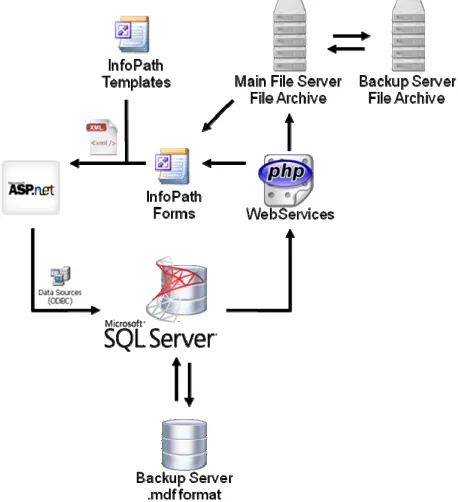
InfoPath provides two methods of capturing data entered into a form, saving the form in xml format or submitting the data to a database using a data connection. The data connection separates InfoPath from other products such as Microsoft Word or Adobe Acrobat, both of which pro- duce fillable forms. Through the data connection, the form data can be exported to a database. InfoPath supports different data connection approaches including: direct SQL, SharePoint Document Library or List, eMail, and Web Service. The web service we use in our application communicates with InfoPath using XML SOAP to trans-fer data in xml format. We use an XML format organizer to insure compatibility with standard XML requirements. The save file of an InfoPath form is in native xml and can be read with any text editor. This also makes it pos-sible to input this xml as a string in the database table. XML data is relayed to the web service, in this case an asp.net application, where it is processed and inserted into a Microsoft SQL database. All XML data is stored in a single table. Conversely, any string can be read from the database straight back to InfoPath. The conversion of database string to file is performed by a simple PHP script which runs in the web browser and xml files are created by the database upon submission to provide ac-cess without a web browser. Figure 2 shows the scheme of data flow though our system.
Figure 2. XML example.
the database (Figure 2). The LBD is submitted manually through ASP.net using an Open Database Connectivity (ODBC) data source as XML. The LBD is perceived as a string of characters and numbers, unique to the input. The drawings, signatures and handwritten notes are stored in the database and can be queried to return values to allow for a comparison of before and after elements. These ele-ments are then linked to the user with a date and time stamp.
3.3. Authentication and Security
Multiple different users with appropriate permissions can access the templates and fill out the necessary forms. These users can be verified through the active directory to ensure security of each form. If a user is not authenticated, they will be unable to submit any information to the database. Active directory, or LDAP server, is a service run by the windows server platform to store user names and pass- words. The system creates a domain to which client computers connect at login. The domain controller, syn- onymous with active directory, is also responsible for maintaining user permissions and privileges on the client computers connected to the domain. The active directory connection is initiated by the dot.net web service upon submission of the InfoPath form.
3.4. Version Control and Auditing
Unique ID numbers are assigned to new documents upon submission. This ID is used to keep track of versions. When a document is recalled from the database, the ID designates any subsequent submission as a change to the original document. Timestamps and Usernames are tagged to each document in the database table, as well as to the XML as it is entered into InfoPath.
When saving or submitting a document, we use a file naming convention to automatically concatenate the fields in the form for the title. The user then has the ability to full-text search through all of the submitted forms for any specific saved information. The query will return a list of matched results and allow the user to view before
and after elements of the form. Auditing and change con- trol are a simple matter of retrieving all documents with a particular ID and comparing the dissimilar xml elements with each other, as the xml element titles are static and built into the form. The comparison routine is a string to string comparison of each xml element in a form with the elements of different versions of the same exact form, with the same exact elements.
3.5. Redundancy and Backup
There are multiple pathways to store the information on the file servers and the database server. Each form tem-plate is published to the Main File Server, which is con-tinuously replicated real time by the Backup File Server. Once the information is entered in the InfoPath forms, it is submitted to the SQL Database and exported to the Main File Server for direct access. The information is stored on the Database Server and is configured to backup each database to the Backup File Server (Figure 3).
3.6. Review and Retrieval
[image:4.595.309.538.469.720.2]As mentioned in the Redundancy and Backup section; there are several ways to store the information. Each of these steps has the capability for the user to review the information entered. The data can then be queried in the Database using PHP WebServices or accessed from a file archive that is “read-only” and updated with each database entry upon submission of the document, by a PHP script called by the .NET web service (Figure 3). The use
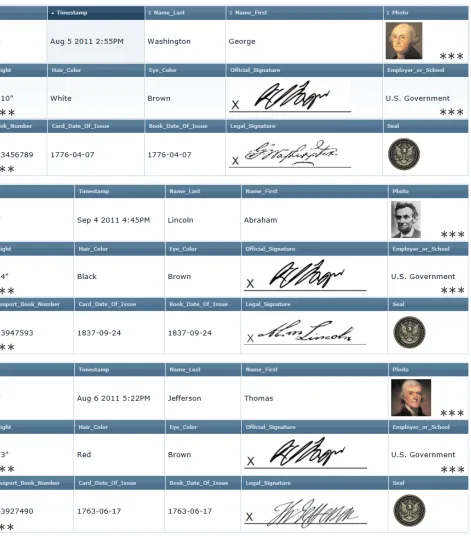
plication title, with name and date of birth of the appli-cant as the field label permitting retrieval of the entire document, which is stored as a data element (Figure 5). of a single table database to hold xml data allows for a
flexible dynamic environment, capable of storing data with any structure. This way the user does not have to enforce structure upon entry. Instead the structure of the database is applied on the back end, in this case the PHP web service. The SQL database stores the version infor- mation for each submission and facilitates the audit trail. The database API allows for quick access to information and the ability to query information within the xml. This provides the ability to search through entered data and compare data between documents given a defined set of parameters facilitated by the PHP WebService upon re- trieval.
4. Discussion
We have presented herein an approach to design of flexi-ble applied databases incorporating graphical information. The structure is controlled by entry routines which are conventional narrative based and non-proprietary, typical of word processing such as Microsoft Word. This natural approach to creation of information contrasts with the difficulty of custom design of databases to directly receive data input. Applied databases are challenging to design. If information is uncorrelated with no sequential organi-zation, there is no disadvantage in database entry. How-ever, if there is high correlation or defined associations in the data items, it is much more difficult to design the database to mimic the natural flow of the data. It is much easier to create and document relational information in the narrative domain than to build a custom database to record the input.
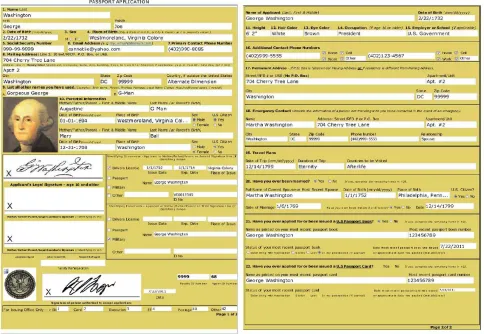
We illustrate this approach with a simple construct: a passport application form mimicking the actual forms employed by the United States Department of State. These forms have both text and graphic input, the most critical items being a photograph of the applicant, and a signa-ture, along with the official seal, and the signature of the approving official. We have prepared a passport applica-tion for several US presidents (Figure 4). The application data is then submitted to the SQL Database. The original
[image:5.595.57.541.385.719.2]application can be retrieved as by querying the ap- We selected InfoPath for the present exercise because
Figure 5. SQL output the three president applications, database elements are truncated due to space limitations.
it offers a highly available and non-proprietary user-friend- ly front end. This approach separates the design of the template from the data in the form, making the output file clean and more useful. We could have designed a sub- mission routine using Microsoft Word or an alternative text editor. However, this would have required use of supplementary code to provide certain desired functions.
build a virtual file archiving system. In contrast to a file-system, a database environment allows for better access of data. File systems store files and other objects only as data streams, indexed by directory and file names, with limited information about the data stored in individual files. Databases allow retrieval based on any attribute or data-property (i.e. SQL columns). A database can search through tables using queries, a feature absent from a file system. The use of queries can then be implemented in software applications to create a custom interface for the retrieval of data. Previous implementations by this site included a network share with pdf files titled with defined identifiers, allowing the user to find required documents [7]. However, this method required that the user browse a directory system populated with user defined folders to add more identifying information. The search functional-ity of this system was lacking, only allowing for the search of user defined identifiers and not within file data ele-ments themselves. The database method eliminates this shortcoming while maintaining the same user defined identifiers (as xml fields). Yet, the same defined identifi-ers can be used as a query element to retrieve the entire document and return it to the InfoPath environment for editing operations.
The SQL database stores the version information for each submission and facilitates the audit trail. The data-base API allows for quick access to information and the ability to query information within the xml. This provi- des the ability to search through entered data and com-pare data between documents given a defined set of pa-rameters facilitated by the PHP WebService upon re-trieval.
InfoPath is used because it offers a user-friendly front end from which the user will enter data. It separates the design of the template from the data in the form, making the output file clean and more useful. The save file of an InfoPath form is in native xml and can be read with any text editor. This also makes it possible to input this xml as a sting in the database table which can be read from the database straight to InfoPath. The conversion of da-tabase string to file is performed by a simple PHP script which runs in the web browser, and xml files are created by the database upon submission to provide access with-out a web browser, the only downside being the amount of customized software to view (InfoPath), transmit (ASP.NET web service), store (SQL server), and retrieve documents (PHP WebServices).
Databases also improve the ability for auditing com-pared to file system approaches. The file system can only tell you who, where, and when files were accessed or changed. They have limited capabilities to capture what was changed. Using tags on an immutable database (all changes are new entries in a shadow table) no version is
ever lost and tighter control on who, what, when, where, and why changes were made can be implemented.
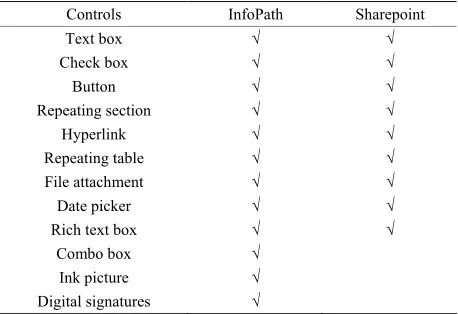
InfoPath incorporates native support for Microsoft SharePoint submission to a database. SharePoint provides a web interface, through IIS, where forms can be accessed or created. Native InfoPath forms can be made to submit to a SharePoint document library mimicking a file system, or to a SharePoint list, mimicking a database or spread sheet. However, Sharepoint lacks certain features which limit its usefulness for graphical applications. InfoPath allows for an expanded use of controls in the creation and use of forms (Table 1).
SharePoint allows for many of these controls but is missing a key component when trying to submit fields larger than 255 characters and does not allow for the ability to use these controls including both text and pic-ture/pen input in the same form. Sharepoint does not pro-vide support for InfoPath’s binary data tools, like ink picture controls. SharePoint lists also have a 255 charac-ter limit and cannot store binary data as base64. If a small b64 string was stored in a list, it would retain its text quality. SharePoint offers no native support to de-code the string and display it in its binary form. Further-more, the Sharepoint document library approach doesn’t incorporate a searchable xml database and suffers simi-larly to a file system where data cannot be searched. In addition, the Sharepoint listing is somewhat convoluted and requires every field to be named similar to a pure database approach.
The alternative to an integrated text graphics database is a linked structure wherein the textual data base calls on an image database with hyperlinks allowing access to graphical items. This is a standard approach to graphical data storage, which has the advantage of reducing pro- cessing requirements. Our technique can be applied to such a construct. However, the complexity of query gen-eration makes this approach less desirable.
[image:7.595.309.538.579.736.2]The original application can be retrieved as by query-
Table 1. InfoPath comparative advantages.
Controls InfoPath Sharepoint
Text box √ √
Check box √ √
Button √ √
Repeating section √ √
Hyperlink √ √
Repeating table √ √
File attachment √ √
Date picker √ √
Rich text box √ √
Combo box √
Ink picture √
ing the application title, with name and date of birth of the applicant as the field label permitting retrieval of the entire document.
5. Conclusion
We have presented herein a first attempt at design of facilitated data entry for flexible database operation, al-lowing both graphical and text input. A key requirement of our approach is that the database integration be dy-namic, not simply storage based. We are able to retrieve database elements for modification in a user friendly narrative environment. All operations are logged in an audit trail with date and time stamps. We have full ad-ministrative control over the data entry operations, in-cluding the ability to lock all or portions of the database. A database management system allows unlimited storage and retrieval of data. The limitation of the database is in the loss of predefined architecture of the information submitted to the system. The relation of data elements which may exist in the human mind is still best main-tained in structured narrative form. We have shown that it is possible to maintain relationships by using flexible structured interfaces for data input. The tools exist today to allow graphical and text based information to coexist in such interfaces. Most important, this strategy is based on freely available popular software. Our approach is non-proprietary offering facile database management to general users. Future efforts should be directed at con-structs which allow the full spectrum of media informa-tion to be processed by database systems.
6. Acknowledgements
Portions of this paper were presented at the International Conference and Exhibition on Biometrics & Biostatistics 5-7 March 2012, Omaha, USA.
REFERENCES
[1] L. Manovich, “Database as a Symbolic,” Convergence, Vol. 5, No. 2, 1999, pp. 80-99.
[2] I. Snyder, “New Media and Cultural Form: Narrative Versus,” In: A. Adams and S. Brindley, Eds., Teaching
English with ICT, Open University Press & McGraw Hill,
London, 2004, pp. 67-79.
[3] M. LeMay, “Reconsidering Database Form: Input,” 2005. www.dichtung-digital.org/2005/2-Lemay.htm
[4] V. Castelli and L. D. Bergman, “Frontmatter and Index, in Image Databases: Search and Retrieval of Digital Im-agery,” John Wiley & Sons,Inc., New York, 2002. [5] V. Castelli, “Progressive Search and Retrieval from Im-
age Databases,” In: A. Kent, Ed., Encyclopedia of Library
and Information Science, Marcel Dekker, Inc., New York,
2002, pp. 284-309.
[6] Z. Lin, B. S. He and B. Choi, “A Quantitative Summary of XML Structures,” Conceptual Modeling–ER 2006, Sprin-
ger/Heidelberg, Berlin, 2006, pp. 228-240.
doi:10.1007/11901181_18
[7] A. Bansal, R. Chamberlain, S. Karr, S. Kwasa, B. McLaughlin, B. Nguyen, M. Rendell, K. Schmit and C. Smith, “A 21 CFR Part 11 Compliant Graphically Based Electronic System for Clinical Research,” Journal of Me-