Chapter 5
Learning objectives
• After this lecture, you will be able to:
– specify which components of a communications
system are necessary to exchange information within and between businesses;
– explain the basic components and terminology of networks, including the Internet;
– identify the benefits available through the introduction of computer networks;
– identify the advantages and disadvantages of the
client/server architecture in comparison with traditional approaches;
Management issues
• From a managerial perspective, this lecture
addresses the following areas:
– What are the business benefits of networks?
– What are the basic concepts and terminology
associated with the Internet and other networks?
– How does the Internet change marketplace
structures?
Computer networks defined
• A computer network can be defined as: ‘a communications system that links two or more computers and peripheral devices and
enables transfer of data between the components’.
• Telecommunications: The method by which data and information are transmitted between different locations.
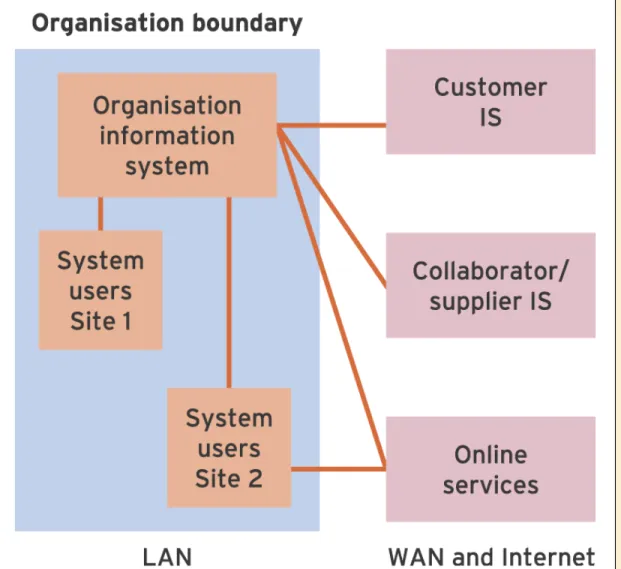
• Local-area network (LAN): A computer network that spans a limited geographic area, typically a single office or building.
Table 5.1 A summary of the key advantages and disadvantages of network
Client/server
•
Client/server
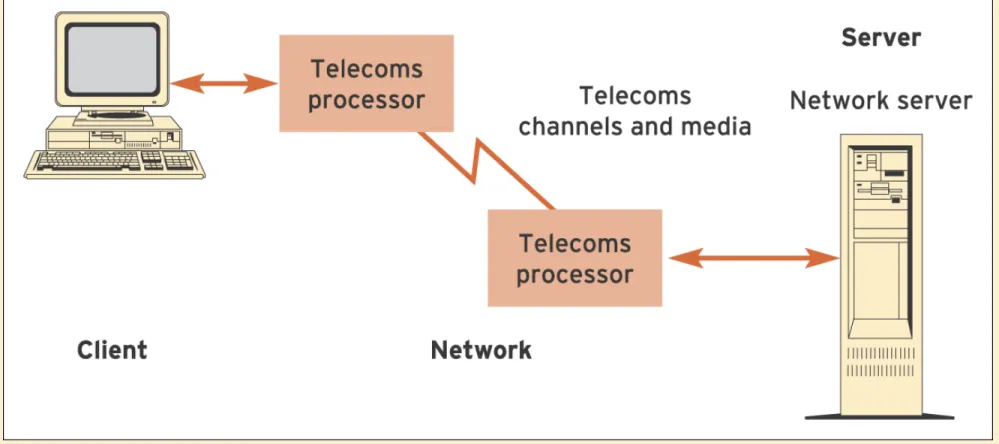
: The client/server architecture
consists of client computers such as PCs sharing
resources such as a database stored on more
powerful server computers.
•
Benefits
:
– Faster execution
– Distributed approach
Client/server disbenefits
• Time lost by staff configuration
• Instability caused by clashes with applications
• Maintenance
• Performance
Server benefits
• Server: A server is a powerful computer used to control the
management of a network. It may have a specific function such as storing user files or a database or managing a printer.
• Maintain security: Access to information in files is restricted according to the user name and password issued to users of the network.
• Sharing of peripheral devices connected to the network, such as printers and tape drives. These are often attached directly to the server.
• Sharing of applications such as word processors, which do not then need to be stored on the hard drive of the end-user’s
computer. The cost of buying applications can be reduced through buying a ‘site licence’.
Telecommunications equipment
• Modem (modulator–demodulator): A modem is a
communications device that allows users to ordinary telephone line.
• Analogue: Analogue data is continuous in that an infinite
number of values between two given points can be represented. As an example, the hands of a clock are able to represent every single possible time of the day.
• Digital: Digital data can only represent a finite number of discrete values. For example, at the most basic level, a
computer recognises only the values 0 (zero) and 1. Any values between 0 and 1, for example 0.15, cannot be represented.
• Hubs: Hubs are used to connect up to 20 PCs to a network in a convenient way.
Data transmission types
•
Broadband
: A relatively high-capacity, high-speed
transmission medium such as cable.
• The standard ADSL broadband speed when it was
first introduced was 512,000 bps, 512 kbps or 0.512
Mbps and it requires a specific ADSL modem
• ADSL = Asynchronous digital subscriber line – upload
and download speeds are different
Activity 5.1 Transmission of data through
different hardware and network components
• Describe the order in which a message passes from one piece of hardware to the next when a home user in the UK sends an e-mail via the Internet to someone in a large corporation in the USA. You should refer to the following terms:
(a) mail server; (b) client PC; (c) modem; (d) hub;
(e) network cable; (f) network card;
(g) gateway server (telecommunications processor); (h) router.
Wireless network standards
•
Bluetooth (PAN)
– A wireless standard for transmission of data between devices over short ranges (less than 10 m)
•
Wi-Fi (LAN)
– A high-speed wireless local-area network enabling wireless access to the Internet for mobile, office and home users.
•
WiMax (MAN)
The Internet
• The Internet
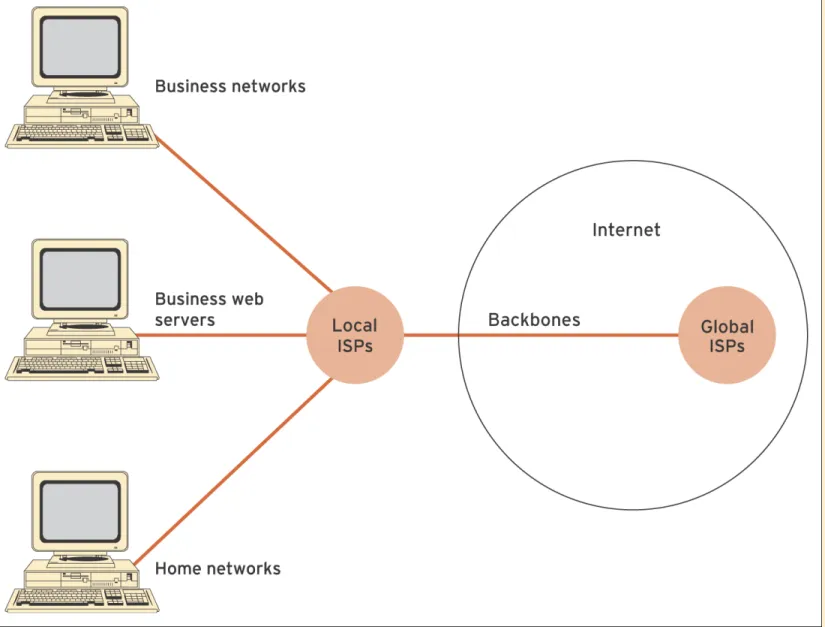
• The Internet refers to the physical network that links computers across the globe. It consists of the
infrastructure of network servers and communications links between them that are used to hold and transport information between the client Pcs and web servers. • Internet service provider (ISP)
• A provider enabling home or business users a connection to access the Internet. They can also host web-based
applications. • Backbones
Business and consumer models of
internet access
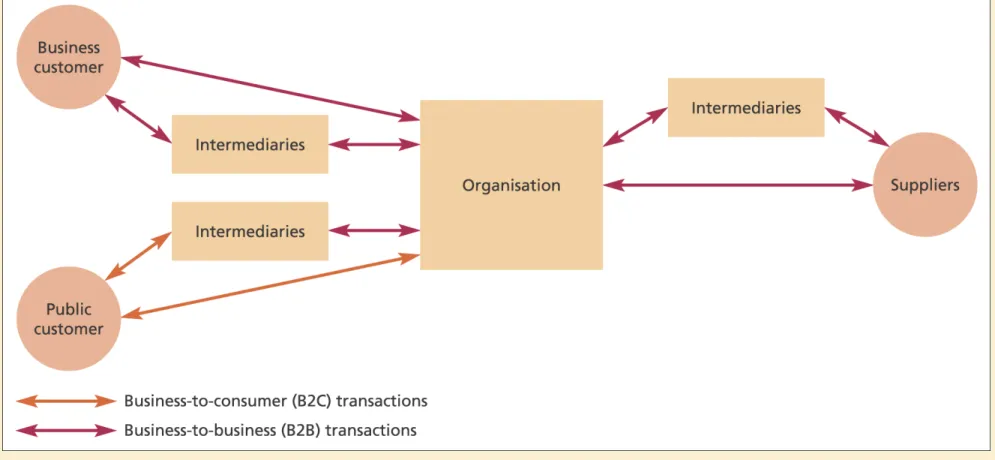
• It is useful to identify e-business opportunities in terms of whether an organisation is using the Internet to transact with consumers ( business-to-consumer – B2C) or other businesses (business-to-business – B2B).
• Business-to-consumer (B2C)
• Commercial transactions are between an organisation and consumers. • Business-to-business (B2B)
• Commercial transactions are between an organisation and other organisations.
• Business-to-business transactions predominate over the Internet, in terms of value, if not frequency. Figure 5.4 helps explain why this is the case. It shows that there are many more opportunities for B2B transactions than B2C, both between an organisation and its suppliers, together with
The role of the internet in restructuring
business relationships
• The relationship between a company and its suppliers and
customers shown in Figure 5.4 can be dramatically altered by the opportunities afforded by the Internet. This occurs because the Internet offers a means of bypassing some of the channel
partners. This process is known as disintermediation or ‘cutting out the middleman’.
• Figure 5.5 illustrates disintermediation in a graphical form for a simplified retail channel. Further intermediaries such as additional distributors may occur in a business-to-business market. Figure 5.5(a) shows the former position where a company markets and sells it products by ‘pushing’ them through a sales channel.
Figures 5.5(b) and (c) show two different types of
disintermediation in which the wholesaler (b) or the wholesaler and retailer (c) are bypassed, allowing the producer to sell and
Intranets and extranets
• If information is limited to those inside an organisation, this is an intranet.
• If access is extended to some others, but not everyone beyond the organisation, this is an extranet.
• The relationship between these terms is illustrated in Figure 5.7. Extranets can be accessed by authorised people outside the company such as collaborators, suppliers or major customers, but information is not
World Wide Web
• World Wide Web
The most common technique for publishing information on the Internet. It is accessed through web browsers which display web pages of embedded graphics and
HTML/XML-encoded text.
• Web browsers are software used to access the
information on the WWW that is stored on web servers HTTP, the hypertext transfer protocol is a standard used to allow web browsers and servers to transfer
requests for delivery of web pages and their embedded graphics.
Other wide-area networks
• Wide-area network (WAN)
Networks covering a large area which connect to
businesses in different parts of the same city, different parts of a country of different countries.
• Value-added networks (VAN)
Value-added networks (VANs) give a subscription service enabling companies to transmit data securely across a shared network.
• Virtual private network (VPN)
A data network that makes use of the public
Smaller-scale networks
•
Local-area network (LAN)
A computer network that spans a limited geographic
area, typically a single office or building.
•
Peer-to-peer network
A simple type of LAN which provides sharing of files
and peripherals between PCs.
•
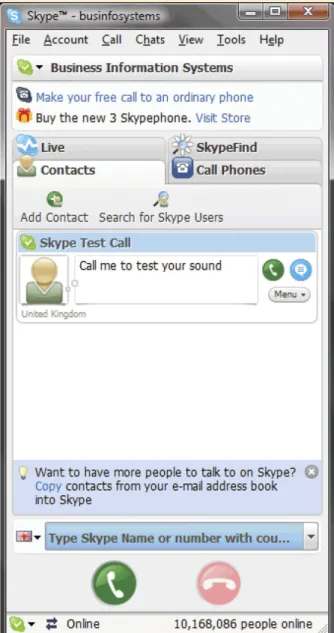
Voice over IP (VoIP)