A RESEARCH PAPER ON ENDLESS FUN
Nizamuddin, Shreshth Kumar, Rishab Kumar
Department of Information Technology, SRM University, Chennai, Tamil Nadu
ABSTRACT
The main objective of the thesis is to observe and learn the process of developing an infinite running game. The game is known as ‘Endless Fun’ and is developed on Python programming language using Pygame Module. The proposed game will be a computer game in a 2 Dimensional (2D) environment. Players will be able to play the game in the multiplayer style, where users take turns at the same computer and the high scores are recorded for further competition. The game will allow any number of players to play the game. The game will not deal with any artificial intelligence but there’ll rather be time-based obstacles.
The theory of the thesis focuses on the game’s concepts, such as the genre, history, tools used, coding, etc. The practical part of the thesis focuses on game’s programmed features, block diagrams, level designs, basis of difficulty, etc. Python was chosen for the development of the project so as to learn Pygame module and easy implementation of python as a language with real world entities.
INTRODUCTION
Today’s gaming industry is the fastest growing industries of all time. It is a multi-billion dollar, multi-national industry that develops games as well as a lot of other products. There are a lot of types of games that are available in the market. There are different types of genres of games available in the market. The types of games varies from high end Xbox games to low end mobile games. All games have different gaming environments, different modules, and different models for design. Some examples of games can be GTA San Andreas (Open World Genre), World of Warcraft (Multiplayer over internet Genre), Counter Strike (LAN Based Game), Halo (MMORPG Genre), Assassin’s Creed (Open World), Subway Surfer (Android Mobile Game), Temple Run (Android Mobile Game), and Stick Cricket (Android Mobile Game).
LITERATURE SURVEY
Small Scale Indie Game Developers
Since they only make one or two games, they don’t have the proper resources that the large companies have for their game development. These developers use a very simple level of graphics. Generally they don’t use 3D modelling or animation of any kind. Mostly they use flash developers to develop the game.
Here in this project we are trying to develop a game that is based on 2D environment and developed on Python programming language.
Large Game Developing Companies
Large companies like Electronic Arts, Ubisoft, Squaresoft, Activison, Capcom,
Konami, and Square Enix develop high end games like FIFA, Assassin’s Creed, Spider-Man, etc. These games are mostly developed for high-end PCs and require a lot of memory. These companies release one game in a year or two because of the degree of designing and programming. They employ thousands of developers. They have better graphics, higher frequency, better sound and even background story or the main plot.
Online Game Websites
Online games have emerged these days, large companies creating small games with simple graphics that can run even with slow internet speed. This has made the gaming world even bigger. These games have become more addictive because in these games we compete with real world players. MMORPG is another type of high end game in which we play with real world players over the internet. This requires high internet speed. Most games over internet are playable using a web browser.
History of Games
Thehistory of computer games dates as far back as the early 1950’s. It started as a
science research with designing simple games and simulations. Video games reached popularity around 1970s and 1980s, with arcade video games, gaming consoles and home computer games. The first commercialized arcade game “Pong” was a huge success, following the famous “Spacewar!” also gained huge popularity. Since then, video games has evolved manifolds with graphics, stories, plots, and has become a popular form of entertainment and a part of modern culture.
METHODOLOGY
Module
In python programs, all our codes usually contain functions and variables. So when we quit from our interpreter, all our definitions are lost. As our codes get longer, it gets very inconvenient to redefine all the values for our variables. To solve this problem, we have two solutions:
To support this, Python has a way to put definitions in a file and use them in a Script or in an interactive instance of the interpreter. Such a file is called a module. A module is a file containing Python definitions and statements.
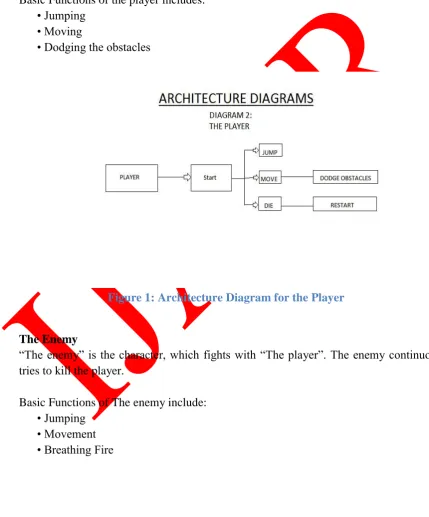
The Player
“The player” is the main character of the game. It is a persona that is used to play the game. Scoring and level up and other environment revolve around “The Player”.
Basic Functions of the player includes: • Jumping
• Moving
• Dodging the obstacles
Figure 1: Architecture Diagram for the Player
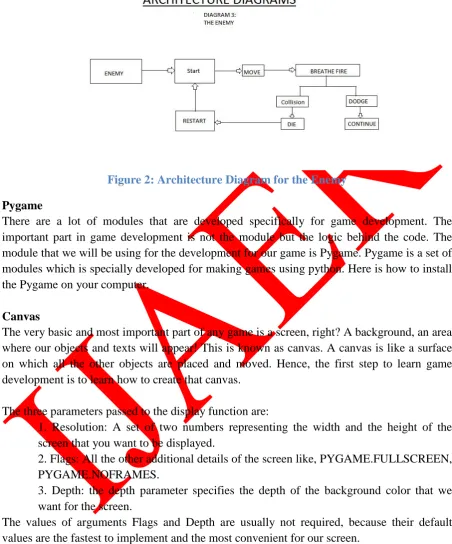
The Enemy
“The enemy” is the character, which fights with “The player”. The enemy continuously tries to kill the player.
Basic Functions of The enemy include: • Jumping
Figure 2: Architecture Diagram for the Enemy
Pygame
There are a lot of modules that are developed specifically for game development. The important part in game development is not the module but the logic behind the code. The module that we will be using for the development for our game is Pygame. Pygame is a set of modules which is specially developed for making games using python. Here is how to install the Pygame on your computer.
Canvas
The very basic and most important part of any game is a screen, right? A background, an area where our objects and texts will appear! This is known as canvas. A canvas is like a surface on which all the other objects are placed and moved. Hence, the first step to learn game development is to learn how to create that canvas.
The three parameters passed to the display function are:
1. Resolution: A set of two numbers representing the width and the height of the screen that you want to be displayed.
2. Flags: All the other additional details of the screen like, PYGAME.FULLSCREEN, PYGAME.NOFRAMES.
3. Depth: the depth parameter specifies the depth of the background color that we want for the screen.
The values of arguments Flags and Depth are usually not required, because their default values are the fastest to implement and the most convenient for our screen.
EVENT DRIVEN PROGRAMMING
EVENT: An event is any change that happens to the code. It can be a keyboard input, or a mouse input or a timer event. We will learn how to manage these events in detail in the course.
HANDLER: A handler is a piece of code, which handles the event. That is, it is executed only when a specific event occurs. A handler is basically, the event manager.
KEYBOARD INPUT
A keyboard input is of two types. One, which is used to take inputs in the form of strings and number, and are stored in variables made by the programmer and the other, in which keyboard inputs act as events.
When we play a game, we often use the arrow keys to move objects, or the escape key to exit the game or the enter key to select an option. In such cases, the input is like an event, and the movement of the object is the work of a handler.
The keyboard input can further be classified into two types: 1. Key Down
2. Key Up
The code for the keyboard input can be written in four easy steps:
1. Create a while Loop to specify exactly when do you want to detect the input. Here, we’re using an infinite loop.
2. Detect the event and store the event type in a variable. This can be done by using the "event" module of Pygame.
pygame.event has an inbuilt function "get()" to detect the event.
3. Compare the event type with the required event and create suitable cases. This can be done by using another function "event.type", which returns the type of the event.
COLLISIONS
In order to do collision detection, we will need a function that can determine if two rectangles intersect each other or not. Here is a picture of intersecting rectangles (on the left) and rectangles that do not intersect (on the right):
There is a very simple rule we can follow to determine if rectangles intersect (i.e. Collide). There are 4 conditions to completely confirm whether or not the points intersect or not:
1. The x-coordinate of the point should either be less than left side of the object or greater than the right side of the object.
RESULT
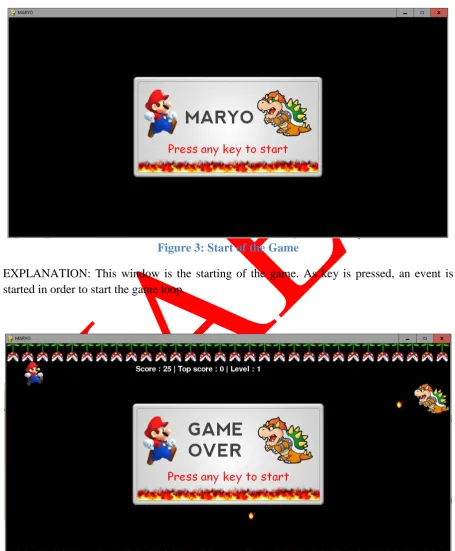
Figure 3: Start of the Game
EXPLANATION: This window is the starting of the game. As key is pressed, an event is started in order to start the game loop.
Figure 4: Death by Cactus
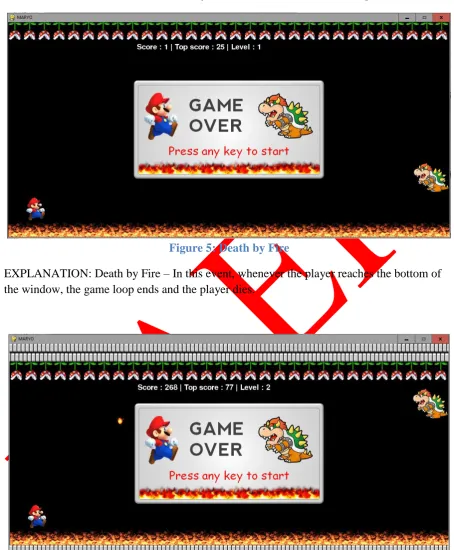
Figure 5: Death by Fire
EXPLANATION: Death by Fire – In this event, whenever the player reaches the bottom of the window, the game loop ends and the player dies.
Figure 6: Level Up
CONCLUSION
The development of the game using Python language and its Pygame module was successful. The characters were linked properly and reacted to the events (Keyboard controls) accordingly. The functioning of all the objects in the game was appropriate. The overall running and execution of the game was successful.
REFERENCES
1. InternShala Online Lectures, (2015), “Learning Python”, www.learnpython.org.
2. Yue-Ling Wong, (2011), ”3D Game Engines.”{Department of Computer Science, University of North Carolina at Chapel Hill
3. Learning Python (2015). “Learning Python”www.internshala.com
4. http://www.tutorialspoint.com/python/index.htm(2016).