Secure Communication System
Secure Communication System
Design
Design
Nazar Abbas Saqib
Agenda
•
What are Firewalls?
•
Why Firewalls?
•
Types of Firewalls
•
Packet Filter Firewalls
•
Dynamic Packet Filter
Firewalls
•
Application Level
Firewalls
•
Circuit Level Gateways
•
Bastion Host
•
Firewall Configurations
Due to internet, any computer can be connected to any other computer in the world – a great advantage to individuals and corporate as well
The protection of corporate network becomes a challenge. At a broad level, there are two kinds of attacks (Fig):
1. Leakage of critical information from corporate network to competitors- a great setback
2. Malicious attacks (viruses, worms, etc) on corporate network from the outsiders to create havoc
Firewall
• A firewall is a device used to secure the connection between one computer or network and another computer or network. It can be implemented in software or hardware or a combination of both.
• Firewall is installed between the internal network of an organization and the rest of the Internet (Fig.)
• All traffic between the network and the internet in either direction must pass through the firewall
Types of Firewall
1.
1.
1.
1. Simple packet
Simple packet
Simple packet
Simple packet----filters
filters
filters
filters
2.
2.
2.
2. Stateful packet
Stateful packet
Stateful packet
Stateful packet----filtering
filtering
filtering
filtering
3.
3.
3.
3. Application
Application
Application
Application----layer proxies
layer proxies
layer proxies
layer proxies
1.
1.
1.
Packet Filter Firewall
As the name suggests, packet filter firewall refers to filter out all
packets passing through the firewall. Packet filter applies a set
of rules to each packet and based on the outcome, decides to
either forward or discard the packet. It is also called as
screening router or screening filter
•
A packet-filter firewall is simply a router that uses a
filtering
table
to decide which packets must be discarded (not
forwarded). The filtering rules are based on number of fields at
the network or transport level
•
It can forward or block packets based on the information in
the network layer : source and destination IP addresses
•
It can forward or block packets based on the information in
the transport layer : source and destination port addresses
and type of protocol (TCP or UDP)
Packet filters usually permit or deny network traffic based on:
1. Source and destination IP addresses
2. Protocol, such as TCP, UDP, or ICMP
3. Source and destination ports and ICMP types and codes
4. Flags in the TCP header, such as whether the packet is a
connect request
5. Direction (inbound or outbound)
6. Which physical interface the packet is traversing
The rules specified in the packet filter work as follows:
A. Incoming packets from network 131.34.0.0 are blocked (security precaution). Note that the * (asterisk) means “any.”
B. Incoming packets destined for any internal TELNET server (port 23) are blocked.
C. Incoming packets destined for internal host 194.78.20.8 are blocked. The organization wants this host for internal use only
D. Outgoing packets from to an HTTP server (port 80) are blocked. The organization does not want employees to browse the Internet
How to Configure a Packet Filter
A B C D
Advantages:
Fast, simple, transparent
Disadvantages:
Cannot prevent attacks on specific application weaknesses
Limiting logging capabilities
Typically no support for user authentication
Vulnerable to exploits that take advantage of problems in the
TCP/IP specification
Easy to make mistakes when creating rules
Packet Filter Firewall-
Attacks & Countermeasures
Packet filter firewalls are vulnerable to following attacks :
1. IP spoofing
IP address spoofing
• An intruder outside the network sends packets to internal corporate network by using one of the internal IP address as the source
address. The attacker hopes that the use of spoofed address will allow penetration of systems that employ simple source address security – packets from specific trusted internal hosts are accepted
Packet Filter Firewall-
Attacks& Countermeasure
Source routing has two variations:
Loose:
Loose:
Loose:
Loose:
The attacker specifies a list of IP addresses through which a
packet must travel. However the packet could also travel through
additional routers that interconnect IP addresses specified in the list
Strict:
Strict:
Strict:
Strict:
The IP addresses in the list specified by the attacker are the only
IP addresses through which a packet is allowed to travel
The security of packet filter can be compromised by :
Source routing address Source routing address Source routing address Source routing address
• An intruder specifies the route, the packet should take as it crosses the internet , in the hopes that this will bypass security measures that do not analyze source routing information ( use of loose source record route (LSRR)
Normal traffic flow from the attacker to the server goes via "router a", "router b", "router c", a firewall and finally to the victim we have our standard scenario for routing traffic over the Internet.
Packet Filter Firewall-
Attacks& Countermeasure
By exploiting, The routing could be made to go via "router a", "router b", "trusted host", the firewall and finally to the victim using the source IP of the trusted host.
Packet Filter Firewall-
Attacks& Countermeasure
Packet Filter Firewall-
Attacks& Countermeasure
Exploiting source routing address info
Traffic can be source routed directly to many low end firewalls, which then
Packet Filter Firewall-
Attacks& Countermeasure
How to defeat?
Tiny fragment attacks
Tiny fragment attacks
Tiny fragment attacks
Tiny fragment attacks
• Fragmentation of packets is required when IP packet is greater than the maximum frame size of the network (called as Maximum Transmission Unit or MTU)
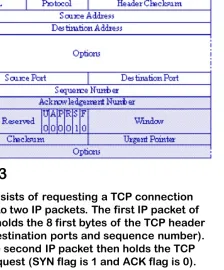
• The tiny fragment attack is staged by sending an IP packet with first segment so small that it contains only the source and destination port information for TCP, not the TCP flags. These are sent in the next fragment
• therefore if access list is based on TCP flags such as SYN=0 or 1 or ACK=1 or 0, they cannot test the first packet
• If first packet passes, most network devices do not check remaining packets
• An intruder can exploit this feature of TCP/IP protocol suite to intentionally create tiny fragments, in this hope that only the first fragment is examined and not the remaining packets
• How to defeat?
• Discard all those packets where the upper layer protocol type is TCP and packet is fragmented
Pictures 1 and 2 show both fragments and picture 3 shows the defragmented packet on the target machine:
Fig. 1
2.
2.
2.
Dynamic Packet Filter Firewall or Stateful packet filter
Firewall
TCP traffic establish TCP session first
TCP port number less than 1024 are well known – permanently
assigned
The port number > 1024 are dynamically generated and have lifetime
of TCP connection
A simple packet-filtering firewall must allow inbound network traffic on
all these high-numbered ports for TCP-based traffic to occur. This
Dynamic Packet Filter Firewall or Stateful packet filter
2. The packet filter will now allow incoming traffic to high-numbered ports only for those packets that fit the profile of one of the entries in this directory.
What about TCP and UDP Traffic?
This has several important advantages over simple (stateless) packet-filtering.
1. Bidirectionality: without some sort of connection-state tracking, a packet-filter isn't really smart enough to know whether an incoming packet is part of an existing connection (e.g., one initiated by an internal host) or the first packet in a new (inbound) connection. Simple packet filters can be told to assume that any TCP packet with the ACK flag set is part of an established session, but this leaves the door open for various " spoofing" attacks.
2. Another advantage of state tracking is protection against certain kinds of port scanning and even some attacks. For example, the powerful port scanner nmap supports advanced " stealth scans" (FIN, Xmas-Tree, and NULL scans) that, rather than simply attempting to initiate legitimate TCP handshakes with target hosts, involve
3.
3.
3.
Application Gateway Firewall
•
Packet filter firewalls does not work at application level Message
needs to be filtered on the information in the message
•
Ex. An organization wants to implement a policy
•
Only those Internet users who have previously established
business relations with the company can have access; access to
other users must be blocked.
Application Gateway Firewall
An application gateway is also called as a proxy server as it acts like a proxy and decides about the flow of application level traffic. Typically they work as follows:
1. An internal users contacts the application gateway (AG) using a TCP/IP application such as FTP, Telnet or HTTP
2. The AG asks for remote host (domain name or IP) as well as the user id and password
3. The user provides information to the gateway, user is authenticated by AG 4. The AG accesses the remote host on behalf of the user and relays packets
between end points
Application Gateway Firewall
•
If the gateway does not implement the proxy code for a specific
application, the service is not supported and cannot be forwarded
across the firewall.
34
Network Address Translation (NAT)
Network Address Translation (NAT)
Network Address Translation (NAT)
Network Address Translation (NAT)
• In computer networking, network address translation (NAT) is the process of modifying network address information in datagram packet headers
while in transit across a traffic routing device for the purpose of remapping a given address space into another
• NAT solves the problem of the shortage of IP addresses. It allows users to have a large number of IP addresses internally but only a single IP address externally . Only the external traffic needs the external IP address. Internal traffic can work with the internal addresses (Fig – next page)
• For NAT to be possible, internet authorities have classified a list of internal as well as external IP addresses
Variant of application gateway: Circuit-Level Gateway
Circuit level gateway is a variation of application gateway- performs some additional functions
Circuit level gateway establishes a new connection b/w remote host and itself -- as it is done by application gateways firewalls
Circuit level gateway changes the source IP address in packets with its own – IP addresses of internal users are hidden from the outside world – an additional feature
1. Application-level gateways tend to be more secure than packet filters. Rather than trying to deal with the numerous possible combinations that are to be allowed and forbidden at the TCP and IP level, the application-level gateway need only scrutinize a few allowable applications.
2. In addition, it is easy to log and audit all incoming traffic at the application level.
3. A prime disadvantage of this type of gateway is the additional processing overhead on each connection. In effect, there are two spliced connections between the end users, with the gateway at the splice point, and the gateway must examine and forward all traffic in both directions.
Application Gateway
Application Gateway
Application Gateway
Packet filtering Packet filtering Packet filtering
Packet filtering StatefulStatefulStatefulStateful Application proxyApplication proxyApplication proxyApplication proxy
Price Price Price
Price Least expensive Moderately
expensive
Most Expensive
Speed Speed Speed
Speed Fast Fast Slower
Configuration Configuration Configuration
Configuration Easy Moderate Moderate
Application Application Application Application Independence Independence Independence Independence
High Moderate Low-must have a separate to proxy for each application for which traffic is to be filtered
Sophistication of Sophistication of Sophistication of Sophistication of filtering rules filtering rules filtering rules filtering rules
Low Moderate High
User User User User Authentication Authentication Authentication Authentication
None (use IP addresses)
None (use IP addresses)
High
Network Exposure Network Exposure Network Exposure
Network Exposure Both ends
directly connected
Both ends directly connected
End of conversation isolated through application proxy
Packet types Packet types Packet types Packet types filtered filtered filtered filtered
TCP and UDP TCP and UDP Generally TCP (although few do handle UDP)
Effectiveness Effectiveness Effectiveness
Effectiveness Lowest Moderate Highest