Abstract—
Nowadays, due to enormous growth of web users many services in the internet including Email, search engine, social networking are provided with free of charge. With the expansion of Web services, denial of service (DoS) attacks by malicious automated programs (e.g., web bots) is becoming a serious problem of web service accounts. CAPTCHA (Completely Automated Public Turing test to tell Computers and Humans Apart) is a human authentication mechanism that generates and grades tests to determine whether the user is a human or a malicious computer program. These tests are easier for humans to solve and tough for automated bots. According to our study, the existing CAPTCHA techniques tried to maximize the difficulty for automated programs to pass tests by increasing distortion or noise. Consequently, it has also become difficult for humans too. In our proposed solution, we try to make use of human cognitive processing abilities into our CAPTCHA design. The suggested approach move and select is a 2-layer test, desired to improve security and reduce the solving time of human. In the result section we have studied both the usability and security issues of our design. The user studies indicate that this CAPTCHA can be solved with 99.04% average success rate in less than 10 seconds.
Index Term — CAPTCHA, Cognitive Psychology,DOS, HIP, Move & Select, OCR, Security, Usability Web Services etc.
I. INTRODUCTION
ACAPTCHA (Completely Automated Public Turing test to tell Computers and Humans Apart) or HIP (Human Interactive Proof) is an automatic security mechanism used to determine whether the user is a human or a malicious computer program .It is a program that generates and grades tests that are human solvable, but intends to be beyond the capabilities of current computer programs [1]. It has become the most widely used standard security technology to prevent automated computer program attacks. With the expansion of Web services, denial of service (DoS) attacks by malicious automated programs (e.g., bots) are becoming a serious problem as masses of Web service accounts are being illicitly obtained, bulk spam e-mails are being sent, and mass spam blogs (splogs) are being created. Thus, the Turing test is becoming a necessary technique to discriminate humans from malicious automated programs [2].
In the original Turing Test, a human judge was allowed to ask a series of questions to two players, one of which was a computer and the other a human. Both players pretended to be human, and the judge had to distinguish between them [3]. CAPTCHAs are similar to Turing Test in that they distinguish humans from computers, but they differ in that the judge is now a computer.
The CAPTCHA is usually a simple visual test or puzzle that a human can complete without much difficulty, but an automated program cannot understand. The test usually consists of letters, numbers or their combination with overlapping and intersection. The CAPTCHA images may be distorted in some way or shown against an intricate background to keep them from being easily read by Optical Character Recognition (OCR) software.
Currently, in order to prevent malicious programs from issuing advertisements or other useless information recklessly, message boards of BBS, blog and wiki have widely used CAPTCHA mechanism, requiring that users must input the correct letters to leave a message. CAPTCHs have a wide variety of applications on the web such as:
Worms and Spam: CAPTCHAs also offer a plausible solution against email worms and spam: only accept an email if you know there is a human behind the other computer.
Online Polls: In November 1999, http://www.slashdot.com released an online poll asking for the best graduate school in computer science. IP addresses of voters were recorded in order to prevent single users from voting more than once .However, students at Carnegie Mellon figured out a way to stuff the ballots using programs that voted for CMU thousands of times. CMU's score started growing rapidly. The next day, students at MIT wrote their own voting program and the poll became a contest between voting “bots”. But CAPTCHAs offer a solution: voters should show they are human before being allowed to vote.
Free Email Services: Several companies (Google, Yahoo!, Microsoft, etc.) offer free email services, “bots” that signed up for thousands of email accounts every minute. This situation has been improved by requiring users to prove they are human before they can get a free email account.
Moin Mahmud Tanvee
1, Mir Tafseer Nayeem
2, Md. Mahmudul Hasan Rafee
31[email protected],2[email protected],3[email protected] 1,2,3
Department of Computer Science and Information Technology (CIT) Islamic University of Technology (IUT)
Board Bazar, Gazipur-1704, Bangladesh
Preventing Dictionary Attacks: Pinkas and Sander [4] have suggested using CAPTCHAs to prevent dictionary attacks in password systems. The idea is simple: prevent a computer from being to iterate through the entire space of passwords by requiring a human to type the passwords.
CAPTCHA also plays a significant role in limiting usage rate. For example, the automatic use of a particular service is allowed unless such use goes beyond a certain extent and affects other users. When that happens, we can limit such usage through the introduction of CAPTCHA mechanism.
Further, CAPTCHAs pose an annoyance to genuine user. A good CAPTCHA minimizes these disadvantages by generating a CAPTCHA test that satisfies its various desired properties. These properties include:
i) Automatic generation of the test. ii) Quick and easy answer to the test.
iii) Acceptance to all humans or a class of humans
iv) Resistance to attacks with publically known protocol [5].
Text and image-based CAPTCHAs are designed hard and as such are unfriendly particularly for disabled and visually impaired people. Audio CAPTCHAs which are used as HIP for visually impaired people are very difficult to pass. CAPTCHAs increase load on servers because of requirement for image database and huge server processing and thus result in delay of Web page downloads and their subsequent refreshes.
In this paper, the proposed method has been developed to distinguish human users and computer programs from each other by the fact that human user have special cognitive processing abilities on the other hand it is nearly impossible for OCR programs to have that and it falls into hard AI problem. We also have showed that our approach can be reconfigured based on the security needs of various web services.
II. VARIOUS TYPES OF CAPTCHA METHODS
A. Text-Based CAPTCHAs:
These are simple to implement. The simplest yet novel approach is to present the user with some questions which only a human user can solve. Examples of such questions are: 1.What is third letter in UNIVERSITY?
2. Which of Yellow, Thursday and Richard is a color? 3. If yesterday was a Sunday, what is today?
Fig. 1. CAPTCHA questions
Question shown in Fig. 1 is very easy for a human user to solve, but it’s very difficult to program a computer to solve them. These are also friendly to people with visual disability – such as those with color blindness.
Other text CAPTCHAs involves text distortion and the user is asked to identify the text. The various implementations are:
1. GIMPY
GIMPY [6] is a very reliable text CAPTCHA built by CMU in collaboration with Yahoo to protect chat rooms from spammers who were posting classified ads and writing scripts to generate free e-mail addresses. Gimpy works by choosing ten words randomly from a dictionary, and displaying them in a distorted and overlapped manner. GIMPY then presents a test to its user, which consists of the distorted image and the directions. It expects that most humans can read at least three words from the distorted image, but current computer programs can’t read easily. An example is depicted in Fig. 2.
Fig. 2. GIMPY CAPTCHAs
2. Ez – Gimpy
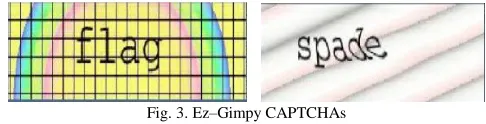
Ez–Gimpy [7] is a simplified version of the Gimpy CAPTCHA, adopted by Yahoo in their signup page. Ez-Gimpy requires the user to type in an English word picked randomly from dictionary that is made noisy and distorted before being presented to the user. The user is then asked to identify the text correctly. The examples are shown in Fig. 3.
Fig. 3. Ez–Gimpy CAPTCHAs
3. Baffle Text
Baffle Text[8] is Xerox PARC’s version of the Gimpy test developed by Henry Baird at University of California at Berkeley. This doesn’t contain dictionary words, but it picks up random alphabets to create a nonsense but pronounceable distorted text to defeat dictionary attacks. This technique overcomes the drawback of Gimpy CAPTCHA because, Gimpy uses dictionary words and hence, clever bots could be designed to check the dictionary for the matching word by brute-force. It assumes that humans are very good at filling in missing portions of an image as shown in Fig. 4 while computers are not.
4. MSN CAPTCHA
Microsoft uses a different CAPTCHA for services provided under MSN umbrella. They use eight characters (upper case) and digits. As shown in Fig. 5 foreground is dark blue, and background is grey. Warping is used to distort the characters, which makes computer recognition very difficult.
Fig. 5. MSN CAPTCHAs
B. GRAPHIC-Based CAPTCHAs:
Graphic CAPTCHAs are challenges that involve pictures or objects that have some sort of similarity that the users have to guess. Computer generates the puzzles and grades the answers, but is itself unable to solve it.
1. Bongo
BONGO [9] asks the user to solve a visual pattern recognition problem. It displays two series of blocks, the left and the right as shows in Fig. 6. After seeing the two blocks, the user is presented with a single block and asked to determine to which group the block belongs to. We have to be careful to see that the user is not confused by a large number of choices in each block.
Fig. 6. BONGO CAPTCHA 2. PIX
PIC [10] is a program that has a large database of labeled images. The CAPTCHA system then presents a user with a set of images, all associated with the same object or concept. The user must then enter the object or concept to which all the images belong. For example, the program might expect the user to correctly associate all these pictures with the word “square” Or “Box” from the Fig. 7.
Fig. 7. PIX CAPTCHA 3.
ESP-PIX
ESP-PIX[11] is a CAPTCHA script that instead of asking you to type letters requires that you look at a set of pictures and then select the word that best describes all the images. It is important not to look at the pictures individually, but as a set. Correct word of Fig. 8 will be Rat.
Fig. 8. ESP-PIX CAPTCHA
4. 3D CAPTCHA
Human user can recognize a sequence of 3D characters easily [12] but it makes OCR program a lot of confusing while identifying the characters. Server needs good graphics card to be practical (rare).It can be combined with some other methods .Not yet common (ex. EABAG_3D) but we might see more in future. Examples are shown in Fig. 9.
Fig. 9. 3D CAPTCHA
5. Image Orientation CAPTCHA
Fig. 10. Image Orientation CAPTCHA
Fig. 11 Shows some images which are ambiguous with respect to orientation. Then the user would be in doubt which objects in the image to properly orientate.
Fig. 11. Ambiguity in orientation.
6. Image Recognition CAPTCHA
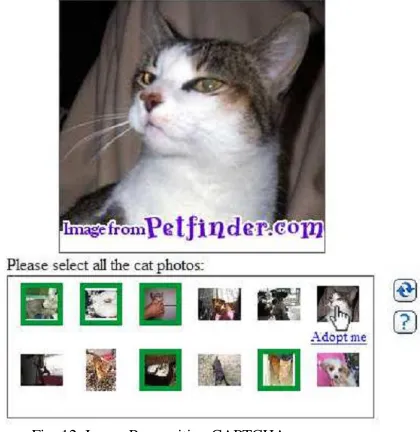
Asirra [15] a CAPTCHA that asks users to identify cats out of a set of 12 photographs of both cats and dogs provided by Petfinder.com are shown in Fig. 12.Asirra is easy for users; user studies indicate it can be solved by humans 99.6% of the time in fewer than 30 seconds [16]. A typical Asirra challenge requires more screen space than a traditional text-based CAPTCHA. Moreover Asirra is not accessible to those with visual impairments.
Fig. 12. Image Recognition CAPTCHA
C. Audio-based CAPTCHAs:
The program [13] picks a word or a sequence of numbers at
random, renders the word or the numbers into a downloadable sound clip and distorts the sound clip using TTS software. It then presents the distorted sound clip to the user and asks users to enter its contents. User listens & enters the spoken word. It helps visually disabled users. Fig. 13 below is the Google’s audio enabled CAPTCHA.
Fig. 13. Audio-based CAPTCHA
D. Video-based CAPTCHAs:
The final This is the newer CAPTCHA using animation or video in which a user must provide three words (tags) describing a video are shown in Fig. 14. According to some studies [17] [18] [19], this approach may provide greater security (i.e., hard to be broken by computer programs) and better usability than text-based and image-based CAPTCHAs. YouTube which currently stores and indexes close to 150 million videos used as a video dataset in[20].However, video is also more complex and need more time and bandwidth to answer the challenge than other schemes.
Fig. 14. Video-based CAPTCHA
III. DEFEATING CAPTCHAS &WASTED HUMAN CYCLES
A. Defeating CAPTCHAs:
There are several approaches available to defeating CAPTCHAs:
1. Insecure implementation
Many CAPTCHA implementations, especially those which have not been designed and reviewed by experts in the fields of security, are prone to common attacks.
Some CAPTCHA protection systems can be bypassed without using OCR simply by re-using the session ID of a known CAPTCHA image. A correctly designed CAPTCHA does not allow multiple solution attempts at one CAPTCHA. This prevents the reuse of a correct CAPTCHA solution or making a second guess after an incorrect OCR attempt. Other CAPTCHA implementations use a hash (such as an MD5 hash) of the solution as a key passed to the client to validate the CAPTCHA. Often the CAPTCHA is of small enough size that this hash could be cracked.Further, the hash could assist an OCR based attempt. A more secure scheme would use an HMAC.
2. Optical character recognition(OCR)
A number of research projects have attempted (often with success) to beat visual CAPTCHAs by creating programs that contain the following functionality:
1. Pre-processing: Removal of background clutter and noise.(Fig. 15(b))
2. Segmentation: Splitting the image into regions which each contain a single character. (Fig. 15(c))
3. Classification: Identifying the character in each region. (Fig. 15(d))
Steps 1 and 3 are easy tasks for computers. The only step where humans still outperform computers is segmentation. If the background clutter consists of shapes similar to letter shapes, and the letters are connected by this clutter, the segmentation becomes nearly impossible with current software. Hence, an effective CAPTCHA should focus on the segmentation.
Fig. 15(a).Initial Image (b) Removal of background
(c) Segmentation (d) Classification
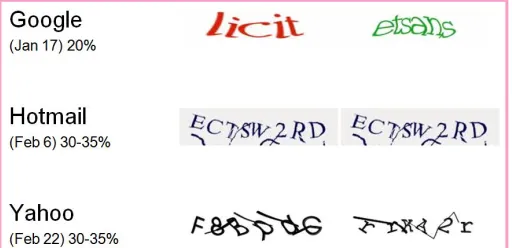
In February 2008 it was reported that spammers had achieved a success rate of 30% to 35%, using a bot, in responding to CAPTCHAs for Microsoft's Live Mail service and a success rate of 20% against Google's Gmail CAPTCHA. A Newcastle University research team has defeated the segmentation part of Microsoft's CAPTCHA with a 90% success rate, and claim that this could lead to a complete crack with a greater than 60% rate. All are summarized in (Fig. 16).
Fig. 16. Attacks in February 2008 at different websites.
3. Human solvers
CAPTCHA is vulnerable to a relay attack that uses humans to solve the tests. One approach involves relaying the puzzles to a group of human operators who can solve CAPTCHAs. In this scheme, a computer fills out a form and when it reaches a CAPTCHA, it gives the CAPTCHA to the human operator to solve.
Spammers pay about $0.80 to $1.20 for each 1,000 solved CAPTCHAs to companies employing human solvers in Bangladesh, China, India, and many other developing nations. Other sources cite a price tag of as low as $0.50 for each 1,000 solved.
Another approach involves copying the CAPTCHA images and using them as CAPTCHAs for a high-traffic site owned by the attacker. With enough traffic, the attacker can get a solution to the CAPTCHA puzzle in time to relay it back to the target site. These methods have been used by spammers to set up thousands of accounts on free email services such as Gmail and Yahoo!.
B. Wasted human cycles
Roughly 60 million CAPTCHAs are solved each day,medium 10 seconds to solve a CAPTCHA. So people around the world waste more than 150,000 hours on solving CAPTCHAs.A fifth of those users giving 30,000 daily man-hours of work then it would constitute the world's fastest and most accurate character-recognition computer, processing 10 million words a day.
In this paper we mainly focus on reducing the wasted human cycle and therefore improve the security of web services.
IV. THE PROPOSED CAPTCHA TEST
In this paper, the proposed method has been developed to distinguish human users and computer programs from each other by the fact that human user have special cognitive processing abilities on the other hand it is nearly impossible for OCR programs to have that and it falls into hard AI problem.
1. Easy for most people to solve. 2. Difficult for automated bots to solve. 3. Easy to generate and evaluate. 4. Users do not feel bored.
There are two major issues involved in designing a strong CAPTCHA test:
1. Robustness (difficult to break) 2. Usability (human friendly)
In the system robustness, the characters must be more distorted, so that the malicious computer software (e.g., a robot program) could not recognize them. Usability is concerned with making CAPTCHA tests easy to learn, use, understand and interpret. It has become difficult for automated programs to pass tests by increasing distortion or noise. Consequently, it has also become difficult for humans too example given in Fig. 17. (a). That is not a good design obviously. On the contrary, if the design is quite easy to be identified by the user, then the computer may also be able to easily identify and solve it as illustrated in Fig. 17(b). We therefore need to adopt even more advanced human cognitive processing abilities to enhance CAPTCHA to overcome this problem.
Fig. 17. (a) Better robustness but lack of usability
(b) Better usability but lack of robustness
So there is a tradeoff between the usability and robustness in designing CAPTCHA test. Moreover, it is also important to note that answering CAPTCHAs added annoyance for potential users, who feel difficult to prove that they are human. To our best survey, there has been no such a CAPTCHA that considered human cognitive processing abilities into the CAPTCHA design.
A. Cognitive Psychology
It is the study of human perception, attention, memory and knowledge, and the ways in which these have been applied in the design of computer interfaces. Cognitive psychology [21] relates the use computer systems:
How humans perceive the world around them (e.g. Web Pages)
How they store and process information and solve problems (e.g. CAPTCHA tests)
How they physically manipulate objects (e.g. clicking a link, button etc)
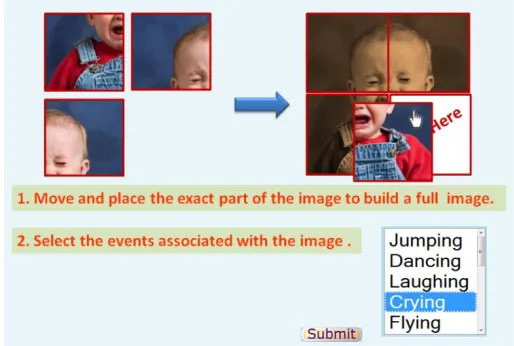
In this paper we propose a 2-layer CAPTCHA test, based on human cognitive psychology to secure web services as shown in Fig. 18.
Fig. 18. The Proposed CAPTCHA test (UI)
In first layer users need to move and place the exact block of image to make a full meaningful image from the set of images rearranged randomly. In case of computer, it may pass the test by choosing a block randomly (it is impossible to know the perfect order as the image is chosen from a large database) but human user can do it very easily with special cognitive processing abilities although the image is re-colored to increase difficulties for computer bots. Moreover, computers cannot perform mouse actions as normal human does.
In second layer, for passing the CAPTCHA test successfully users need to select events (there can be more than one events describes the image) associated with the image from the drop-down list to ensure more security and to avoid miss-spelling of users. Though a lot of work has been done in the area of machine vision, recognition of events is still a tough task for machines [22]. After completion of this two layer then the user need to press the submit button and finishes the test. This whole scenario is described in Fig. 19.
B. Proposed Algorithm
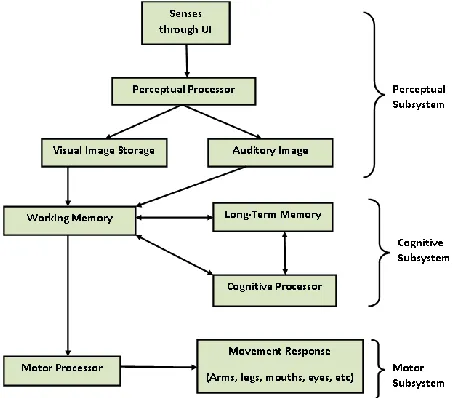
The algorithm can be better described by a model shown in Fig.20.Itdescribes the cognitive process that users go through between perception and action. First, users perceive the CAPTCHA test and outputs into visual image storage through perceptual processor. Cognitive processor provides the further processing of the image by consulting with long term memory (previous experience such as, frequency of internet use). The actual actions (e.g. move, select and submit) are carried out by motor processor.
Fig. 20. The model considered in our algorithm
TABLE I: Shows that the time needed in different components in the model in Fig. 20. We conclude that at each layer the users can spend at most 4-9 seconds depending on the frequency of internet use, thus our approach significantly improves the performance including task completion time of CAPTCHA test, number of errors, and ease of use.
TABLE I
Time needed in different components in the model.
Parameter Mean Range
Eye movement time 230 ms 70-700 ms
Decay of visual image storage 200 ms 90-1000 ms Perceptual processor cycle time 100 ms 50-200 ms Cognitive processor cycle time 70 ms 25-170 ms
Motor processor cycle time 70 ms 30-100 ms
V. USER STUDIES AND RESULTS
Our move and select CAPTCHA test makes use of the human cognitive psychology in recognizing events associated with images to distinguish between humans and automated computer programs, a task that is relatively easy for humans. The test images were taken from a large image database such as Google images [23]. The images were resized and slightly distorted or re-colored before presenting to the user. To effectively evaluate move & select CAPTCHA, we performed user studies among 25 users in the age range of 12-40, all
familiar with computers and using Internet but have difference in years of internet use and frequency of internet use per day(hours).TABLE II listed some of the randomly selected participants or the users .
TABLE II
Some randomly selected participants. Participant(ID) Age
(years)
Years of internet use
Frequency of internet use per day(hours)
ID 1 26 5 4-6 (hrs)
ID 3 18 3 9 (hrs)
ID 9 23 6 2-5 (hrs)
ID 14 37 12 6-7 (hrs)
ID 9 29 8 5 (hrs)
ID 23 14 1 2-3 (hrs)
We have compared the performance of move & select CAPTCHA with an image based CAPTCHA named ESP PIX and a text based CAPTCHA named EZ-GIMPY. Each user is given 12 tests of all the three CAPTCHAs. The user study results for the three CAPTCHAs are briefed in TABLE III.
TABLE III
The user study results for the three CAPTCHAs CAPTCHA test
ESP PIX EZ-GIMPY Move & Select Average solving
time in seconds
10.42 12.56 6.03
Average success rate (for 25 participants)
85.44% 67.84% 99.04%
A. Usability Study
Quoted from Jakob Nielsen [24], usability is defined by the following five quality components:
• Learnability: How easy is it for users to accomplish basic tasks the first time they encounter the design?
• Efficiency: Once users have learned the design, how quickly can they perform tasks?
• Memorability: When users return to the design after a period of not using it, how easily can they re-establish proficiency?
• Errors: How many errors do users make, how severe are these errors, and how easily can they recover from the errors?
• Satisfaction: How pleasant is it to use the design?
Fig.21 and Fig.22 shows the detailed results of user studies for the three types of CAPTCHAs. The following observations in context of usability are made:
• Average success rate of Move & Select CAPTCHA is 99.04%, ESP PIX is 85.44% and EZ-GIMPY is 67.84% so it improves the efficiency.
EZ-GIMPY. So it has better learnability.
• The user response time is found to be more consistent in Move & Select CAPTCHA than the other two CAPTCHAs.
• Out of 25 users, 23 users passed all the 12 tests of Move & Select CAPTCHA given to them. So it has a low error rate.
Fig. 21. Average success rate
Fig. 22. Average solving time to pass CAPTCHA test
After the completion of the test users are asked to answer a question as presented below.
Which CAPTCHA is enjoyable to you? A. ESP PIX
B. EZ-GIMPY C. Move & Select D. none of above
In the above poll we have collected 23 valid responses out of 25 users. After analyzing the valid responses we found that about 78% (≈19/23) of the responses are for C (Move & Select).So this scheme has better satisfaction.
Typically, the basic task that Move & Select CAPTCHA imposes to users is intuitive, easy to understand and easy to remember. Thus, Move & Select CAPTCHA has a relatively good learnability and memorability.
B. Security Study
Move & Select CAPTCHA is more secure compare to other existing schemes because of 2-layers. Both of these layers can lead to hard AI problems for computer bots. However, bots may try for a Brute force attack or random guess attack.
1. Brute force attack
In textual CAPTCHA, all possibilities for a CAPTHCA with 8 characters are 968. In our CAPTCHA scheme, the space depends on the actions done in 2 layers.
Firstly, difficulty level depends on the density of the randomly rearranged blocks. Each time, the main image is divided into pieces in layer-1, so there are total small pieces. In Fig. 18 main image is divided into 2*2 pieces.
Secondly, difficulty level depends on the event list in the drop-down menu in layer-2. This has been done to reduce the spelling errors thus eliminated the requirement of keyboard in the CAPTCHA test.
Brute force attack, trying to randomly guess the correct answer, is the simplest attack for a scheme. For our scheme, the probabilities are different with the value of & .
Where, =no of pieces we divide our image . =no of events listed in the drop-down menu.
The probability of the single random guess is
.
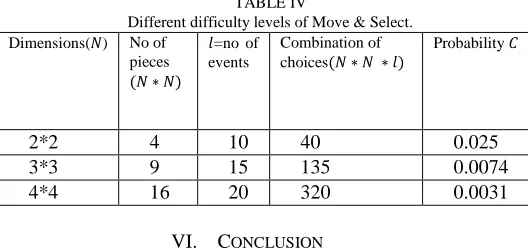
TABLE IV shows the result for three different conditions. Here, the difficulty level can be reconfigured as our need but this will increase the response time and eventually decrease the success rate of potential users.
TABLE IV
Different difficulty levels of Move & Select. Dimensions( ) No of
pieces
=no of events
Combination of choices
Probability
2*2 4 10 40 0.025
3*3 9 15 135 0.0074
4*4 16 20 320 0.0031
VI. CONCLUSION
Currently represented example is designed in HTML with JavaScript and PHP little help of CSS, which is easy to implement. Better designs can be possible with some extensions in HTML and JavaScript, Java Applets or Macromedia Flash. This design is kept simple such that user can easily understand, low bandwidth consuming but powerful in terms of security against any sort of bot attacks.
This approach is designed taking the consideration of mobile devices such as iPhone, androids, Pocket PCs, Touch phones etc as this approach can work without the help of keyboard.
The proposed approach is not suitable for visually impaired users. Also it may be challenging for users with learning disabilities.
REFERENCES
[1] von Ahn, L., Blum, M., Langford, J.: Telling Humans and Computer Apart (Automatically) or How Lazy Cryptographers do AI. Comm. of the ACM 47(2), 56–60 (2004)
[3] M. Blum, L. A. von Ahn, and J. Langford, “The CAPTCHA Project, Completely Automatic Public Turing Test to Tell Computers and Humans Apart,” Nov. 2000, http://www.captcha.net, Dept. of Computer Science, Carnegie-Mellon Univ.
[4] A. Turing. Computing machinery and intelligence. Mind, 49:433–460, 1950.
[5] Pinkas, B. and Sander, T. Securing Passwords Against Dictionary ATTACKS. In Proceedings of the ACM Computer and Security Conference (CCS’ 02). ACM Press, November 2002.
[6] School of Computer Science. (2009, Dec.). Gimpy. Carnegie Mellon. [Online]. Available: http://www.captcha.net/captchas/gimpy/.
[7] Greg Mori and Jitendra Malik. Recognizing Objects in Adversarial Clutter: Breaking a Visual CAPTCHA. In Computer Vission and Pattern Recognition, 2003.
[8] M. Chew and H.S. Baird, “BaffleText, a Human Interaction Proof”, In Proceedings of the 10th SPIE/IS&T Document Recognition and Retrieval Conference (DRR'03), Santa Clara, CA, USA, 2003, pp. 305-316.
[9] Louis Von Ahn, Manual Blum and John Langford. Telling Humans and Computers Apart Automatically. Comm. Of the ACM, 47(2):57-60, 2004.
[10] Ahn, L. von. 2005. Human Computation. Ph. D. dissertation, Carnegie Mellon University, CMU-CS-05-193.
[11] M. Blum, L. A. von Ahn, and J. Langford, “The CAPTCHA Project, Completely Automatic Public Turing Test to Tell Computers and Humans Apart,” Nov. 2000, http://www.captcha.net, Dept. of Computer Science, Carnegie-Mellon Univ.
[12] Monica Chew and J. D. Tygar, “Image Recognition CAPTCHAs”, Proc. Of the 7th Information Security Conference, 2004.
[13] T.Y Chan. “Using a Text-to-Speech Synthesizer to Generate a Reverse Turing Test”, In Proceedings of the 15th IEEE International Conference on Tools with Artificial Intelligence, Sacramento, CA, USA, 2003, pp. 226-232.
[14] R. Gossweiler, M. Kamvar, and S. Baluja, “Whats Up CAPTCHA? A CAPTCHA Based On Image Orientation”, In Proceedings of the 18th International Conference on World Wide Web, Madrid, Spain, 2009, pages 841-850.
[15] J. Elson, J. Douceur, J. Howell and J. Saul. “Asirra: A CAPTCHA that exploits interest- aligned manual image categorization”, Proc. Of ACM CCS 2007, pp. 366-374.
[16] Monica Chew and J. D. Tygar, “Image Recognition CAPTCHAs”, Proc. Of the 7th Information Security Conference, 2004.
[17] Cui, J.-S., Mei, J.-T., Wang, X., Zhang, D., Zhang, W.-Z.: A CAPTCHA Implementation Based on 3D Animation. In: International Conference on Multimedia Information Networking and Security, MINES, vol. 2, pp. 179–182 (2009)
[18] Ince, I.F., Salman, Y.B.: Execution Time Prediction for 3D Interactive CAPTCHA by Keystroke LevelModel. In: Fourth International Conference on Computer Sciences and Convergence Information Technology, pp. 1057–1061 (2009)
[19] Kluever, K.A., Zanibbi, R.: Balancing Usability and Security in a Video CAPTCHA. In: ACM International Conference Proceeding Series (2009)
[20] M. Cha, H. Kwak, P. Rodriguez, Y.-Y. Ahn, and S. Moon. ITube, You Tube, Everybody Tubes: Analyzing the World’sLargest User Generated Content Video System. In Proc. IMC2007, ACM Press (2007), 1–14. [21] http://en.wikipedia.org/wiki/Cognitive_psychology
[22] Chew, M., Tygar, D. (2004) Image Recognition CAPTCHAs, in Proceedings of the 7th International Information Security Conference (ISC 2004)
[23] Google images. http://images.google.com
[24] Jakob Nielsen. Usability 101: Introduction to Usability, 2003. Available