258 | P a g e
A NEW STUDY ABOUT ALIENWARE 17 GAMING
COMPUTER AND ITS SPECIFICATION,
ARCHITECTURE
Kogilan A/L Krishnansamy
1, Vishanth A/L Sukumaran
2,
Haridasan A/L Balakrishnan
3 1,2,3Diploma Students, Asia Pacific University, Kuala Lumpur, Malaysia
ABSTRACT
When one thinks about “mobile computing”, one’s mind will definitely steer to its portability feature. Nomadic
computing or mobile computing can be defined as the use of mobile devices in conjunction with mobile
communication technologies to enable users to access the Internet from anywhere in the world. In this 21st
century, mobile computers have already become ubiquitous which exist in every corner of the world. Mobile
devices such as smartphones, wearable computers and laptops have percolated into every aspect of human life
and have created a new dimension. Before this, connecting all the people together might be impossible but now,
with the aid of mobile devices, everything is possible. In the world we know today, computers are useful to a
multitude of people for a multitude of purposes. However, computers have affected the outcome of many
important things in the history and now affect the life of everyone on the earth. In general sense, mobile
computing is the use of any computer physically not connected to the host computer or server and can interact
anytime and anywhere.
Keywords : Mobile Computers, Memory, Technologies, Touch Screen
I INTRODUCTION
In this assignment, several researches were carried out to gather information regarding a specific model of a
mobile computer. The knowledge obtained by conducting this research enables the researchers to further
improve the technologies that are being used nowadays. This research was conducted on the month of April and
Alienware 17 is selected as a device to be researched on. Alienware 17 is a gaming laptop and it is generally
known for its ultimate gaming performance. This laptop is a high grossing product of Alienware where it has
collected the highest profit when this product is introduced to the world. Besides that, Alienware 17 is very
well-known for its 4K UHD display which is an astonishing upgrade a laptop can ever have in this era. When
people heard the word „computer‟, they think of a device that they can go on to finish their work, communicate
or to play games. Eventually, in the 17th centuries, computers were meant to be something different than it does
259 | P a g e
1.1 Technologies behind the Success of Mobile Computers
According to “Fig.1” the sale of desktop is declining whereas the usage of mobile devices is inclining due to its
mobility and convenience. This shows that the world will be dominated by mobile computers in the future. The
technologies that are implemented in mobile computers have allured each and every person all around the world.
The following are some of the technologies behind the success of mobile computers.
Figure 1. Usages of mobile and desktop
a. Lithium-ion Rechargeable-battery
One of the technologies behind mobile computing is lithium-ion rechargeable-battery hardware. Currently,
lithium-ion is the fastest growing and most promising battery chemistry in the world (Battery University, 2010).
These batteries have high energy-density which provides a potential for long-term usage capacities. The much
higher power density offered by lithium ion batteries is a distinct advantage. Additionally, this battery also has
low self-discharged. The rate of self-discharge is much lower that it won‟t lose its charge over time. This
hardware doesn‟t require much maintenance to ensure its performance and capabilities [1].
b. Touch-screen Technology
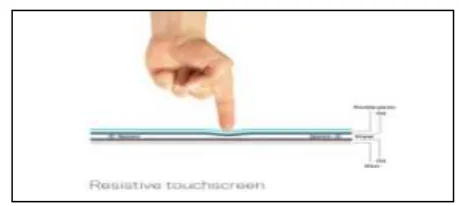
Touch-screen technology was commonly introduced to mobile computers where it takes a role as an input
device. Traditionally, the screen consists of 2 layers; resistive and conductive layers which were known as
resistive technology. However the capacitive touch technology was then introduced in smartphones which
consists of Corning‟s Gorilla glass (top layer), touch layer (middle layer) and LCD display panel (bottom layer)
as shown in Figure 1.1[2].
260 | P a g e
Due to its convenience, users are able to give out multi-touch input functions such as zoom-in and zoom-out.Additional hardware such as mouse, keyboard, switches and buttons are physically not required because
everything in built-in. Therefore, maintenance in order to keep it clean will be easier due to absence of buttons.
c. Wi-Fi Technology
Wi-Fi is a rapid growing technology which is used in all devices especially in mobile computers. It is a
well-known wireless communication technology where it allows users to connect to "wireless local area network"
(WLAN). Throughout this technology, users are able to save cost from different aspects. Users are able to make
calls and use the Internet to access websites and upload or download files for free. There are even no charges for
long distance calls via Wi-Fi technology. Therefore, the cost of mobile data and calls can be used efficiently [3].
d. Global Positioning System (GPS) Technology
The Global Positioning System (GPS) technology has significantly upgraded its usage and value in our palm.
This technology has been implemented in certain mobile computers which are equipped with maps and
locations. It is able to pinpoint a location and provide precise and step-by-step directions from one place to
another. Moreover, this system will be updated automatically if there is any physical route change. Even in law
enforcement, they are currently finding numerous uses for this technology. For example, this technology is used
to monitor vehicles and suspected individuals of a crime or terrorist activity [4]. Therefore, this invention is
crucial in order to sustain the peace in our country and to also avoid confusions in tracking location.
II CPU SPECIFICATION, FEATURES AND GENERAL ARCHITECTURE
2.1 CPU Specifications
Alienware 17 is a gaming laptop with a width of 16.28 inches and a depth of 11.77 inches. The thickness of this
gaming laptop is 1.91 inches which is actually quite less compared to other models of gaming laptops. The
weight of the Alienware 17 is 9.15 pounds. Figure 2.1 shows the picture ofAlienware 17 shown in “Fig.2.1”.
261 | P a g e
The Alienware 17 comes with three different variations of operating systems supports Windows 7, 8 & 10.Alienware 17 comes with two CPU options; both are Intel Quad-core processors, Core 4700MQ and Core
i7-4930MX. Intel Core i7-4930MX is the main processor implemented into the Alienware 17 whereas the Intel
Core i7-4700MQ is the optional processor due to the differences in the GPU. Intel Core i7-4930MX has a smart
cache of 8MB. The Direct Media Interface (DMI2) of Intel Core 4730MX results in 5GT/s. Intel Core
i7-4930MX has 4 cores and 8 threads in it which makes the performance of the Alienware 17 beyond our
expectations. The Intel core processors of Alienware 17 consists of 57W of Thermal Design Power (TDP). TDP
represents the average power the core used in watts. Intel Turbo Boost Technology is specially implemented
into the Intel Core i7-4930MX as this new technology dynamically increases the processor‟s frequency as
needed by taking advantage of thermal and power headroom to give the Alienware 17 a burst of speed shown in
“Fig.2.2”.
Intel Core i7-4700MQ processor
Quad-core
Base frequency is 2.4 GHz; Max Turbo frequency is 3.4 GHz
CPU Family – Haswell
Memory type DDR3 with RAM size 8GB; RAM speed is 1600 MHz
Support 64 bit
GPU – AMD Radeon R9 M290x; 8GB GDDR5
Intel Core i7-4930MX processor
Quad-core
Base frequency is 3 GHz; Max Turbo frequency is 3.9 GHz
CPU Family – Haswell
Memory type DDR3 with RAM size 32GB; RAM speed 1600 MHz
Support 64 bit
GPU – NVIDIA GeForce GTX 880M; 8GB GDDR5
262 | P a g e
2.2 Features
Core i7-4930MX is more powerful and faster compared to the Core i7-4700MQ processor. Core i7-4930 helps
the user to achieve a better performance in the sense of gaming and all other programs. There are several
features in the Alienware 17 gaming laptop which makes it a very special mobile computer for the society. The
first features that makes this device a unique mobile computer is the design of the Alienware 17. Alienware
Corporation names the design as “The Spaceship Returns”. The chassis‟ sleek and the spaceship-inspired
paneling of Alienware 17 attracts the eyes of the customers. Besides that, the cutting-edge design is made up of
durable anodized aluminum which was reinforced by a magnesium alloy frame specially created to protect the
LCD and the internal components of the device [5].
The Alienware 17 is designed for its maximum performance, with a rear GPU/CPU exhaust vent to manage the
heat generated inside the system. In addition, it has a smooth black deck inside that provides a nice contrast to
the space-gray exterior panels and the additional lights mounted under the keyboard and behind the Alienware
logo beneath the display [5]. The second feature that gives a high impact to this device is the 4K sparkling
display. Alienware 17 has 17.3-inch UHD screen which is pretty much better than anything else in its class. It
outputs sharp, bright and super-colorful and makes marveling at little things like the detail on a gun in a game
such as Fallout 4 a real threat. Alienware 17 comes with a brightness of 318.6 nits which beats almost all the
other gaming laptops‟ screens. Alienware 17 also topped its competition in color range, with an RGB range of
173.5 percent. This makes the Alienware 17 to stand bright among the rest of the gaming laptops available in the
market.
Alienware 17 has a processing power like never before. Nowadays, all the 6th Generation Intel® Core i7 Quad
Core Processors come with a factory-overclocked which results in even more speed, power and performance out
of Alienware 17. Nevertheless, the Intel‟s Turbo Boost 2.0 technology enthusiastically controlling power and performance enables the users to cram even more action out of Alienware 17‟s 8-cell battery on a single charge.
As the main function of the Alienware 17 is for the gaming purpose, Alienware Corporation provides 2 different
Graphic Cards to the customers which are AMD Radeon and NVIDIA GeForce. AMD Radeon R9 M290x GPU
improves features and the effects in games as it is being optimized for an incredible Windows 8.1 gaming
experience.
This GPU also provides cutting edge features as well as full functionality of DirectX 11.2 for Windows 8.1
while extending the battery life of the device. Apart from the AMD GPU, Alienware 17 also provides NVIDIA
GeForce GTX 880M with 8GB GDDR5 graphics memory. This GPU turns on lightning-fast FXAA
anti-aliasing for the wonderful combination of image quality and gaming performance. The NVIDIA Adaptive
Vertical Sync prevents the image tearing, and NVIDIA PhysX brings an ultimate gaming performance with
dynamic and interactive environments. A good speaker provides a better gaming experience for the users.
Alienware 17 had never failed in doing so. They have implemented Dolby Home Theater v4 in the speaker
architecture. This Dolby Home Theater v4 delivers the captivating listening experience that your games or other
263 | P a g e
completely feel like being into the game whereas the Volume Maximizer lets you blast the Alienware 17‟s audioat peak volume without noise or clipping.
Apart from the extraordinary processing speed, the Alienware 17 also comes with a massive speed of
transferring files. Alienware 17 has a built-in Killer Gigabit Ethernet NIC which identifies and prioritize the
network traffic so that the latency sensitive streams that require maximum speed, like games are prioritized over
less important traffic. Besides that, it has a file transferring speed of up to 15Gbit/s. Alienware 17 has an extra
feature of USB 3.1 which enables the user to transfer files with a transferring speed of 40GB/s. The last feature
that attracts the customers is the AlienFX system lighting. Since the Alienware 17 comes with only one silver
color body, AlienFX system lighting provides 20 different colors to Alienware 17. These 20 different colors are
applied in the rear panel, chassis surround and on the track pad for about 10,240 billion color combinations
approximately. This provides a mesmerizing lighting effect to the users to have an astonishing gaming
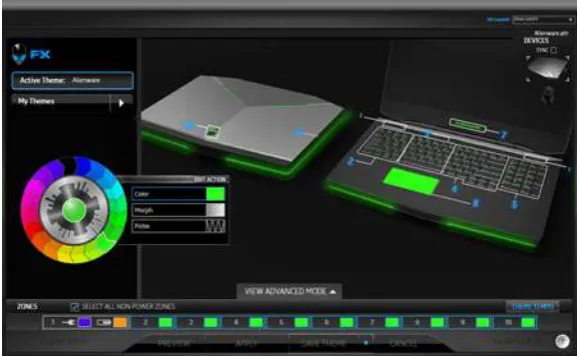
experience [6]. “Fig 2.3” shown the interface of the AlienFX lighting program.
Figure 2.3 Interface of AlienFX lighting
2.3General Architecture
The Alienware 17 is divided into 4 different parts. The first part is the keyboard and the touchpad of the device.
Then the architecture continues with the sleek cover which fits the keyboard and the touch pad. Below the
cover, it contains the motherboard, fan, GPU, RAM and other chips that are needed for the mobile device to run
smoothly and efficiently according to the user‟s need. The battery and the hard disk compartment are placed in
front the motherboard at the allocated space. The Alienware 17 has 8 cell lithium ion battery which supports a
longer time of usage. All these devices and components are connected in the motherboard of the Alienware 17.
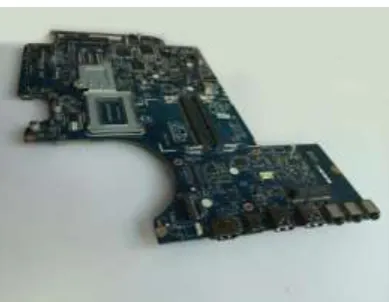
Figure 2-5 shows the power button circuit board of Alienware 17 which is connected to the motherboard. The
264 | P a g e
III MEMORY ARCHITECTURE
Memory architecture refers to the integration of various types of memory in order to boost the performance and
productivity of a computer without disrupting the reliability of storage or making the computer prohibitively
expensive [7]. Computer systems often employ a memory hierarchy for a systematic transmission of data
whereby relatively fast, expensive and small memory occupy high position whereas slow, inexpensive and large
memory occupy low position in the hierarchy. Similar to other ordinary laptops, Alienware 17 is manufactured
with a Random Access Memory (RAM), cache memory and a high performing Solid State Drive (SSD) to store
instructions and data.
3.1 Random Access Memory
RAM or primary memory can be defined as a temporary workspace in which the operating system, application
software and instructions in current use are stored [8]. Alienware 17 is equipped with dual channel Double Data
Rate fourth generation (DDR4)-2133 SODIMM RAM which supports higher data rates and delivers faster burst
access speeds. DDR4 increases memory bandwidth up to 25.6 GB/s and maximize system performance by
providing smooth access. Since DDR4 memory operates at just 1.2V compared to DDR3 which performs at
1.5V, less heat is generated, hence, there is less chance for computer glitch to occur. (Micron, 2016). Figure 2-8,
shows a brief comparison between DDR4 and DDR3.16GB memory. With an additional payment, users are able
to upgrade the RAM up to 32GB memory for a more convenient usage. The DDR4 RAM in Alienware 17
operates at a speed of 2133 MHz and remains undisputed by many other RAMs. Figure 2-9 shows an example
of DDR4 RAM.
3.2 Solid State Drive (SSD) - Storage Memory
SSD can be defined as a non-volatile storage device that stores persistent data on solid-state flash memory.
SATA III 6 GB/s MTS400 M.2 SSD is being physically installed in the motherboard of Alienware 17 for an
efficient and methodical storage of data. It is ideal for everyday computing usage and able to store
approximately 1 TB of data or information as shown “Fig.2.4”.
265 | P a g e
SATA SSD is capable to fully utilize its storage density by integrating 340, 000 distinctive tracks in the breadthof a single inch. Besides that, this hard drive contains sophisticated power modes and uses only a small portion
of energy to function. Therefore, users are able to perform computational tasks for a longer period without the
need of power supply. The SSD is selected as the main storage memory of Alienware 17 as it provides more
useful and beneficial functions compared to the hard disk drive (HDD). HDD generates annoying noises when
the data is transferred or retrieved from it which may cause disturbance to the user‟s gaming experience shown
in Table.1.
Table.1 Comparison of SSD and HDD.
3.3 Cache memory
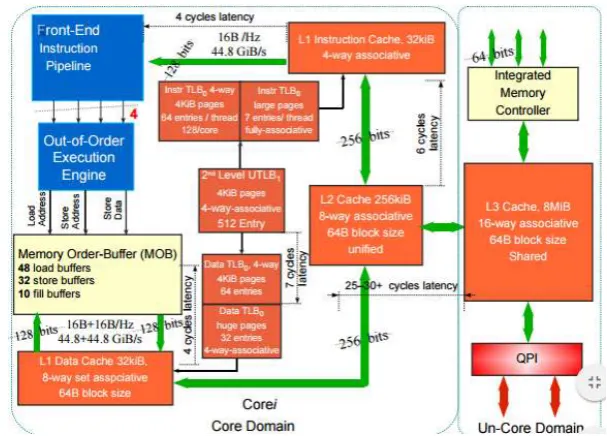
Since Alienware 17 contains Intel Core i7-4700MQ processor, the allocation and structure of cache memory
follows Nehalem microarchitecture. L1, L2 and L3 cache allocate space up to 256 KB, 1024 KB and 8MB
respectively. According to Nehalem architecture, L1 cache has a single access data port and share two hardware
threads running in the core. The access latency to retrieve data in L1 cache is 4 clocks and the throughout period
is 1 clock. L2 cache is designed for very low latency and it can support both data and instructions. The data
access time of L2 is 10 clocks which is relatively higher than L1 cache. L3 cache is designed to manage
communication between processor cores and processor sockets. However, the data access time of L3 cache is
quite long which is 10 clocks [9]. Figure 2.5 shows an overview of Nehalem‟s architecture which represents
266 | P a g e
IV FUTURE OF MOBILE COMPUTING
Dozens of prognostications have been made, saying that mobile computing will dominate each and every
segment of the world by the year 2025. Various ideas on how to enhance the architecture and functions of
wireless devices are being constantly generated to astonish the people. The following are some of the forecasted
technologies that might be implemented in the development of mobile computers.
4.1 Wireless and Fast Charging
When the mobile devices run out of battery, users might be frustrated because they have to wait until their
mobile devices are fully charged. Ignoring potential hazards, some of them even use their mobile devices while
it is connected to the charger. This may result in explosion and lead users to demise. Taking all those things into
consideration, mobile device developers are currently designing mobile devices that allow fast wireless charging
in which cables and adapters are not required. With the aid of this technology, users are able to perform
computer-based tasks without worrying about the battery life of their mobile devices.
4.2 Flexible Display
Researchers from the Queen‟s University are currently developing a smartphone featuring a flexible and
foldable display. The multi-touch input together with the help of bend sensors interacts with the user to detect
the degree of the device when it is bent. According to the director of Queen University, RoelVertegraal, when
this smartphone is bent down, pages flip from right to left and allows users to feel the sensation of the page [10].
Figure 2.6 below shows an image of the flexible smartphone.
267 | P a g e
Figure 2.6: An image of flexible smartphone
4.3 Health care facilities
In the future, mobile computers will be extensively used in health care for various purposes such as monitoring
individual‟s health, controlling unhealthy habits and treatments. Moreover, it is allegedly said that mobile
computers will enable medical practitioners to virtually control the patient‟s blood glucose level. For example,
when there is a rise in blood glucose level, wireless monitoring and corrective-action devices will trigger the
pancreas of the patients to secrete insulin and other hormones, thus chances of getting diabetes mellitus is
diminished.
4.4 Easy computing
Traditionally, mobile phones were used to call the people. Then slowly as the innovation and technologies
increases, simple text messaging facility was implemented where it allows the users to send a simple text
message instead of keeping the mobile online for hours. This saves the cost of the line to interact with the
people. But what we see today is not just only calling and texting facilities are available. Today‟s technology
and innovation has brought the functionality of a mobile computer similar to a desktop where it brings ease to
the people. Due to its increased processing power, better battery life, vastly improved networking speeds, and
larger screen sizes on mobile devices has replaced the usage of desktop. Mobile computer is increasingly used
more as an information distributor. In the future, the CPU or general architecture of the mobile devices will be
simplified with a larger screen size to display its output. Therefore, this simplified device will be likable for the
users due to its lighter weight and a wider screen to view the output clearly.
4.5 e-Trading
E-trading is a financial market platform where it is done through electronically by using web browser. This
process takes place among two type of groups which are business to business (B2B) and business to consumer
(B2C). In future, e-trading delivers the streaming market depth where it conveniently displays the real-time bids
& asks, along with market depth from a single, intuitive screen. Live Order Status also will be shown to users in
order to keep track all of the orders in real time with greater ease and clarity [11].
V GENERAL CONCLUSION
From this research, the researchers are able to comprehend the basic architecture and CPU specifications of
268 | P a g e
specifications of all components in Alienware 17. The researchers were expected to see an exponential growthin the development and purchasing of mobile devices specifically for Alienware 17 laptop. Even though
Alienware 17 will be the forerunner to be chosen by the users to undergo the actual gaming experience, there
were some drawbacks stated in this research where potential health risks and security risks should be kept in
concern. In the future, there will be harm of privacy and security as the quantity of mobile devices elevate. It
will make it really easy to prey on people who like to share more personal information on unsecured networks.
Although the Information Technology corporations are striving hard to shield and overcome the security
concerns, users should do their part to protect themselves and adapt to the evolving technology. All of this will
result in higher productivity, profitable businesses, and staying connected with our families and friends.
VI ACKNOWLEDGMENT
The authors acknowledge Dr Jothi Sophia, Principal, CSI JACON, Madurai, India for their constant
encouragement and motivation to contribute this paper in International Conference, India.
REFERENCES
[1] Battery University, 2010.Is Lithium-ion the Ideal Battery?. [Online]
Available at: http://batteryuniversity.com/learn/article/is_lithium_ion_the_ideal_battery
[Accessed 2 April 2016].
[2] Larsen, R., 2012. Rasmus Larsen. [Online]
Available at: http://www.flatpanelshd.com/focus.php?subaction=showfull&id=1348049303
[Accessed 2 April 2016].
[3] Conjecture, 2003. What Are the Advantages of a Wi-Fi® Phone?. [Online]
Available at: http://www.wisegeek.com/what-are-the-advantages-of-a-wi-fi-phone.htm
[Accessed 2 April 2016].
[4] Contributing Writer, 2007. What Are the Advantages of GPS?. [Online]
Available at: http://science.opposingviews.com/advantages-gps-17559.html
[Accessed 2 April 2016].
[5] Rutherford, S., 2016. Alienware 17 R3 (2016) Review, s.l.: Laptopmag.
[6] Dell, 2016. Alienware 17 gaming laptop. [Online]
Available at: http://www.dell.com/ed/p/alienware-17/pd
269 | P a g e
[7] Wise Geek, 2016. what is memory architecture?. [Online]Available at: http://www.wisegeek.com/what-is-memory-architecture.htm
[Accessed 28 April 2016].
[8] TechTarget, 2014. SSD. [Online]
Available at: http://searchstorage.techtarget.com/definition/solid-state-drive
[Accessed 29 April 2016].
[9] Michael E. Thomadakis, P., 2011. The Architecture of the Nehalem Processor, Texas: Texas A&M
University.
[10] Heisler, Y., 2016. This flexible smartphone display might be the future of mobile computing. [Online]
Available at: http://bgr.com/2016/02/17/flexible-smartphone-display-oled/
[Accessed 21 May 2016].
[11] E-trade, 2014. Sophisticated futures traders will feel at home here.. [Online]
Available at: https://us.etrade.com/active-trading/investment-products/futures