e-ISSN: 2250-3021, p-ISSN: 2278-8719
Vol. 3, Issue 12 (December. 2013), ||V3|| PP 14-22
Comarison and Analysis of Simulators for Ad hoc Wireless
Networks
Mr. Nirav Bhatt, Dr. Dhaval Kathiriya
1Reaserch Scholar, School of Computer Science, R K University, Rajkot 2Director IT, Anand Agricultural University, Anand
Abstract: - Wireless networks are one of the best field for research unlike wired networks. In ad hoc wireless networks to evaluate the performance and behavior of various routing strategies & protocols, simulators are very good compromises between cost and complexities as well as accuracy of the results. Since there are many simulators available for ad hoc wireless networks, it is often difficult to decide which simulator to choose. The paper contains survey about simulators supporting in ad hoc wires networks. It aims to find a simulator which would help the researchers to develop and analyze various strategies and models in a reliable and easier way. We do not focus on the correlation of the individual simulation results, but try to compare the simulators from feature and usability point of view unlike other simulator comparison.
Index Terms: - Ad hoc wireless networks, Simulations, OPNET Modeler, NS-2, J-Sim, OMNET++.
I.
INTRODUCTION
During last few years ad hoc wireless networks are becoming more and more popular. A wide spread methodology to evaluate the performance of various routing strategies and models in ad hoc wireless networks is simulation. Simulation is also used for the development of new routing strategies and new network architectures. In order to investigate any characteristics for routing strategies in ad hoc wireless networks, they are usually implemented in network simulator. Behavior of network architectures and routing topologies can be easily studied by setting simulation parameters. Most available network simulation toolkits are based on the paradigm of discrete event-based simulation.
The aim of this survey is to find a wireless network simulator that provides a good balance between features, efficiency, extendibility, accuracy, and easiness of use. Such a simulator will allow researchers to take the steps described above without much has-sle, and allow them to concentrate on their research rather than the simulator. Therefore, this survey contains information about features, abilities, advantages/disadvantages and structures of different network simulators and investigates their feasibility as a research tool. The survey is based on a collection of papers and surveys, some of which compare different network simulators according to defined criteria and some of which analyze simulators‟ conformance to a specific project or area.
We are using various parameters to measure the simulator‟s result and comparisons[1,7]. Because choices about which internal details of particular routing strategy and parameters used in simulation is particularly difficult for wireless network simulation rather than wired simulation. In wired network over last 30 to 40 years experience of researchers allows significant abstractions. For example point-to-point links are often represented as a simply by bandwidth and a delay with queue, as well as framing and transmission errors. On the other end in ad hoc wireless networking field provides less guidance on what abstractions are appropriate. In ad hoc wireless networks low level details can have large effects on performance of routing strategy. So to study that kinds of details and parameters in ad hoc wireless networks simulation is the best tool. We are presenting a case study in which commonly used wireless network simulators like NS-2, OPNET Modeler, J-Sim, OMNET++ etc. were used to evaluate the topology control routing strategies. We are also specifying the missing features of each simulator as well as also describe the amount of effort needed for installations, familiarizations, implementations and visualizations from feature and usability point of view. It also gives the descriptions of a list of simulators (specified above) and provides the estimations of their popularities and give some hints on which simulators used for what needs. At the end a table is presented comparing the considered simulators according to their own languages, their modules and whether they have GUI support or not[7,8 ].
first event on the list is considered as the head. All the events have contains the data associated with it and whenever any event completes it is removed from the list. An event becomes an interrupt when it reaches the head of the event list and it is delivered by the simulation kernel to the designated module in the simulator. Data associated with the event can be obtained by the module when the interrupt occurs and certain modules, process and queues are also selected to place initial interrupts on the event list. Simulation Kernel (SK) manages the whole event list, simulation kernel delivers each event in sequence to the appropriate module as well as simulation kernel receives request from the modules and inserts new events on the existing event lists.
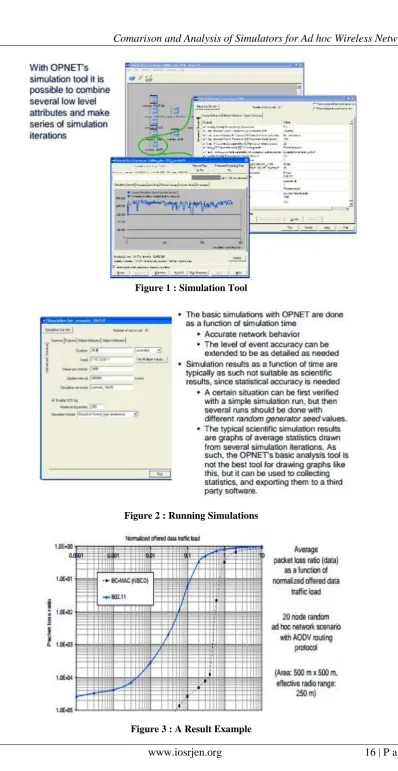
Additionally, some possibilities to implement own algorithms are given. Several tools and editors are provided. The principle is to make use of the numerous existing components that are part of OPNET Modeler. Thereby the effort of the developers should decrease, the implementation time should shrink and the number of errors should become less. OPNET Modeler is not open source software and therefore users and companies need to purchase licenses. Because it is a commercial software product, user- friendly interfaces play an important role. A graphical interface (GUI) is provided and a lot of documentation comes along with OPNET Modeler. The cost of the software could be deter many developers, since its open source solutions are available in the market. A vast number of protocol models are available in OMNET Modeler and users can implement their own models. Models are developed in a hierarchical way using a four-level structure. Network level, which is not the OSI layer of the same name, handles topology modeling and overall configuration. Node level deals with internal structures of nodes like transmitters and receivers while functionalities of node level devices are modeled as finite state machines at the process layer. Proto-C layer, being the lowest layer, is where the coding of model behavior takes place in Proto-C language which is an extension of C. The layer contains a large number of kernel procedures available and it allows access to source codes of built in models.
Figure 1 : Simulation Tool
Figure 2 : Running Simulations
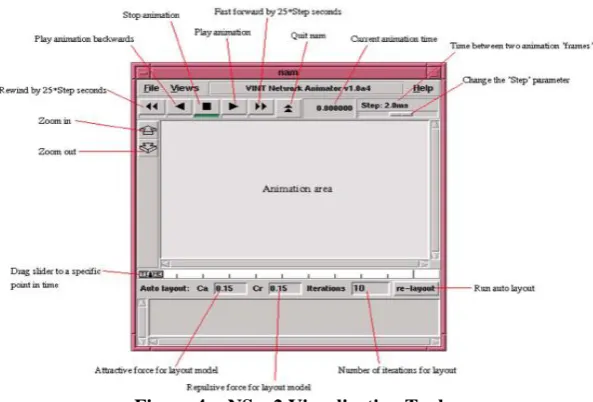
For the wireless part, mobile IP is also provided. NS2 provides users with executable command ns which take on input argument, the name of a Tcl simulation scripting file. Users are feeding the name of a Tcl simulation script (which sets up a simulation) as an input argument of an NS2 executable command ns. In most cases, a simulation trace file is created, and is used to plot graph and/or to create animation. NS2 consists of two key languages: C++ and Object-oriented Tool Command Language (OTcl) [7, 8]. While the C++ defines the internal mechanism (i.e. a backend) of the simulation objects, the OTcl sets up simulation by assembling and configuring the objects as well as scheduling discrete events (i.e., a frontend). The C++ and the OTcl are linked together using TclCL. Mapped to a C++ object, variables in the OTcl domains are sometimes referred to as handles. Conceptually, a handle (e.g., n as a Node handle) is just a string in the OTcl domain, and does not contain any functionality. NS2 provides a large number of built-in C++ objects. It is advisable to use these C++ objects to set up a simulation using a Tcl simulation script. However, advance users may find these objects insufficient. They need to develop their own C++ objects, and use a OTcl configuration interface to put together these objects.
NS - 2 provides OSI layers excluding presentation and session layers. It has a huge pool of available features, offering a large number of external protocols already implemented. Behavior of the simulator is highly trusted within the network community. NS - 2 supports deterministic or probabilistic packet loss in queues attached to network nodes as well as it supports deterministic and stochastic modeling of traffic distribution. It also allows defining disturbances and corruptions that may occur in a simulated network like link interruptions, node stoppage and recovery by modifying scenario scripts. The simulation event scheduler of the simulator, contained in OTcl script interpreter, is either a non real-time scheduler or a real time scheduler which is mainly used for real-time synchronization of an emulated network. The user indicates in the event scheduler when network elements should start or stop transmitting packets. With its emulation facility, ns-2 can be connected to a real network and capture live packets just like a common node. It can also inject packets into the live network. The simulator can generate personalized trace files by allowing users to select parameters to be traced, therefore saves CPU resource [1].
Figure 4 : NS – 2 Visualization Tool
Figure 5: NS – 2 Analysis Tool (X Graph)
IV.
OMNET++
Figure 6: Overview of Basic Modules in OMNET++
Main objective of OMNET++ is to enable large-scale simulation, simulation models are need to be a hierarchical built from the reusable components as much as possible. The OMNET++ simulation software should facilitate visualizing and debugging of simulation models in order to reduce debugging time, which traditionally takes up a large percentage of simulation projects. This simulation software itself should be modular, customizable and should allow embedding simulations into larger network applications. An OMNET++ model consists of modules that communicate with message passing [8]. The active modules are termed simple modules, they are written in C++, using the simulation class library. Simple modules can be grouped into compound modules and so forth, the number of hierarchy levels is not limited. Messages can be sent either via connections that span between modules or directly to their destination modules. Modules can have parameters. Parameters are mainly used to pass configuration data to simple modules, and to help define model topology. Parameters may take string, numeric or Boolean values. Because parameters are represented as objects in the program, parameters – in addition to holding constants – may transparently act as sources of random numbers with the actual distributions provided with the model configuration, they may interactively prompt the user for the value, and they might also hold expressions referencing other parameters. Compound modules may pass parameters or expressions of parameters to their sub-modules [14].
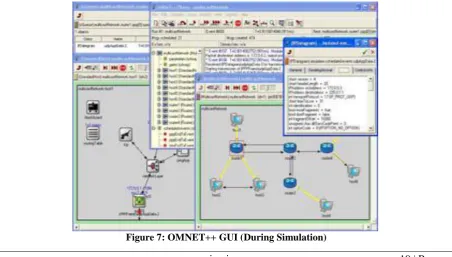
The simulator includes parallel simulation functionality (for executing simulations quicker and being able to model networks made of tens of thousands stations) through the use of either MPI or PVM3 communication libraries. OMNET++ has a well-written fairly large user manual, API documentation and so many tutorials. Since the simulator has a complex structure, careful consultation of the available documentation is needed while working with it. INET Framework and Mobility Framework both has API documentation and Mobility Framework also has a user manual. OMNET++ has extensive GUI support. GNED allows building of network topologies graphically, so it provides easy definition of network simulation scenarios. It can generate topologies as NED files. It also supports interactive execution of the simulation, tracing and debugging. The user is able to start or stop the simulation execution in Tkenv and can change variables or objects inside the model at runtime. It provides the user with a detailed picture of the simulation state at any point of execution. OMNET++ simulator includes the powerful simulation tools and also includes the modules for the Application Layer and Network Layer of OSI model as well as a Network Interface Card module which encapsulates MAC and Physical layers. Physical layer consists of one module for determining SNR characteristics and one module for deciding whether a packet can be passed to upper levels. A Mobility module provides and updates a node‟s current position and establishes communication channels.
OMNET++ provides: support for hierarchical models, a graphical editor, GUI-based execution environment (except for nam ), separation of models from experiments, graphical analysis tools, simulation library features such as multiple RNG streams with arbitrary mapping and result collection, seamlessly integrated parallel simulation support, etc which all are not available in other simulators.
V.
J-SIM
J-Sim (formally known as Java Sim) is a network simulator written in JAVA. It is build according to the component - based software paradigm. It provides compositional simulation environment developed by a team at the Distributed Real Time Computing Laboratory of the Ohio State University and by Illuinois University. It has been built on the autonomous component architecture (ACA), which mimics the integrated circuit design and manufacturing model. Everything in J-Sim is component like a node, a link, a protocol. Connection between component is done through ports. Actually there are three possible ways to connect the ports: one-to-one, one-to-many and many-to-many.
J-Sim is not used often in research works, so some can may arrives a question about the validity of its models. The component of J-Sim contracts and that describes how a component responds to data that arrives at each of its ports. Components are able to handle data in an execution context on their own, so that they can be designed, implemented and tested separate from the rest of the system. One good feature of J-Sim is to set flags for components which provides the better options for the enable, disable and display. Using flags, failures of nodes or protocols or links may be specify by simply disabling them.
In J-sim, execution contexts are implemented by Java threads with the thread scheduler of the JAVA Virtual Machine scheduling and thread machine. Therefore the simulations a simulator runs in the same manner as the system run. Event execution can be carried out in real time so that the interactions and interferences among event executions take place as in real systems. That is improves the fidelity of the simulation. These simulators have a good introductory material with overviews and examples for small scenarios but lacks a comprehensive manual. J-Sim distinguishes two layers basically, the lower layer Core Service Layer (CSL) comprises every OSI layers from physical to network, while the higher layer comprises the remaining OSI layers [15].
Figure 8: Overview of J-Sim Wireless Extensions Components
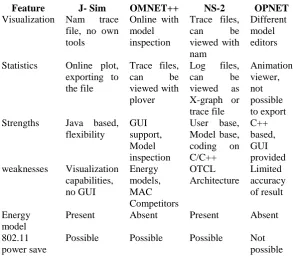
Feature J- Sim OMNET++ NS-2 OPNET
Visualization Nam trace file, no own tools
Online with model inspection
Trace files, can be viewed with nam
Different model editors
Statistics Online plot, exporting to the file
Trace files, can be viewed with plover
Log files, can be viewed as X-graph or trace file Animation viewer, not possible to export Strengths Java based,
flexibility
GUI support, Model inspection
User base, Model base, coding on C/C++
C++ based, GUI provided weaknesses Visualization
capabilities, no GUI Energy models, MAC Competitors OTCL Architecture Limited accuracy of result Energy model
Present Absent Present Absent
802.11 power save
Possible Possible Possible Not possible
Table: Comparison of Simulation Features
VI.
CONCLUSION
OMNET++ also provide a strong GUI unlike ns-2. But OMNET++ lacks the large quantity (loads) for external models and users that is possible easily in ns-2.
REFERENCES
[1] S. Mehta, Niamat Ullah, Md. Humaun Kabir. A Case Study of Networks Simulation Tools for Wireless Networks. Third Asia International Conference on Modeling & Simulation in 2009.
[2] J. Lessmann, P. Janacik, L. Lachev. Comparative Study of Wireless Network Simulators. The Seventh International Conference on Networking, 2008.
[3] S. V. Mallapur, S.R. Patil, Survey on Simulation Tools for Mobile Ad-Hoc Networks. International Journal of Computer Networks and Wireless Communications (IJCNWC), 2012.
[4] E. Egea-Lopez, J. Vales-Alonso, A. Martinez Sala. Simulation Scalability Issues in Wireless Sensor Networks. IEEE Communications Magazine. July 2006.
[5] S. Duflos, G. L. Grand, A. A. Diallo, C. Chaudet. List of Available and Suitable Simulation Components. Technical report, Ecole Nationale Supieure des Tommunications (ENST), September – 2006.
[6] B. Schilling. Qualitative comparison of network simulation tools. Institute of Parallel and Distributed Systems (IPVS), University of Stuttgart, January 2005.
[7] Murat Miran K¨oksal. A Survey of Network Simulators Supporting Wireless Networks. 2008.
[8] Dalimir Orfanus, Johannes Lessmann, Peter Janacik, Lazar Lachev. Performance of Wireless Network Simulators – A Case Study.
[9] C. P. Singh, O. P. Vyas, and M. K. Tiwari. A Survey of Simulation in Sensor Networks. Proceedings of CIMCA'08.
[10] H. Sundani, H. Li, V. K. Devabhaktuni, M. Alam. Wireless Sensor Network Simulators A Survey and Comparisons. International Journal of Computer Networks, vol. 2, February 2011.
[11] M. Imran, A. M. Said, and H. Hasbullah. A Survey of Simulators, Emulators and Testbeds for Wireless Sensor Networks. Proceedings of IT-Sim 2010, 4th International Symposium on Information Technology.
[12] OPNET Modeler, http://www.opnet.com/.