Volume 5, Issue 7, July 2016
ABSTRACT—
Although development of a digital world in recent years, technology helps in every field, and various type of appliance made our work easier, but it have also reduce the capability to do work efficiently. It is simply the advancement of the technology.
Now-a-day’s electronics play a important role in our daily life, and With all description of the system and sometimes their operating environment becomes more difficult to transfer data at the 11th hour from one system to another. Because of this limitation sometimes need is felt of data transferring wirelessly between the two or more system and it has not a proper channel for communication. It can be done by to implementing a small BLUETOOTH device on the USB flash drive. We can easily access information The detriment of the USB device is that being a peripheral device, it needs a moderator, generally a Personal Computer (PC) and laptop initiate and transferring data and communication between two USB storage devices[5].
Index Terms— USB ( Universal serial Bus), SMD (surface mount device), SMT (surface mount technology), BLE (Bluetooth low energy).
I. INTRODUCTION
The most attractive Universal Serial Bus (USB) storage devices used to connect a computer to devices like keyboard, mouse, printer and scanner etc. The computer user’s need for a fast and large capacity and easily system available for data storage.
Many more data and application are daily developed and computer user has to transfer data from one flash drive to another every day, with the less consume time. For this user computer has to first find a computer then wait till it starts, and plug this device, then data transfer in the storage device in which we may have a huge number of data and this data will copy in another USB flash drive and a storage device it may be possible using this small device which can be managed easily.
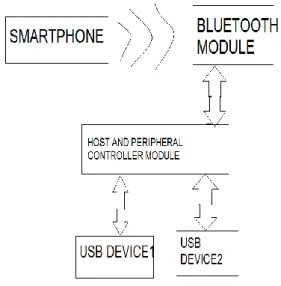
As shown in figure 1 the user can transfer the data from a source to destination end. We can also be able to select which folder is to be transfer with the help of user interface SMARTPHONE along with Up-Down arrow & option & select button. Pen drives can be an easy way to transfer files
between computers, they can also be a vector for malware infections[4]. The dissimilarities of USB drive is that it requires a PC or laptop to initiate transfer files between two devices. Our objective is to initiate and establish a device which initiate and allows for file transfer between two USB devices that do not the need of a Personal Computer (PC) Furthermore data move through a computer, since the computer has much power to be wasted in which we have to first power on than enable the device,
Figure 1 Smartphone to USB
before it can send and receive, also the malware and of viruses has made the life of the system user more difficult[4]. This project is protected from the virus attack. It will faster read and write. And its speed is depending on the version of the USB device.
II. BLUETOOTH
Bluetooth is used for a short distance and open wireless technology which is used and designed to replace the cable. Bluetooth is a medium for data and voice signals between the electronic device.
Bluetooth is a device intended for use in short- range PAN’s operates from 2.4GHz to 2.4835 ISM radio bands from a fixed and mobile device. It is used for reducing frequency with different protocols that use the 2.45GHz radio ISM band. In this Gaussian frequency shift key modulation is used for modulating the signals.
AN EFFECTIVE APPROACH OF BLUETOOTH ENABLED USB FLASH
DRIVE
Priyanka Verma, Dr. Rinkesh Mittal CEC LANDRAN, MOHALI (CHANDIGARH)
Volume 5, Issue 7, July 2016 Communication and connection are established by the
master and slave and an ad-hoc computer network is used. its wireless control protocols communicate with mobile phone and to hand free handset’s. Bluetooth is used in different application such as telephones, tablets, media players, robotics systems, handheld and laptops.
It is a packet based protocol used with a master slave structure. One is master and another seven slave in a piconet, and 25,000 member companies in the area of telecommunication, computing, networking and consumer electronics [4]. Bluetooth is a wire-replacement communications and it is designed for low-power consumption, with a short range based on low-cost of transceiver microchips in each device.
BLUETOOTH V4.0
Bluetooth v4.0 is smart and used for Bluetooth low energy. It includes classic Bluetooth and Bluetooth high speed and this Bluetooth is based on Wi-Fi. Bluetooth is work in different mode, single mode and dual mode implementation. Bluetooth v4.0 is aimed to running on in coin cell battery [5].
BLUETOOTH INTERNAL WORKING
Bluetooth offer a replacement of IRDA (infrared data association technology) shorter range IRDA and has line of sight requirement. Bluetooth communication overcomes these strict requirements;
1. Bluetooth devices range up to 10 meters for communication.
2. Bluetooth device do not need of direct line of sight. 3. Bluetooth device is a point to multipoint.
Bluetooth architecture is two types Bluetooth protocol stack Bluetooth profile
III. PEN DRIVE
A USB flash drive is a storage device, and it includesflash memory and used for data storage and transfer from one system to another. Flash drives are removable and rewritable, and physically and small in size[3].
Pen drive and storage drive one support with a USB standard like USB1.0 (12Mbps), USB2.0 (480Mbps) USB 3.0 (5 Gbps) is super speed. It is a lightweight device and less cost. It is also used for personal data backup.
INTERNAL STRUCTURE OF THE PEN DRIVE
Pen drive usually consist of a PCB (printed circuit board) with a USB connector, Power connections and a number of integrated circuit (ICs).
In which One PCB provides an interface between the memory and the USB Connector.
Next ic is a NAND flash memory where all the files are stored.
Pen drive and USB flash drive uses the PCB for transferring the data and power from the USB device.
The Controller chip is considered to be the brain of pen drive.
USB Connector-
it acts as an interface between the nand flash memory ic, and the computer to which the pen drive plugged. USB connector is commonly protected by a removable capacitor.
USB Mass storage
Controller chip helps to retrieve the information from the pen drive, and it also helps in recording/reading the information on the NAND flash memory. It is basically a Microcontroller with on chip RAM and ROM.
Test Points
They are electric pins used to activate and a operation of the pen drive during assemblages.
NAND flash memory chip
It helps in storage of files and all data, also it allows the erasing the information so that we can delete files into the pen drive.
Crystal oscillator
It is a piece of quartz crystal to vibrate at a very particular frequency.
LED
If the flash drive is working properly indicate by the LED.
Write protect switch
An optional component used to safeguard the information saved on the flash drive.
Space for second flash memory chip
It is used for increasing the quality of and storage capacity.
Figure: 2 USB Flash Drive .
Inside USB
Volume 5, Issue 7, July 2016
1. Vcc
2. D-
3. D+
4. Ground
VCC is used as power suppy signal.
D+ and D- is used as data line for transferring the data through these lines.
Ground is also used as power supply signals to the device.
Fig:3 USB Pin
IV.USB 3.0 (UNIVERSAL SERIAL BUS)
USB 3.0 basically its read and write speed in megabyte (MB/s). It is mostly used for personal data transport like documents, music, business files, photos and also store information regarding medical field [3].
USB 3.0 is super speed drive which has faster speed and low power consumption. Its storage capacity is up to 512 GB. When we insert the USB 3.0 in the system it will detect the USB port in which type of port we are inserting and will communicate to each other .it is a host controller device and backward compatible to the USB 2.0.
USB 3.0 provides better speed and very much efficient power management than USB2.0.
Data transfer speed is limited to USB2.0 level. When these device inter-operate.
USB 3.0 speed is (5Gbps)10 times faster than USB2.0
USB 3.0 provides power consumption more than USB 2.0 is up to 900MA.
USB 3.0 is a bidirectional device.
USB3.0 INTERNAL ARCHITECTURE
USB 3.0 is a host controller device, so it does not has need of other host for communicating. USB3.0 is a super speed up to 5GB/s. USB 3.0 is backward compatible with USB2.0 and this is a full duplex. In this figure 4 has shown USB2.0 with USB 3.0. the separate data path for USB2.0 data lines and USB 3.0 data lines. In this blue path shows the USB2.0 similarly, green path shows the USB3.0 . host controller port1 and port 2 is connected to super speed hub and port 2 is
connected to previous generation USB2.0 which has high speed 480Mbps, full speed 12Mb/s and low speed is 1.2Mb/s.
Figure: 4 USB Architecture
Port1 and port2 connected to each other however port is going to the up-stream port which is give power to the super speed hub and to the USB2.0 hub connection with four port of USB that is GROUND, D+, D-, and VCC SUPPLY. These port assembled in one port of USB3.0 peripheral. This host controller is interface through peripheral bus control interface to the other device.
V. FLASH MEMORY
flash memory is a non volatile memory and a storage device
in computer and electronic is also called Flash EEPROM, Flash electrically erasable PROM.
Figure:5 Floating gate
Nand type memory is commonly used for write and read. It consumes less area and larger storage and density.
It contains low power and high density, source, drain and gate shown in figure 5. This memory is rewritable. For Example we have single transmitter all is electrically erasable but in that case is not a bit erasable. we have to erase global erase. It is serially data transfer and serial interface.
Volume 5, Issue 7, July 2016
VI. LITERATURE REVIEW
Pen drives is very useful for computer world. The work on the pen drive is limited which is only 256 to 512 GB and only transfer data when plugged into the other USB Device it is limited. USB device is not a portable and in the last studied it has PIC microcontroller for making it portable and Bluetooth module is used but this device has number of disadvantages its size and cost is large comparison to the normal pen drive. With the help of this project we can overcome the limitation of that Pen Drive and easily transfer business files, music, photos and applications.. The device will work over the Bluetooth link as well as with the USB 3.0 interface also. This project will completely different from a normal pen drive due to many reasons.
2. Amirthaganesh.S “ Wireless USB flash drive”
The aim of this paper is to implement a Wireless USB pen drive in which the USB pen drive can be used without using the dongle and connecting to the system. Data medium is more easily transfer without connecting to the pc. Distance over 100 meters.
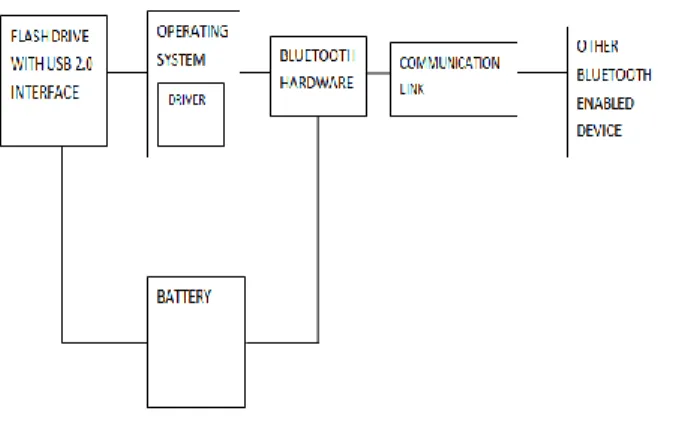
Figure:6 Flash drive to Bluetooth Module
A Bluetooth module is connected between PC and transmitter which transmit information and at the receiver side it receive information with the help of Bluetooth module and works on the IEEE standard and serially data transfer by RS232 serial communication module. This device is helpful for wirelessly data transfer in USB flash drive.
Bluetooth module is implemented in the flash drive has shown in figure 7. Its size is not fixed and not affected to it. This module is required for wireless
VII IDEA INNOVATION
In this project, When users transfer the data from one drive to another have to faced many problem in daily life.USB flash drive is used for storing and the data in which we are not able to transfer files from two USB device without the help of computer and laptop[4]. For these facilities we are making a portable and handy drive which is very useful and easy to handle with the help of this project we can easily transfer data and share data from any Smartphone and device which has Bluetooth is available. However this device is operated many times need a host for handle the system and system is very complex. In which controller control the data transfer and initiate the USB transactions.
This project is based on SMD technology in which all components is attached through SMD. In the surface mount technology is a method for producing and mounted electronics components like IC’s are mounted or placed onto surface of printed circuit board. The electronics device so made is known as surface mount device. It is a lightweight device used and it does not have any external power source.
VIII. Surface-Mount Technology (SMT)
It is a method for constructing electronic circuits in which the different components are attached directly upon the surface of printed (PCBs).so it is known as surface-mount device (SMD).SMD components is commonly is small than through hole technology, by the reason of it consist of either small leads and without leads. It has different leads or style with short pins, flat contacts and joins on components.
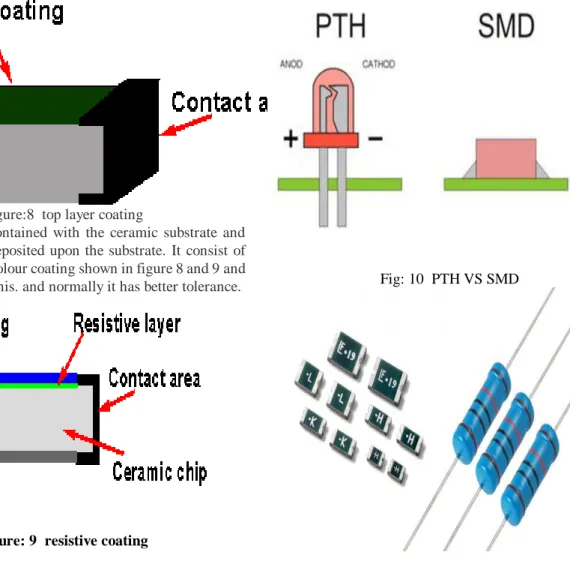
SMD Technology comes in different package or variety, and it is consist of different and small size shown in figure 7. Its different package and verity depend upon the interconnectivity requirements.
Volume 5, Issue 7, July 2016
Figure:8 top layer coating
These resistor is contained with the ceramic substrate and metal oxide film deposited upon the substrate. It consist of metal oxide black colour coating shown in figure 8 and 9 and white marking on this. and normally it has better tolerance.
Figure: 9 resistive coating IX. SMD VERSUS PTH
Surface mount device and pin through hole is as that same but it has small difference is that smd is used as miniaturisation of component and compact size and pth has complex size. surface mounting device is the new perimeter of the electronic visualization technology the smd technology is represented by the miniaturization of all the electronic components, led’s included. in the industry. As shown in figure 10 and 11 PTH and SMD difference. Through hole technology is replaced by the surface mount technology. In the through hole technology components with wire and lead and fitted on the surface of Printed circuit board through hole and solder iron. Both technologies can be used on the same board. The through-hole technology components is not suitable for surface mounting technique. It has without lead and wire components is used has pin is increased and thousand of components placed on the single board without hole and solder.
Fig: 10 PTH VS SMD
Fig :11 Components
X. IMPLEMENTATION DETAILS System Block Diagram
Literature review where we have studied about the USB and BLUTOOTH, one device is connected to other. In this PIC MICROCONTROOLER is used for enabling the Bluetooth of both device i.e. used for transferring the data. This approach is complex and expensive and it is reduced by using this project, and there we are using different approach for connecting the Bluetooth of both devices in place of PIC MICROCONTROLLER using SMD technology. In the USB flash drive is based on SMD Technology all the component are placed directly on PCB through SMD and USB TO BLUTOOTH interface MICROCONTROLLER is used. As shown in diagram Bluetooth module is used which is connected to the USB DEVICE through host and peripheral controller module. In this project, we have to firstly on the Bluetooth of pen drive and Smartphone then connect to both as well and then transfer the data very easily [5]. Now-a-Day’s all computer user wants the entire device should be handy and this project fulfil the computer user requirement and its size and area is reduced by the SMD.
Volume 5, Issue 7, July 2016
Figure 12 Flash Drive
XI. CONCLUSION
Now-a-day’s increasing requirements of user. Every user wants a handy device for transferring the data without the help of personal computer and a laptop. But the problem along with the transfer and moving the data from a personal computer or laptop to mobiles or from the pen drives is complicated. If you do not have these devices It is reasonable to purchase a Bluetooth Enabled USB Flash drive than investing on system. consequently we turned up with a battery operated reasonable device which can move the all information between two device which has Bluetooth is used which can interface to the both devices and data will be transferred easily without connecting USB to PC and laptop.
XII FUTURE ASPECTS
a. it can be possible the reverse of the same transferring of data from the pen drive to cell phones and to the systems. b. Display screen can also be inbuilt in the pen drive. c. We can handle the data of pen drive by making folders or deleting them using the display and scroll keys.
d. It can also be implemented with the help of Bluetooth through WIFI technology.
REFERENCES
[1]. Arfwedson, Henrik and Sneddon, Rob, “Ericss0n’s Bluetooth Modules”, Nov 4, 1999. Ericsson Review No.4, PP 198-205.
[2]. Priyanka Verma “An Implementation and Comparison of IO Expander on Spartan 3E for low cost and area efficiency.” Published in International journal of electrical and electronics engg. Volume 2, spl, issue 1(2015).
[3]. Khakal S.M. Matte P.N, Awari M.V.3
“Innovative Approach of USB Communication” published in
International Journal of Science and Research (IJSR) in 2014.
[4]. B. Naresh Kumar Reddy, N. Venktram
“An Efficient Data Transmission by Using Modern USB
Flash Drive” Published in International Journal of
Multimedia and Ubiquitous Engineering volume 9, No. 10 (2014).
[5]. K.B. Tripathy” A CONCEPT OF DATA TRANSFER VIA BLUETOOTH IN PEN DRIVE” Published Journal of global research in computer science, Volume 4, No. 4, April 2013.
[6]. Ankit Dixit, O P Singh, G.R Mishra “Design and Analysis of a patch Antenna for Bluetooth application” International journal of research in Engineering and Technology, eISSN 2319-1163 | pISSN 2321-7808.
[7]. Mukesh Tiwari, Siddhartha Motghare, Jimit Gada, Unmesh Barhate “ Flash Drive To Flash Drive Data Transfer” Published in International Refereed Journal of Engineering and Science (IRJES) ISSN (Online) 2319-183X, (Print) 2319-1821 Volume 2, Issue 3(March 2013), PP.17-23
First Author name, PRIYANKA VERMA Electronics & Communication (VLSI Design), Chandigarh Engineering college Mohali, Chandigarh (PUNJAB TECHNICAL UNIVERSITY.,Chandigarh, INDIA,
Second Author name,Dr. Rinkesh Mittal
Electronics & Communication (VLSI Design), Chandigarh Engineering college Mohali, Chandigarh (PUNJAB TECHNICAL UNIVERSITY., Chandigarh, INDIA,